light CITROEN C5 2018 User Guide
[x] Cancel search | Manufacturer: CITROEN, Model Year: 2018, Model line: C5, Model: CITROEN C5 2018Pages: 348, PDF Size: 10.72 MB
Page 37 of 348

35
C5 _en_Chap01_instruments-bord_ed01-2016
Warning/indicator lampis on Cause Action / Observations
Diesel engine
pre-heating fixed.
The ignition switch is at the
2nd
position (ignition on).
Wait until the warning lamp has switched off before starting.
The duration for which the warning lamp is on is determined
by the climatic conditions.
Parking brakefixed. The parking brake is applied. Release the parking brake to switch off the warning
lamp, keeping your foot on the brake pedal.
Observe the safety recommendations.
For further information on the Manual parking
brake or the Electric parking brake , refer to the
corresponding section.
flashing.
The parking brake is not fully applied
or is released.
Passenger's
front airbag fixed.
The control switch, located in the
glove box, is in the "ON" position.
The passenger's front airbag is
activated.
In this case, do not install a rear ward
facing child seat. Turn the control switch to the "
OFF" position to
deactivate the front passenger's airbag.
You can install a rear ward facing child seat, unless
there is an airbag fault.
Stop & Star t fixed. When the vehicle stops (red lights,
traffic jams, ...) the Stop & Start system
has put the engine into STOP mode. The warning lamp goes off and the engine restarts
automatically in START mode, as soon as you want to
move off.
flashes for a few
seconds, then goes
of f. STOP mode is temporarily
unavailable,
or
START mode is invoked
automatically. For more information on Stop & Star t
, refer to the
corresponding section.
1
Instruments
Page 41 of 348
39
C5 _en_Chap01_instruments-bord_ed01-2016
Touch screen tablet
This system gives access to:
- m enus for adjusting settings for vehicle
functions and systems,
-
a
udio and display settings menus,
-
a
udio system and telephone controls and
the display of associated information,
-
t
he display of the exterior temperature (a
blue snowflake appears if there is a risk
of
ice),
-
t
he display of the trip computer.
And, depending on equipment, it also allows:
-
t
he display of visual parking sensors
information,
-
a
ccess to the controls for the navigation
system and Internet services, and the
display of associated information.
For safety reasons, the driver must
only carry out operations that
require close attention with the
vehicle stationary.
Some functions are not accessible
when driving. After a few moments with no action on
the secondary page, the primary page
is displayed automatically.General operation
Recommendations
It is necessary to press firmly, particularly for
"flick" gestures (scrolling through lists, moving
the map...). A light wipe is not enough.
The screen does not recognise pressing with
more than one finger.
This technology allows use at all temperatures
and when wearing gloves.
Principles
Press the MENU
button, then the virtual
buttons in the touch screen tablet.
Each menu is displayed over one or two pages
(primary page and secondary page).
Use this button to go to the
secondary page.
Use this button to return to the
primary page.
Use this button for access to
additional information and to the
settings for certain functions.
Use this button to confirm.
Use this button to quit.
Do not use pointed objects on the touch
screen tablet.
Do not touch the touch screen tablet
with wet hands.
Uses a soft clean cloth to clean the
touch screen tablet.
1
Instruments
Page 43 of 348
41
C5 _en_Chap01_instruments-bord_ed01-2016
"Driving" menu
The systems with settings that can be adjusted are detailed in the table below.Button Corresponding function Comments
Vehicle settings Access to other functions with settings that can be adjusted. The functions are grouped together under
three tabs:
-
"Driving assistance "
●
"
Parking sensors" (Audible and visual parking assistance).
F
or more information on the Parking sensors, refer to the corresponding section.
●
"
Automatic parking brake" (Automatic electric parking brake).
F
or more information on the Electric parking brake, refer to the corresponding section.
●
"
Automatic rear wiper in reverse" (Activation of rear wiper coupled to reverse gear).
F
or more information on the Wiper control stalk, refer to the corresponding section.
-
"Lighting "
●
"
Guide-me-home lighting" (Automatic guide-me-home lighting).
F
or more information on the Lighting control stalk, refer to the corresponding section.
●
"
Auto headlamp dip".
F
or more information on the Lighting control stalk, refer to the corresponding section.
●
"
LED daytime running lamps".
F
or more information on the Lighting control stalk, refer to the corresponding section.
-
"Vehicle access "
●
"
Driver plip action" (Selective unlocking of the driver's door).
F
or more information on the Remote control, refer to the corresponding section.
●
"
Driver welcome" (Welcome function).
F
or more information on the Front seats, refer to the corresponding section.
Select or deselect the tabs at the bottom of the screen to display the functions required.
1
Instruments
Page 46 of 348
44
C5_en_Chap02_ouverture_ed01-2016
Remote control key
System which permits central unlocking or locking of the vehicle using the lock or from a distance. It is also used to open the boot, locate and start
the vehicle, as well as providing protection against theft.
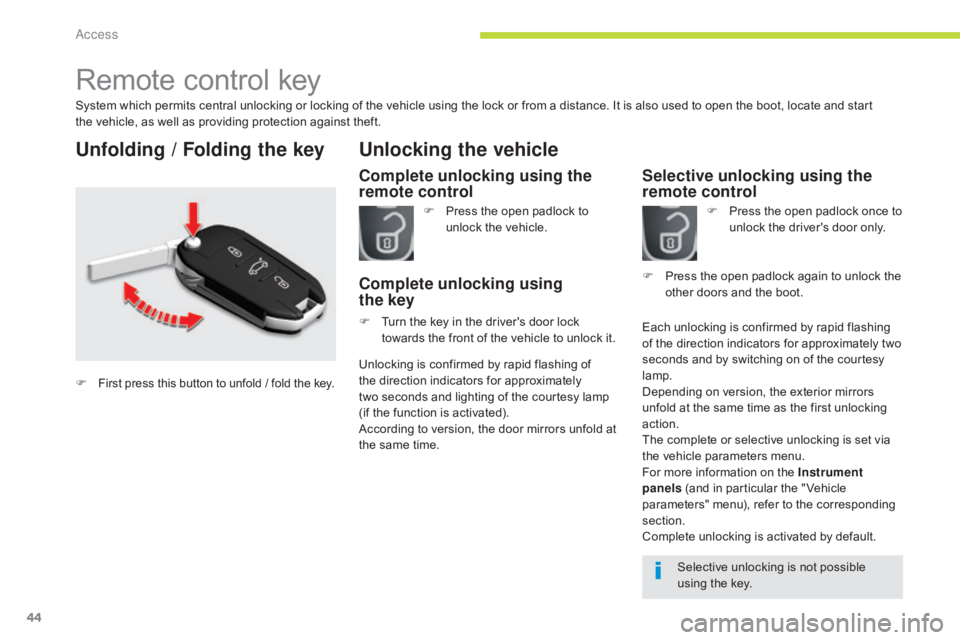
Unfolding / Folding the key
Complete unlocking using the
remote control
Unlocking the vehicle
F Press the open padlock to unlock the vehicle.
Complete unlocking using
the key
F Turn the key in the driver's door lock
towards the front of the vehicle to unlock it.
Selective unlocking using the
remote control
F Press the open padlock once to unlock the driver's door only.
Each unlocking is confirmed by rapid flashing
of the direction indicators for approximately two
seconds and by switching on of the courtesy
lamp.
Depending on version, the exterior mirrors
unfold at the same time as the first unlocking
action.
The complete or selective unlocking is set via
the vehicle parameters menu.
For more information on the Instrument
panels (and in particular the " Vehicle
parameters" menu), refer to the corresponding
section.
Complete unlocking is activated by default. F
P
ress the open padlock again to unlock the
other doors and the boot.
Selective unlocking is not possible
using the key.
Unlocking is confirmed by rapid flashing of
the direction indicators for approximately
two
seconds and lighting of the courtesy lamp
(if the function is activated).
According to version, the door mirrors unfold at
the same time.
F
First press this button to unfold / fold the key.
Access
Page 48 of 348
46
C5_en_Chap02_ouverture_ed01-2016
F Turn the key in the driver's door lock to the rear of the vehicle to lock it and
hold it in this position for more than two
seconds to close the windows and sunroof
automatically in addition to locking.
F
T
urn the key to the rear of the vehicle within
five seconds to deadlock it.
Using the keyDeadlocking renders the exterior and
interior door controls inoperative.
It also deactivates the manual central
control button.
Therefore, never leave anyone inside
the vehicle when it is deadlocked.
Deadlocking
F Press the closed padlock to lock the vehicle or press
the closed padlock for more
than two seconds to close
the windows and sunroof
automatically in addition to
locking.
F
P
ress the closed padlock again within
five
seconds to deadlock the vehicle.
Using the remote control
Deadlocking is confirmed by fixed lighting
of the direction indicators for approximately
two seconds.
According to version, the exterior mirrors fold at
the same time. When stationary with the engine off,
locking is confirmed by flashing of the
indicator lamp on the interior locking
control.
If one of the doors or the boot is open
or has not been closed correctly, the
central locking will not work.
Access
Page 49 of 348
47
C5_en_Chap02_ouverture_ed01-2016
Operating problem
Following disconnection of the vehicle battery,
replacement of the remote control battery or in
the event of a remote control fault, you can no
longer unlock, lock or locate your vehicle.
F
F
irst of all, use the key in the lock to unlock
or lock your vehicle.
F
T
hen, reinitialise the remote control.
If the problem persists, contact a CITROËN
dealer or a qualified workshop as soon as
possible.
Reinitialisation
F Switch off the ignition.
F T urn the key to position 2 (Igntion on) .
(
For more information on Starting-
switching off the engine , refer to the
corresponding section).
F
P
ress the closed padlock immediately for a
few seconds, until the operation requested
is triggered.
F
S
witch off the ignition and remove the key
from the ignition switch.
The remote control is fully operational again.
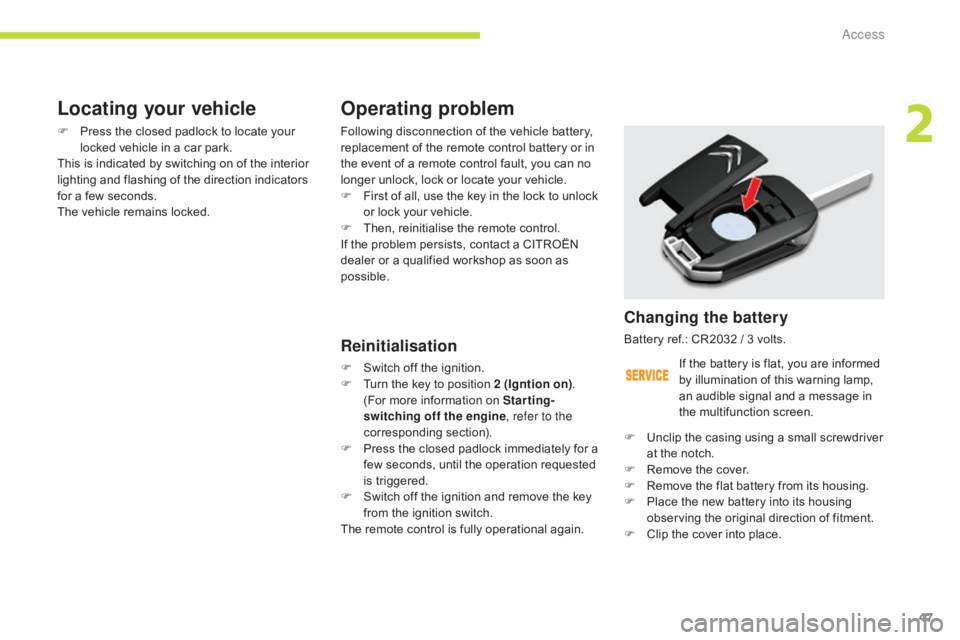
Changing the battery
Battery ref.: CR2032 / 3 volts.
F
U
nclip the casing using a small screwdriver
at the notch.
F
R
emove the cover.
F
R
emove the flat battery from its housing.
F
P
lace the new battery into its housing
observing the original direction of fitment.
F
C
lip the cover into place.
Locating your vehicle
F Press the closed padlock to locate your locked vehicle in a car park.
This is indicated by switching on of the interior
lighting and flashing of the direction indicators
for a few seconds.
The vehicle remains locked.
If the battery is flat, you are informed
by illumination of this warning lamp,
an audible signal and a message in
the multifunction screen.
2
Access
Page 67 of 348

65
C5_en_Chap03_ergonomie-et-confort_ed01-2016
Steering wheel adjustment
F First, adjust the driver's seat to the most suitable position.
F
W
hen stationary , lower the lever A to
release the steering wheel adjustment.
F
A
djust for height and reach.
F
R
aise the lever to lock the steering wheel
adjustment.
The steering wheel can be adjusted for height and reach to adapt the driving position to the size of
the driver.
Adjustment
As a safety precaution, these
operations must only be carried out
while the vehicle is stationary.
After locking, if you press firmly on the
steering wheel, a slight click may be
heard.
3
Ease of use and comfort
Page 69 of 348

67
C5_en_Chap03_ergonomie-et-confort_ed01-2016
Electrochrome (automatic day/
night) model
In order to guarantee optimum visibility
during your manoeuvres, the mirror lightens
automatically when reverse gear is engaged. Using a sensor which measures the light
from the rear of the vehicle, this system
automatically and progressively changes
between day and night usage.
It has an anti-dazzle system which darkens the
mirror glass: this reduces any driver discomfort
caused by the light beam of following vehicles,
the sun...In vehicles fitted with electrochrome door
mirrors, the system has an on/off button and an
associated warning lamp.
On
F With the ignition on, press on button 1
.
The warning lamp 2 comes on and the mirror
glass is in automatic mode.
Off
F Press on button 1 .
The warning lamp 2 goes off and the mirror
glass remains in its lightest definition.
Rear view mirror
Manual model
Adjustment
F A djust the mirror so that the glass is
directed correctly in the "day" position.
Day / night position
F
P
ull the lever to change to the "night" anti-
dazzle position.
F
P
ush the lever to change to the normal
"day" position.
Equipped with an anti-dazzle system, which darkens the mirror glass and reduces the nuisance to
the driver caused by the sun, headlamps from other vehicles...
3
Ease of use and comfort
Page 78 of 348
76
C5_en_Chap03_ergonomie-et-confort_ed01-2016
Map reading lamps
F With the ignition on, press the corresponding switch.
Panoramic sunroof rear
reading lamps (Tourer)
With the key in position or with the ignition on:
F P ress the corresponding switch 1 .
The reading lamp concerned comes on for
ten
m
inutes.
The rear reading lamps come on:
-
w
hen the key is removed from the ignition,
-
w
hen the vehicle is unlocked.
They switch off gradually:
-
w
hen the vehicle is locked,
-
w
hen the ignition is switched on.
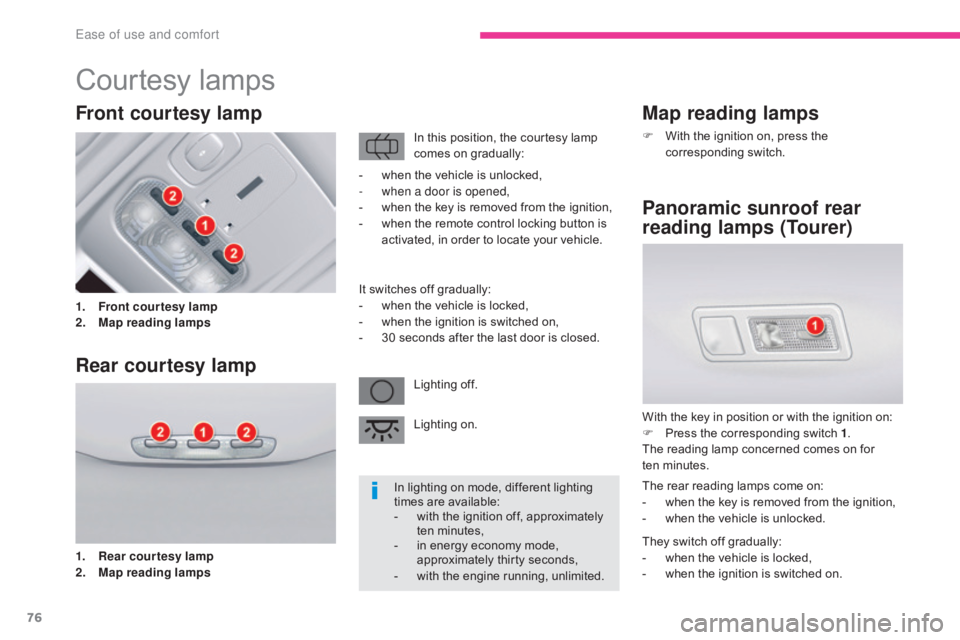
Courtesy lamps
1. Front courtesy lamp
2. M ap reading lamp s
Front courtesy lamp
Rear courtesy lamp
1. Rear courtesy lamp
2. M
ap reading lamps In this position, the courtesy lamp
comes on gradually:
Lighting off.
Lighting on.
-
w
hen the vehicle is unlocked,
-
w
hen a door is opened,
-
w
hen the key is removed from the ignition,
-
w
hen the remote control locking button is
activated, in order to locate your vehicle.
It switches off gradually:
-
w
hen the vehicle is locked,
-
w
hen the ignition is switched on,
-
3
0 seconds after the last door is closed.
In lighting on mode, different lighting
times are available:
-
w
ith the ignition off, approximately
ten minutes,
- i n energy economy mode,
approximately thirty seconds,
-
w
ith the engine running, unlimited.
Ease of use and comfort
Page 79 of 348
77
C5_en_Chap03_ergonomie-et-confort_ed01-2016
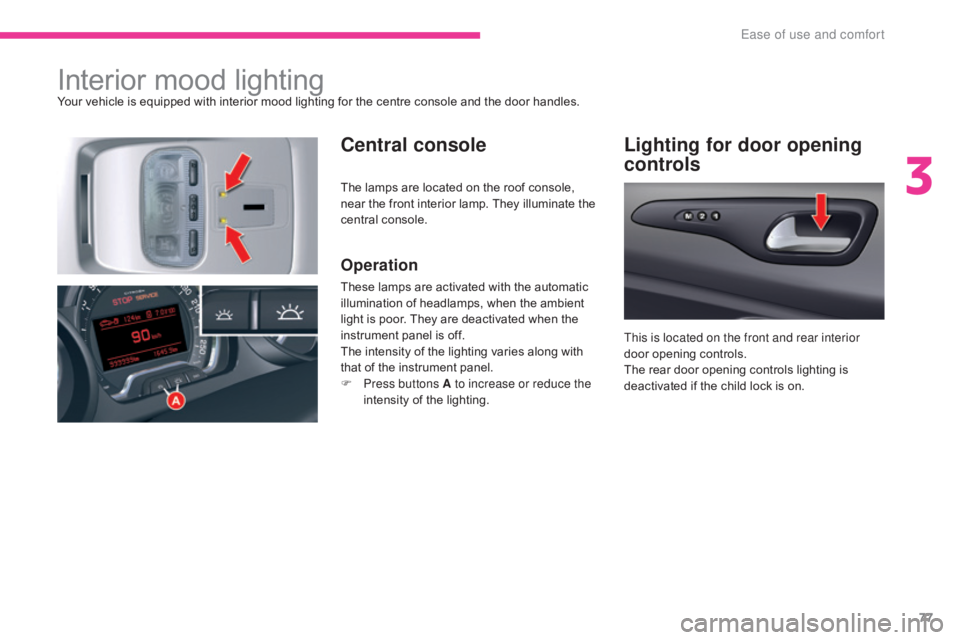
Interior mood lightingYour vehicle is equipped with interior mood lighting for the centre console and the door handles.
Central consoleLighting for door opening
controls
Operation
These lamps are activated with the automatic
illumination of headlamps, when the ambient
light is poor. They are deactivated when the
instrument panel is off.
The intensity of the lighting varies along with
that of the instrument panel.
F
P
ress buttons A to increase or reduce the
intensity of the lighting. This is located on the front and rear interior
door opening controls.
The rear door opening controls lighting is
deactivated if the child lock is on.
The lamps are located on the roof console,
near the front interior lamp. They illuminate the
central console.
3
Ease of use and comfort