light CITROEN C5 2018 Workshop Manual
[x] Cancel search | Manufacturer: CITROEN, Model Year: 2018, Model line: C5, Model: CITROEN C5 2018Pages: 348, PDF Size: 10.72 MB
Page 230 of 348
228
C5_en_Chap08_en-cas-de-panne_ed01-2016
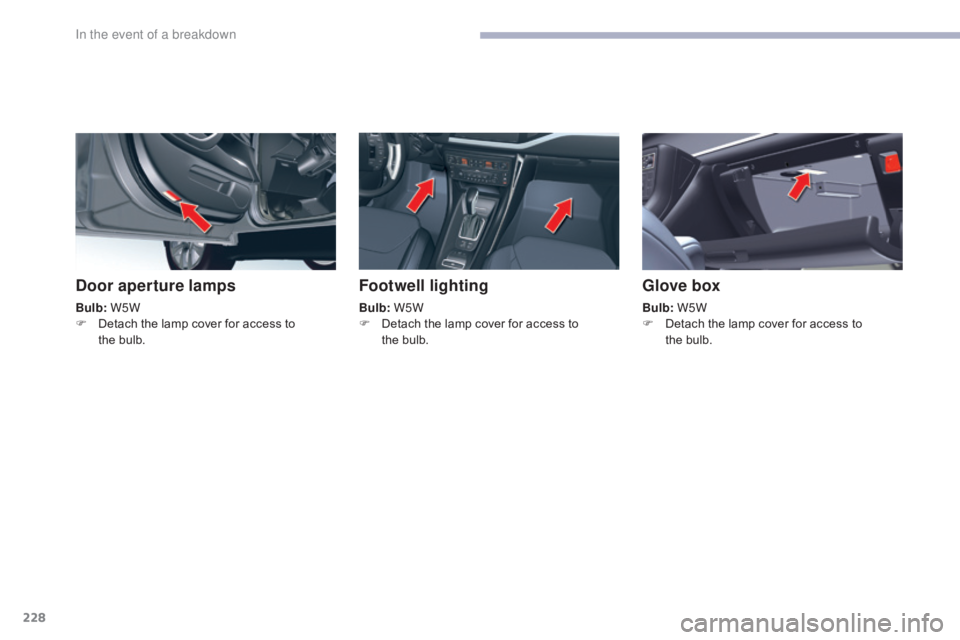
Door aperture lamps
Bulb: W5W
F D etach the lamp cover for access to
the
bulb.
Footwell lighting
Bulb: W5W
F D etach the lamp cover for access to
the
bulb.
Glove box
Bulb: W5W
F D etach the lamp cover for access to
the
bulb.
In the event of a breakdown
Page 233 of 348
231
C5_en_Chap08_en-cas-de-panne_ed01-2016
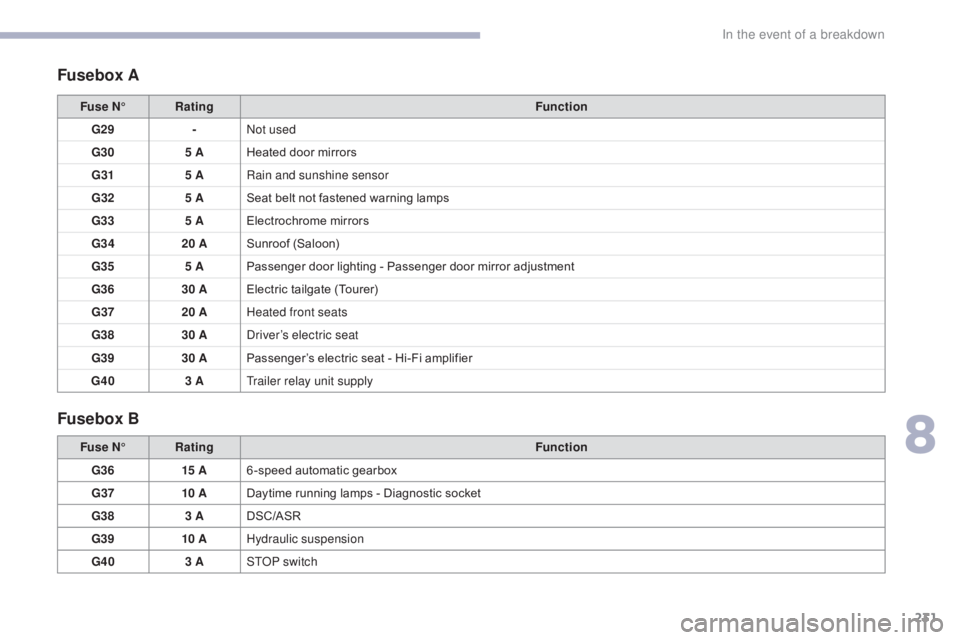
Fusebox A
Fusebox B
Fuse N°Rating Function
G29 -Not used
G30 5 AHeated door mirrors
G31 5 ARain and sunshine sensor
G32 5 ASeat belt not fastened warning lamps
G33 5 AElectrochrome mirrors
G34 20 ASunroof (Saloon)
G35 5 APassenger door lighting - Passenger door mirror adjustment
G36 30 AElectric tailgate (Tourer)
G37 20 AHeated front seats
G38 30 ADriver’s electric seat
G39 30 APassenger’s electric seat - Hi-Fi amplifier
G40 3 ATrailer relay unit supply
Fuse N° Rating Function
G36 15 A6 -speed automatic gearbox
G37 10 ADaytime running lamps - Diagnostic socket
G38 3 ADSC/ASR
G39 10 AHydraulic suspension
G40 3 ASTOP switch
8
In the event of a breakdown
Page 234 of 348
232
C5_en_Chap08_en-cas-de-panne_ed01-2016
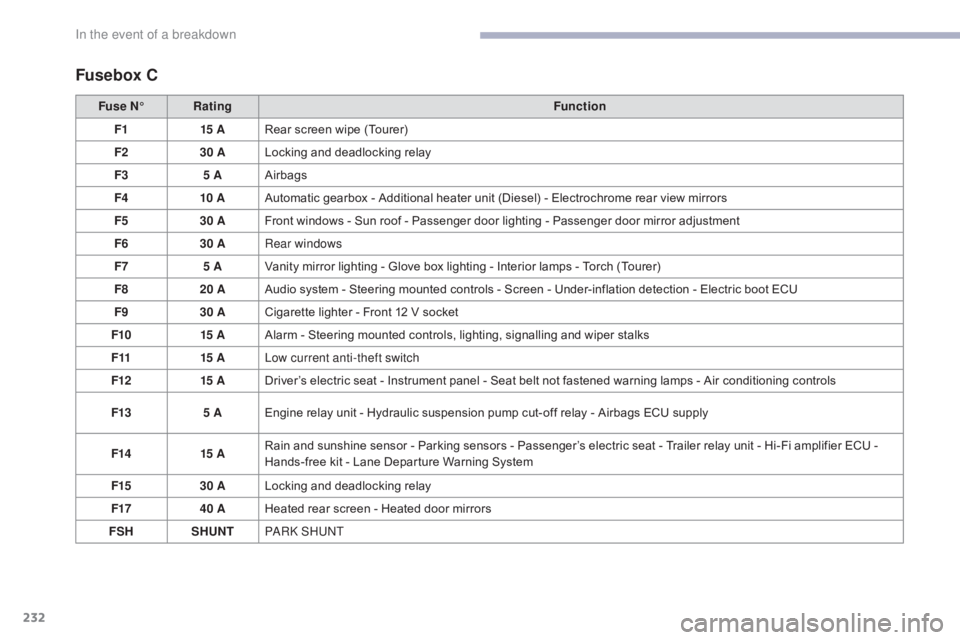
Fusebox C
Fuse N°Rating Function
F1 15 ARear screen wipe (Tourer)
F2 30 ALocking and deadlocking relay
F3 5 AAirbags
F4 10 AAutomatic gearbox - Additional heater unit (Diesel) - Electrochrome rear view mirrors
F5 30 AFront windows - Sun roof - Passenger door lighting - Passenger door mirror adjustment
F6 30 ARear windows
F7 5 AVanity mirror lighting - Glove box lighting - Interior lamps - Torch (Tourer)
F8 20 AAudio system - Steering mounted controls - Screen - Under-inflation detection - Electric boot ECU
F9 30 ACigarette lighter - Front 12 V socket
F10 15 AAlarm - Steering mounted controls, lighting, signalling and wiper stalks
F11 15 ALow current anti-theft switch
F12 15 ADriver’s electric seat - Instrument panel - Seat belt not fastened warning lamps - Air conditioning controls
F13 5 AEngine relay unit - Hydraulic suspension pump cut-off relay - Airbags ECU supply
F14 15 ARain and sunshine sensor - Parking sensors - Passenger’s electric seat - Trailer relay unit - Hi-Fi amplifier ECU -
Hands-free kit - Lane Departure Warning System
F15 30 ALocking and deadlocking relay
F17 40 AHeated rear screen - Heated door mirrors
FSH SHUNTPA R K S H U NT
In the event of a breakdown
Page 238 of 348
236
C5_en_Chap08_en-cas-de-panne_ed01-2016
Starting using another battery
When your vehicle's battery is discharged, the
engine can be started using a slave battery
(external or on another vehicle) and jump lead
cables or a battery booster.F
S tart the engine of the vehicle with the
good battery and leave it running for a few
minutes.
F
O
perate the starter on the broken down
vehicle and let the engine run.
I
f the engine does not start straight away,
switch off the ignition and wait a few
moments before trying again.
Never try to start the engine by
connecting a battery charger.
Never use a 24 V or higher battery
b o o s t e r.
First check that the slave battery has a
nominal voltage of 12 V and a capacity
at least equal to that of the discharged
battery.
The two vehicles must not be in contact
with each other.
Switch off the electrical consumers on
both vehicles (audio system, wipers,
lighting, ...).
Ensure that the jump lead cables do
not pass close to moving parts of the
engine (cooling fan, belts, ...).
Do not disconnect the (+) terminal when
the engine is running. Some functions, including Stop & Start,
are not available if the battery is not
sufficiently charged.
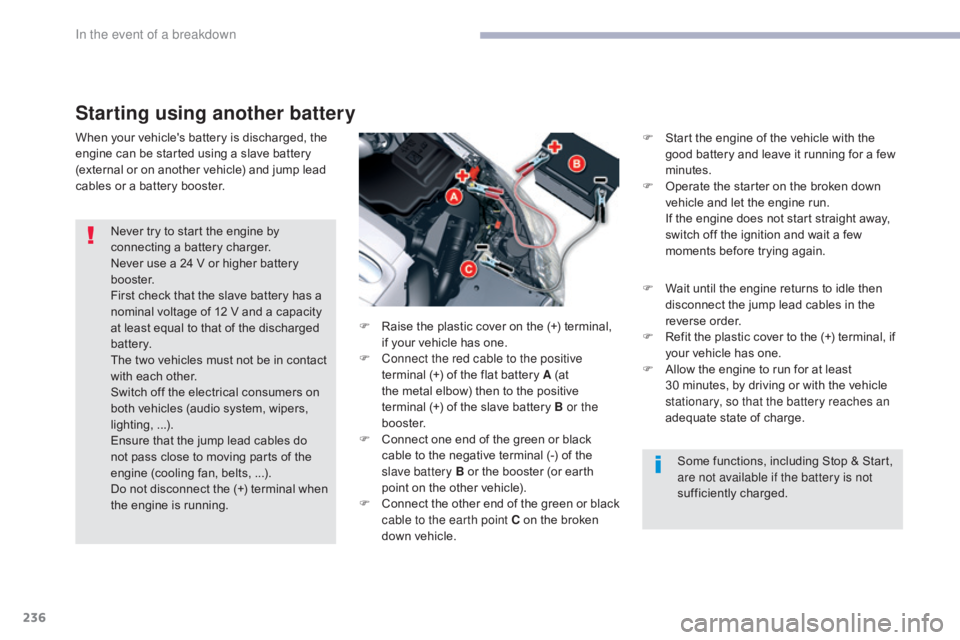
F
R
aise the plastic cover on the (+) terminal,
if your vehicle has one.
F
C
onnect the red cable to the positive
terminal (+) of the flat battery A (at
the metal elbow) then to the positive
terminal
(+) of the slave battery B or the
b o o s t e r.
F
C
onnect one end of the green or black
cable to the negative terminal (-) of the
slave battery B or the booster (or earth
point on the other vehicle).
F
C
onnect the other end of the green or black
cable to the earth point C on the broken
down vehicle. F
W
ait until the engine returns to idle then
disconnect the jump lead cables in the
reverse order.
F
R
efit the plastic cover to the (+) terminal, if
your vehicle has one.
F
A
llow the engine to run for at least
30
minutes, by driving or with the vehicle
stationary, so that the battery reaches an
adequate state of charge.
In the event of a breakdown
Page 239 of 348
237
C5_en_Chap08_en-cas-de-panne_ed01-2016
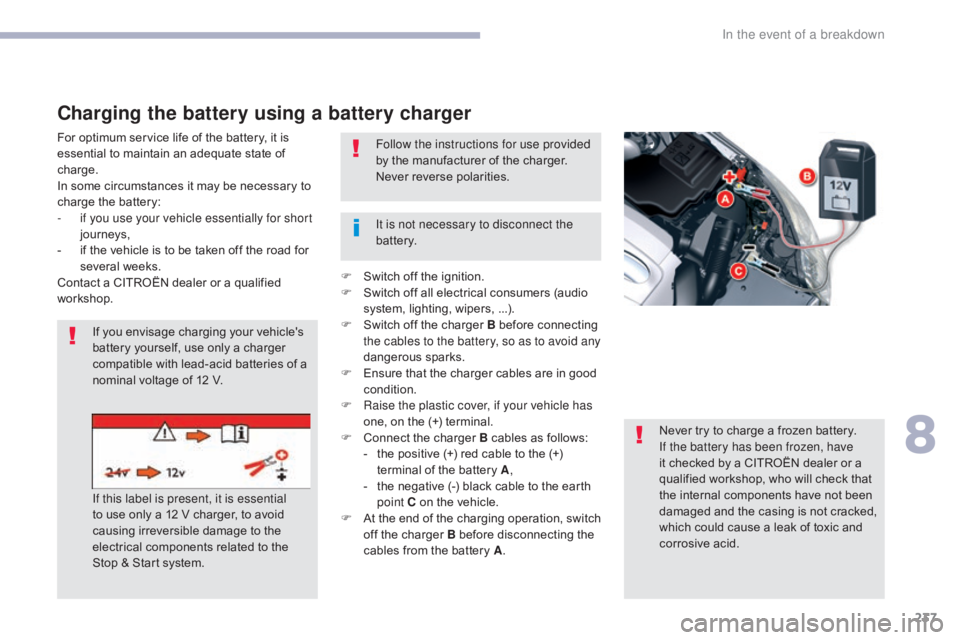
Charging the battery using a battery charger
For optimum service life of the battery, it is
essential to maintain an adequate state of
charge.
In some circumstances it may be necessary to
charge the battery:
-
i
f you use your vehicle essentially for short
journeys,
-
i
f the vehicle is to be taken off the road for
several weeks.
Contact a CITROËN dealer or a qualified
workshop.
If you envisage charging your vehicle's
battery yourself, use only a charger
compatible with lead-acid batteries of a
nominal voltage of 12 V.
Never try to charge a frozen battery.
If the battery has been frozen, have
it checked by a CITROËN dealer or a
qualified workshop, who will check that
the internal components have not been
damaged and the casing is not cracked,
which could cause a leak of toxic and
corrosive acid.
It is not necessary to disconnect the
battery. Follow the instructions for use provided
by the manufacturer of the charger.
Never reverse polarities.
If this label is present, it is essential
to use only a 12 V charger, to avoid
causing irreversible damage to the
electrical components related to the
Stop & Start system. F
S
witch off the ignition.
F
S
witch off all electrical consumers (audio
system, lighting, wipers, ...).
F
S
witch off the charger B before connecting
the cables to the battery, so as to avoid any
dangerous sparks.
F
E
nsure that the charger cables are in good
condition.
F
R
aise the plastic cover, if your vehicle has
one, on the (+) terminal.
F
C
onnect the charger B cables as follows:
-
t
he positive (+) red cable to the (+)
terminal of the battery A ,
-
t
he negative (-) black cable to the earth
point C on the vehicle.
F
A
t the end of the charging operation, switch
off the charger B before disconnecting the
cables from the battery A .
8
In the event of a breakdown
Page 240 of 348
238
C5_en_Chap08_en-cas-de-panne_ed01-2016
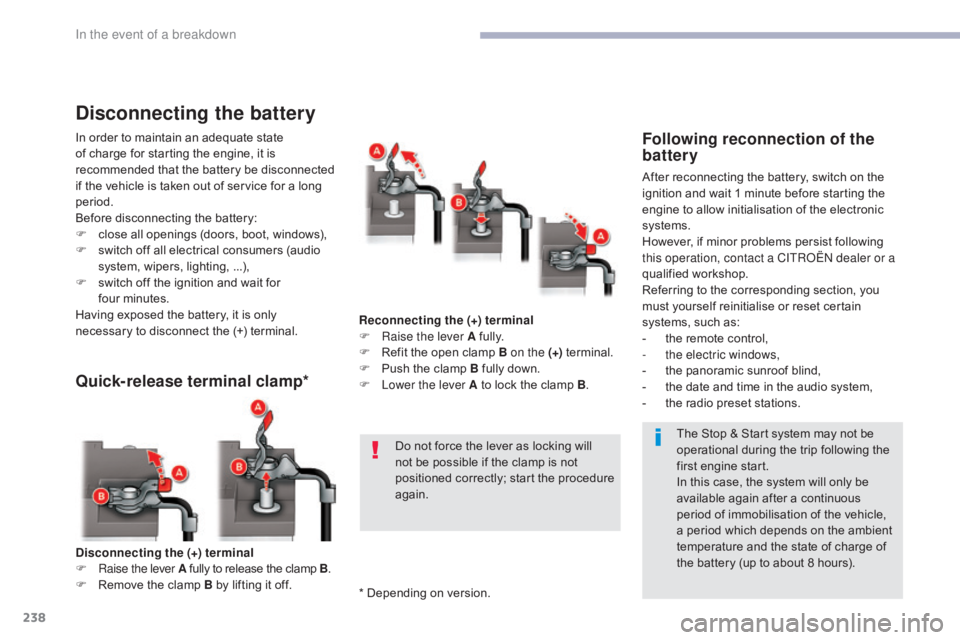
Disconnecting the (+) terminal
F Ra ise the lever A fully to release the clamp B .
F
R
emove the clamp B by lifting it off.
Quick-release terminal clamp*
Reconnecting the (+) terminal
F Ra ise the lever A fully.
F
R
efit the open clamp B on the (+) terminal.
F
P
ush the clamp B fully down.
F
L
ower the lever A to lock the clamp B .
Do not force the lever as locking will
not be possible if the clamp is not
positioned correctly; start the procedure
again.
Disconnecting the battery
In order to maintain an adequate state
of charge for starting the engine, it is
recommended that the battery be disconnected
if the vehicle is taken out of service for a long
period.
Before disconnecting the battery:
F
c
lose all openings (doors, boot, windows),
F
s
witch off all electrical consumers (audio
system, wipers, lighting, ...),
F
s
witch off the ignition and wait for
four
m
inutes.
Having exposed the battery, it is only
necessary to disconnect the (+) terminal.Following reconnection of the
battery
After reconnecting the battery, switch on the
ignition and wait 1 minute before starting the
engine to allow initialisation of the electronic
systems.
However, if minor problems persist following
this operation, contact a CITROËN dealer or a
qualified workshop.
Referring to the corresponding section, you
must yourself reinitialise or reset certain
systems, such as:
-
t
he remote control,
-
t
he electric windows,
-
t
he panoramic sunroof blind,
-
t
he date and time in the audio system,
-
t
he radio preset stations.The Stop & Start system may not be
operational during the trip following the
first engine start.
In this case, the system will only be
available again after a continuous
period of immobilisation of the vehicle,
a period which depends on the ambient
temperature and the state of charge of
the battery (up to about 8 hours).
* Depending on version.
In the event of a breakdown
Page 244 of 348

242
C5_en_Chap09_caracteristiques-techniques_ed01-2016
Weights and towed loads (in kg)
Petrol engineTHP 160
THP 15 0
Gearbox Automatic (6-speed)
Model code RD 5FM-A
RD 5FE-A /D RW 5FM-A
RW 5FE-A/D
Body SaloonTourer
Unladen weight 1 5151 534
Kerb weight 1 5901 609
Gross vehicle weight (GV W) 2 0262 200
Gross train weight (GTW) 2 5262 700
Braked trailer (within GTW limit)
-
o
n a 10% or 12% slope 500
500
Braked trailer* (with load transfer within GTW
limit) 710
790
Unbraked trailer 500500
Recommended nose weight 6974
The GTW and towed load values indicated apply up to a maximum altitude of 1 000 metres; the towed load mentioned must be reduced by 10 % for
each additional 1 000 metres of altitude.
The maximum authorised speed is reduced when towing (comply with the legislation in force in your country).
High exterior temperatures may result in a reduction in the per formance of the vehicle in order to protect the engine; when the exterior temperature is
higher than 37 °C, limit the weight towed. *
T
he weight of the braked trailer can be increased, within the GTW limit, on condition that the GV W of the towing vehicle is reduced by the same
amount; warning, towing with a lightly loaded towing vehicle may have an adverse effect on its road holding.
Technical data
Page 246 of 348

244
C5_en_Chap09_caracteristiques-techniques_ed01-2016
Diesel engineBlueHDi 15 0 S&S BlueHDi 180 S&S
Gearbox Manual (6-speed)EAT6 automatic (6-speed)
Model code RD AHR- M/SRW AHR- M/S RD AHW-T/SRW AHW-T/S
Body SaloonTourerSaloon Tourer
Unladen weight 1 5401 5751 620 1 655
Kerb weight 1 6151 650 1 695 1 730
Gross vehicle weight (GV W) 2 1602 235 2 1902 290
Gross train weight (GTW) 3 6603 6353 290 3 290
Braked trailer (within GTW limit)
-
o
n a 10% or 12% slope 1 500
1 400 1 10 01 000
Braked trailer* (with load transfer within GTW
limit) 1 750
1 650 1 350 1 250
Unbraked trailer 750750750750
Recommended nose weight 736757 51
The GTW and towed load values indicated apply up to a maximum altitude of 1 000 metres; the towed load mentioned must be reduced by 10 % for
each additional 1 000 metres of altitude.
The maximum authorised speed is reduced when towing (comply with the legislation in force in your country).
High exterior temperatures may result in a reduction in the per formance of the vehicle in order to protect the engine; when the exterior temperature is
higher than 37 °C, limit the weight towed. *
T
he weight of the braked trailer can be increased within the GTW limit, on condition that the GV W of the towing vehicle is reduced by the same
amount; warning, towing with a lightly loaded towing vehicle may have an adverse effect on its road holding.
Weights and towed loads (in kg)
Technical data
Page 258 of 348
256
C5_en_Chap10b_SMEGplus_ed01-2016
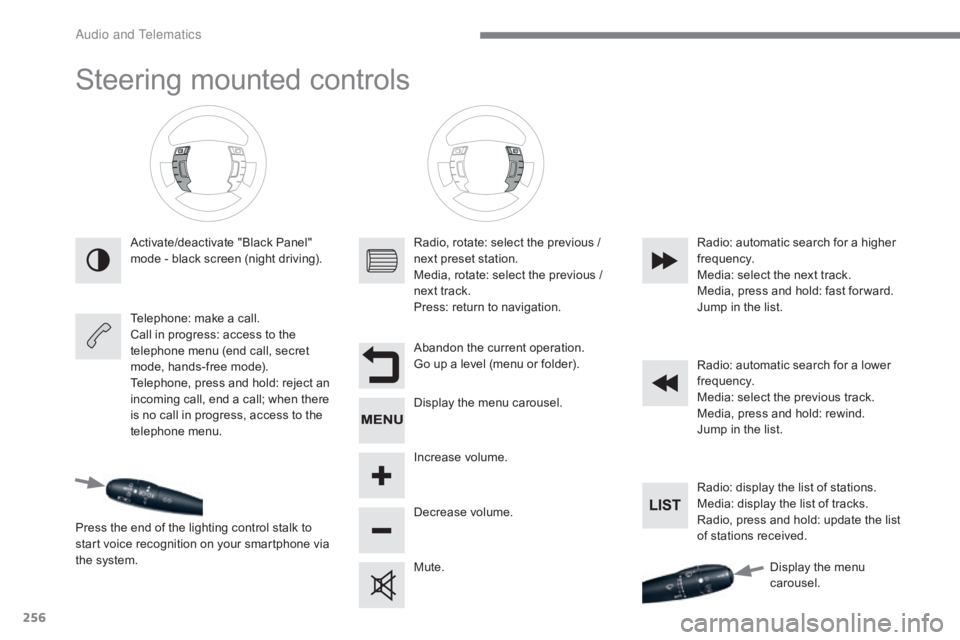
Steering mounted controls
Activate/deactivate "Black Panel"
mode - black screen (night driving).
Telephone: make a call.
Call in progress: access to the
telephone menu (end call, secret
mode, hands-free mode).
Telephone, press and hold: reject an
incoming call, end a call; when there
is no call in progress, access to the
telephone menu.
Press the end of the lighting control stalk to
start voice recognition on your smartphone via
the system. Radio, rotate: select the previous /
next preset station.
Media, rotate: select the previous /
next track.
Press: return to navigation.
Abandon the current operation.
Go up a level (menu or folder).
Display the menu carousel.
Increase volume.
Decrease volume.
Mute.Radio: automatic search for a higher
frequency.
Media: select the next track.
Media, press and hold: fast for ward.
Jump in the list.
Radio: automatic search for a lower
frequency.
Media: select the previous track.
Media, press and hold: rewind.
Jump in the list.
Radio: display the list of stations.
Media: display the list of tracks.
Radio, press and hold: update the list
of stations received.
Display the menu
carousel.
Audio and Telematics
Page 295 of 348
293
C5_en_Chap10b_SMEGplus_ed01-2016
As a safety measure and because it
requires sustained attention by the
driver, using a smartphone when
driving is prohibited.
All operations must be done with the
vehicle stationary.
The synchronisation of a
smartphone allows applications on a
smartphone that are adapted to the
MirrorLink
TM technology to be displayed
i
n the vehicle's screen.
The principles and standards
are constantly evolving. For the
communication process between the
smartphone and the system to work
correctly, the smartphone must be
unlocked; update the operating system
of your smartphone as well as the date
and time in the smartphone and the
system.
For the list of eligible smartphones,
connect to the brand's internet website
in your country.
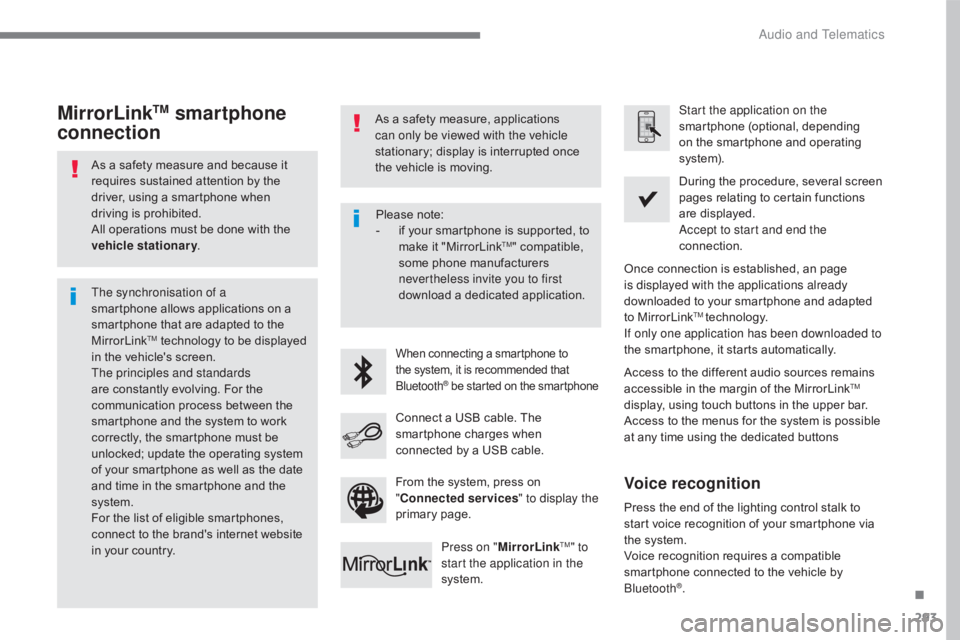
MirrorLinkTM smartphone
connectionAs a safety measure, applications
can only be viewed with the vehicle
stationary; display is interrupted once
the vehicle is moving.
When connecting a smartphone to
the system, it is recommended that
Bluetooth
® be started on the smartphone
Start the application on the
smartphone (optional, depending
on the smartphone and operating
syste m).
Access to the different audio sources remains
accessible in the margin of the MirrorLink
TM
display, using touch buttons in the upper bar.
Access to the menus for the system is possible
at any time using the dedicated buttons During the procedure, several screen
pages relating to certain functions
are displayed.
Accept to start and end the
connection.
Connect a USB cable. The
smartphone charges when
connected by a USB cable. Press on " MirrorLink
TM" to
start the application in the
system. Once connection is established, an page
is displayed with the applications already
downloaded to your smartphone and adapted
to MirrorLink
TM technology.
If only one application has been downloaded to
the smartphone, it starts automatically.
Press the end of the lighting control stalk to
start voice recognition of your smartphone via
the system.
Voice recognition requires a compatible
smartphone connected to the vehicle by
Bluetooth
®.
Voice recognition
Please note:
- i f your smartphone is supported, to
make it "MirrorLink
TM" compatible,
some phone manufacturers
nevertheless invite you to first
download a dedicated application.
From the system, press on
" Connected services " to display the
primary page.
.
Audio and Telematics