audio Citroen C6 2011 1.G Owner's Guide
[x] Cancel search | Manufacturer: CITROEN, Model Year: 2011, Model line: C6, Model: Citroen C6 2011 1.GPages: 216, PDF Size: 10.31 MB
Page 174 of 216
7.24
11
22
33
11
22
06INTERNAL TELEPHONE
ENTERING THE PIN CODE
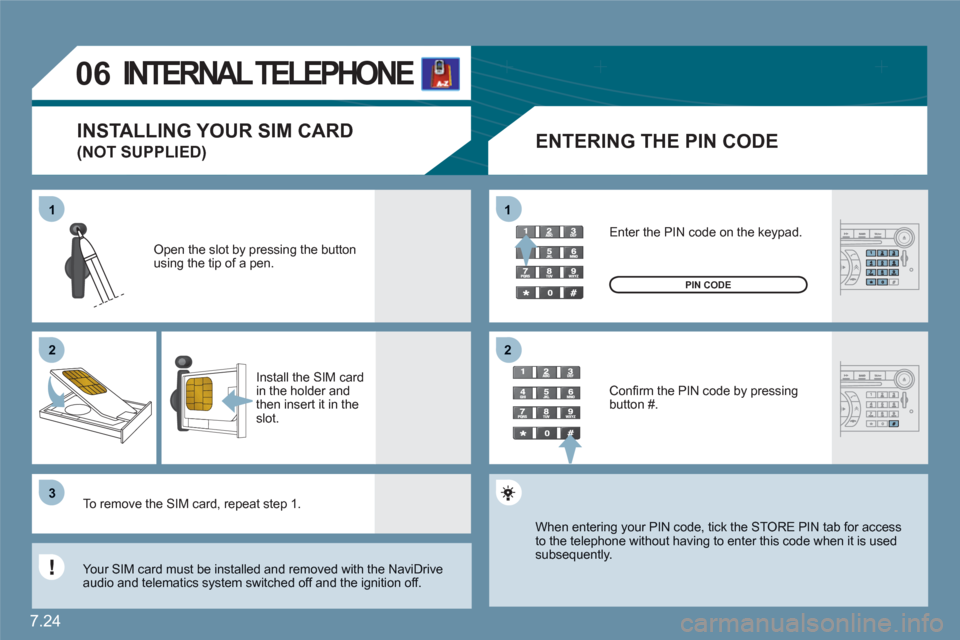
Open the slot by pressing the buttonusing the tip of a pen.
Install the SIM card in the holder and then insert it in theslot.
To remove the SIM card, repeat step 1.
Your SIM card must be installed and removed with the NaviDrive audio and telematics system switched off and the ignition off.
Enter the PIN code on the keypad.
Confi rm the PIN code by pressing button #.
PIN CODE
When entering your PIN code, tick the STORE PIN tab for access to the telephone without having to enter this code when it is usedsubsequently.
INSTALLING YOUR SIM CARD
(NOT SUPPLIED)
Page 175 of 216
7.25
33
22
11
44
06
The services offered by the telephone depend on the network, the SIM card and the compatibility of the Bluetooth equipment used. Refer to your telephone's manual and your operator to check which services you have access to. A list of mobile telephones which offer the best range of services is available from dealers.
BLUETOOTH TELEPHONE
CONNECTING A BLUETOOTH
TELEPHONE
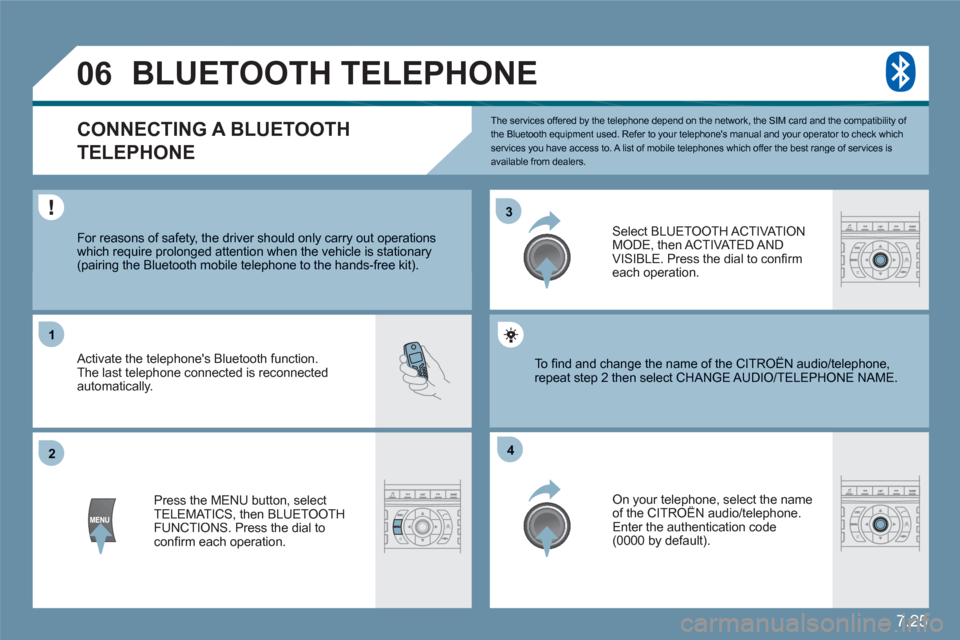
For reasons of safety, the driver should only carry out operations which require prolonged attention when the vehicle is stationary (pairing the Bluetooth mobile telephone to the hands-free kit).
Activate the telephone's Bluetooth function. The last telephone connected is reconnected automatically.
Select BLUETOOTH ACT I VAT IONMODE, then ACTIVATED AND VISIBLE. Press the dial to confi rm each operation.
Press the MENU button, select TELEMATICS, then BLUETOOTH FUNCTIONS. Press the dial to confi rm each operation.
On your telephone, select the nameof the CITROËN audio/telephone. y
Enter the authentication code (0000 by default).
To fi nd and change the name of the CITROËN audio/ttelephone, repeat step 2 then select CHANGE AUDIO/TELEPHOONE NAME.
Page 182 of 216
7.32
2 1
VOICE COMMANDS
DISPLAYING THE LIST AND USING THEM
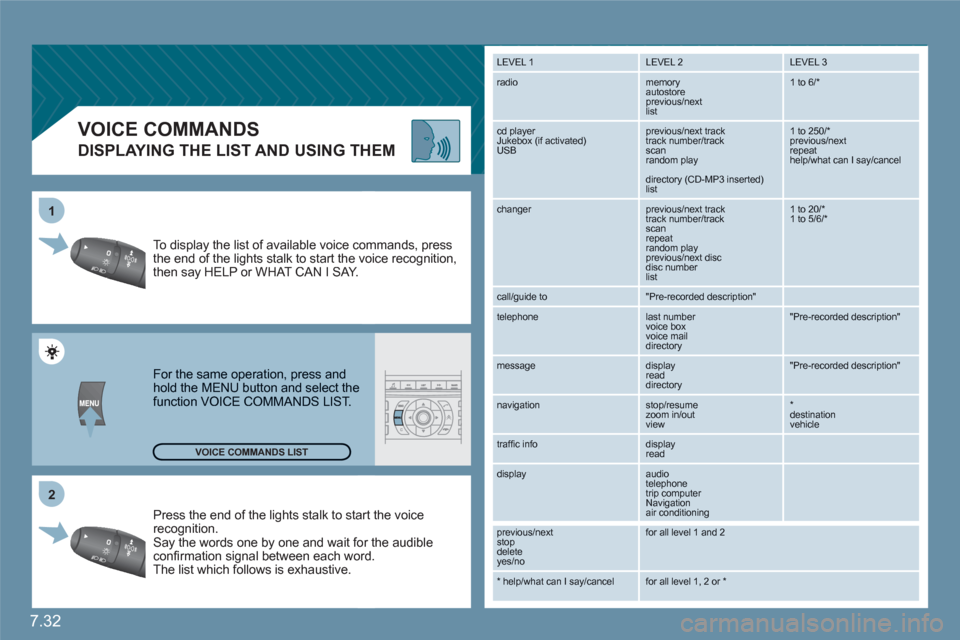
Press the end of the lights stalk to staart the voicerecognition. Say the words one by one and wait foor the audibleconfi rmation signal between each woord.
The list which follows is exhaustive.
To display the list of available voice coommands, press the end of the lights stalk to start the vvoice recognition,then say HELP or WHAT CAN I SAY.
For the same operation, press and hold the MENU button and select the function VOICE COMMANDS LIST.
LEVEL 1
LEVEL 2 LEVEL 3
radio memory autostore
previous/next list
1 to 6/*
cd player
Jukebox (if activated) USB
previous/next track
track number/track scan
random play
directory (CD-MP3 inserted) list
1 to 250/* previous/next repeat help/what can I say/cancel
changer
previous/next track
track number/track scan
repeat
random play previous/next disc disc number list
1 to 20/* 1 to 5/6/*
call/guide to
"Pre-recorded description"
telephone
last number
voice box
voice mail
directory
"Pre-recorded description"
message
display
read directory
"Pre-recorded description"
navigation
stop/resume
zoom in/out
view
*destination vehicle
traffi c info display
read
display audio
telephone
trip computer
Navigation
air conditioning
previous/next
stop delete
yes/no
for all level 1 and 2
* help/what can I say/cancel for all level 1, 2 or * VOICE COMMANDS LIST
Page 185 of 216
7.35
4
4
3
1
2
3
4
4
3
4
4
4
4
4
1
2
3
3
3
3
3
3
3
3
2
3
2
3
3
2
4
4
2
4
4
4
3
3
4
4
4
4
4
4
4
3
3
4
4
4
4
3
3
2
2
2
3
4
4
4
4
2
3
5
5
supermarkets, shopping
culture, tourism and shows
culture and museums
casinos and nightlife
cinemas and theatres
tourism
shows and exhibitions
sports and open air centres
sports centres
golf courses
skating rinks, bowling alleys
winter sports resorts
parks, gardens
theme parks
transport and automobile
airports, ports
stations, bus stations
vehicle rental
lay-bys, car parks
service stations, garages
read messages
new message display
TRAFFIC INFORMATION
SELECT TMC STAT I O N
automatic TMC
manual TMC
list of TMC stations
MOVE THE MAP/FOLLOW VEHICLE
DISPLAY MAP
full screen MAP
MAP in window
MAP DATABASE DESCRIPTION
READ MESSAGES
FILTER TRAFFIC INFORMATION
geographic fi lter
store all messages
store messages
around the vehicle
on the route
road information
traffi c information
road closure
size limit
road condition
weather and visibility
urban/city information
parking
public transport
demonstrations
AUDIO FUNCTIONS
RADIO FAVOURITES
enter a frequency
activate/deactivate RDS mode
activate/deactivate regional mode
display/hide radio text
CD AND JUKEBOX PREFERENCES
activate/deactivate Introscan (SCN)
activate/deactivate Random mode (RDM)
activate/deactivate Repeat (RPT)
activate/deactivate display of CD info
CD
copy CD to Jukebox
copy complete CD
multiple selection
CONFIGURE MESSAGE ANNOUNCEMENT
Page 187 of 216
7.37
1
2
2
1
2
1
2
2
2
3
3
4
4
4
3
2
2
2
3
4
4
4
3
3
3
3
4
4
4
4
1
2
2
1
2
2
2
1
1
1
3
3
3
3
3
3
3
3
2
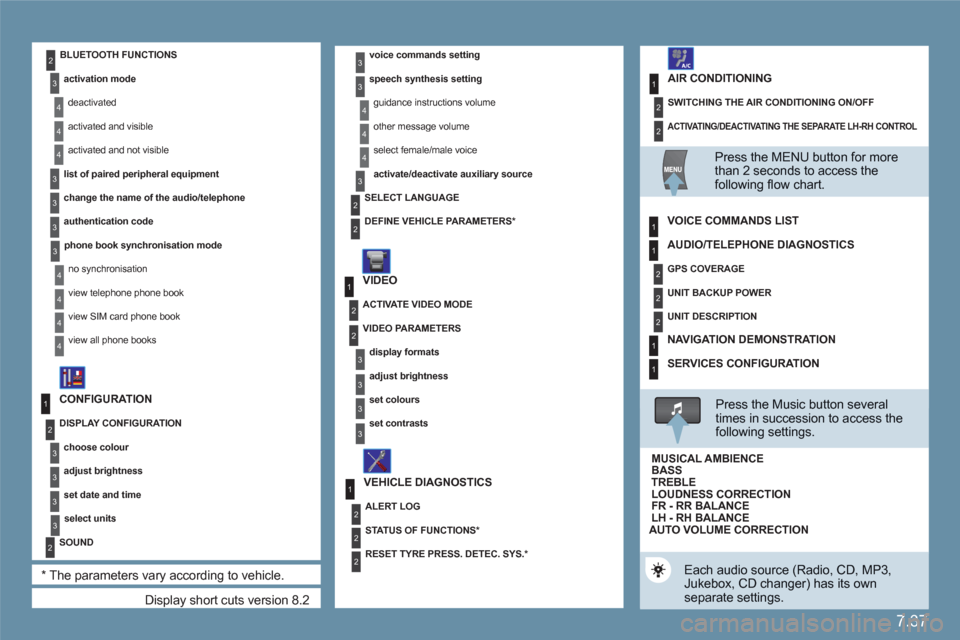
Display short cuts version 8.2
CONFIGURATION
DISPLAY CONFIGURATION
choose colour
adjust brightness
set date and time
select units
SOUND
*
The parameters vary according to vehicle.
voice commands setting
speech synthesis setting
guidance instructions volume
other message volume
select female/male voice
activate/deactivate auxiliary source
VIDEO
VEHICLE DIAGNOSTICS
SELECT LANGUAGE
DEFINE VEHICLE PARAMETERS
*
ACTIVATE VIDEO MODE
VIDEO PARAMETERS
display formats
adjust brightness
set colours
set contrasts
ALERT LOG
STATUS OF FUNCTIONS *
RESET TYRE PRESS. DETEC. SYS. *
BLUETOOTH FUNCTIONS
activation mode
deactivated
activated and visible
activated and not visible
list of paired peripheral equipment
change the name of the audio/telephone
authentication code
phone book synchronisation mode
no synchronisation
view telephone phone book
view SIM card phone book
view all phone books
ACTIVATING/DEACTIVATING THE SEPARATE LH-RH CONTROL
SWITCHING THE AIR CONDITIONING ON/OFF
AIR CONDITIONING
Press the MENU button for more than 2 seconds to access thefollowing fl ow chart.
VOICE COMMANDS LIST
Press the Music button severaltimes in succession to access the following settings.
AUTO VOLUME CORRECTION
Each audio source (Radio, CD, MP3,Jukebox, CD changer) has its own separate settings.
AUDIO/TELEPHONE DIAGNOSTICS
GPS COVERAGE
UNIT BACKUP POWER
UNIT DESCRIPTION
NAVIGATION DEMONSTRATION
SERVICES CONFIGURATION
LOUDNESS CORRECTION TREBLEBASS MUSICAL AMBIENCE
FR - RR BALANCE LH - RH BALANCE
Page 188 of 216
7.38
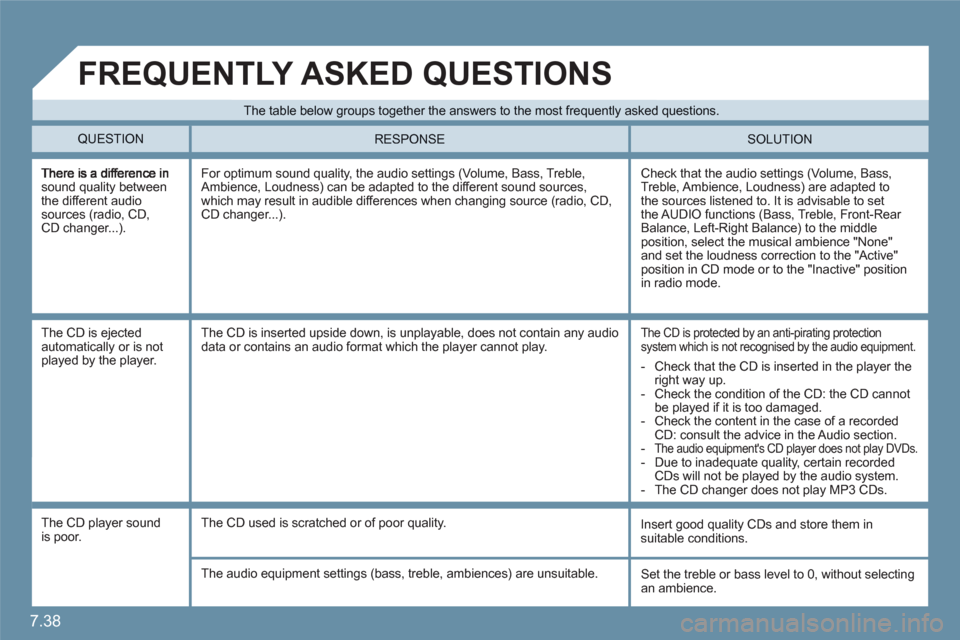
sound quality between the different audio sources (radio, CD,CD changer...).
Check that the audio settings (Volume, Bass, Treble, Ambience, Loudness) are adapted to the sources listened to. It is advisable to set the AUDIO functions (Bass, Treble, Front-Rear Balance, Left-Right Balance) to the middle position, select the musical ambience "None"and set the loudness correction to the "Active" position in CD mode or to the "Inactive" position in radio mode.
For optimum sound quality, the audio settings (Volume, Bass, Treble, Ambience, Loudness) can be adapted to the different sound sources, which may result in audible differences when changing source (radio, CD,CD changer...).
The CD is ejectedautomatically or is notplayed by the player.
The CD is protected by an anti-pirating protectionsystem which is not recognised by the audio equipment.
The CD is inserted upside down, is unplayable, does not contain any audiodata or contains an audio format which the player cannot play.
The CD player sound is poor.
Insert good quality CDs and store them insuitable conditions.
The CD used is scratched or of poor quality.
The audio equipment settings (bass, treble, ambiences) are unsuitable. Set the treble or bass level to 0, without selectingan ambience.
The table below groups together the answers to the most frequently asked questions.
QUESTION SOLUTION
RESPONSE
FREQUENTLY ASKED QUESTIONS
- Check that the CD is inserted in the player the right way up.
- Check the condition of the CD: the CD cannot be played if it is too damaged.
- Check the content in the case of a recordedCD: consult the advice in the Audio section.
-The audio equipment's CD player does not play DVDs.
- Due to inadequate quality, certain recordedCDs will not be played by the audio system.
- The CD changer does not play MP3 CDs.
Page 189 of 216
7.39
SOLUTION RESPONSE
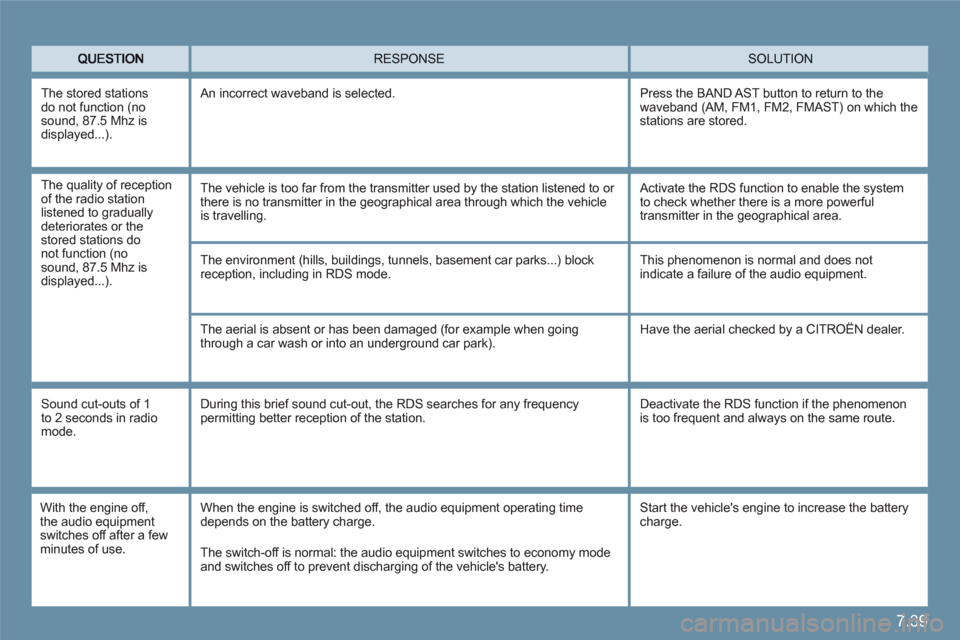
The environment (hills, buildings, tunnels, basement car parks...) blockreception, including in RDS mode.
The aerial is absent or has been damaged (for example when going through a car wash or into an underground car park).
This phenomenon is normal and does notindicate a failure of the audio equipment.
Have the aerial checked by a CITROËN dealer.
Sound cut-outs of 1 to 2 seconds in radiomode.
During this brief sound cut-out, the RDS searches for any frequency permitting better reception of the station.
Deactivate the RDS function if the phenomenon is too frequent and always on the same route.
With the engine off,the audio equipment switches off after a fewminutes of use.
When the engine is switched off, the audio equipment operating timedepends on the battery charge.
The switch-off is normal: the audio equipment switches to economy mode and switches off to prevent discharging of the vehicle's battery.
The stored stations do not function (nosound, 87.5 Mhz is displayed...)
.
An incorrect waveband is selected.
Press the BAND AST button to return to the waveband (AM, FM1, FM2, FMAST) on which the stations are stored.
Start the vehicle's engine to increase the battery charge.
The quality of reception of the radio station listened to gradually deteriorates or thestored stations do not function (nosound, 87.5 Mhz is displayed...).
The vehicle is too far from the transmitter used by the station listened to or there is no transmitter in the geographical area through which the vehicle is travelling.
Activate the RDS function to enable the system to check whether there is a more powerfultransmitter in the geographical area.
Page 190 of 216
7.40
QUESTION SOLUTIONRESPONSE
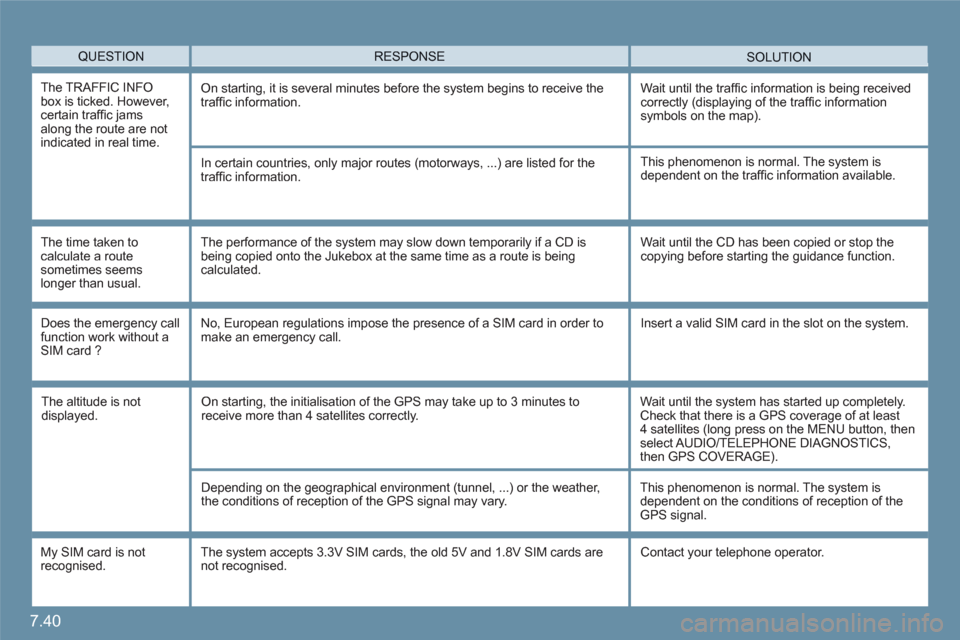
The TRAFFIC INFO box is ticked. However, certain traffi c jams along the route are notindicated in real time.
On starting, it is several minutes before the system begins to receive the traffi c information.Wait until the traffi c information is being receivedcorrectly (displaying of the traffi c information symbols on the map).
In certain countries, only major routes (motorways, ...) are listed for the traffi c information.
The time taken tocalculate a routesometimes seems longer than usual.
This phenomenon is normal. The system isdependent on the traffi c information available.
The performance of the system may slow down temporarily if a CD is being copied onto the Jukebox at the same time as a route is beingcalculated.
Wait until the CD has been copied or stop thecopying before starting the guidance function.
Does the emergency call function work without aSIM card ?
No, European regulations impose the presence of a SIM card in order tomake an emergency call. Insert a valid SIM card in the slot on the system.
My SIM card is not recognised.
The system accepts 3.3V SIM cards, the old 5V and 1.8V SIM cards are not recognised. Contact your telephone operator.
The altitude is notdisplayed. On starting, the initialisation of the GPS may take up to 3 minutes toreceive more than 4 satellites correctly.
Wait until the system has started up completely. Check that there is a GPS coverage of at least 4 satellites (long press on the MENU button, thenselect AUDIO/TELEPHONE DIAGNOSTICS,then GPS COVERAGE).
Depending on the geographical environment (tunnel, ...) or the weather, the conditions of reception of the GPS signal may vary.
This phenomenon is normal. The system isdependent on the conditions of reception of theGPS signal.
Page 192 of 216
7.42
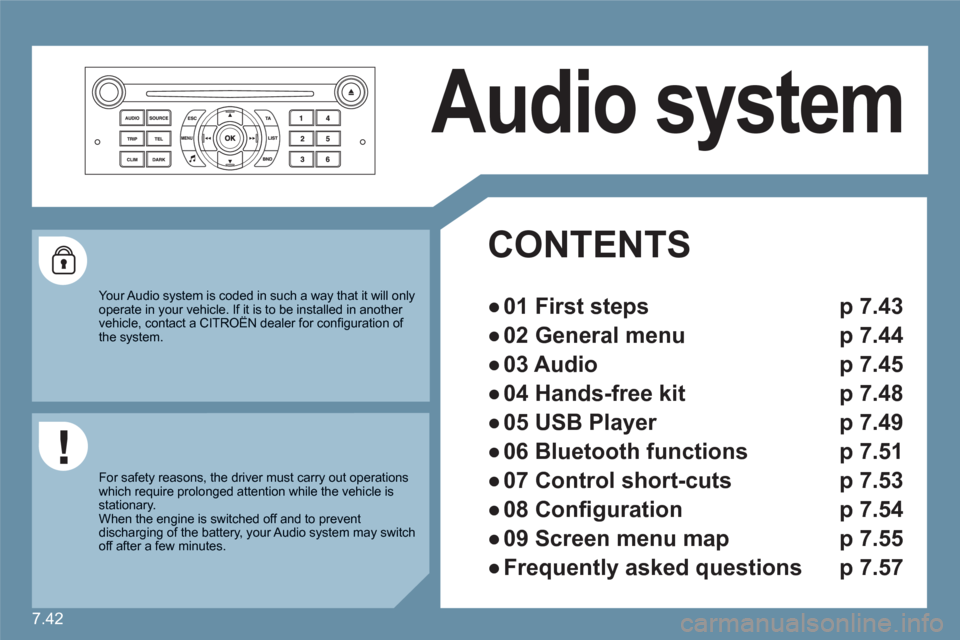
Audio system
CONTENTS
●
01 First steps p 7.43
●
02 General menu p 7.44
●
03 Audio p 7.45
●
04 Hands-free kit p 7.48
●
05 USB Player p 7.49
●
06 Bluetooth functions p 7.51
●
07 Control short-cuts p 7.53
●
08 Confi guration p 7.54
●
09 Screen menu map p 7.55
●
Frequently asked questions p 7.57
Your Audio system is coded in such a way that it will only operate in your vehicle. If it is to be installed in another vehicle, contact a CITROËN dealer for confi guration of y
the system.
For safety reasons, the driver must carry out operations which require prolonged attention while the vehicle is stationary.
When the engine is switched off and to prevent discharging of the battery, your Audio system may switch off after a few minutes.
Page 193 of 216
7.43
11
223344
55
6677
1010
111
1212131314141515
88
99
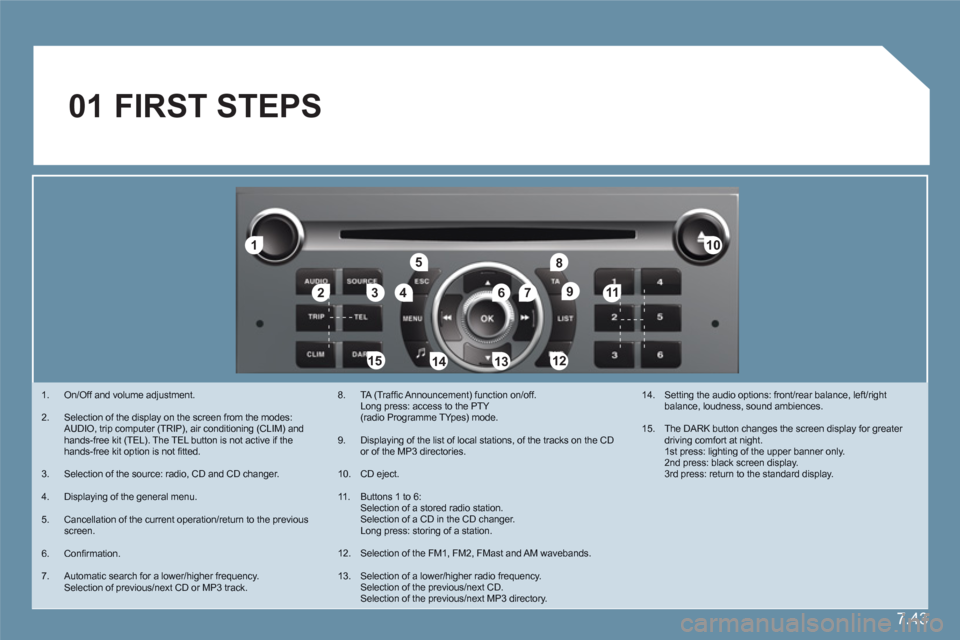
01 FIRST STEPS
1. On/Off and volume adjustment.
2. Selection of the display on the screen from the modes:AUDIO, trip computer (TRIP), air conditioning (CLIM) and hands-free kit (TEL). The TEL button is not active if the hands-free kit option is not fi tted.
3. Selection of the source: radio, CD and CD changer.
4. Displaying of the general menu.
5. Cancellation of the current operation/return to the previous screen.
6. Confi rmation.
7. Automatic search for a lower/higher frequency. Selection of previous/next CD or MP3 track.
8. TA (Traffi c Announcement) function on/off.Long press: access to the PTY(radio Programme TYpes) mode.
9. Displaying of the list of local stations, of the tracks on the CD or of the MP3 directories.
10. CD eject.
11 . Buttons 1 to 6: Selection of a stored radio station. Selection of a CD in the CD changer. Long press: storing of a station.
12. Selection of the FM1, FM2, FMast and AM wavebands.
13. Selection of a lower/higher radio frequency. Selection of the previous/next CD. Selection of the previous/next MP3 directory.
14. Setting the audio options: front/rear balance, left/rightbalance, loudness, sound ambiences.
15. The DARK button changes the screen display for greater driving comfort at night.1st press: lighting of the upper banner only.2nd press: black screen display.3rd press: return to the standard display.