phone CITROEN DS3 2018 Handbook (in English)
[x] Cancel search | Manufacturer: CITROEN, Model Year: 2018, Model line: DS3, Model: CITROEN DS3 2018Pages: 248, PDF Size: 8.79 MB
Page 230 of 248
2
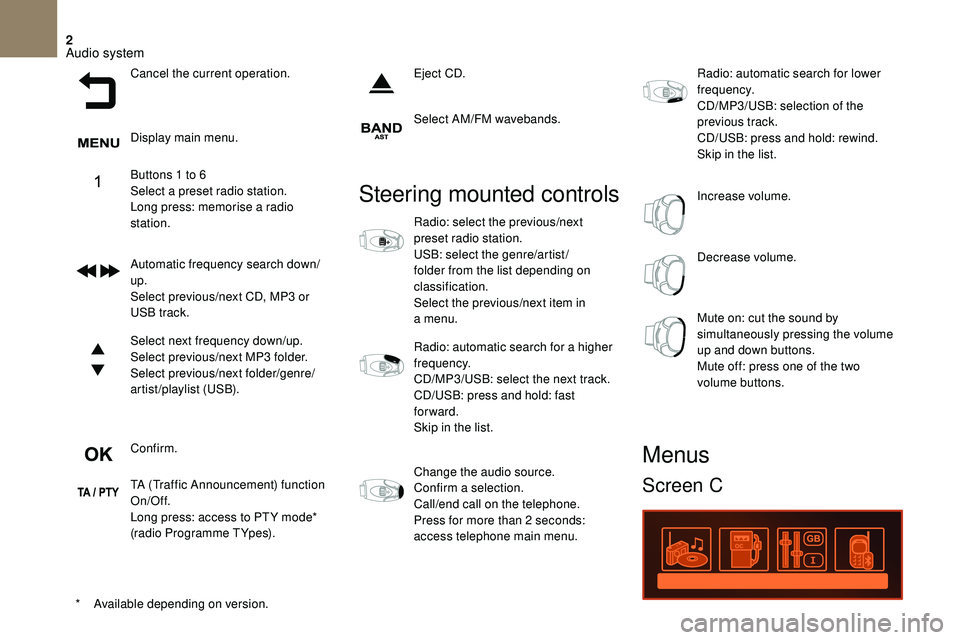
Cancel the current operation.
Display main menu.
Buttons 1 to 6
Select a
preset radio station.
Long press: memorise a
radio
station.
Automatic frequency search down/
up.
Select previous/next CD, MP3
or
USB track.
Select next frequency down/up.
Select previous/next MP3
folder.
Select previous/next folder/genre/
artist/playlist (USB).
Confirm.
TA (Traffic Announcement) function
On/Off.
Long press: access to PT Y mode*
(radio Programme TYpes). Eject CD.
Select AM/FM wavebands.
*
A
vailable depending on version.
Steering mounted controls
Radio: select the previous/next
preset radio station.
USB: select the genre/artist /
folder from the list depending on
classification.
Select the previous/next item in
a menu.
Radio: automatic search for a
higher
frequency.
CD/MP3/USB: select the next track.
CD/USB: press and hold: fast
forward.
Skip in the list.
Change the audio source.
Confirm a
selection.
Call/end call on the telephone.
Press for more than 2
seconds:
access telephone main menu. Radio: automatic search for lower
frequency.
CD/MP3/USB: selection of the
previous track.
CD/USB: press and hold: rewind.
Skip in the list.
Increase volume.
Decrease volume.
Mute on: cut the sound by
simultaneously pressing the volume
up and down buttons.
Mute off: press one of the two
volume buttons.
Menus
Screen C
Audio system
Page 231 of 248
3
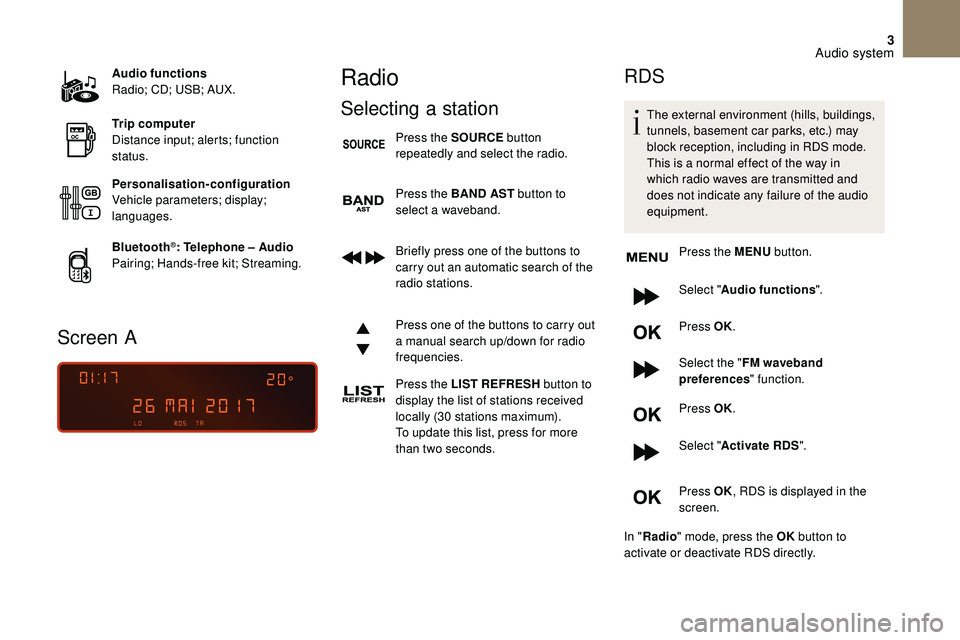
Audio functions
Radio; CD; USB; AUX.
Trip computer
Distance input; alerts; function
status.
Personalisation-configuration
Vehicle parameters; display;
languages.
Bluetooth
®: Telephone – Audio
Pairing; Hands-free kit; Streaming.
Screen A
Radio
Selecting a station
Press the SOURCE button
repeatedly and select the radio.
Press the BAND AST button to
select a
waveband.
Briefly press one of the buttons to
carry out an automatic search of the
radio stations.
Press one of the buttons to carry out
a
manual search up/down for radio
frequencies.
Press the LIST REFRESH button to
display the list of stations received
locally (30
stations maximum).
To update this list, press for more
than two seconds.
RDS
The external environment (hills, buildings,
tunnels, basement car parks, etc.) may
block reception, including in RDS mode.
This is a
normal effect of the way in
which radio waves are transmitted and
does not indicate any failure of the audio
equipment.
Press the MENU button.
Select " Audio functions ".
Press OK.
Select the " FM waveband
preferences " function.
Press OK.
Select " Activate RDS ".
Press OK , RDS is displayed in the
screen.
In " Radio " mode, press the OK button to
activate or deactivate RDS directly.
Audio system
Page 234 of 248
6
Information and advice
The audio system will only play files with
the ".mp3" extension with a sampling rate
of 22.05
kHz or 44.1 kHz. No other file type
(".wma", ".mp4", ".m3u", etc.) can be played.
It is recommended that file names be of no
more than 20
characters and avoiding special
characters (e.g. " ?; ù) so as to avoid any
problem reading or displaying the files..
In order to be able to play a
recorded CDR or
CDRW, when recording it is preferable to select
standards ISO
9660 level 1.2 or Joliet.
If the disc is recorded in another format, it may
not be played correctly.
It is recommended that the same
recordingstandard is always used for an
individual disc, with as low a
speed as possible
(4x maximum) for optimum sound quality.
In the particular case of a
multi-session CD, the
Joliet standard is recommended.
Use only USB memory sticks in FAT32
format
(File Allocation Table).
To protect the system, do not use a
USB
hub. It is recommended that you use genuine
Apple® USB cables for correct operation.
Bluetooth® audio streaming
Streaming allows you to listen to audio files on
your smartphone using the vehicle's speakers.
Connect the telephone: see the "
Telephone"
section.
Select in the menu " Bluetooth
®: Telephone –
Audio " the telephone to connect to.
The audio system connects to a
newly paired
telephone automatically.
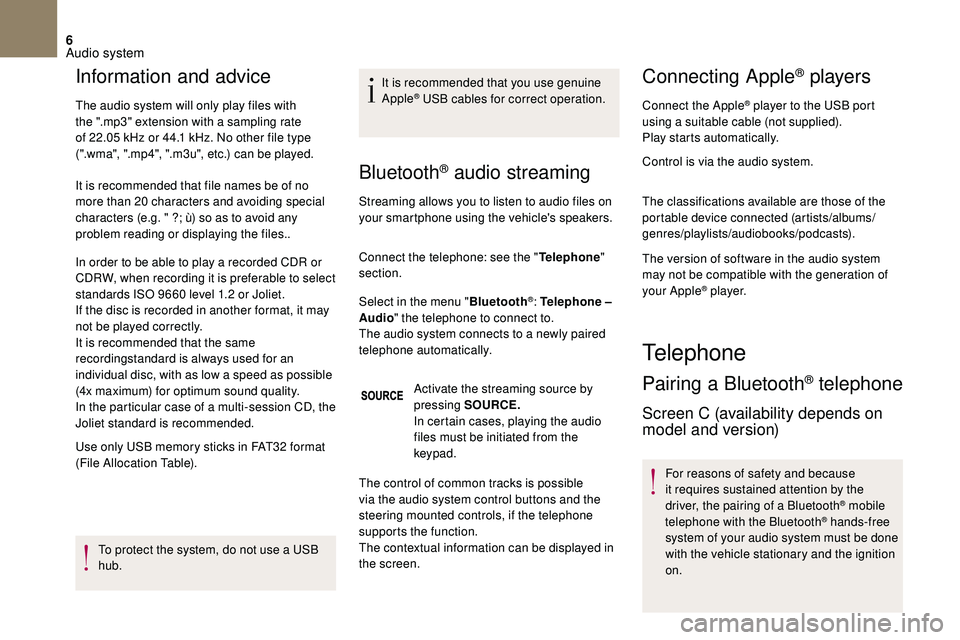
Activate the streaming source by
pressing SOURCE.
In certain cases, playing the audio
files must be initiated from the
keypad.
The control of common tracks is possible
via the audio system control buttons and the
steering mounted controls, if the telephone
supports the function.
The contextual information can be displayed in
the screen.
Connecting Apple® players
Connect the Apple® player to the USB port
using a
suitable cable (not supplied).
Play starts automatically.
Control is via the audio system.
The classifications available are those of the
portable device connected (artists/albums/
genres/playlists/audiobooks/podcasts).
The version of software in the audio system
may not be compatible with the generation of
your Apple
® p l aye r.
Telephone
Pairing a Bluetooth® telephone
Screen C (availability depends on
model and version)
For reasons of safety and because
it requires sustained attention by the
driver, the pairing of a
Bluetooth
® mobile
telephone with the Bluetooth® hands-free
system of your audio system must be done
with the vehicle stationary and the ignition
on.
Audio system
Page 235 of 248
7
Visit www.dsautomobiles.com for more
information (compatibility, more help, etc.).
Activate the Bluetooth
® function on the
telephone and ensure that it is "visible to all"
(telephone configuration).
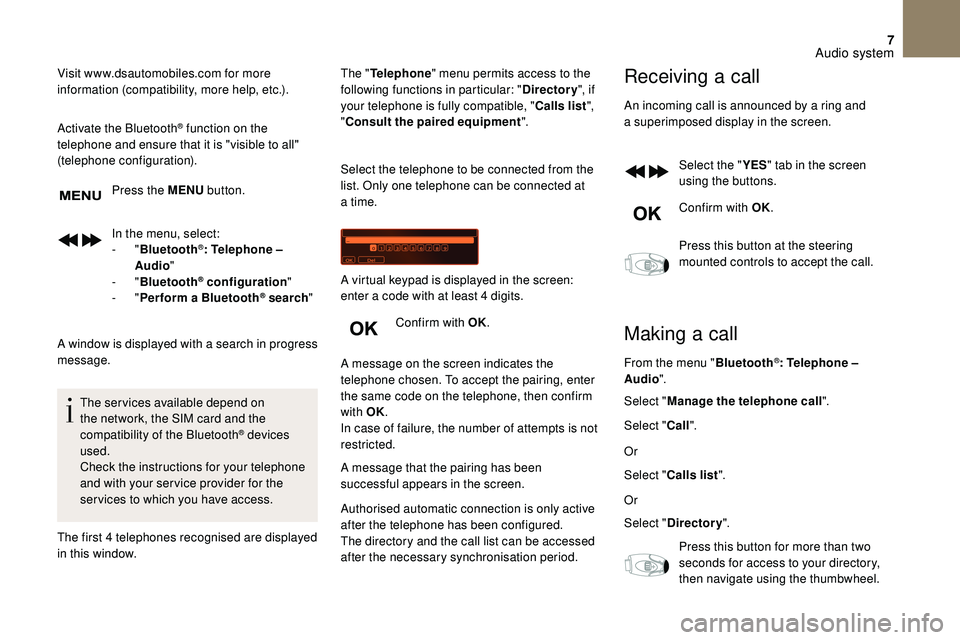
Press the MENU button.
In the menu, select:
-
" Bluetooth
®: Telephone –
Audio "
-
" Bluetooth
® configuration "
-
" Perform a
Bluetooth® search "
A window is displayed with a
search in progress
message.
The services available depend on
the network, the SIM card and the
compatibility of the Bluetooth
® devices
used.
Check the instructions for your telephone
and with your ser vice provider for the
ser vices to which you have access.
The first 4
telephones recognised are displayed
in this window. The "
Telephone " menu permits access to the
following functions in particular: " Directory", if
your telephone is fully compatible, " Calls list",
" Consult the paired equipment ".
Select the telephone to be connected from the
list. Only one telephone can be connected at
a time.
Confirm with OK.
A message on the screen indicates the
telephone chosen. To accept the pairing, enter
the same code on the telephone, then confirm
with OK.
In case of failure, the number of attempts is not
restricted.
A message that the pairing has been
successful appears in the screen. A virtual keypad is displayed in the screen:
enter a code with at least 4 digits.
Authorised automatic connection is only active
after the telephone has been configured.
The directory and the call list can be accessed
after the necessary synchronisation period.
Receiving a call
An incoming call is announced by a ring and
a superimposed display in the screen.
Select the " YES" tab in the screen
using the buttons.
Confirm with OK.
Press this button at the steering
mounted controls to accept the call.
Making a call
From the menu " Bluetooth®: Telephone –
Audio ".
Select " Manage the telephone call".
Select " Call".
Or
Select " Calls list ".
Or
Select " Directory ".
Press this button for more than two
seconds for access to your directory,
then navigate using the thumbwheel.
Audio system
Page 236 of 248
8
Or
To dial a number, use your telephone's keypad,
with the vehicle stationary.
Ending a call
During a call, press this button for
m ore than two seconds.
Confirm with OK to end the call.
The system accesses the telephone's contacts
directory, depending on its compatibility, and
while it is connected by Bluetooth.
With certain telephones connected by
Bluetooth you can send a
contact to the
directory of the audio system.
Contacts imported in this way are saved
in a
permanent directory visible to all,
whatever the telephone connected.
The menu for the directory is not
accessible if it is empty.
Frequently asked
questions
The following information puts together the
answers to the most frequently asked questions
concerning your audio system.
Audio system
Page 240 of 248

12
QUESTIONRESPONSESOLUTION
I am unable to access my voicemail. Few telephones or ser vice providers allow the
use of this function.
Telephone
Audio system
Page 241 of 248
203
ABS .....................................................................9 6 -97
Accessories .............................................................. 92
Access to rear seats
.......................................... 63-65
Active City Brake
............................................. 140 -142
AdBlue
® .............................................. 1 9, 28, 159 -161
Additive, diesel ....................................................... 15 8
Adjusting head restraints
......................................... 62
Adjusting seats
....................................... 6
1-62, 64-65
Adjusting the air distribution
.................................... 73
Adjusting the air flow
................................................ 73
Adjusting the date
................................... 31- 3 4 , 4 0 - 41
Adjusting the height and reach of the steering wheel
................................................. 67
Adjusting the temperature
.................................. 7
2-75
Adjusting the time
................................... 3
1- 3 4 , 4 0 - 41
Advice on care and maintenance
.........................162
Advice on driving
............................................. 11 6 -117
Airbags ...................................................... 17, 101, 10 6
Airbags, curtain
............................................... 102-103
Airbags, front
.......................................... 101-103, 10 6
Airbags, lateral
................................................ 102-103
Air conditioning, automatic
.......................... 70
, 72-75
Air conditioning, manual
............................... 7 0 -71, 74
Air intake
.............................................................. 72-75
Air vents
.............................................................. 68-69
Alarm ................................................................... 46 - 47
Anti-lock braking system (ABS)
........................96 -97
Anti-pinch
........................................................... 47- 4 8
Anti-slip regulation (ASR)
.................................. 96 -97
Apple CarPlay connection
....................................... 13
Armrest, front
........................................................... 79
Assistance call
................................................... 93
-96
Assistance, emergency braking ........................96 -97
Audio streaming (Bluetooth)
...........................1 0 -11, 6
A
Battery ..................................................... 1 5 7, 1 8 8 -1 9 1
Battery, charging ............................................ 1
8 9 -19 0Battery, remote control
......................................
44-45
Black panel
...............................................................
31
BlueHDi
...................................................
28, 159, 165
Bluetooth (hands-free)
................................
14 -16 , 6 - 8
Bluetooth (telephone)
.........................................
14 -16
Bonnet
............................................................
15 3 -15 4
Boot
.....................................................................
57- 5 8
Brake discs
.....................................................
15 8 -159
Brake lamps ..................................................... 176 -179
Brakes
.......................................................
14, 15 8 -159
Bulbs (changing)
.....................................
174, 176 -179
Cable, audio
............................................................. 10
C
able, Jack
...............................................................
10
Capacity, fuel tank
.................................................
148
Cartridge, fragrance
................................................
76
CD
........................................................................\
.......
5
CD, MP3
.................................................................
5-6
Central locking
...................................................
43, 49
Changing a
bulb
......................................
17
4, 176 -179
Changing a
fuse
......................
18
1-183, 185 -18 6, 188
Changing a
wheel
..................................
1
6 9 -170, 173
Changing a
wiper blade
...................................
9 0, 15 3
Changing the remote control battery
...................... 44
C
hecking the engine oil level
.............................
2
7-2 8
Checking the levels
........................................
15 5 -157
Checking tyre pressures (using the kit) ...165 -166, 168
Checks
..................................................... 15 4, 157-159
Checks, routine
............................................... 157-159
Child lock
........................................................ 11 0 , 113
Children
........................................................... 11 0 -113
Child seats
...................... 10
0, 104 -105, 109 -110, 114
Child seats, conventional
...................................... 10
9
Child seats, ISOFIX
......................................... 111 -113
Cleaning (advice)
................................................... 162
Closing the boot
........................................... 4
3 , 57- 5 8
Closing the doors
............................................... 4
3, 49
Configuration, vehicle
...................... 31-34, 36, 40 - 41 Connection, Bluetooth
........................................
1
4 -16
Connection, MirrorLink
............................................
12
Control, electric windows
.................................. 4
7- 4 8
Control, emergency boot release
.....................
5 7, 5 9
Control, emergency door
...................................
5 0 - 51
Control, heated seats
........................................
62- 63
Control stalk, lighting
................................... 2
2-23, 84
Control stalk, wipers
..........................................
8
8-89
Courtesy lamp
..................................................
7
7, 1 8 0
Cruise control
.................................................
13 8 -14 0
Cup holder ................................................................
78
DAB (Digital Audio Broadcasting) – Digital radio
.....
9
Date (setting)
...........................................
31- 3 4 , 4 0 - 41
Daytime running lamps, LED
..........................
87, 176
Deactivating the passenger airbag
....... 10
1-102, 10 6
Deadlocking
.......................................................
43-44
Defrosting
........................................................... 71
, 75
Demisting
.............................................................
71-75
Dials and gauges
.................................................. 9
-12
Dimensions
............................................................. 19
9
Dipstick
................................................ 2
7-28, 15 5 -15 6
Direction indicators
............................ 2
2 , 8 6 , 176 -179
Display screen, instrument panel
...............
9 -12, 13 0
Display screen, multifunction (with audio system) ...............................31- 3 4 , 4 0 - 41
Door pockets ............................................................ 78
Doors
........................................................................\
49
Dynamic stability control (DSC)
........................96 -97
B C
DEconomy mode ...................................................... 15 3
Electronic brake force distribution (EBFD) ....... 9
6 -97
Emergency braking assistance (EBA)
.............. 9
6 -97
Emergency call ................................................... 93-96
E
Alphabetical index
Page 244 of 248
206
Tables of engines ........................................... 195, 198
Tables of fuses ........................181-183, 185 -18 6, 188
Ta n k , f u e l
........................................................ 14
8 -149
Technical data
................................................ 19
5, 198
Telephone
.................................................... 1
4 -16 , 6 - 8
Temperature, coolant
............................................... 24
Textured paint
......................................................... 162
Third brake lamp
.................................................... 179
Three flashes (direction indicators)
........................86
Time (setting)
........................................... 31- 3 4 , 4 0 - 41
TMC (Traffic info)
....................................................... 6
To o l s ........................................................ 16 9 -170, 173
Total distance recorder
............................................ 30
Touch screen tablet
........................................... 34-35
To w b a r
............................................................ 1
17, 1 5 2
Towed loads
........................................................... 19 4
Towing another vehicle
...................................191-192
Traction control (ASR)
....................................... 96-98
Traffic information (TA)
.......................................... 7,
4
Traffic information (TMC)
..........................................6
Tr a i l e r
.............................................................. 1
17, 1 5 2
Trajectory control systems
......................................97
Trip computer
......................................... 3
3-34, 38-41
Trip distance recorder
.............................................. 3
0
Ty r e s
....................................................................... 201
Tyre under-inflation detection
......... 1
8, 134, 136, 169
T
Under-inflation (detection) ..............18, 134, 136, 169
Unlocking .................................................................. 43
Unlocking from the inside
........................................49
Updating risk areas
.................................................... 6
Updating the date
..................................................... 41
U
pdating the time
..................................................... 41
UREA warning lamp
................................................ 28
USB
............................................................... 9 -10, 4, 6Ventilation
......................................................
6 8 -71, 74
Voice recognition
................................................
13 -14
Warning and indicator lamps ..............................12-13
Warning lamp, braking system
................................
14
Warning lamp, diesel engine pre-heater
................ 21
W
arning lamps
.........................................................
12
Warning lamp, SCR emissions control system ......
20
Warning lamp, Service
............................................
16
Washing (advice)
....................................................
162
Weights
................................................................... 19
4
Wheel, spare
.................................. 1
6 9 -170, 173 , 2 01
Window controls ................................................. 47- 4 8
Wiper blades (changing)
..................................
9 0, 15 3
Wiper, rear
.......................................................... 8
8-89
Wipers
.................................................................
88-89
Wipers, automatic rain sensitive
....................... 8
8-89
UV
W
Alphabetical index