phone CITROEN DS3 CABRIO 2015 Handbook (in English)
[x] Cancel search | Manufacturer: CITROEN, Model Year: 2015, Model line: DS3 CABRIO, Model: CITROEN DS3 CABRIO 2015Pages: 404, PDF Size: 13.2 MB
Page 53 of 404
51
Monochrome screen C
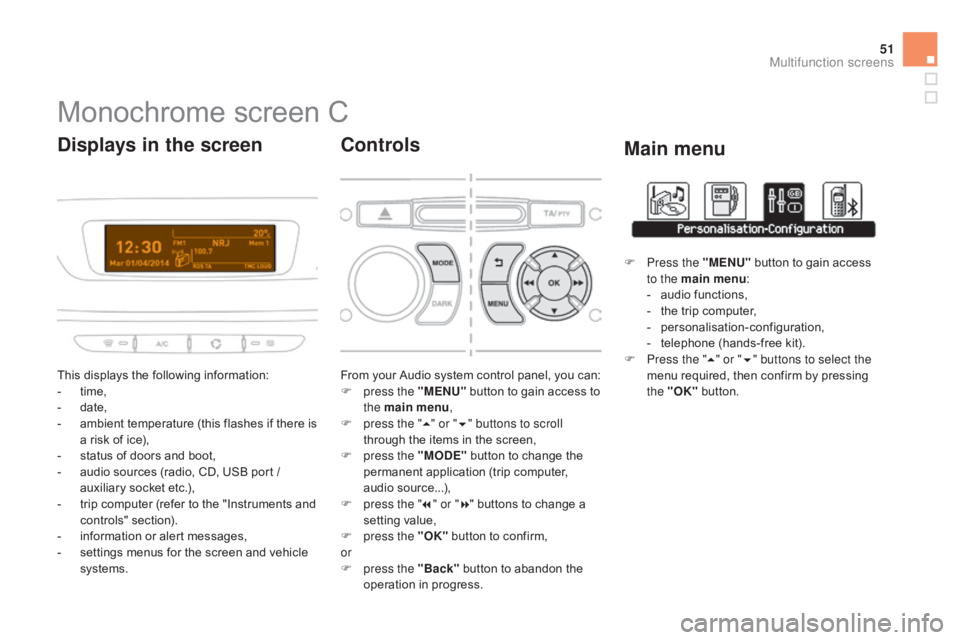
This displays the following information:
- t ime,
-
d
ate,
-
a
mbient temperature (this flashes if there is
a
risk of ice),
-
s
tatus of doors and boot,
-
a
udio sources (radio, CD, USB port /
a
uxiliary socket etc.),
-
t
rip computer (refer to the "Instruments and
c
ontrols"
s
ection).
-
i
nformation or alert messages,
-
s
ettings menus for the screen and vehicle
s
ystems.
displays in the screen
From your Audio system control panel, you can:
F p ress the "MENU" button to gain access to
t
he main menu ,
F
p
ress the " 5" or " 6" buttons to scroll
through
the items in the screen,
F
p
ress the "MO
dE"
button to change the
p
ermanent application (trip computer,
a
udio
s
ource...),
F
p
ress the " 7" or " 8"
buttons to change a
s
etting value,
F
p
ress the "OK"
button to confirm,
or
F
p
ress the "Back"
button to abandon the
o
peration in progress.
Controls
F Press the "MENU" button to gain access t
o the main menu :
-
a
udio functions,
-
t
he trip computer,
-
pe
rsonalisation-configuration,
-
t
elephone (hands-free kit).
F
P
ress the " 5" or " 6" buttons to select the
menu
required, then confirm by pressing
t
he "OK"
button.
Main menu
Multifunction screens
Page 56 of 404
Display configuration
Once this menu has been selected, you can gain access to the following settings:
-
b
rightness-video
s
etting,
-
d
ate and time setting,
-
s
election of units.
Once
the fuel consumption units have
b
een changed to mpg, the information
i
n the screen relating to speed and
d
istance also changes to mph and
mil
es
re
spectively. For
safety
reasons,
configuration
by
the
d
river of the multifunction screen must
o
nly be done when stationary.
Choice of language
Once this menu has been selected, you can change the language used by the screen by
c
hoosing one from a defined list.With
Audio system on, once this menu is s
elected you can configure your Bluetooth h
ands-free system (pairing), view the various
t
elephone directories (list of calls, services...)
a
nd manage your calls (call, hang up, second
c
all, secret mode...).
For
more information on the "Telephone"
f
unction, refer to the "Audio system" section.
"Telephone" Menu
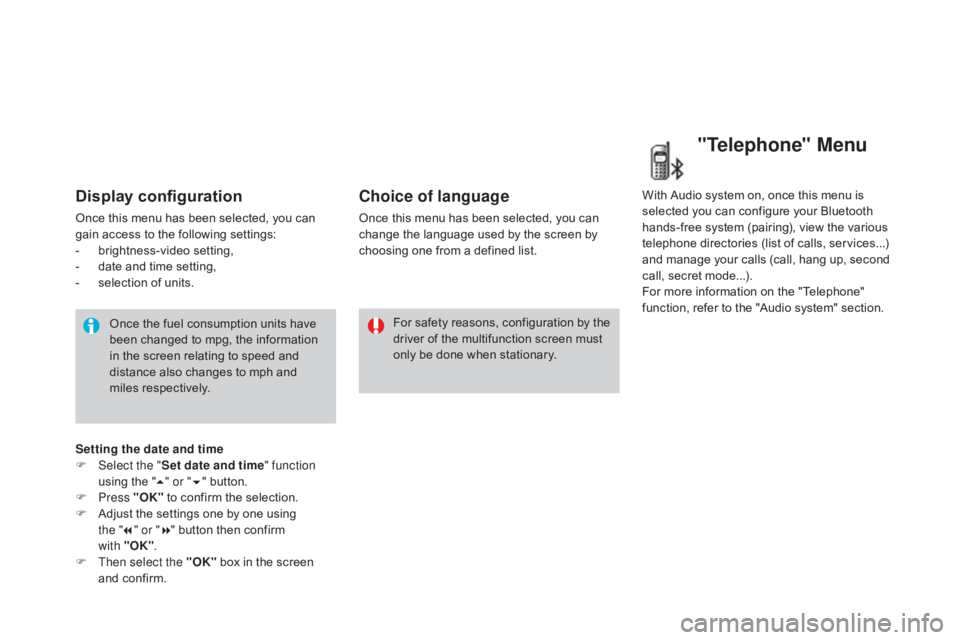
Setting the date and time
F Sel ect the " Set date and time" function
using
the "5 " or " 6"
button.
F
Press "OK"
to confirm the selection.
F
A
djust the settings one by one using
the " 7" or " 8"
button then confirm
with "OK" .
F
T
hen select the "OK"
box in the screen
a
nd confirm.
Page 57 of 404
55
16/9 colour screen (eMyWay)
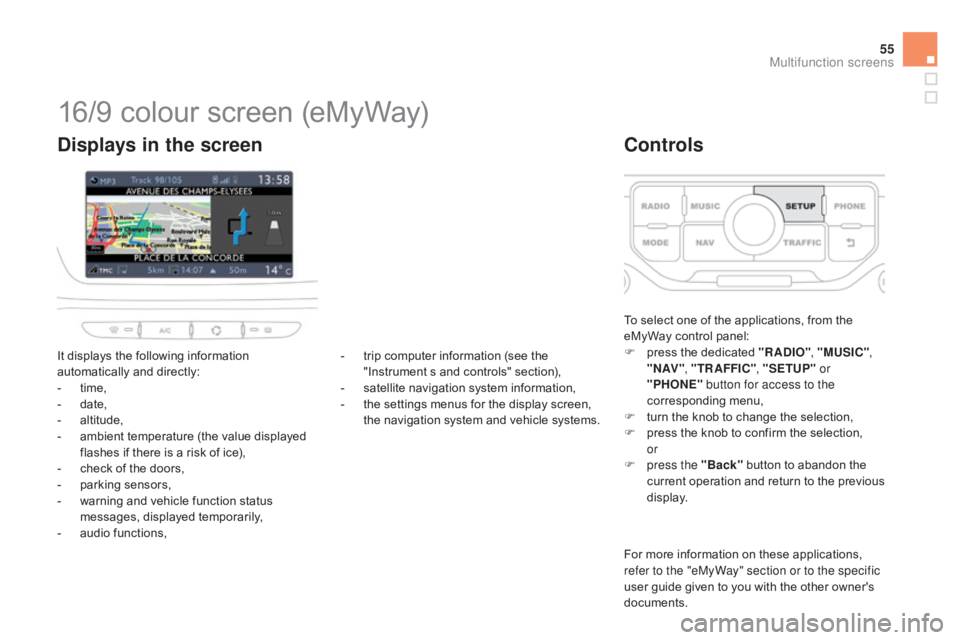
It displays the following information automatically and directly:
-
t
ime,
-
d
ate,
-
al
titude,
-
a
mbient temperature (the value displayed
f
lashes if there is a risk of ice),
-
c
heck of the doors,
-
p
arking sensors,
-
w
arning and vehicle function status
m
essages, displayed temporarily,
-
a
udio functions,
displays in the screen
To select one of the applications, from the eMyWay control panel:
F
p
ress the dedicated "RA
dI
O", "MUSIC" ,
" N AV " , "TR AFFIC" , "SETUP" or
"PHONE" button for access to the
corresponding
m
enu,
F
t
urn the knob to change the selection,
F
p
ress the knob to confirm the selection,
or
F
p
ress the "Back"
button to abandon the
c
urrent
o
peration
a
nd
r
eturn
t
o
t
he
p
revious
d
isplay.
Controls
For more information on these applications, refer to the "eMyWay" section or to the specific
user
guide given to you with the other owner's
d
ocuments.
-
t
rip
computer
information
(see
the
"
Instrument
s
and
controls"
section),
-
s
atellite
navigation
system
information,
-
t
he
settings
menus
for
the
display
screen,
t
he
navigation
system
and
vehicle
systems.
Multifunction screens
Page 240 of 404

Energy economy modeSystem which manages the period of use of certain functions to conserve a sufficient level of charge in the battery.
A fter the engine has stopped, you can still use functions such as the audio equipment, windscreen wipers, dipped beam headlamps, courtesy lamps,
e
tc. for a maximum combined period of thirty minutes.
This
period may be greatly reduced if
t
he battery is not fully charged.
A
flat battery prevents the engine from
s
tarting (refer to the corresponding
par
agraph).
If
the telephone is being used at the
s
ame time on the eMyWay audio
n
avigation system, it will be interrupted
a
fter 10 minutes.
Switching to economy mode
Once this period has elapsed, a message appears on the multifunction screen indicating
t
hat the vehicle has switched to economy mode
a
nd the active functions are put on standby.
Exiting economy mode
These functions are reactivated automatically the next time the vehicle is driven.
F
I
n order to resume the use of these
f
unctions immediately, start the engine and
l
et it run for a few minutes.
The
time available to you will then be double
t
he period for which the engine is left running.
H
owever, this period will always be between
f
ive and thirty minutes.
Page 249 of 404

247
"Multimedia":
hands-free system, audio systems, semi-
i ntegral satellite navigation system, portable
n
avigation systems, mapping update CD,
d
riving assistant system, DVD player, reversing
c
amera, USB Box, speakers, Hi-Fi module,
2
30V socket, WiFi on Board, telephone/
smartphone
carrier, rear multimedia carrier...By
visiting a CITROËN dealer, you can also o
btain cleaning and maintenance products (
interior and exterior) - including ecological
p
roducts from the "TECHNATURE" range,
p
roducts for topping up (screenwash fluid...),
t
ouch-up pens and paint aerosols for the exact
c
olour of your vehicle, refills (cartridge for the
t
emporary puncture repair kit...), ...
Installation of radio
communication
transmitters
Before installing any after-market radio communication transmitter, you can
c
ontact a CITROËN dealer for the
s
pecification of transmitters which can
b
e fitted (frequency, maximum power,
a
erial position, specific installation
requirements),
in line with the Vehicle
E
lectromagnetic
C
ompatibility
D
irective
(
2004/104/EC). The
fitting of electrical equipment
o
r accessories which are not
recommended by CITROËN may result i
n a failure of your vehicle's electronic
system and excessive electrical
c
onsumption.
Contact
a CITROËN dealer
f
or information on the range of
r
ecommended equipment and
a
ccessories.
Depending
on the legislation in force in
t
he country, certain safety equipment
m
ay be compulsory: high visibility s
afety vests, warning triangles, b
reathalyzers, spare bulbs, spare
fuses,
fire extinguisher, first aid kit,
m
ud flaps at the rear of the vehicle.
Practical information
Page 287 of 404
285
The
system
is
protected
in
such
a
way
that
it
will
only
operate
in
your
vehicle.
eMyWay
01 First steps - Control panel
For safety reasons, the driver must only carry out operations
which require prolonged attention while the
vehicle
is stationary.
When
the engine is switched off and to prevent
discharging
of the battery, the system switches off
following
the activation of the energy economy mode.
CONTENTS
02
Steering mounted
controls
03
General operation
04
Navigation
- Guidance
05
T
raffic information
06
Using
the telephone
07
Radio
08
Music media players
09
Audio
settings
10
Configuration
11
Screen menu
map p.
p.
p.
p.
p.
p.
p.
p.
p.
p.
p.
286
288
289
291
304
307
317
320
326
327
328
SATELLITE NAVIGATION SYSTEM
MULTIME
d IA BLUETOOTH
TELEPHONE AU
d IO SYSTEM
Frequently asked questions p.
332
Page 289 of 404
01
287
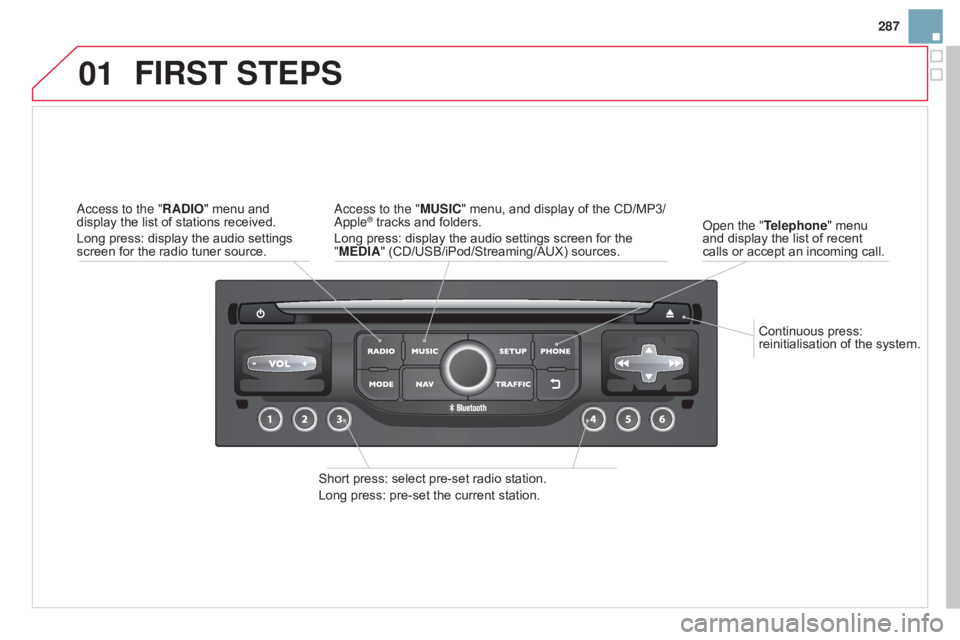
Continuous
press:
reinitialisation
of
the
system.
o
pen the "Telephone"
menu
and
display
the
list
of
recent
calls
or
accept
an
incoming
call.
FIRST STEPS
Short press: select pre-set radio station.
Long press: pre-set the current station.
a
ccess to the "MUSIC" menu, and display of the CD/MP3/
a
pple
® tracks and folders.
Long
press: display the audio settings screen for the
"
ME
d
IA" (CD/USB/iPod/Streaming/AUX) sources.a
ccess to the "RA
d
IO"
menu
and
display
the
list
of
stations
received.
Long
press:
display
the
audio
settings
screen
for
the
radio
tuner
source.
Page 290 of 404
02
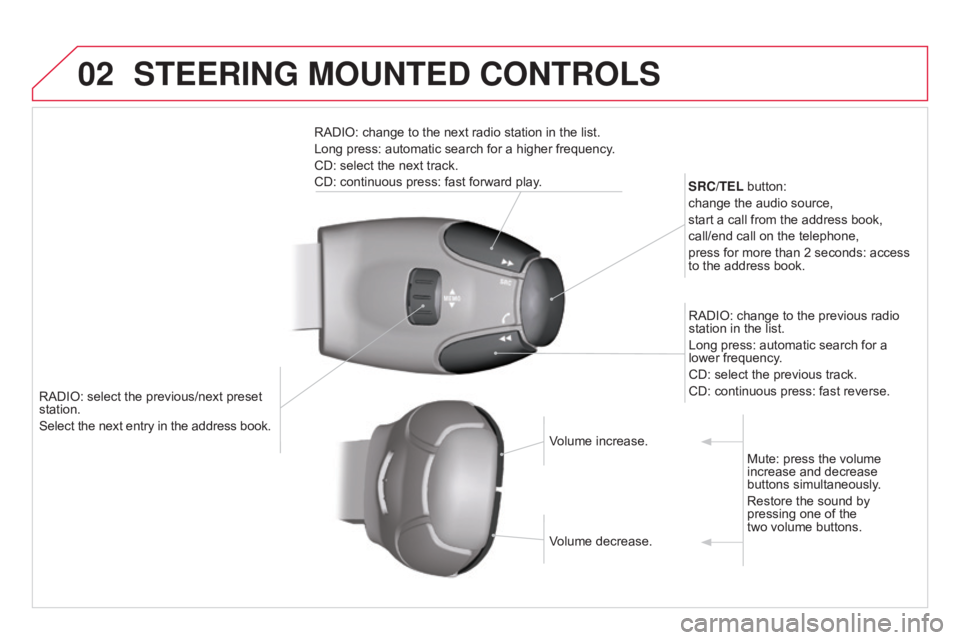
RADIO: select the previous/next preset station.
Select the next entry in the address book. SRC/TEL
button:
change the audio source,
start a call from the address book,
call/end call on the telephone,
press for more than 2 seconds: access
to
the address book.
RADIO: change to the previous radio
station
in the list.
Long press: automatic search for a
lower
frequency.
CD: select the previous track.
CD: continuous press: fast reverse.
RADIO: change to the next radio station in the list.
Long press: automatic search for a higher frequency.
CD: select the next track.
CD: continuous press: fast forward play.
Volume increase.
Volume
decrease.Mute:
press the volume
increase
and decrease
buttons
simultaneously.
Restore
the sound by
pressing
one of the
two
volume buttons.
STEERING MOUNTEd CONTROLS
Page 291 of 404
03
289
For
the
details
of
the
menus,
refer
to
the
"Screen
menu
map"
section.
For
cleaning
the
screen,
the
use
of
a
soft,
non-abrasive
cloth
(spectacles
cloth)
is
recommended,
with
no
additional
product.
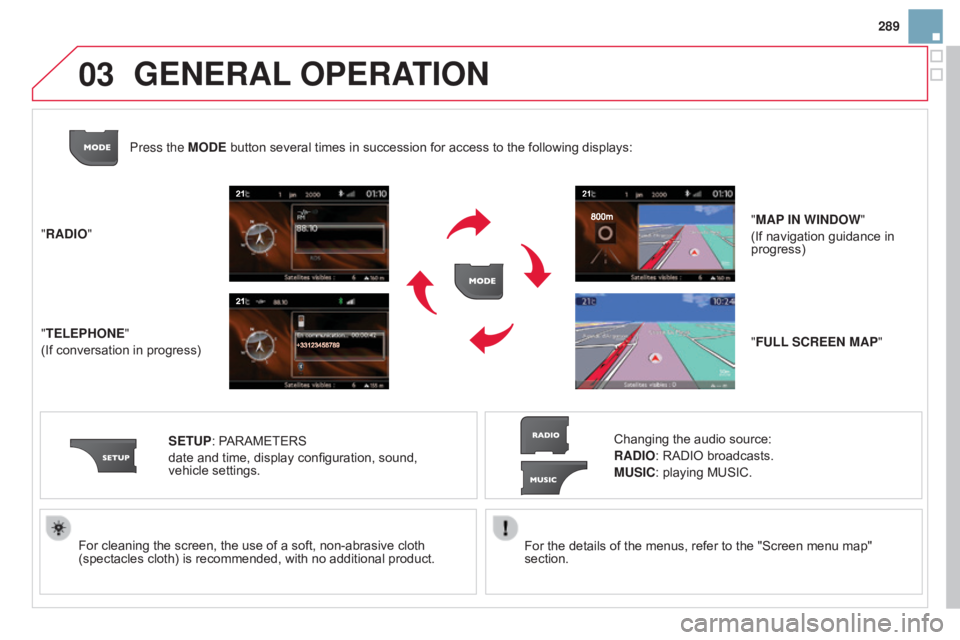
"RA
d
IO"
"TELEPHONE"
(If
conversation
in
progress) SETUP:
PARAMETERS
date
and
time,
display
configuration,
sound,
vehicle
settings. Changing
the
audio
source:
RA
d
IO:
RADIO
broadcasts.
MUSIC:
playing
MUSIC.
Press the MO
d
E
button
several
times
in
succession
for
access
to
the
following
displays:
"FULL SCREEN MAP" "MAP IN WIN
d
OW "
(If
navigation
guidance in
progress)
GENERAL OPERATION
Page 292 of 404
03
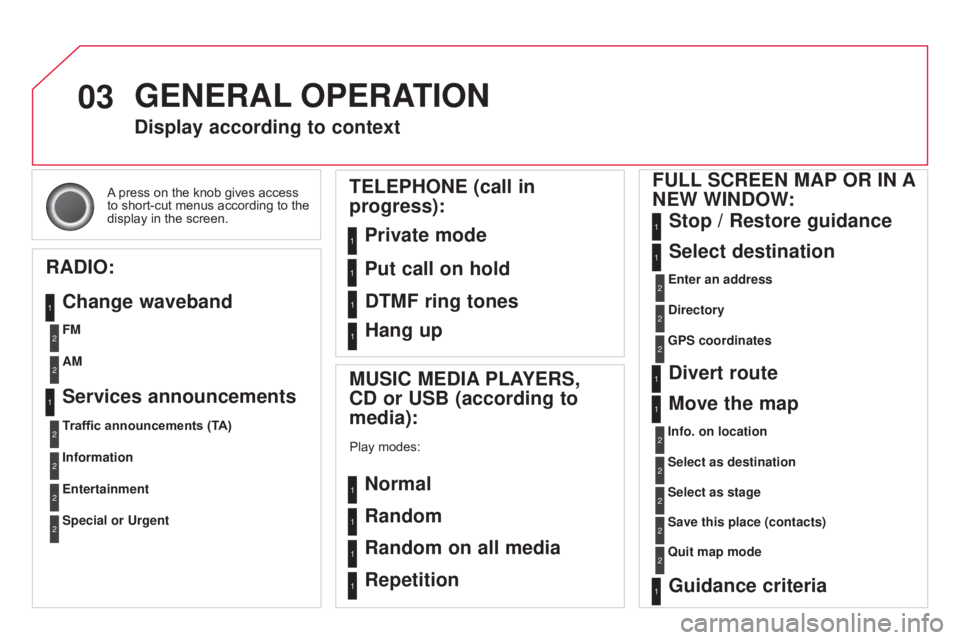
A press on the knob gives access to
short-cut menus according to the
display
in the screen.
display according to context
RA
d
IO:
Change waveband
MUSIC ME
d IA PLAYERS,
C
d or USB (according to
media):
Play modes:
Normal
Random
Random on all media
Repetition
TELEPHONE (call in
progress):
Private mode FULL SCREEN MAP OR IN A
NEW WIN d OW:
Stop / Restore guidance
Select destination
Enter an address
d
irectory
GPS coordinates
divert route
Move the map
Info. on location
Select as destination
Select as stage
Save this place (contacts)
Quit map mode
Guidance criteria
Put call on hold
d
TMF ring tones
Hang up
1
1
1
1
1
1
1
2
2
2
2
2
1
2
2
2
1
1
1
1
1
1FM
Traffic announcements (TA) AM
Information
Entertainment
Special or Urgent2
2
2
2
2
2
Services announcements1
GENERAL OPERATION