light CITROEN DS4 2010 Owner's Manual
[x] Cancel search | Manufacturer: CITROEN, Model Year: 2010, Model line: DS4, Model: CITROEN DS4 2010Pages: 421, PDF Size: 8.05 MB
Page 104 of 421

102
Rear view mirror
Equipped with an anti-dazzle system, which darkens the mirror glass and reduces the nuisance to
the driver caused by the sun, headlamps from other vehicles...
Manual model
Adjustment
F A djust the mirror so that the glass is
directed correctly in the "day" position.
Day / night position
This system automatically and progressively
changes between the day and night uses by
means of a sensor, which measures the light
from the rear of the vehicle.
Automatic "electrochrome" model
In order to ensure optimum visibility
during your manoeuvres, the mirror
lightens automatically when reverse
gear is engaged.
F
P
ull the lever to change to the "night" anti-
dazzle position.
F
P
ush the lever to change to the normal
"day" position.
03
Ease of use and comfort
Page 106 of 421

104
Manual air conditioning
The air conditioning system operates only with the engine running.
1. Temperature adjustment
F Turn the dial to select a position between blue (cold)
and red (hot) so as to adjust
the temperature to your
requirements.
2. Air flow adjustment
This dial is used to increase or
decrease the speed of the air
booster fan.
3. Air distribution adjustment
This dial is used to arrange the distribution of
air in the passenger compartment by combining
several air outlets.
F
I
f you place the air flow control
in position 0 , the system is
deactivated. However, a slight flow
of air, due to the movement of the
vehicle, can still be felt.
F
T
urn the dial from position 1 to position 5 to
obtain a comfortable air flow. Windscreen and side windows.
Windscreen, side windows and
footwells.
Footwells.
Central and side vents.
The air distribution can be
adapted by placing the dial in an
intermediate position.
Avoid driving too long with the
ventilation off (risk of misting and
deterioration of air quality).
03
Ease of use and comfort
Page 108 of 421

106
Dual-zone digital air conditioningThe air conditioning system operates when the engine is running.
Automatic operation
1. Automatic comfort programme
F Press the "AUTO" button
repeatedly:
-
a f
irst indicator lamp comes
on; the "light" setting mode is
selected,
-
a s
econd indicator lamp
comes on; the "medium"
setting mode is selected,
-
a t
hird indicator lamp comes
on; the "intense" mode
setting is selected. When the engine is cold, the air
flow will reach its optimum level
progressively, taking account of the
weather and the desired comfort level
so as to avoid too great a distribution
of cold air.
On entering the vehicle, if the interior
temperature is much colder or warmer
than the comfort value, there is no
need to change the value displayed in
order to obtain the comfort required.
The system corrects the difference
in temperature automatically and as
quickly as possible.
This system is designed to operate effectively
in all seasons, with the windows closed. We recommend the use of one of the three
AUTO modes available: they provide optimised
regulation of the temperature in the
passenger
compartment according to the comfort value
that you have chosen.
These three modes automatically adjust the
air flow, according to the desired setting, while
also maintaining the desired comfort value.
03
Ease of use and comfort
Page 111 of 421

109
Switching the system off
F Turn the air flow control to the left until all of the indicator
lamps go off.
This switch does not operate the air conditioning, only the air fan.
When the "REST" function is activated, you cannot modify the temperature, air flow
and distribution settings: these are controlled automatically according to the ambient
temperature.
This function is not available in the STOP mode of Stop & Start. Avoid prolonged operation in interior
air recirculation mode or driving for
long periods with the system off (risk of
misting and deterioration of air quality).
On switching on the engine
-
T
he control screens come on: the function
is available.
-
P
ressing the REST button activates the
ventilation for a few minutes. Activation of
the function is confirmed by the display of
two dashes in the control screens and four
air flow level indicator lamps.
-
T
he function can be deactivated and
reactivated if the control screens are on.
-
T
he screens go off at the end of this
period. On stopping the engine
-
W
hile the control screens remain on: the
function is available.
-
P
ressing the REST button activates the
ventilation for a few minutes. Activation of
the function is confirmed by the display of
two dashes in the control screens and four
air flow level indicator lamps.
L
ocking the vehicle has no effect on this
function.
-
T
he control screens go off at the end of this
period.
P
ressing again before the end of the period
interrupts off the ventilation definitively: the
control screens go off and the function is
no longer available. This action switches off the air conditioning and
the ventilation.
Temperature related comfort is no longer
assured but a slight flow of air, due to the
movement of the vehicle, can still be felt.
F
M
odify the settings
(temperature, air flow or air
distribution) or press the
"AUTO" button to reactivate
the system with the values set
before it was switched off.
03
Ease of use and comfort
Page 114 of 421

11 2
Illuminated glove box
Its lid has locations for storing a pen, a pair of
glasses, tokens...
F
T
o open the glove box, raise the handle.
The glove box is illuminated when the lid is
opened.
It gives access to the passenger's front airbag
deactivation switch A.
It also gives access to the dashboard fusebox.
For more information on Changing a fuse ,
refer to the corresponding section.
Front fittings
The connection of an electrical device
not approved by CITROËN, such as a
USB charger, may adversely affect the
operation of vehicle electrical systems,
causing faults such as poor telephone
reception or inter ference with displays
in the screens.
F
T
o use the cigarette lighter, press it in and wait
a few seconds until it pops out automatically.
F
T
o connect a 12 V accessory
(max power:
120 W), remove the cigarette
lighter and connect a suitable adaptor.
You can use this socket to connect a telephone
charger, a bottle warmer...
After use, put the cigarette lighter
back into
place straight away.
Cigarette lighter / 12 V accessory socket
03
Ease of use and comfort
Page 118 of 421
11 6
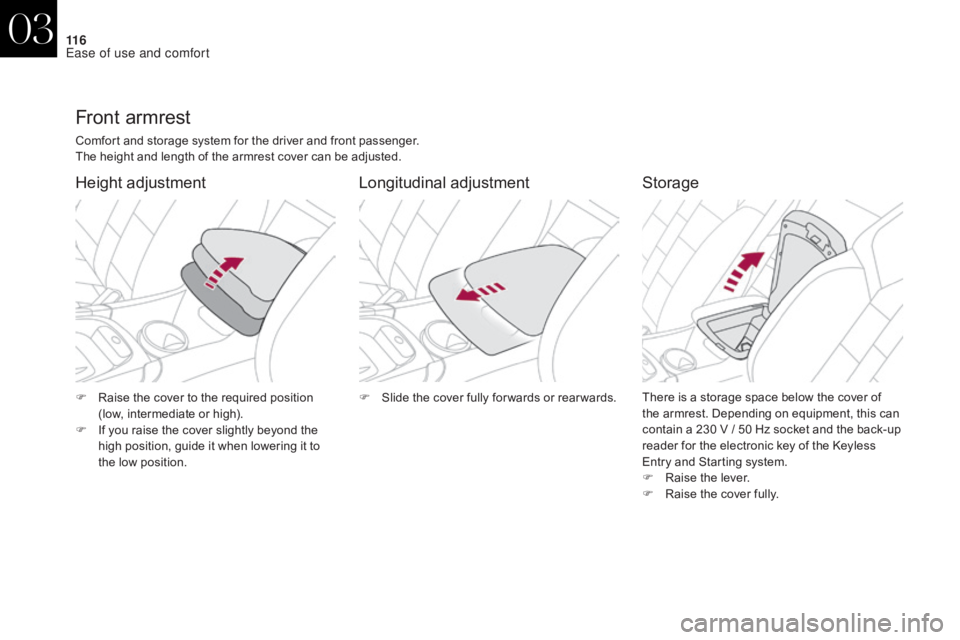
Front armrest
Comfort and storage system for the driver and front passenger.
The height and length of the armrest cover can be adjusted.
Height adjustmentLongitudinal adjustmentStorage
There is a storage space below the cover of
the armrest. Depending on equipment, this can
contain a 230 V / 50 Hz socket and the back-up
reader for the electronic key of the Keyless
Entry and Starting system.
F
Ra
ise the lever.
F
R
aise the cover fully.
F
S
lide the cover fully for wards or rear wards.
F
R
aise the cover to the required position
(low, intermediate or high).
F
I
f you raise the cover slightly beyond the
high position, guide it when lowering it to
the low position.
03
Ease of use and comfort
Page 124 of 421
122
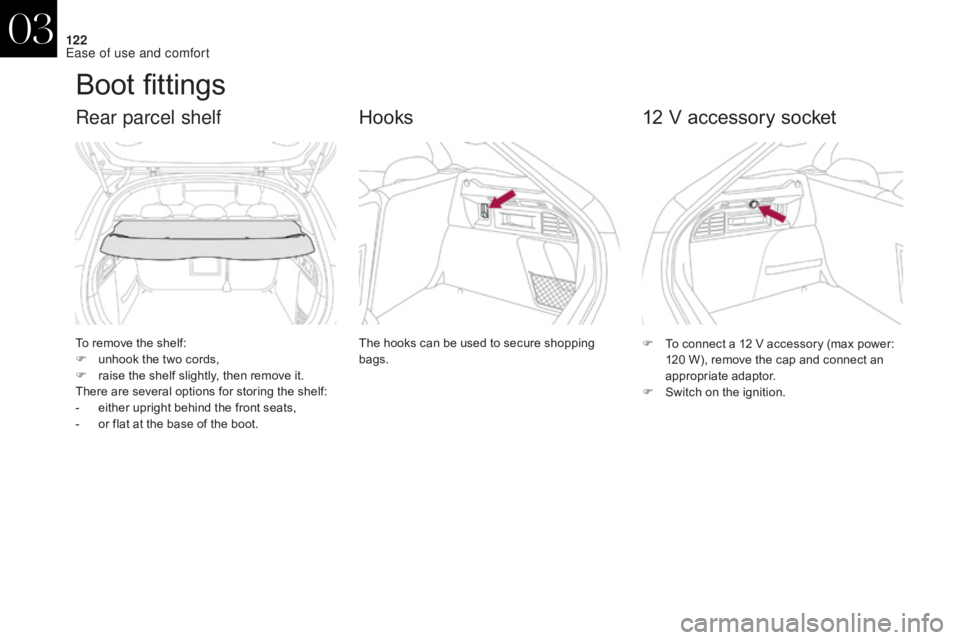
Boot fittings
To remove the shelf:
F u nhook the two cords,
F
r
aise the shelf slightly, then remove it.
There are several options for storing the shelf:
-
e
ither upright behind the front seats,
-
o
r flat at the base of the boot.
Rear parcel shelf
The hooks can be used to secure shopping
bags.
Hooks
F To connect a 12 V accessory (max power: 120 W), remove the cap and connect an
appropriate adaptor.
F
S
witch on the ignition.
12 V accessory socket
03
Ease of use and comfort
Page 125 of 421
123
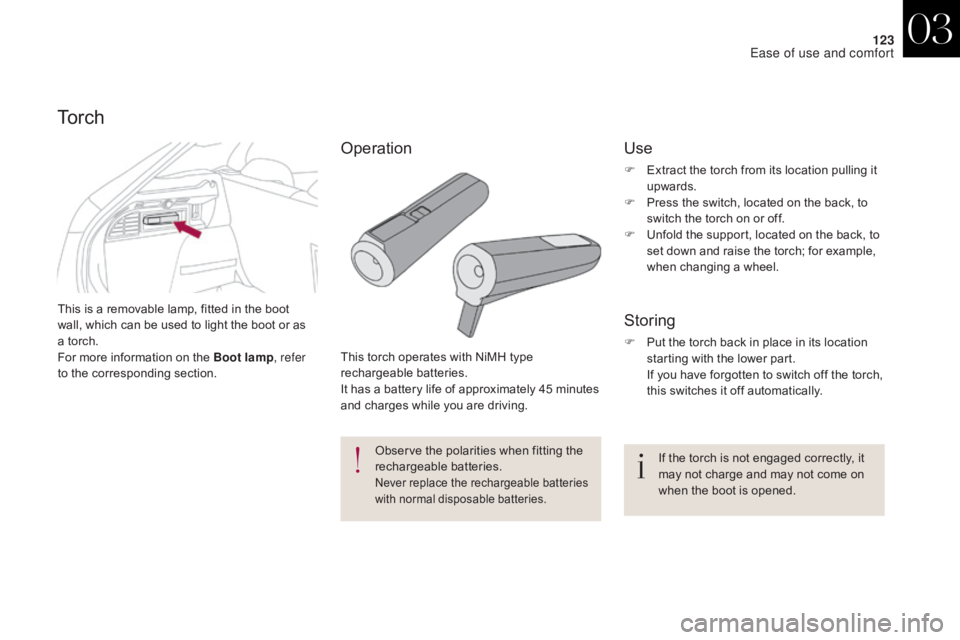
This is a removable lamp, fitted in the boot
wall, which can be used to light the boot or as
a torch.
For more information on the Boot lamp, refer
to the corresponding section.
To r c h
This torch operates with NiMH type
rechargeable batteries.
It has a battery life of approximately 45 minutes
and charges while you are driving.
Observe the polarities when fitting the
rechargeable batteries.
Never replace the rechargeable batteries
with normal disposable batteries.
Storing
F Put the torch back in place in its location starting with the lower part.
I
f you have forgotten to switch off the torch,
this switches it off automatically.
If the torch is not engaged correctly, it
may not charge and may not come on
when the boot is opened.
Use
F Extract the torch from its location pulling it upwards.
F
P
ress the switch, located on the back, to
switch the torch on or off.
F
U
nfold the support, located on the back, to
set down and raise the torch; for example,
when changing a wheel.
Operation
03
Ease of use and comfort
Page 128 of 421
LIGHTING A ND V ISIBILITY
Page 130 of 421

128
Lighting controlSystem for selection and control of the various front and rear lamps providing the vehicle's lighting.
Without AUTO lighting
With AUTO lighting
Main lighting
Selection of main lighting mode
Automatic illumination of headlamps.
Dipping the headlamps
Turn the ring to place the desired symbol
against the mark.Sidelamps only.
Dipped or main beam headlamps.
Pull the stalk to switch between dipped and
main beam headlamps.
In the lighting off and sidelamps modes, the
driver can switch on the main beam headlamps
temporarily ("headlamp flash") by maintaining a
pull on the stalk.
In some weather conditions (e.g. low
temperature or humidity), the presence
of misting on the internal sur face of the
glass of the headlamps and rear lamps
is normal; it disappears after the lamps
have been on for a few minutes.
Travelling abroad
Halogen and xenon headlamps
If planning to use your vehicle in a
country that drives on the other side of
the road, the headlamp dipped beams
must be adjusted to avoid dazzling on-
coming drivers.
Contact a CITROËN dealer or a
qualified workshop.
Lighting off (ignition off) /
Daytime running lamps (engine running).
Operation of the selected lighting is
confirmed by the illumination of the
corresponding indicator lamp.
04
Lighting and visibility