audio Citroen DS4 2011 1.G User Guide
[x] Cancel search | Manufacturer: CITROEN, Model Year: 2011, Model line: DS4, Model: Citroen DS4 2011 1.GPages: 396, PDF Size: 31.05 MB
Page 68 of 396
Colour screen and map
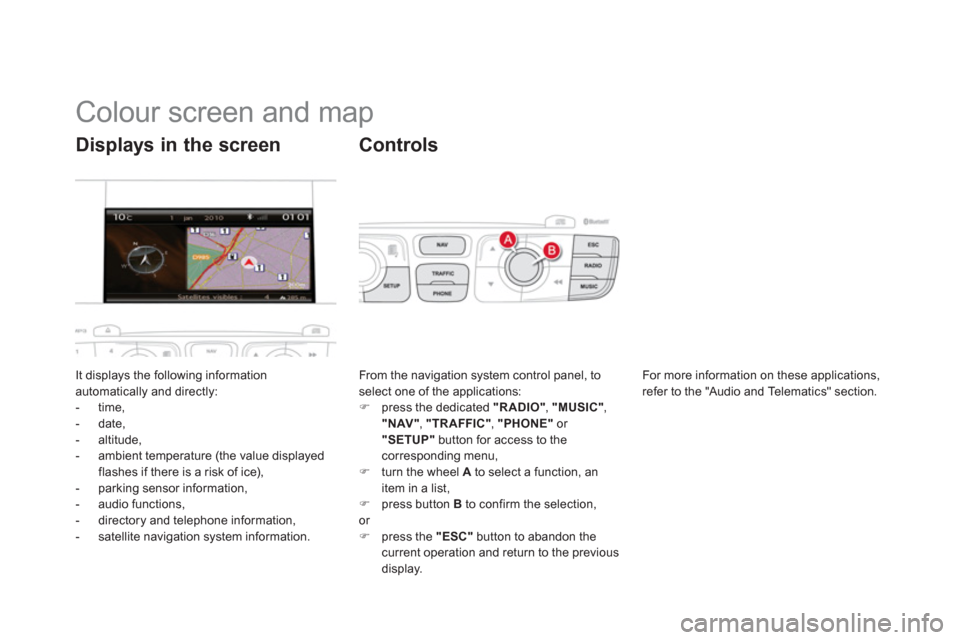
It displays the following information
automatically and directly:
- time,
- date,
- altitude,
- ambient temperature (the value displayed
flashes if there is a risk of ice),
- parking sensor information,
- audio functions,
- directory and telephone information,
- satellite navigation system information.
Displays in the screen
From the navigation system control panel, to
select one of the applications:
)
press the dedicated "RADIO"
, "MUSIC"
,
"NAV"
, "TRAFFIC"
, "PHONE"
or
"SETUP"
button for access to the
corresponding menu,
)
turn the wheel A
to select a function, an
item in a list,
)
press button B
to confirm the selection,
or
)
press the "ESC"
button to abandon the
current operation and return to the previous
display.
Controls
For more information on these applications,
refer to the "Audio and Telematics" section.
Page 72 of 396
Tr i p c o m p u t e r
Monochrome screen C
Information displays
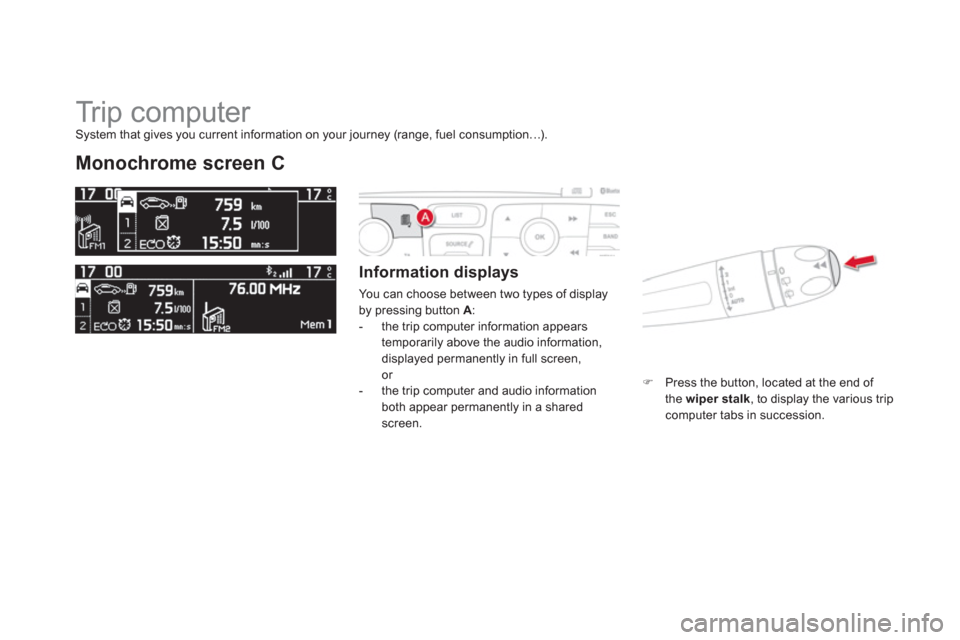
You can choose between two types of display
by pressing button A
:
- the trip computer information appears
temporarily above the audio information,
displayed permanently in full screen,
or
- the trip computer and audio information
both appear permanently in a shared
screen.
)
Press the button, located at the end of
the wiper stalk
, to display the various trip
computer tabs in succession.
System that gives you current information on your journey (range, fuel consumption…).
Page 74 of 396
Central colour screen associated with the satellite
navigation system
Information displays
- Display of instantaneous information with:
●
the range,
●
the current fuel consumption,
●
Stop & Star t time counter.
- Display of trip "1"
with:
●
the distance travelled,
●
the average fuel consumption,
●
the average speed,
for the first trip.
- Display of trip "2"
with:
●
the distance travelled,
●
the average fuel consumption,
●
the average speed,
for the second trip.
●
information on the current audio source,
●
black screen,
●
navigation-guidance messages.
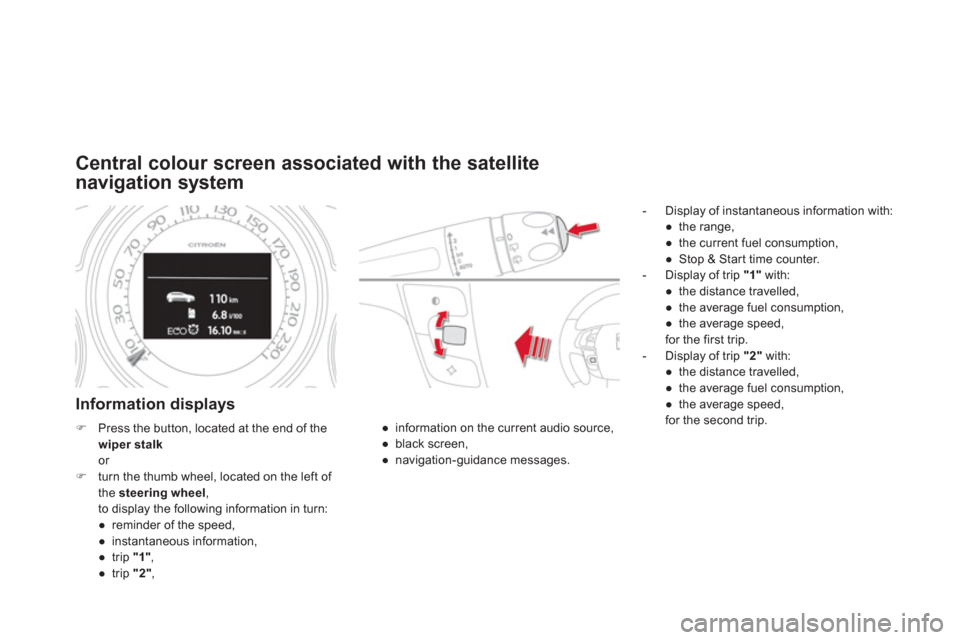
)
Press the button, located at the end of the
wiper stalk
or
)
turn the thumb wheel, located on the left of
the steering wheel
,
to display the following information in turn:
●
reminder of the speed,
●
instantaneous information,
●
trip "1"
,
●
trip "2"
,
Page 139 of 396
137Visibility
Interior mood lighting
The dimmed passenger compar tment lighting improves visibility in the vehicle when
the light is poor.
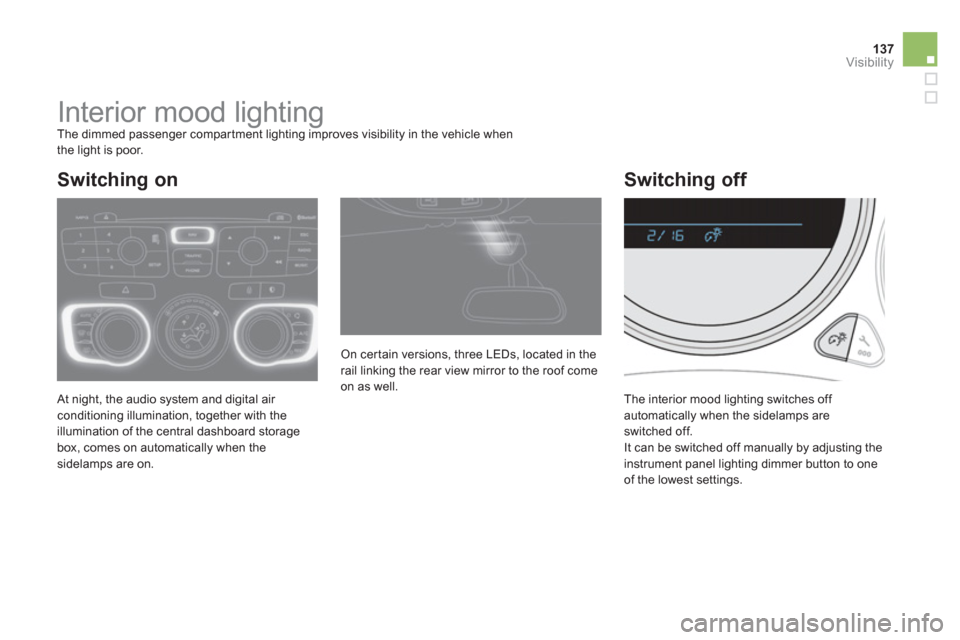
At night, the audio system and digital air
conditioning illumination, together with the
illumination of the central dashboard storage
box, comes on automatically when the
sidelamps are on. The interior mood lighting switches off
automatically when the sidelamps are
switched off.
It can be switched off manually by adjusting the
instrument panel lighting dimmer button to one
of the lowest settings. On cer tain versions, three LEDs, located in the
rail linking the rear view mirror to the roof come
on as well.
Switching on
Switching off
Page 146 of 396
Cigarette lighter/12 V
accessory socket
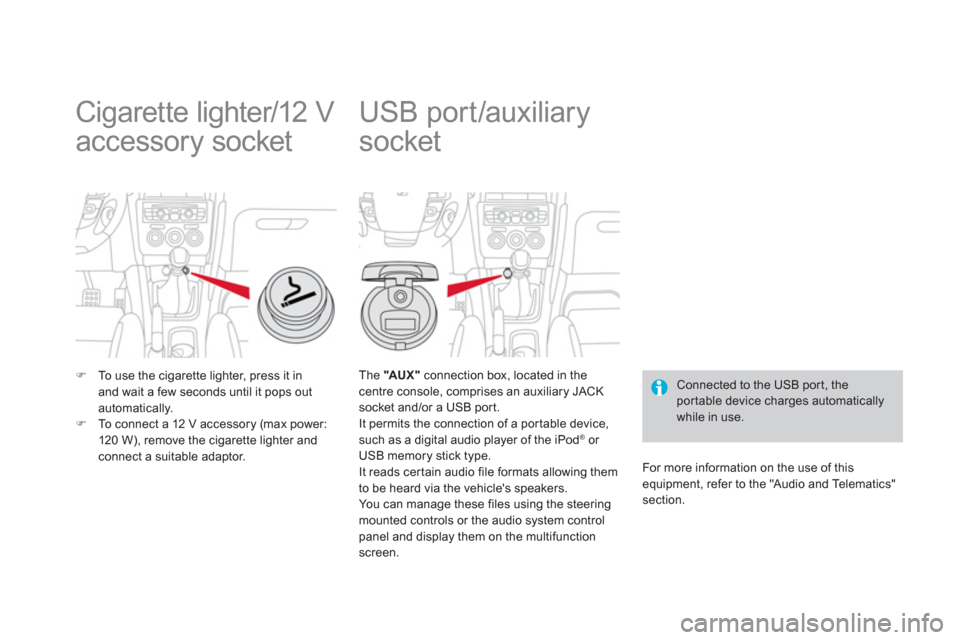
)
To use the cigarette lighter, press it in
and wait a few seconds until it pops out
automatically.
)
To connect a 12 V accessory (max power:
120 W), remove the cigarette lighter and
connect a suitable adaptor.
USB port/auxiliary
socket
Connected to the USB por t, the
por table device charges automatically
while in use.
The "AU X "
connection box, located in the
centre console, comprises an auxiliary JACK
socket and/or a USB port.
It permits the connection of a por table device,
such as a digital audio player of the iPod
® or
USB memory stick type.
It reads cer tain audio file formats allowing them
to be heard via the vehicle's speakers.
You can manage these files using the steering
mounted controls or the audio system control
panel and display them on the multifunction
screen.
For more information on the use of this
equipment, refer to the "Audio and Telematics"
section.
Page 175 of 396
173
Safety
Automatic operation of
hazard warning lamps
When braking in an emergency, depending on
the deceleration, the hazard warning lamps
come on automatically.
They switch off automatically the first time you
accelerate.
)
You can also switch them off by pressing
the button.
Horn
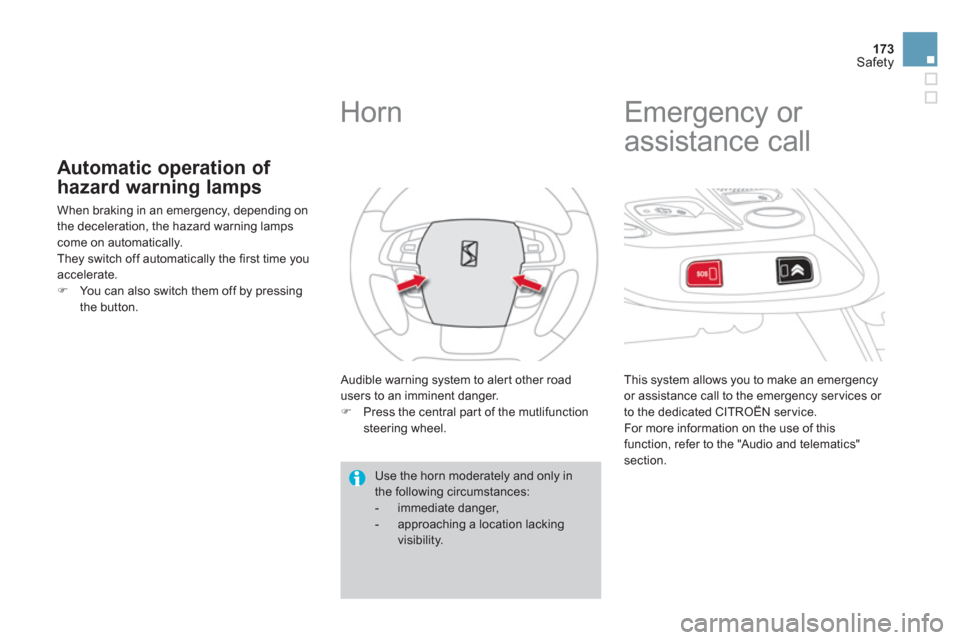
Audible warning system to aler t other road
users to an imminent danger.
)
Press the central part of the mutlifunction
steering wheel.
Use the horn moderately and only in
the following circumstances:
- immediate danger,
- approaching a location lacking
visibility.
Emergency or
assistance call
This system allows you to make an emergency
or assistance call to the emergency ser vices or
to the dedicated CITROËN ser vice.
For more information on the use of this
function, refer to the "Audio and telematics"
section.
Page 221 of 396
219Driving
Memorising speeds
This memorisation of speeds applies to both the speed limiter and the cruise control.
You can memorise up to 5 speeds in the system. By default, a few speeds are already memorised.
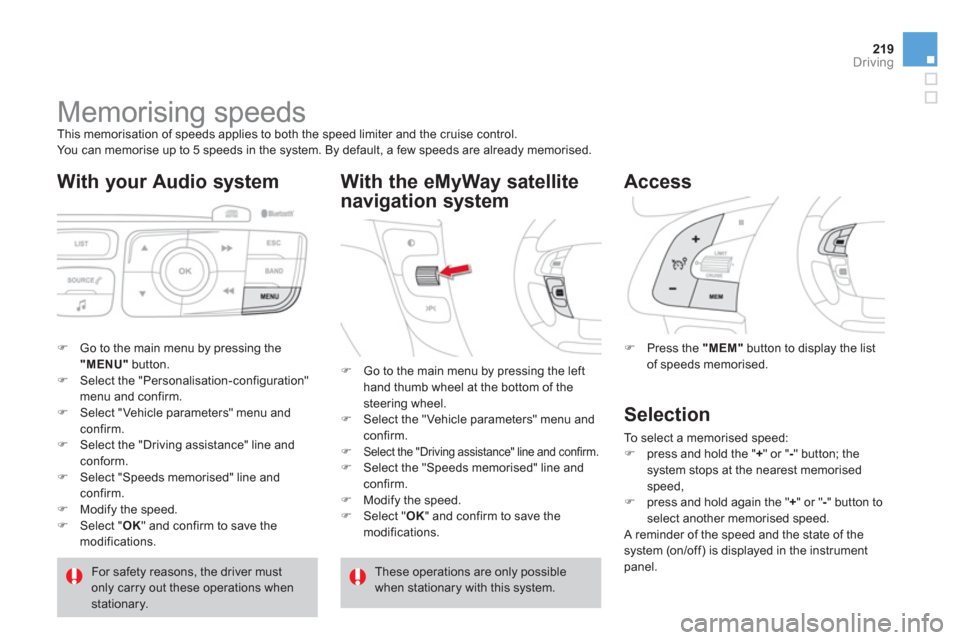
With your Audio system
)
Go to the main menu by pressing the
"MENU"
button.
)
Select the "Personalisation-configuration"
menu and confirm.
)
Select "Vehicle parameters" menu and
confirm.
)
Select the "Driving assistance" line and
conform.
)
Select "Speeds memorised" line and
confirm.
)
Modify the speed.
)
Select " OK
" and confirm to save the
modifications.
With the eMyWay satellite
navigation system
)
Press the "MEM"
button to display the list
of speeds memorised.
Access
For safety reasons, the driver must
only carry out these operations when
stationary.
)
Go to the main menu by pressing the left
hand thumb wheel at the bottom of the
steering wheel.
)
Select the "Vehicle parameters" menu and
confirm.
)
Select the "Driving assistance" line and confirm.
)
Select the "Speeds memorised" line and
confirm.
)
Modify the speed.
)
Select " OK
" and confirm to save the
modifications.
These operations are only possible
when stationary with this system.
Selection
To select a memorised speed:
)
press and hold the " +
" or " -
" button; the
system stops at the nearest memorised
speed,
)
press and hold again the " +
" or " -
" button to
select another memorised speed.
A reminder of the speed and the state of the
system (on/off) is displayed in the instrument
panel.
Page 268 of 396
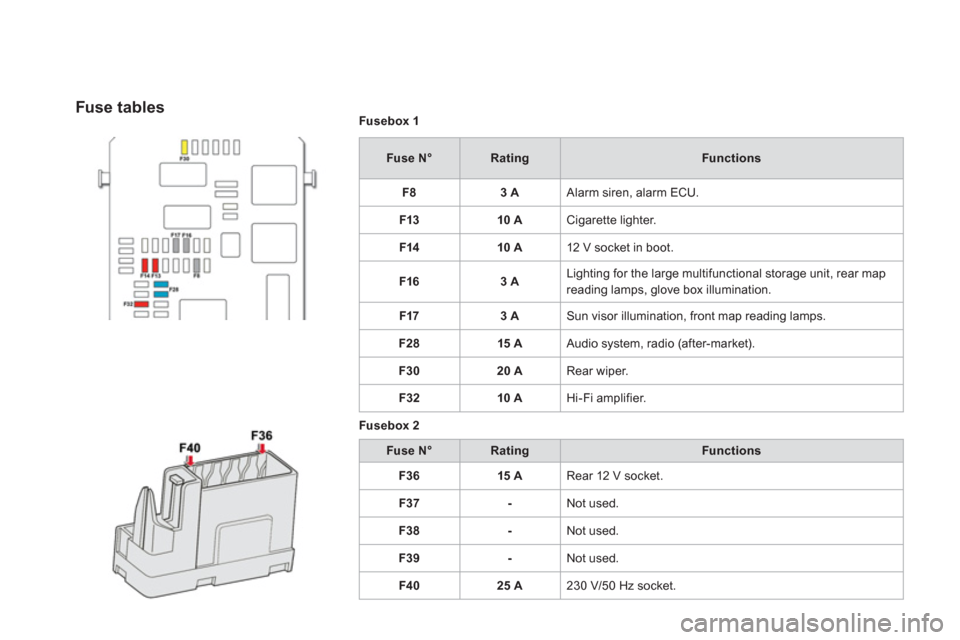
Fusebox 1
Fuse N°
Rating
Functions
F8
3 A
Alarm siren, alarm ECU.
F13
10 A
Cigarette lighter.
F14
10 A
12 V socket in boot.
F16
3 A
Lighting for the large multifunctional storage unit, rear map
reading lamps, glove box illumination.
F17
3 A
Sun visor illumination, front map reading lamps.
F28
15 A
Audio system, radio (after-market).
F30
20 A
Rear wiper.
F32
10 A
Hi-Fi amplifier.
Fusebox 2
Fuse N°
Rating
Functions
F36
15 A
Rear 12 V socket.
F37
-
Not used.
F38
-
Not used.
F39
-
Not used.
F40
25 A
230 V/50 Hz socket.
Fuse tables
Page 274 of 396
Energy economy mode
System which manages the period of use of cer tain functions to conser ve a sufficient level of charge in the battery.
After the engine has stopped, you can still use functions such as the audio equipment, windscreen wipers, dipped beam headlamps, cour tesy lamps,
etc. for a maximum combined period of thirty minutes.
This period may be greatly reduced if
the battery is not fully charged.
A flat battery prevents the engine from
starting (refer to the corresponding
paragraph). If the telephone is being used at the
same time on the navigation system,
it will be interrupted after 10 minutes.
Switching to economy mode
Once this period has elapsed, a message
appears in the screen indicating that the vehicle
has switched to economy mode and the active
functions are put on standby.
Exiting economy mode
These functions are reactivated automatically
the next time the vehicle is driven.
)
In order to resume the use of these
functions immediately, star t the engine and
let it run for a few minutes.
The time available to you will then be double
the period for which the engine is left running.
However, this period will always be between
five and thir ty minutes.
Page 281 of 396
279Practical information
"Multimedia":
audio systems, steering mounted audio controls,
speakers, Hi-Fi module, Bluetooth hands-free
system, por table satellite navigation system,
semi-integral support bracket for portable
navigation system, speed camera detector, USB
Box, reversing camera, por table video screen,
por table video suppor t bracket, 230 V/50 Hz
socket, 230 V/12 V adaptor, Wi-Fi on board...
By visiting a CITROËN dealer you can also
obtain cleaning and maintenance products
(interior and exterior) - including ecological
products in the "TECHNATURE" range,
products for topping up (screenwash...), paint
touch-up pens and aerosols for the exact colour
of your vehicle, refills (sealant cartridge for the
temporar y puncture repair kit...), ...
Installation of radio
communication
transmitters
Before installing any after-market radio
communication transmitter, you can
contact a CITROËN dealer for the
specification of transmitters which can
be fitted (frequency, maximum power,
aerial position, specific installation
requirements), in line with the Vehicle
Electromagnetic Compatibility Directive
(2004/104/EC).
The fitting of electrical equipment
or accessories which are not
recommended by CITROËN may result
in a failure of your vehicle's electronic
system and excessive electrical
consumption.
Please note this precaution.
You are advised to contact a CITROËN
representative to be shown the range
of recommended equipment and
accessories.
Depending on the legislation in force
in the country, it may be compulsory
to have a high visibility safety vest,
warning triangle and spare bulbs and
fuses available in the vehicle.