audio Citroen DS4 2011 1.G Workshop Manual
[x] Cancel search | Manufacturer: CITROEN, Model Year: 2011, Model line: DS4, Model: Citroen DS4 2011 1.GPages: 396, PDF Size: 31.05 MB
Page 357 of 396
355
7
6
8
9
2
1
04
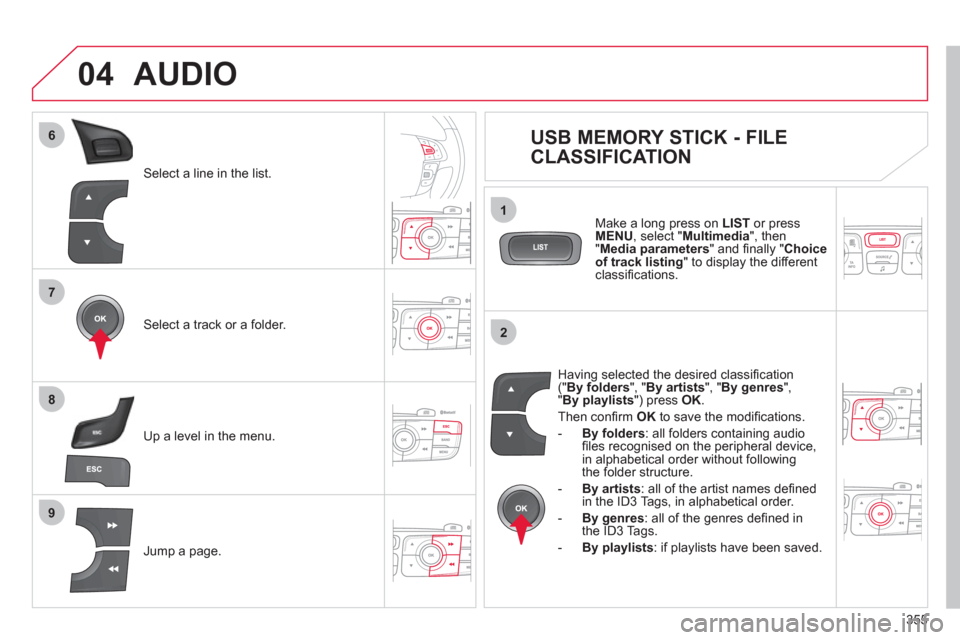
Select a line in the list.
Select a track or a folder.
Jump a page.
Up a level in the menu.
AUDIO
USB MEMORY STICK - FILE
CLASSIFICATION
Having selected the desired classifi cation
(" By folders
", " By artists
", " By genres
",
" By playlists
") press OK
.
Then confi rm OK
to save the modifi cations.
- By folders
: all folders containing audio
fi les recognised on the peripheral device,
in alphabetical order without following
the folder structure.
- By artists
: all of the artist names defi ned
in the ID3 Tags, in alphabetical order.
- By genres
: all of the genres defi ned in
the ID3 Tags.
- By playlists
: if playlists have been saved.
Make a long press on LIST
or press
MENU
, select " Multimedia
", then
" Media parameters
" and fi nally " Choice
of track listing
" to display the different
classifi cations.
Page 358 of 396
356
04 AUDIO
iPod ®
or PORTABLE PLAYER
Management of the device is via the audio system controls.
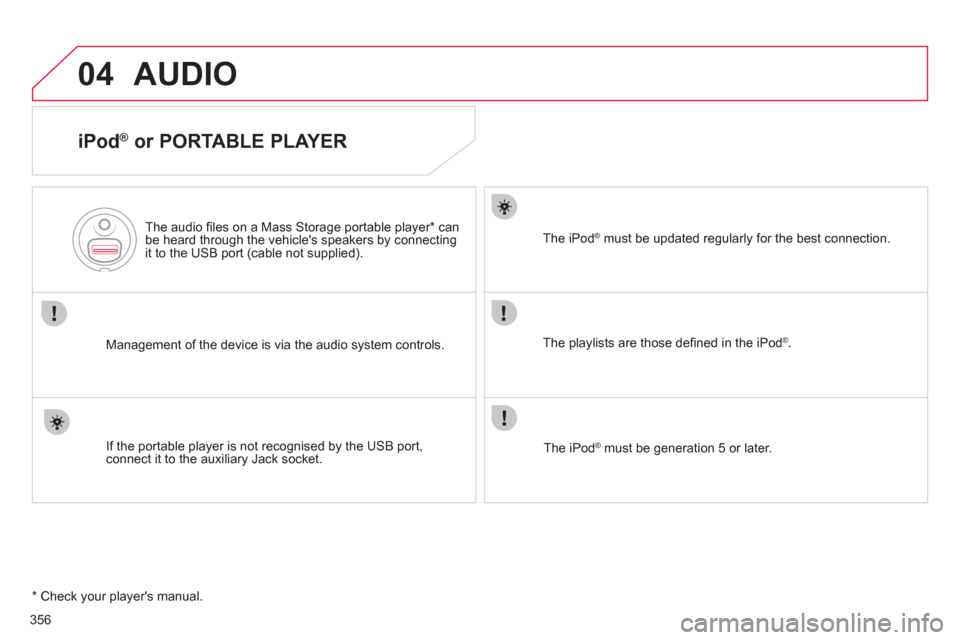
The audio fi les on a Mass Storage portable player * can
be heard through the vehicle's speakers by connecting
it to the USB port (cable not supplied).
If the portable player is not recognised by the USB port,
connect it to the auxiliary Jack socket.
The iPod
®
must be updated regularly for the best connection.
The playlists are those defi ned in the iPod
®
.
The iPod
®
must be generation 5 or later.
* Check your player's manual.
Page 359 of 396
357
3
2
4
04
1
AUDIO
AUXILIARY SOCKET (AUX)
AUXILIARY JACK SOCKET
Do not connect a device to the USB port and to the auxiliary
Jack socket at the same time.
The auxiliary Jack socket permits the connection of a portable
non-mass storage device or an iPod
® if not recognised by
the USB port.
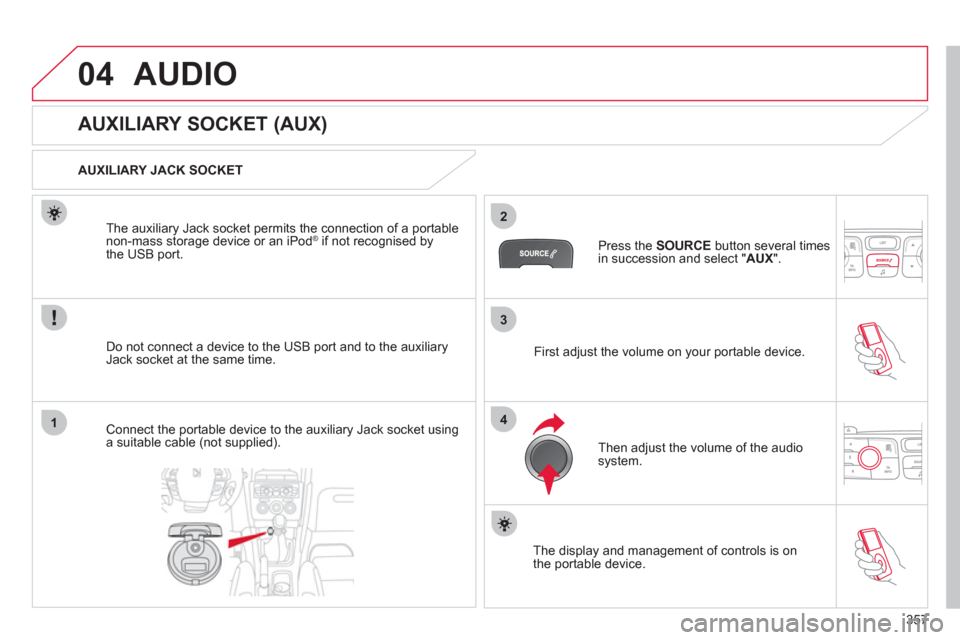
Connect the portable device to the auxiliary Jack socket using
a suitable cable (not supplied).
Press the SOURCE
button several times
in succession and select " AUX
".
First adjust the volume on your portable device.
Then adjust the volume of the audio
system.
The display and management of controls is on
the portable device.
Page 360 of 396
358
04
1
2
1
2
3
4
5
AUDIO
STREAMING - PLAYING AUDIO FILES
VIA BLUETOOTH
Depending on the compatibility of the phone
Connect the telephone: see the "USING THE
TELEPHONE" section.
Streaming allows music fi les on a telephone to be heard via
the vehicle's speakers.
The telephone must support the appropriate Bluetooth profi les
(profi les A2DP/AVRCP).
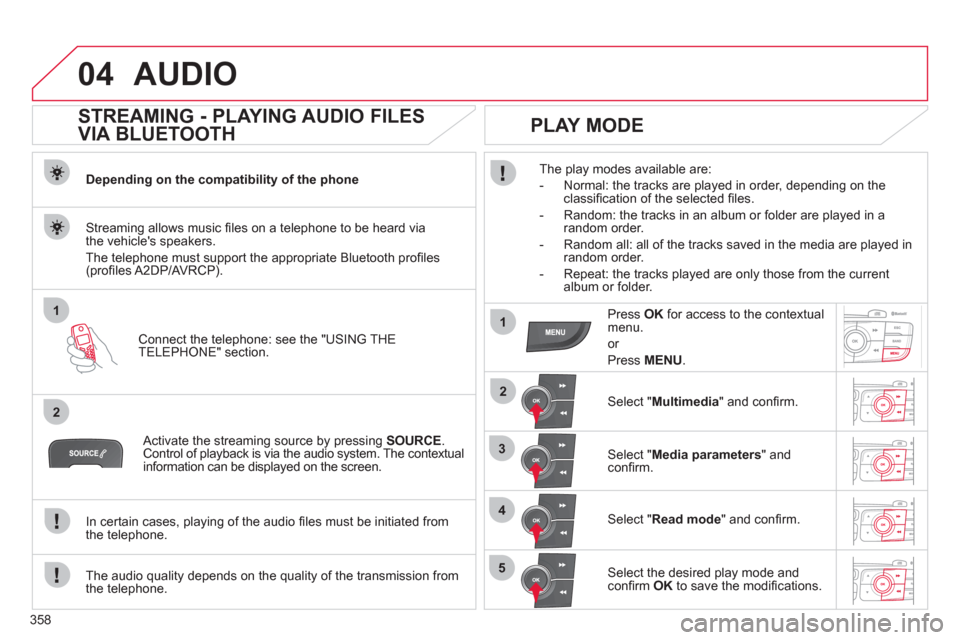
Activate the streaming source by pressing SOURCE
.
Control of playback is via the audio system. The contextual
information can be displayed on the screen.
In certain cases, playing of the audio fi les must be initiated from
the telephone.
The audio quality depends on the quality of the transmission from
the telephone.
PLAY MODE
The play modes available are:
- Normal: the tracks are played in order, depending on the
classifi cation of the selected fi les.
- Random: the tracks in an album or folder are played in a
random order.
- Random all: all of the tracks saved in the media are played in
random order.
- Repeat: the tracks played are only those from the current
album or folder.
Press OK
for access to the contextual
menu.
or
Press MENU
.
Select " Multimedia
" and confi rm.
Select " Media parameters
" and
confi rm.
Select " Read mode
" and confi rm.
Select the desired play mode and
confi rm OK
to save the modifi cations.
Page 361 of 396
359
05
1
25
3
4
6
USING THE TELEPHONE
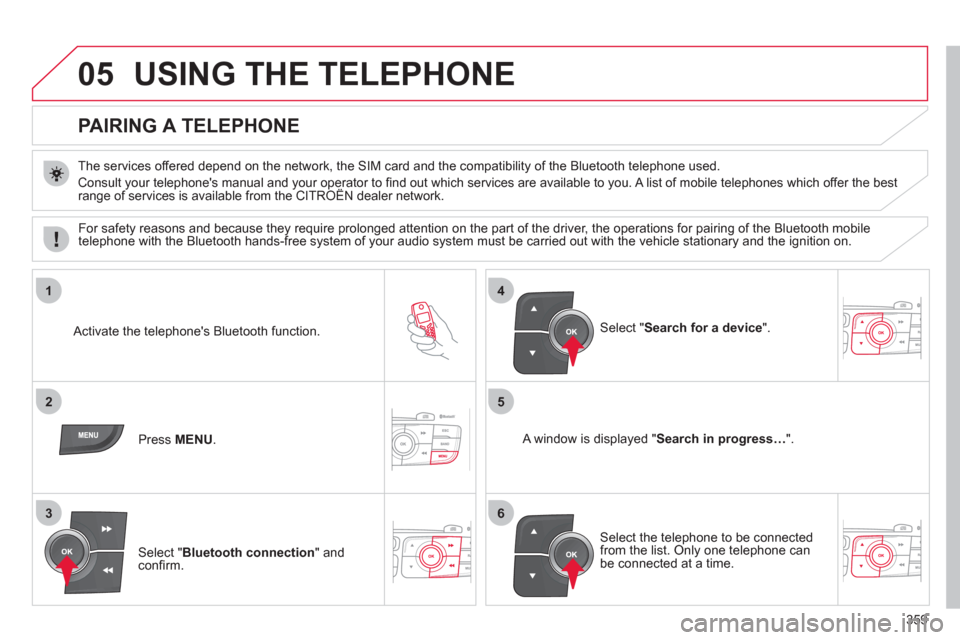
PAIRING A TELEPHONE
The services offered depend on the network, the SIM card and the compatibility of the Bluetooth telephone used.
Consult your telephone's manual and your operator to fi nd out which services are available to you. A list of mobile telephones which offer the best
range of services is available from the CITROËN dealer network.
Activate the telephone's Bluetooth function.
Press MENU
.
A window is displayed " Search in progress…
".
Select the telephone to be connected
from the list. Only one telephone can
be connected at a time.
Select " Search for a device
".
For safety reasons and because they require prolonged attention on the part of the driver, the operations for pairing of the Bluetooth mobile
telephone with the Bluetooth hands-free system of your audio system must be carried out with the vehicle stationary and the ignition on.
Select " Bluetooth connection
" and
confi rm.
Page 364 of 396
362
1
2
3
4
05
5
USING THE TELEPHONE
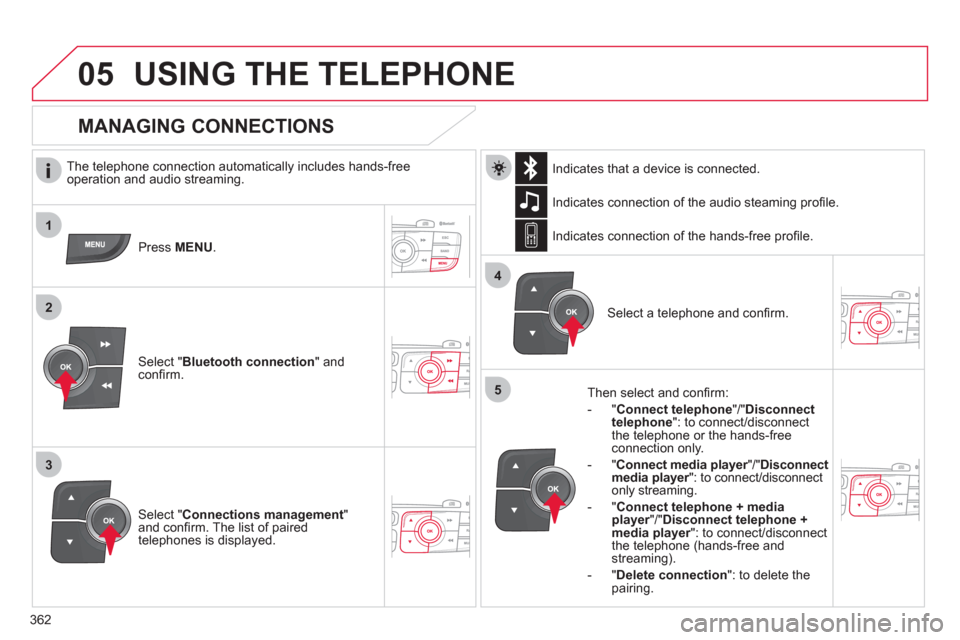
The telephone connection automatically includes hands-free
operation and audio streaming.
Press MENU
.
Select " Bluetooth connection
" and
confi rm. Indicates connection of the audio steaming profi le.
MANAGING CONNECTIONS
Select " Connections management
"
and confi rm. The list of paired
telephones is displayed.
Select a telephone and confi rm. Indicates connection of the hands-free profi le.
Then select and confi rm:
- " Connect telephone
"/" Disconnect
telephone
": to connect/disconnect
the telephone or the hands-free
connection only.
- " Connect media player
"/" Disconnect
media player
": to connect/disconnect
only streaming.
- " Connect telephone + media
player
"/" Disconnect telephone +
media player
": to connect/disconnect
the telephone (hands-free and
streaming).
- " Delete connection
": to delete the
pairing.
Indicates that a device is connected.
Page 369 of 396
367
2
3
1
05 USING THE TELEPHONE
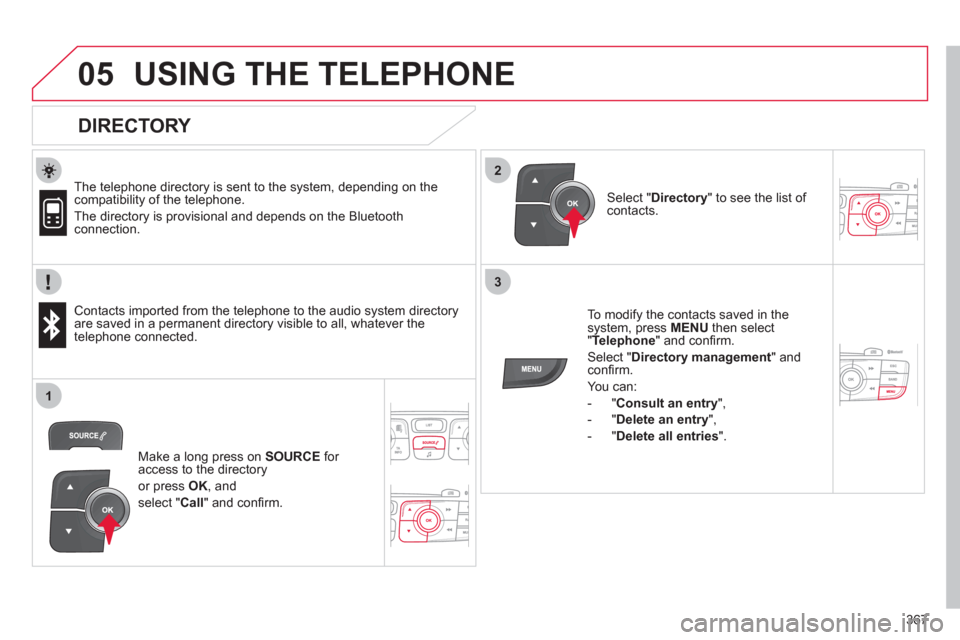
DIRECTORY
The telephone directory is sent to the system, depending on the
compatibility of the telephone.
The directory is provisional and depends on the Bluetooth
connection.
Contacts imported from the telephone to the audio system directory
are saved in a permanent directory visible to all, whatever the
telephone connected.
To modify the contacts saved in the
system, press MENU
then select
" Telephone
" and confi rm.
Select " Directory management
" and
confi rm.
You can:
- " Consult an entry
",
- " Delete an entry
",
- " Delete all entries
".
Select " Directory
" to see the list of
contacts.
Make a long press on SOURCE
for
access to the directory
or press OK
, and
select " Call
" and confi rm.
Page 370 of 396
368
1
2
06
3
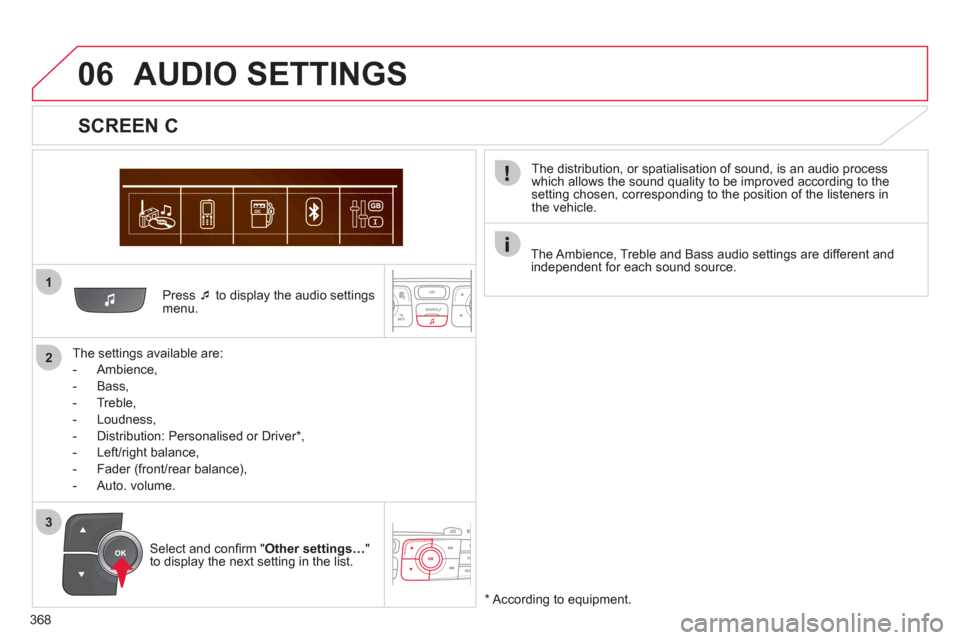
Press ‘
to display the audio settings
menu.
The settings available are:
- Ambience,
- Bass,
- Treble,
- Loudness,
- Distribution: Personalised or Driver * ,
- Left/right balance,
- Fader (front/rear balance),
- Auto. volume.
SCREEN C
The distribution, or spatialisation of sound, is an audio process
which allows the sound quality to be improved according to the
setting chosen, corresponding to the position of the listeners in
the vehicle.
AUDIO SETTINGS
*
According to equipment.
Select and confi rm " Other settings…
"
to display the next setting in the list.
The Ambience, Treble and Bass audio settings are different and
independent for each sound source.
Page 375 of 396
373
FREQUENTLY ASKED QUESTIONS
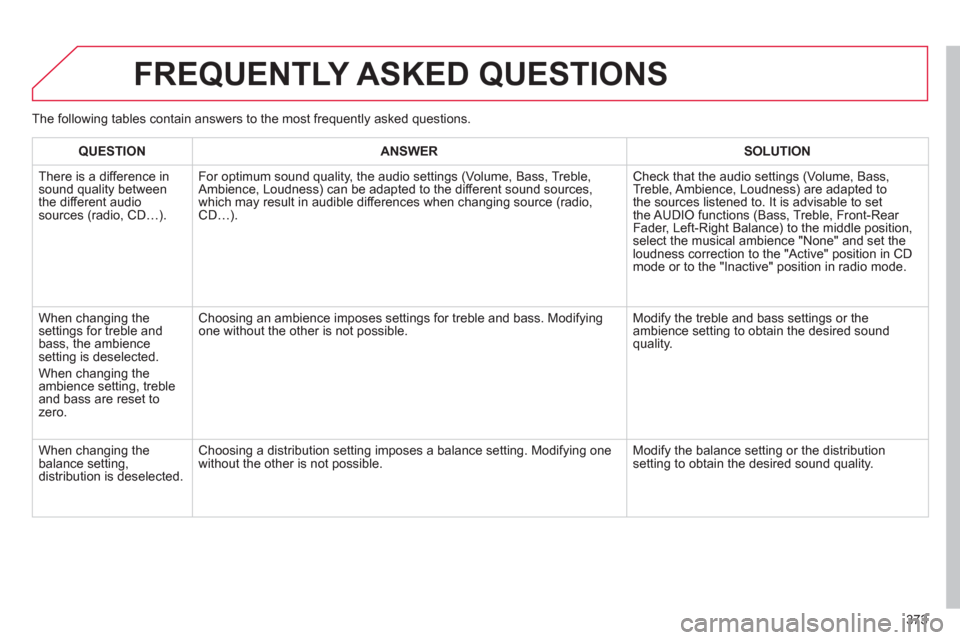
QUESTION
ANSWER
SOLUTION
There is a difference in
sound quality between
the different audio
sources (radio, CD…).
For optimum sound quality, the audio settings (Volume, Bass, Treble,
Ambience, Loudness) can be adapted to the different sound sources,
which may result in audible differences when changing source (radio,
CD…). Check that the audio settings (Volume, Bass,
Treble, Ambience, Loudness) are adapted to
the sources listened to. It is advisable to set
the AUDIO functions (Bass, Treble, Front-Rear
Fader, Left-Right Balance) to the middle position,
select the musical ambience "None" and set the
loudness correction to the "Active" position in CD
mode or to the "Inactive" position in radio mode.
When changing the
settings for treble and
bass, the ambience
setting is deselected.
When changing the
ambience setting, treble
and bass are reset to
zero. Choosing an ambience imposes settings for treble and bass. Modifying
one without the other is not possible. Modify the treble and bass settings or the
ambience setting to obtain the desired sound
quality.
When changing the
balance setting,
distribution is deselected. Choosing a distribution setting imposes a balance setting. Modifying one
without the other is not possible. Modify the balance setting or the distribution
setting to obtain the desired sound quality. The following tables contain answers to the most frequently asked questions.
Page 376 of 396
374
FREQUENTLY ASKED QUESTIONS
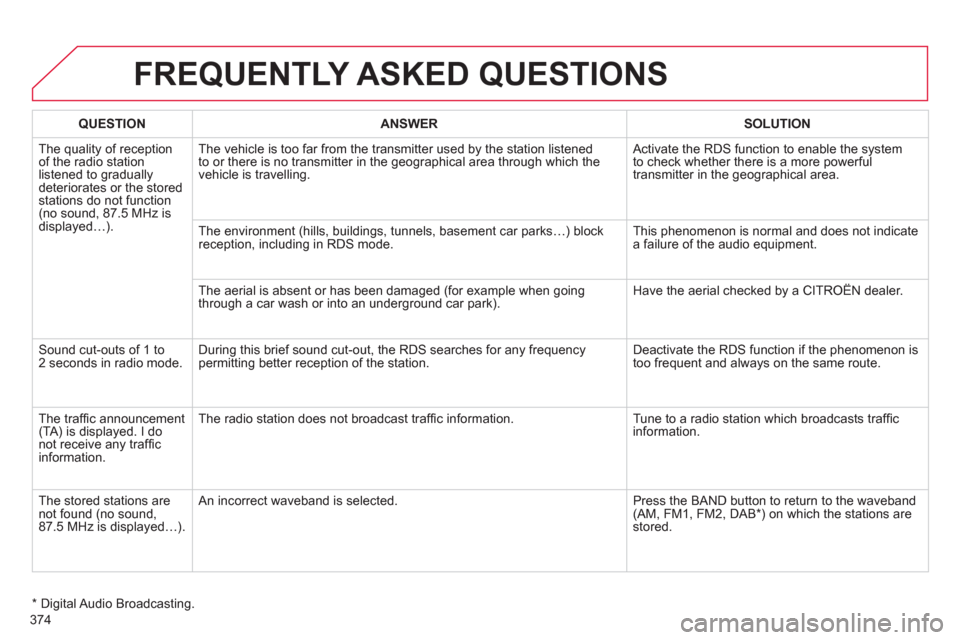
QUESTION
ANSWER
SOLUTION
The quality of reception
of the radio station
listened to gradually
deteriorates or the stored
stations do not function
(no sound, 87.5 MHz is
displayed…). The vehicle is too far from the transmitter used by the station listened
to or there is no transmitter in the geographical area through which the
vehicle is travelling. Activate the RDS function to enable the system
to check whether there is a more powerful
transmitter in the geographical area.
The environment (hills, buildings, tunnels, basement car parks…) block
reception, including in RDS mode. This phenomenon is normal and does not indicate
a failure of the audio equipment.
The aerial is absent or has been damaged (for example when going
through a car wash or into an underground car park). Have the aerial checked by a CITROËN dealer.
Sound cut-outs of 1 to
2 seconds in radio mode. During this brief sound cut-out, the RDS searches for any frequency
permitting better reception of the station. Deactivate the RDS function if the phenomenon is
too frequent and always on the same route.
The traffi c announcement
(TA) is displayed. I do
not receive any traffi c
information. The radio station does not broadcast traffi c information. Tune to a radio station which broadcasts traffi c
information.
The stored stations are
not found (no sound,
87.5 MHz is displayed…). An incorrect waveband is selected. Press the BAND button to return to the waveband
(AM, FM1, FM2, DAB * ) on which the stations are
stored.
* Digital Audio Broadcasting.