port CITROEN DS4 2023 Owner's Manual
[x] Cancel search | Manufacturer: CITROEN, Model Year: 2023, Model line: DS4, Model: CITROEN DS4 2023Pages: 296, PDF Size: 9.91 MB
Page 179 of 296

177
Maximum authorised load distributed
over the roof bars, for a load height not
exceeding 40 cm (with the exception of
bicycle carriers):
-
f
or roof bars with 90 mm pads: 50 kg ,
-
f
or roof bars with 15 0 mm pads: 80 kg.
For more information, contact the dealer
network or a qualified workshop.
If the height exceeds 40 cm, adapt the
speed of the vehicle to the profile of the
road to avoid damaging the roof bars and
the mountings on the vehicle.
Please refer to local legislation in order
to comply with the regulations related to
transporting objects which are longer than
the vehicle.
Bonnet
The cooling fan may star t after
switching off the engine: take care
with articles and clothing that might be
caught by the fan blades.
Opening
F Open the left-hand front door.
F
P
ull the interior bonnet release lever A ,
located at the bottom of the door aperture. F
P
ush the exterior safety catch B to the left
and raise the bonnet.
F
U
nclip the stay C from its housing on the
back of the bonnet.
F
F
ix the stay in the slot to hold the bonnet
open.
Before doing anything under the bonnet,
deactivate the Stop & Start system to
avoid the risk of injury related to an
automatic change to START mode.
07
Practical information
Page 180 of 296
178
The location of the interior bonnet release
lever prevents opening of the bonnet when
the left-hand front door is shut.
Do not open the bonnet when there is a
very strong wind.
When the engine is hot, handle the
exterior safety catch and the stay with
care (risk of burns).
Closing
F Take the stay out of the support slot.
F C lip the stay in its housing on the back of
the bonnet.
F
L
ower the bonnet and release it near the
end of its travel.
F
P
ull on the bonnet to check that it is fully
latched.
Because of the presence of electrical
equipment under the bonnet, it is
recommended that exposure to water
(rain, washing, etc.) be limited.
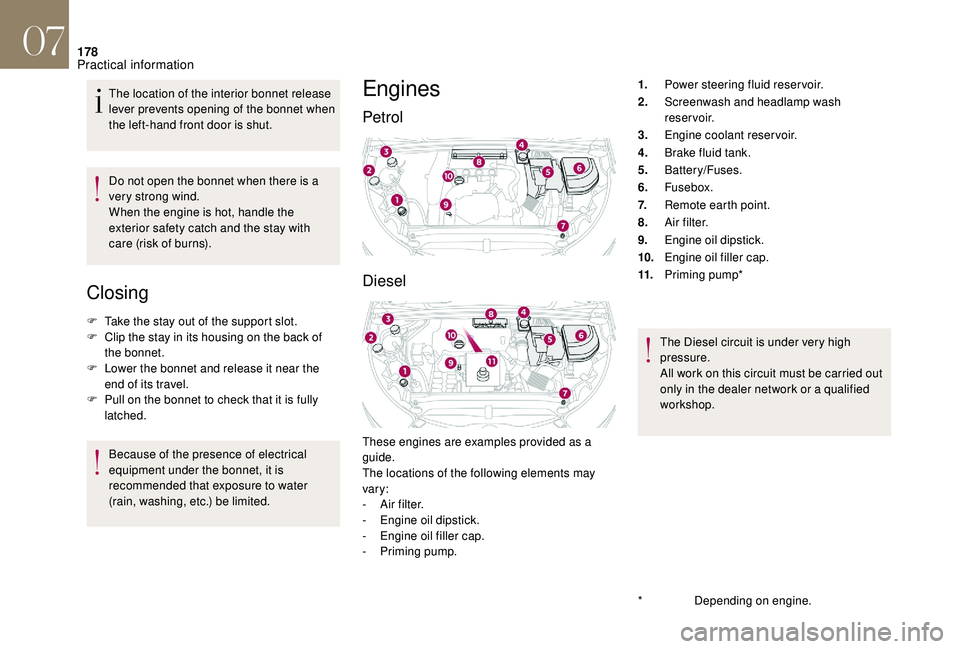
Engines
Petrol
Diesel
These engines are examples provided as a
guide.
The locations of the following elements may
vary:
-
A
ir filter.
-
E
ngine oil dipstick.
-
E
ngine oil filler cap.
-
P
riming pump. 1.
Power steering fluid reservoir.
2. Screenwash and headlamp wash
reservoir.
3. Engine coolant reservoir.
4. Brake fluid tank.
5. Battery/Fuses.
6. Fusebox.
7. Remote earth point.
8. A i r f i l t e r.
9. Engine oil dipstick.
10. Engine oil filler cap.
11. Priming pump*
The Diesel circuit is under very high
pressure.
All work on this circuit must be carried out
only in the dealer network or a qualified
workshop.
*
D
epending on engine.
07
Practical information
Page 185 of 296

183
Manual parking brake
If excessive travel or a loss of
effectiveness of this system is
noticed, the parking brake must
be checked, even between two
services.
This system must be checked in the dealer
network or by a qualified workshop.
Electric parking brake
This system does not require any
routine servicing. However, in the
event of a problem, have the system
checked in the dealer network or by
a qualified workshop.
For more information on the Electric
parking brake , refer to the corresponding
section.
Only use products recommended by DS
AUTOMOBILES or products of equivalent
quality and specification.
In order to optimise the operation of
components as important as those in
the braking system, DS AUTOMOBILES
selects and offers very specific products.
After washing the vehicle, dampness, or
in wintry conditions, ice can form on the
brake discs and pads: braking efficiency
may be reduced. Make light brake
applications to dry and defrost the brakes.
AdBlue® (BlueHDi
engines)
To respect the environment and ensure
compliance with the Euro 6 standard, without
adversely affecting the performance or
fuel consumption of Diesel engines, DS
AUTOMOBILES has taken the decision to
equip its vehicles with a system that associates
SCR (Selective Catalytic Reduction) with a
Diesel particle filter (DPF) for the treatment of
exhaust gases.
SCR system
Using a liquid called AdBlue® that contains
urea, a catalytic converter turns up to 85% of
the oxides of nitrogen (NOx) into nitrogen and
water, which are harmless to health and the
environment.
Brake pads
Brake wear depends on the style
of driving, particularly in the case
of vehicles used in town, over short
distances. It may be necessary to
have the condition of the brakes
checked, even between vehicle
services.
Unless there is a leak in the circuit, a drop in
the brake fluid level indicates that the brake
pads are worn.
Brake disc/drum wear
For information on checking brake
disc wear, contact the dealer
network or a qualified workshop.
07
Practical information
Page 187 of 296

185
Keep AdBlue® out of the reach of children,
in its original container or bottle.
Never transfer AdBlue
® to another
container: it would lose its purity.
Never dilute AdBlue
® with water.
Never pour AdBlue® into the Diesel fuel
tank. Containers or bottles are available from the
dealer network or a qualified workshop.
Never top up from an AdBlue
® dispenser
reserved for heavy goods vehicles.
Recommendations on storage
AdBlue® freezes below around -11°C and
deteriorates above 25°C. It is recommended
that bottles or containers be stored in a cool
place and protected from direct sunlight.
Under these conditions, the fluid can be kept
for at least a year.
If the additive has frozen, it can be used once it
has completely thawed out.
Never store bottles or containers of
AdBlue
® in your vehicle.
Procedure
Before topping up, ensure that the vehicle is
parked on a flat and level sur face.
In wintry conditions, ensure that the
temperature of the vehicle is above -11°C.
Otherwise the AdBlue
® may be frozen and F
S
witch off the ignition and remove the key,
or if your vehicle has one, press the START/
STOP button to switch off the engine.
F
R
aise the boot floor for access to the
AdBlue
® tank. Secure the boot floor by
attaching its cord to the hook on the parcel
shelf support.
F
U
nclip the black plastic blanking plug using
its tab.
F
T
urn the blue cap a 6th of a turn anti-
clockwise.
F
L
ift off the cap.
In certain conditions (high exterior temperature,
for example), the risk of ammonia being
released cannot be excluded: do not inhale
the vapours. Ammonia has an irritant effect on
mucous membranes (eyes, nose and throat).
Use only AdBlue
® fluid that meets the
ISO
22241 standard. so cannot be poured into its tank. Park your
vehicle in a warmer area for a few hours to
allow the top-up to be carried out.
07
Practical information
Page 188 of 296

186
Important: if your vehicle's AdBlue® tank
i
s completely empty – which is
confirmed by the alert messages and the
impossibility of starting the engine – you
must add at least 4 litres.
F
A
fter emptying the container or bottle, wipe
away any spillage around the tank filler
using a damp cloth. If any AdBlue
® additive is spilt or splashed,
wash immediately with cold water or wipe
with a damp cloth.
If the AdBlue
® has crystallised, clean it off
using a sponge and hot water.
F
R
efit the blue cap to the tank filler and turn it
a 6th of a turn clockwise, to its stop.
F
R
efit the black plastic blanking plug, clipping
it in on the flap.
F
R
efit the boot carpet and close the tailgate.
Important: in the event of a top-up after
a breakdown because of a lack of
AdBlue, you must wait around 5 minutes
before switching on the ignition, without
opening the driver’s door, unlocking
the vehicle, introducing the key into
the ignition switch, or introducing
the key of the "Keyless Entr y and
Star ting" system into the passenger
compartment .
Switch on the ignition, then wait for
10
seconds before starting the engine.
F
O
btain a container or bottle of AdBlue
®.
After first checking the use-by date, read
carefully the instructions on use on the label
before pouring the contents of the container
or bottle into your vehicle's AdBlue
® tank.
Advice on care and maintenance
Recommendations on the care and
maintenance of your vehicle are given in the
Maintenance and Warranty Guide.
Matt finish
If your vehicle is coated with a clear, matt
varnish, it is essential that you take the
following instructions into account to avoid
damaging the paint, due to an inappropriate
treatment. These instructions are also valid for
the alloy wheels coated in a clear, matt varnish.
Textured paint
The textured paint reacts to light with variations
of appearance and finish that emphasise the
car's lines and form. This paint coating has
particles that remain visible and create a
unique satin relief effect. Its lightly granulated
texture gives it a surprising feel.
07
Practical information
Page 194 of 296
192
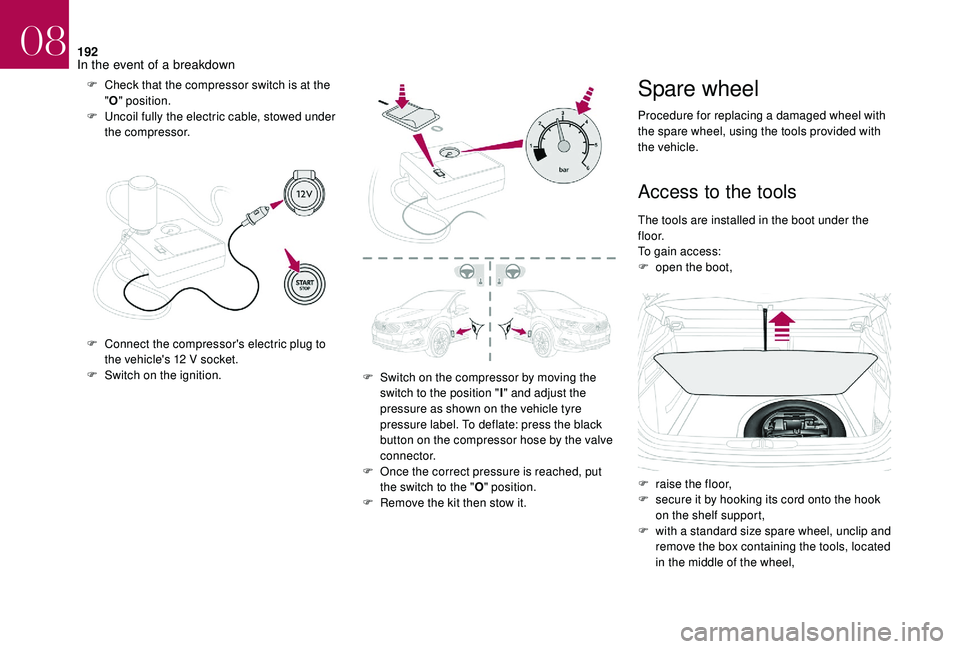
F Check that the compressor switch is at the "O " position.
F
U
ncoil fully the electric cable, stowed under
the compressor.
F
C
onnect the compressor's electric plug to
the vehicle's 12 V socket.
F
S
witch on the ignition. F
S
witch on the compressor by moving the
switch to the position " I" and adjust the
pressure as shown on the vehicle tyre
pressure label. To deflate: press the black
button on the compressor hose by the valve
connector.
F
O
nce the correct pressure is reached, put
the switch to the " O" position.
F
R
emove the kit then stow it.Spare wheel
Procedure for replacing a damaged wheel with
the spare wheel, using the tools provided with
the vehicle.
Access to the tools
The tools are installed in the boot under the
f l o o r.
To gain access:
F
o
pen the boot,
F
r
aise the floor,
F
s
ecure it by hooking its cord onto the hook
on the shelf support,
F
w
ith a standard size spare wheel, unclip and
remove the box containing the tools, located
in the middle of the wheel,
08
In the event of a breakdown
Page 214 of 296

212
Reconnecting the (+) terminal
Do not force the lever as locking will be
impossible if the clamp is not positioned
correctly; start the procedure again.
Following reconnection
If minor problems nevertheless persist
following this operation, contact the dealer
network or a qualified workshop.
By referring to the corresponding section, you
must reset certain systems yourself, such as:
-
o
ne-touch electric windows,
-
t
he date and time,
-
a
udio and navigation system settings.
Versions equipped with Stop & Start are
fitted with a 12 V lead-acid battery of
specific technology and specification.
Its replacement should be carried out
only in the dealer network or a qualified
workshop.
The Stop & Start system may not be
operational during the trip following the
first engine start.
In this case, the system will only be
available again after a continuous
period of immobilisation of the vehicle,
a period which depends on the exterior
temperature and the state of charge of the
battery (up to about 8 hours).
F
Ra
ise the lever A fully.
F
R
efit the open clamp B on the (+) terminal.
F
P
ush the clamp B fully down.
F
L
ower the lever A to lock the clamp B .
After reconnecting the battery, turn on the
ignition and wait 1 minute before starting
the engine, in order to enable the electronic
systems to initialise.Towing the vehicle
Procedure for having your vehicle towed or
for towing another vehicle using a removable
towing eye.
Access to the tools
The towing eye is installed in the boot under
t h e f l o o r.
To access it:
F
o
pen the boot,
F
r
aise the floor,
F
s
ecure it by hooking its cord on the hook on
the rear shelf support,
F
r
emove the towing eye from the holder.
08
In the event of a breakdown
Page 229 of 296
5
12:13
18,5 21,5
23 °C
12:13
18,5 21,5
23 °C
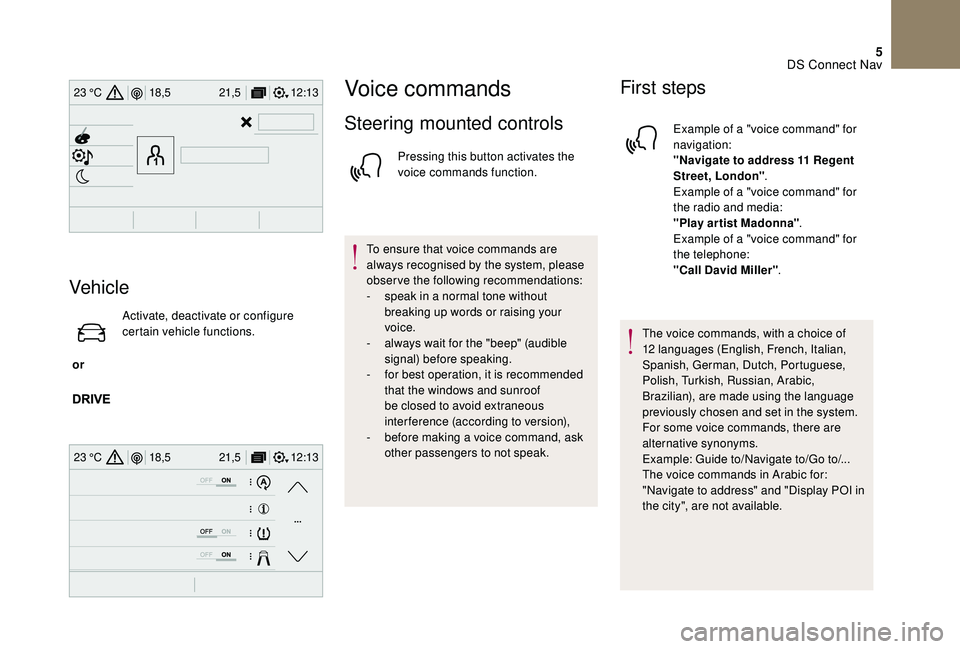
Vehicle
or Activate, deactivate or configure
certain vehicle functions.
Voice commands
Steering mounted controls
Pressing this button activates the
voice commands function.
To ensure that voice commands are
always recognised by the system, please
observe the following recommendations:
-
s
peak in a normal tone without
breaking up words or raising your
voice.
-
a
lways wait for the "beep" (audible
signal) before speaking.
-
f
or best operation, it is recommended
that the windows and sunroof
be closed to avoid extraneous
interference (according to version),
-
b
efore making a voice command, ask
other passengers to not speak.
First steps
Example of a "voice command" for
navigation:
"Navigate to address 11 Regent
Street, London" .
Example of a "voice command" for
the radio and media:
"Play ar tist Madonna" .
Example of a "voice command" for
the telephone:
"Call David Miller" .
The voice commands, with a choice of
12 languages (English, French, Italian,
Spanish, German, Dutch, Portuguese,
Polish, Turkish, Russian, Arabic,
Brazilian), are made using the language
previously chosen and set in the system.
For some voice commands, there are
alternative synonyms.
Example: Guide to/Navigate to/Go to/...
The voice commands in Arabic for:
"Navigate to address" and "Display POI in
the city", are not available.
DS Connect Nav
Page 232 of 296
8
These commands can be made from any screen page after pressing the " Voice command"
or "Telephone" button located on the steering wheel, as long as there is no telephone call in
progress.Voice commands Help messages
Tune to channel <…> You can pick a radio station by saying "tune
to" and the station name or frequency. For
example "tune to channel Talksport" or "tune to
98.5 FM". To listen to a preset radio station, say
"tune to preset number". For example "tune to
preset number five".
What's playing To display the details of the current "track",
"artist" and "album", you can say " What's
playing"
Play song <...> Use the command "play" to select the type
of music you'd like to hear. You can pick by
"song", "artist", or "album". Just say something
like "play artist, Madonna", "play song, Hey
Jude", or "play album, Thriller".
Play ar tist <...>
Play album <...> Media voice commands are available only
for a USB connection.
"Radio Media" voice commands
DS Connect Nav
Page 233 of 296
9
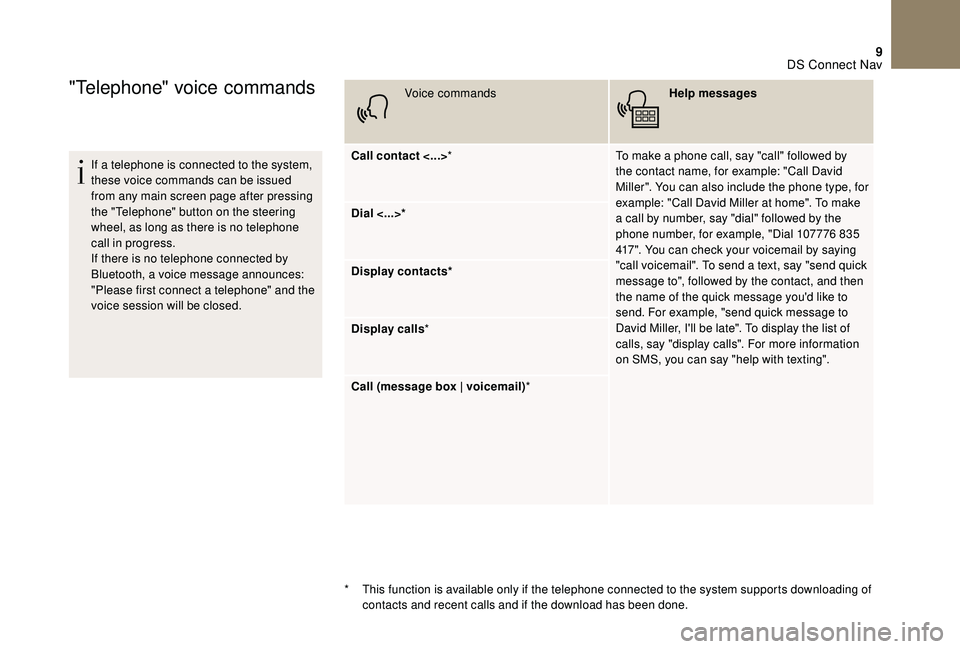
"Telephone" voice commands
If a telephone is connected to the system,
these voice commands can be issued
from any main screen page after pressing
the "Telephone" button on the steering
wheel, as long as there is no telephone
call in progress.
If there is no telephone connected by
Bluetooth, a voice message announces:
"Please first connect a telephone" and the
voice session will be closed.Voice commands
Help messages
Call contact <...> * To make a phone call, say "call" followed by
the contact name, for example: "Call David
Miller". You can also include the phone type, for
example: "Call David Miller at home". To make
a call by number, say "dial" followed by the
phone number, for example, "Dial 107776 835
417". You can check your voicemail by saying
"call voicemail". To send a text, say "send quick
message to", followed by the contact, and then
the name of the quick message you'd like to
send. For example, "send quick message to
David Miller, I'll be late". To display the list of
calls, say "display calls". For more information
on SMS, you can say "help with texting".
Dial <...>*
Display contacts*
Display calls
*
Call (message box | voicemail) *
*
T
his function is available only if the telephone connected to the system supports downloading of
contacts and recent calls and if the download has been done.
DS Connect Nav