phone Citroen DS5 RHD 2011.5 1.G User Guide
[x] Cancel search | Manufacturer: CITROEN, Model Year: 2011.5, Model line: DS5 RHD, Model: Citroen DS5 RHD 2011.5 1.GPages: 348, PDF Size: 10.49 MB
Page 269 of 348

06
267
USING THE TELEPHONE
Access to the "TELEPHONE" menu
""""""""pppppTelephoneTelephoneTelephoneTelephoneTelephoneTelephoneTelephoneTelephoneTelephoneTelephoneTelephoneTelephoneTelephoneTelephoneTl hTl hTl hTl hTl h""""""""
Press this button.
To make a call, select a number in the list and confi rm " OK"to start the call.
Connecting a different telephone deletes the list of recent calls.
No telephone connected.
Telephone connected.
Incoming call.
Outgoing call.
Synchronisation of address book in progress.
Telephone call in progress.
In the top bar of the permanentdisplay
Go from the list to the menu (left/right).
or
Page 270 of 348

1
2
5
6
3
4
06
PAIRING A BLUETOOTH TELEPHONE
FIRST CONNECTION
For reasons of safety and because they require prolonged attention on the part of the driver, the operations for pairing the Bluetooth
mobile telephone to the hands-free system of the audio unit must becarried out with the vehicle stationary.
Activate the tele
phone's Bluetoothfunction and ensure that it is "shown to all" (telephone confi guration).
Pr
ess this button.
Select the name of the desired
peripheral from the list of devices detected then select "Connect
" and confi rm.
The s
ystem offers to connect the
telephone:
- in "
Hands-free mode" (telephoneonly),
- in "
Audio" mode (streaming: playingmusic fi les on the telephone),
-
or "All
" (for selection of both
modes).
Select " OK
" and confi rm.
Select " Bluetooth functions " and confi rm.
Select "Peripherals search" andconfi rm.
The list of
peripherals detected is
displayed. Wait until the " Connect"button is available.
USING THE TELEPHONE
Visit www.citroen.co.uk for more information (compatibility,
additional help, ...).
Page 271 of 348
8
06
7
269
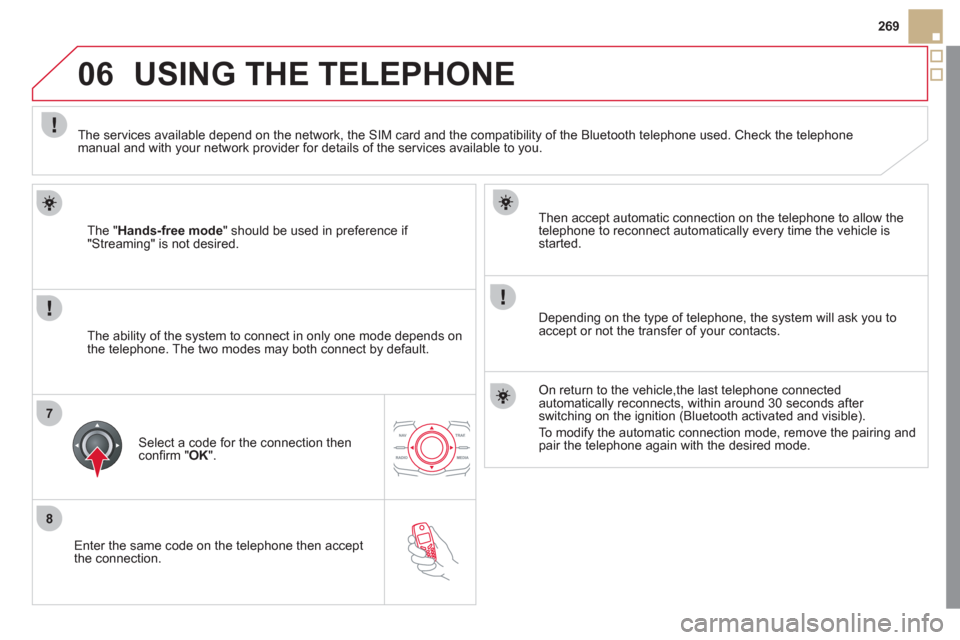
Enter the same code on the telephone then accept
th
e connection.
Then accept automatic connection on the telephone to allow the
telephone to reconnect automaticall
y every time the vehicle is started.
Dependin
g on the type of telephone, the system will ask you to
accept or not the transfer of your contacts.
USING THE TELEPHONE
The "Hands-free mode" should be used in preference if "Streaming" is not desired.
The services available depend on the network, the
SIM card and the compatibility of the Bluetooth telephone used. Check the telephone manual and with your network provider for details of the services available to you.
The ability o
f the system to connect in only one mode depends on
the telephone. The two modes may both connect by default.
Select a code for the connection then confi rm " OK
".
On return to the vehicle,the last telephone connected
automatically reconnects, within around 30 seconds after switching on the ignition (Bluetooth activated and visible).
To modif
y the automatic connection mode, remove the pairing andpair the telephone again with the desired mode.
Page 272 of 348
1
2
2
3
1
3
4
06
SR
C
USING THE TELEPHONE
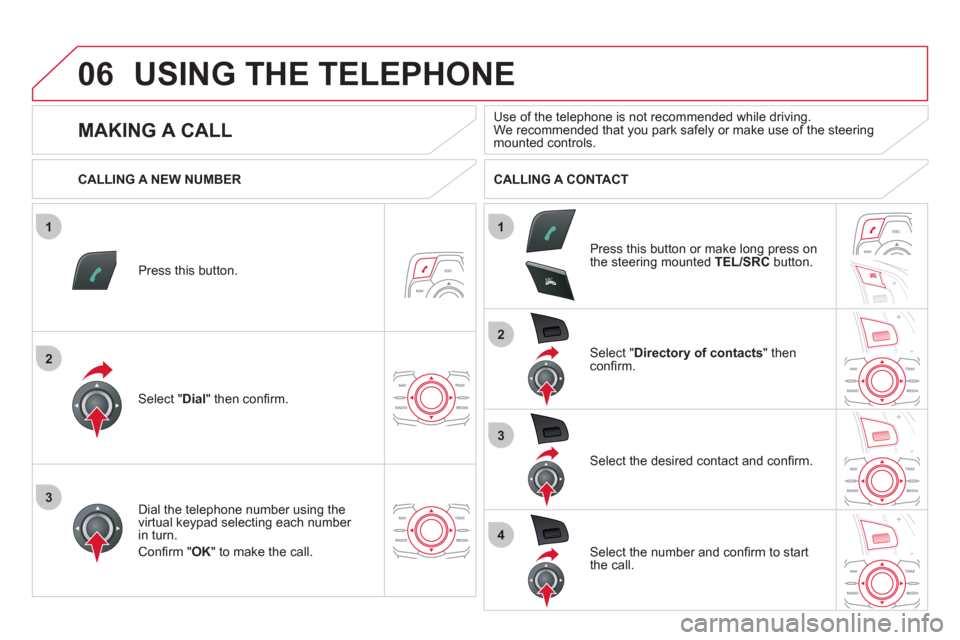
Press this button.
Select " Dial" then confi rm.
Select " Directory of contacts" thenconfi rm.
Dial the telephone number usin
g the
virtual keypad selecting each number in turn.
Confi rm " OK
" to make the call.
Press this button or make lon
g press on
the steering mounted TEL/SRC
button.
CALLING A NEW NUMBER CALLING A CONTACT
Select the desired contact and confi rm.
Select the number and confi rm to start
the call.
MAKING A CALL
Use of the telephone is not recommended while driving.We recommended that you park safely or make use of the steeringmounted controls.
Page 273 of 348
1
2
06
1
SR
C
SRC
271
USING THE TELEPHONE
CALLING A RECENTLY DIALLED NUMBER
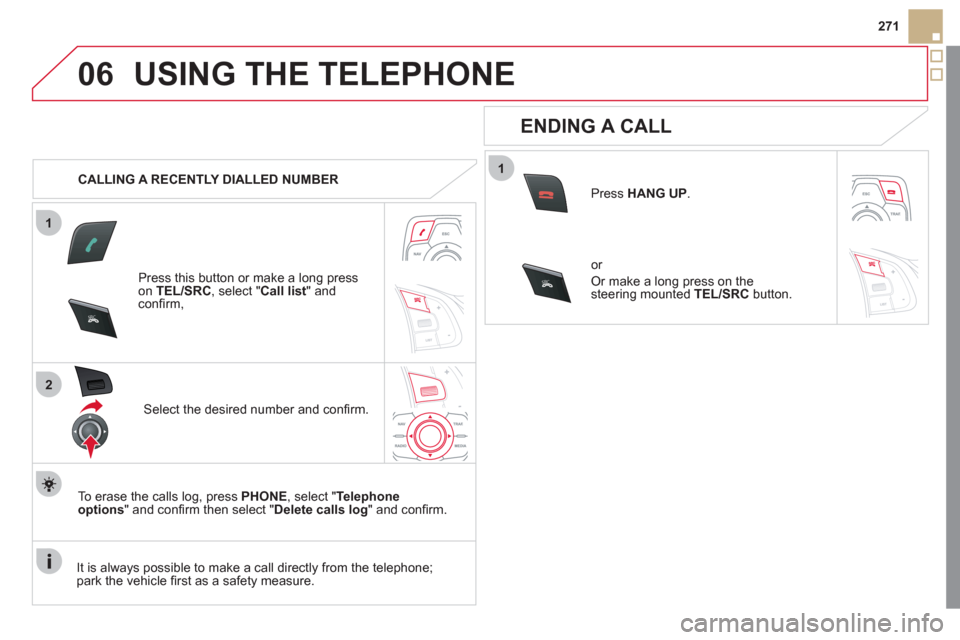
Press this button or make a lon
g press on TEL/SRC, select "Call list" andconfi rm,
Select the desired number and confi rm.
To erase the calls lo
g, press PHONE
, select " Telephoneoptions" and confi rm then select " Delete calls log
" and confi rm.
ENDING A CALL
Press HANG UP.
or
Or make a long press on the
steering mounted TEL/SRCbutton.
It is alwa
ys possible to make a call directly from the telephone;
park the vehicle fi rst as a safety measure.
Page 274 of 348
1
2
06
SR
C
SR
C
USING THE TELEPHONE
RECEIVING A CALL
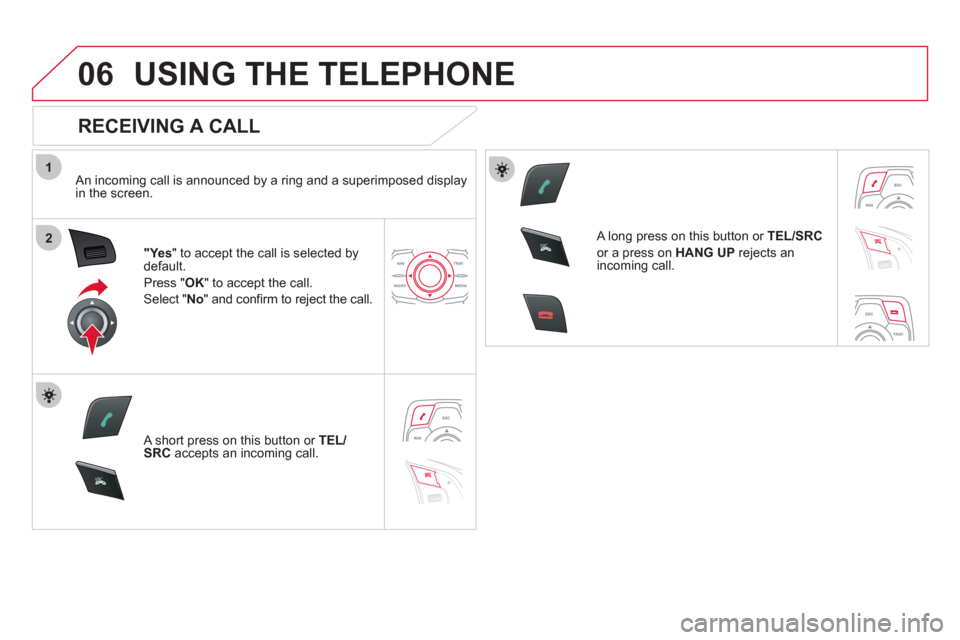
An incoming call is announced by a ring and a superimposed displayin the screen.
"Ye s" to accept the call is selected bydefault.
Press "
OK" to accept the call.
Select " No" and confi rm to reject the call.
A short press on this button or TEL/SRCaccepts an incoming call.
A long press on this button or TEL/SRC
or a press on HANG UPrejects an
incoming call.
Page 275 of 348
1
2a
2b
2c
2d
06
SRC
273
USING THE TELEPHONE
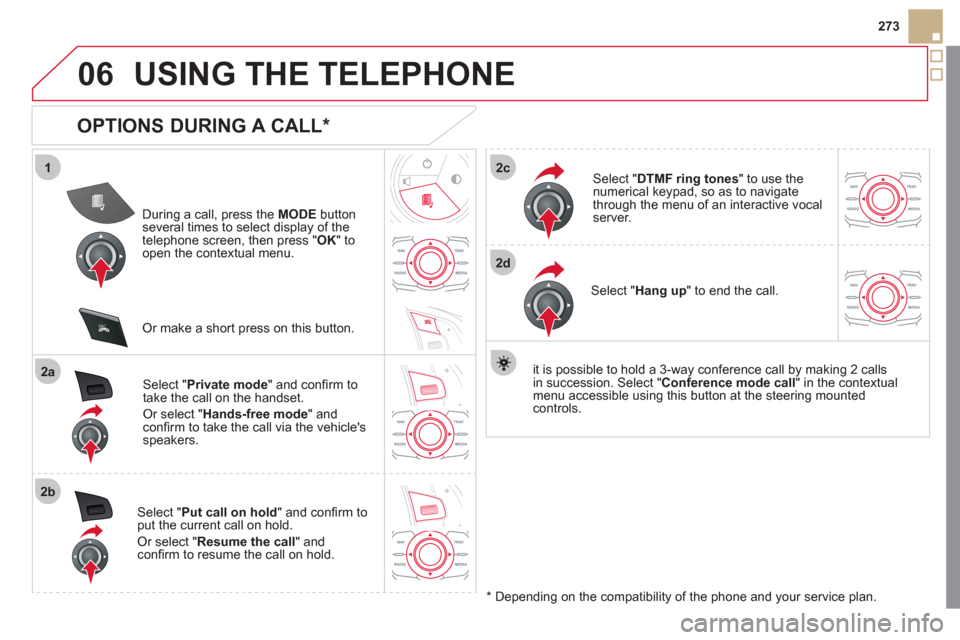
OPTIONS DURING A CALL *
During a call, press the MODE
button several times to select display of the
telephone screen, then press "OK " toopen the contextual menu.
Select " Private mode
" and confi rm totake the call on the handset.
Or select " Hands-free mode" andconfi rm to take the call via the vehicle's
speakers.
Select " Put call on hold" and confi rm to
put the current call on hold.
Or select " Resume the call" andconfi rm to resume the call on hold.
Select " DTMF ring tones
" to use thenumerical keypad, so as to navigate
through the menu of an interactive vocal server.
Select " Hang up " to end the call.
*
Depending on the compatibility of the phone and your service plan. it is possible to hold a 3-wa
y conference call by making 2 callsin succession. Select " Conferencemode call
" in the contextualmenu accessible using this button at the steering mountedcontrols.
Or make a short press on this button.
Page 276 of 348
1
2
3
1
2
3
4
5
06
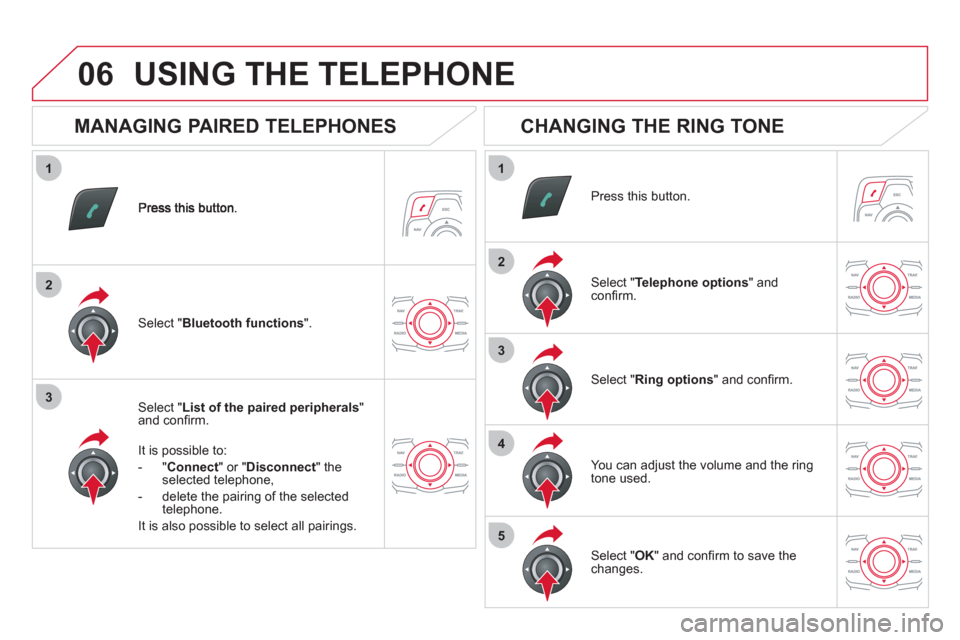
Select " List of the paired peripherals"and confi rm.
It is possible to:
-
"Connect" or " Disconnect " theselected telephone,
- delete the pairin
g of the selected
telephone.
It is also possible to select all pairin
gs.
USING THE TELEPHONE
MANAGING PAIRED TELEPHONES
CHANGING THE RING TONE
Press this button.
Select " Telephone options" andconfi rm.
Select " Ring options" and confi rm.
You can ad
just the volume and the ring
tone used.
Select " Bluetooth functions".
Select " OK
" and confi rm to save thechanges.
Page 277 of 348
07
275
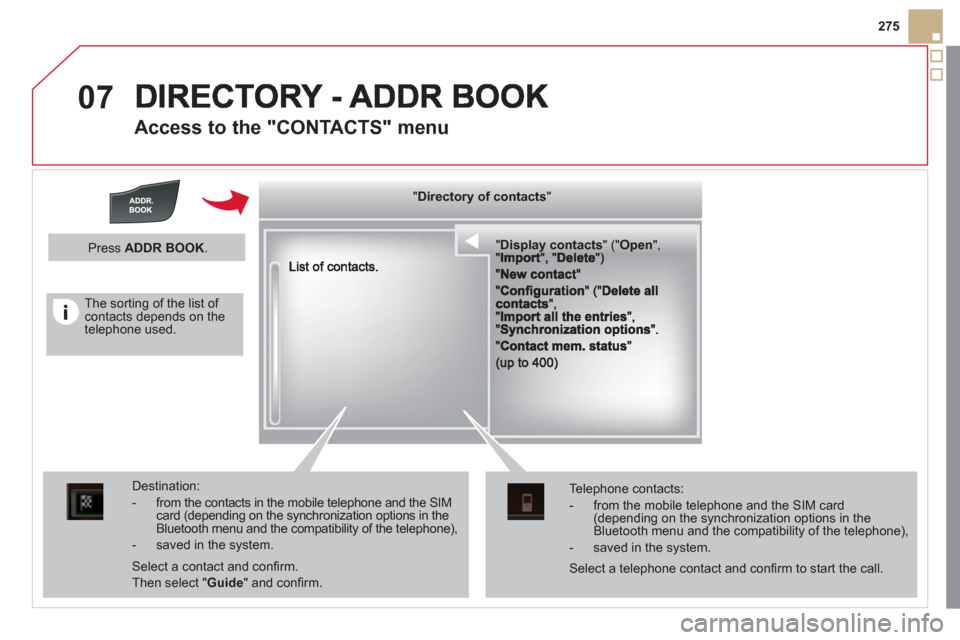
Access to the "CONTACTS" menu
""""""""""pypypypypypypysp ay co tactsDisplay contactsDisplay contactsDisplay contactsDisplay contactsDisplay contactsDisplay contactsDisplay contactsDisplay contactsDisplay contactsDisplay contactsDisplay contactsDisplay contactsDisplay contactsDisplay contactsDisplay contactsDisplay contactsDisplay contactsDisplay contactsDisplay contactsDisplay contactsDi l t tDi l t tDi l t tDi l t tDi l t tDi l t tDi l(((((((( ( (((((((((((((((("(""(""(""(""(""(""(""(""(""("pppppppOpeOpenOpenOpenOpenOpenOpenOpenOpenOpenOpenOpenOpenOpenOpenOpenOpenOpenOpenOpenOpenOOOOOOO,,,,, , ,,,""""""""""""""ItItItIt""""""""DltDltDltDlt")")")"))
Destination:
- from the contacts in the mobile telephone and the SIMcard (depending on the synchronization options in the Bluetooth menu and the compatibility of the telephone),
- saved in the system.
Select a contact and confi rm.
Then select "Guide
" and confi rm.
Telephone contacts:
- from the mobile telephone and the SIM card(depending on the synchronization options in the Bluetooth menu and the compatibility of the telephone),
- saved in the system.
Press ADDR BOOK.
Select a telephone contact and confi rm to start the call.
The sorting of the list of contacts depends on the telephone used.
""""""""yyyyyDirectory of contactsDirectory of contactsDirectory of contactsDirectory of contactsDirectory of contactsDirectory of contactsDirectory of contactsDirectory of contactsDirectory of contactsDirectory of contactsDirectory of contactsDirectory of contactsDirectory of contactsDirectory of contactsDi t f t tDi t f t tDi t f t tDi t f t tDi f""""""""
Page 278 of 348
1
2
3a
3b
3c
4
07
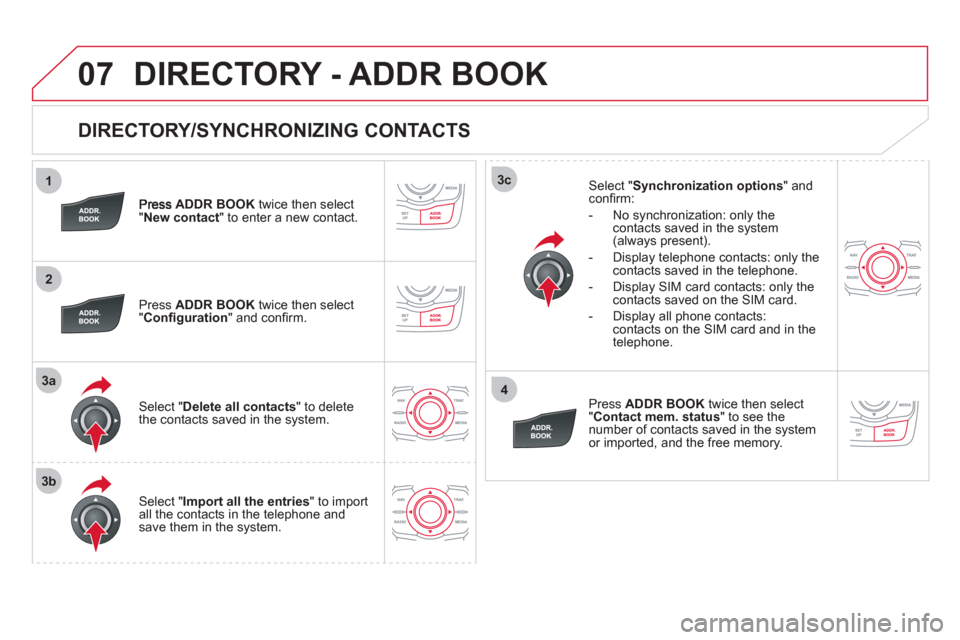
DIRECTORY/SYNCHRONIZING CONTACTS
ADDR BOOKtwice then select "New contact" to enter a new contact.
Pr
ess ADDR BOOKtwice then select
"Confi guration" and confi rm.
Select "Delete all contacts" to delete
the contacts saved in the system.
Select "Import all the entries
" to import
all the contacts in the telephone and
save them in the system.
Select "Synchronization options
" and confi rm:
- No s
ynchronization: only the contacts saved in the system (always present).
- Display telephone contacts: only the
contacts saved in the telephone.
- Displa
y SIM card contacts: only thecontacts saved on the SIM card.
- Displa
y all phone contacts: contacts on the SIM card and in the
telephone.
Pr
ess ADDR BOOKtwice then select
" Contact mem. status
" to see the number of contacts saved in the systemor imported, and the free memory.
DIRECTORY - ADDR BOOK