ignition CITROEN DS7 CROSSBACK 2017 Owner's Manual
[x] Cancel search | Manufacturer: CITROEN, Model Year: 2017, Model line: DS7 CROSSBACK, Model: CITROEN DS7 CROSSBACK 2017Pages: 244, PDF Size: 6.87 MB
Page 48 of 244
46
Ease of use and comfort03
Changing settings
► In the Heating Functions or Ventilated Seats
page, select the relevant seat.
► Select an intensity from the three preset
levels: "1" (Low), "2" (Normal) or "3" (High).
The settings are memorised when the ignition is
switched off.
Do not use the function when the seat is
not occupied.
Reduce the heating intensity as soon as
possible.
When the seat and passenger compartment
have reached a satisfactory temperature,
switch the function off; reducing electrical
consumption in turn decreases energy
consumption.
Prolonged use of heated seats is not
recommended for people with sensitive
skin.
There is a risk of burns for people whose
perception of heat is impaired (e.g. illness,
taking medication).
To keep the heated pad intact and to prevent a
short circuit:
–
Do no
t place heavy or sharp objects on the
seat.
–
Do no
t kneel or stand on the seat.
–
Do no
t spill liquids onto the seat.
–
Ne
ver use the heating function if the seat
is damp.
Multipoint massage
System with a choice of type of massage and
adjustment of its intensity.
This system operates with the engine running, as
well as in STOP mode of the Stop & Start.
Activation/Deactivation
In the Seats touch screen application,
select the Massage tab.
► Select the driver or passenger seat.
The corresponding page is displayed with the last
memorised settings.
If the settings are suitable, press to
activate/deactivate the function in the
Seats application.
If no action is taken, the display returns to its
initial state.
The function status is not memorised when the
ignition is switched off.
Changing settings
► In the Massage page, select the seat
concerned.
► Select a massage intensity from the three
preset levels: "1" (Low), "2" (Normal) or "3"
(High).
► Select another type of massage from those
offered.
The modifications are taken into account
immediately and memorised when the ignition is
switched off.
Once activated, the system starts a one hour
massage cycle, made up of sequences of 6
minutes of massage followed by 3 minutes at
rest.
The system stops automatically at the end of the
cycle.
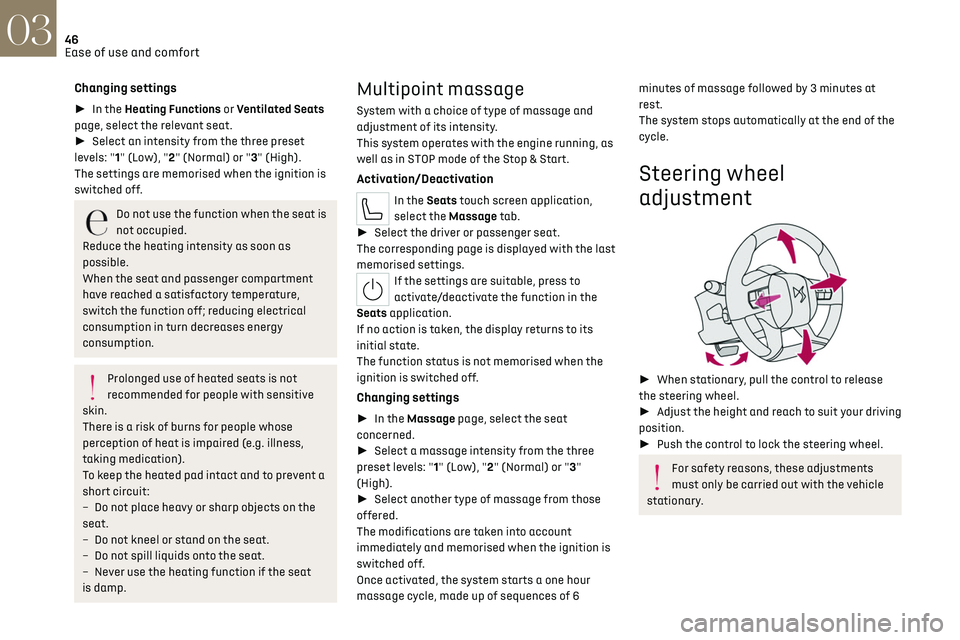
Steering wheel
adjustment
► When stationary, pull the control to release
the steering wheel.
► Adjust the height and reach to suit your driving
position.
► Push the control to lock the steering wheel.
For safety reasons, these adjustments
must only be carried out with the vehicle
stationary.
Page 49 of 244
47
Ease of use and comfort03
Mirrors
Door mirrors
Adjustment
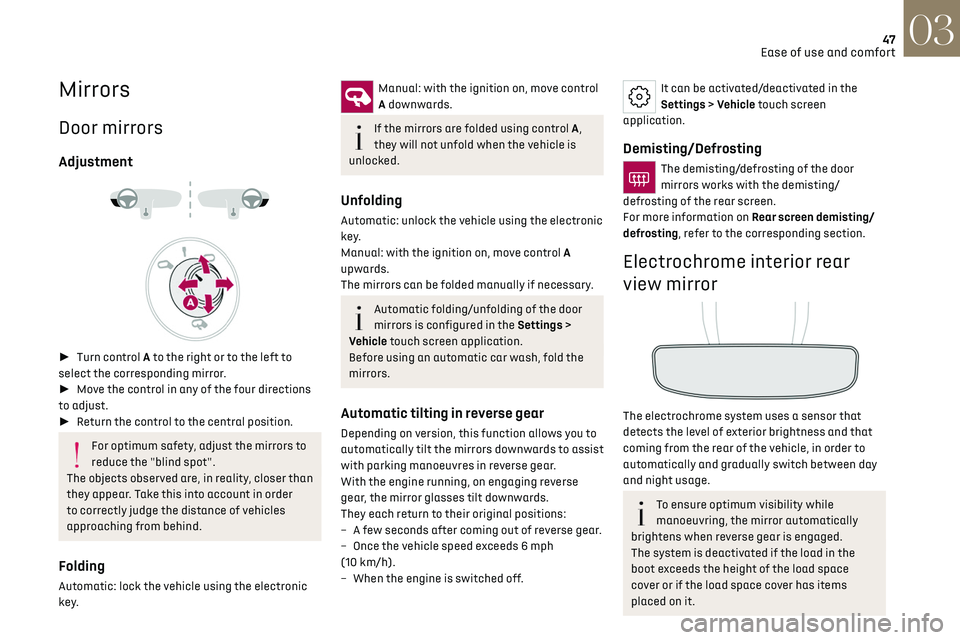
► Turn control A to the right or to the left to
select the corresponding mirror.
► Move the control in any of the four directions
to adjust.
► Return the control to the central position.
For optimum safety, adjust the mirrors to
reduce the "blind spot".
The objects observed are, in reality, closer than
they appear. Take this into account in order
to correctly judge the distance of vehicles
approaching from behind.
Folding
Automatic: lock the vehicle using the electronic
key.
Manual: with the ignition on, move control
A downwards.
If the mirrors are folded using control A,
they will not unfold when the vehicle is
unlocked.
Unfolding
Automatic: unlock the vehicle using the electronic
key.
Manual: with the ignition on, move control A
upwards.
The mirrors can be folded manually if necessary.
Automatic folding/unfolding of the door
mirrors is configured in the Settings >
Vehicle touch screen application.
Before using an automatic car wash, fold the
mirrors.
Automatic tilting in reverse gear
Depending on version, this function allows you to
automatically tilt the mirrors downwards to assist
with parking manoeuvres in reverse gear.
With the engine running, on engaging reverse
gear, the mirror glasses tilt downwards.
They each return to their original positions:
–
A fe
w seconds after coming out of reverse gear.
–
O
nce the vehicle speed exceeds 6 mph
(10 km/h).
–
When the engine is s
witched off.
It can be activated/deactivated in the
Settings > Vehicle touch screen
application.
Demisting/Defrosting
The demisting/defrosting of the door
mirrors works with the demisting/
defrosting of the rear screen.
For more information on Rear screen demisting/
defrosting, refer to the corresponding section.
Electrochrome interior rear
view mirror
The electrochrome system uses a sensor that
detects the level of exterior brightness and that
coming from the rear of the vehicle, in order to
automatically and gradually switch between day
and night usage.
To ensure optimum visibility while
manoeuvring, the mirror automatically
brightens when reverse gear is engaged.
The system is deactivated if the load in the
boot exceeds the height of the load space
cover or if the load space cover has items
placed on it.
Page 52 of 244
50
Ease of use and comfort03
Air distribution
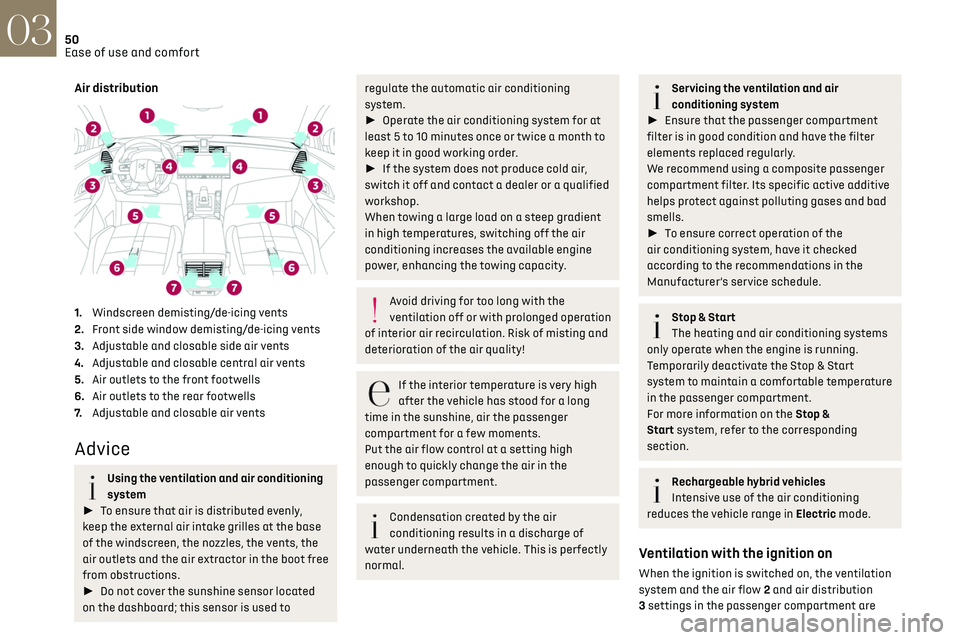
1.Windscreen demisting/de-icing vents
2. Front side window demisting/de-icing vents
3. Adjustable and closable side air vents
4. Adjustable and closable central air vents
5. Air outlets to the front footwells
6. Air outlets to the rear footwells
7. Adjustable and closable air vents
Advice
Using the ventilation and air conditioning
system
► To ensure that air is distributed evenly,
keep the external air intake grilles at the base
of the windscreen, the nozzles, the vents, the
air outlets and the air extractor in the boot free
from obstructions.
► Do not cover the sunshine sensor located
on the dashboard; this sensor is used to
regulate the automatic air conditioning
system.
► Operate the air conditioning system for at
least 5 to 10 minutes once or twice a month to
keep it in good working order.
► If the system does not produce cold air,
switch it off and contact a dealer or a qualified
workshop.
When towing a large load on a steep gradient
in high temperatures, switching off the air
conditioning increases the available engine
power, enhancing the towing capacity.
Avoid driving for too long with the
ventilation off or with prolonged operation
of interior air recirculation. Risk of misting and
deterioration of the air quality!
If the interior temperature is very high
after the vehicle has stood for a long
time in the sunshine, air the passenger
compartment for a few moments.
Put the air flow control at a setting high
enough to quickly change the air in the
passenger compartment.
Condensation created by the air
conditioning results in a discharge of
water underneath the vehicle. This is perfectly
normal.
Servicing the ventilation and air
conditioning system
► Ensure that the passenger compartment
filter is in good condition and have the filter
elements replaced regularly.
We recommend using a composite passenger
compartment filter. Its specific active additive
helps protect against polluting gases and bad
smells.
► To ensure correct operation of the
air conditioning system, have it checked
according to the recommendations in the
Manufacturer’s service schedule.
Stop & Start
The heating and air conditioning systems
only operate when the engine is running.
Temporarily deactivate the Stop & Start
system to maintain a comfortable temperature
in the passenger compartment.
For more information on the Stop &
Start system, refer to the corresponding
section.
Rechargeable hybrid vehicles
Intensive use of the air conditioning
reduces the vehicle range in Electric mode.
Ventilation with the ignition on
When the ignition is switched on, the ventilation
system and the air flow 2 and air distribution
3 settings in the passenger compartment are
Page 53 of 244
51
Ease of use and comfort03
activated, for a period which depends on the
battery charge.
This function does not include the air conditioning
system.
Dual-zone automatic air
conditioning
This system automatically controls the activation
of the air conditioning system, regulating the
temperature, air flow and air distribution inside
the passenger compartment.
This system works with the engine running, but
access to the ventilation and its controls remains
possible with the ignition on.
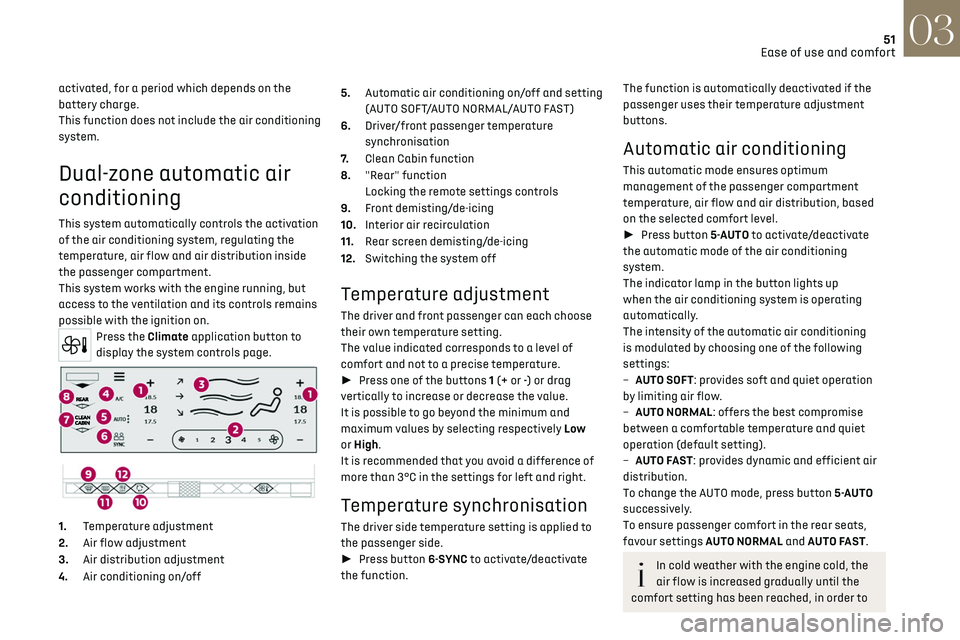
Press the Climate application button to
display the system controls page.
1. Temperature adjustment
2. Air flow adjustment
3. Air distribution adjustment
4. Air conditioning on/off 5.
Automatic air conditioning on/off and setting
(AUTO SOFT/AUTO NORMAL/AUTO FAST)
6. Driver/front passenger temperature
synchronisation
7. Clean Cabin function
8. "Rear" function
Locking the remote settings controls
9. Front demisting/de-icing
10. Interior air recirculation
11. Rear screen demisting/de-icing
12. Switching the system off
Temperature adjustment
The driver and front passenger can each choose
their own temperature setting.
The value indicated corresponds to a level of
comfort and not to a precise temperature.
► Press one of the buttons 1 (+ or -) or drag
vertically to increase or decrease the value.
It is possible to go beyond the minimum and
maximum values by selecting respectively Low
or High.
It is recommended that you avoid a difference of
more than 3°C in the settings for left and right.
Temperature synchronisation
The driver side temperature setting is applied to
the passenger side.
► Press button 6-SYNC to activate/deactivate
the function.
The function is automatically deactivated if the
passenger uses their temperature adjustment
buttons.
Automatic air conditioning
This automatic mode ensures optimum
management of the passenger compartment
temperature, air flow and air distribution, based
on the selected comfort level.
► Press button 5-AUTO to activate/deactivate
the automatic mode of the air conditioning
system.
The indicator lamp in the button lights up
when the air conditioning system is operating
automatically.
The intensity of the automatic air conditioning
is modulated by choosing one of the following
settings:
–
A
UTO SOFT: provides soft and quiet operation
by limiting air flow.
–
A
UTO NORMAL: offers the best compromise
between a comfortable temperature and quiet
operation (default setting).
–
A
UTO FAST: provides dynamic and efficient air
distribution.
To change the AUTO mode, press button 5-AUTO
successively.
To ensure passenger comfort in the rear seats,
favour settings AUTO NORMAL and AUTO FAST.
In cold weather with the engine cold, the
air flow is increased gradually until the
comfort setting has been reached, in order to
Page 57 of 244
55
Ease of use and comfort03
► Press + to add a programme.
► Select the time of entry into the vehicle and
the desired days. Press OK.
► Press ON to activate this programming.
The pre-conditioning sequence begins
approximately 45 minutes before the programmed
time when the vehicle is connected (20 minutes
when it is not connected) and is maintained for
10 minutes after.
This indicator lamp comes on fixed when
a temperature pre-conditioning cycle is
programmed. It flashes when temperature pre-
conditioning is in progress.
You can set multiple programmes.
Each one is saved in the system.
To optimise the driving range, we recommend
starting a programme while the vehicle is
connected.
The programming can also be carried out
from a smartphone via the MyDS App
application.
For more information on Remotely operable
additional functions, refer to the corresponding
section.
The fan noise that occurs during
temperature pre-conditioning is perfectly
normal.
Operating conditions
– The function is only activ ated when the ignition
is switched off and the vehicle locked.
–
When the v
ehicle is not connected, the function
is only activated if the battery charge level is
greater than 20%.
–
When the v
ehicle is not connected and a
recurring programme is active (e.g. from Monday
to Friday), if two temperature pre-conditioning
sequences are run without the vehicle being used,
the programme will be deactivated.
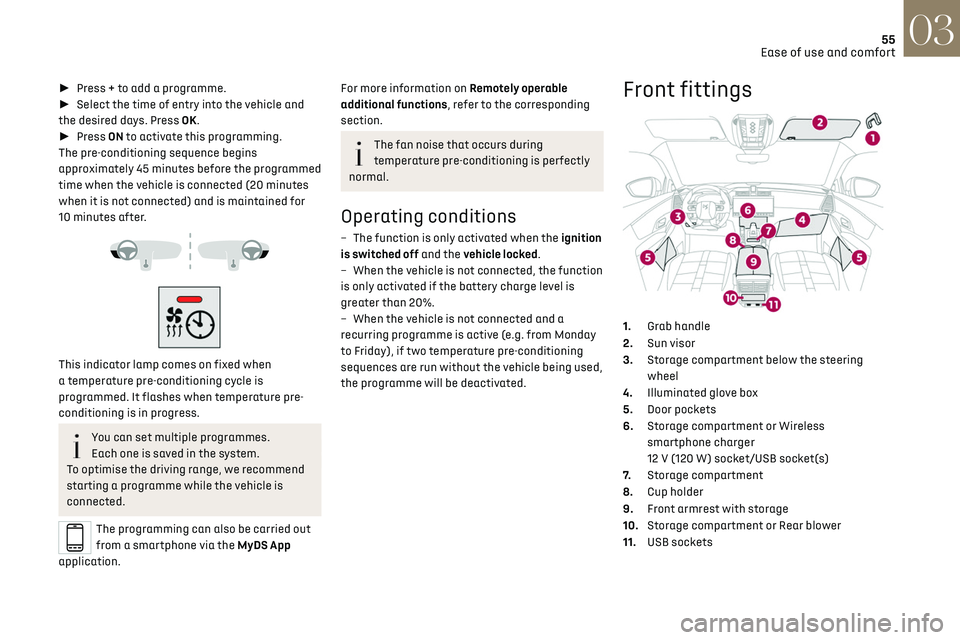
Front fittings
1. Grab handle
2. Sun visor
3. Storage compartment below the steering
wheel
4. Illuminated glove box
5. Door pockets
6. Storage compartment or Wireless
smartphone charger
12 V (120 W) socket/USB socket(s)
7. Storage compartment
8. Cup holder
9. Front armrest with storage
10. Storage compartment or Rear blower
11. USB sockets
Page 58 of 244
56
Ease of use and comfort03
Sun visor
► With the ignition on, raise the concealing flap;
depending on the version, the mirror is illuminated
automatically.
This sun visor is also equipped with a ticket
holder.
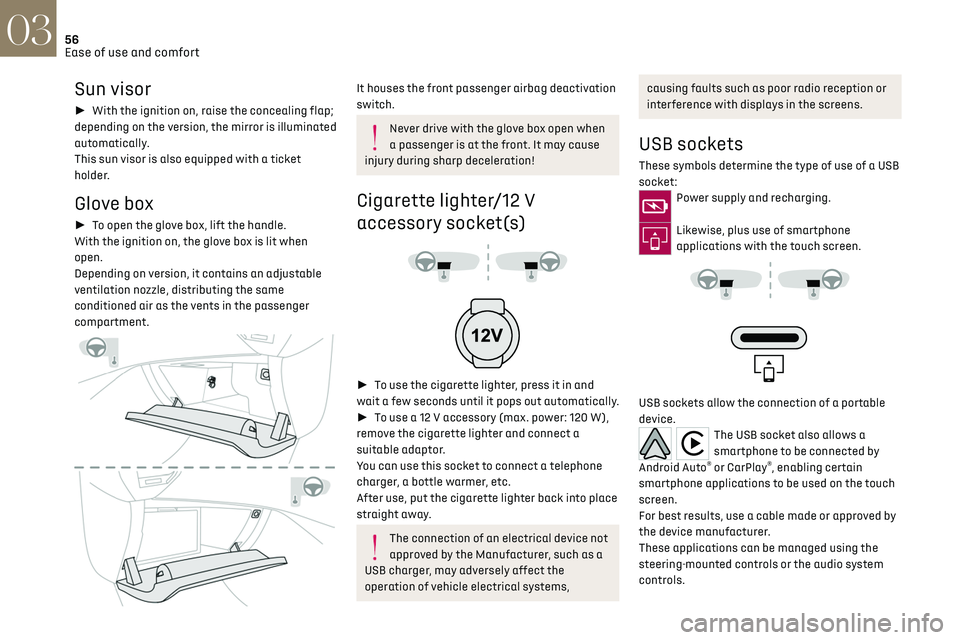
Glove box
► To open the glove box, lift the handle.
With the ignition on, the glove box is lit when
open.
Depending on version, it contains an adjustable
ventilation nozzle, distributing the same
conditioned air as the vents in the passenger
compartment.
It houses the front passenger airbag deactivation
switch.
Never drive with the glove box open when
a passenger is at the front. It may cause
injury during sharp deceleration!
Cigarette lighter/12 V
accessory socket(s)
► To use the cigarette lighter, press it in and
wait a few seconds until it pops out automatically.
► To use a 12 V accessory (max. power: 120 W),
remove the cigarette lighter and connect a
suitable adaptor.
You can use this socket to connect a telephone
charger, a bottle warmer, etc.
After use, put the cigarette lighter back into place
straight away.
The connection of an electrical device not
approved by the Manufacturer, such as a
USB charger, may adversely affect the
operation of vehicle electrical systems,
causing faults such as poor radio reception or
interference with displays in the screens.
USB sockets
These symbols determine the type of use of a USB
socket:
Power supply and recharging.
Likewise, plus use of smartphone
applications with the touch screen.
USB sockets allow the connection of a portable
device.
The USB socket also allows a
smartphone to be connected by
Android Auto
® or CarPlay®, enabling certain
smartphone applications to be used on the touch
screen.
For best results, use a cable made or approved by
the device manufacturer.
These applications can be managed using the
steering-mounted controls or the audio system
controls.
Page 59 of 244
57
Ease of use and comfort03
When the USB socket is used, the portable
device charges automatically.
While charging, a message is displayed if the
power drawn by the portable device exceeds
the current supplied by the vehicle.
For more information about how to use this
equipment, refer to the sections describing the
audio and telematics systems.
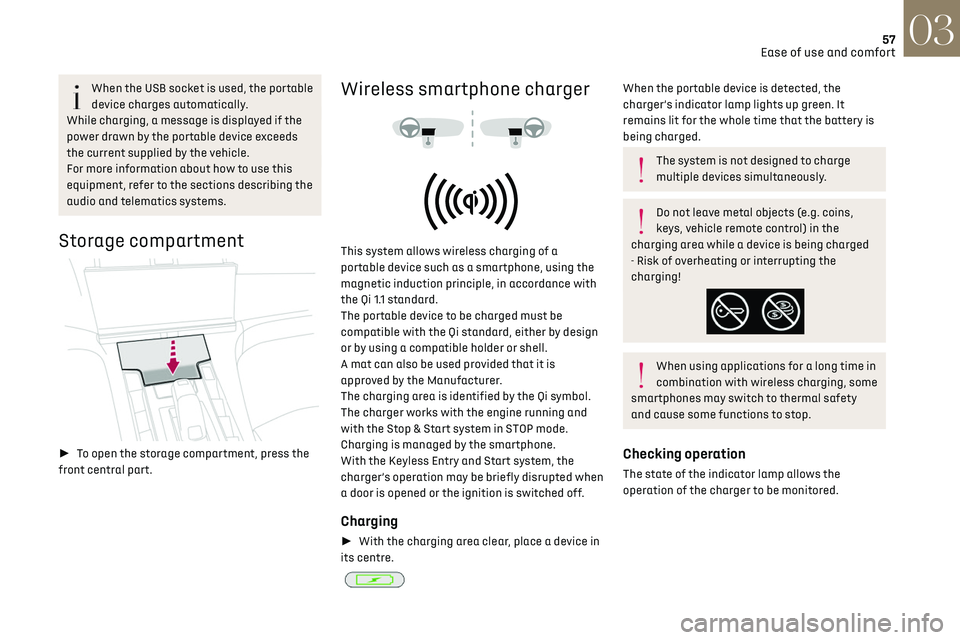
Storage compartment
► To open the storage compartment, press the
front central part.
Wireless smartphone charger
This system allows wireless charging of a
portable device such as a smartphone, using the
magnetic induction principle, in accordance with
the Qi 1.1 standard.
The portable device to be charged must be
compatible with the Qi standard, either by design
or by using a compatible holder or shell.
A mat can also be used provided that it is
approved by the Manufacturer.
The charging area is identified by the Qi symbol.
The charger works with the engine running and
with the Stop & Start system in STOP mode.
Charging is managed by the smartphone.
With the Keyless Entry and Start system, the
charger’s operation may be briefly disrupted when
a door is opened or the ignition is switched off.
Charging
► With the charging area clear, place a device in
its centre.
When the portable device is detected, the
charger’s indicator lamp lights up green. It
remains lit for the whole time that the battery is
being charged.
The system is not designed to charge
multiple devices simultaneously.
Do not leave metal objects (e.g. coins,
keys, vehicle remote control) in the
charging area while a device is being charged
- Risk of overheating or interrupting the
charging!
When using applications for a long time in
combination with wireless charging, some
smartphones may switch to thermal safety
and cause some functions to stop.
Checking operation
The state of the indicator lamp allows the
operation of the charger to be monitored.
Page 61 of 244
59
Ease of use and comfort03
Mats
Fitting
When fitting it on the driver's side, only use
the mountings present on the carpet (a "click"
indicates proper locking).
The other mats are simply laid over the carpet.
Removing/refitting
► To remove it on the driver's side, move the seat
backwards and unclip the fasteners.
► To refit it, position the mat and secure it by
pressing down.
► Check that the mat is secured correctly.
To avoid any risk of jamming the pedals:
–
O nly use mats which are suited to the
fixings already present in the vehicle; these
fixings must be used.
–
Ne
ver fit one mat on top of another.
The use of mats not approved by the
Manufacturer may interfere with access to the
pedals and hinder the operation of the cruise
control/speed limiter.
The approved mats have two fasteners located
underneath the seat.
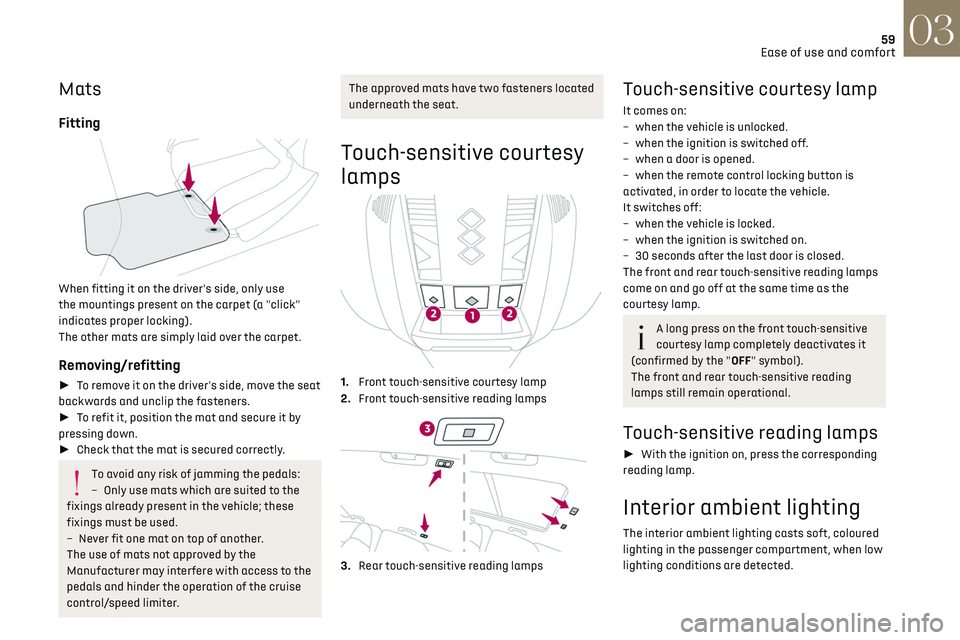
Touch-sensitive courtesy
lamps
1. Front touch-sensitive courtesy lamp
2. Front touch-sensitive reading lamps
3.Rear touch-sensitive reading lamps
Touch-sensitive courtesy lamp
It comes on:
–
when the v ehicle is unlocked.
–
when the ignition is s
witched off.
–
when a door is opened.
–
when the remo
te control locking button is
activated, in order to locate the vehicle.
It switches off:
–
when the v
ehicle is locked.
–
when the ignition is s
witched on.
–
30 sec
onds after the last door is closed.
The front and rear touch-sensitive reading lamps
come on and go off at the same time as the
courtesy lamp.
A long press on the front touch-sensitive
courtesy lamp completely deactivates it
(confirmed by the "OFF" symbol).
The front and rear touch-sensitive reading
lamps still remain operational.
Touch-sensitive reading lamps
► With the ignition on, press the corresponding
reading lamp.
Interior ambient lighting
The interior ambient lighting casts soft, coloured
lighting in the passenger compartment, when low
lighting conditions are detected.
Page 63 of 244
61
Ease of use and comfort03
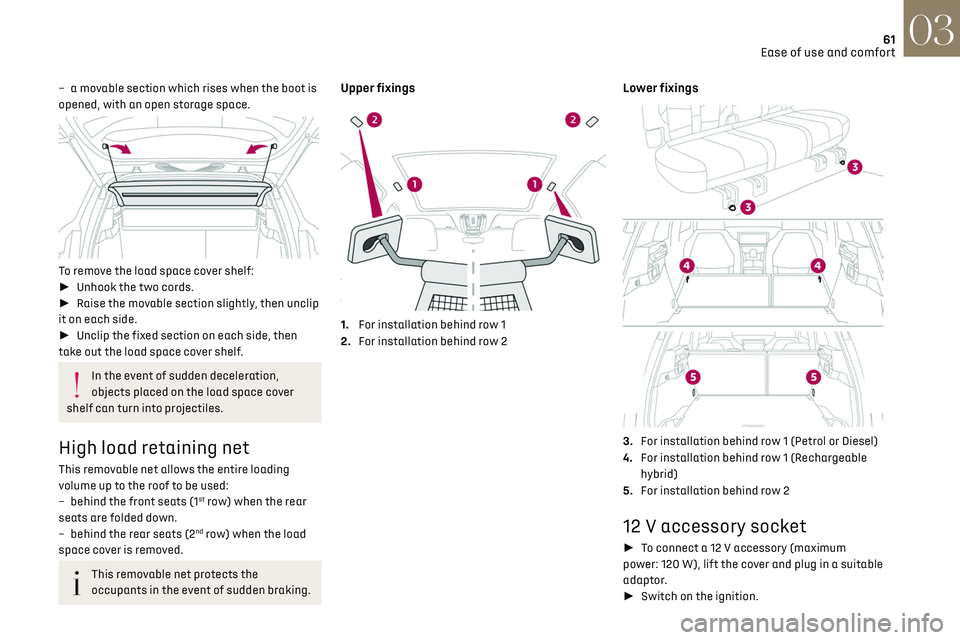
– a movable section which rises when the boot is
opened, with an open storage space.
To remove the load space cover shelf:
► Unhook the two cords.
► Raise the movable section slightly, then unclip
it on each side.
► Unclip the fixed section on each side, then
take out the load space cover shelf.
In the event of sudden deceleration,
objects placed on the load space cover
shelf can turn into projectiles.
High load retaining net
This removable net allows the entire loading
volume up to the roof to be used:
–
behind the fron
t seats (1
st row) when the rear
seats are folded down.
–
behind the rear sea
ts (2
nd row) when the load
space cover is removed.
This removable net protects the
occupants in the event of sudden braking.
Upper fixings
1. For installation behind row 1
2. For installation behind row 2
Lower fixings
3.For installation behind row 1 (Petrol or Diesel)
4. For installation behind row 1 (Rechargeable
hybrid)
5. For installation behind row 2
12 V accessory socket
► To connect a 12 V accessory (maximum
power: 120 W), lift the cover and plug in a suitable
adaptor.
► Switch on the ignition.
Page 64 of 244
62
Ease of use and comfort03
The connection of an electrical device not
approved by the Manufacturer, such as a
USB charger, may adversely affect the
operation of vehicle electrical systems,
causing faults such as poor radio reception or
interference with displays in the screens.
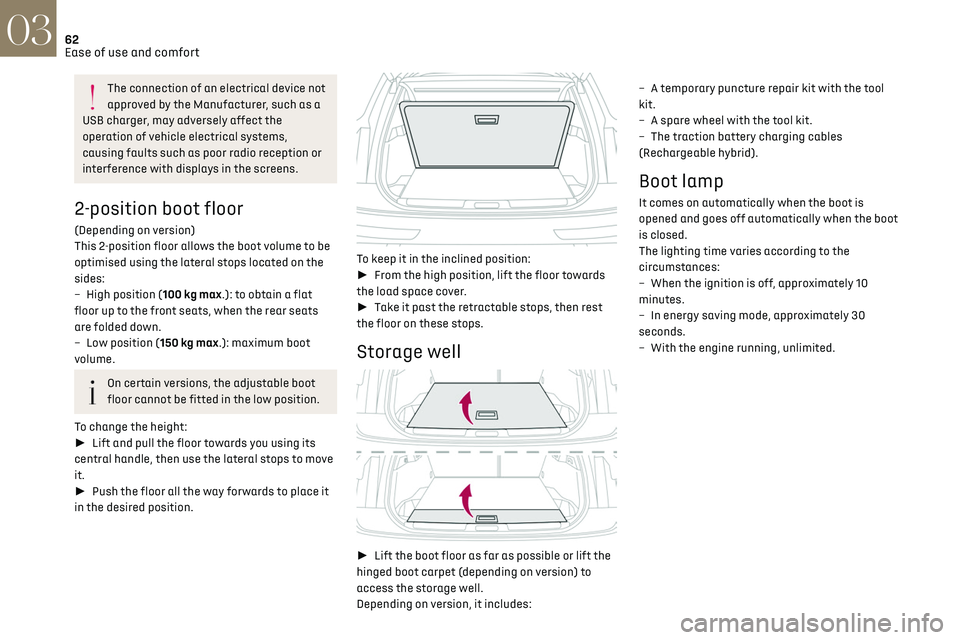
2-position boot floor
(Depending on version)
This 2-position floor allows the boot volume to be
optimised using the lateral stops located on the
sides:
–
High po
sition (100 kg max.): to obtain a flat
floor up to the front seats, when the rear seats
are folded down.
–
Lo
w position (150 kg max.): maximum boot
volume.
On certain versions, the adjustable boot
floor cannot be fitted in the low position.
To change the height:
► Lift and pull the floor towards you using its
central handle, then use the lateral stops to move
it.
► Push the floor all the way forwards to place it
in the desired position.
To keep it in the inclined position:
► From the high position, lift the floor towards
the load space cover.
► Take it past the retractable stops, then rest
the floor on these stops.
Storage well
► Lift the boot floor as far as possible or lift the
hinged boot carpet (depending on version) to
access the storage well.
Depending on version, it includes: –
A t
emporary puncture repair kit with the tool
kit.
–
A spare wheel with the t
ool kit.
–
The traction ba
ttery charging cables
(Rechargeable hybrid).
Boot lamp
It comes on automatically when the boot is
opened and goes off automatically when the boot
is closed.
The lighting time varies according to the
circumstances:
–
When the ignition is o
ff, approximately 10
minutes.
–
In energy sa
ving mode, approximately 30
seconds.
–
With the engine running, unlimit
ed.