media CITROEN DS7 CROSSBACK 2018 Owner's Manual
[x] Cancel search | Manufacturer: CITROEN, Model Year: 2018, Model line: DS7 CROSSBACK, Model: CITROEN DS7 CROSSBACK 2018Pages: 244, PDF Size: 6.87 MB
Page 113 of 244
111
Driving06
The tyre under-inflation detection cannot,
in any circumstances, replace the need
for vigilance on the part of the driver.
This system does not avoid the need to
regularly check the tyre pressures (including
the spare wheel), especially before a long
journey.
Driving with under-inflated tyres, particularly
in adverse conditions (heavy load, high speed,
long journey):
–
w
orsens road-holding.
–
lengthens braking dist
ances.
–
c
auses premature wear of the tyres.
–
increase
s energy consumption.
The inflation pressures defined for the
vehicle can be found on the tyre pressure
label.
For more information on the Identification
markings, refer to the corresponding section.
Checking tyre pressures
This check should be done monthly when
the tyres are "cold" (vehicle stopped for 1 hour
or after a journey of less than 6 miles (10 km)
at moderate speeds).
Otherwise, add 0.3 bar to the pressures shown
on the label.
Snow chains
The system does not have to be
reinitialised after fitting or removing snow
chains.
Under-inflation alert
This is signalled by the fixed illumination
of this warning lamp, accompanied by an
audible signal and, depending on equipment, the
display of a message.
► Reduce speed immediately, avoid excessive
steering movements and avoid sudden braking.
► Stop the vehicle as soon as it is safe to do so.
The loss of pressure detected may not
always cause visible deformation of the
tyre.
Do not rely on just a visual check.
► Using a compressor, such as the one in
the temporary puncture repair kit, check the
pressures of all four tyres when cold.
► If it is not possible to carry out this check
immediately, drive carefully at reduced speed.
► In the event of a puncture, use the temporary
puncture repair kit or the spare wheel (depending
on equipment).
Driving too slowly may not ensure
optimum monitoring.
The alert is not immediately triggered in the
event of a sudden loss of pressure or tyre blow-
out. This is because analysis of the values read
by the wheel's speed sensors can take several
minutes.
The alert may be delayed at speeds below 25
mph (40 km/h), or when adopting a sporty
driving mode.
The alert is kept active until the system is
reinitialised.
Reinitialisation
► The system must be reinitialised after any
adjustment to the pressure of one or more tyres,
and after changing one or more wheels.
Before reinitialising the system, make
sure that the pressures of the four tyres
are correct for the conditions of use of the
vehicle and conform to the values written on
the tyre pressure label.
Check the pressures of the four tyres before
performing the reinitialisation.
The system does not advise if a pressure is
incorrect at the time of reinitialisation.
With the vehicle stationary, the system
can be reinitialised in the Settings>Vehicle
touch screen application.
► Then select Safety > Tire Pressure Setup.
► Press YES to confirm.
The reinitialisation is confirmed by the display of
a message and an audible signal.
Page 120 of 244
118
Driving06
To modify the speed limit setting based on the
speed suggested by the Road signs recognition
function displayed on the instrument panel:
► Press 5-MEM once; a message is displayed,
confirming the memorisation request.
► Press 5-MEM again to save the suggested
speed.
The new speed setting value is displayed on the
instrument panel.
Temporarily exceeding the
speed setting
► Fully depress the accelerator pedal.
The speed limiter is temporarily deactivated and
the displayed speed setting flashes.
► Release the accelerator pedal to return to
below the speed setting.
When exceeding the speed is not due to the
driver's action (e.g. in case of a steep slope), an
audible signal is triggered immediately.
On a steep descent or in the event of
sharp acceleration, the speed limiter will
not be able to prevent the vehicle from
exceeding the speed setting.
If necessary, apply the brakes to control your
vehicle’s speed.
When the vehicle speed returns to the speed
setting level, the speed limiter operates again: the
speed setting display becomes fixed again.
Switching off
► Turn the thumbwheel 1 to the "OFF" position:
speed limiter information is no longer displayed.
Malfunction
In the event of a malfunction, dashes are
displayed flashing and then fixed instead of the
speed setting.
Have it checked by a dealer or a qualified
workshop.
Cruise control - Specific
recommendations
The cruise control function does not
guarantee compliance with the maximum
authorised speed and the safety distance
between vehicles, the driver remains
responsible for their driving.
In the interest of public safety, only use cruise
control if the traffic conditions enable vehicles
to drive at a steady speed and maintain an
adequate safety distance.
Remain vigilant while cruise control is
activated. If you press and hold one of the
speed setting modification buttons, your
vehicle may change speed very abruptly.
When descending a steep hill, the cruise
control system cannot prevent the vehicle from
exceeding the set speed. Brake if necessary to
control the vehicle speed.
On steep climbs or when towing, the set speed
may not be reached or maintained.
Exceeding the programmed speed setting
You can temporarily exceed the speed
setting by pressing the accelerator pedal (the
programmed speed flashes).
To return to the speed setting, release the
accelerator pedal (when the set speed is
reached again, the displayed speed stops
flashing).
Operating limits
Never use the system in the following
situations:
–
In an urban area with the risk o
f pedestrians
crossing the road.
–
In hea
vy traffic (except versions with the
Stop & Go function).
–
O
n winding or steep roads.
–
O
n slippery or flooded roads.
–
In poor w
eather conditions.
–
In the e
vent of restricted visibility for the
driver.
–
D
riving on a speed circuit.
–
D
riving on a rolling road.
–
When using a ‘
space-saver’ type spare
wheel.
–
When using sno
w chains, non-slip covers or
studded tyres.
Page 123 of 244
121
Driving06
The brake lamps come on if the vehicle is
slowed down by the system.
It can be dangerous to drive if the brake lamps
are not in perfect working order.
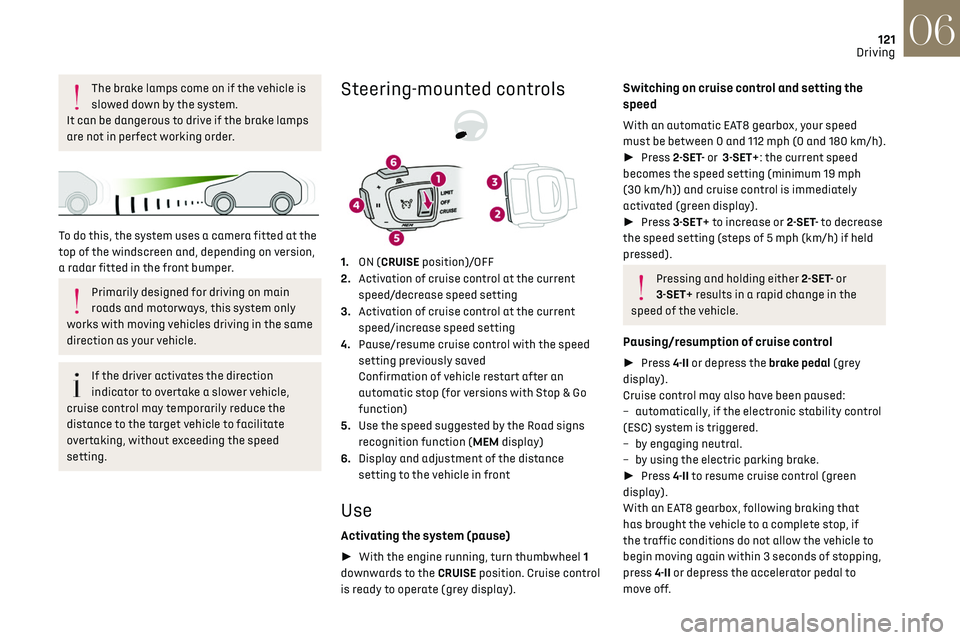
To do this, the system uses a camera fitted at the
top of the windscreen and, depending on version,
a radar fitted in the front bumper.
Primarily designed for driving on main
roads and motorways, this system only
works with moving vehicles driving in the same
direction as your vehicle.
If the driver activates the direction
indicator to overtake a slower vehicle,
cruise control may temporarily reduce the
distance to the target vehicle to facilitate
overtaking, without exceeding the speed
setting.
Steering-mounted controls
1. ON (CRUISE position)/OFF
2. Activation of cruise control at the current
speed/decrease speed setting
3. Activation of cruise control at the current
speed/increase speed setting
4. Pause/resume cruise control with the speed
setting previously saved
Confirmation of vehicle restart after an
automatic stop (for versions with Stop & Go
function)
5. Use the speed suggested by the Road signs
recognition function (MEM display)
6. Display and adjustment of the distance
setting to the vehicle in front
Use
Activating the system (pause)
► With the engine running, turn thumbwheel 1
downwards to the CRUISE position. Cruise control
is ready to operate (grey display).
Switching on cruise control and setting the
speed
With an automatic EAT8 gearbox, your speed
must be between 0 and 112 mph (0 and 180 km/h).
► Press 2-SET- or 3-SET+: the current speed
becomes the speed setting (minimum 19 mph
(30 km/h)) and cruise control is immediately
activated (green display).
► Press 3-SET+ to increase or 2-SET- to decrease
the speed setting (steps of 5 mph (km/h) if held
pressed).
Pressing and holding either 2-SET- or
3-SET+ results in a rapid change in the
speed of the vehicle.
Pausing/resumption of cruise control
► Press 4-II or depress the brake pedal (grey
display).
Cruise control may also have been paused:
–
aut
omatically, if the electronic stability control
(ESC) system is triggered.
–
b
y engaging neutral.
–
b
y using the electric parking brake.
► Press 4-II to resume cruise control (green
display).
With an EAT8 gearbox, following braking that
has brought the vehicle to a complete stop, if
the traffic conditions do not allow the vehicle to
begin moving again within 3 seconds of stopping,
press 4-II or depress the accelerator pedal to
move off.
Page 124 of 244
122
Driving06
If the driver takes no action after the vehicle
has been stopped, the electric parking brake is
applied automatically after about 5 minutes.
Cruise control remains active after
changing gear, regardless of the gearbox
type.
When the driver attempts to reactivate
cruise control after the function has been
paused, the message "Activation not possible,
unsuitable conditions" is displayed briefly if
reactivation is not possible (safety conditions
not met).
Changing the programmed speed setting with
the Road signs recognition function
► Press 5-MEM to accept the speed suggested
by the system on the instrument panel, then press
again to confirm.
To prevent sudden acceleration or
deceleration of the vehicle, select a speed
setting relatively close to the vehicle's current
speed.
Changing the inter-vehicle distance
► Press 6 to display the distance setting
thresholds ("Distant", "Normal", "Close"), then
press again to select a threshold.
After a few seconds, the option is accepted and
will be memorised when the ignition is switched
off.
Temporarily exceeding the speed setting
► Press the accelerator pedal fully. Distance
monitoring and cruise control are deactivated
while acceleration is maintained. "Cruise control
on hold" is displayed.
Deactivating the system
► Turn thumbwheel 1 upwards to the OFF
position.
Information displayed on the
instrument panel
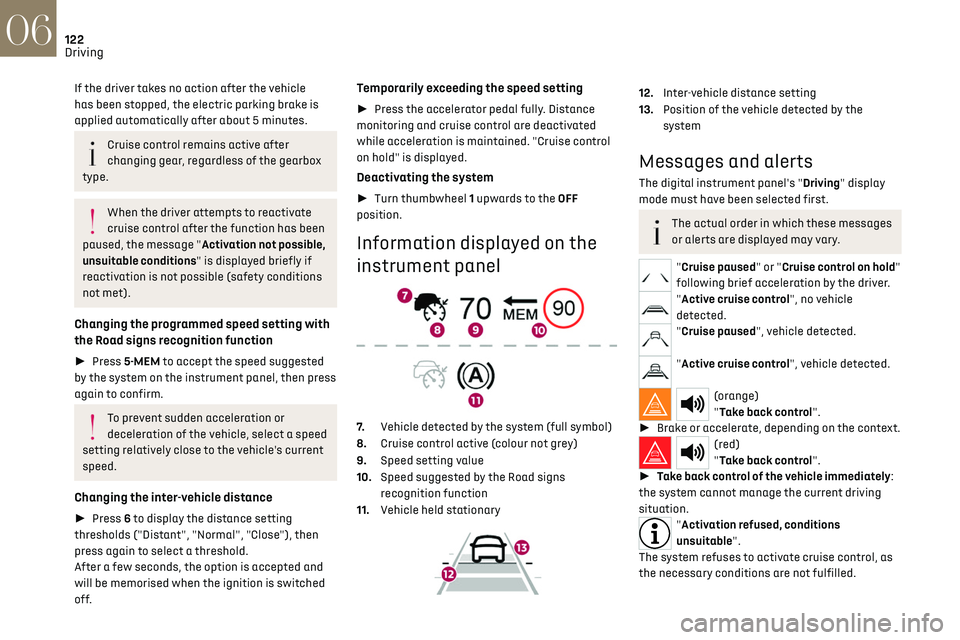
7. Vehicle detected by the system (full symbol)
8. Cruise control active (colour not grey)
9. Speed setting value
10. Speed suggested by the Road signs
recognition function
11. Vehicle held stationary
12.Inter-vehicle distance setting
13. Position of the vehicle detected by the
system
Messages and alerts
The digital instrument panel's "Driving" display
mode must have been selected first.
The actual order in which these messages
or alerts are displayed may vary.
"Cruise paused" or "Cruise control on hold"
following brief acceleration by the driver.
"Active cruise control", no vehicle
detected.
"Cruise paused", vehicle detected.
"Active cruise control", vehicle detected.
(orange)
"Take back control".
► Brake or accelerate, depending on the context.
(red)
"Take back control".
► Take back control of the vehicle immediately:
the system cannot manage the current driving
situation.
"Activation refused, conditions
unsuitable".
The system refuses to activate cruise control, as
the necessary conditions are not fulfilled.
Page 125 of 244
123
Driving06
Stop function
"Cruise paused" (for a few
seconds).
The system has brought the vehicle to a complete
stop and is keeping it immobilised: cruise control
is paused.
The driver must accelerate to move off again,
then reactivate cruise control.
Stop & Go function
"To pick up again: accelerate or
press the II button".
The system has brought the vehicle to a complete
stop.
Within 3 seconds, the vehicle gradually and
automatically begins moving again.
Beyond 3 seconds, the driver must accelerate or
press 4-II to move off again.
While the vehicle is immobilised, the
following recommendations apply:
–
The driv
er should not leave the vehicle.
–
Do no
t open the boot.
–
Do no
t drop off or pick up passengers.
–
Do no
t engage reverse gear.
When moving off again, watch out for
cyclists, pedestrians and animals, as they
may not be detected properly.
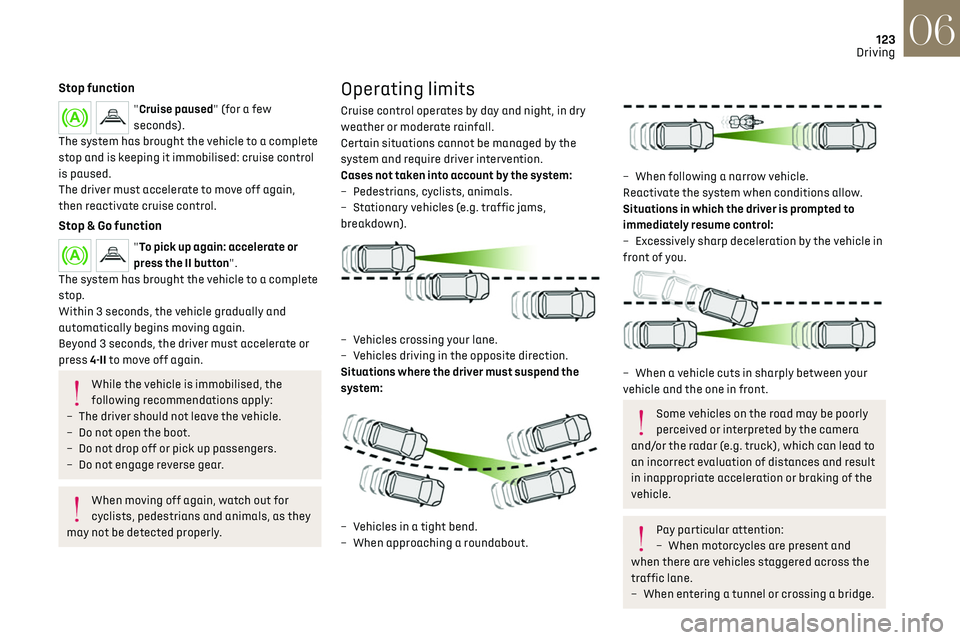
Operating limits
Cruise control operates by day and night, in dry
weather or moderate rainfall.
Certain situations cannot be managed by the
system and require driver intervention.
Cases not taken into account by the system:
–
Pede
strians, cyclists, animals.
–
St
ationary vehicles (e.g. traffic jams,
breakdown).
– Vehicles crossing your lane.
– V ehicles driving in the opposite direction.
Situations where the driver must suspend the
system:
– Vehicles in a tight bend.
– When approaching a roundabout.
– When follo wing a narrow vehicle.
Reactivate the system when conditions allow.
Situations in which the driver is prompted to
immediately resume control:
–
Ex
cessively sharp deceleration by the vehicle in
front of you.
– When a vehicle cuts in sharply between your
vehicle and the one in front.
Some vehicles on the road may be poorly
perceived or interpreted by the camera
and/or the radar (e.g. truck), which can lead to
an incorrect evaluation of distances and result
in inappropriate acceleration or braking of the
vehicle.
Pay particular attention:
– When mo torcycles are present and
when there are vehicles staggered across the
traffic lane.
–
When en
tering a tunnel or crossing a bridge.
Page 135 of 244
133
Driving06
Lane keeping assist
For more information, refer to the General
recommendations on the use of driving
and manoeuvring aids.
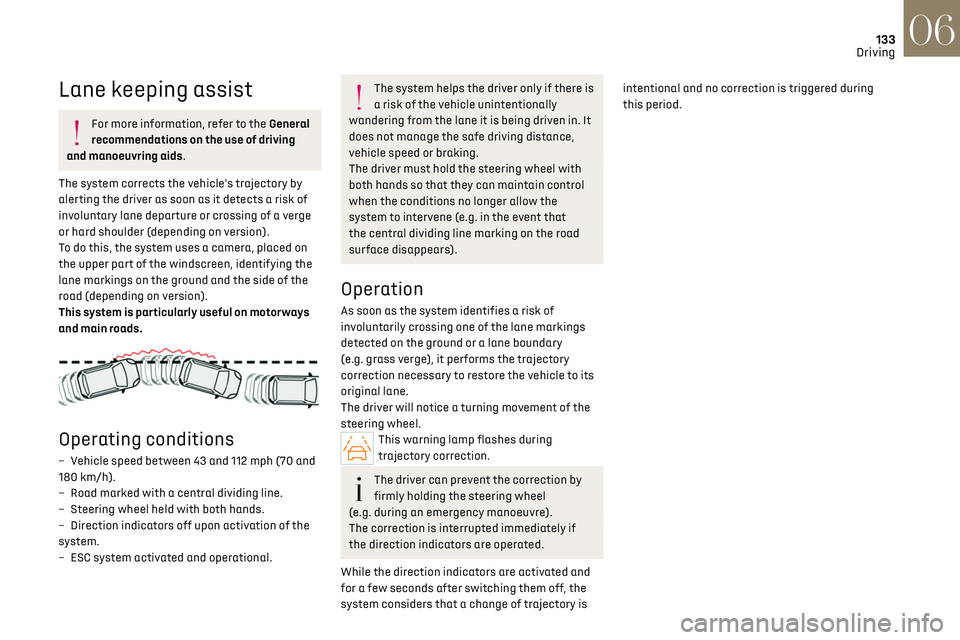
The system corrects the vehicle's trajectory by
alerting the driver as soon as it detects a risk of
involuntary lane departure or crossing of a verge
or hard shoulder (depending on version).
To do this, the system uses a camera, placed on
the upper part of the windscreen, identifying the
lane markings on the ground and the side of the
road (depending on version).
This system is particularly useful on motorways
and main roads.
Operating conditions
– Vehicle speed between 43 and 112 mph (70 and
180 km/h).
–
R
oad marked with a central dividing line.
–
St
eering wheel held with both hands.
–
Direction indic
ators off upon activation of the
system.
–
ESC s
ystem activated and operational.
The system helps the driver only if there is
a risk of the vehicle unintentionally
wandering from the lane it is being driven in. It
does not manage the safe driving distance,
vehicle speed or braking.
The driver must hold the steering wheel with
both hands so that they can maintain control
when the conditions no longer allow the
system to intervene (e.g. in the event that
the central dividing line marking on the road
surface disappears).
Operation
As soon as the system identifies a risk of
involuntarily crossing one of the lane markings
detected on the ground or a lane boundary
(e.g. grass verge), it performs the trajectory
correction necessary to restore the vehicle to its
original lane.
The driver will notice a turning movement of the
steering wheel.
This warning lamp flashes during
trajectory correction.
The driver can prevent the correction by
firmly holding the steering wheel
(e.g. during an emergency manoeuvre).
The correction is interrupted immediately if
the direction indicators are operated.
While the direction indicators are activated and
for a few seconds after switching them off, the
system considers that a change of trajectory is intentional and no correction is triggered during
this period.
Page 137 of 244
135
Driving06
Operating limits
The system goes into standby automatically in
the following cases:
–
ESC deactiv
ated or operation triggered.
–
Speed belo
w 43 mph (70 km/h) or greater than
112 mph (180 km/h).
–
Electric
al connection to a trailer.
–
U
se of a"space-saver" spare wheel detected (as
detection is not immediate, deactivation of the
system is recommended).
–
Dynamic driving style det
ected, pressure on the
brake or accelerator pedal.
–
D
riving over lane markings.
–
Activ
ation of the direction indicators.
–
C
rossing the inside line on a bend.
–
D
riving on a tight bend.
–
Inactivity b
y the driver detected during
correction.
The following situations may interfere
with the operation of the system or
prevent it from working:
–
Insufficien
t contrast between the road
surface and the verge or hard shoulder
(e.g. shade).
–
Lane markings w
orn, hidden (snow, mud) or
multiple (roadworks, etc.),
–
C
lose proximity to the vehicle in front (lane
markings may not be detected).
–
R
oads that are narrow, winding.
Risk of undesirable operation
The system should be deactivated in the following
situations:
–
When changing a wheel or w
orking near a
wheel.
–
T
owing or with a bicycle carrier on a towing
device, especially with trailer not plugged in or
not approved.
–
R
oad in poor condition, unstable or with very
poor grip (risk of aquaplaning, snow, ice).
–
Adv
erse weather conditions.
–
D
riving on racing circuits.
–
D
riving on a rolling road.
Deactivation/Activation
By default, the system is automatically activated
at every engine start.
It is configured in the ADAS touch screen
application.
or
Direct access to the Shortcuts for driving aids.
Deactivation is confirmed by the
illumination of this indicator lamp on the
instrument panel.
Malfunction
In the event of a malfunction, these
warning lamps light up on the
instrument panel, accompanied by the display of
a message and an audible signal.
Have it checked by a dealer or a qualified
workshop.
Blind spot monitoring
For more information, refer to the General
recommendations on the use of driving
and manoeuvring aids.
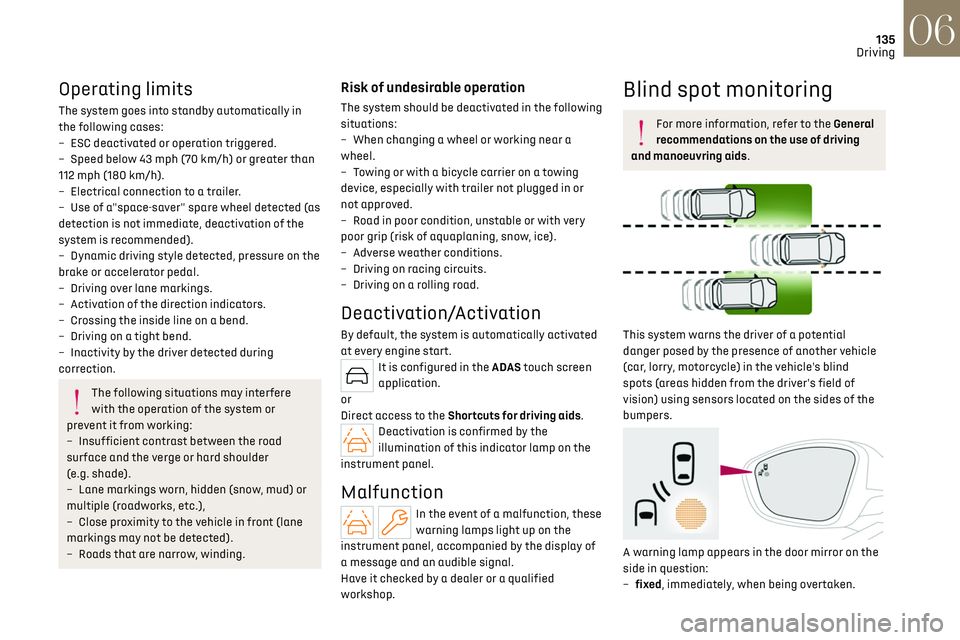
This system warns the driver of a potential
danger posed by the presence of another vehicle
(car, lorry, motorcycle) in the vehicle's blind
spots (areas hidden from the driver's field of
vision) using sensors located on the sides of the
bumpers.
A warning lamp appears in the door mirror on the
side in question:
–
fix
ed, immediately, when being overtaken.
Page 147 of 244
145
Practical information07
Before travelling abroad, it is advisable to
check with a dealer if the vehicle is suitable
for the distribution equipment of the countries
visited.
Rechargeable hybrid
system
Electrical system
The electrical circuit of the rechargeable hybrid
system is identified by orange cables and its
components are marked with this symbol:
The rechargeable hybrid powertrain uses
a voltage of between 240 V and 400 V.
This system may be hot both when the ignition
is on and after switching it off.
Comply with the warning messages shown on
the labels, particularly inside the charging flap.
High voltage system voltage is dangerous
and can cause burns or other injuries or
even fatal electric shock.
Since damage to high voltage components is
not visible, the Manufacturer recommends
that you:
–
Ne
ver touch the components, damaged
or not, and never let your jewelry or other
metallic objects come into contact with these
components.
–
Ne
ver work on the orange high voltage
cables or on any other high voltage component
marked with the Electric risk label. Any
intervention on the high voltage system
must be carried out by qualified persons in
workshops qualified and approved to carry out
this type of work.
–
Ne
ver damage, modify or remove the orange
high voltage cables or disconnect them from
the high voltage network.
–
Ne
ver open, modify or remove the cover of
the traction battery.
–
Ne
ver work with cutting and forming tools
or heat sources near high voltage components
and cables.
In case of low level of fluid in the cooling
tank, the refilling shall only be performed in a
qualified and trained workshop to verify that
the leakage is not in the traction battery.
Any intervention on the high voltage system
must be carried out by qualified persons in
workshops qualified and approved to carry out
this type of work.Damage to the vehicle or the traction battery
could result in the leakage of toxic gases
or fluids either immediately or later. The
Manufacturer recommends that you:
–
Alw
ays inform the fire and emergency
services in the event of an incident, warning
that the vehicle is equipped with a traction
battery.
–
Ne
ver touch the liquids leaking from the
traction battery.
–
Do no
t inhale the gases emitted by the
traction battery which are toxic.
–
Mo
ve away from the vehicle in the event of
incident or accident, the gases emitted being
flammable and could cause a fire.
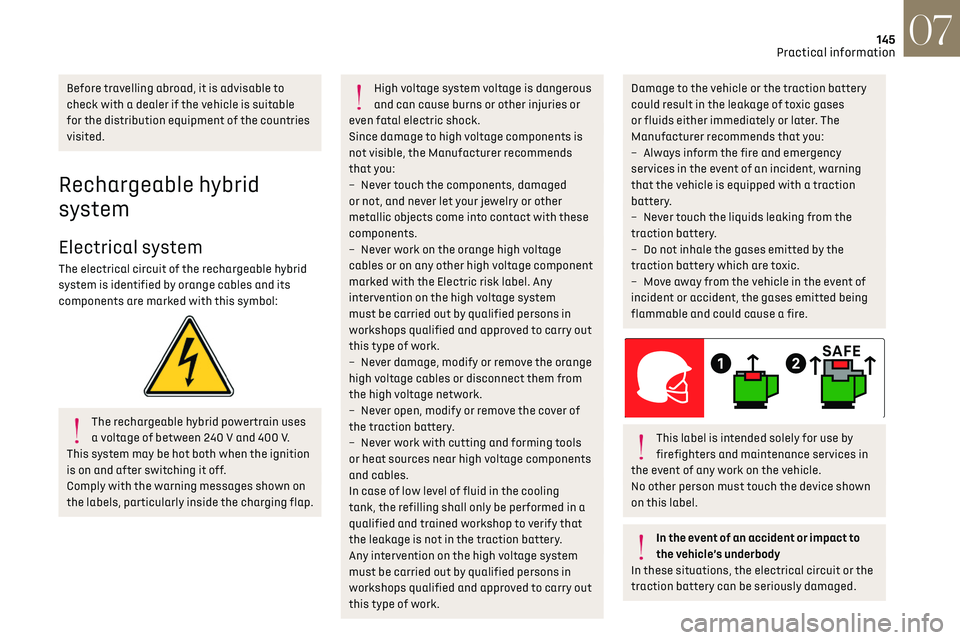
This label is intended solely for use by
firefighters and maintenance services in
the event of any work on the vehicle.
No other person must touch the device shown
on this label.
In the event of an accident or impact to
the vehicle’s underbody
In these situations, the electrical circuit or the
traction battery can be seriously damaged.
Page 152 of 244
150
Practical information07
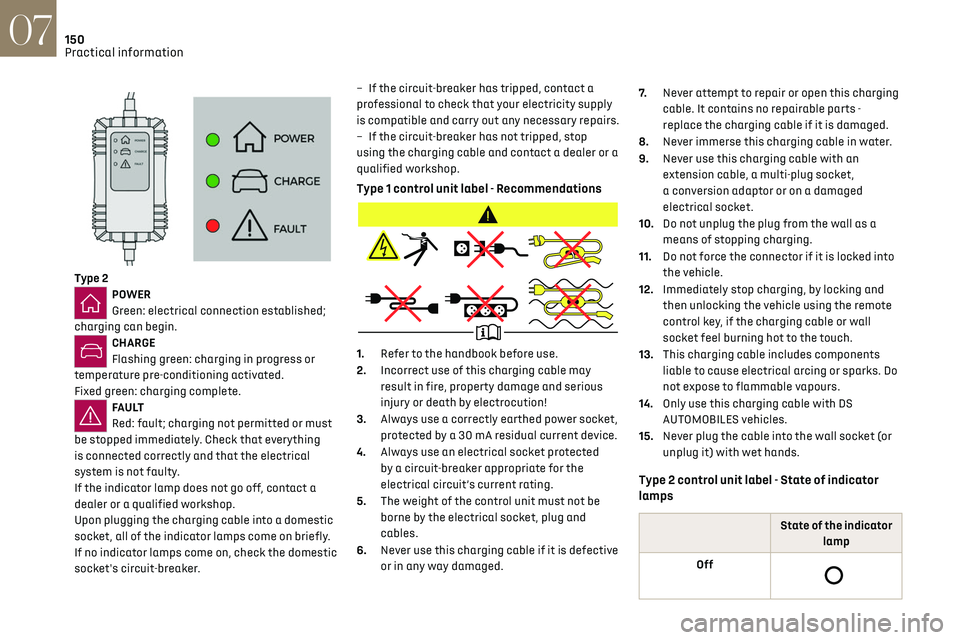
Type 2POWER
Green: electrical connection established;
charging can begin.
CHARGE
Flashing green: charging in progress or
temperature pre-conditioning activated.
Fixed green: charging complete.
FA U LT
Red: fault; charging not permitted or must
be stopped immediately. Check that everything
is connected correctly and that the electrical
system is not faulty.
If the indicator lamp does not go off, contact a
dealer or a qualified workshop.
Upon plugging the charging cable into a domestic
socket, all of the indicator lamps come on briefly.
If no indicator lamps come on, check the domestic
socket's circuit-breaker. –
If the circ
uit-breaker has tripped, contact a
professional to check that your electricity supply
is compatible and carry out any necessary repairs.
–
If the circ
uit-breaker has not tripped, stop
using the charging cable and contact a dealer or a
qualified workshop.
Type 1 control unit label - Recommendations
1. Refer to the handbook before use.
2. Incorrect use of this charging cable may
result in fire, property damage and serious
injury or death by electrocution!
3. Always use a correctly earthed power socket,
protected by a 30 mA residual current device.
4. Always use an electrical socket protected
by a circuit-breaker appropriate for the
electrical circuit’s current rating.
5. The weight of the control unit must not be
borne by the electrical socket, plug and
cables.
6. Never use this charging cable if it is defective
or in any way damaged. 7.
Never attempt to repair or open this charging
cable. It contains no repairable parts -
replace the charging cable if it is damaged.
8. Never immerse this charging cable in water.
9. Never use this charging cable with an
extension cable, a multi-plug socket,
a conversion adaptor or on a damaged
electrical socket.
10. Do not unplug the plug from the wall as a
means of stopping charging.
11. Do not force the connector if it is locked into
the vehicle.
12. Immediately stop charging, by locking and
then unlocking the vehicle using the remote
control key, if the charging cable or wall
socket feel burning hot to the touch.
13. This charging cable includes components
liable to cause electrical arcing or sparks. Do
not expose to flammable vapours.
14. Only use this charging cable with DS
AUTOMOBILES vehicles.
15. Never plug the cable into the wall socket (or
unplug it) with wet hands.
Type 2 control unit label - State of indicator
lamps
State of the indicator
lamp
Off
Page 154 of 244
152
Practical information07
POWERCHARGE FA U LT SymbolDescription
(red)
Control unit malfunction. No charging allowed.
If an error indicator reappears after a manual reset,
the control unit must be checked by a dealer before
the next charge.
(green)
(green)
(red)
The control unit is in diagnostic mode.
Manual reset procedure
The control unit can be reset by simultaneously disconnecting the charging connector and the wall socket.
Then, reconnect the wall socket first. For more information, refer to the handbook.
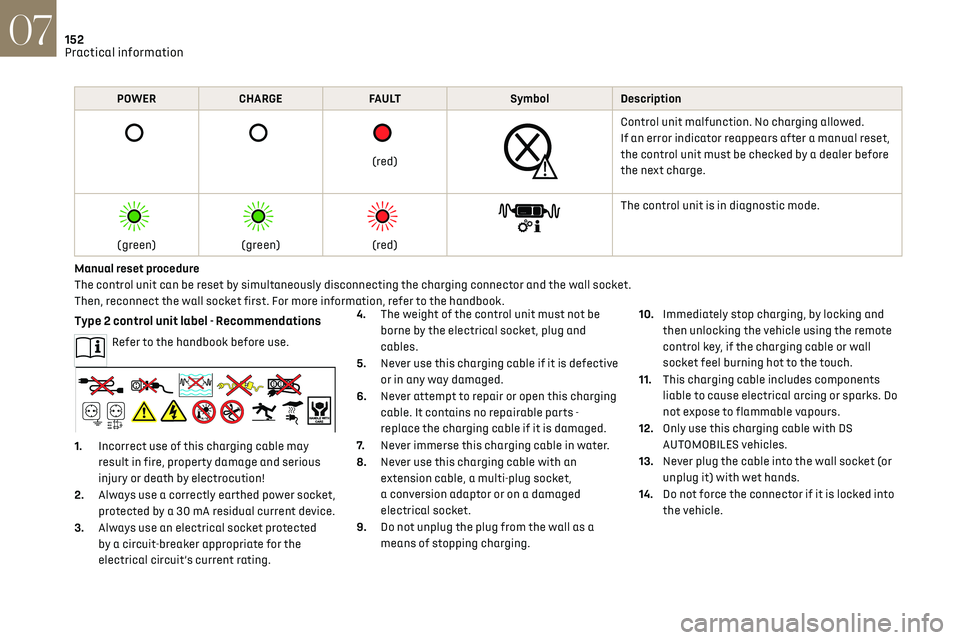
Type 2 control unit label - Recommendations
Refer to the handbook before use.
1. Incorrect use of this charging cable may
result in fire, property damage and serious
injury or death by electrocution!
2. Always use a correctly earthed power socket,
protected by a 30 mA residual current device.
3. Always use an electrical socket protected
by a circuit-breaker appropriate for the
electrical circuit’s current rating. 4.
The weight of the control unit must not be
borne by the electrical socket, plug and
cables.
5. Never use this charging cable if it is defective
or in any way damaged.
6. Never attempt to repair or open this charging
cable. It contains no repairable parts -
replace the charging cable if it is damaged.
7. Never immerse this charging cable in water.
8. Never use this charging cable with an
extension cable, a multi-plug socket,
a conversion adaptor or on a damaged
electrical socket.
9. Do not unplug the plug from the wall as a
means of stopping charging. 10.
Immediately stop charging, by locking and
then unlocking the vehicle using the remote
control key, if the charging cable or wall
socket feel burning hot to the touch.
11. This charging cable includes components
liable to cause electrical arcing or sparks. Do
not expose to flammable vapours.
12. Only use this charging cable with DS
AUTOMOBILES vehicles.
13. Never plug the cable into the wall socket (or
unplug it) with wet hands.
14. Do not force the connector if it is locked into
the vehicle.