media CITROEN DS7 CROSSBACK 2018 User Guide
[x] Cancel search | Manufacturer: CITROEN, Model Year: 2018, Model line: DS7 CROSSBACK, Model: CITROEN DS7 CROSSBACK 2018Pages: 244, PDF Size: 6.87 MB
Page 48 of 244
46
Ease of use and comfort03
Changing settings
► In the Heating Functions or Ventilated Seats
page, select the relevant seat.
► Select an intensity from the three preset
levels: "1" (Low), "2" (Normal) or "3" (High).
The settings are memorised when the ignition is
switched off.
Do not use the function when the seat is
not occupied.
Reduce the heating intensity as soon as
possible.
When the seat and passenger compartment
have reached a satisfactory temperature,
switch the function off; reducing electrical
consumption in turn decreases energy
consumption.
Prolonged use of heated seats is not
recommended for people with sensitive
skin.
There is a risk of burns for people whose
perception of heat is impaired (e.g. illness,
taking medication).
To keep the heated pad intact and to prevent a
short circuit:
–
Do no
t place heavy or sharp objects on the
seat.
–
Do no
t kneel or stand on the seat.
–
Do no
t spill liquids onto the seat.
–
Ne
ver use the heating function if the seat
is damp.
Multipoint massage
System with a choice of type of massage and
adjustment of its intensity.
This system operates with the engine running, as
well as in STOP mode of the Stop & Start.
Activation/Deactivation
In the Seats touch screen application,
select the Massage tab.
► Select the driver or passenger seat.
The corresponding page is displayed with the last
memorised settings.
If the settings are suitable, press to
activate/deactivate the function in the
Seats application.
If no action is taken, the display returns to its
initial state.
The function status is not memorised when the
ignition is switched off.
Changing settings
► In the Massage page, select the seat
concerned.
► Select a massage intensity from the three
preset levels: "1" (Low), "2" (Normal) or "3"
(High).
► Select another type of massage from those
offered.
The modifications are taken into account
immediately and memorised when the ignition is
switched off.
Once activated, the system starts a one hour
massage cycle, made up of sequences of 6
minutes of massage followed by 3 minutes at
rest.
The system stops automatically at the end of the
cycle.
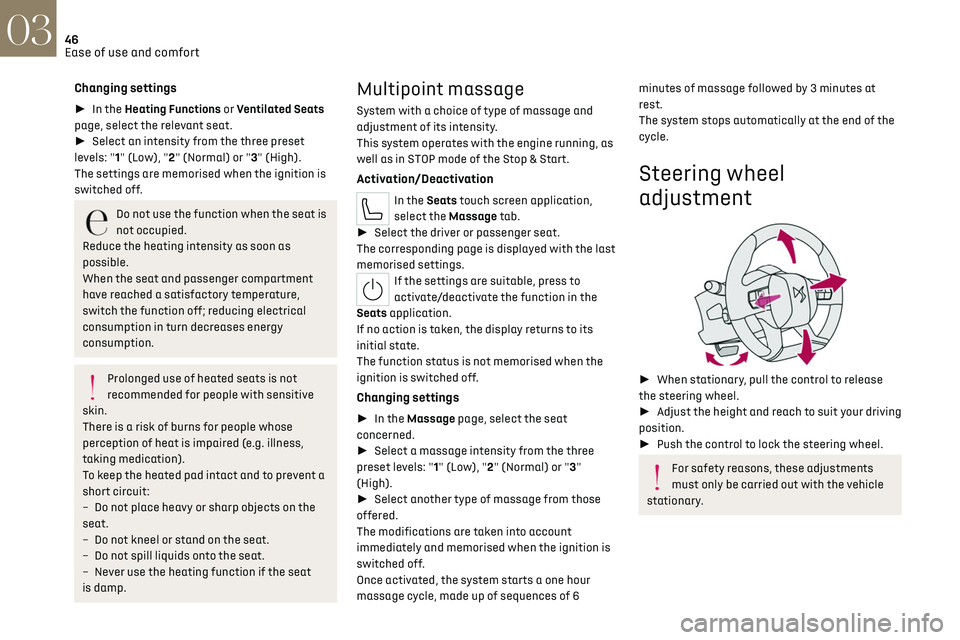
Steering wheel
adjustment
► When stationary, pull the control to release
the steering wheel.
► Adjust the height and reach to suit your driving
position.
► Push the control to lock the steering wheel.
For safety reasons, these adjustments
must only be carried out with the vehicle
stationary.
Page 65 of 244
63
Lighting and visibility04
Exterior lighting control
stalk
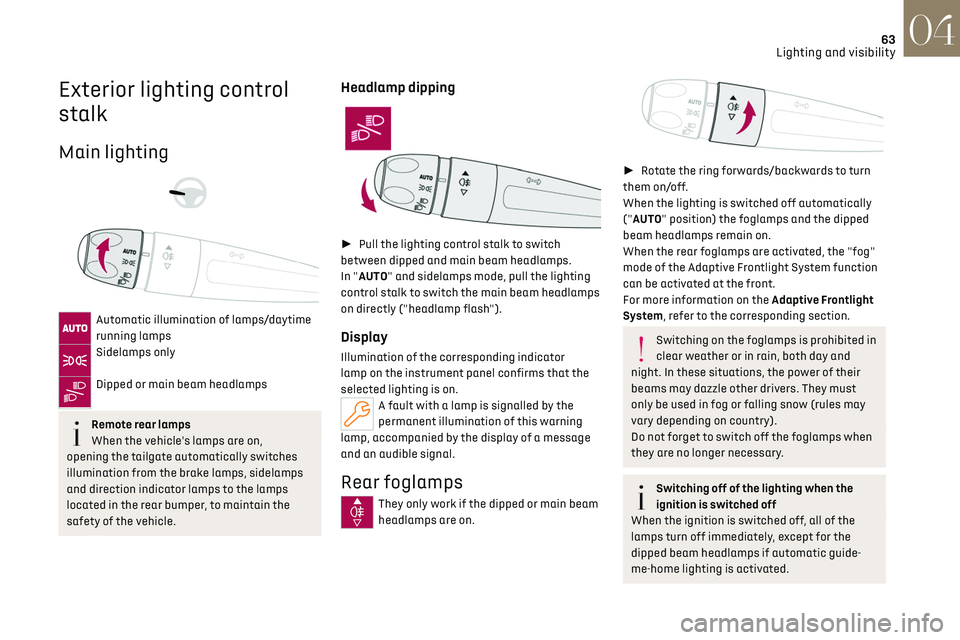
Main lighting
Automatic illumination of lamps/daytime
running lamps
Sidelamps only
Dipped or main beam headlamps
Remote rear lamps
When the vehicle's lamps are on,
opening the tailgate automatically switches
illumination from the brake lamps, sidelamps
and direction indicator lamps to the lamps
located in the rear bumper, to maintain the
safety of the vehicle.
Headlamp dipping
► Pull the lighting control stalk to switch
between dipped and main beam headlamps.
In "AUTO" and sidelamps mode, pull the lighting
control stalk to switch the main beam headlamps
on directly ("headlamp flash").
Display
Illumination of the corresponding indicator
lamp on the instrument panel confirms that the
selected lighting is on.
A fault with a lamp is signalled by the
permanent illumination of this warning
lamp, accompanied by the display of a message
and an audible signal.
Rear foglamps
They only work if the dipped or main beam
headlamps are on.
► Rotate the ring forwards/backwards to turn
them on/off.
When the lighting is switched off automatically
("AUTO" position) the foglamps and the dipped
beam headlamps remain on.
When the rear foglamps are activated, the "fog"
mode of the Adaptive Frontlight System function
can be activated at the front.
For more information on the Adaptive Frontlight
System, refer to the corresponding section.
Switching on the foglamps is prohibited in
clear weather or in rain, both day and
night. In these situations, the power of their
beams may dazzle other drivers. They must
only be used in fog or falling snow (rules may
vary depending on country).
Do not forget to switch off the foglamps when
they are no longer necessary.
Switching off of the lighting when the
ignition is switched off
When the ignition is switched off, all of the
lamps turn off immediately, except for the
dipped beam headlamps if automatic guide-
me-home lighting is activated.
Page 75 of 244
73
Lighting and visibility04
Windscreen wash
► Pull the wiper control stalk towards you and
hold.
A final wiping cycle is performed when
screenwashing ends.
The windscreen wash jets are
incorporated into the tip of each wiper
arm.
Screenwash fluid is sprayed along the length
of the wiper blade. This improves visibility and
reduces screenwash fluid consumption.
To avoid damaging the wiper blades, do
not operate the screenwash if the
screenwash reservoir is empty.
Only operate the screenwash if there is no risk
of the fluid freezing on the windscreen and
hindering visibility. During the winter period,
use "very cold climate" rated products.
Never top up with water.
Rear wiper
► Turn the ring to align the desired symbol with
the marking.
Off
Intermittent wiping
Screenwash-wipe
Reverse
When reverse gear is engaged, the rear wiper will
come into operation automatically if the front
windscreen wipers are operating.
It is configured in the Settings > Vehicle
touch screen application.
In the event of accumulation of snow or
hard frost or if a bicycle carrier is fitted to
a towing system, deactivate the automatic
rear wiper via theSettings > Vehicle touch
screen application.
Rear screenwash
► Turn the ring as far as it will go and hold it in
position.
The screenwash and the wiper operate for as long
as the ring remains turned.
A final wiping cycle is performed when screen
washing ends.
Special position of the
windscreen wipers
This maintenance position is used while cleaning
or replacing the wiper blades. It can also be
useful, in wintry weather (ice, snow), to release
the wiper blades from the windscreen.
To maintain the effectiveness of the flat
wiper blades, it is advisable to:
–
handle them with c
are.
–
clean them regularly using soap
y water.
–
a
void using them to hold cardboard on the
windscreen.
–
replac
e them at the first signs of wear.
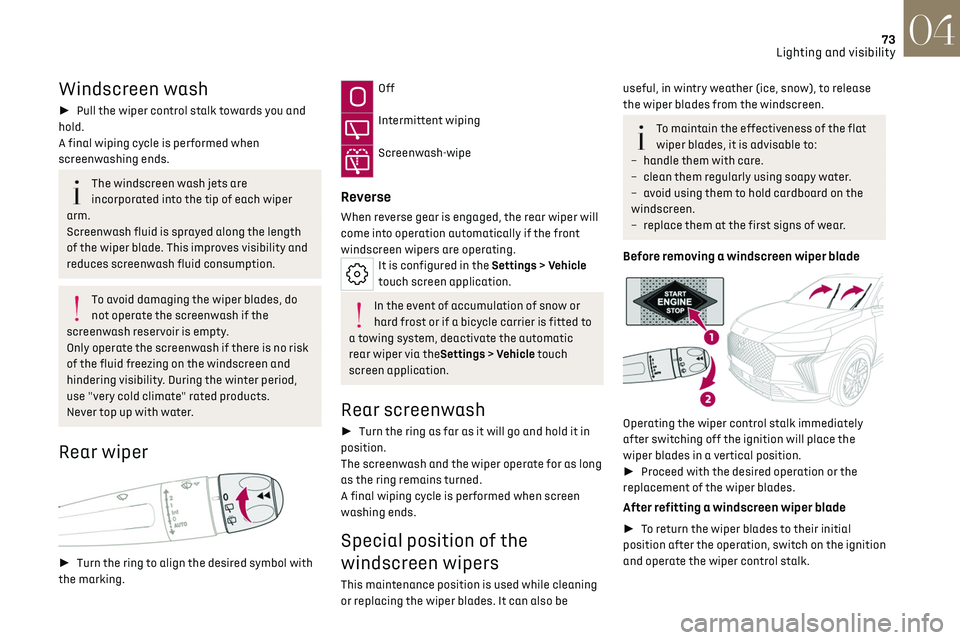
Before removing a windscreen wiper blade
Operating the wiper control stalk immediately
after switching off the ignition will place the
wiper blades in a vertical position.
► Proceed with the desired operation or the
replacement of the wiper blades.
After refitting a windscreen wiper blade
► To return the wiper blades to their initial
position after the operation, switch on the ignition
and operate the wiper control stalk.
Page 79 of 244

77
Safety05
Horn
► Press the central part of the steering wheel.
Pedestrian horn
(Rechargeable hybrid)
This system alerts pedestrians that the vehicle is
approaching, when driving in Electric mode (100%
electric driving).
The pedestrian horn operates once the vehicle is
moving and at speeds of up to 19 mph (30 km/h),
in forward or reverse gear.
This function cannot be deactivated.
Malfunction
In the event of a malfunction, this warning
lamp lights up on the instrument panel.
* In accordance with the general conditions of use of the service, available from dealers and subject to technological and technical limitations.
**
Depending on the geographic c overage provided by the "eCall (SOS)" and "DS ASSISTANCE" systems.
The list of countries covered and the telematic services provided is available from dealers or on the website for your country. Have it checked by a dealer or a qualified
workshop.
Emergency or assistance
call
1. eCall (SOS)
2. DS ASSISTANCE
eCall (SOS)
Your vehicle may be fitted with the eCall (SOS)
system either as standard or as an option.
The eCall (SOS) system provides direct contact to
the emergency services and is fully built into the
vehicle. This contact is made either automatically
via the sensors built into the vehicle, or by
pressing button 1.
According to the country of sale, the eCall (SOS)
system corresponds to the systems PE112,
ERAGLONASS, 999, etc.
The eCall (SOS) system is activated by default.
► To make an emergency call manually, press
button 1 for more than 2 seconds.
The lit indicator lamp and a voice message
confirm that the call has been made to the
emergency services*.
The eCall (SOS) system immediately locates
your vehicle and puts you in contact with the
appropriate emergency services**.
► Pressing again immediately cancels the
request.
The indicator lamp flashes while the vehicle
data is being sent, and then remains lit when
communication is established.
In the event that a serious accident is
detected by the sensors built into the
vehicle, such as the airbag control unit, an
emergency call is made automatically.
The eCall (SOS) system is a public service
of general interest and is free-of-charge.
Page 81 of 244
79
Safety05
DS ASSISTANCE
► If the vehicle breaks down, press button 2
for more than 2 seconds to request assistance
(confirmed by a voice message*).
► Pressing again immediately cancels the
request.
Privacy mode allows you to manage the
level of sharing (data and/or location)
between your vehicle and DS AUTOMOBILES.
It can be configured in the Settings touch
screen application.
If you purchased your vehicle outside the
dealer network, you are invited to have a
dealer check the configuration of these
services and, if desired, modify it as required.
In a multilingual country, services can be
configured to use the official national
language of your choice.
For technical reasons and in particular to
improve the quality of telematics services
provided to customers, the Manufacturer
reserves the right to carry out updates to the
vehicle's on-board telematics system at any
time.
* Depending on the geographic c overage of the "eCall (SOS)" and "DS ASSISTANCE" systems and the official national language chosen by the owner of the
vehicle.
The list of countries covered and the telematic services provided is available from dealers or on the website for your country.
During an update to the vehicle's on-board
telematics system, the DS ASSISTANCE
system will be unavailable.
If you benefit from the DS CONNECT BOX
offer with the SOS and Assistance Pack
included, there are additional services
available to you in your personal space, via the
website for your country.
For information about the SOS and Assistance
Pack, please refer to the general conditions for
these services.
Electronic stability control
(ESC)
The electronic stability control programme
includes the following systems:
–
An
ti-lock braking system (ABS) and Electronic
brake force distribution (EBFD).
–
Emergenc
y braking assistance (EBA).
–
An
ti-slip regulation (ASR).
–
Dynamic st
ability control (DSC).
–
Trailer st
ability assist (TSA).
Anti-lock braking system
(ABS)/Electronic brake force
distribution (EBFD)
These systems enhance the vehicle’s stability
and handling during braking, and enable greater
control while cornering, particularly on poor or
slippery road surfaces.
ABS prevents wheel locking in the event of
emergency braking.
Electronic brake force distribution (EBFD)
manages overall braking pressure on each
individual wheel.
► When braking in an emergency, depress the
pedal very firmly and maintain this pressure.
Normal operation of the ABS may make
itself felt by slight vibrations of the brake
pedal.
The fixed illumination of this warning lamp
signals that there is a fault with the ABS.
The vehicle retains conventional braking. Drive
carefully at a moderate speed.
Have it checked by a dealer or a qualified
workshop.
This warning lamp, when lit together with
the STOP and ABS warning lamps,
Page 85 of 244
83
Safety05
At a speed greater than 12 mph (20 km/h), these
warning lamps flash, accompanied by an audible
signal for approximately two minutes. After this
time, these warning lamps remain on as long as
the seatbelts are not refastened.
Advice
The driver must ensure that passengers
use the seat belts correctly and that they
are all fastened before setting off.
Wherever seated in the vehicle, you must
always fasten the seat belt, even for short
journeys.
Do not invert the seat belt buckles, as they will
not fulfil their role properly.
To ensure the proper functioning of the belt
buckles, make sure that there are no foreign
bodies present (e.g. a coin) before fastening.
Before and after use, ensure that the seat belt
is reeled in correctly.
After folding or moving a seat or rear bench
seat, ensure that the seat belt is positioned
and reeled in correctly.
Installation
The lower part of the strap must be
positioned as low as possible over the pelvis.
The upper part must be positioned in the
hollow of the shoulder.
At the front, adjusting the position of the
seat belt may require the seat height to be
adjusted.
In order to be effective, a seat belt must:
– be tigh tened as close to the body as
possible.
–
be pulled in fron
t of you with a smooth
movement, checking that it is not twisted.
–
must only be used t
o secure one person.
–
no
t show signs of tearing or fraying.
–
no
t be changed or modified, in order to avoid
affecting its performance.
Recommendations for children
Use a suitable child seat if the passenger
is less than 12 years old or shorter than 1.5
metres.
Never use the same seat belt to secure more
than one child.
Never carry a child on your lap.
For more information on Child seats, refer to
the corresponding section.
Maintenance
In accordance with current safety
regulations, for all work on your vehicle's seat
belts, contact a qualified workshop with the
skills and equipment needed, which a dealer is
able to provide.
Have your seat belts checked regularly by a
dealer or a qualified workshop, particularly if
the straps show signs of damage.
Clean the seat belt straps with soapy water or
a textile cleaning product, sold by dealers.
Airbags
General information
This system is designed to improve the safety
of the occupants of the front seats and the rear
outer seats in the event of a violent collision. The
airbags supplement the action of the seat belts
equipped with a force limiting system.
Electronic detectors record and analyse the
front and side impacts sustained in the impact
detection zones:
–
In the e
vent of violent impact, the airbags
deploy instantly and help better protect the
occupants of the vehicle; immediately after the
impact, the airbags deflate rapidly in order not
to hinder the visibility or the possible exit of the
occupants.
–
In the e
vent of a slight impact, a rear impact
and under certain rollover conditions, the airbags
may not deploy; only the seat belt helps to protect
you in these situations.
The seriousness of the impact depends on the
nature of the obstacle and the speed of the
vehicle at the moment of collision.
The airbags do not operate when the
ignition is switched off.
This equipment will only deploy once. If a
second impact occurs (during the same or a
subsequent accident), the airbag will not be
deployed again.
Page 105 of 244
103
Driving06
to change modes, an alert message is displayed
on the instrument panel.
Only appropriate mode change instructions are
validated.
With the engine running and the brakes
released, if R, D or M is selected, the
vehicle moves off, even without pressing the
accelerator pedal.
Never press the accelerator and brake
pedals at the same time. Risk of
damaging the gearbox!
If the battery is flat, you must place the chocks
supplied with the vehicle tools against one of
the wheels to immobilise the vehicle.
Unlocking the gearbox
– From mode P: ► Fully depress the brake pedal.
► Press the Unlock button.
► While continuing to press the brake pedal
and the Unlock button, select another mode.
–
F
rom neutral N, at a speed below 3 mph
(5 km/h): ► Fully depress the brake pedal.
► While continuing to depress the brake pedal,
select another mode.
Engaging reverse gear
► Slow down until you come to a stop.
► Depress the brake pedal, then press the
Unlock button.
► While continuing to press, select mode R.
Permanent manual mode
Entering the mode:
► With mode D initially selected.
► Press button M; the green indicator lamp in
the button comes on.
Exiting the mode:
► Push forwards once to return to D.
or
► Press button M; the indicator lamp in the
button goes off.
Switching off the ignition
To switch off the ignition, the vehicle must be
stationary.
Free-wheeling
For more information on Free-wheeling, refer to
the corresponding section.
If you open the driver's door while mode N
is engaged, an audible signal will sound. It
will stop when you close the driver's door
again.
Special aspects of automatic mode
The gearbox selects the gear that provides
optimal performance based on ambient
temperature, road profile, vehicle loading and
driving style.
For maximum acceleration, press the accelerator
fully down (kick-down). The gearbox changes down automatically or holds the selected gear
until the maximum engine speed is reached.
Steering mounted controls allow the driver to
temporarily select a gear, if the vehicle speed and
engine speed conditions permit.
Special aspects of manual mode
The gearbox only changes from one gear to
another if the vehicle speed and engine speed
conditions permit.
Starting the vehicle
From mode P:
►
Fully depress the brake pedal.
► Start the engine.
► Maintaining pressure on the brake pedal,
press the Unlock button.
► Push once or twice rearwards to select
the automatic mode D, or forwards to engage
reverse R.
From neutral N:
► Fully depress the brake pedal.
► Start the engine.
► Maintaining pressure on the brake pedal,
push rearwards to select the automatic mode D,
or forwards, while pressing the Unlock button to
engage reverse R.
Then, from D or R:
► Release the brake pedal.
► Accelerate gradually to automatically release
the electric parking brake.
The vehicle moves off immediately.
Page 106 of 244
104
Driving06
Never try to start the engine by pushing
the vehicle.
Switching the vehicle off
Regardless of the current gearbox mode, mode P
is immediately engaged automatically when the
ignition is switched off.
However, in mode N, mode P will be engaged after
a delay of 5 seconds (time to enable free-wheeling
mode).
Check that mode P has been engaged and
that the electric parking brake was applied
automatically; if not, apply it manually.
The corresponding indicator lamps on the
gear selector and the electric parking
brake control must be on, as well as the
indicator lamps on the instrument panel.
Gearbox malfunction
This warning lamp comes on, accompanied
by an audible signal and the display of a
message.
Visit a dealer or a qualified workshop.
Do not drive faster than 62 mph (100 km/h),
keeping to the speed limit.
Switching of the gearbox to back-up mode
Mode D locks in third gear.
The paddles on the steering wheel do not work
and mode M is no longer accessible.
You may feel a significant jolt on engaging reverse
gear. This will not damage the gearbox.
Selector malfunction
Minor malfunction
This warning lamp comes on, accompanied
by the display of a message and an audible
signal.
Drive carefully.
Visit a dealer or a qualified workshop.
In some cases, the selector indicator lamps may
no longer come on, but the gearbox state is still
displayed on the instrument panel.
Major malfunction
This warning lamp comes on, accompanied
by the display of a message.
You must stop the vehicle.
Stop as soon as it is safe to do so and
switch off the ignition.
Contact a dealer or a qualified workshop.
e-EAT8 electric automatic
gearbox (Rechargeable
hybrid)
Automatic 8-speed gearbox with a push selector
and regenerative braking function.
With the exception of manual mode and
regenerative braking, the operation is identical to
that of other EAT8 gearboxes. For more information on the Operation or the
Malfunctions of the EAT8 gearbox, refer to the
corresponding sections.
Gearbox selector positions
P.
Car park
For parking the vehicle: the front wheels are
blocked.
R. Reverse gear
N. Neutral
For moving the vehicle with the ignition
off: in certain car washing machines, when
towing the vehicle, etc.
D/B. Automatic forward gear (D) or automatic
forward gear with regenerative braking (B)
The gearbox manages gear changes
according to the style of driving, the road
profile and the vehicle load. With the
regenerative braking function activated,
the gearbox also controls braking when the
accelerator pedal is released.
Page 108 of 244
106
Driving06
The system uses a computer and sensors, which
determine the optimal level of shock absorption
to be applied to each shock absorber.
The system is also associated with a camera,
located at the top of the windscreen, constantly
monitoring the road condition. Based on the
information transmitted by the camera, the
system anticipates possible road defects.
The operation of the system depends on the
driving mode selected (depending on equipment).
For more information on the Driving modes,
please refer to the corresponding section.
Malfunction
In the event of a malfunction, this warning
lamp lights up on the instrument panel.
Have it checked by a dealer or a qualified
workshop.
Driving modes
The driving modes available depend on the engine
and equipment of the vehicle.
Driving modes are selected using the following
control:
► Press the control to display the modes on the
instrument panel.
► Press the control again to change mode.
The selected mode is activated immediately.
With petrol / Diesel engines
Whenever the ignition is switched on, Normal
driving mode is selected by default.
Eco
To reduce fuel consumption by optimising the
operation of the heating and air conditioning and,
depending on version, accelerator, automatic
gearbox, gear shift indicator.
Free-wheeling in Eco mode: depending on version,
with the EAT8 gearbox, switching into "free-
wheeling" is encouraged to slow the vehicle down
without using engine braking. You can save fuel
by taking your foot gradually and fully off the
accelerator pedal in anticipation of slowing down.
Comfort
To achieve more comfortable driving on poor
road surfaces, over speed humps and sleeping
policemen or on long journeys. In this mode, DS
ACTIVE SCAN SUSPENSION utilises additional
information coming from the multifunction
camera (early detection of road type and road
surface condition).
Normal
To restore the default settings.
Sport
To obtain more dynamic driving with action on the
power steering, DS ACTIVE SCAN SUSPENSION,
accelerator and gear changes (with an automatic
gearbox), acoustic ambience of the engine and
the possibility of displaying the vehicle’s dynamic
settings on the instrument panel.
Manual
Permanent Manual mode with an automatic
gearbox.
This manual mode is accessed via the button M of
the push selector.
To change gears manually using the control
paddles on the steering wheel.
For more information on Automatic gearbox
(EAT8), refer to the corresponding section.
Page 111 of 244
109
Driving06
instrument panel, accompanied by the display of
a message.
Have it checked by a dealer or a qualified
workshop.
Gear shift indicator
(Depending on engine)
This system is designed to reduce fuel
consumption by recommending the most suitable
gear.
Operation
Depending on the driving situation and the
vehicle's equipment, the system may recommend
skipping one or more gears.
Gear engagement recommendations are not to be
considered mandatory. Indeed, the configuration
of the road, the traffic density and safety remain
determining factors when choosing the best
gear. Therefore, the driver remains responsible
for deciding whether or not to follow the system’s
advice.
The system cannot be deactivated.
The system is only active in mode M of the
automatic gearbox.
The information appears on the instrument
panel, in the form of an arrow and the
recommended gear.
The system adapts the gear change
instructions according to the driving
conditions (e.g. slope, load) and driving style
(e.g. power demand, acceleration, braking).
The system never suggests:
–
engaging first gear
.
–
engaging re
verse gear.
Stop & Start
The Stop & Start function puts the engine
temporarily into standby - STOP mode - during
phases when the vehicle is stationary (e.g. red
lights, traffic jams). The engine automatically
restarts - START mode - as soon as the driver
indicates the intention of moving off again.
Primarily designed for urban use, the function
is intended to reduce fuel consumption and
exhaust emissions as well as the noise level when
stationary.
The function does not affect the functionalities of
the vehicle, in particular the braking.
Deactivation/Reactivation
By default, the function is activated when the
ignition is switched on.
It is configured in the ADAS touch screen
application.
or
Direct access to the Shortcuts for driving aids.
The display of a message on the instrument panel
confirms the change of state.
If the function is deactivated while the engine is
in STOP mode, it will restart immediately.
Associated indicator lamps
Function activated: engine on standby
(STOP mode)
Function deactivated or malfunction
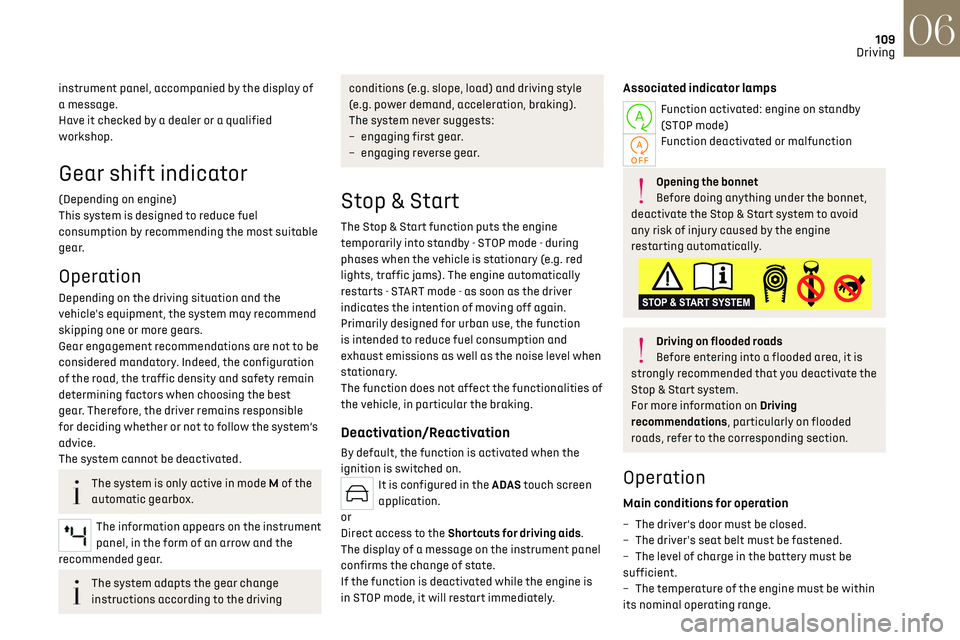
Opening the bonnet
Before doing anything under the bonnet,
deactivate the Stop & Start system to avoid
any risk of injury caused by the engine
restarting automatically.
Driving on flooded roads
Before entering into a flooded area, it is
strongly recommended that you deactivate the
Stop & Start system.
For more information on Driving
recommendations, particularly on flooded
roads, refer to the corresponding section.
Operation
Main conditions for operation
– The driver’s door must be closed.
– The driv er's seat belt must be fastened.
–
The le
vel of charge in the battery must be
sufficient.
–
The t
emperature of the engine must be within
its nominal operating range.