keyless entry Citroen GRAND C4 PICASSO RHD 2016 2.G Owner's Manual
[x] Cancel search | Manufacturer: CITROEN, Model Year: 2016, Model line: GRAND C4 PICASSO RHD, Model: Citroen GRAND C4 PICASSO RHD 2016 2.GPages: 523, PDF Size: 13.63 MB
Page 4 of 523
Touch screen tablet 11
Instrument panels
1
7
Indicator
and warning lamps
2
1
Gauges
and indicators
3
7
Adjustment
buttons
4
5
Trip
computer
4
8
InstrumentsOver view
Electronic key - remote control 5
1
Keyless Entry and Starting
5
3
Central
locking
6
0
Doors
61
Boo
t
6
3
Motorised
tailgate
6
4
Hands-free
tailgate access
6
8
Alarm
7
0
Electric
windows
7
3
Access
Front seats 75
Rear seats
8
2
Seat
modularity
8
9
Steering
wheel adjustment
9
1
Ventilation
9
2
Heating
9
4
Dual-zone
m
anual
a
ir
c
onditioning
9
5
Dual-zone
automatic air conditioning
9
7
Front
demist - defrost
1
02
Rear
screen demist -
d
efrost
1
02
Scented
air freshener
1
03
Interior
fittings
1
05
Courtesy
lamps
1
19
Interior
mood lighting
1
20
Ease of use a nd c omfort
Driving recommendations 1 21
Starting-switching off the engine with
the
electronic key
1
23
Starting-switching
off the engine with
Keyless
Entry and Starting
1
25
Electric
parking brake
1
29
Hill
start assist
1
36
5 -speed
manual gearbox
1
37
6 -speed
manual gearbox
1
37
Automatic
gearbox
1
38
Gear
ef ficiency indicator
1
43
Stop & Start
1
44
Memorising
speeds
1
47
Speed
limit recognition
1
48
Speed
limiter
1
52
Cruise
control
1
55
Dynamic
cruise control
1
58
Dynamic
cruise control
with
Stop function
1
65
Collision
risk alert
1
74
Assisted
lane departure
warning
system
1
76
Blind
spot monitoring system
1
80
Fatigue
detection system
1
83
Parking
sensors
1
85
Reversing
camera
1
87
360
Vision
1
88
Park
Assist
1
90
Under-inflation
d
etection
1
98
Driving
Eco-driving
Contents
Page 6 of 523
4
Exterior
Fuel tank, misfuel
p revention 25 5-257
Wipers,
screenwash
2
16 -220
Changing a wiper blade
2
66
Exterior welcome lighting
2
12-213
Door mirror spotlamps
2
12
Cornering lighting
2
14
Directional
l
ighting
2
15
Adjusting the headlamp beam height 213
Changing bu
lbs 2
99-303
-
f
ront
lamps
-
fo
glamps
-
d
irection
indicator
repeaters
Very
cold
climate
screen(s)
2
59
Door
mirrors
2
01-202
Panoramic
sunroof
2
21
Roof
bars
2
67
Accessories
26
4-265
ESC:
ABS,
EBA,
ASR,
DSC
2
23 -225
Tyre
under-inflation
detection
1
98 -200
Tyre
pressures
3
29
Temporary
puncture
repair
kit
2
82-288
Changing
a
wheel
2
89 -298
-
t
ools
-
s
pare
wheel
-
r
emoving
/
refitting
Snow
chains
2
58
Changing
bu
lbs
3
03-307
-
r
ear
lamps
-
3
rd
brake
lamp
-
n
umber
plate
lamps
-
fo
glamps
Parking
sensors
1
85 -186
Reversing
camera
1
87
360
Vision
1
88 -189
Park
Assist
1
90 -197
Towbar
1
22,
262
Towing
(advice)
3
17-318
Towbar
with
quickly
detachable
tow
ball
2
60-261
Boot
6
3-69
-
o
pening
/
closing
- em
ergency r
elease
Motorised
tailgate
6
4- 67
Hands-free
tailgate
6
8 - 69
Electronic
key
/
"Keyless
Entry
and
S
tarting"
system
5
1-59
-
o
pening
/
closing
-
a
nti-theft
protection
-
b
ack-up
control
-
b
attery
Doors
61
- 62
-
o
pening
/
closing
-
em
ergency
c
ontrol
Central
locking
6
0
Alarm
7
0-72
Electric
windows
7
3 -74
Over view
Page 55 of 523
53
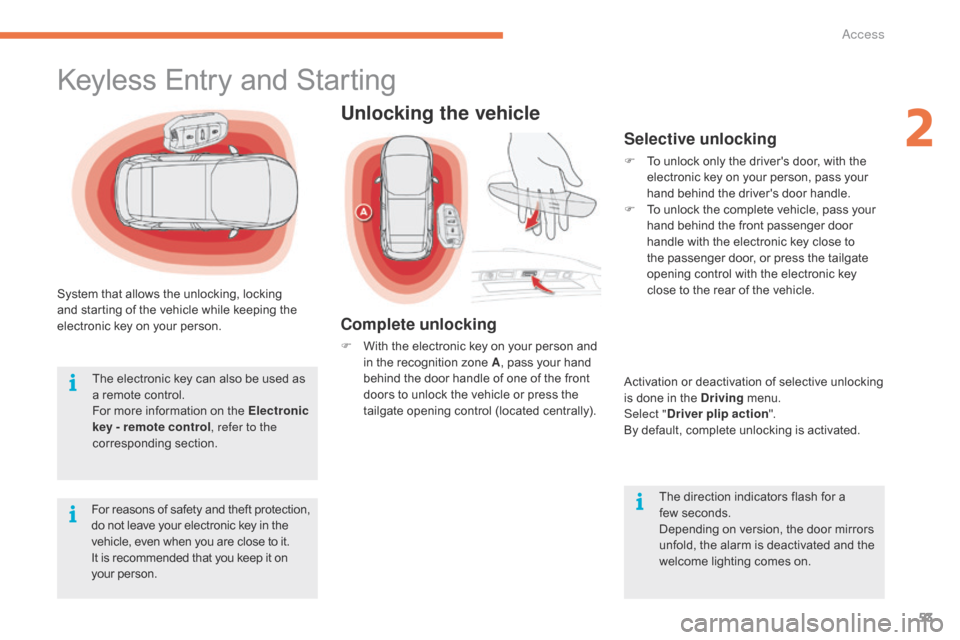
System that allows the unlocking, locking and starting of the vehicle while keeping the
e
lectronic key on your person.
For
reasons of safety and theft protection,
d
o not leave your electronic key in the
v
ehicle, even when you are close to it.
It
is recommended that you keep it on
y
our person.
The
electronic key can also be used as
a
remote control.
For
more information on the Electronic
key - remote control , refer to the
corresponding
s
ection.
Keyless Entry and Starting
Unlocking the vehicle
Complete unlocking
F With the electronic key on your person and i
n the recognition zone A,
pass your hand
b
ehind the door handle of one of the front
d
oors to unlock the vehicle or press the
t
ailgate opening control (located centrally).
Selective unlocking
F To unlock only the driver's door, with the e
lectronic key on your person, pass your
h
and behind the driver's door handle.
F
T
o unlock the complete vehicle, pass your
h
and behind the front passenger door
h
andle with the electronic key close to
t
he passenger door, or press the tailgate
o
pening control with the electronic key
c
lose to the rear of the vehicle.
Activation
or deactivation of selective unlocking
i
s done in the Driving
menu.
Select " Driver plip action ".
By
default, complete unlocking is activated.
The
direction indicators flash for a
few
seconds.
Depending
on version, the door mirrors
u
nfold, the alarm is deactivated and the
w
elcome lighting comes on.
2
Access
Page 58 of 523
56
As a safety measure (children on board), never leave the vehicle without
t
aking the electronic key for the Keyless
E
ntry and Starting system with you,
e
ven for a short period.
Be
aware of the risk of theft when the
e
lectronic key for the Keyless Entry and
S
tarting system is in one of the defined
z
ones with the vehicle unlocked.
If
one
of
the
doors
or
the
boot
is
still
o
pen
or
if
the
electronic
key
for
the
K
eyless
Entry
and
Starting
system
has
b
een
left
inside
the
vehicle,
the
central
l
ocking
does
not
take
place.
However,
the
alarm
(if
fitted)
will
be
fully
a
ctivated
after
about
45
seconds.
In
order to preserve the battery in the
e
lectronic key and the vehicle's battery,
t
he "hands-free" functions are put into
l
ong-term standby after 21 days without
u
se. To restore these functions, press
o
ne of the remote control buttons or
s
tart the engine with the electronic key
i
n the reader.
For
more information on starting with
K
eyless Entr y and Star ting , refer to
the
corresponding section.
If
the
vehicle
is
unlocked
by
mistake
a
nd
with
no
action
on
the
doors
or
boot,
t
he
vehicle
will
lock
again
automatically
a
fter
about
30
seconds.
If
fitted
to
your
vehicle,
the
alarm
will
a
lso
be
reactivated
automatically.
The
automatic
folding
and
unfolding
o
f
the
door
mirrors
can
be
deactivated
b
y
a
CITROËN
dealer
or
a
qualified
w
orkshop. Accumulations
(water, dust, grime, s
alt...) on the inner sur face of the door
h
andle may affect detection.
If
cleaning the inner sur face of the door
h
andle using a cloth does not restore
d
etection, contact a CITROËN dealer or
a
qualified workshop.
A
sudden splash of water (stream of
w
ater, high pressure jet washer, …)
m
ay be identified by the system as the
d
esire to open the vehicle.
Access
Page 62 of 523
60
Manual central locking
Central locking
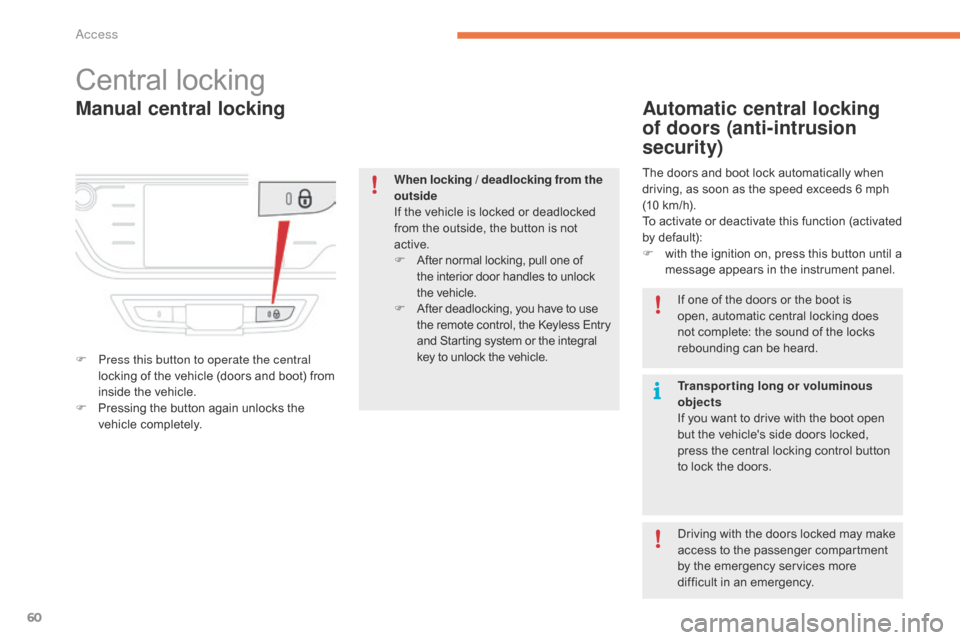
F Press this button to operate the central locking of the vehicle (doors and boot) from
i
nside the vehicle.
F
P
ressing the button again unlocks the
v
ehicle
c
ompletely.
Automatic central locking
of doors (anti-intrusion
security)
The doors and boot lock automatically when driving, as soon as the speed exceeds 6 mph
(
10 km/h).
To
activate or deactivate this function (activated
b
y default):
F
w
ith the ignition on, press this button until a
m
essage appears in the instrument panel.
When locking / deadlocking from the
outside
If
the
vehicle
is
locked
or
deadlocked
f
rom
the
outside,
the
button
is
not
a
ctive.
F
A
fter
normal
locking,
pull
one
of
t
he
interior
door
handles
to
unlock
t
he vehicle.
F
A
fter
deadlocking,
you
have
to
use
t
he
remote
control,
the
Keyless
Entry
a
nd
Starting
system
or
the
integral
k
ey
to
unlock
the
vehicle. If
one of the doors or the boot is
o
pen, automatic central locking does
n
ot complete: the sound of the locks
r
ebounding can be heard.
Transporting long or voluminous
objects
If
you want to drive with the boot open
b
ut the vehicle's side doors locked,
p
ress the central locking control button
t
o lock the doors.
Driving
with the doors locked may make
a
ccess to the passenger compartment
b
y the emergency services more
d
ifficult in an emergency.
Access
Page 63 of 523
61
Doors
Opening
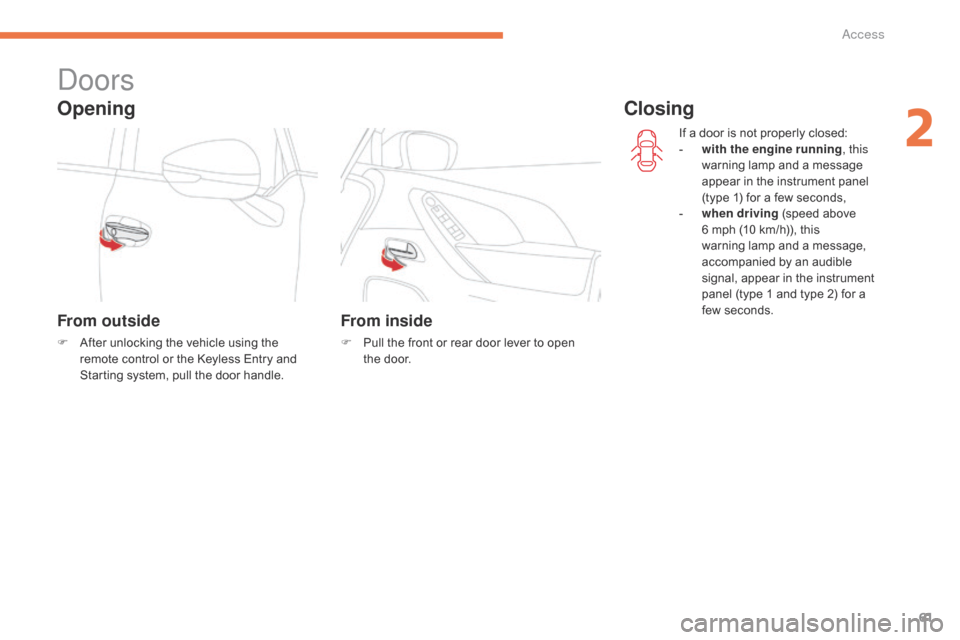
From outside
F After unlocking the vehicle using the r
emote control or the Keyless Entry and
S
tarting system, pull the door handle.
From inside
F Pull the front or rear door lever to open t
he door. If
a door is not properly closed:
-
w
ith the engine running
, this
warning lamp and a message
a
ppear in the instrument panel
(
type 1) for a few seconds,
-
wh
en driving
(speed above
6
mph (10 km/h)), this
w
arning lamp and a message,
a
ccompanied by an audible
s
ignal, appear in the instrument
p
anel (type 1 and type 2) for a
f
ew seconds.
Closing
2
Access
Page 65 of 523
63
Boot
Opening the tailgate
With the electronic key /
remote controlWith the tailgate opening
control
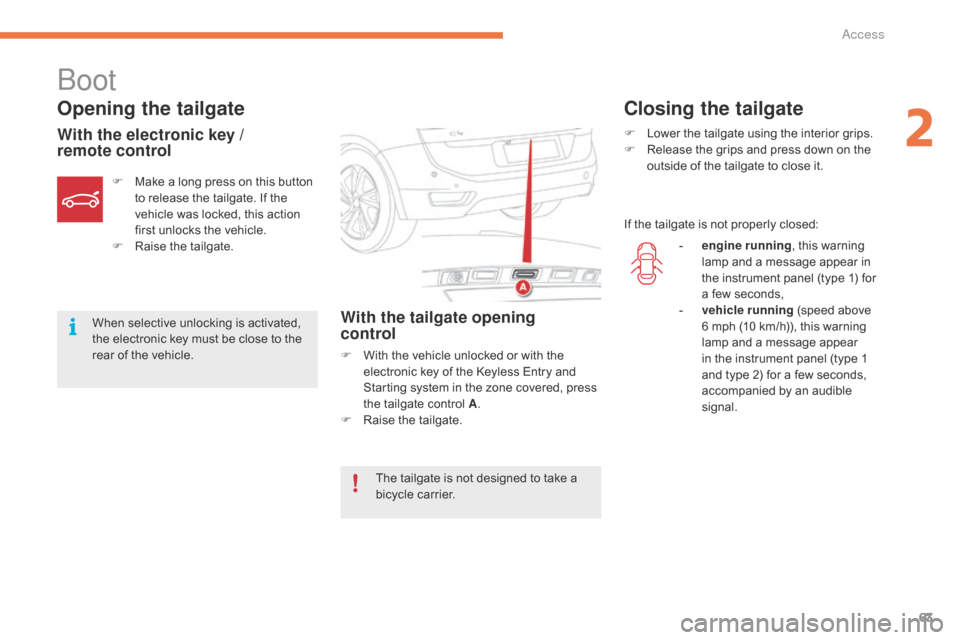
F With the vehicle unlocked or with the e
lectronic key of the Keyless Entry and
S
tarting system in the zone covered, press
t
he tailgate control A.
F
Ra
ise
t
he
t
ailgate.
F
M
ake
a
long
press
on
this
button
t
o
release
the
tailgate.
If
the
v
ehicle
was
locked,
this
action
f
irst
unlocks
the
vehicle.
F
Ra
ise
t
he
t
ailgate.
When
selective
unlocking
is
activated,
t
he
electronic
key
must
be
close
to
the
r
ear
of
the
vehicle.
Closing the tailgate
F Lower
the tailgate using the interior grips.
F R elease the grips and press down on the
o
utside of the tailgate to close it.
If
the tailgate is not properly closed:
The
tailgate
is
not
designed
to
take
a
b
icycle
carrier. -
e
ngine running,
this warning
l
amp and a message appear in
t
he instrument panel (type 1) for
a
few seconds,
-
v
ehicle running
(speed above
6
mph (10 km/h)), this warning
l
amp and a message appear
i
n the instrument panel (type 1
a
nd type 2) for a few seconds,
a
ccompanied by an audible
s
ignal.
2
Access
Page 67 of 523
65
or
Opening the tailgate with the
electronic key / remote control (A)
Opening the tailgate with the
"Keyless Entry and Starting"
system "B"
Opening the tailgate
F Make a long press on the remote c
ontrol button.
F
P
ress button B on the tailgate, with the
e
lectronic key in the zone covered.
When
selective locking is activated, the
e
lectronic key must be near the rear of
t
he
vehicle.
By
default, the tailgate opens
c
ompletely or alternatively to the
m
emorised
p
osition.
F
A
fter
complete unlocking of the vehicle,
p
ress control B on the tailgate.
The
instruction is confirmed by an audible
s
ignal.
Motorised closing
There are two possibilities:
F P ress and release the exterior control B.
or
The
motorised tailgate has an anti-
pinch
system that interrupts closing if it
e
ncounters an obstacle.
F
P
ress and then release button C.
There
are
several
ways
of
operating
the
m
otorised t
ailgate:
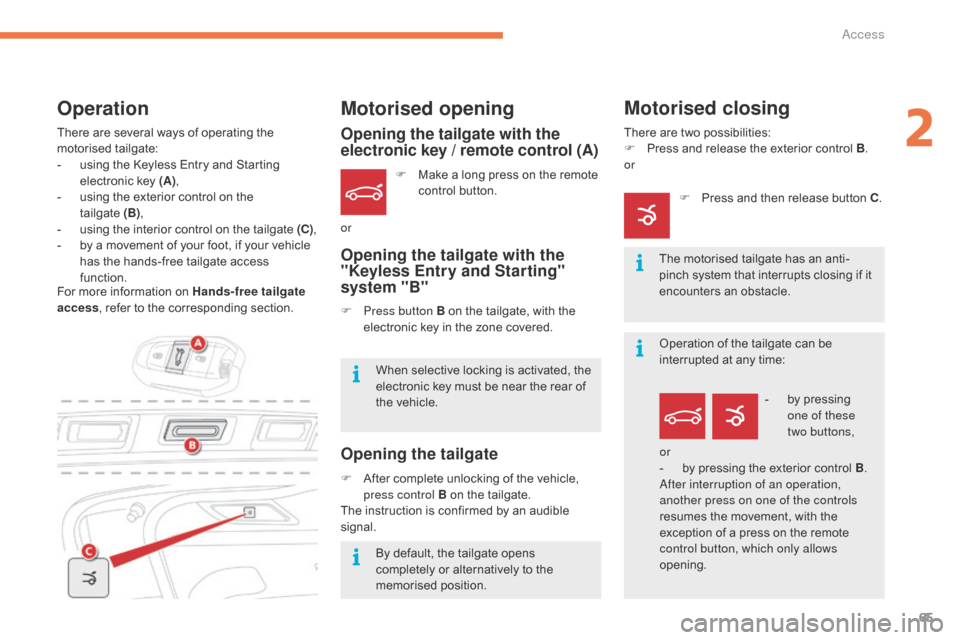
-
u
sing
the
Keyless
Entry
and
Starting
e
lectronic
key
(A) ,
-
u
sing
the
exterior
control
on
the
t
ailgate (B),
-
u
sing
the
interior
control
on
the
tailgate
(C) ,
-
b
y
a
movement
of
your
foot,
if
your
vehicle
h
as
the
hands-free
tailgate
access
f
unction.
Motorised opening
For more information on Hands-free tailgate
a ccess ,
refer to the corresponding section.
Operation
Operation of the tailgate can be interrupted at any time:
-
b
y pressing
o
ne of these
two
buttons,
or
-
b
y pressing the exterior control B.
After interruption of an operation,
another press on one of the controls
resumes
the movement, with the
e
xception of a press on the remote
c
ontrol button, which only allows
opening.
2
Access
Page 72 of 523
70
For all work on the alarm system, contact a CITROËN dealer or a
q
ualified
w
orkshop.
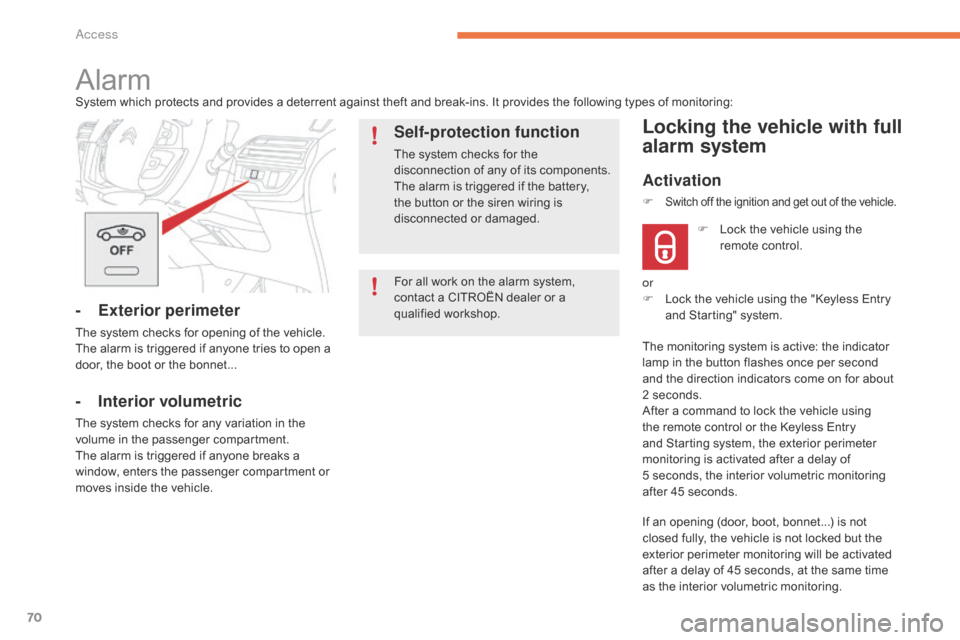
AlarmSystem which protects and provides a deterrent against theft and break-ins. It provides the following types of monitoring:
- Exterior perimeter
The system checks for opening of the vehicle.
T he alarm is triggered if anyone tries to open a
d
oor, the boot or the bonnet...
- Interior volumetric
The system checks for any variation in the volume in the passenger compartment.
The
alarm is triggered if anyone breaks a
w
indow, enters the passenger compartment or
m
oves inside the vehicle.
Self-protection function
The system checks for the disconnection of any of its components.
The
alarm is triggered if the battery,
t
he button or the siren wiring is
d
isconnected
o
r
d
amaged.
Locking the vehicle with full
alarm system
Activation
If an opening (door, boot, bonnet...) is not closed fully, the vehicle is not locked but the
e
xterior perimeter monitoring will be activated
a
fter a delay of 45 seconds, at the same time
a
s the interior volumetric monitoring.
F
L
ock the vehicle using the
r
emote control.
F
Switch off the ignition and get out of the vehicle.
or
F
L ock the vehicle using the "Keyless Entry
a
nd Starting" system.
The
monitoring system is active: the indicator
l
amp in the button flashes once per second
a
nd the direction indicators come on for about
2
seconds.
After
a command to lock the vehicle using
t
he remote control or the Keyless Entry
a
nd Starting system, the exterior perimeter
m
onitoring is activated after a delay of
5 s
econds, the interior volumetric monitoring
a
fter 45 seconds.
Access
Page 73 of 523
71
OFF
Locking the vehicle with exterior perimeter
monitoring only
Deactivate the interior volumetric monitoring to avoid unwanted triggering of the alarm in
c
ertain cases such as:
-
l
eaving a window partially open,
-
w
ashing your vehicle,
-
c
hanging a wheel,
-
t
owing your vehicle,
-
t
ransport on a ferry.
Deactivating the volumetric
monitoring
F Switch off the ignition and within t
en seconds press this button
u
ntil its indicator lamp is on fixed.
F
G
et
out of the vehicle.
F
I
mmediately lock the vehicle using the
r
emote control or the "Keyless Entry and
S
tarting" system.
Only
the
exterior perimeter protection system is
a
ctive:
the indicator lamp in the button flashes
o
nce
per
second.
To
be
effective, this deactivation must be done
e
very
time the ignition is switched off.
In
the
case
of
automatic
locking
of
the
v
ehicle
(which
occurs
after
a
period
o
f
30
seconds
if
a
door
or
the
boot
is
n
ot
opened),
the
monitoring
system
is
r
eactivated
a
utomatically.
Deactivation
F Press one of the unlocking buttons on the r
emote control:
short press
long
press
or
F
U
nlock the vehicle using the "Keyless Entry
a
nd Starting" system.
The
monitoring system is deactivated: the
i
ndicator lamp in the button is off and the
d
irection indicators flash for about 2 seconds.
Reactivating the interior
volumetric monitoring
F Deactivate the exterior perimeter m
onitoring by unlocking the vehicle using
t
he remote control or the Keyless Entry and
S
tarting system.
The
indicator lamp in the button goes off.
F
R
eactivate the full alarm system by locking
t
he vehicle using the remote control or the
"
Keyless Entry and Starting" system.
The
indicator lamp in the button flashes once
p
er second again.
2
Access