tank DAEWOO LACETTI 2004 Service Manual Online
[x] Cancel search | Manufacturer: DAEWOO, Model Year: 2004, Model line: LACETTI, Model: DAEWOO LACETTI 2004Pages: 2643, PDF Size: 80.54 MB
Page 2022 of 2643

7B – 20IMANUAL CONTROL HEATING, VENTILATION AND AIR CONDITIONING SYSTEM
DAEWOO V–121 BL4
S Dip new O–rings in clean polyalkaline glycol refrig-
erant oil before installation.
MAINTAINING CHEMICAL STABILITY
IN THE REFRIGERATION SYSTEM
The efficient operation and the life of the air conditioning
(A/C) system is dependent upon the chemical stability of
the refrigeration system. When foreign materials, such as
dirt, air, or moisture, contaminate the refrigeration system,
they will change the stability of the refrigerant and the poly-
alkaline glycol (PAG) compressor oil. They will also affect
the pressure–temperature relationship, reduce efficient
operation, and can possibly cause interior corrosion and
abnormal wear of moving parts.
Observe the following practices to ensure chemical stabil-
ity in the system:
S Wipe away dirt or oil at and near any connection
before opening that connection. This will reduce the
chance of dirt entering the system.
S Cap, plug, or tape both sides of a connection as
soon as possible after opening the connection. This
will prevent the entry of dirt, foreign material, and
moisture.
S Keep all tools clean and dry, including the manifold
gauge set and all replacement parts.
S Use a clean and dry transfer device and container
to add polyalkaline glycol refrigerant oil. This will
ensure that the oil remains as moisture–free as
possible. Refer to ”Discharging, Adding Oil, Eva-
cuating, and Charging Procedures for A/C System”
in this section.
S Have everything you need ready to allow you to
perform all operations quickly when opening an A/C
system. Do not leave the A/C system open any lon-
ger than necessary.
S Evacuate and recharge any A/C system that has
been opened. Refer to ”Discharging, Adding Oil,
Evacuating, and Charging Procedures for A/C Sys-
tem” in this section for the instructions to perform
this procedure properly.
All service parts are dehydrated and sealed before ship-
ping. They should remain sealed until just before making
connections. All the parts should be at room temperature
before uncapping. This prevents condensation of mois-
ture from the air from entering the system. Reseal all parts
as soon as possible.
DISCHARGING, ADDING OIL,
EVACUATING, AND CHARGING
PROCEDURES FOR A/C SYSTEM
CAUTION : Use only refillable refrigerant tanks that
are authorized for the charging station being used.
The use of other tanks may cause personal injury or
void the warranty. Refer to the manufacturer’s in-
structions for the charging station.CAUTION : To avoid personal injury, always wear
goggles and gloves when performing work that in-
volves opening the refrigeration system.
A charging station discharges, evacuates, and recharges
an air–conditioning (A/C) system with one hookup. Filter-
ing the refrigerant during the recovery cycle together with
filtering during the evacuation cycle ensures a supply of
clean, dry refrigerant for A/C system charging.
S Never use the R–134a charging station on a sys-
tem charged with R–12. The refrigerants and the
oils from each system are not compatible with
those from the other system and must never be
mixed, even in the smallest amount. Mixing refriger-
ant residue will damage the equipment.
S Never use adapters which convert from one size
fitting to another. Such use allows contamination,
which may cause system failure.
Charging Station Setup and Maintenance
There are many charging stations available. All perform
the various tasks required to discharge the system and re-
cover refrigerant, evacuate the system, add a measured
amount of oil, and recharge an A/C system with a mea-
sured amount of refrigerant. Refer to the manufacturer’s
instructions for all initial setup procedures and all mainte-
nance procedures.
Control Panel Functions
A charging station will have controls and indicators to allow
the operator to control and monitor the operation in prog-
ress. Refer to the manufacturer’s instructions for details.
These can be expected to include the following:
1. Main Power Switch
S Supplies electrical power to the control panel.
2. Display
S Shows the time programmed for vacuum.
S Shows the weight of the refrigerant programmed
for recharging.
S Refer to the manufacturer’s instructions for de-
tailed programming information.
3. Low–Side Manifold Gauge
S Shows the system’s low–side pressure.
4. High–Side Manifold Gauge
S Shows the system’s high–side pressure.
5. Controls Panel
S Controls the various operating functions.
6. Low–Side Valve
S Connects the low side of the A/C system to the
unit.
7. Moisture Indicator
S Shows whether the refrigerant is wet or dry.
8. High–Side Valve
S Connects the high side of the A/C system to the
unit.
Page 2023 of 2643

MANUAL CONTROL HEATING, VENTILATION AND AIR CONDITIONING SYSTEM 7B – 21
DAEWOO V–121 BL4
Refrigerant Recovery
Important : Use only a refrigerant tank that is designed for
the charging station in use. The unit’s overfill limitation
mechanism is calibrated specifically for use with this tank.
The tank’s valves are also manufactured specifically for
this unit.
1. Attach the high–side hose with the quick disconnect
coupler to the high–side fitting of the vehicle’s A/C
system.
2. Open the coupler valve.
3. Attach the low–side hose with the quick disconnect
coupler to the low–side fitting of the vehicle’s A/C
system.
4. Open the coupler valve.
5. Check the high–side and the low–side gauges on
the unit’s control panel in order to ensure that the
A/C system has pressure. If there is no pressure,
there is no refrigerant in the system to recover.
Important : If there is no refrigerant in the system, do not
continue with the recovery operation which would, under
this condition, draw air into the recovery tank.
6. Open both the high–side and the low–side valves.
7. Open the gas and the liquid valves on the tank.
8. Drain any oil that may be in the oil separator.
9. Close the oil drain valve.
10. Plug the unit into the proper voltage outlet.
11. Turn on the main power switch.
Notice : Never reuse refrigerant oil. Damage to the A/C
system may result from such reuse. Dispose of the refrig-
erant oil properly.
12. Begin the recovery process. Refer to the manufac-
turer ’s instructions for the charging station in use.
Important : Some A/C system polyalkaline glycol (PAG)
lubricating oil may be removed with the refrigerant during
recovery. The amount of oil removed varies. A charging
station separates the oil from the refrigerant and provides
a means of determining how much oil was removed. Re-
place the same amount of oil when recharging the system.
Refer to the manufacturer’s instructions for the charging
station in use.
13. Wait 5 minutes, then check the control panel low–
side gauge. If the A/C has maintained vacuum, the
recovery is complete.
14. If the low–side gauge pressure rises above zero,
there is more refrigerant in the system. Recover the
additional refrigerant. Repeat this step until the sys-
tem maintains vacuum for 2 minutes.
Important : If the control indicator shows that the refriger-
ant tank is full during the recovery process and the unit
shuts off, install an empty unit tank to store the refrigerant
needed for steps later in the procedure. Do not use any
other type of tank.
Evacuation
The unit tank must contain a sufficient amount of R–134a
refrigerant for charging. Check the amount of refrigerant
in the tank. If there is less than 3.6 kg (8 pounds) of refrig-
erant, add new refrigerant to the tank. Refer to the
manufacturer ’s instructions for adding refrigerant.
1. Verify that the high–side and the low–side hoses
are connected to the A/C system. Open both the
high–side and the low–side valves on the unit’s
control panel.
2. Open both the gas and the liquid valves on the
tank.
Important : Refer to the manufacturer’s instructions for
the charging station in use. It is necessary to evacuate the
system before recharging it with new or recycled refriger-
ant.
3. Start the vacuum pump and begin the evacuation
process. Non–condensable gases (mostly air) are
vented from the tank automatically during the re-
cycling process. You may hear the pressure being
released.
4. Check for leaks in the system. Refer to the
manufacturer ’s instructions for the charging station
in use.
Important : Change the vacuum pump oil frequently. Re-
fer to the manufacturer’s instructions for the charging sta-
tion in use.
A/C System Oil Charge Replenishing
Any oil removed from the A/C system during the recovery
process must be replenished at this time.
1. Use the correct graduated bottle of PAG oil for the
R–134a system.
Important:
S Keep the oil bottles tightly capped at all times to
protect the oil from moisture and contamination.
S You must have an A/C system vacuum for this op-
eration. Never open the oil injection valve while
there is positive pressure in the A/C system. This
will result in oil blowback through the bottle vent.
S Never let the oil level drop below the pickup tube
while charging or replenishing the system, as this
will allow air into the A/C system.
2. Refer to the manufacturer’s instructions for the
charging station in use. Add the proper amount of
PAG oil to the system.
3. Close the valve when the required oil charge has
been pulled into the system.
Charging
Important : Evacuate the A/C system before charging.
1. Close the low–side valve on the control panel.
2. Open the high–side valve on the control panel.
3. Refer to the manufacturer’s instructions for the
charging station in use.
4. Enter the amount of refrigerant needed to charge
the A/C, making sure to use the correct system of
measurement, i.e. kilogram (kg) or pound (lb).
5. Begin the charging process.
Page 2024 of 2643

7B – 22IMANUAL CONTROL HEATING, VENTILATION AND AIR CONDITIONING SYSTEM
DAEWOO V–121 BL4
Successful Transfer Complete
1. Close the high–side valve on the unit’s control pan-
el. Both valves should be closed.
2. Start the vehicle and the A/C system.
3. Let the engine run until the readings on the high–
side gauge and the low–side gauge stabilize.
4. Compare the readings to the system specifications.
5. Check the evaporator outlet temperature to ensure
that the A/C system is operating within the system
specifications.
6. Keep the A/C running.
7. Close the high–side coupler valve.
8. Disconnect the high–side hose from the vehicle.
9. Open the high–side and low–side valves on the
control panel. The system will quickly draw in refrig-
erant from both hoses through the low–side hose.
10. Close the low–side coupler valve.
11. Disconnect the low–side hose from the vehicle.
Unsuccessful Transfer
Sometimes the total charge does not transfer into the A/C
system. There are two reasons why this may occur:
1. The pressure in the unit’s tank and the pressure in
the A/C system are roughly equal.
S This will cause the transfer to proceed too slow-
ly.
S Refer to the manufacturer’s instructions for the
charging station in use.
2. There was not enough refrigerant in the unit’s tank
to transfer the full charge.
S It is necessary to recover the partial charge of
refrigerant from the vehicle and then evacuate
the A/C system and charge it again.
S Refer to the manufacturer’s instructions for the
charging station in use.
Page 2025 of 2643

MANUAL CONTROL HEATING, VENTILATION AND AIR CONDITIONING SYSTEM 7B – 23
DAEWOO V–121 BL4
SERVICEABLE COMPONENTS
COMPONENTS USED IN NON–A/C
SYSTEMS
Refer to Section 7A, Heating and Ventilation System for
on–vehicle service procedures for the following sections:
S Blower Motor.
S Blower Resistor.
S Control Assembly Knob Lighting.
S Control Assembly.
S Heater Hoses.
S High–Blower Relay.
S A/C Control Vacuum Tank.
S Temperature Control Cable.
S Heater/Air Distributor Case Assembly (A/C Mod-
ule).
S Heater Core
Page 2063 of 2643

7D – 8IAUTOMATIC TEMPERATURE CONTROL HEATING, VENTILATION, AND AIR CONDITIONING SYSTEM
DAEWOO V–121 BL4
NO HOT AIR FROM BLOWER
StepActionValue(s)YesNo
1Check the coolant level.
Is the coolant level correct?–Go to Step 3Go to Step 2
2Add coolant as needed.
Is the heater operating?–System OKGo to Step 3
31. Turn the ignition to ON.
2. Observe the temperature indication screen of
the controller.
Does the digit flash on and off?–Go to Step 4Go to Step 5
4Run a self–diagnosis circuit check.
Does the display indicate a defect code?–Go to the table
for the code
that flashesGo to Step 7
5Observe the blower motor operation.
Is the blower motor functioning at all?–Go to Step 6Go to ”Blower
Motor Does
Not Run at All”
6Use the blower push switch to cycle the blower
through its different speeds.
Does the motor function at different speeds?–Go to Step 7Go to ”Code 6
– Power Tran-
sistor Error”
71. Run the blower and operate the MODE push
switch manually.
2. Check for airflow out the various outlets.
Does the air flow from the different outlets as it
should?–Go to Step 9Go to Step 8
81. Remove the heater outlet and check for ob-
structions.
2. Remove any obstructions found.
Is the heater operating?–System OKGo to Step 9
9Observe the air mix door (AMD) motor while chang-
ing the temperature setting from 18 to 32°C (64 to
90°F) and then from 32 to 18°C (90 to 64°F).
Is the AMD motor functioning properly?–Go to Step 10Go to”Code 4 –
Air Mix Door
Error”
10Check the coolant hoses for leaks or kinks.
Are the coolant hoses in good condition?–Go to Step 12Go to Step 11
11Repair any problem with the coolant hoses.
Is the heater operating?–System OKGo to Step 12
12Check the surge tank cap.
Is the surge tank cap in good condition?–Go to Step 14Go to Step 13
13Repair or replace the surge tank cap as needed.
Is the heater operating?–System OKGo to Step 14
141. Set the A/C switch to OFF.
2. Set the temperature control to 32°C (90°F).
3. Set the blower motor speed to full high (all seg-
ments illuminated on the display).
4. Remove the surge tank cap.
5. Start the vehicle and run the engine at idle.
6. Watch for the flow of the coolant when the ther-
mostat opens.
Does the coolant flow?–Go to Step 16Go to Step 15
Page 2329 of 2643

9E – 30IINSTRUMENTATION/DRIVER INFORMATION
DAEWOO V–121 BL4
GENERAL DESCRIPTION
AND SYSTEM OPERATION
CIGAR LIGHTER
The cigar lighter is located in the front portion of the floor
console. To use the lighter, push it in completely. When the
lighter is hot, it will release itself from contact with the heat-
ing element. The lighter and the heating element can be
damaged if the lighter is not allowed to release itself fully
from the heating element.
ASHTRAY
The ashtray is located below the audio system. To access
the ashtray, pull it out from the center console. The ashtray
lamp will go on when the parking lamps or the headlamps
are turned on.
INSTRUMENT PANEL VENTS
The center and the side vents in the instrument panel can
be adjusted up and down and from side to side. The side
vents can also be aimed toward the side windows in order
to defog them.
GLOVE BOX
The glove box can be opened by pulling up on the latch
handle. The glove box must be removed in order to gain
access to the passenger’s side airbag module.
DIGTAL CLOCK
The digital clock is located in the instrument panel, above
the audio system. The clock is capable of a 12–hour or a
24–hour display.
INSTRUMENT CLUSTER
The instrument cluster is located above the steering col-
umn and in the instrument cluster trim panel. The instru-
ment cluster contains the instruments that provide the
driver with vehicle performance information. The instru-
ment cluster contains a speedometer, an odometer, a trip
odometer, a temperature gauge, a fuel gauge, and several
indicator lamps. For replacement of the indicator lamp
bulbs contained in the instrument cluster, refer to ”Instru-
ment Cluster Indicator Lamps Specifications” and”Instru-
ment Cluster Indicator Lamps” in this section.
SPEEDOMETER/ODOMETER/TRIP
ODOMETER
The speedometer measures the speed of the vehicle in
km/h (mph in some countries). It consists of an instrument
cluster gauge connected to the vehicle speed sensor
(VSS) on the transaxle output shaft.The odometer measures in kilometers (miles in some
countries) the total distance the vehicle has traveled since
it was manufactured. It consists of an instrument cluster
gauge connected to the VSS on the transaxle output shaft.
The trip odometer measures the distance the vehicle has
traveled since the odometer was last reset. It consists of
an instrument cluster gauge connected to the VSS on the
transaxle output shaft. The trip odometer can be reset to
zero at any time so that the driver can record the distance
traveled from any starting point.
FUEL GAUGE
The fuel gauge consists of an instrument cluster gauge
connected to a sending unit in the fuel tank.
The fuel gauge indicates the quantity of fuel in the tank
only when the ignition switch is turned to ON or ACC.
When the ignition is turned to LOCK or START, the pointer
may come to rest at any position.
TEMPERATURE GAUGE
The temperature gauge consists of an instrument cluster
gauge connected to a temperature sensor that is in con-
tact with the circulating engine coolant.
The temperature gauge indicates the temperature of the
coolant. Prolonged driving or idling in very hot weather
may cause the pointer to move beyond the center of the
gauge. The engine is overheating if the pointer moves into
the red zone at the upper limit of the gauge.
INSTRUMENT CLUSTER INDICATOR
LAMPS
The instrument cluster contains indicator lamps that indi-
cate the functioning of certain systems or the existence of
potential problems with the operation of the vehicle. The
indicator lamps are replaceable. For replacement of the in-
dicator lamps contained in the instrument cluster, refer to
”Instrument Cluster Indicator Lamps Specifications”
and”Instrument Cluster Indicator Lamps” in this section.
CHIME MODULE
The chime module is located above the instrument panel
fuse block and will sound in order to bring attention to one
or more of the following conditions:
S The lamps are on, the door is ajar, and the ignition
switch is not in ACC, ON, or START.
S The seat belt is unbuckled when the ignition switch
is in ON or START.
S The door is open when the ignition switch is in ON
or START.
S The key is left in the ignition switch when the igni-
tion is in LOCK and the door is open.
Page 2481 of 2643

9S – 10IBODY REAR END
DAEWOO V–121 BL4
GENERAL DESCRIPTION
AND SYSTEM OPERATION
FUEL FILLER DOOR
The fuel filler door attaches to the fuel tank pocket on the
right side of the vehicle. The door is opened by pulling on
the fuel filler door remote handle located on the floor in
front of the driver’s seat.
REAR DECK LID (NOTCHBACK)
The rear deck lid consists of an inner and outer panel thatis hemmed around the perimeter and bonded together
with structural adhesive. The deck lid torque rods assist in
the opening of the rear deck lid and hold it in the open posi-
tion.
HATCHBACK DOOR
The Hatchback door consists of the rear hatch glass within
a steel frame. The steel frame is made of an inner and an
outer panel hemmed around the perimeter, and bonded
together with structural adhesive. The gas support assem-
blies assist in the opening of the hatchback door, and can
hold the door open.
Page 2510 of 2643

1–2 GENERAL INFORMATIONNUBIRA/LACETTI
1. GENERAL INSTRUCTION
This publication is designed to help you the body repair
technician with your specialized work. Vehicle bodywork
has changed a great deal over the years. As vehicles
have developed technically, vehicle bodywork has also
had to meet new requirements with design, changes to
reconcile apparently conflicting demands to name just a
few examples:
S strength and safety ; low weight
S spaciousness ; good aerodynamices
S high quality ; low price
.
The durability and ease of repair of the bodywork also
plays an important part.
.
Nowadays, the use of highly automated production
equipment makes it possible to maintain the tightest
tolerances and thus ensure a high level of quality.
.
When bodywork is damaged, the customer rightly ex-
pects it to be expertly repaired to the same quality stan-
dards.
.
At the same time, for his safety, the customer expects
you to have comprehensive knowledge of materials,
measuring and straightening methods, possible distor-
tion, optimum corrosion prevention and much more be-
sides.
.
This publication is designed to help you update your
knowledge and give you an idea of what you require to
rectify moderate or severe accident damage, for your
own safety and for the satisfaction of your customers.
2. IMPORTANT SAFETY NOTICE
2–1. BEFORE BEGINNING WORK
S Disconnect the battery to reduce the possibility of fire
caused by electrical shorts.
S Check for fuel leaks and repair as necessary.
S Remove the fuel tank and/or fuel lines if welding equip-
ment is to be used near the fuel system.
S Before welding, sanding or cutting, protect carpets and
seats with fire–proof covers.
S Follow standard safety practices when using toxic or
flammable liquids.
S Use standard safety equipment when spraying paint,
welding, cutting, sanding or grinding. Standard safety
equipment includes.
S Respirator and filter masks: Designed to filter out toxic
fumes, mist, dust or other airborn particles. Use a respi-
rator or filter mask designed to protect you from the haz-
ards of the particular job; some respirators, for example,
are designed to filter out only dust and airborn particles,
not toxic fumes.
S Safety goggles or glasses: Designed to protect your
eyes from projectiles, dust particles or splashing liquid.
S Gloves: Rubber gloves protect against corrosive chemi-
cals. Welding gloves protect against burns and abra-
sions caused by welding, sanding or grinding.
S Safety shoes: Non–slip soles protect against slipping.
Metal toe inserts protect against falling objects.
S Ear plugs: Protect eardrums from harmful noise levels.
.
2–2. DURING WORK
S Do not smoke while working near the fuel system.
S Deposit gas or solvent–soaked shop towels in an ap-
proved container.
S Brake lining contains asbestos, which can cause cancer.
Do not use an air hose to blow off brake assemblies: use
only an approved vacuum cleaner, and wear an ap-
proved filter mask or respirator.
S Always attach a safety cable when using a hydraulic ram
or a frame straightening table: do not stand in direct line
with the chains used on such equipment.
Page 2563 of 2643
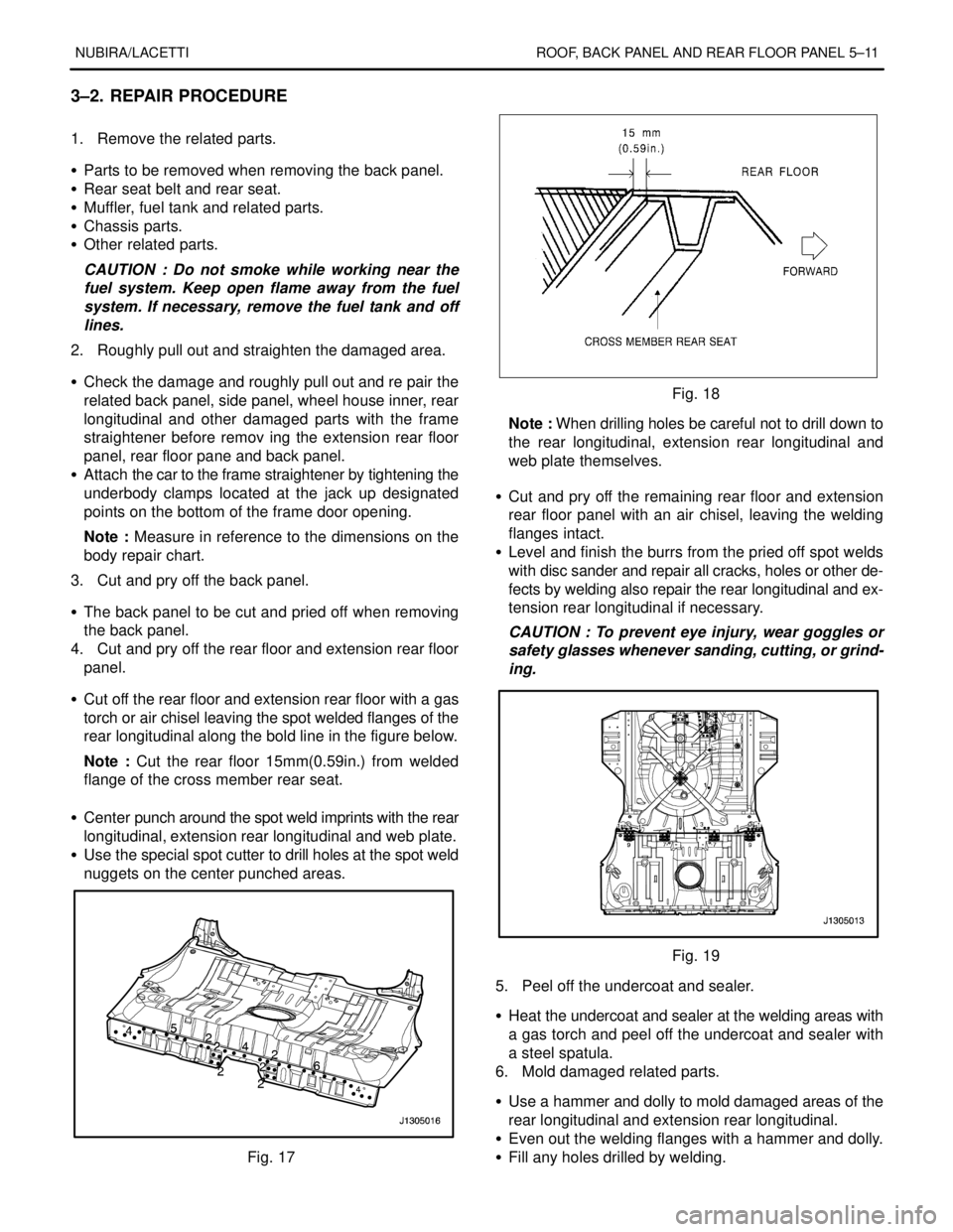
NUBIRA/LACETTI ROOF, BACK PANEL AND REAR FLOOR PANEL 5–11
3–2. REPAIR PROCEDURE
1. Remove the related parts.
S Parts to be removed when removing the back panel.
S Rear seat belt and rear seat.
S Muffler, fuel tank and related parts.
S Chassis parts.
S Other related parts.
CAUTION : Do not smoke while working near the
fuel system. Keep open flame away from the fuel
system. If necessary, remove the fuel tank and off
lines.
2. Roughly pull out and straighten the damaged area.
S Check the damage and roughly pull out and re pair the
related back panel, side panel, wheel house inner, rear
longitudinal and other damaged parts with the frame
straightener before remov ing the extension rear floor
panel, rear floor pane and back panel.
S Attach the car to the frame straightener by tightening the
underbody clamps located at the jack up designated
points on the bottom of the frame door opening.
Note : Measure in reference to the dimensions on the
body repair chart.
3. Cut and pry off the back panel.
S The back panel to be cut and pried off when removing
the back panel.
4. Cut and pry off the rear floor and extension rear floor
panel.
S Cut off the rear floor and extension rear floor with a gas
torch or air chisel leaving the spot welded flanges of the
rear longitudinal along the bold line in the figure below.
Note : Cut the rear floor 15mm(0.59in.) from welded
flange of the cross member rear seat.
S Center punch around the spot weld imprints with the rear
longitudinal, extension rear longitudinal and web plate.
S Use the special spot cutter to drill holes at the spot weld
nuggets on the center punched areas.
Fig. 17
Fig. 18
Note : When drilling holes be careful not to drill down to
the rear longitudinal, extension rear longitudinal and
web plate themselves.
S Cut and pry off the remaining rear floor and extension
rear floor panel with an air chisel, leaving the welding
flanges intact.
S Level and finish the burrs from the pried off spot welds
with disc sander and repair all cracks, holes or other de-
fects by welding also repair the rear longitudinal and ex-
tension rear longitudinal if necessary.
CAUTION : To prevent eye injury, wear goggles or
safety glasses whenever sanding, cutting, or grind-
ing.
Fig. 19
5. Peel off the undercoat and sealer.
S Heat the undercoat and sealer at the welding areas with
a gas torch and peel off the undercoat and sealer with
a steel spatula.
6. Mold damaged related parts.
S Use a hammer and dolly to mold damaged areas of the
rear longitudinal and extension rear longitudinal.
S Even out the welding flanges with a hammer and dolly.
S Fill any holes drilled by welding.
Page 2575 of 2643
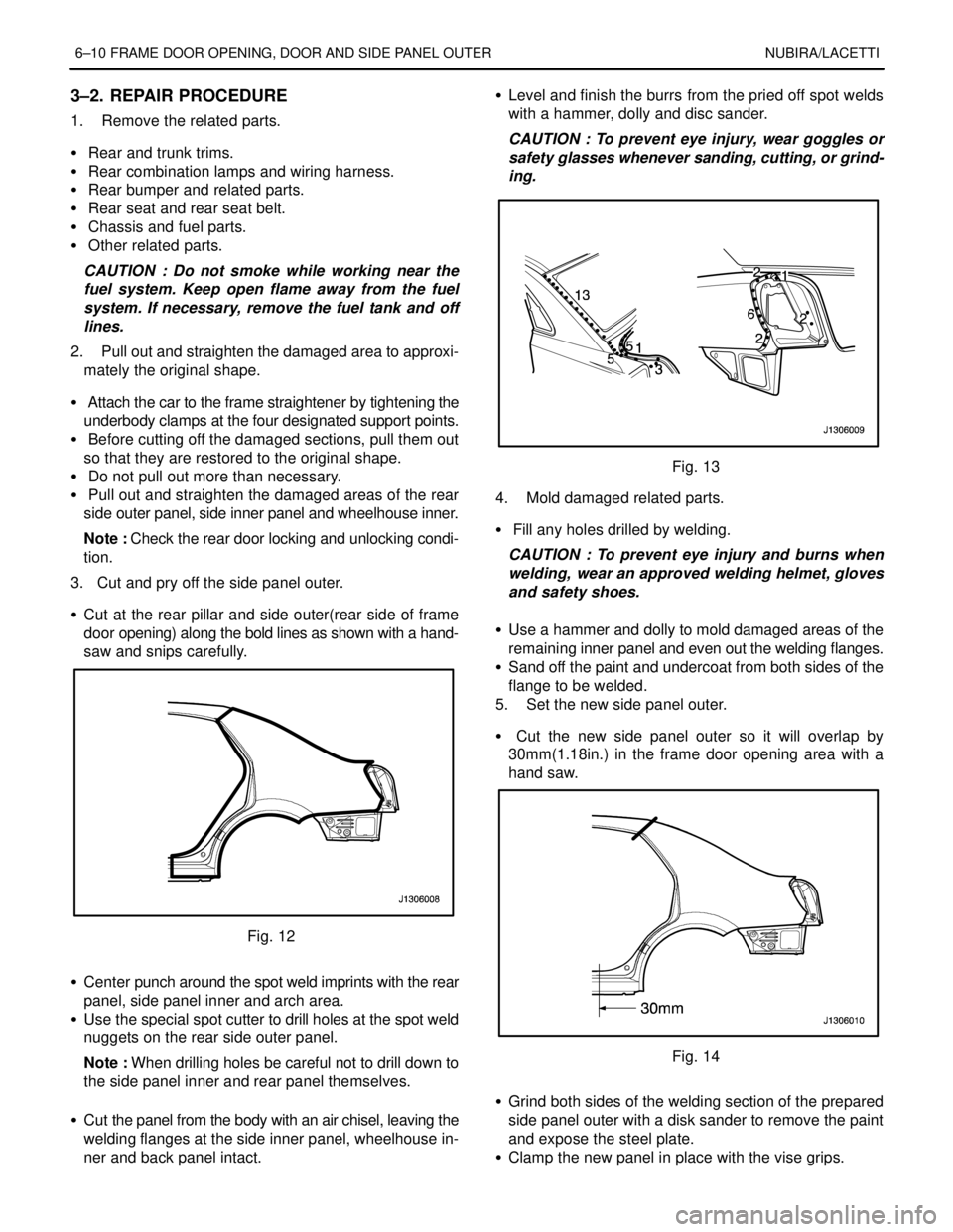
6–10 FRAME DOOR OPENING, DOOR AND SIDE PANEL OUTER NUBIRA/LACETTI
3–2. REPAIR PROCEDURE
1. Remove the related parts.
S Rear and trunk trims.
S Rear combination lamps and wiring harness.
S Rear bumper and related parts.
S Rear seat and rear seat belt.
S Chassis and fuel parts.
S Other related parts.
CAUTION : Do not smoke while working near the
fuel system. Keep open flame away from the fuel
system. If necessary, remove the fuel tank and off
lines.
2. Pull out and straighten the damaged area to approxi-
mately the original shape.
S Attach the car to the frame straightener by tightening the
underbody clamps at the four designated support points.
S Before cutting off the damaged sections, pull them out
so that they are restored to the original shape.
S Do not pull out more than necessary.
S Pull out and straighten the damaged areas of the rear
side outer panel, side inner panel and wheelhouse inner.
Note : Check the rear door locking and unlocking condi-
tion.
3. Cut and pry off the side panel outer.
S Cut at the rear pillar and side outer(rear side of frame
door opening) along the bold lines as shown with a hand-
saw and snips carefully.
Fig. 12
S Center punch around the spot weld imprints with the rear
panel, side panel inner and arch area.
S Use the special spot cutter to drill holes at the spot weld
nuggets on the rear side outer panel.
Note : When drilling holes be careful not to drill down to
the side panel inner and rear panel themselves.
S Cut the panel from the body with an air chisel, leaving the
welding flanges at the side inner panel, wheelhouse in-
ner and back panel intact.S Level and finish the burrs from the pried off spot welds
with a hammer, dolly and disc sander.
CAUTION : To prevent eye injury, wear goggles or
safety glasses whenever sanding, cutting, or grind-
ing.
Fig. 13
4. Mold damaged related parts.
S Fill any holes drilled by welding.
CAUTION : To prevent eye injury and burns when
welding, wear an approved welding helmet, gloves
and safety shoes.
S Use a hammer and dolly to mold damaged areas of the
remaining inner panel and even out the welding flanges.
S Sand off the paint and undercoat from both sides of the
flange to be welded.
5. Set the new side panel outer.
S Cut the new side panel outer so it will overlap by
30mm(1.18in.) in the frame door opening area with a
hand saw.
Fig. 14
S Grind both sides of the welding section of the prepared
side panel outer with a disk sander to remove the paint
and expose the steel plate.
S Clamp the new panel in place with the vise grips.