radio antenna DATSUN 210 1979 Service Manual
[x] Cancel search | Manufacturer: DATSUN, Model Year: 1979, Model line: 210, Model: DATSUN 210 1979Pages: 548, PDF Size: 28.66 MB
Page 440 of 548
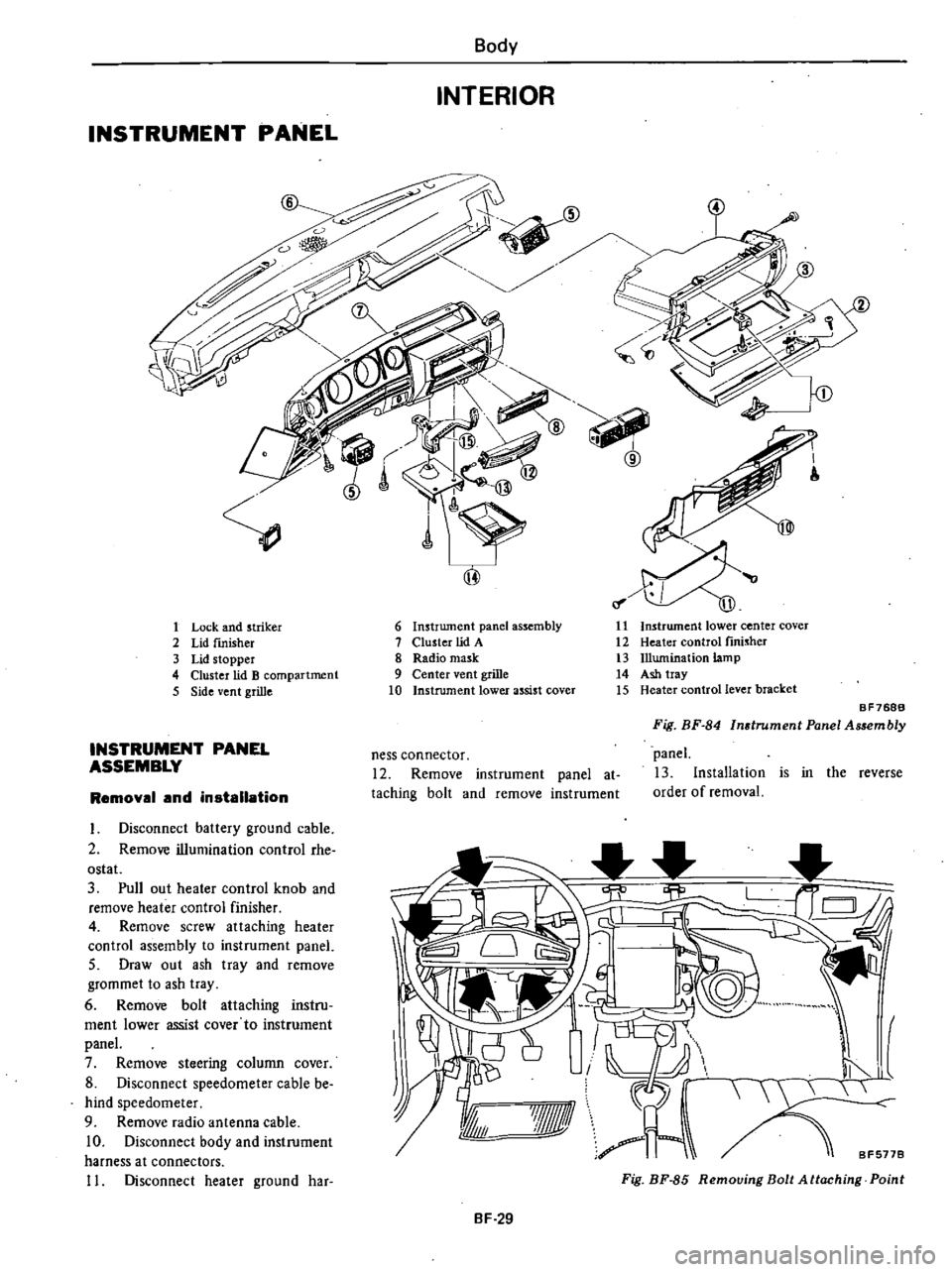
INSTRUMENT
PANEL
Body
INTERIOR
1
Lock
and
striker
2
Lid
fInisher
3
Lid
stopper
4
Cluster
lid
B
compartment
5
Side
vent
grille
INSTRUMENT
PANEL
ASSEMBLY
Removal
and
installation
I
Disconnect
battery
ground
cable
2
Remove
illumination
control
rhe
ostat
3
Pull
out
heater
control
knob
and
remove
heater
control
finisher
4
Remove
screw
attaching
heater
control
assembly
to
instrument
panel
5
Draw
out
ash
tray
and
remove
grommet
to
ash
tray
6
Remove
bolt
attaching
instru
ment
lower
assist
cover
to
instrument
panel
7
Remove
steering
column
cover
8
Disconnect
speedometer
cable
be
hind
speedometer
9
Remove
radio
antenna
cable
10
Disconnect
body
and
instrument
harness
at
connectors
11
Disconnect
heater
ground
har
6
Instrument
panel
assembly
7
Cluster
lid
A
8
Radio
mask
9
Center
vent
grille
10
Instrument
lower
assist
cover
11
Instrument
lower
center
cover
12
Heater
control
fInisher
13
Illumination
lamp
14
Ash
tray
15
Heater
control
lever
bracket
ness
connector
12
Remove
instrument
panel
at
taching
bolt
and
remove
instrument
BF768B
Fig
BF
84
Instrument
Panel
Assembly
panel
13
Installation
is
in
the
reverse
order
of
removal
I
I
I
8F5778
7Jf1ll
A
Fig
BF
85
Removing
Bolt
Attaching
Point
BF
29
Page 465 of 548
Rear
wiper
and
her
awltch
V
D
mn
ID
I
INSPECTION
Wiper
motor
Wiper
motor
unit
is
made
up
of
a
motor
and
an
auto
stop
mechanism
Inspect
wiper
motor
unit
as
fol
lows
See
Fig
BE
42
I
Th
re
should
be
continuity
be
tween
the
following
terminals
Body
Electrical
System
ill
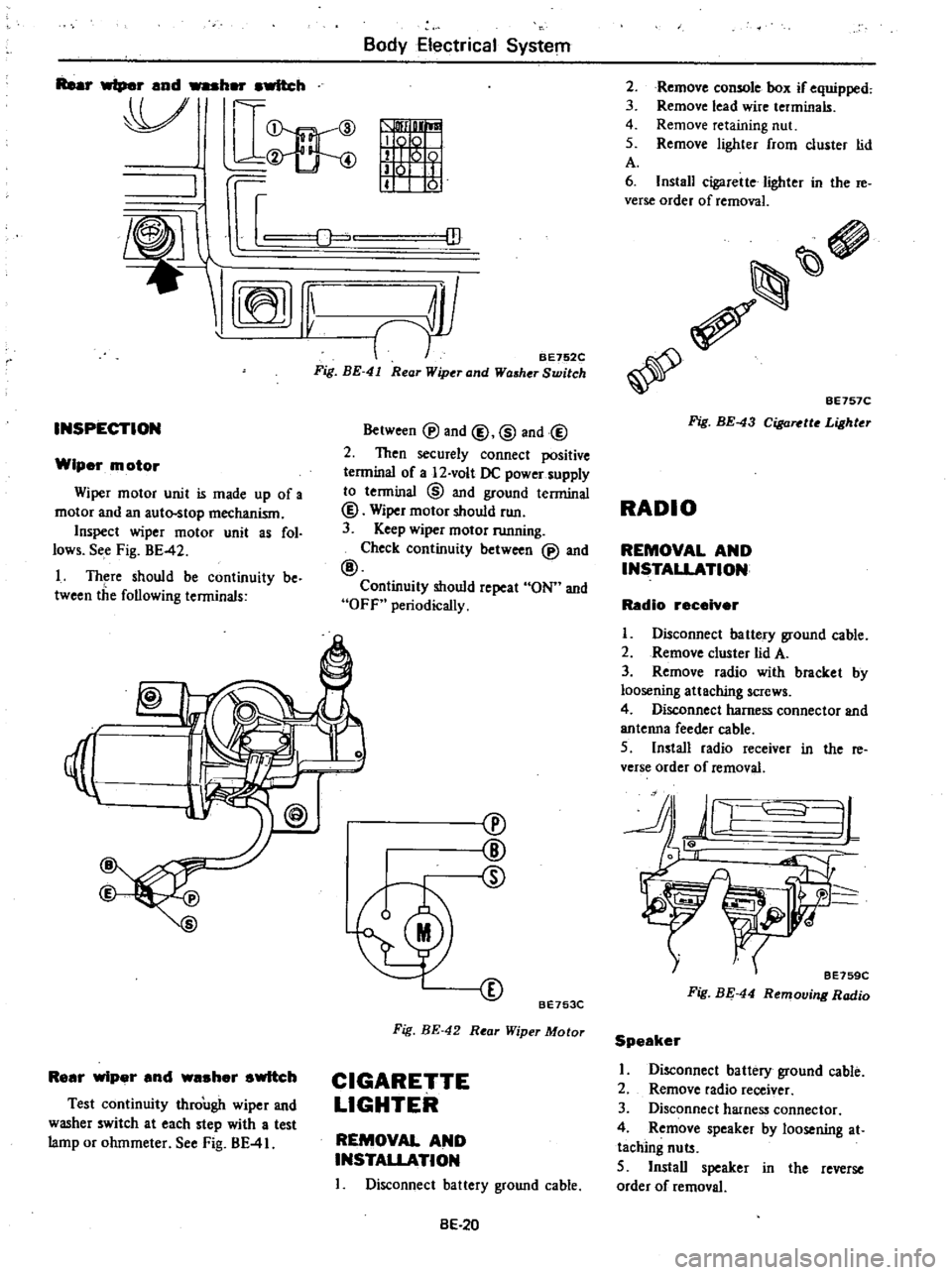
BE752C
Fig
BE
41
Rear
Wiper
and
Washer
Switch
Between
@
and
@
@
and@
2
Then
securely
connect
positive
terminal
of
a
12
volt
DC
power
supply
to
tenninal
@
and
ground
terminal
@
Wiper
motor
should
run
3
Keep
wiper
motor
running
Check
continuity
between
@
and
@
Continuity
should
repeat
ON
and
OFf
periodically
I
Rear
wiper
and
waaher
switch
Test
continuity
through
wiper
and
washer
switch
at
each
step
with
a
test
lamp
or
ohmmeter
See
Fig
BE
41
cv
@
CD
BE753C
Fig
BE
42
Rear
Wiper
Motor
CIGARETTE
LIGHTER
REMOVAL
AND
INSTALLATION
I
Disconnect
battery
ground
cable
BE
20
Remove
comole
box
if
equipped
Remove
lead
wire
terminals
Remove
retaining
nut
Remove
lighter
from
cluster
lid
2
3
4
5
A
6
Install
cigarette
lighter
in
the
re
verse
order
of
removal
BE757C
Fig
BE
43
CiI
a
tto
Lighter
RADIO
REMOVAL
AND
INSTALLATION
Radio
receiver
I
Disconnect
battery
ground
cable
2
Remove
cluster
lid
A
3
Remove
radio
with
bracket
by
loosening
attaching
screws
4
DiscOnnect
harness
connector
and
antenna
feeder
cable
5
Install
radio
receiver
in
the
re
verse
order
of
removal
JL
J
tf
BE759C
Fig
BE
44
Removing
Radio
Speaker
I
Disconnect
battery
ground
cable
2
Remove
radio
receiver
3
Disconnect
harness
connector
4
Remove
speaker
by
loosening
at
taching
nuts
5
Install
speaker
in
the
reverse
order
of
removal
Page 466 of 548
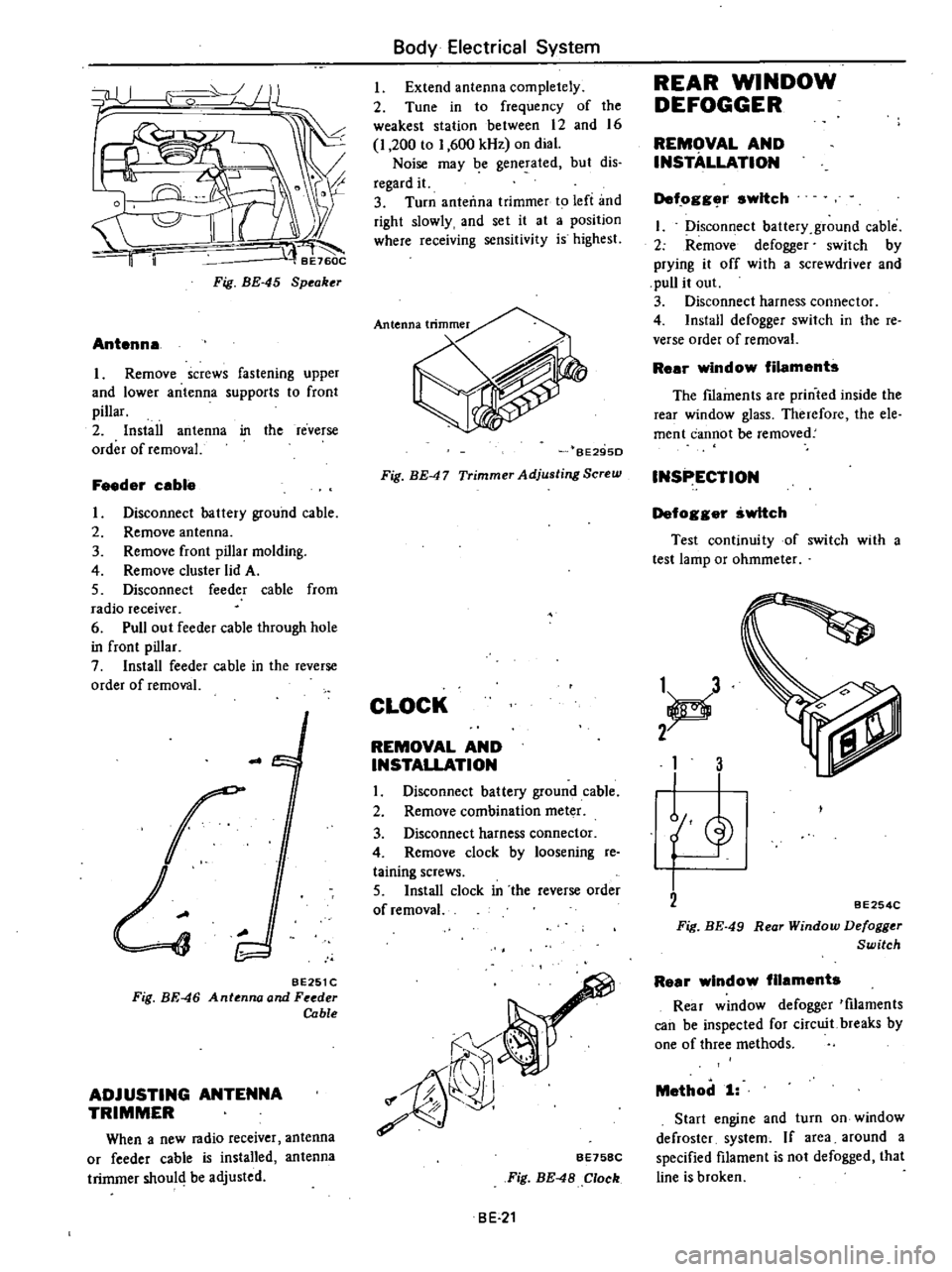
t
Fig
BE
45
Speaker
Antenna
Remove
screws
fastening
upper
and
lower
antenna
supports
to
front
pillar
2
Install
antenna
in
the
reverse
order
of
removal
Feeder
cable
I
Disconnect
battery
ground
cable
2
Remove
antenna
3
Remove
front
pillar
molding
4
Remove
cluster
lid
A
5
Disconnect
feeder
cable
from
radio
receiver
6
Pull
out
feeder
cable
through
hole
in
front
pillar
7
Install
feeder
cable
in
the
reverse
order
of
removal
r
BE251C
Fig
BE
46
Antenna
and
Feeder
Cable
ADJUSTING
ANTENNA
TRIMMER
When
a
new
radio
receiver
antenna
or
feeder
cable
is
installed
antenna
trimmer
shoul
be
adjusted
Body
Electrical
System
Extend
antenna
completely
2
Tune
in
to
frequency
of
the
weakest
station
between
12
and
16
I
200
to
1
600
kHz
on
dial
Noise
may
be
generated
but
dis
regard
it
3
Turn
anteiln3
trimmer
to
left
and
right
slowly
and
set
it
at
a
position
where
receiving
sensitivity
is
highest
BE29SD
Fig
BE
47
Trimmer
Adjusting
Screw
CLOCK
REMOVAL
AND
INSTALLATION
I
Disconnect
battery
ground
cable
2
Remove
combination
meter
3
Disconnect
harness
connector
4
Remove
clock
by
loosening
re
taining
screws
5
Install
clock
in
the
reverse
order
of
removal
r
Jf
rr
i1
b
Ii
f
7
8
eE758C
Fig
BE
48
Clock
BE
21
REAR
WINDOW
DEFOGGER
REMOVAL
AND
INSTALLATION
Def
ogg
r
switch
I
Disconfi
ect
battery
ground
cable
2
Remove
defogger
switch
by
prying
it
off
with
a
screwdriver
and
pull
it
out
3
Disconnect
harness
connector
4
Install
defogger
switch
in
the
reo
verse
order
of
removal
Rear
window
filaments
The
fIlaments
are
printed
inside
the
rear
window
glass
Therefore
the
ele
ment
cannot
be
removed
INSPECTION
Defogger
switch
Test
continuity
of
switch
with
a
test
lamp
or
ohmmeter
1
d
2
1
3
L
BE254C
Fig
BE
49
Rear
Window
Defogger
Switch
Rear
window
filaments
Rear
window
defogger
tfilaments
can
be
inspected
for
circuit
breaks
by
one
of
three
methods
Method
1
Start
engine
and
turn
on
window
defroster
system
If
area
around
a
specified
filament
is
not
defogged
that
line
is
broken
Page 499 of 548
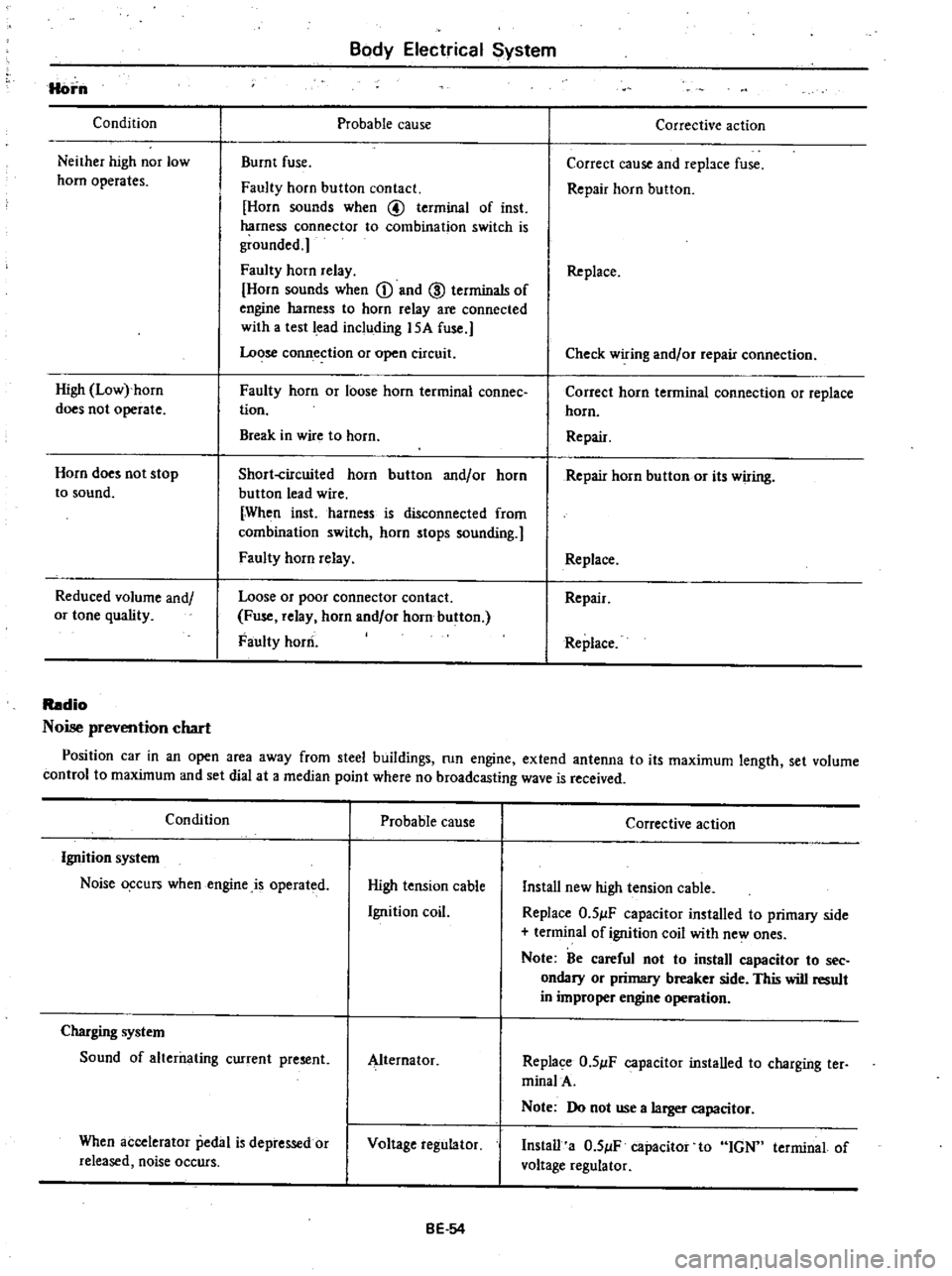
Horn
Condition
Neither
high
nor
low
horn
operates
High
Low
horn
does
not
operate
Horn
does
not
stop
to
sound
Reduced
volume
and
or
tone
quality
Body
Electrical
System
Probable
cause
Burnt
fuse
Faulty
horn
button
contact
Horn
sounds
when
@
terminal
of
inst
harness
connector
to
combination
switch
is
grounded
Faulty
horn
relay
Horn
sounds
when
CD
and
ID
terminals
of
engine
harness
to
horn
relay
are
connected
with
a
test
lead
including
15A
fuse
Lo
se
conn
ection
or
open
circuit
Faulty
horn
or
loose
horn
terminal
connee
tion
Break
in
wire
to
horn
Short
circuited
horn
button
and
or
horn
button
lead
wire
When
inst
harness
is
disconnected
from
combination
switch
horn
stops
sounding
Faulty
horn
relay
Loose
or
poor
connector
contact
Fuse
relay
horn
and
or
horn
button
Faulty
horn
Corrective
action
Correct
cause
and
repbce
fuse
Repair
horn
button
Replace
Check
wiring
and
or
repair
connection
Correct
horn
terminal
connection
or
replace
horn
Repair
Repair
horn
button
or
its
wiring
Replace
Repair
Replace
Radio
Noise
prevention
chart
Position
car
in
an
open
area
away
from
steel
buildings
run
engine
extend
antenna
to
its
maximum
length
set
volume
control
to
maximum
and
set
dial
at
a
median
point
where
no
broadcasting
wave
is
received
Condition
Probable
cause
Ignition
system
Noise
o
curs
when
engine
is
operated
High
tension
cable
Ignition
coil
Charging
system
Sound
of
alterilating
current
present
Alternator
When
accelerator
pedal
is
depressed
or
released
noise
occurs
Voltage
regulator
BE
54
Corrective
action
Install
new
high
tension
cable
Replace
O
5
lF
capacitor
installed
to
primary
side
terminal
of
ignition
coil
with
ne
ones
Note
Be
careful
not
to
install
capacitor
to
see
ondary
or
primary
breaker
side
This
will
result
in
improper
engine
operation
Replace
O
5
lF
capacitor
installed
to
charging
ter
minalA
Note
Do
not
use
a
larger
capacitor
Install
a
O
5
lF
capacitor
to
IGN
terminal
of
voltage
regulator