instrument panel DODGE CARAVAN 2004 4.G User Guide
[x] Cancel search | Manufacturer: DODGE, Model Year: 2004, Model line: CARAVAN, Model: DODGE CARAVAN 2004 4.GPages: 397, PDF Size: 6.83 MB
Page 76 of 397

NErasing Homelink Buttons...............124
NReprogramming a Single Homelink Button . . . 124
NSecurity............................124
mPower Sunroof Ð If Equipped.............125
NExpress Open Feature..................126
NWind Buffeting.......................127
NSunroof Maintenance...................127
mElectrical Power Outlets Ð If Equipped.......127
NElectrical Outlet Use With Engine Off.......129
mConvenience Tray Drawer And Cup Holders . . . 129
NInstrument Panel Cup Holders............129NConvenience Tray And Optional Smoker's
Package Kit.........................130
NRear Cupholders......................130
mStorage..............................132
NFront Seat Storage Bin Ð If Equipped.......132
NRemovable Floor Console Ð If Equipped....132
NRear Compartment Storage Bins...........135
NCargo Area Storage....................135
NCargo Organizer Ð If Equipped...........136
mRoof Luggage Rack Ð If Equipped..........139
mLoad Leveling System...................141
76 UNDERSTANDING THE FEATURES OF YOUR VEHICLE
Page 79 of 397
WARNING!
Vehicles and other objects seen in the right side
convex mirror will look smaller and farther away
than they really are. Relying too much on your right
side mirror could cause you to collide with another
vehicle or other object.
Use your inside mirror when judging the size or
distance of a vehicle seen in this convex mirror.
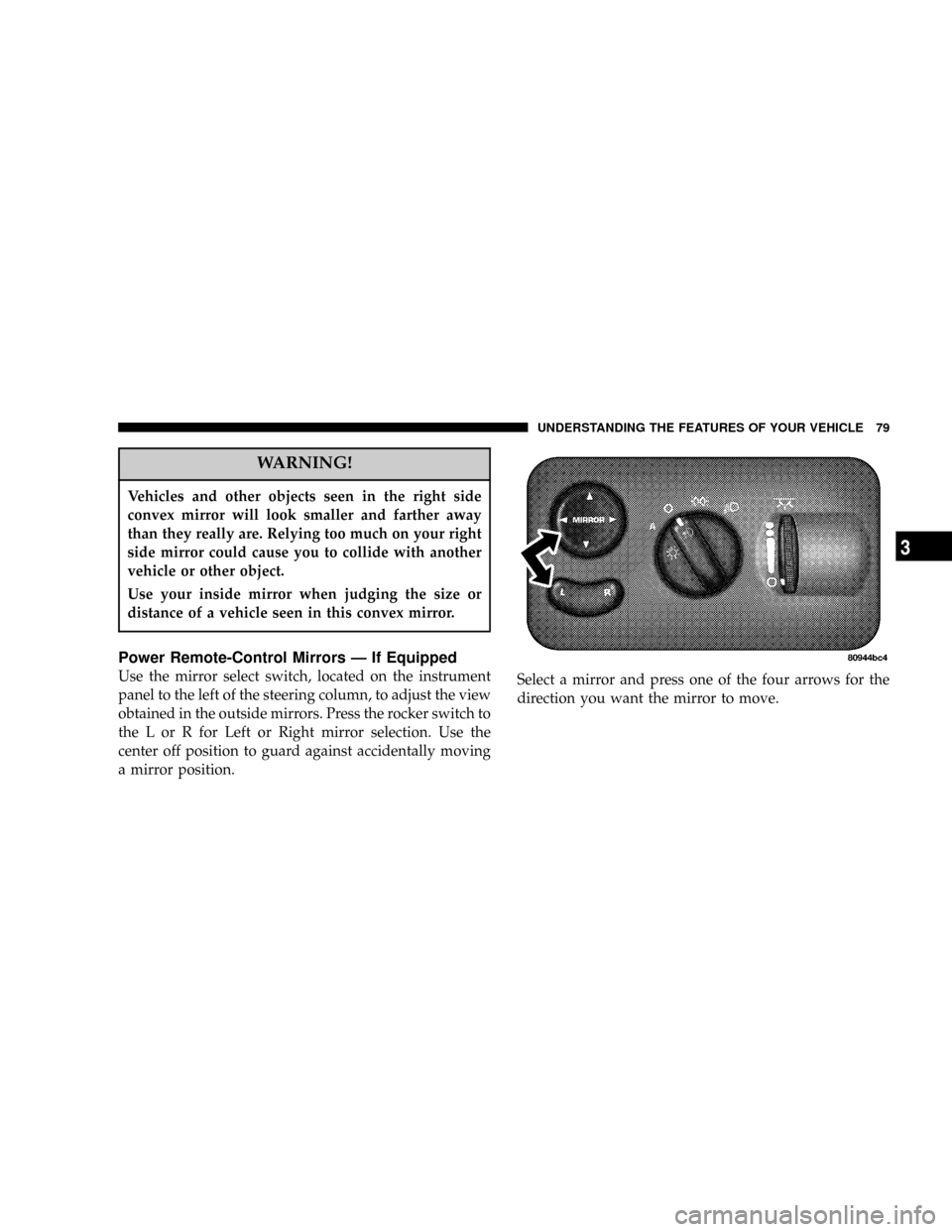
Power Remote-Control Mirrors Ð If Equipped
Use the mirror select switch, located on the instrument
panel to the left of the steering column, to adjust the view
obtained in the outside mirrors. Press the rocker switch to
the L or R for Left or Right mirror selection. Use the
center off position to guard against accidentally moving
a mirror position.Select a mirror and press one of the four arrows for the
direction you want the mirror to move.
UNDERSTANDING THE FEATURES OF YOUR VEHICLE 79
3
Page 82 of 397

CAUTION!
Do not place any article under a power seat or
impede its ability to move as it may cause damage to
the seat controls. Seat travel may become limited if
movement is stopped by an obstruction in the seat's
path.
Adjustable Head Restraints Ð If Equipped
Head restraints can reduce the risk of whiplash injury in
the event of impact from the rear. Pull up or push down
on the head restraint so that the upper edge is as high as
practical. To raise the head restraint, pull up on the head
restraint. To lower the head restraint, depress the release
tab located at the base of the head restraint and push
down on the head restraint.
Heated Seats Ð If Equipped
This feature heats the front driver and passenger seats.
The controls for the heated seats are located on the
instrument panel above the radio. You may choose LOW,
HIGH or No Heat. The switch position as well as an
indicator light will show when the LOW or HIGH heat is
ON.
82 UNDERSTANDING THE FEATURES OF YOUR VEHICLE
Page 96 of 397

WARNING!
²Not all head restraints in this vehicle are the same.
Head restraints from one seating position should
not be removed and installed in any other seating
position. In a collision, serious injury or death may
result if the proper head restraint is not installed on
each seat.
²The cargo area in the rear of the vehicle should not
be used as a play area by children. They could be
seriously injured in a collision. Children should be
seated and using the proper restraint system.
²It is extremely dangerous to ride in a cargo area,
inside or outside of a vehicle. In a collision, people
riding in these areas are more likely to be seriously
injured or killed.
²Do not allow people to ride in any area of your
vehicle that is not equipped with seats and seat belts.
²Be sure everyone in your vehicle is in a seat and
using a seat belt properly.
TO OPEN AND CLOSE THE HOOD
To open the hood, two latches must be released. First pull
the hood release lever located under the left side of the
instrument panel.
96 UNDERSTANDING THE FEATURES OF YOUR VEHICLE
Page 98 of 397

LIGHTS
All of the lights, except the hazard warning lights, are
controlled by switches to the left of the steering column
on the instrument panel.
Interior Lights
Interior lights are turned on when a door or liftgate is
opened, the keyless entry transmitter is activated, or
when the dimmer control is moved to the extreme top.
NOTE:On long wheel base vehicles the dome lights for
the second row seat passenger's can be turned on or off
by pressing the lens. The lights will remain on until the
lens is pressed a second time, so be sure they have been
turned off before leaving the vehicle.
The interior lights will automatically turn off in about 15
minutes if any of the following occur.
²A door, sliding door or the liftgate is left open.
²Any overhead reading light is left on.
²If the dimmer control is in the extreme top position.
98 UNDERSTANDING THE FEATURES OF YOUR VEHICLE
Page 99 of 397

NOTE:The key must be out of the ignition switch or the
ignition switch must be in the OFF position for this
feature to operate.
Park Lights
Turn this switch to the first detent to turn the park
lights on. This also turns on all instrument panel
lighting.
Headlights
Turn the headlight switch to the 2nd detent to
turn the headlights and park lights on. This
also turns on all instrument panel lighting.
To change the brightness of the instrument panel lights,
rotate the dimmer control up or down.
Dimmer Control
With the park lights or headlights
on, rotating the dimmer control
for the interior lights on the in-
strument panel upward will in-
crease the brightness of the instru-
ment panel lights.
Dome Light Position
Rotate the dimmer control com-
pletely upward to the second de-
tent (extreme top position) to turn
on the interior lights, except the
front reading/courtesy lights. The
interior lights will remain on
when the dimmer control is in this
position.
UNDERSTANDING THE FEATURES OF YOUR VEHICLE 99
3
Page 111 of 397
The lights also turn on when a front door, a sliding door
or the liftgate is opened. If your vehicle is equipped with
Remote Keyless Entry, the lights will also turn on when
the unlock button on the transmitter is pressed.
The area around the instrument panel cupholders is also
illuminated from a light in the overhead console. This
light is turned on when the headlight switch is on and
will adjust in brightness when the dimmer control is
rotated up or down.
Sunglass Storage
At the rear of the console a compartment is provided for
the storage of two pair of sunglasses.
Press the door latch to open the compartment. The door
will slowly rotate to an open position.
Compass/Temperature Display
This display provides the outside temperature and one of
eight compass readings to indicate the direction the
vehicle is facing.
WARNING!
Even if the display still reads a few degrees above
32ÉF ( 0ÉC), the road surface may be icy, particularly
in woods or on bridges. Drive carefully under such
conditions to prevent an accident and possible per-
sonal injury or property damage.
Automatic Compass Calibration
This compass is self calibrating which eliminates the
need to manually set the compass. When the vehicle is
new, the compass may appear erratic and the ªCALº
symbol will be displayed. After completing three 360É
UNDERSTANDING THE FEATURES OF YOUR VEHICLE 111
3
Page 127 of 397
WARNING!
In an accident, there is a greater risk of being thrown
from a vehicle with an open sunroof. You could also
be seriously injured or killed. Always fasten your
seat belt properly and make sure all passengers are
properly secured too.
Do not allow small children to operate the sunroof.
Never allow fingers or other body parts, or any
object to project through the sunroof opening. Injury
may result.
Wind Buffeting
Wind buffeting can be described as the perception of
pressure on the ears or a helicopter type sound in the
ears. Your vehicle may exhibit wind buffeting with the
windows down, or the sunroof (if equipped) in certainopen or partially open positions. This is a normal occur-
rence and can be minimized. If the buffeting occurs with
the rear windows open, open the front and rear windows
together to minimize the buffeting. If the buffeting occurs
with the sunroof open, adjust the sunroof opening to
minimize the buffeting or open any window.
Sunroof Maintenance
Use only a non-abrasive cleaner and a soft cloth to clean
the glass panel.
ELECTRICAL POWER OUTLETS Ð IF EQUIPPED
To the left of the instrument panel cup holder are two 12
volt power outlets. The upper outlet is controlled by the
ignition switch and the lower outlet is connected directly
to the battery. The upper outlet will also operate a
conventional cigar lighter unit (if equipped with an
optional Smoker's Package).
UNDERSTANDING THE FEATURES OF YOUR VEHICLE 127
3
Page 128 of 397

A third outlet is located on the driver's side, just to the
rear of the sliding door and is also controlled by the
ignition switch. The lower and rear outlets will not
accommodate a conventional cigar lighter unit.
The outlets include tethered caps labeled with a key or
battery symbol indicating the power source. The lowerinstrument panel outlet is powered directly from the
battery, items plugged into this outlet may discharge the
battery and/or prevent engine starting.
The lower outlet is protected by an automatic reset circuit
breaker. The automatic circuit breaker restores power
when the overload is removed. The circuit breaker also
supplies power to the outlet in the removable floor
console, when in the front position. Refer to section 3
ªRemovable Floor Consoleº in this manual.
NOTE:If desired, all of the power outlets can be
converted by your authorized dealer to provide power
with the ignition switch in the OFF position.
128 UNDERSTANDING THE FEATURES OF YOUR VEHICLE
Page 129 of 397

Electrical Outlet Use With Engine Off
CAUTION!
²Many accessories that can be plugged in draw power
from the vehicle's battery, even when not in use (i.e.
cellular phones, etc.). Eventually, if plugged in long
enough, the vehicle's battery will discharge sufficiently
to degrade battery life and/or prevent engine starting.
²Accessories that draw higher power (i.e. coolers,
vacuum cleaners, lights, etc.), will degrade the battery
even more quickly. Only use these intermittently and
with greater caution.
²After the use of high power draw accessories, or long
periods of the vehicle not being started (with accesso-
ries still plugged in), the vehicle must be driven a
sufficient length of time to allow the alternator to
recharge the vehicle's battery.
²Power outlets are designed for accessory plugs only. Do
not hang any type of accessory or accessory bracket from
the plug. Improper use of the power outlet can cause
damage not covered by your warranty.
CONVENIENCE TRAY DRAWER AND CUP
HOLDERS
Instrument Panel Cup Holders
The instrument panel cupholders are located in a pull out
drawer just below the climate controls.
When the drawer is pulled out firmly, the arms of the
cupholders will spring out. Place the container to be held
UNDERSTANDING THE FEATURES OF YOUR VEHICLE 129
3