display DODGE CARAVAN 2008 5.G User Guide
[x] Cancel search | Manufacturer: DODGE, Model Year: 2008, Model line: CARAVAN, Model: DODGE CARAVAN 2008 5.GPages: 531, PDF Size: 7.72 MB
Page 178 of 531
NOTE:
²Ensure that the rear bumper is free of dirt and debris
to keep the system operating properly.
²Jackhammers, large trucks, and other vibrations could
affect the performance of the system.
Enabling and Disassembling The Rear Park Assist
System
There are times when you may want to disable the Rear
Park Assist System, such as when towing a trailer.
NOTE:The manufacturer suggests disabling the Rear
Park Assist System when towing a trailer. Refer to the
following procedures.
Vehicles Equipped With the Electronic Vehicle
Information Center (EVIC)
You can turn the Rear Park Assist System on or off
through the EVIC. For details, refer to ªPersonal Settings(Customer Programmable Features)º under ªElectronic
Vehicle Information Center (EVIC)º in Section 4 of this
manual.
Vehicles Equipped With the Compass Mini-Trip
Computer (CMTC)
You can turn the Rear Park Assist System ON or OFF
through the CMTC by pressing the left reset button in the
instrument cluster. Turn the ignition switch to the ON
position, then press and hold the rest button for approxi-
mately two seconds.
Service The Rear Park Assist System
If the Rear Park Assist System malfunctions, the instru-
ment cluster will actuate a single chime, once per ignition
cycle, and it will display the(SERVICE PARK ASSIST
SYSTEM(message. Refer to ªCompass Mini Trip Com-
puter (CMTC) or ªElectronic Vehicle Information Center
(EVIC)º Ð as equipped, in Section 4 of this manual.
176 UNDERSTANDING THE FEATURES OF YOUR VEHICLE
Page 179 of 531
If(SERVICE PARK ASSIST SYSTEM(appears in the
Electronic Vehicle Information Center (EVIC), after mak-
ing sure the rear bumper is clean, please see your
authorized dealer.
Should this wrench symbol display with the
letterPnext to it, your Park Sense System
needs servicing. Contact your authorized
dealer.
Cleaning The Rear Park Assist System
Clean the Rear Park Assist Sensors with water, car wash
soap and a soft cloth. Do not use rough or hard cloths. Do
not scratch or poke the sensors, otherwise, you could
damage the sensors.
ADJUSTABLE PEDALS Ð IF EQUIPPED
This feature allows both the brake and accelerator pedals to
move toward or away from the driver to provide improved
position with the steering wheel. The adjustable pedal
system is designed to allow a greater range of driver comfort
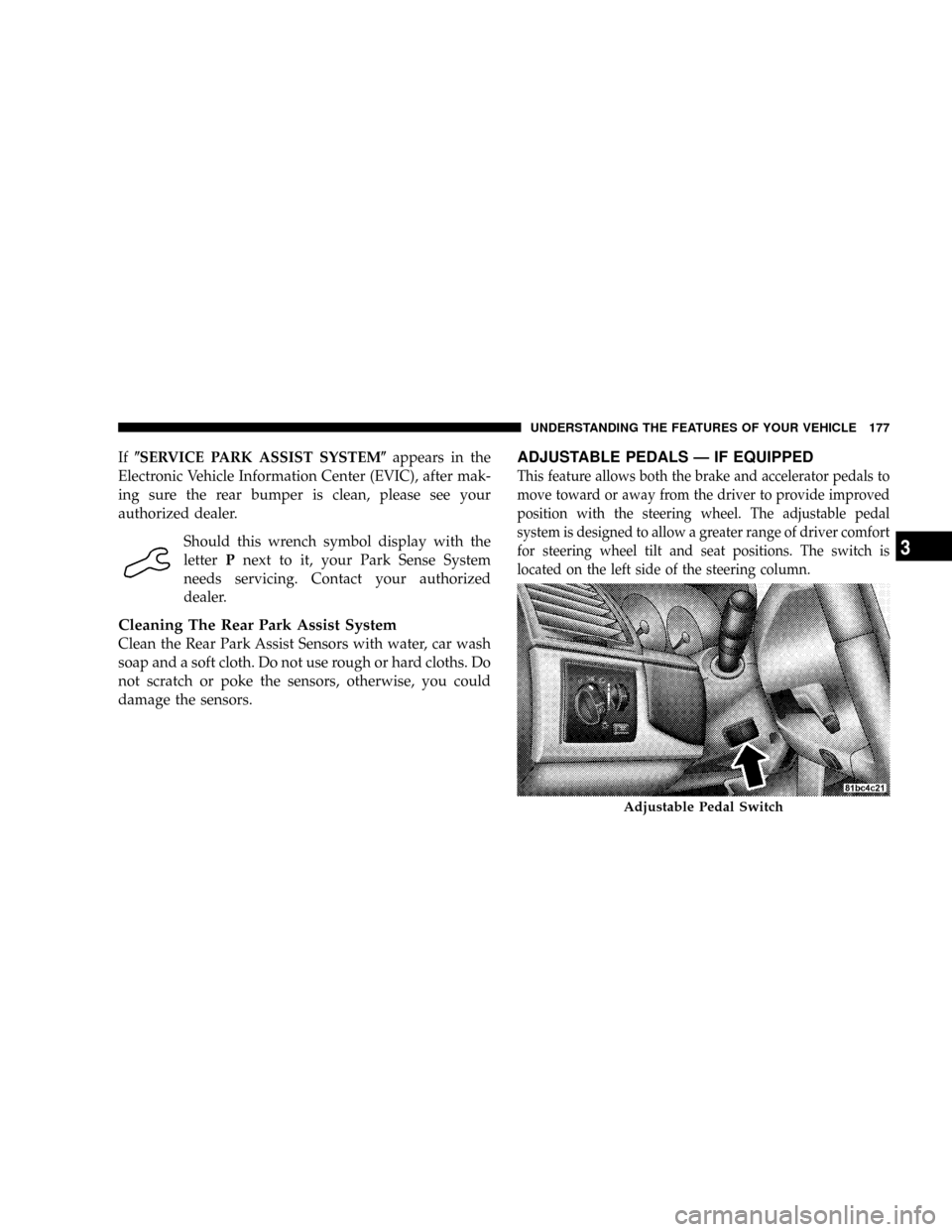
for steering wheel tilt and seat positions. The switch is
located on the left side of the steering column.
Adjustable Pedal Switch
UNDERSTANDING THE FEATURES OF YOUR VEHICLE 177
3
Page 180 of 531
Press the button forward to move the pedals forward
(toward the front of the vehicle).
Press the button rearward to move the pedals rearward
(toward the driver).
²The pedals can be adjusted with the ignition OFF.
²The pedals can be adjusted while driving.
²The pedalscannotbe adjusted when the vehicle is in
REVERSE or when the Electronic Speed Control Sys-
tem is ON. The following messages will be displayed
on vehicles equipped with the Electronic Vehicle In-
formation System (EVIC) if the pedals are attempted to
be adjusted when the system is locked out (ªAdjust-
able Pedal Disabled Ð Cruise Control Engagedº or
ªAdjustable Pedal Disabled Ð Vehicle In Reverseº).
CAUTION!
Do not place any article under the adjustable pedals
or impede its ability to move as it may cause damage
to the pedal controls. Pedal travel may become lim-
ited if movement is stopped by an obstruction in the
adjustable pedal's path.
178 UNDERSTANDING THE FEATURES OF YOUR VEHICLE
Page 221 of 531
UNDERSTANDING YOUR INSTRUMENT PANEL
CONTENTS
mInstrument Panels And Controls............223
mBase Instrument Cluster..................224
mPremium Instrument Cluster...............225
mInstrument Cluster Descriptions............226
mCompass Mini-Trip Computer (CMTC) Ð
If Equipped...........................238
NCompass Mini-Trip Computer (CMTC)
Odometer Displays....................238
NCompass Mini-Trip Computer (CMTC) Reset
Buttons............................238NCompass/Temperature Display...........240
mElectronic Vehicle Information Center (EVIC) Ð
If Equipped...........................241
NEVIC Displays.......................243
NTrip Functions.......................244
NCompass Display.....................246
NPersonal Settings
(Customer Programmable Features)........248
mRadio General Information................251
NRadio Broadcast Signals.................2514
Page 231 of 531
Brake Warning Light will turn on along with the ABS
Light. Immediate repair to the ABS system is required.
The operation of the Brake Warning Light can be checked
by turning the ignition switch from the OFF position to
the ON position. The light should illuminate for approxi-
mately two seconds. The light should then turn off unless
the parking brake is applied or a brake fault is detected.
If the light does not illuminate, have the light inspected
by an authorized dealer.
The light also will turn on when the parking brake is
applied with the ignition switch in the ON position.
NOTE:This light shows only that the parking brake is
applied. It does not show the degree of brake application.9.Tachometer Ð Premium Instrument Cluster Only
The white area of the scale shows the permissible engine
revolutions-per-minute (RPM x 1000) for each gear range.
Before reaching the red area, ease up on the accelerator to
prevent engine damage.
10. Transmission Range Indicator
This display indicator shows the automatic transaxle gear
selection.
NOTE:You must apply the brakes before shifting from
Park.
11. Odometer/Trip Odometer Ð If Equipped
The odometer shows the total distance the vehicle has
been driven.
U.S. federal regulations require that upon transfer of
vehicle ownership, the seller certify to the purchaser the
correct mileage that the vehicle has been driven. There-
fore, if the odometer reading is changed during repair or
UNDERSTANDING YOUR INSTRUMENT PANEL 229
4
Page 232 of 531
replacement, be sure to keep a record of the reading
before and after the service so that the correct mileage can
be determined.
The trip odometer shows individual trip mileage. To
switch from odometer to trip odometer, press the Trip
Odometer button.
To reset a trip odometer, display the desired trip odom-
eter to be reset then push and hold the button until the
display resets (approximately two seconds).
12. PRNDL/Odometer Display Area
When the appropriate conditions exist, the following
odometer messages will display:
CHAngE OIL............... OilChange Required
CRUISE.....................Cruise Control On
door.............................Door Ajar
ESPOFF............................ ESPOffgATE..........................Lift Gate Ajar
gASCAP.......................Fuel Cap Fault
hood*............................Hood Ajar
noFUSE..........................Fuse Fault
LoCOOL........................ LowCoolant
LoWASH.................... LowWasher Fluid
NOTE:If your vehicle is equipped with an hood switch,
in the case of hood ajar, a warning message will be
displayed in either the PRNDL/Odometer display as
ªhoodº or ªHood Ajarº in the EVIC display.
NOTE:Some of the above warnings will be displayed in
the Compass Mini-Trip Computer / Electronic Vehicle
Information Center Display Area under the Speedometer.
CHAngE OIL
Your vehicle is equipped with an engine oil change
indicator system. The ªChange Oilº message will flash in
the instrument cluster odometer for approximately 12
230 UNDERSTANDING YOUR INSTRUMENT PANEL
Page 233 of 531
seconds after a single chime has sounded to indicate the
next scheduled oil change interval. The engine oil change
indicator system is duty cycle-based, which means the
engine oil change interval may fluctuate dependent upon
your personal driving style.
Unless reset, this message will continue to display each
time you turn the ignition switch to the ON/RUN
position. To turn off the message temporarily, press and
release the Trip Odometer button on the instrument
cluster. To reset the oil change indicator system (after
performing the scheduled maintenance) refer to the fol-
lowing procedure.
1. Turn the ignition switch to the ON position (Do not
start the engine).
2. Fully depress the accelerator pedal slowly three times
within 10 seconds.
3. Turn the ignition switch to the OFF/LOCK position.NOTE:If the indicator message illuminates when you
start the vehicle, the oil change indicator system did not
reset. If necessary repeat this procedure.
13. Odometer Display Reset Button
To reset a message display (gATE, gASCAP, noFUSE,
CHAngE OIL, LoCOOL, LoWASH), push and hold the
button until the display resets (approximately two sec-
onds).
14. Electronic Stability Program (ESP) Indicator
Light/Traction Control System (TCS) Indicator Light
If this indicator light flashes during accelera-
tion, apply as little throttle as possible. While
driving, ease up on the accelerator. Adapt your
speed and driving to the prevailing road con-
ditions, and do not switch off the ESP, or TCS.
UNDERSTANDING YOUR INSTRUMENT PANEL 231
4
Page 238 of 531
For additional information on TPMS, refer to Section 5 Ð
Starting and Operating, ªTire Pressure Monitoring Sys-
temº of this manual.
For additional information on Tire Pressures, refer to
Section 5 Ð Starting and Operating, ªTire Inflation
Pressuresº of this manual.
26. Electronic Stability Program (ESP) Indicator Light
The malfunction lamp for the ESP is combined
with BAS. The yellow ªESP/BAS Warning
Lampº comes on when the ignition switch is
turned to the ªONº position. They should go
out with the engine running. If the ªESP/BAS Warning
Lampº comes on continuously with the engine running,
a malfunction has been detected in either the ESP or the
BAS system. If this light remains on after several ignition
cycles, and the vehicle has been driven several miles/
kilometers at speeds greater than 30 mph (48 km/h), see
your authorized dealer as soon as possible.27. Compass Mini-Trip Computer (CMTC) Reset
Button
Press the reset button to scroll through sub menus (i.e.,
Trip Functions: AVG Fuel Economy, DTE, Elapsed Time,
and Units.
NOTE:For more detailed operation, refer to ªCompass
Mini-Trip Computerº later in this section.
28. Compass Mini-Trip Computer (CMTC) Display /
Electronic Vehicle Information Center (EVIC) DisplayÐ
If Equipped
Compass Mini-Trip Computer (CMTC) Ð If Equipped
On vehicles equipped with CMTC, the display provides
the outside temperature, one of eight compass headings
to indicate the direction the vehicle is facing and the
current radio station. Refer to ªCompass Mini-Trip Com-
puterº later in this section.
236 UNDERSTANDING YOUR INSTRUMENT PANEL
Page 239 of 531
Electronic Vehicle Information Center (EVIC) Display
Ð If Equipped
The Electronic Vehicle Information Center (EVIC) fea-
tures a driver-interactive display that is located in the
lower half of the speedometer.
Oil Change Required
Your vehicle is equipped with an engine oil change
indicator system. TheOil Change Requiredmessage will
flash in the EVIC display for approximately 10 seconds
after a single chime has sounded to indicate the next
scheduled oil change interval. The engine oil change
indicator system is duty cycle based, which means the
engine oil change interval may fluctuate dependent upon
your personal driving style.Unless reset, this message will continue to display each
time you turn the ignition switch to the ON/RUN
position. To turn off the message temporarily, press and
release the Menu button. To reset the oil change indicator
system (after performing the scheduled maintenance)
refer to the following procedure.
1. Turn the ignition switch to the ON position (Do not
start the engine).
2. Fully depress the accelerator pedal slowly three times
within 10 seconds.
3. Turn the ignition switch to the OFF/LOCK position.
NOTE:If the indicator message illuminates when you
start the vehicle, the oil change indicator system did not
reset. If necessary repeat this procedure.
UNDERSTANDING YOUR INSTRUMENT PANEL 237
4
Page 240 of 531
COMPASS MINI-TRIP COMPUTER (CMTC) Ð IF
EQUIPPED
NOTE:The compass on your vehicle is self-calibrating,
eliminating the need to manually calibrate the compass.
The Compass Mini-Trip Computer features a driver-
interactive display (displays information on outside tem-
perature, compass direction, and trip information). It is
located in the instrument cluster, below the Fuel and
Temperature gauges.
Compass Mini-Trip Computer (CMTC) Odometer
Displays
When the appropriate conditions exist, the following
odometer messages will display:
CHAngE OIL............... OilChange Required
CRUISE......................Cruise Activated
door.............................Door AjarESPOFF...................... ESPDeactivated
gATE..........................Lift Gate Ajar
gASCAP.......................Fuel Cap Fault
hood............................Hood Ajar
noFUSE..........................Fuse Fault
LoCOOL........................ LowCoolant
LoWASH.................... LowWasher Fluid
These messages can be manually turned off by pressing
the right reset button (on the instrument cluster).
Compass Mini-Trip Computer (CMTC) Reset
Buttons
CMTC Reset Button
Press the left reset button located on the instrument
cluster to scroll through the sub menus (i.e., Trip Func-
tions: AVG Fuel Economy, DTE, Elapsed Time, and
Units).
238 UNDERSTANDING YOUR INSTRUMENT PANEL