clock DODGE CHALLENGER 2015 3.G User Guide
[x] Cancel search | Manufacturer: DODGE, Model Year: 2015, Model line: CHALLENGER, Model: DODGE CHALLENGER 2015 3.GPages: 603, PDF Size: 14.97 MB
Page 275 of 603
setting has been selected. Press the back arrow button on
the touchscreen to return to the previous menu.
•Set Time Hours
This feature will allow you to adjust the hours. The “Sync
time with GPS” button on the touchscreen must be
unchecked. To make your selection, press the “+” or “–”
buttons on the touchscreen to adjust the hours up or
down. Press the back arrow button on the touchscreen to
return to the previous menu.
•Set Time Minutes
This feature will allow you to adjust the minutes. The
“Sync time with GPS” button on the touchscreen must be
unchecked. To make your selection, press the “+” or “–”
buttons on the touchscreen to adjust the minutes up or
down. Press the back arrow button on the touchscreen to
return to the previous menu.
•Time Format
This feature will allow you to select the time format
display setting. Press the “Time Format” button on the
touchscreen until a check-mark appears next to the 12hrs
or 24hrs setting, showing that setting has been selected.
Press the back arrow button on the touchscreen to return
to the previous menu.
•Show Time In Status Bar — If Equipped
This feature will allow you to turn on or shut off the
digital clock in the status bar. To change the Show Time
Status setting press the “Show Time in Status Bar” button
on the touchscreen until a check-mark appears next to
setting, indicating that the setting has been selected. Press
the back arrow button on the touchscreen to return to the
previous menu or press the “X” button on the touch-
screen to close out of the settings screen.
4
UNDERSTANDING YOUR INSTRUMENT PANEL 273
Page 287 of 603
•Subscription Information
New vehicle purchasers or lessees will receive a free
limited time subscription to SiriusXM Satellite Radio
with your radio. Following the expiration of the free
services, it will be necessary to access the information on
the Subscription Information screen to re-subscribe.
Press the “Subscription Info” button on the touchscreen
to access the Subscription Information screen.
Write down the SIRIUS ID numbers for your receiver. To
reactivate your service, either call the number listed on
the screen or visit the provider online.
NOTE:SiriusXM Travel Link is a separate subscription
and is available for U.S. residents only.
Restore Settings
After pressing the “Restore Settings” button on the
touchscreen the following settings will be available:
•Restore Settings
When this feature is selected it will reset the Display,
Clock, Audio, and Radio Settings to their default settings.
To restore the settings to their default setting, press the
Restore Settings button. A pop-up will appear asking
#Are you sure you want to reset your settings to default?”
select “Yes” to restore, or “Cancel” to exit. Once the
settings are restored, a pop up appears stating#settings
reset to default.#Press the okay button on the touchscreen
to exit.
4
UNDERSTANDING YOUR INSTRUMENT PANEL 285
Page 320 of 603

temperature settings or on the touchscreen, press and
slide the temperature bar button towards the red arrow
for warmer temperature settings.
NOTE:Pressing this button while in Sync mode will
automatically exit Sync.
8. Passenger Temperature Control Down Button
(Uconnect® 8.4 Radio Only)
Provides the passenger with independent temperature
control. Push the button on the faceplate for cooler
temperature settings or on the touchscreen, press and
slide the temperature bar button towards the blue arrow
for cooler temperature settings.
NOTE:Pressing this button while in Sync mode will
automatically exit Sync.
9. SYNC
Press the Sync button on the touchscreen to toggle the
Sync feature On/Off. The Sync indicator is illuminated
when this feature is enabled. Sync is used to synchronize
the passenger temperature setting with the driver tem-
perature setting. Changing the passenger temperature
setting while in Sync will automatically exit this feature.
10. Blower Control
Blower control is used to regulate the amount of air
forced through the climate system. There are seven
blower speeds available. Adjusting the blower will cause
automatic mode to switch to manual operation. The
speeds can be selected using either the blower control
knob on the faceplate or the buttons on the touchscreen
as follows:
Blower Control Knob On The Faceplate
The blower speed increases as you turn the blower
control knob clockwise from the lowest blower setting.
The blower speed decreases as you turn the blower
control knob counterclockwise.
318 UNDERSTANDING YOUR INSTRUMENT PANEL
Page 473 of 603
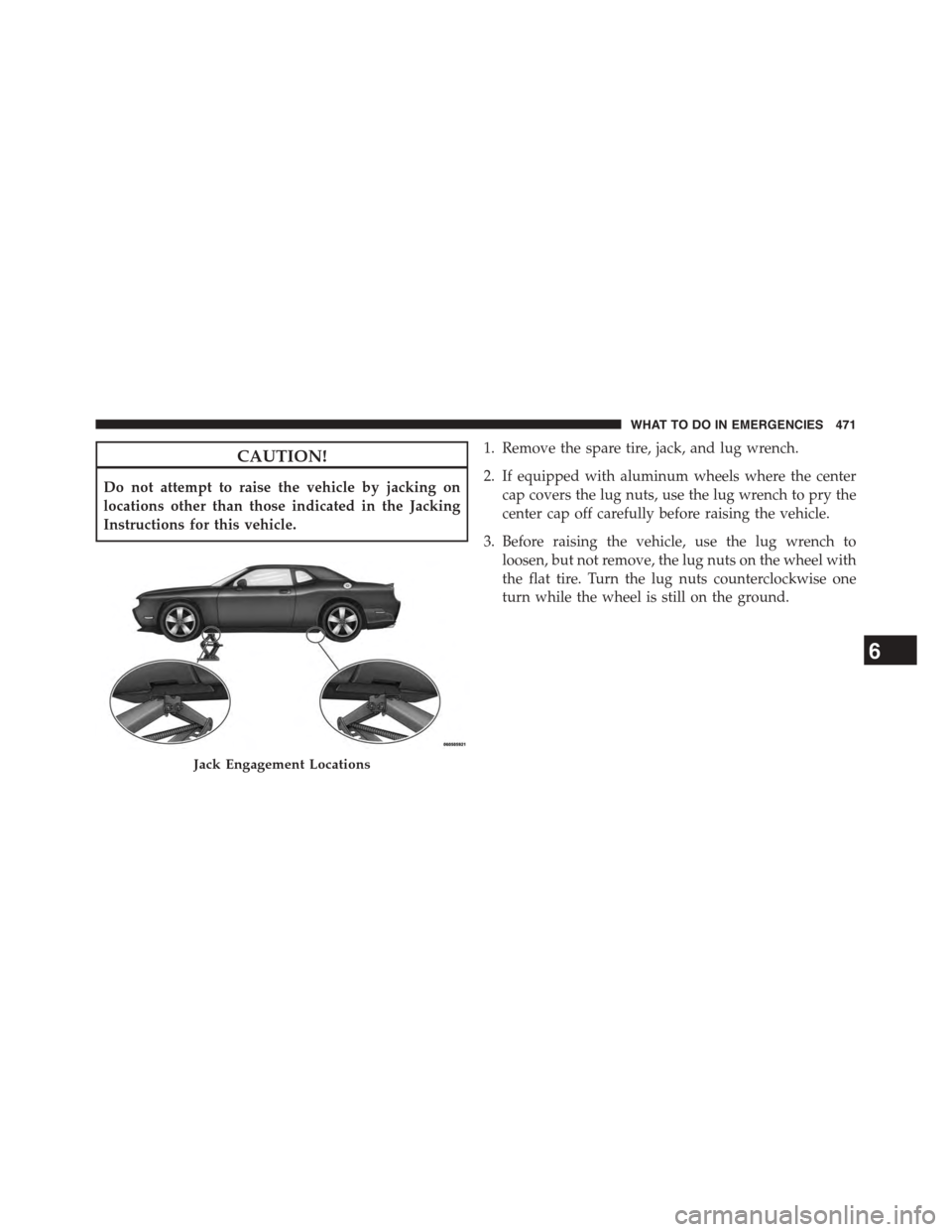
CAUTION!
Do not attempt to raise the vehicle by jacking on
locations other than those indicated in the Jacking
Instructions for this vehicle.
1. Remove the spare tire, jack, and lug wrench.
2. If equipped with aluminum wheels where the center
cap covers the lug nuts, use the lug wrench to pry the
center cap off carefully before raising the vehicle.
3. Before raising the vehicle, use the lug wrench to
loosen, but not remove, the lug nuts on the wheel with
the flat tire. Turn the lug nuts counterclockwise one
turn while the wheel is still on the ground.
Jack Engagement Locations
6
WHAT TO DO IN EMERGENCIES 471
Page 474 of 603
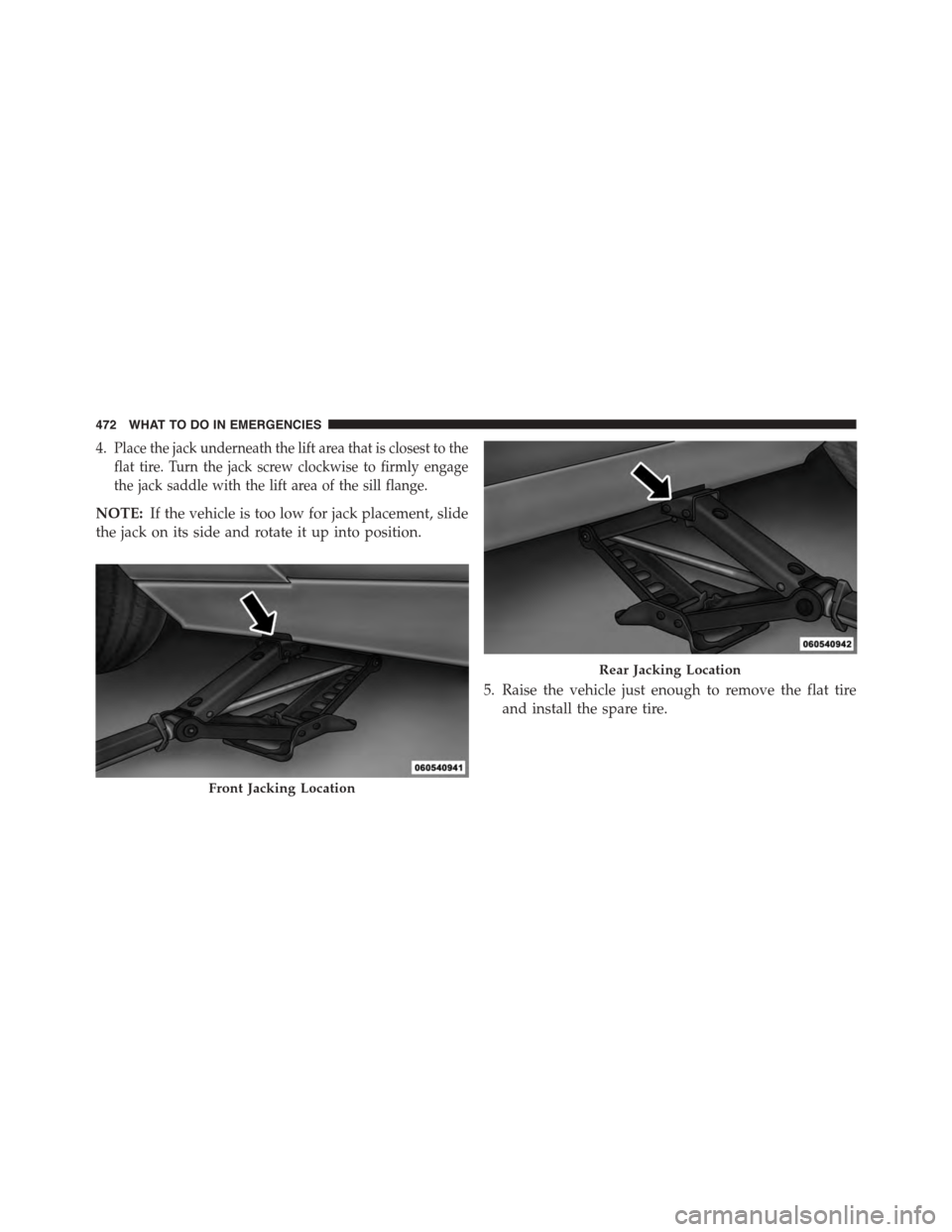
4.Place the jack underneath the lift area that is closest to the
flat tire. Turn the jack screw clockwise to firmly engage
the jack saddle with the lift area of the sill flange.
NOTE:If the vehicle is too low for jack placement, slide
the jack on its side and rotate it up into position.
5. Raise the vehicle just enough to remove the flat tire
and install the spare tire.
Front Jacking Location
Rear Jacking Location
472 WHAT TO DO IN EMERGENCIES
Page 476 of 603
NOTE:
•For vehicles so equipped, do not attempt to install a
center cap or wheel cover on the compact spare.
•Refer to “Compact Spare Tire” and to “Limited-Use
Spare” under “Tires—General Information” in
“Starting And Operating” for additional warnings,
cautions, and information about the spare tire, its
use, and operation.
8. Install the lug nuts with the cone shaped end of the lug
nut toward the wheel. Lightly tighten the lug nuts.
WARNING!
To avoid the risk of forcing the vehicle off the jack,
do not tighten the lug nuts fully until the vehicle has
been lowered. Failure to follow this warning may
result in personal injury.
9. Lower the vehicle to the ground by turning the jack
handle counterclockwise.
10. Refer to “Torque Specifications” in this section for
proper lug nut torque.
11. Stow the jack, tools and flat tire. Make sure the base
of the jack faces the front of the vehicle before
tightening down the fastener.
WARNING!
A loose tire or jack thrown forward in a collision or
hard stop could endanger the occupants of the ve-
hicle. Always stow the jack parts and the spare tire in
the places provided. Have the deflated (flat) tire
repaired or replaced immediately.
Road Tire Installation
1. Mount the road tire on the axle.
474 WHAT TO DO IN EMERGENCIES
Page 477 of 603
2. Install the remaining lug nuts with the cone shaped
end of the nut toward the wheel. Lightly tighten the
lug nuts.
WARNING!
To avoid the risk of forcing the vehicle off the jack,
do not tighten the lug nuts fully until the vehicle has
been lowered. Failure to follow this warning may
result in personal injury.
3. Lower the vehicle to the ground by turning the jack
handle counterclockwise.
4. Refer to Torque Table for proper lug nut torque.
5. After 25 miles (40 km) check the lug nut torque with a
torque wrench to ensure that all lug nuts are properly
seated against the wheel.
JUMP-STARTING PROCEDURES
If your vehicle has a discharged battery it can be jump-
started using a set of jumper cables and a battery in
another vehicle or by using a portable battery booster
pack. Jump-starting can be dangerous if done improperly
so please follow the procedures in this section carefully.
NOTE:When using a portable battery booster pack
follow the manufacturer ’s operating instructions and
precautions.
CAUTION!
Do not use a portable battery booster pack or any
other booster source with a system voltage greater
than 12 Volts or damage to the battery, starter motor,
alternator or electrical system may occur.
6
WHAT TO DO IN EMERGENCIES 475
Page 541 of 603
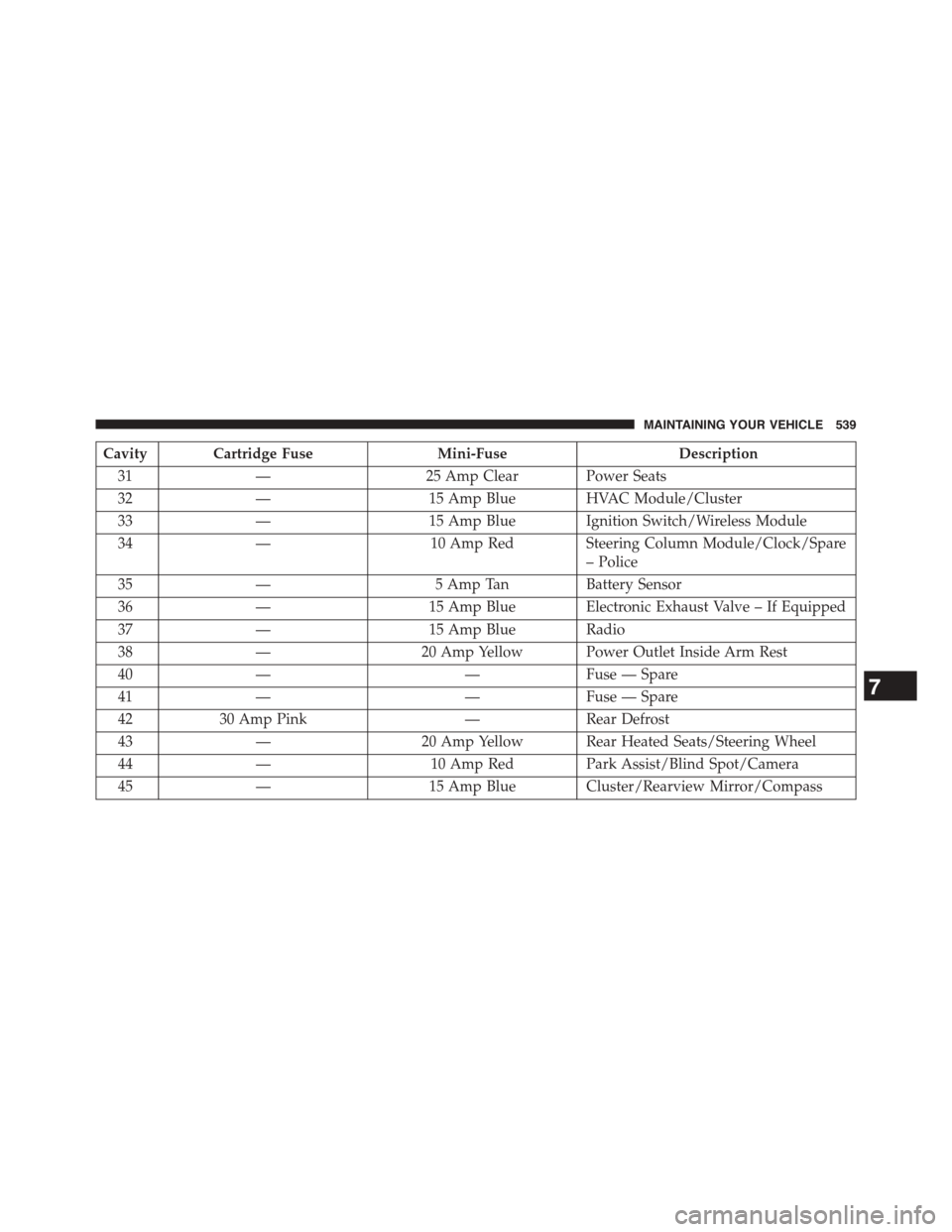
Cavity Cartridge FuseMini-FuseDescription
31—25 Amp Clear Power Seats
32—15 Amp Blue HVAC Module/Cluster
33—15 Amp Blue Ignition Switch/Wireless Module
34—10 Amp Red Steering Column Module/Clock/Spare
– Police
35—5 Amp TanBattery Sensor
36—15 Amp Blue Electronic Exhaust Valve – If Equipped
37—15 Amp Blue Radio
38—20 Amp Yellow Power Outlet Inside Arm Rest
40——Fuse — Spare
41——Fuse — Spare
4230 Amp Pink—Rear Defrost
43—20 Amp Yellow Rear Heated Seats/Steering Wheel
44—10 Amp Red Park Assist/Blind Spot/Camera
45—15 Amp Blue Cluster/Rearview Mirror/Compass
7
MAINTAINING YOUR VEHICLE 539
Page 547 of 603
BULB REPLACEMENT
NOTE:Lens fogging can occur under certain atmo-
spheric conditions. This will usually clear as atmospheric
conditions change to allow the condensation to change
back into a vapor. Turning the lamps on will usually
accelerate the clearing process.
Low Beam Headlamp, High Beam Headlamp,
Park/Turn Lamp — Models with Halogen
Headlamps — If Equipped
To replace the passenger side lamps:
1. Open the hood.
2. Remove the headlamp cover.
3. Reach behind the passenger headlamp assembly.
NOTE:The park/turn lamps can also be accessed at this
point.
4. Turn the headlamp access cap counterclockwise to
remove.
5. Remove bulb by turning it counter clockwise and
disconnect.
6. Install new bulb by turning it clockwise and reconnect.
7. Reinstall headlamp access cap by turning it clockwise
and then reinstall headlamp cover.
To replace the driver side lamps:
1. Open the hood.
2. Remove the air cleaner filter cover by removing three
fasteners and loosening the clean air inlet clamp and
then rotate cover off to the side.
NOTE:The cover has an electrical connector that does
not need to be disconnected if the cover is rotated off to
the side.
7
MAINTAINING YOUR VEHICLE 545
Page 548 of 603
3. Remove one fastener on the lower air box to remove
and access the rear of the headlamp assembly.
4. Reach behind the passenger headlamp assembly.
NOTE:The park/turn lamps can also be accessed at this
point.
5. Remove the headlamp cover.
6. Turn the headlamp access cap counterclockwise to
remove.
7. Remove bulb by turn it counter clockwise and discon-
nect.
8. Install new bulb by turning it clockwise and reconnect.
9. Reinstall headlamp access cap by turning it clockwise
and then reinstall headlamp cover.
10. Reinstall engine air cleaner assembly.
Low Beam Headlamp, High Beam Headlamp, and
Park/Turn Lamp — Models with High Intensity
Discharge (HID) Headlamps — If Equipped
HID Headlamps
The headlamps are a type of high voltage discharge tube.
High voltage can remain in the circuit even with the
headlamp switch off and the key removed.Because of
this, you should not attempt to service a headlamp bulb
yourself. If a headlamp bulb fails, take your vehicle to
an authorized dealer for service.
WARNING!
A transient high voltage occurs at the bulb sockets of
HID headlamps when the headlamp switch is turned
ON. It may cause serious electrical shock or electro-
cution if not serviced properly. See your authorized
dealer for service.
546 MAINTAINING YOUR VEHICLE