instrument cluster DODGE CHALLENGER 2015 3.G Owner's Manual
[x] Cancel search | Manufacturer: DODGE, Model Year: 2015, Model line: CHALLENGER, Model: DODGE CHALLENGER 2015 3.GPages: 603, PDF Size: 14.97 MB
Page 288 of 603
Clear Personal Data
After pressing the “Clear Personal Data Settings” button
on the touchscreen the following settings will be avail-
able:
•Clear Personal Data
When this feature is selected it will remove personal data
including Bluetooth® devices and presets. To remove
personal information, press the “Clear Personal Data”
button and a pop-up will appear asking#Are you sure
you want to clear all personal data?” select “OK” to
Clear, or “Cancel” to exit. Once the data has been cleared,
a pop up appears stating#Personal data cleared”. Press
the back arrow button on the touchscreen to return to the
previous menu.
System Information
After pressing the “System Information” button on the
touchscreen the following settings will be available:
•System Information
When System Information is selected, a System Informa-
tion screen will appear displaying the system software
version.
Performance Pages — If Equipped
Performance Pages is an application that provides a
display for performance indicators, as received from the
Instrument Cluster, that will help you gain familiarity
with the capabilities of your vehicle in real-time.
To access the Performance Pages, press the “Apps”
button on the touchscreen then press the “Performance
Pages” button on the touchscreen. Press the desired
button on the touchscreen to access that specific Perfor-
mance Page.
286 UNDERSTANDING YOUR INSTRUMENT PANEL
Page 365 of 603
Only shift from DRIVE to PARK or REVERSE when the
accelerator pedal is released and the vehicle is stopped.
Be sure to keep your foot on the brake pedal when
shifting between these gears.
The transmission shift lever has PARK, REVERSE, NEU-
TRAL, DRIVE, and MANUAL (Autostick®) shift posi-
tions. Manual shifts can be made using the Autostick®
shift control (refer to “AutoStick®” in this section for
further information). Toggling the shift lever forward (-)
or rearward (+) while in the MANUAL (AutoStick®)
position (beside the DRIVE position) will manually select
the transmission gear, and will display the current gear in
the instrument cluster as M1, M2, M3, etc.
NOTE:If the shift lever cannot be moved to the PARK,
REVERSE, or NEUTRAL position (when pushed for-
ward) it is probably in the MANUAL (AutoStick®, +/-)
position (beside the DRIVE position). In MANUAL
(AutoStick®) mode, the transmission gear is displayed in
the instrument cluster (as M1, M2, M3, etc.). Move the
shift lever to the right (into the DRIVE [D] position) for
access to PARK, REVERSE, and NEUTRAL.
Gear Ranges
DO NOT race the engine when shifting from PARK or
NEUTRAL into another gear range.
NOTE:After selecting any gear range, wait a moment to
allow the selected gear to engage before accelerating.
This is especially important when the engine is cold.
PARK (P)
This range supplements the parking brake by locking the
transmission. The engine can be started in this range.
5
STARTING AND OPERATING 363
Page 370 of 603
MANUAL (M)
The MANUAL (M, +/-) position (beside the DRIVE
position) enables full manual control of transmission
shifting (also known as AutoStick® mode; refer to
“AutoStick®” in this section for further information).
Toggling the shift lever forward (-) or rearward (+) while
in the MANUAL (AutoStick®) position will manually
select the transmission gear, and will display the current
gear in the instrument cluster as M1, M2, M3, etc.
Transmission Limp Home Mode
Transmission function is monitored electronically for
abnormal conditions. If a condition is detected that could
result in transmission damage, Transmission Limp Home
Mode is activated. In this mode, the transmission may
operate only in certain gears, or may not shift at all.
Vehicle performance may be severely degraded and the
engine may stall. In some situations, the transmission
may not re-engage if the engine is turned off and
restarted. The Malfunction Indicator Light (MIL) may be
illuminated. A message in the instrument cluster will
inform the driver of the more serious conditions, and
indicate what actions may be necessary.
In the event of a momentary problem, the transmission
can be reset to regain all forward gears by performing the
following steps.
NOTE:In cases where the instrument cluster message
indicates the transmission may not re-engage after en-
gine shutdown, perform this procedure only in a desired
location (preferably, at your authorized dealer).
368 STARTING AND OPERATING
Page 372 of 603
displayed in the instrument cluster, along with a high-
lighted#M#(Manual) indication. When the shift lever is
in the MANUAL (M) position, tap the shift lever forward
(-) (or tap the (-) shift paddle on the steering wheel, if
equipped) to downshift the transmission to the next
lower gear, or tap the lever rearward (+) (or tap the (+)
shift paddle, if equipped) to command an upshift.
NOTE:Tapping one of the steering wheel-mounted shift
paddles (+/-), if equipped, while the shift lever is in
DRIVE, will activate a temporary AutoStick® mode.
Tapping (-) to enter AutoStick® mode will downshift the
transmission to the next lower gear, while using (+) to
enter AutoStick® mode will retain the current gear. The
current gear will be displayed in the instrument cluster,
but the#M#will not be highlighted. The transmission will
revert back to normal operation (if the shift lever remains
in DRIVE) after a period of time, depending on accelera-
tor pedal activity.
In AutoStick® mode, the transmission will shift up or
down when (+/-) is manually selected by the driver
(using the shift lever, or the shift paddles [if equipped]),
unless an engine lugging or overspeed condition would
result. It will remain in the selected gear until another
upshift or downshift is chosen, except as described
below.
•In temporary AutoStick® mode (shift lever in DRIVE),
the transmission will automatically shift up when
maximum engine speed is reached. If the accelerator is
fully depressed, the transmission will downshift when
possible (based on current vehicle speed and gear).
Lack of accelerator pedal activity will cause the trans-
mission to revert to automatic operation.
•If normal AutoStick® mode is engaged (shift lever in
MANUAL position), manual gear selection will be
maintained until the shift lever is returned to DRIVE,
or as described below. The transmission will not
370 STARTING AND OPERATING
Page 373 of 603
upshift automatically at redline in this mode, nor will
downshifts be obtained if the accelerator pedal is
pressed to the floor.
•The transmission will automatically downshift as the
vehicle slows (to prevent engine lugging) and will
display the current gear.
•The transmission will automatically downshift to first
gear when coming to a stop. After a stop, the driver
should manually upshift (+) the transmission as the
vehicle is accelerated.
•You can start out, from a stop, in first or second gear.
Tapping (+) (at a stop) will allow starting in second
gear. Starting out in second gear can be helpful in
snowy or icy conditions.
•If a requested downshift would cause the engine to
over-speed, that shift will not occur.
•The system will ignore attempts to upshift at too low
of a vehicle speed.
•Holding the (-) paddle depressed (if equipped), or
holding the shift lever in the (-) position, will down-
shift the transmission to the lowest gear possible at the
current speed.
•Transmission shifting will be more noticeable when
AutoStick® is engaged.
•The system may revert to automatic shift mode if a
fault or overheat condition is detected.
To disengage AutoStick® mode, return the shift lever to
the DRIVE position, or press and hold the (+) shift paddle
(if equipped, and the shift lever is already in DRIVE)
until “D” is once again indicated in the instrument
cluster. You can shift in or out of the AutoStick® mode at
any time without taking your foot off the accelerator
pedal.
5
STARTING AND OPERATING 371
Page 392 of 603
NOTE:When the ESC is switched OFF, a feature of the
system remains active. This feature controls wheel spin
across an axle quite similarly to a limited slip differential.
If one wheel on an axle is spinning faster than the other,
the system will apply the brake of the spinning wheel
and allow more engine torque to be applied to the wheel
that is not spinning. To improve the vehicle’s traction
when driving with tire chains, or when starting off in
deep snow, sand, or gravel, it may be desirable to switch
to the “Partial Off” mode by momentarily pressing the
“ESC Off” switch.
ESC Activation/Malfunction Indicator Light And
ESC OFF Indicator Light
The “ESC Activation/Malfunction Indicator
Light” in the instrument cluster will come on
when the ignition switch is cycled to the ON/
RUN position. It should go out with the engine
running. If the “ESC Activation/Malfunction Indicator
Light” comes on continuously with the engine running, a
malfunction has been detected in the ESC system. If this
light remains on after several ignition cycles, and the
vehicle has been driven several miles (kilometers) at
speeds greater than 30 mph (48 km/h), see your autho-
rized dealer as soon as possible to have the problem
diagnosed and corrected.
The “ESC Activation/Malfunction Indicator Light” (lo-
cated in the instrument cluster) starts to flash as soon as
the tires lose traction and the ESC system becomes active.
The “ESC Activation/Malfunction Indicator Light” also
flashes when TCS is active. If the “ESC Activation/
Malfunction Indicator Light” begins to flash during ac-
celeration, ease up on the accelerator and apply as little
throttle as possible. Be sure to adapt your speed and
driving to the prevailing road conditions.
390 STARTING AND OPERATING
Page 423 of 603
Premium System
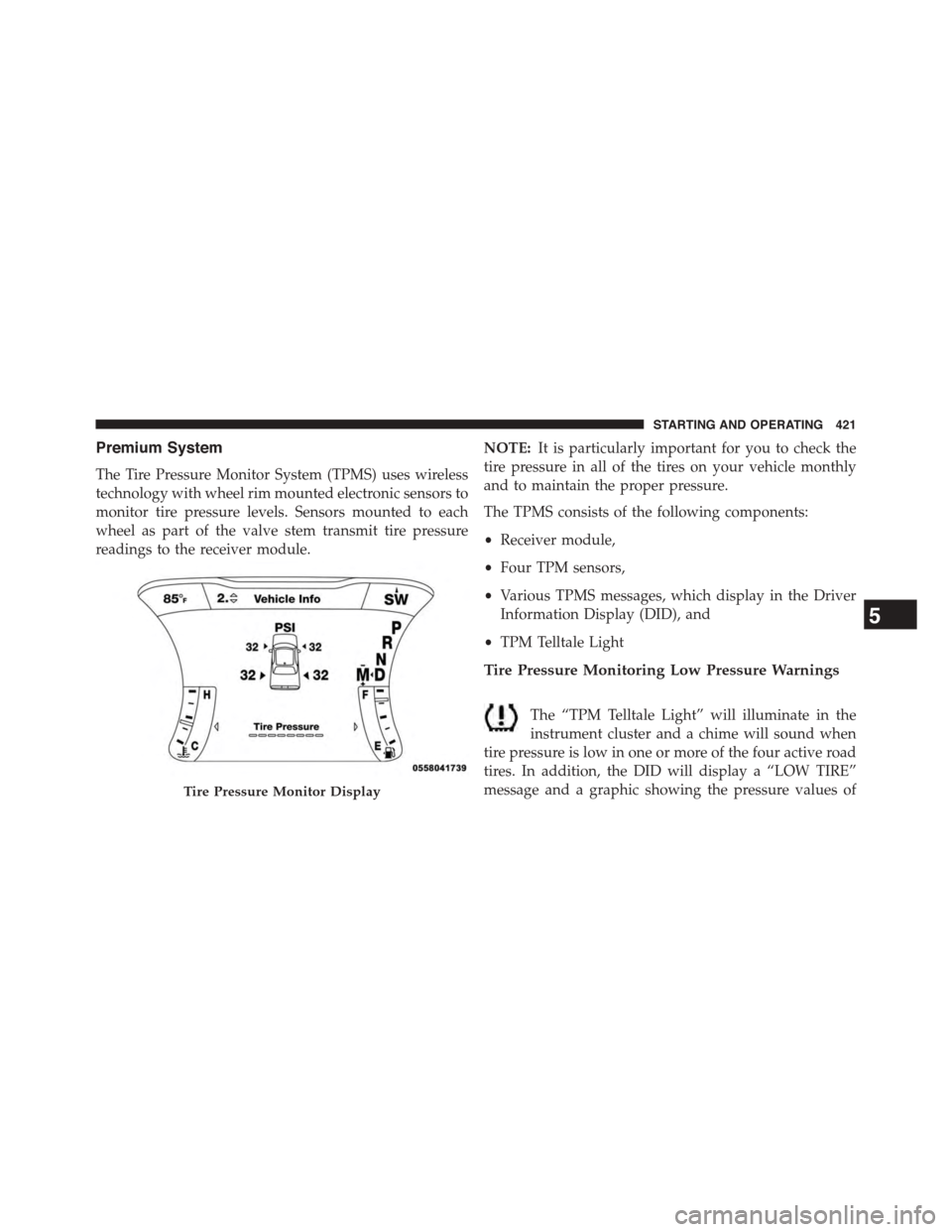
The Tire Pressure Monitor System (TPMS) uses wireless
technology with wheel rim mounted electronic sensors to
monitor tire pressure levels. Sensors mounted to each
wheel as part of the valve stem transmit tire pressure
readings to the receiver module.
NOTE:It is particularly important for you to check the
tire pressure in all of the tires on your vehicle monthly
and to maintain the proper pressure.
The TPMS consists of the following components:
•Receiver module,
•Four TPM sensors,
•Various TPMS messages, which display in the Driver
Information Display (DID), and
•TPM Telltale Light
Tire Pressure Monitoring Low Pressure Warnings
The “TPM Telltale Light” will illuminate in the
instrument cluster and a chime will sound when
tire pressure is low in one or more of the four active road
tires. In addition, the DID will display a “LOW TIRE”
message and a graphic showing the pressure values ofTire Pressure Monitor Display
5
STARTING AND OPERATING 421
Page 434 of 603
CAUTION!
•Damage to the fuel system or emissions control
system could result from using an improper fuel
tank filler tube cap (gas cap).
•A poorly fitting gas cap could let impurities into
the fuel system.
•A poorly fitting gas cap may cause the “Malfunc-
tion Indicator Light (MIL)” to turn on.
•To avoid fuel spillage and overfilling, do not “top
off” the fuel tank after filling. When the fuel
nozzle “clicks” or shuts off, the fuel tank is full.
WARNING!
•Never have any smoking materials lit in or near the
vehicle when the gas cap is removed or the tank is
being filled.
(Continued)
WARNING!(Continued)
•Never add fuel to the vehicle when the engine is
running.
•A fire may result if gasoline is pumped into a
portable container that is inside of a vehicle. You
could be burned. Always place gas containers on
the ground while filling.
NOTE:
•When the fuel nozzle “clicks” or shuts off, the fuel tank
is full.
•Tighten the gas cap until you hear a “clicking” sound.
This is an indication that the gas cap is tightened
properly. The MIL in the instrument cluster may turn
on if the gas cap is not secured properly. Make sure
that the gas cap is tightened each time the vehicle is
refueled.
432 STARTING AND OPERATING
Page 530 of 603
Glass Surfaces
All glass surfaces should be cleaned on a regular basis
with MOPAR® Glass Cleaner, or any commercial
household-type glass cleaner. Never use an abrasive type
cleaner. Use caution when cleaning the inside rear win-
dow equipped with electric defrosters or the right rear
quarter window equipped with the radio antenna. Do
not use scrapers or other sharp instrument that may
scratch the elements.
When cleaning the rear view mirror, spray cleaner on the
towel or rag that you are using. Do not spray cleaner
directly on the mirror.
Cleaning Plastic Instrument Cluster Lenses
The lenses in front of the instruments in this vehicle are
molded in clear plastic. When cleaning the lenses, care
must be taken to avoid scratching the plastic.
1. Clean with a wet soft rag. A mild soap solution may be
used, but do not use high alcohol content or abrasive
cleaners. If soap is used, wipe clean with a clean damp
rag.
2. Dry with a soft cloth.
Seat Belt Maintenance
Do not bleach, dye, or clean the belts with chemical
solvents or abrasive cleaners. This will weaken the fabric.
Sun damage can also weaken the fabric.
If the belts need cleaning, use MOPAR® Total Clean, a
mild soap solution, or lukewarm water. Do not remove
the belts from the vehicle to wash them. Dry with a soft
cloth.
Replace the belts if they appear frayed or worn or if the
buckles do not work properly.
528 MAINTAINING YOUR VEHICLE
Page 586 of 603
Deck Lid, Power Release.....................39
Defroster, Rear Window.....................218
Defroster, Windshield.......................95
Delay (Intermittent) Wipers..................148
Diagnostic System, Onboard.................492
Dimmer Switch, Headlight...................144
Dipsticks
Oil (Engine)...........................496
Disabled Vehicle Towing....................484
Disposal
Antifreeze (Engine Coolant)................516
Door Locks
Door Locks............................22
Key Fob . . . . . . . . . . . . . . . . . . . . . . . . . . . . . . .29
Remote...............................29
Remote Keyless Entry (RKE)................29
Door Locks, Automatic......................31
Door Opener, Garage.......................199
Driver Information Display
DID . . . . . . . . . . . . . . . . . . . . . . . . . . . . . . . ..236
Instrument Cluster Display................236
Driving
Through Flowing, Rising, or Shallow Standing
Water................................373
Electrical Power Outlets.....................211
Electric Remote Mirrors.....................113
Electronic Brake Control System...............381
Electronic Power Distribution Center (Fuses)......530
Electronic Speed Control (Cruise Control)........154
Electronic Stability Control (ESC)..............386
Emergency Deck Lid Release..................41
Emergency, In Case of
Freeing Vehicle When Stuck................479
Jacking...............................466
Jump Starting..........................475
Overheating...........................453
584 INDEX