brake DODGE CHALLENGER 2022 Owners Manual
[x] Cancel search | Manufacturer: DODGE, Model Year: 2022, Model line: CHALLENGER, Model: DODGE CHALLENGER 2022Pages: 336, PDF Size: 16.47 MB
Page 6 of 336
4
STARTING AND OPERATING
STARTING THE ENGINE ......................................... 82
Manual Transmission — If Equipped ...............82
Automatic Transmission — If Equipped...........82
Normal Starting ................................................83
AutoPark ...........................................................84
Extended Park Starting ....................................85
If Engine Fails To Start .....................................85
Cold Weather Operation
(Below –22°F Or −30°C) ...............................86
After Starting.....................................................86
ENGINE BLOCK HEATER — IF EQUIPPED ............ 86
ENGINE BREAK-IN RECOMMENDATIONS —
3.6L & 5.7L ........................................................... 86
PARKING BRAKE ................................................... 86
MANUAL TRANSMISSION — IF EQUIPPED ......... 88 6-Speed Manual Transmission........................88
Shifting ..............................................................88
Recommended Shift Speeds...........................89
1–4 Skip Shift ..................................................89
Downshifting .....................................................90 AUTOMATIC TRANSMISSION —
IF EQUIPPED .......................................................... 90
Ignition Park Interlock ......................................91
Brake Transmission Shift Interlock (BTSI)
System .............................................................91
8-Speed Automatic Transmission ...................91
SPORT MODE — WITHOUT PERFORMANCE
CONTROL................................................................. 96
FUEL SAVER TECHNOLOGY 5.7L —
IF EQUIPPED ...........................................................97
ELECTRIC POWER STEERING ...............................97
CRUISE CONTROL SYSTEMS — IF EQUIPPED .....97
Cruise Control ..................................................97
Adaptive Cruise Control (ACC) .........................99
PARKSENSE REAR PARK ASSIST —
IF EQUIPPED ....................................................... 107
ParkSense Sensors ....................................... 107
ParkSense Display ........................................ 107ParkSense Warning Display ......................... 109
Enabling And Disabling ParkSense .............. 109Service The ParkSense Rear Park
Assist System ................................................ 110Cleaning The ParkSense System ................. 110
ParkSense System Usage Precautions........ 110
PARKVIEW REAR BACK UP CAMERA............... 111 REFUELING THE VEHICLE .................................. 112
Loose Fuel Filler Cap Message .................... 113
VEHICLE LOADING .............................................. 113
Vehicle Certification Label ........................... 113
Gross Vehicle Weight Rating (GVWR) .......... 113
Gross Axle Weight Rating (GAWR) ............... 114
Overloading ................................................... 114
Loading .......................................................... 114
TRAILER TOWING ............................................... 114
Common Towing Definitions......................... 114
Trailer Hitch Classification............................ 116
Trailer Towing Weights
(Maximum Trailer Weight Ratings)............... 116
Trailer And Tongue Weight .......................... 117
Towing Requirements ................................... 117
Towing Tips ................................................... 119
RECREATIONAL TOWING
(BEHIND MOTORHOME) ..................................... 120
DRIVING TIPS ....................................................... 120
Driving On Slippery Surfaces ........................ 120Driving Through Water ................................. 121
22_LA_OM_EN_USC_t.book Page 4
Page 7 of 336
5
MULTIMEDIA
UCONNECT SYSTEMS ......................................... 122
CYBERSECURITY ................................................. 122
UCONNECT SETTINGS ........................................ 123Customer Programmable Features .............. 123
UCONNECT INTRODUCTION................................ 141
System Overview ........................................... 141Drag & Drop Menu Bar ................................. 143Safety And General Information ................... 143
UCONNECT MODES ............................................. 144
Steering Wheel Audio Controls ..................... 144
Radio Mode .................................................. 145
Media Mode .................................................. 154
Phone Mode ................................................. 156
ANDROID AUTO™ & APPLE CARPLAY® —
IF EQUIPPED ........................................................ 167
Android Auto™ .............................................. 167Apple CarPlay®.............................................. 169Android Auto™ And Apple CarPlay®
Tips And Tricks............................................... 171
PERFORMANCE PAGES ...................................... 171
Home .............................................................. 172
Timers ............................................................ 174
Gauges ........................................................... 176G-Force ........................................................... 177Engine ............................................................ 178
Dynamometer (Dyno) .................................... 178 DODGE DRIVE MODES — IF EQUIPPED ............ 179
Performance Control — If Equipped ............. 179
RADIO OPERATION AND MOBILE
PHONES ............................................................... 184
Regulatory And Safety Information .............. 184
SAFETY
SAFETY FEATURES .............................................. 185 Anti-Lock Brake System (ABS) ..................... 185
Electronic Brake Control (EBC) System ...... 186
AUXILIARY DRIVING SYSTEMS.......................... 191
Blind Spot Monitoring (BSM) —
If Equipped..................................................... 191Forward Collision Warning (FCW)
Operation — If Equipped ............................... 194
Tire Pressure Monitoring System (TPMS) .... 196
OCCUPANT RESTRAINT SYSTEMS ................... 200
Occupant Restraint Systems Features ....... 200
Important Safety Precautions ...................... 200Seat Belt Systems ........................................ 201Supplemental Restraint Systems (SRS) ...... 207Child Restraints ............................................ 216 SAFETY TIPS ........................................................ 230
Transporting Passengers.............................. 230
Transporting Pets ....................................... 230
Safety Checks You Should Make
Inside The Vehicle ........................................ 230
Periodic Safety Checks You Should
Make Outside The Vehicle ............................ 231
Exhaust Gas................................................... 232
Carbon Monoxide Warnings ........................ 232
IN CASE OF EMERGENCY
HAZARD WARNING FLASHERS ........................ 233
ASSIST AND SOS MIRROR — IF EQUIPPED...... 233
JACKING AND TIRE CHANGING ......................... 237Preparations For Jacking ............................ 237
Jack Location/Spare Tire Stowage ............. 237
Jacking And Changing A Tire ....................... 238
TIRE SERVICE KIT — IF EQUIPPED ..................... 241
Tire Service Kit Storage ................................ 241Tire Service Kit Components And
Operation ....................................................... 242Tire Service Kit Usage Precautions .............. 242
Sealing A Tire With Tire Service Kit .............. 244
22_LA_OM_EN_USC_t.book Page 5
Page 8 of 336
6
JUMP STARTING .................................................. 246 Preparations For Jump Start......................... 247Jump Starting Procedure .............................. 247
IF YOUR ENGINE OVERHEATS ........................... 248
MANUAL PARK RELEASE — 8–SPEED
TRANSMISSION .................................................. 249
FREEING A STUCK VEHICLE .............................. 250
TOWING A DISABLED VEHICLE .......................... 252 Rear-Wheel Drive (RWD) Models.................. 253
ENHANCED ACCIDENT RESPONSE SYSTEM
(EARS) .................................................................. 253
EVENT DATA RECORDER (EDR) ......................... 253
SERVICING AND MAINTENANCE
SCHEDULED SERVICING .................................... 254
3.6L And 5.7L Engines ................................. 254
ENGINE COMPARTMENT .................................... 259
3.6L Engine ................................................... 2595.7L Engine ................................................... 260Checking Oil Level ......................................... 261
Adding Washer Fluid ................................... 261Maintenance-Free Battery ........................... 262
Pressure Washing ......................................... 262 VEHICLE MAINTENANCE..................................... 263
Engine Oil ...................................................... 263
Engine Oil Filter ........................................... 265Engine Air Cleaner Filter ............................ 265
Air Conditioner Maintenance ..................... 266
Accessory Drive Belt Inspection ................... 267Body Lubrication ......................................... 268
Windshield Wiper Blades ............................ 268
Exhaust System ............................................. 270Cooling System ............................................ 271
Brake System ............................................... 274
Clutch Hydraulic System — Manual
Transmission (If Equipped)........................... 275Manual Transmission — If Equipped............ 275
Automatic Transmission — If Equipped ....... 275
All-Wheel Drive (AWD) — If Equipped .......... 276
Rear Axle ........................................................ 276Fuses.............................................................. 277
Bulb Replacement ........................................ 286
TIRES..................................................................... 290
Tire Safety Information ................................ 290Tires — General Information ........................ 297
Tire Types....................................................... 301
Spare Tires — If Equipped ............................ 301
Wheel And Wheel Trim Care ........................ 303
Snow Traction Devices ................................. 304
Tire Rotation Recommendations ................. 306 DEPARTMENT OF TRANSPORTATION
UNIFORM TIRE QUALITY GRADES .................... 306
Treadwear...................................................... 307
Traction Grades ............................................. 307Temperature Grades..................................... 307
VEHICLE STORAGE ............................................ 307
BODYWORK .......................................................... 308
Protection From Atmospheric Agents ........ 308Body And Underbody Maintenance ............. 308
Preserving The Bodywork ............................. 308
INTERIORS ........................................................... 309
Seats And Fabric Parts ................................. 309
Plastic And Coated Parts .............................. 309
Leather Surfaces........................................... 310
Glass Surfaces ............................................. 310
TECHNICAL SPECIFICATIONS
VEHICLE IDENTIFICATION NUMBER (VIN) ........ 311
BRAKE SYSTEM .................................................. 311
WHEEL AND TIRE TORQUE
SPECIFICATIONS ................................................. 311Torque Specifications ................................... 311
22_LA_OM_EN_USC_t.book Page 6
Page 12 of 336
10
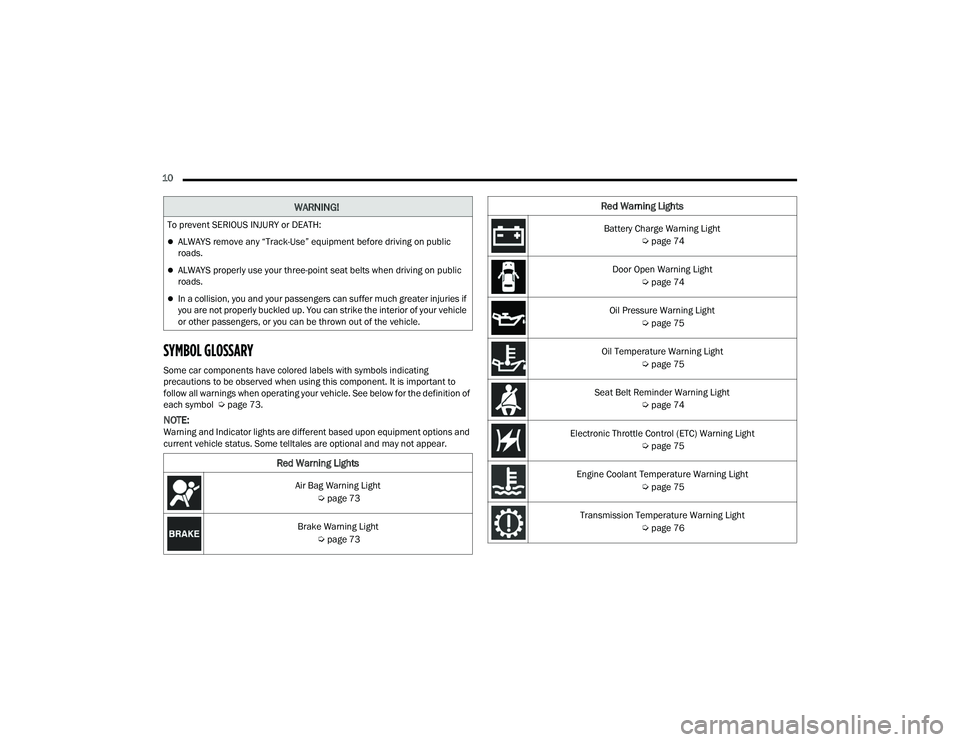
SYMBOL GLOSSARY
Some car components have colored labels with symbols indicating
precautions to be observed when using this component. It is important to
follow all warnings when operating your vehicle. See below for the definition of
each symbol Úpage 73.
NOTE:Warning and Indicator lights are different based upon equipment options and
current vehicle status. Some telltales are optional and may not appear.
WARNING!
To prevent SERIOUS INJURY or DEATH:
ALWAYS remove any “Track-Use” equipment before driving on public
roads.
ALWAYS properly use your three-point seat belts when driving on public
roads.
In a collision, you and your passengers can suffer much greater injuries if
you are not properly buckled up. You can strike the interior of your vehicle
or other passengers, or you can be thrown out of the vehicle.
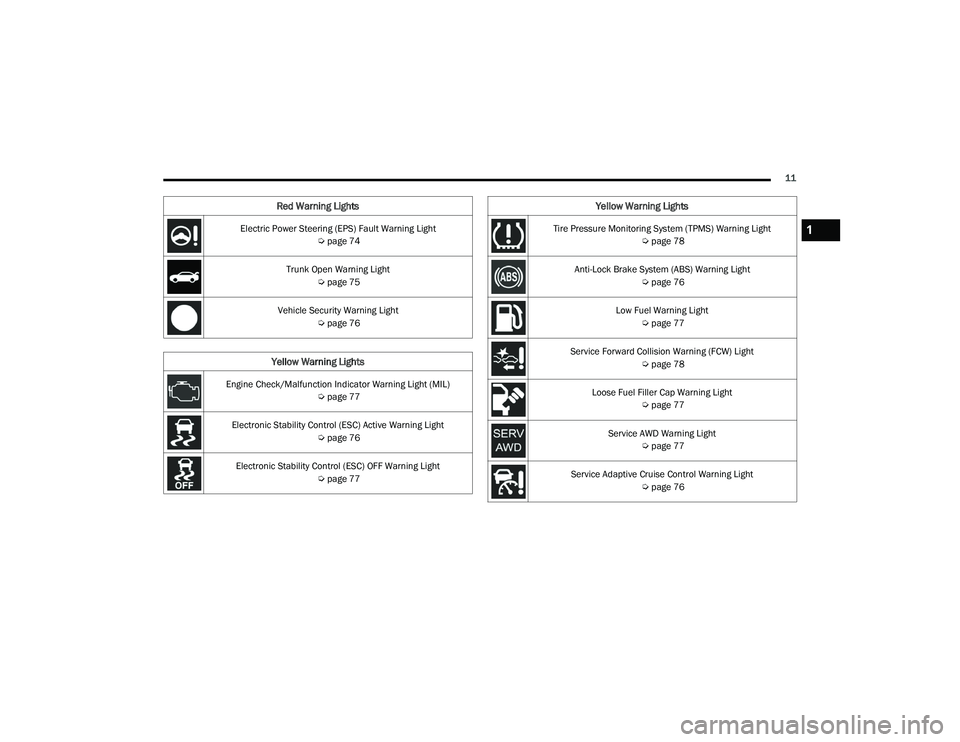
Red Warning Lights
Air Bag Warning Light
Úpage 73
Brake Warning Light Úpage 73
Battery Charge Warning Light
Úpage 74
Door Open Warning Light Úpage 74
Oil Pressure Warning Light Úpage 75
Oil Temperature Warning Light Úpage 75
Seat Belt Reminder Warning Light Úpage 74
Electronic Throttle Control (ETC) Warning Light Úpage 75
Engine Coolant Temperature Warning Light Úpage 75
Transmission Temperature Warning Light Úpage 76
Red Warning Lights
22_LA_OM_EN_USC_t.book Page 10
Page 13 of 336
11
Electric Power Steering (EPS) Fault Warning Light Úpage 74
Trunk Open Warning Light Úpage 75
Vehicle Security Warning Light Úpage 76
Yellow Warning Lights
Engine Check/Malfunction Indicator Warning Light (MIL)
Úpage 77
Electronic Stability Control (ESC) Active Warning Light Úpage 76
Electronic Stability Control (ESC) OFF Warning Light Úpage 77
Red Warning Lights
Tire Pressure Monitoring System (TPMS) Warning Light
Úpage 78
Anti-Lock Brake System (ABS) Warning Light Úpage 76
Low Fuel Warning Light Úpage 77
Service Forward Collision Warning (FCW) Light Úpage 78
Loose Fuel Filler Cap Warning Light Úpage 77
Service AWD Warning Light Úpage 77
Service Adaptive Cruise Control Warning Light Úpage 76
Yellow Warning Lights
1
22_LA_OM_EN_USC_t.book Page 11
Page 19 of 336
GETTING TO KNOW YOUR VEHICLE17
(Continued)
IGNITION SWITCH
KEYLESS ENTER ‘N GO™ IGNITION
This feature allows the driver to operate the
ignition switch with the push of a button as long as
the key fob is in the passenger compartment.
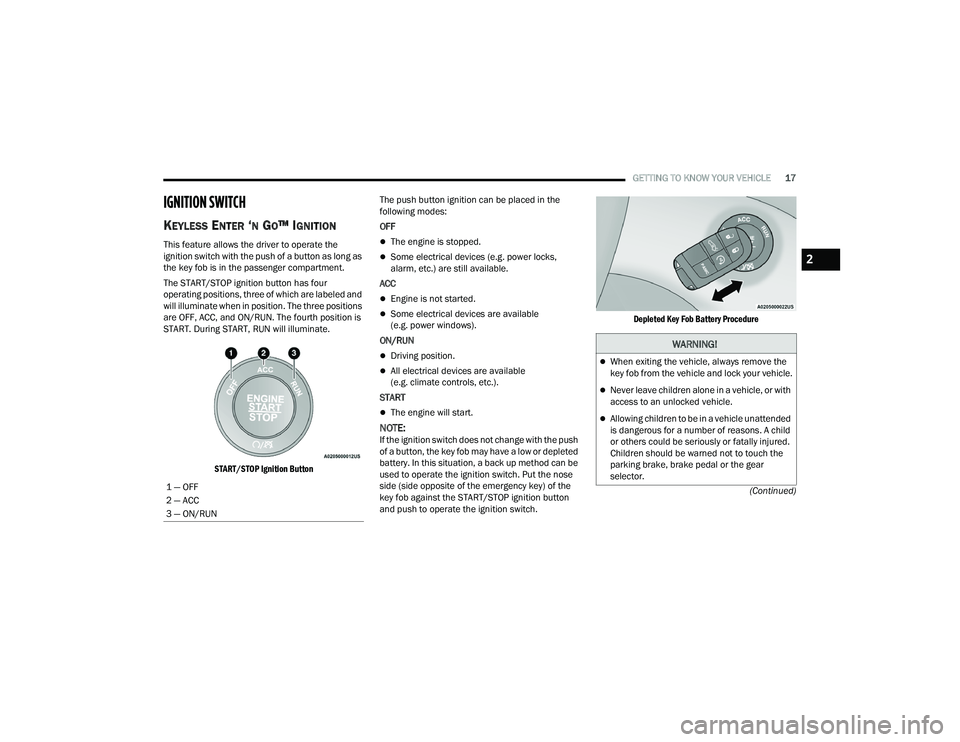
The START/STOP ignition button has four
operating positions, three of which are labeled and
will illuminate when in position. The three positions
are OFF, ACC, and ON/RUN. The fourth position is
START. During START, RUN will illuminate.
START/STOP Ignition Button
The push button ignition can be placed in the
following modes:
OFF
The engine is stopped.
Some electrical devices (e.g. power locks,
alarm, etc.) are still available.
ACC
Engine is not started.
Some electrical devices are available
(e.g. power windows).
ON/RUN
Driving position.
All electrical devices are available
(e.g. climate controls, etc.).
START
The engine will start.
NOTE:If the ignition switch does not change with the push
of a button, the key fob may have a low or depleted
battery. In this situation, a back up method can be
used to operate the ignition switch. Put the nose
side (side opposite of the emergency key) of the
key fob against the START/STOP ignition button
and push to operate the ignition switch.
Depleted Key Fob Battery Procedure
1 — OFF
2 — ACC
3 — ON/RUN
WARNING!
When exiting the vehicle, always remove the
key fob from the vehicle and lock your vehicle.
Never leave children alone in a vehicle, or with
access to an unlocked vehicle.
Allowing children to be in a vehicle unattended
is dangerous for a number of reasons. A child
or others could be seriously or fatally injured.
Children should be warned not to touch the
parking brake, brake pedal or the gear
selector.
2
22_LA_OM_EN_USC_t.book Page 17
Page 21 of 336
GETTING TO KNOW YOUR VEHICLE19
All of the following conditions must be met before
the engine will remote start:
Gear selector in PARK
Doors closed
Hood closed
Trunk closed
Hazard switch off
Brake switch inactive (brake pedal not pressed)
Battery at an acceptable charge level
PANIC button not pushed
System not disabled from previous remote start
event
Vehicle Security system indicator flashing
Ignition in the OFF position
Fuel level meets minimum requirement
Vehicle Security system is not signaling an
intrusion
Malfunction Indicator Light (MIL) is not
illuminated
TO EXIT REMOTE START MODE
To drive the vehicle after starting the Remote Start
system, either push and release the unlock button
on the key fob to unlock the doors, or unlock the
vehicle using Keyless Enter ‘n Go™ — Passive Entry
via the door handles, and disarm the Vehicle
Security system (if equipped). Then, prior to the
end of the 15 minute cycle, push and release the
START/STOP ignition button.
The Remote Start system will turn the engine off if
the Remote Start button on the key fob is pushed
again, or if the engine is allowed to run for the
entire 15 minute cycle. Once the ignition is placed
in the ON/RUN position, the climate controls will
resume the previously set operations
(temperature, blower control, etc.).
NOTE:
To avoid unintentional shutdowns, the system
will disable for two seconds after receiving a
valid Remote Start request.
For vehicles equipped with the Keyless
Enter ‘n Go™ — Passive Entry feature, the
message “Remote Start Active — Push Start
Button” will show in the instrument cluster
display until you push the START/STOP ignition
button.
Remote Start will also cancel if any of the following
occur:
The engine stalls or engine speed exceeds
2500 RPM.
Any engine warning lights come on.
The Low Fuel Light turns on.
The hood is opened.
The hazard switch is pushed.
The gear selector is moved out of PARK.
The brake pedal is pressed.
WARNING!
Do not start or run an engine in a closed
garage or confined area. Exhaust gas contains
Carbon Monoxide (CO) which is odorless and
colorless. Carbon Monoxide is poisonous and
can cause serious injury or death when
inhaled.
Keep key fobs away from children. Operation
of the Remote Start system, windows, door
locks or other controls could cause serious
injury or death.
2
22_LA_OM_EN_USC_t.book Page 19
Page 26 of 336
24GETTING TO KNOW YOUR VEHICLE
(Continued)
NOTE:Manually locking the vehicle will not arm the
Vehicle Security system.
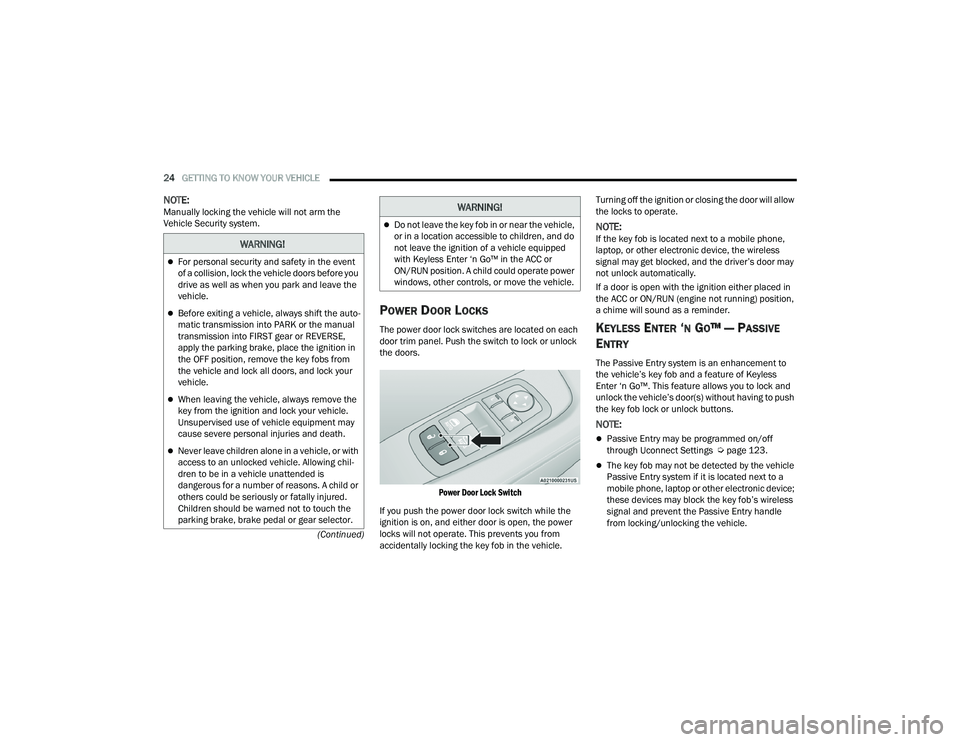
POWER DOOR LOCKS
The power door lock switches are located on each
door trim panel. Push the switch to lock or unlock
the doors.
Power Door Lock Switch
If you push the power door lock switch while the
ignition is on, and either door is open, the power
locks will not operate. This prevents you from
accidentally locking the key fob in the vehicle. Turning off the ignition or closing the door will allow
the locks to operate.
NOTE:If the key fob is located next to a mobile phone,
laptop, or other electronic device, the wireless
signal may get blocked, and the driver’s door may
not unlock automatically.
If a door is open with the ignition either placed in
the ACC or ON/RUN (engine not running) position,
a chime will sound as a reminder.
KEYLESS ENTER ‘N GO™ — PASSIVE
E
NTRY
The Passive Entry system is an enhancement to
the vehicle’s key fob and a feature of Keyless
Enter ‘n Go™. This feature allows you to lock and
unlock the vehicle’s door(s) without having to push
the key fob lock or unlock buttons.
NOTE:
Passive Entry may be programmed on/off
through Uconnect Settings Ú page 123.
The key fob may not be detected by the vehicle
Passive Entry system if it is located next to a
mobile phone, laptop or other electronic device;
these devices may block the key fob’s wireless
signal and prevent the Passive Entry handle
from locking/unlocking the vehicle.
WARNING!
For personal security and safety in the event
of a collision, lock the vehicle doors before you
drive as well as when you park and leave the
vehicle.
Before exiting a vehicle, always shift the auto -
matic transmission into PARK or the manual
transmission into FIRST gear or REVERSE,
apply the parking brake, place the ignition in
the OFF position, remove the key fobs from
the vehicle and lock all doors, and lock your
vehicle.
When leaving the vehicle, always remove the
key from the ignition and lock your vehicle.
Unsupervised use of vehicle equipment may
cause severe personal injuries and death.
Never leave children alone in a vehicle, or with
access to an unlocked vehicle. Allowing chil -
dren to be in a vehicle unattended is
dangerous for a number of reasons. A child or
others could be seriously or fatally injured.
Children should be warned not to touch the
parking brake, brake pedal or gear selector.
Do not leave the key fob in or near the vehicle,
or in a location accessible to children, and do
not leave the ignition of a vehicle equipped
with Keyless Enter ‘n Go™ in the ACC or
ON/RUN position. A child could operate power
windows, other controls, or move the vehicle.
WARNING!
22_LA_OM_EN_USC_t.book Page 24
Page 47 of 336
GETTING TO KNOW YOUR VEHICLE45
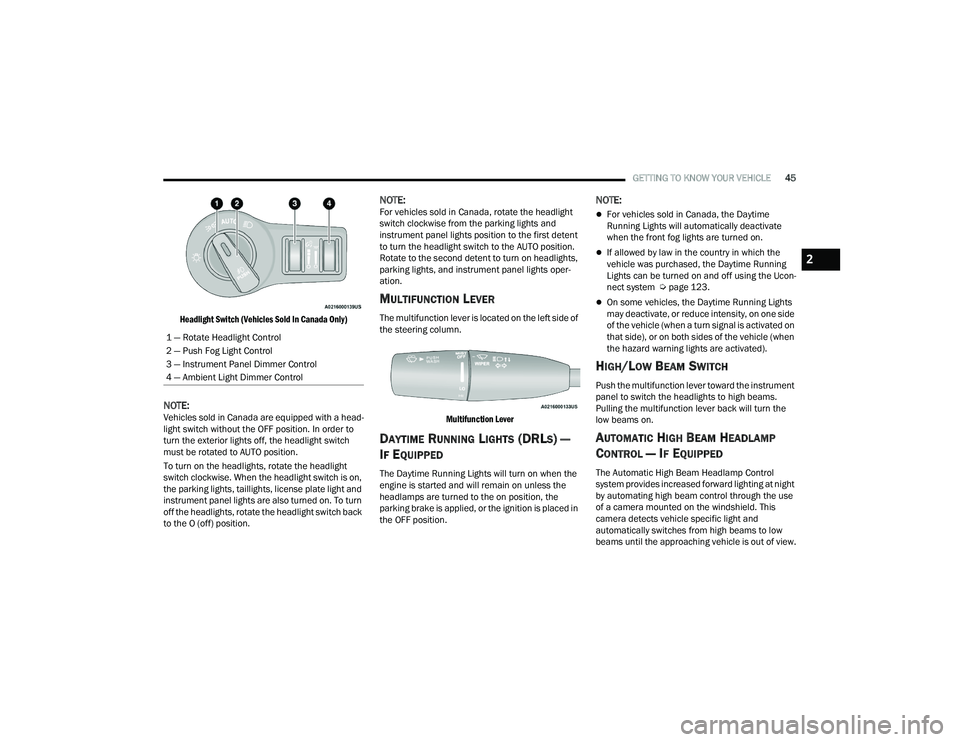
Headlight Switch (Vehicles Sold In Canada Only)
NOTE:Vehicles sold in Canada are equipped with a head -
light switch without the OFF position. In order to
turn the exterior lights off, the headlight switch
must be rotated to AUTO position.
To turn on the headlights, rotate the headlight
switch clockwise. When the headlight switch is on,
the parking lights, taillights, license plate light and
instrument panel lights are also turned on. To turn
off the headlights, rotate the headlight switch back
to the O (off) position.
NOTE:For vehicles sold in Canada, rotate the headlight
switch clockwise from the parking lights and
instrument panel lights position to the first detent
to turn the headlight switch to the AUTO position.
Rotate to the second detent to turn on headlights,
parking lights, and instrument panel lights oper -
ation.
MULTIFUNCTION LEVER
The multifunction lever is located on the left side of
the steering column.
Multifunction Lever
DAYTIME RUNNING LIGHTS (DRLS) —
I
F EQUIPPED
The Daytime Running Lights will turn on when the
engine is started and will remain on unless the
headlamps are turned to the on position, the
parking brake is applied, or the ignition is placed in
the OFF position.
NOTE:
For vehicles sold in Canada, the Daytime
Running Lights will automatically deactivate
when the front fog lights are turned on.
If allowed by law in the country in which the
vehicle was purchased, the Daytime Running
Lights can be turned on and off using the Ucon -
nect system Ú page 123.
On some vehicles, the Daytime Running Lights
may deactivate, or reduce intensity, on one side
of the vehicle (when a turn signal is activated on
that side), or on both sides of the vehicle (when
the hazard warning lights are activated).
HIGH/LOW BEAM SWITCH
Push the multifunction lever toward the instrument
panel to switch the headlights to high beams.
Pulling the multifunction lever back will turn the
low beams on.
AUTOMATIC HIGH BEAM HEADLAMP
C
ONTROL — IF EQUIPPED
The Automatic High Beam Headlamp Control
system provides increased forward lighting at night
by automating high beam control through the use
of a camera mounted on the windshield. This
camera detects vehicle specific light and
automatically switches from high beams to low
beams until the approaching vehicle is out of view.
1 — Rotate Headlight Control
2 — Push Fog Light Control
3 — Instrument Panel Dimmer Control
4 — Ambient Light Dimmer Control
2
22_LA_OM_EN_USC_t.book Page 45
Page 69 of 336
GETTING TO KNOW YOUR INSTRUMENT PANEL67
Up And Down Arrow Buttons:
Using the up or down arrow button allows
you to cycle through the Main Menu Items.
Changes the Main Screen area and Menu Title
area.
Left And Right Arrow Buttons:
Using the left or right arrow button allows
you to cycle through the submenu items of the
Main menu item.
NOTE:
Holding the up or down or left or
right arrow button will loop the user through
the currently selected menu or options
presented on the screen.
Upon returning to a main menu, the last
submenu screen viewed within that main menu
will be displayed.
OK Button:
For Digital Speedometer:
Pushing the OK button changes units
(mph or km/h).
For Screen Setup:
OK button allows user to enter menu and
submenus.
Within each submenu layer, the up and
down arrow buttons will allow the user to
select the item of interest.
Pushing the OK button makes the selection and
a confirmation screen will appear (returning the
user to the first page of the submenu).
Pushing the left arrow button will exit each
submenu layer and return to the main menu.
For the Trip and Fuel Economy menus (and
Performance Timers) — If Equipped:
Information is reset by pushing and holding the
OK button.
ENGINE OIL LIFE RESET
Oil Change Required
Your vehicle is equipped with an engine oil change
indicator system. The “Oil Change Required”
message will display in the instrument cluster
display for five seconds after a single chime has
sounded, to indicate the next scheduled oil change
interval. The engine oil change indicator system is
duty cycle based, which means the engine oil
change interval may fluctuate, dependent upon
your personal driving style. Unless reset, this message will continue to display
each time you place the ignition in the ON/RUN
position. To turn off the message temporarily, push
and release the
OK or arrow buttons. To reset the
oil change indicator system (after performing the
scheduled maintenance), refer to the following
procedure.
Vehicles Equipped With Keyless Enter ‘N Go™ —
Ignition
Use the steering wheel instrument cluster display
controls for the following procedure(s):
1. Without pressing the brake pedal, push the ENGINE START/STOP button and place the
ignition in the ON/RUN position (do not start
the engine).
2. Push and release the down arrow button to
scroll downward through the main menu to
“Vehicle Info.”
3. Push and release the right arrow button to
access the ”Oil Life” screen.
3
22_LA_OM_EN_USC_t.book Page 67