steering wheel DODGE CHALLENGER 2022 Owners Manual
[x] Cancel search | Manufacturer: DODGE, Model Year: 2022, Model line: CHALLENGER, Model: DODGE CHALLENGER 2022Pages: 336, PDF Size: 16.47 MB
Page 4 of 336
2
INTRODUCTION
SYMBOLS KEY ...........................................................9
VEHICLE MODIFICATIONS/ALTERATIONS .............9
SYMBOL GLOSSARY.............................................. 10
GETTING TO KNOW YOUR VEHICLE
KEYS ....................................................................... 13 Key Fob .............................................................13
SENTRY KEY ........................................................... 16
IGNITION SWITCH .................................................. 17
Keyless Enter ‘n Go™ Ignition .........................17
REMOTE START — IF EQUIPPED .......................... 18
How To Use Remote Start ................................18
To Exit Remote Start Mode ..............................19
Remote Start Front Defrost Activation —
If Equipped........................................................20
Remote Start Comfort Systems —
If Equipped........................................................20
Remote Start Windshield Wiper De–Icer
Activation — If Equipped ..................................20
Remote Start Cancel Message —
If Equipped........................................................20
VEHICLE SECURITY SYSTEM — IF EQUIPPED ..... 21
To Arm The System ..........................................21
To Disarm The System .....................................21
Rearming The System ......................................21
Security System Manual Override ...................21
Tamper Alert .....................................................21 DELUXE VEHICLE SECURITY SYSTEM —
IF EQUIPPED ...........................................................22
To Arm The System ..........................................22
To Disarm The System .....................................22
Security System Manual Override ...................23
DOORS ....................................................................23
Manual Door Locks ..........................................23
Power Door Locks ...........................................24
Keyless Enter ‘n Go™ — Passive Entry............24
Automatic Unlock Doors On Exit......................27
Automatic Door Locks — If Equipped ..............27
STEERING WHEEL ..................................................27
Manual Tilt/Telescoping Steering
Column — If Equipped ...................................27
Power Tilt/Telescoping Steering
Column — If Equipped .....................................28
Heated Steering Wheel — If Equipped ............28
UCONNECT VOICE RECOGNITION ........................29
Introducing Voice Recognition.........................29
Basic Voice Commands ...................................29
Get Started .......................................................29
Additional Information .....................................30
DRIVER MEMORY SETTINGS — IF EQUIPPED .....30
Programming The Memory Feature ................31
Linking And Unlinking The Key Fob
To Memory ........................................................31
Memory Position Recall ...................................31 SEATS ..................................................................... 32
Manual Adjustment (Front Seats) —
If Equipped .......................................................32
Manual Adjustment (Rear Seats).................... 33
Power Adjustment (Front Seats) —
If Equipped .......................................................34
Heated Seats — If Equipped ........................... 35
Front Ventilated Seats — If Equipped ............. 36
Vehicles Without Passenger Seating
Installed ............................................................ 36
Passenger Seat Easy Entry.............................. 37
Head Restraints ............................................... 37
MIRRORS ............................................................... 39
Inside Rearview Mirror..................................... 39
Illuminated Vanity Mirrors .............................. 39
Outside Mirrors ................................................ 40
Power Mirrors .................................................. 40
Heated Mirrors — If Equipped ......................... 40
UNIVERSAL GARAGE DOOR OPENER
(HOMELINK®) ....................................................... 40
Before You Begin Programming
HomeLink® ...................................................... 41
Erasing All The HomeLink® Channels ............ 41
Identifying Whether You Have A Rolling
Code Or Non-Rolling Code Device ................... 41
Programming HomeLink® To A Garage
Door Opener ..................................................... 42
22_LA_OM_EN_USC_t.book Page 2
Page 7 of 336
5
MULTIMEDIA
UCONNECT SYSTEMS ......................................... 122
CYBERSECURITY ................................................. 122
UCONNECT SETTINGS ........................................ 123Customer Programmable Features .............. 123
UCONNECT INTRODUCTION................................ 141
System Overview ........................................... 141Drag & Drop Menu Bar ................................. 143Safety And General Information ................... 143
UCONNECT MODES ............................................. 144
Steering Wheel Audio Controls ..................... 144
Radio Mode .................................................. 145
Media Mode .................................................. 154
Phone Mode ................................................. 156
ANDROID AUTO™ & APPLE CARPLAY® —
IF EQUIPPED ........................................................ 167
Android Auto™ .............................................. 167Apple CarPlay®.............................................. 169Android Auto™ And Apple CarPlay®
Tips And Tricks............................................... 171
PERFORMANCE PAGES ...................................... 171
Home .............................................................. 172
Timers ............................................................ 174
Gauges ........................................................... 176G-Force ........................................................... 177Engine ............................................................ 178
Dynamometer (Dyno) .................................... 178 DODGE DRIVE MODES — IF EQUIPPED ............ 179
Performance Control — If Equipped ............. 179
RADIO OPERATION AND MOBILE
PHONES ............................................................... 184
Regulatory And Safety Information .............. 184
SAFETY
SAFETY FEATURES .............................................. 185 Anti-Lock Brake System (ABS) ..................... 185
Electronic Brake Control (EBC) System ...... 186
AUXILIARY DRIVING SYSTEMS.......................... 191
Blind Spot Monitoring (BSM) —
If Equipped..................................................... 191Forward Collision Warning (FCW)
Operation — If Equipped ............................... 194
Tire Pressure Monitoring System (TPMS) .... 196
OCCUPANT RESTRAINT SYSTEMS ................... 200
Occupant Restraint Systems Features ....... 200
Important Safety Precautions ...................... 200Seat Belt Systems ........................................ 201Supplemental Restraint Systems (SRS) ...... 207Child Restraints ............................................ 216 SAFETY TIPS ........................................................ 230
Transporting Passengers.............................. 230
Transporting Pets ....................................... 230
Safety Checks You Should Make
Inside The Vehicle ........................................ 230
Periodic Safety Checks You Should
Make Outside The Vehicle ............................ 231
Exhaust Gas................................................... 232
Carbon Monoxide Warnings ........................ 232
IN CASE OF EMERGENCY
HAZARD WARNING FLASHERS ........................ 233
ASSIST AND SOS MIRROR — IF EQUIPPED...... 233
JACKING AND TIRE CHANGING ......................... 237Preparations For Jacking ............................ 237
Jack Location/Spare Tire Stowage ............. 237
Jacking And Changing A Tire ....................... 238
TIRE SERVICE KIT — IF EQUIPPED ..................... 241
Tire Service Kit Storage ................................ 241Tire Service Kit Components And
Operation ....................................................... 242Tire Service Kit Usage Precautions .............. 242
Sealing A Tire With Tire Service Kit .............. 244
22_LA_OM_EN_USC_t.book Page 5
Page 22 of 336
20GETTING TO KNOW YOUR VEHICLE
REMOTE START FRONT DEFROST
A
CTIVATION — IF EQUIPPED
When Remote Start is active, and the outside
ambient temperature is 40°F (4.5°C) or below, the
system will automatically activate front defrost for
15 minutes or less. The time is dependent on the
ambient temperature. Once the timer expires, the
system will automatically adjust the settings
depending on ambient conditions. See “Remote
Start Comfort Systems — If Equipped” in the next
section for detailed operation.
REMOTE START COMFORT SYSTEMS —
I
F EQUIPPED
When Remote Start is activated, the front and rear
defrost will automatically turn on in cold weather.
The heated steering wheel and driver heated seat
feature will turn on if selected in the comfort menu
screen within Uconnect Settings Ú page 123. In
warm weather, the driver vented seat feature will
automatically turn on when Remote Start is
activated, if programmed in the comfort menu
screen. The vehicle will adjust the climate control
settings depending on the outside ambient
temperature. Automatic Temperature Control (ATC) —
If Equipped
The climate controls will be automatically adjusted
to the optimal temperature and mode settings
depending on the outside ambient temperature.
This will occur until the ignition is placed in the
ON/RUN position where the climate controls will
resume their previous settings.
Manual Temperature Control (MTC) — If Equipped
In ambient temperatures at 40°F (4.5°C) or
below, the climate settings will default to
maximum heat, with fresh air entering the
cabin. If the front defrost timer expires, the
vehicle will enter Mix Mode.
In ambient temperatures from 40°F (4.5°C) to
78°F (26°C), the climate settings will be based
on the last settings selected by the driver.
In ambient temperatures at 78°F (26°C) or
above, the climate settings will default to MAX
A/C, Bi-Level Mode, with Recirculation on.
For more information on ATC, MTC, and climate
control settings, see Ú page 51.
NOTE:These features will stay on through the duration of
Remote Start until the ignition is placed in the
ON/RUN position. The climate control settings will
change if manually adjusted by the driver while the vehicle is in Remote Start mode, and exit auto
-
matic override. This includes the OFF button on the
climate controls, which will turn the system off.
REMOTE START WINDSHIELD WIPER
D
E–ICER ACTIVATION — IF EQUIPPED
When Remote Start is active and the outside
ambient temperature is less than 33°F (0.6°C),
the Windshield Wiper De-Icer will activate. Exiting
Remote Start will resume its previous operation. If
the Windshield Wiper De-Icer was active, the timer
and operation will continue.
REMOTE START CANCEL MESSAGE —
I
F EQUIPPED
One of the following messages will display in the
instrument cluster display if the vehicle fails to
remote start or exits Remote Start prematurely:
Remote Start Cancelled — Door Open
Remote Start Cancelled — Hood Open
Remote Start Cancelled — Fuel Low
Remote Start Cancelled — Trunk Open
Remote Start Disabled — Start Vehicle To Reset
The message will stay active until the ignition is
placed in the ON/RUN position.
22_LA_OM_EN_USC_t.book Page 20
Page 29 of 336
GETTING TO KNOW YOUR VEHICLE27
NOTE:
After pushing the door handle button, you must
wait two seconds before you can lock or unlock
the doors, using either Passive Entry door
handle. This is done to allow you to check if the
vehicle is locked by pulling the door handle,
without the vehicle unlocking.
The Passive Entry system will not operate if the
key fob battery is depleted.
The vehicle doors can also be locked by using the
key fob lock button or the lock button located on
the vehicle’s interior door panel Ú page 322.
AUTOMATIC UNLOCK DOORS ON EXIT
The doors will unlock automatically on vehicles
with power door locks if:
The Automatic Unlock Doors On Exit feature is
enabled within Uconnect Settings Ú page 123.
The driver door is opened.
The doors were not previously unlocked.
NOTE:
The doors will also unlock automatically when
the gear selector was not previously in the PARK
position, then is placed into the PARK position.
Use the Automatic Unlock Doors On Exit feature
in accordance with local laws.
AUTOMATIC DOOR LOCKS —
I
F EQUIPPED
The auto door lock feature default condition is
enabled. When enabled, the door locks will lock
automatically when the vehicle's speed exceeds
15 mph (24 km/h). The auto door lock feature can
be enabled or disabled by an authorized dealer per
written request of the customer. Please see an
authorized dealer for service.
STEERING WHEEL
MANUAL TILT/TELESCOPING STEERING
C
OLUMN — IF EQUIPPED
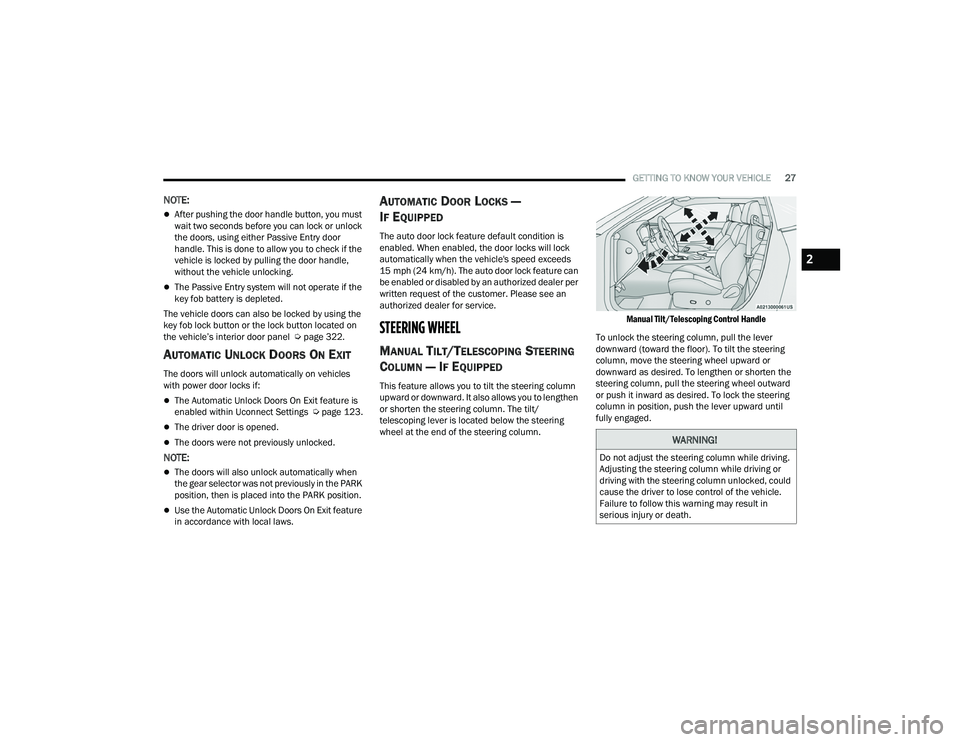
This feature allows you to tilt the steering column
upward or downward. It also allows you to lengthen
or shorten the steering column. The tilt/
telescoping lever is located below the steering
wheel at the end of the steering column.
Manual Tilt/Telescoping Control Handle
To unlock the steering column, pull the lever
downward (toward the floor). To tilt the steering
column, move the steering wheel upward or
downward as desired. To lengthen or shorten the
steering column, pull the steering wheel outward
or push it inward as desired. To lock the steering
column in position, push the lever upward until
fully engaged.
WARNING!
Do not adjust the steering column while driving.
Adjusting the steering column while driving or
driving with the steering column unlocked, could
cause the driver to lose control of the vehicle.
Failure to follow this warning may result in
serious injury or death.
2
22_LA_OM_EN_USC_t.book Page 27
Page 30 of 336
28GETTING TO KNOW YOUR VEHICLE
POWER TILT/TELESCOPING STEERING
C
OLUMN — IF EQUIPPED
This feature allows you to tilt the steering column
upward or downward. It also allows you to lengthen
or shorten the steering column. The power tilt/
telescoping steering column control is located
below the multifunction lever on the steering
column.
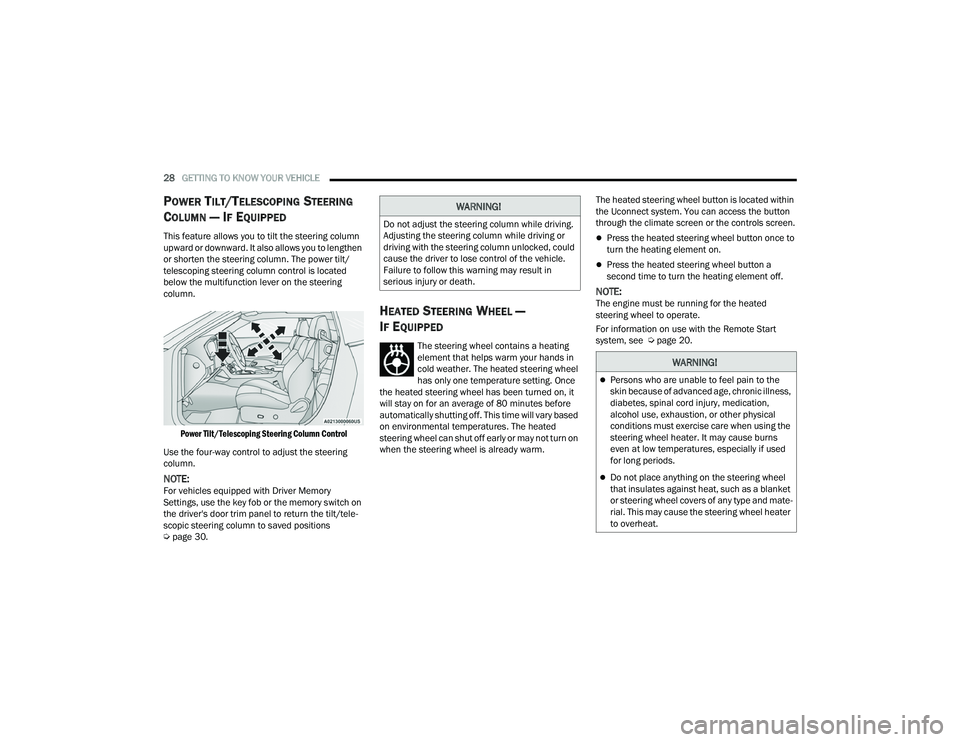
Power Tilt/Telescoping Steering Column Control
Use the four-way control to adjust the steering
column.
NOTE:For vehicles equipped with Driver Memory
Settings, use the key fob or the memory switch on
the driver's door trim panel to return the tilt/tele -
scopic steering column to saved positions
Ú page 30.
HEATED STEERING WHEEL —
I
F EQUIPPED
The steering wheel contains a heating
element that helps warm your hands in
cold weather. The heated steering wheel
has only one temperature setting. Once
the heated steering wheel has been turned on, it
will stay on for an average of 80 minutes before
automatically shutting off. This time will vary based
on environmental temperatures. The heated
steering wheel can shut off early or may not turn on
when the steering wheel is already warm. The heated steering wheel button is located within
the Uconnect system. You can access the button
through the climate screen or the controls screen.
Press the heated steering wheel button once to
turn the heating element on.
Press the heated steering wheel button a
second time to turn the heating element off.
NOTE:The engine must be running for the heated
steering wheel to operate.
For information on use with the Remote Start
system, see Ú
page 20.
WARNING!
Do not adjust the steering column while driving.
Adjusting the steering column while driving or
driving with the steering column unlocked, could
cause the driver to lose control of the vehicle.
Failure to follow this warning may result in
serious injury or death.
WARNING!
Persons who are unable to feel pain to the
skin because of advanced age, chronic illness,
diabetes, spinal cord injury, medication,
alcohol use, exhaustion, or other physical
conditions must exercise care when using the
steering wheel heater. It may cause burns
even at low temperatures, especially if used
for long periods.
Do not place anything on the steering wheel
that insulates against heat, such as a blanket
or steering wheel covers of any type and mate -
rial. This may cause the steering wheel heater
to overheat.
22_LA_OM_EN_USC_t.book Page 28
Page 52 of 336
50GETTING TO KNOW YOUR VEHICLE
(Continued)
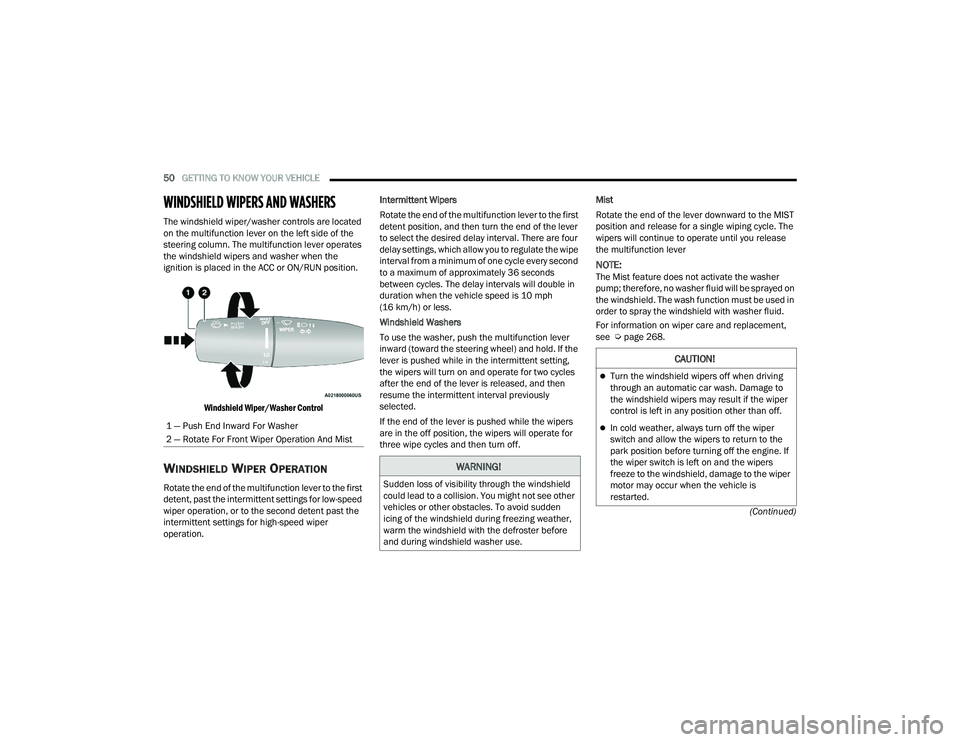
WINDSHIELD WIPERS AND WASHERS
The windshield wiper/washer controls are located
on the multifunction lever on the left side of the
steering column. The multifunction lever operates
the windshield wipers and washer when the
ignition is placed in the ACC or ON/RUN position.
Windshield Wiper/Washer Control
WINDSHIELD WIPER OPERATION
Rotate the end of the multifunction lever to the first
detent, past the intermittent settings for low-speed
wiper operation, or to the second detent past the
intermittent settings for high-speed wiper
operation. Intermittent Wipers
Rotate the end of the multifunction lever to the first
detent position, and then turn the end of the lever
to select the desired delay interval. There are four
delay settings, which allow you to regulate the wipe
interval from a minimum of one cycle every second
to a maximum of approximately 36 seconds
between cycles. The delay intervals will double in
duration when the vehicle speed is 10 mph
(16 km/h) or less.
Windshield Washers
To use the washer, push the multifunction lever
inward (toward the steering wheel) and hold. If the
lever is pushed while in the intermittent setting,
the wipers will turn on and operate for two cycles
after the end of the lever is released, and then
resume the intermittent interval previously
selected.
If the end of the lever is pushed while the wipers
are in the off position, the wipers will operate for
three wipe cycles and then turn off.
Mist
Rotate the end of the lever downward to the MIST
position and release for a single wiping cycle. The
wipers will continue to operate until you release
the multifunction lever
NOTE:The Mist feature does not activate the washer
pump; therefore, no washer fluid will be sprayed on
the windshield. The wash function must be used in
order to spray the windshield with washer fluid.
For information on wiper care and replacement,
see Ú
page 268.
1 — Push End Inward For Washer
2 — Rotate For Front Wiper Operation And Mist
WARNING!
Sudden loss of visibility through the windshield
could lead to a collision. You might not see other
vehicles or other obstacles. To avoid sudden
icing of the windshield during freezing weather,
warm the windshield with the defroster before
and during windshield washer use.
CAUTION!
Turn the windshield wipers off when driving
through an automatic car wash. Damage to
the windshield wipers may result if the wiper
control is left in any position other than off.
In cold weather, always turn off the wiper
switch and allow the wipers to return to the
park position before turning off the engine. If
the wiper switch is left on and the wipers
freeze to the windshield, damage to the wiper
motor may occur when the vehicle is
restarted.
22_LA_OM_EN_USC_t.book Page 50
Page 57 of 336
GETTING TO KNOW YOUR VEHICLE55
To provide you with maximum comfort in the
Automatic mode during cold start-ups, the blower
fan will remain on low until the engine warms up.
The blower will increase in speed and transition
into Auto mode.
Manual Operation Override
This system offers a full complement of manual
override features. The AUTO symbol in the front
ATC display will be turned off when the system is
being used in the manual mode.
CLIMATE VOICE COMMANDS
Adjust vehicle temperatures hands-free and keep
everyone comfortable while you keep moving
ahead.
Push the VR button. After the beep, say one of the
following commands:
“Set driver temperature to 70 degrees”
“Set passenger temperature to 70 degrees”
TIP:Voice Command for Climate may only be used to
adjust the interior temperature of your vehicle.
Voice Command will not work to adjust the heated
seats or steering wheel if equipped.
OPERATING TIPS
Refer to the chart at the end of this section for
suggested control settings for various weather
conditions.
Summer Operation
The engine cooling system must be protected with
a high-quality antifreeze coolant to provide proper
corrosion protection and to protect against engine
overheating. OAT coolant (conforming to
MS.90032) is recommended.
Winter Operation
To ensure the best possible heater and defroster
performance, make sure the engine cooling
system is functioning properly and the proper
amount, type, and concentration of coolant is
used. Use of the Air Recirculation mode during
Winter months is not recommended, because it
may cause window fogging.
Vacation/Storage
For information on maintaining the Climate Control
system when the vehicle is being stored for an
extended period of time, see Ú page 307.
Window Fogging
Vehicle windows tend to fog on the inside in mild,
rainy, and/or humid weather. To clear the
windows, select Defrost or Mix mode and increase
the front blower speed. Do not use the
Recirculation mode without A/C for long periods,
as fogging may occur.
Outside Air Intake
Make sure the air intake, located directly in front of
the windshield, is free of obstructions, such as
leaves. Leaves collected in the air intake may
reduce airflow, and if they enter the air distribution
box, they could plug the water drains. In Winter
months, make sure the air intake is clear of ice,
slush, and snow.
Cabin Air Filter
The Climate Control system filters out dust and
pollen from the air. Contact an authorized dealer to
service your cabin air filter, and to have it replaced
when needed.
2
22_LA_OM_EN_USC_t.book Page 55
Page 64 of 336
62GETTING TO KNOW YOUR VEHICLE
HOOD
OPENING THE HOOD
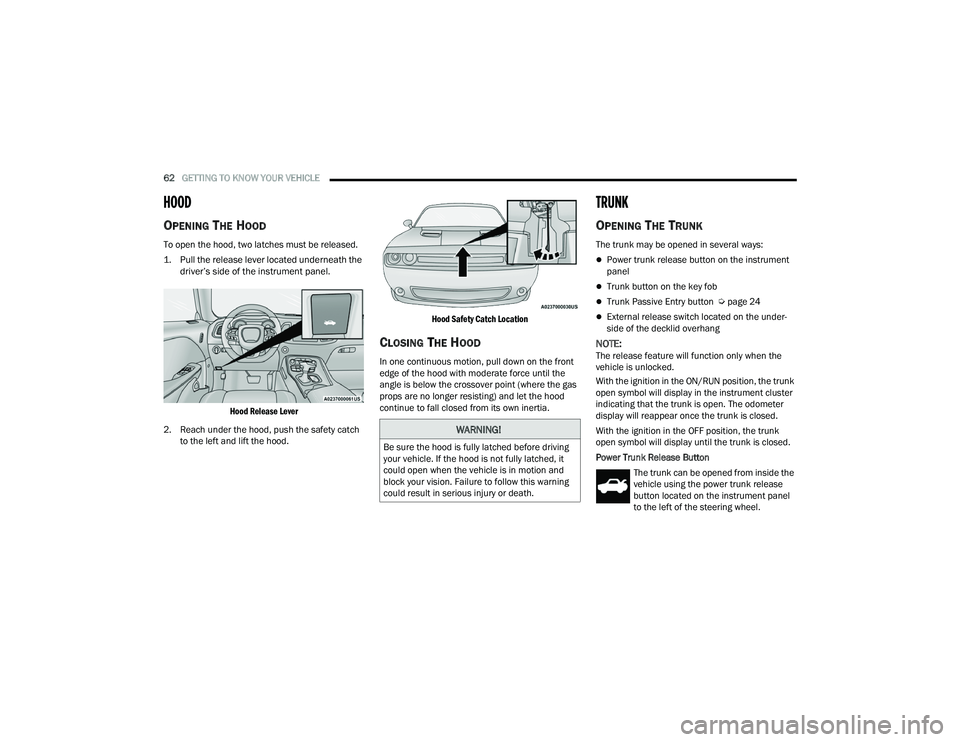
To open the hood, two latches must be released.
1. Pull the release lever located underneath the
driver’s side of the instrument panel.
Hood Release Lever
2. Reach under the hood, push the safety catch to the left and lift the hood.
Hood Safety Catch Location
CLOSING THE HOOD
In one continuous motion, pull down on the front
edge of the hood with moderate force until the
angle is below the crossover point (where the gas
props are no longer resisting) and let the hood
continue to fall closed from its own inertia.
TRUNK
OPENING THE TRUNK
The trunk may be opened in several ways:
Power trunk release button on the instrument
panel
Trunk button on the key fob
Trunk Passive Entry button Ú
page 24
External release switch located on the under -
side of the decklid overhang
NOTE:The release feature will function only when the
vehicle is unlocked.
With the ignition in the ON/RUN position, the trunk
open symbol will display in the instrument cluster
indicating that the trunk is open. The odometer
display will reappear once the trunk is closed.
With the ignition in the OFF position, the trunk
open symbol will display until the trunk is closed.
Power Trunk Release Button
The trunk can be opened from inside the
vehicle using the power trunk release
button located on the instrument panel
to the left of the steering wheel.
WARNING!
Be sure the hood is fully latched before driving
your vehicle. If the hood is not fully latched, it
could open when the vehicle is in motion and
block your vision. Failure to follow this warning
could result in serious injury or death.
22_LA_OM_EN_USC_t.book Page 62
Page 67 of 336
GETTING TO KNOW YOUR INSTRUMENT PANEL65
INSTRUMENT CLUSTER DESCRIPTIONS
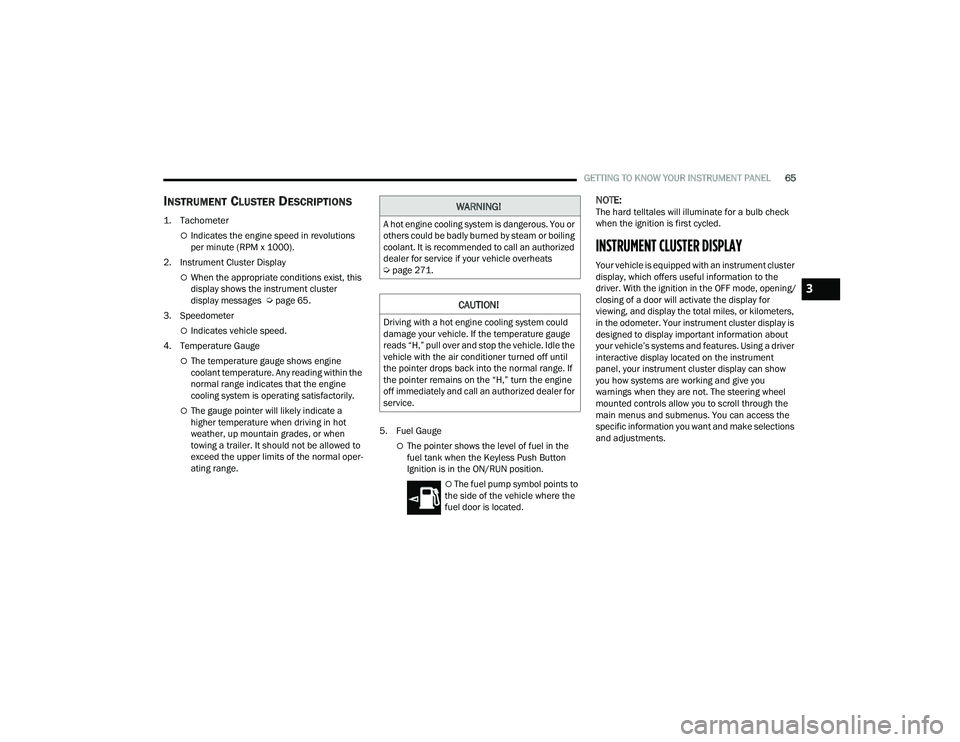
1. Tachometer
Indicates the engine speed in revolutions
per minute (RPM x 1000).
2. Instrument Cluster Display
When the appropriate conditions exist, this
display shows the instrument cluster
display messages Ú page 65.
3. Speedometer
Indicates vehicle speed.
4. Temperature Gauge
The temperature gauge shows engine
coolant temperature. Any reading within the
normal range indicates that the engine
cooling system is operating satisfactorily.
The gauge pointer will likely indicate a
higher temperature when driving in hot
weather, up mountain grades, or when
towing a trailer. It should not be allowed to
exceed the upper limits of the normal oper -
ating range. 5. Fuel Gauge
The pointer shows the level of fuel in the
fuel tank when the Keyless Push Button
Ignition is in the ON/RUN position.
The fuel pump symbol points to
the side of the vehicle where the
fuel door is located.
NOTE:The hard telltales will illuminate for a bulb check
when the ignition is first cycled.
INSTRUMENT CLUSTER DISPLAY
Your vehicle is equipped with an instrument cluster
display, which offers useful information to the
driver. With the ignition in the OFF mode, opening/
closing of a door will activate the display for
viewing, and display the total miles, or kilometers,
in the odometer. Your instrument cluster display is
designed to display important information about
your vehicle’s systems and features. Using a driver
interactive display located on the instrument
panel, your instrument cluster display can show
you how systems are working and give you
warnings when they are not. The steering wheel
mounted controls allow you to scroll through the
main menus and submenus. You can access the
specific information you want and make selections
and adjustments.
WARNING!
A hot engine cooling system is dangerous. You or
others could be badly burned by steam or boiling
coolant. It is recommended to call an authorized
dealer for service if your vehicle overheats
Ú page 271.
CAUTION!
Driving with a hot engine cooling system could
damage your vehicle. If the temperature gauge
reads “H,” pull over and stop the vehicle. Idle the
vehicle with the air conditioner turned off until
the pointer drops back into the normal range. If
the pointer remains on the “H,” turn the engine
off immediately and call an authorized dealer for
service.
3
22_LA_OM_EN_USC_t.book Page 65
Page 68 of 336
66GETTING TO KNOW YOUR INSTRUMENT PANEL
LOCATION AND CONTROLS
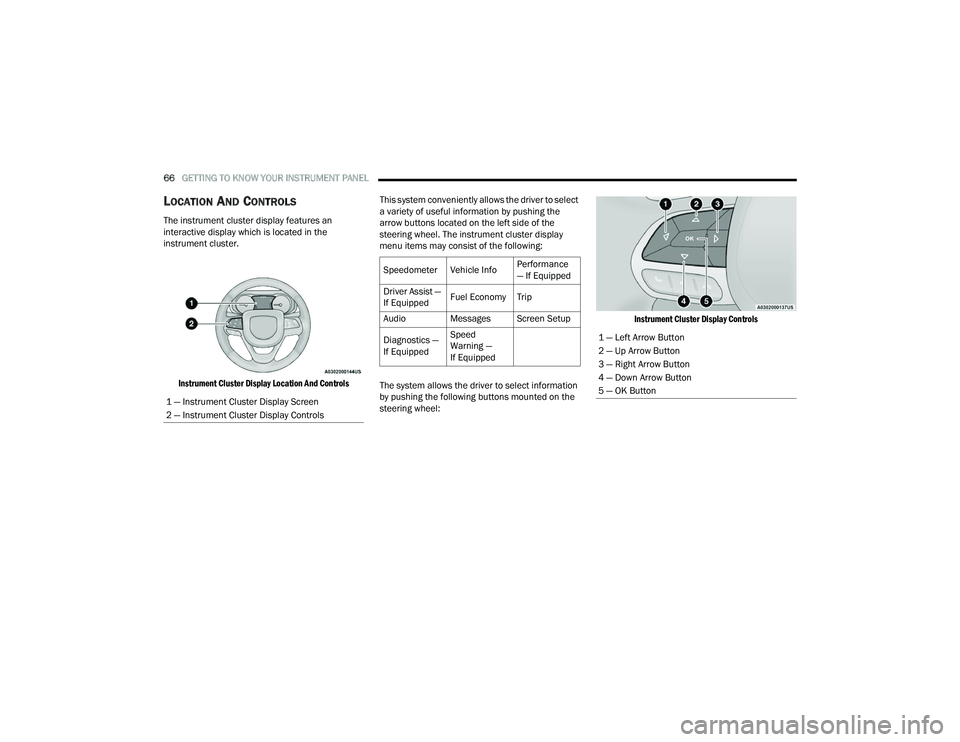
The instrument cluster display features an
interactive display which is located in the
instrument cluster.
Instrument Cluster Display Location And Controls
This system conveniently allows the driver to select
a variety of useful information by pushing the
arrow buttons located on the left side of the
steering wheel. The instrument cluster display
menu items may consist of the following:
The system allows the driver to select information
by pushing the following buttons mounted on the
steering wheel:
Instrument Cluster Display Controls
1 — Instrument Cluster Display Screen
2 — Instrument Cluster Display Controls
Speedometer Vehicle Info Performance
— If Equipped
Driver Assist —
If Equipped Fuel Economy Trip
Audio Messages Screen Setup
Diagnostics —
If Equipped Speed
Warning —
If Equipped
1 — Left Arrow Button
2 — Up Arrow Button
3 — Right Arrow Button
4 — Down Arrow Button
5 — OK Button
22_LA_OM_EN_USC_t.book Page 66