tires DODGE CHALLENGER 2023 Owners Manual
[x] Cancel search | Manufacturer: DODGE, Model Year: 2023, Model line: CHALLENGER, Model: DODGE CHALLENGER 2023Pages: 300, PDF Size: 12.82 MB
Page 7 of 300

5
IN CASE OF EMERGENCY
HAZARD WARNING FLASHERS ..................................... 199
ASSIST AND SOS MIRROR — IF EQUIPPED .................. 199
JACKING AND TIRE CHANGING ...................................... 202 Preparations For Jacking .......................................... 202
Jack Location/Spare Tire Stowage ......................... 202Jacking And Changing A Tire ................................... 203
TIRE SERVICE KIT — IF EQUIPPED ................................. 206 Alternate Tire Service Kit — If Equipped .................. 211
JUMP STARTING .............................................................. 216 Preparations For Jump Start .................................... 216
Jump Starting Procedure .......................................... 217
IF YOUR ENGINE OVERHEATS ........................................ 218
MANUAL PARK RELEASE–8–SPEED
TRANSMISSION ............................................................... 218
FREEING A STUCK VEHICLE............................................ 220
TOWING A DISABLED VEHICLE ..................................... 221 All Wheel Drive (AWD) Models — If Equipped.......... 222
Rear-Wheel Drive (RWD) Models ............................. 222
ENHANCED ACCIDENT RESPONSE
SYSTEM (EARS) ............................................................... 222
EVENT DATA RECORDER (EDR) ..................................... 222
SERVICING AND MAINTENANCE
SCHEDULED SERVICING ................................................ 223 3.6L And 5.7L Engines ............................................ 223
ENGINE COMPARTMENT ................................................ 228 3.6L Engine .............................................................. 228
5.7L Engine .............................................................. 229
Checking Oil Level .................................................... 230
Adding Washer Fluid................................................. 230Maintenance-Free Battery ....................................... 231
Pressure Washing ..................................................... 231
VEHICLE MAINTENANCE ................................................. 231 Engine Oil ................................................................. 231Engine Oil Filter ......................................................... 233Engine Air Cleaner Filter ........................................... 233Air Conditioner Maintenance ................................... 234Accessory Drive Belt Inspection............................... 235
Body Lubrication ....................................................... 235
Windshield Wiper Blades ......................................... 236
Exhaust System ........................................................ 237Cooling System ......................................................... 237Brake System ........................................................... 240
Clutch Hydraulic System —
Manual Transmission (If Equipped) ........................ 240
Manual Transmission — If Equipped ....................... 240
Automatic Transmission — If Equipped ................... 241
All-Wheel Drive (AWD) — If Equipped ...................... 241Rear Axle ................................................................... 241
Fuses ......................................................................... 242
Bulb Replacement .................................................... 250 TIRES ..................................................................................253
Tire Safety Information ............................................. 253
Tires — General Information ..................................... 261
Tire Types ................................................................... 264Spare Tires — If Equipped ......................................... 264
Wheel And Wheel Trim Care ..................................... 266
Snow Traction Devices ............................................. 267
Tire Rotation Recommendations ............................. 268
DEPARTMENT OF TRANSPORTATION UNIFORM
TIRE QUALITY GRADES ................................................... 268 Treadwear .................................................................. 268
Traction Grades ......................................................... 269
Temperature Grades ................................................. 269
VEHICLE STORAGE ...........................................................269
BODYWORK ......................................................................270 Protection From Atmospheric Agents ...................... 270
Body And Underbody Maintenance.......................... 270
Preserving The Bodywork ......................................... 270
INTERIORS ........................................................................ 271 Seats And Fabric Parts.............................................. 271Plastic And Coated Parts .......................................... 271
Leather Surfaces ....................................................... 272
Glass Surfaces .......................................................... 272
23_LA_OM_EN_USC_t.book Page 5
Page 62 of 300
60GETTING TO KNOW YOUR INSTRUMENT PANEL
INSTRUMENT CLUSTER DISPLAY
S
ELECTABLE MENU ITEMS
Push and release the up or down arrow button until
the desired Selectable Menu item is displayed in the
instrument cluster display.
Follow the Menu or submenu prompts as desired.
Speedometer
Push and release the up or down arrow button until
the speedometer menu is displayed in the instrument
cluster display. Push and release the OK button to toggle
units (km/h or mph) of the speedometer.
Vehicle Info
Push and release the up or down arrow button until
the “Vehicle Info” menu is displayed in the instrument
cluster display. Push and release the right or left
arrow button to scroll through the submenus items of
“Vehicle Info.” Follow the directional prompts to access or
reset any of the following “Vehicle Info” submenu items:
Tire Pressure Monitor
If tire pressure is OK for all tires, a vehicle ICON is
displayed with tire pressure values in each corner of the
ICON.
If one or more tires have low pressure, “Inflate Tire To XX”
is displayed with the vehicle ICON and the tire pressure
values in each corner of the ICON with the pressure value
of the low tire are displayed in a different color than the
other tire pressure value. If the Tire Pressure system requires service, “Service Tire
Pressure System” is displayed.
Tire PSI is an information only function and cannot be
reset
Úpage 168.
Coolant Temp
Displays the actual coolant temperature.
Trans Temp
Displays the actual transmission temperature.
Oil Temp
Displays the actual oil temperature.
Oil Pressure
Displays the actual oil pressure.
Oil Life
To reset the Oil Life, you must hold the OK button. The
“Hold OK to Reset” instruction will be displayed at all
times, but the following conditions will need to be met in
order to reset Oil Life:
The vehicle must be off
The ignition must be in the ON/RUN position
If the conditions are met, holding the OK button will reset
the gauge and the numeric display will return to 100%.
If the conditions are not met, a pop-up message will
display for 5 seconds, describing the required conditions,
and then the Oil Life screen will reappear.
Battery Voltage
Displays the actual battery voltage.
All Wheel Drive (AWD) Status — If Equipped
Displays the status of the All - Wheel Drive system.
Performance Features
Push and release the up or down arrow button until
the Performance menu is displayed in the instrument
cluster display. Push the right or left arrow button to
enter the submenus.
The Performance Features include the following:
0-60 mph (0-100 km/h) Timer
Best
Last
Recent
Reaction Timer
0-100 mph (0-160 km/h) Timer
Best
Last
Recent
Reaction Timer
WARNING!
Measurement of vehicle statistics with the
Performance Features is intended for off-highway or
track use only and should not be done on any public
roadways. It is recommended that these features be
used in a controlled environment and within the limits
of the law. The capabilities of the vehicle as measured
by the performance pages must never be exploited in a
reckless or dangerous manner, which can jeopardize
the user’s safety or the safety of others. Only a safe,
attentive, and skillful driver can prevent accidents.
23_LA_OM_EN_USC_t.book Page 60
Page 69 of 300
GETTING TO KNOW YOUR INSTRUMENT PANEL67
Loose Fuel Filler Cap Warning Light —
If Equipped
This warning light will illuminate when the fuel
filler cap is loose. Properly close the filler cap to
disengage the light. If the light does not turn
off, please see an authorized dealer.
Engine Check/Malfunction Indicator
Warning Light (MIL)
The Engine Check/Malfunction Indicator Light
(MIL) is a part of an Onboard Diagnostic System
called OBD II that monitors engine and
automatic transmission control systems.
This warning light will illuminate when the ignition is in the
ON/RUN position before engine start. If the bulb does not
come on when turning the ignition switch from OFF to
ON/RUN, have the condition checked promptly.
Certain conditions, such as a loose or missing gas cap,
poor quality fuel, etc., may illuminate the light after engine
start. The vehicle should be serviced if the light stays on
through several typical driving styles. In most situations,
the vehicle will drive normally and will not require towing.
When the engine is running, the MIL may flash to alert
serious conditions that could lead to immediate loss of
power or severe catalytic converter damage. The vehicle
should be serviced by an authorized dealer as soon as
possible if this occurs.
Service AWD Warning Light — If Equipped
This telltale will turn on to indicate the All Wheel
Drive (AWD) system is not functioning properly
and that service is required. Contact an
authorized dealer.
Service Forward Collision Warning (FCW)
Light — If Equipped
This warning light will illuminate to indicate a
fault in the Forward Collision Warning System.
Contact an authorized dealer for service
Úpage 167.
Tire Pressure Monitoring System (TPMS)
Warning Light
The warning light switches on and a message is
displayed to indicate that the tire pressure is
lower than the recommended value and/or
that slow pressure loss is occurring. In these
cases, optimal tire duration and fuel consumption may not
be guaranteed.
Should one or more tires be in the condition mentioned
previously, the display will show the indications
corresponding to each tire.
Each tire, including the spare (if provided), should be
checked monthly when cold and inflated to the inflation
pressure recommended by the vehicle manufacturer on
the vehicle placard or tire inflation pressure label. If your
vehicle has tires of a different size than the size indicated
on the vehicle placard or tire inflation pressure label, you
should determine the proper tire inflation pressure for
those tires.
WARNING!
A malfunctioning catalytic converter can reach higher
temperatures than in normal operating conditions. This
can cause a fire if you drive slowly or park over
flammable substances such as dry plants, wood,
cardboard, etc. This could result in death or serious
injury to the driver, occupants or others.
CAUTION!
Prolonged driving with the Malfunction Indicator Light
(MIL) on could cause damage to the vehicle control
system. It also could affect fuel economy and
driveability. If the MIL is flashing, severe catalytic
converter damage and power loss will soon occur.
Immediate service is required.CAUTION!
Do not continue driving with one or more flat tires as
handling may be compromised. Stop the vehicle,
avoiding sharp braking and steering. If a tire puncture
occurs, repair immediately using the dedicated tire
repair kit and contact an authorized dealer as soon as
possible.
3
23_LA_OM_EN_USC_t.book Page 67
Page 70 of 300
68GETTING TO KNOW YOUR INSTRUMENT PANEL
As an added safety feature, your vehicle has been
equipped with a TPMS that illuminates a low tire pressure
telltale when one or more of your tires is significantly
underinflated. Accordingly, when the low tire pressure
telltale illuminates, you should stop and check your tires
as soon as possible, and inflate them to the proper
pressure. Driving on a significantly underinflated tire
causes the tire to overheat and can lead to tire failure.
Underinflation also reduces fuel efficiency and tire tread
life, and may affect the vehicle’s handling and stopping
ability.
Please note that the TPMS is not a substitute for proper
tire maintenance, and it is the driver’s responsibility to
maintain correct tire pressure, even if underinflation has
not reached the level to trigger illumination of the TPMS
low tire pressure telltale.
Your vehicle has also been equipped with a TPMS
malfunction indicator to indicate when the system is not
operating properly. The TPMS malfunction indicator is
combined with the low tire pressure telltale. When the
system detects a malfunction, the telltale will flash for
approximately one minute and then remain continuously
illuminated. This sequence will continue upon subsequent
vehicle start-ups as long as the malfunction exists. When
the malfunction indicator is illuminated, the system may
not be able to detect or signal low tire pressure as
intended. TPMS malfunctions may occur for a variety of
reasons, including the installation of replacement or
alternate tires or wheels on the vehicle that prevent the
TPMS from functioning properly. Always check the TPMS malfunction telltale after
replacing one or more tires or wheels on your vehicle to
ensure that the replacement or alternate tires and wheels
allow the TPMS to continue to function properly.
YELLOW INDICATOR LIGHTS
Forward Collision Warning (FCW) OFF
Indicator Light — If Equipped
This indicator light illuminates to indicate that
Forward Collision Warning is off.
GREEN INDICATOR LIGHTS
Adaptive Cruise Control (ACC) Set Without
Target Vehicle Indicator Light —
If Equipped
This will display the distance setting for the ACC
system when the system is engaged
Úpage 85.
Adaptive Cruise Control (ACC) Set With
Target Vehicle Indicator Light —
If Equipped
This will display when the ACC is set and the
vehicle in front is detected Úpage 85.
Parking/Headlights On Indicator Light
This indicator light will illuminate when the
parking lights or headlights are turned on
Úpage 39.
Front Fog Indicator Light — If Equipped
This indicator light will illuminate when the
front fog lights are on Úpage 39.
CAUTION!
The TPMS has been optimized for the original
equipment tires and wheels. TPMS pressures and
warning have been established for the tire size
equipped on your vehicle. Undesirable system
operation or sensor damage may result when using
replacement equipment that is not of the same size,
type, and/or style. Aftermarket wheels can cause
sensor damage. Using aftermarket tire sealants may
cause the Tire Pressure Monitoring System (TPMS)
sensor to become inoperable. After using an
aftermarket tire sealant it is recommended that you
take your vehicle to an authorized dealer to have your
sensor function checked.
23_LA_OM_EN_USC_t.book Page 68
Page 100 of 300

98STARTING AND OPERATING
VEHICLE CERTIFICATION LABEL
Your vehicle has a Vehicle Certification Label affixed to the
drivers side B-pillar or the rear of the driver’s door.
The label contains the following information:
Name of manufacturer
Month and year of manufacture
Gross Vehicle Weight Rating (GVWR)
Gross Axle Weight Rating (GAWR) front
Gross Axle Weight Rating (GAWR) rear
Vehicle Identification Number (VIN)
Type of vehicle
Month, Day, and Hour of manufacture (MDH)
The bar code allows a computer scanner to read the VIN.
GROSS VEHICLE WEIGHT RATING
(GVWR)
The GVWR is the total allowable weight of your vehicle.
This includes driver, passengers, and cargo. The total load
must be limited so that you do not exceed the GVWR.
GROSS AXLE WEIGHT RATING (GAWR)
The GAWR is the maximum capacity of the front and rear
axles. Distribute the load over the front and rear axles
evenly. Make sure that you do not exceed either front or
rear GAWR.
OVERLOADING
The load carrying components (axle, springs, tires, wheels,
etc.) of your vehicle will provide satisfactory service as
long as you do not exceed the GVWR and the front and
rear GAWR.
The best way to figure out the total weight of your vehicle
is to weigh it when it is fully loaded and ready for
operation. Weigh it on a commercial scale to ensure that
it is not over the GVWR.
Figure out the weight on the front and rear of the vehicle
separately. It is important that you distribute the load
evenly over the front and rear axles.
Overloading can cause potential safety hazards and
shorten useful service life. Heavier axles or suspension
components do not necessarily increase the vehicle's
GVWR.
LOADING
To load your vehicle properly, first figure out its empty
weight, axle-by-axle and side-by-side. Store heavier items
down low and be sure you distribute their weight as evenly
as possible. Stow all loose items securely before driving. If
weighing the loaded vehicle shows that you have
exceeded either GAWR, but the total load is within the
specified GVWR, you must redistribute the weight.
Improper weight distribution can have an adverse effect
on the way your vehicle steers and handles and the way
the brakes operate.
NOTE:Refer to the “Vehicle Certification Label” affixed to the rear
of the driver's door for your vehicle's GVWR and GAWRs
Úpage 98.
TRAILER TOWING
In this section, you will find safety tips and information on
limits to the type of towing you can reasonably do with your
vehicle. Before towing a trailer, carefully review this
information to tow your load as efficiently and safely as
possible.
To maintain warranty coverage, follow the requirements
and recommendations in this manual concerning vehicles
used for trailer towing.
Manual Transmission — If Equipped
Trailer towing with this vehicle is not recommended.
WARNING!
Because the front wheels steer the vehicle, it is
important that you do not exceed the maximum front or
rear GAWR. A dangerous driving condition can result if
either rating is exceeded. You could lose control of the
vehicle and have a collision.
23_LA_OM_EN_USC_t.book Page 98
Page 103 of 300
STARTING AND OPERATING101
(Continued)
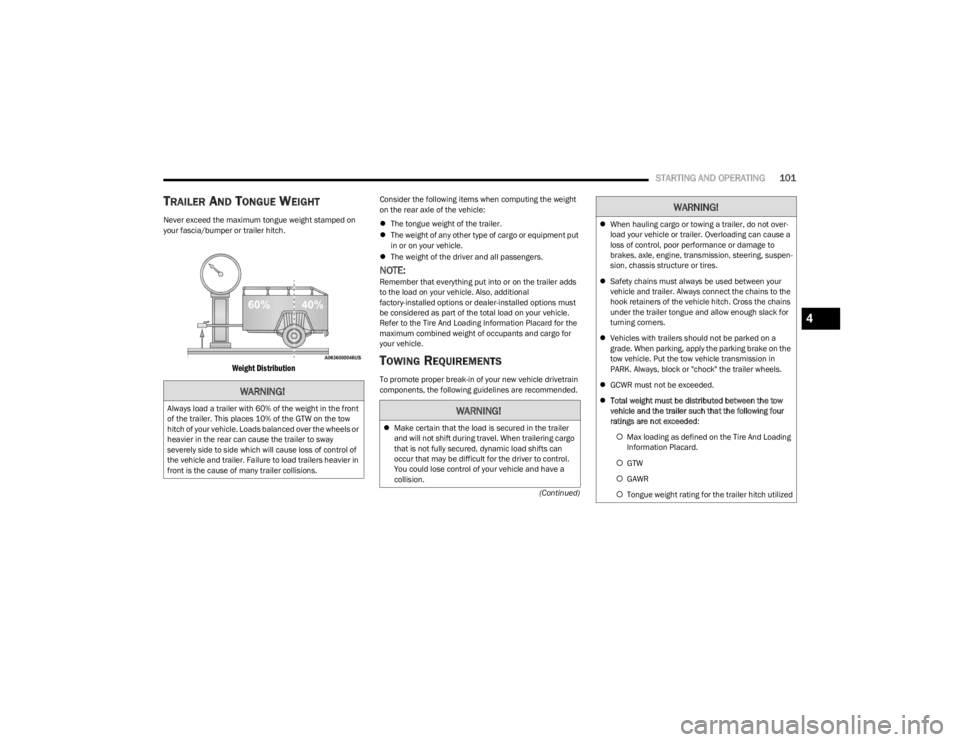
TRAILER AND TONGUE WEIGHT
Never exceed the maximum tongue weight stamped on
your fascia/bumper or trailer hitch.
Weight Distribution
Consider the following items when computing the weight
on the rear axle of the vehicle:
The tongue weight of the trailer.
The weight of any other type of cargo or equipment put
in or on your vehicle.
The weight of the driver and all passengers.
NOTE:Remember that everything put into or on the trailer adds
to the load on your vehicle. Also, additional
factory-installed options or dealer-installed options must
be considered as part of the total load on your vehicle.
Refer to the Tire And Loading Information Placard for the
maximum combined weight of occupants and cargo for
your vehicle.
TOWING REQUIREMENTS
To promote proper break-in of your new vehicle drivetrain
components, the following guidelines are recommended.
WARNING!
Always load a trailer with 60% of the weight in the front
of the trailer. This places 10% of the GTW on the tow
hitch of your vehicle. Loads balanced over the wheels or
heavier in the rear can cause the trailer to sway
severely side to side which will cause loss of control of
the vehicle and trailer. Failure to load trailers heavier in
front is the cause of many trailer collisions.WARNING!
Make certain that the load is secured in the trailer
and will not shift during travel. When trailering cargo
that is not fully secured, dynamic load shifts can
occur that may be difficult for the driver to control.
You could lose control of your vehicle and have a
collision.
When hauling cargo or towing a trailer, do not over -
load your vehicle or trailer. Overloading can cause a
loss of control, poor performance or damage to
brakes, axle, engine, transmission, steering, suspen -
sion, chassis structure or tires.
Safety chains must always be used between your
vehicle and trailer. Always connect the chains to the
hook retainers of the vehicle hitch. Cross the chains
under the trailer tongue and allow enough slack for
turning corners.
Vehicles with trailers should not be parked on a
grade. When parking, apply the parking brake on the
tow vehicle. Put the tow vehicle transmission in
PARK. Always, block or "chock" the trailer wheels.
GCWR must not be exceeded.
Total weight must be distributed between the tow
vehicle and the trailer such that the following four
ratings are not exceeded :
Max loading as defined on the Tire And Loading
Information Placard.
GTW
GAWR
Tongue weight rating for the trailer hitch utilized
WARNING!
4
23_LA_OM_EN_USC_t.book Page 101
Page 104 of 300

102STARTING AND OPERATING
Perform the maintenance listed in the “Scheduled
Servicing” Úpage 223. When towing a trailer, never
exceed the GAWR or GCWR ratings.
Towing Requirements — Tires
Do not attempt to tow a trailer while using a compact
spare tire.
Do not drive more than 50 mph (80 km/h) when towing
while using a full size spare tire.
Proper tire inflation pressures are essential to the safe
and satisfactory operation of your vehicle. For proper
tire inflation procedures.
Check the trailer tires for proper tire inflation pressures
before trailer usage.
Check for signs of tire wear or visible tire damage
before towing a trailer.
Replacing tires with a higher load carrying capacity will
not increase the vehicle's GVWR and GAWR limits.
For further information
Úpage 253.
Towing Requirements — Trailer Brakes
Do not interconnect the hydraulic brake system or
vacuum system of your vehicle with that of the trailer.
This could cause inadequate braking and possible
personal injury.
An electronically actuated trailer brake controller is
required when towing a trailer with electronically actu -
ated brakes. When towing a trailer equipped with a
hydraulic surge actuated brake system, an electronic
brake controller is not required.
Trailer brakes are recommended for trailers over
1,000 lb (453 kg) and required for trailers in excess of
2,000 lb (907 kg).
Towing Requirements — Trailer Lights And
Wiring
Whenever you pull a trailer, regardless of the trailer size,
stoplights and turn signals on the trailer are required for
motoring safety.
The Trailer Tow Package may include a four- and seven-pin
wiring harness. Use a factory approved trailer harness and
connector.
NOTE:Do not cut or splice wiring into the vehicle’s wiring
harness.
CAUTION!
Do not tow a trailer at all during the first 500 miles
(805 km) the new vehicle is driven. The engine, axle
or other parts could be damaged.
Then, during the first 500 miles (805 km) that a
trailer is towed, do not drive over 50 mph (80 km/h)
and do not make starts at full throttle. This helps the
engine and other parts of the vehicle wear in at the
heavier loads.
WARNING!
Do not connect trailer brakes to your vehicle's
hydraulic brake lines. It can overload your brake
system and cause it to fail. You might not have
brakes when you need them and could have an acci -
dent.
Towing any trailer will increase your stopping
distance. When towing, you should allow for addi -
tional space between your vehicle and the vehicle in
front of you. Failure to do so could result in an
accident.
CAUTION!
If the trailer weighs more than 1,000 lb (453 kg)
loaded, it should have its own brakes and they should
be of adequate capacity. Failure to do this could lead to
accelerated brake lining wear, higher brake pedal
effort, and longer stopping distances.
23_LA_OM_EN_USC_t.book Page 102
Page 106 of 300

104STARTING AND OPERATING
AutoStick
When using the AutoStick shift control, select the
highest gear that allows for adequate performance and
avoids frequent downshifts. For example, choose “5” if
the desired speed can be maintained. Choose “4” or
“3” if needed to maintain the desired speed.
To prevent excess heat generation, avoid continuous
driving at high RPM. Reduce vehicle speed as neces -
sary to avoid extended driving at high RPM. Return to a
higher gear or vehicle speed when grade and road
conditions allow.
RECREATIONAL TOWING
(BEHIND MOTORHOME)
Recreational towing (with all four wheels on the ground, or
using a tow dolly) is NOT ALLOWED. The only acceptable
method for towing this vehicle (behind another vehicle) is
on a vehicle trailer with all four wheels OFF the ground.
DRIVING TIPS
DRIVING ON SLIPPERY SURFACES
Information in this section will aid in safe controlled
launches in adverse conditions.
Acceleration
Rapid acceleration on snow covered, wet, or other slippery
surfaces may cause the driving wheels to pull erratically to
the right or left. This phenomenon occurs when there is a
difference in the surface traction under the rear (driving)
wheels.
Traction
When driving on wet or slushy roads, it is possible for a
wedge of water to build up between the tire and road
surface. This is known as hydroplaning and may cause
partial or complete loss of vehicle control and stopping
ability. To reduce this possibility, the following precautions
should be observed:
Slow down during rainstorms or when the roads are
slushy.
Slow down if the road has standing water or puddles.
Replace tires when tread wear indicators first become
visible.
Keep tires properly inflated.
Maintain sufficient distance between your vehicle and
the vehicle in front of you to avoid a collision in a
sudden stop.
Your vehicle may be equipped with a Limited Slip
Differential (LSD) that reduces, but does not eliminate, the
amount of wheel slip across a given axle for improved
handling.
CAUTION!
Towing this vehicle in violation of the above
requirements can cause severe engine, transmission
and/or transfer case damage. Damage from improper
towing is not covered under the New Vehicle Limited
Warranty.
WARNING!
Rapid acceleration on slippery surfaces is dangerous.
Unequal traction can cause sudden pulling of the rear
wheels. You could lose control of the vehicle and
possibly have a collision. Accelerate slowly and carefully
whenever there is likely to be poor traction (ice, snow,
wet, mud, loose sand, etc.).
23_LA_OM_EN_USC_t.book Page 104
Page 161 of 300
159
(Continued)
SAFETY
SAFETY FEATURES
ANTI-LOCK BRAKE SYSTEM (ABS)
The ABS provides increased vehicle stability and brake
performance under most braking conditions. The system
automatically prevents wheel lock and enhances vehicle
control during braking.
The ABS performs a self-check cycle to ensure that the
ABS is working properly each time the vehicle is started
and driven. During this self-check, you may hear a slight
clicking sound as well as some related motor noises.
The ABS is activated during braking when the system
detects one or more wheels are beginning to lock. Road
conditions such as ice, snow, gravel, bumps, railroad
tracks, loose debris, or panic stops may increase the
likelihood of the ABS activating.
You also may experience the following normal
characteristics when the ABS activates:
ABS motor noise or clicking sounds (you may continue
to hear for a short time after the stop)
Brake pedal pulsations
A slight drop of the brake pedal at the end of the stop The ABS is designed to function with the Original
Equipment Manufacturer (OEM) tires. Modification may
result in degraded ABS performance.
Anti-Lock Brake System (ABS) Warning
Light
The yellow ABS Warning Light will turn on when the ignition
is placed in the ON/RUN mode and may stay on for as long
as four seconds.
If the ABS Warning Light remains on or comes on while
driving, it indicates that the anti-lock portion of the brake
system is not functioning and that service is required.
However, the conventional brake system will continue to
operate normally if the ABS Warning Light is on.
If the ABS Warning Light is on, the brake system should be
serviced as soon as possible to restore the benefits of
Anti-Lock Brakes. If the ABS Warning Light does not come
on when the ignition is placed in the ON/RUN mode, have
the light repaired as soon as possible.
WARNING!
The ABS contains sophisticated electronic equip -
ment that may be susceptible to interference caused
by improperly installed or high output radio transmit -
ting equipment. This interference can cause possible
loss of anti-lock braking capability. Installation of
such equipment should be performed by qualified
professionals.
Pumping of the Anti-Lock Brakes will diminish their
effectiveness and may lead to a collision. Pumping
makes the stopping distance longer. Just press firmly
on your brake pedal when you need to slow down or
stop.
The ABS cannot prevent the natural laws of physics
from acting on the vehicle, nor can it increase
braking or steering efficiency beyond that afforded
by the condition of the vehicle brakes and tires or the
traction afforded.
The ABS cannot prevent collisions, including those
resulting from excessive speed in turns, following
another vehicle too closely, or hydroplaning.
The capabilities of an ABS equipped vehicle must
never be exploited in a reckless or dangerous
manner that could jeopardize the user’s safety or the
safety of others.
WARNING!
6
23_LA_OM_EN_USC_t.book Page 159
Page 163 of 300

SAFETY161
Electronic Stability Control (ESC)
ESC enhances directional control and stability of the
vehicle under various driving conditions. ESC corrects for
oversteering or understeering of the vehicle by applying
the brake of the appropriate wheel(s) to counteract the
previously mentioned conditions. Engine power may also
be reduced to help the vehicle maintain the desired path.
Oversteer — when the vehicle is turning more than
appropriate for the steering wheel position.
Understeer — when the vehicle is turning less than
appropriate for the steering wheel position.
ESC uses sensors in the vehicle to determine the vehicle
path intended by the driver and compares it to the actual
path of the vehicle. When the actual path does not match
the intended path, ESC applies the brake of the
appropriate wheel to assist in counteracting the oversteer
or understeer condition.
The ESC Activation/Malfunction Indicator Light located in
the instrument cluster will start to flash as soon as the ESC
system becomes active. The ESC Activation/Malfunction
Indicator Light also flashes when the TCS is active. If the
ESC Activation/Malfunction Indicator Light begins to flash
during acceleration, ease up on the accelerator and apply
as little throttle as possible. Be sure to adapt your speed
and driving to the prevailing road conditions.
ESC Operating Modes
Depending upon model and mode of operation, the ESC
system may have multiple operating modes.
ESC On
This is the normal operating mode for the ESC. Whenever
the vehicle is started, the ESC system will be in this mode.
This mode should be used for most driving conditions.
Alternate ESC modes should only be used for specific
reasons as noted in the following paragraphs.
Partial Off
This mode may be useful if the vehicle becomes stuck.
This mode may modify TCS and ESC thresholds for
activation, which allows for more wheel spin than normally
allowed.
To enter the “Partial Off” mode, momentarily push the ESC
OFF button and the ESC OFF Indicator Light will illuminate.
To turn the ESC on again, momentarily push the ESC OFF
button and the ESC OFF Indicator Light will turn off.WARNING!
Electronic Stability Control (ESC) cannot prevent the
natural laws of physics from acting on the vehicle,
nor can it increase the traction afforded by prevailing
road conditions. ESC cannot prevent accidents,
including those resulting from excessive speed in
turns, driving on very slippery surfaces, or hydro -
planing. ESC also cannot prevent accidents resulting
from loss of vehicle control due to inappropriate
driver input for the conditions. Only a safe, attentive,
and skillful driver can prevent accidents. The capabil -
ities of an ESC equipped vehicle must never be
exploited in a reckless or dangerous manner which
could jeopardize the user’s safety or the safety of
others.
Vehicle modifications, or failure to properly maintain
your vehicle, may change the handling characteris -
tics of your vehicle, and may negatively affect the
performance of the ESC system. Changes to the
steering system, suspension, braking system, tire
type and size or wheel size may adversely affect ESC
performance. Improperly inflated and unevenly worn
tires may also degrade ESC performance. Any vehicle
modification or poor vehicle maintenance that
reduces the effectiveness of the ESC system can
increase the risk of loss of vehicle control, vehicle
rollover, personal injury and death.
WARNING!
When in “Partial Off” mode, the TCS functionality of ESC
(except for the limited slip feature described in the TCS
section) has been disabled and the ESC OFF Indicator
Light will be illuminated. When in “Partial Off” mode,
the engine power reduction feature of TCS is disabled,
and the enhanced vehicle stability offered by the ESC
system is reduced.
6
23_LA_OM_EN_USC_t.book Page 161