key DODGE CHARGER 2011 7.G Owners Manual
[x] Cancel search | Manufacturer: DODGE, Model Year: 2011, Model line: CHARGER, Model: DODGE CHARGER 2011 7.GPages: 104, PDF Size: 4.53 MB
Page 3 of 104
INTRODUCTION/WELCOMEWelcome From Chrysler Group LLC....2
CONTROLS AT A GLANCEDriver Cockpit...............4
Instrument Cluster .............6
GETTING STARTEDKeyFob...................8
Remote Start................9
Keyless Enter-N-Go .............9
Theft Alarm ................11
Seat Belt .................12
Supplemental Restraint System (SRS) —
Air Bags ..................12
Child Restraints .............13
Front Seats ................16
Rear Seat .................18
Heated Seats ...............18
Heated And Cooled Cupholders .....20
Adjustable Pedals ............20
Tilt/Telescoping Steering Column ....21
OPERATING YOUR VEHICLETurn Signal/Wiper/Washer/High Beam
Lever...................22
Headlight Switch .............23
Speed Control ..............24
Climate Controls .............27
Power Sunroof ..............30
Wind Buffeting ..............31
ELECTRONICSYour Vehicle's Sound System ......32
Identifying Your Radio ..........34
Uconnect Touch™ 4.3 & 4.3S At
A Glance .................35
Uconnect Touch™ 8.4 & 8.4N At
A Glance .................36
Radio ...................38
Sirius Satellite Radio ...........39
Player ...................42
Garmin
®Navigation (8.4N Only) ....44
Sirius Travel Link (8.4N Only) ......47
Playing iPod/USB/MP3 Devices .....48
Uconnect™ Phone (Bluetooth
®Hands
Free Calling) ...............49
Uconnect™ Voice Command
(8.4 & 8.4N Only) ............54 Electronic Vehicle Information Center
(EVIC)
...................56
Programmable Features .........57
Universal Garage Door Opener
(HomeLink
®) ...............58
Power Outlet ...............60
UTILITY
Trailer Towing Weights (Maximum Trailer
Weight Ratings) ..............61
Recreational Towing (Behind Motorhome,
Etc.) ....................62
WHAT TO DO IN EMERGENCIES
24-Hour Towing Assistance .......63
Instrument Cluster Warning Lights . . . 63
If Your Engine Overheats .........66
Jacking And Tire Changing ........67
Jump-Starting ..............70
Shift Lever Override ...........72
Towing A Disabled Vehicle ........73
Freeing A Stuck Vehicle .........74
Event Data Recorder (EDR) .......75
MAINTAINING YOUR VEHICLEOpening The Hood............76
Fuel Door Release ............77
Engine Compartment ...........79
Fluids And Capacities ..........81
Maintenance Chart ............83
Fuses ...................86
Tire Pressures ...............90
Wheel And Wheel Trim Care .......90
Exterior Bulbs ..............91
CONSUMER ASSISTANCEChrysler Group LLC Customer Center . . 92
Chrysler Canada Inc. Customer
Center...................92
Assistance For The Hearing Impaired . . 92
Publications Ordering ..........92
Reporting Safety Defects In The
50 United States And
Washington, D.C. .............93
MOPAR ACCESSORIESAuthentic Accessories By MOPAR®...94
INDEX..................95
TABLE OF CONTENTS
Page 5 of 104
Vehicles Sold In Canada
With respect to any vehicles sold in Canada, the name Chrysler Group LLC shall be
deemed to be deleted and the name Chrysler Canada Inc. used in substitution
therefore.
WARNING!
• Pedals that cannot move freely can cause loss of vehicle control and increasethe risk of serious personal injury.
• Always make sure that objects cannot fall into the driver foot well while the vehicle is moving. Objects can become trapped under the brake pedal and
accelerator pedal causing a loss of vehicle control.
• Failure to properly follow floor mat installation or mounting can cause interference with the brake pedal and accelerator pedal operation causing
loss of control of the vehicle.
• Never use the ‘PARK’ position as a substitute for the parking brake. Always apply the parking brake fully when parked to guard against vehicle movement
and possible injury or damage.
• Refer to your Owner's Manual on the DVD for further details.
USE OF AFTERMARKET PRODUCTS (ELECTRONICS)
The use of aftermarket devices including cell phones, MP3 players, GPS systems, or
chargers may affect the performance of on-board wireless features including Keyless
Enter-N-Go and Remote Start range. If you are experiencing difficulties with any of your
wireless features, try disconnecting your aftermarket devices to see if the situation
improves. If your symptoms persist, please see an authorized dealer.
CHRYSLER, DODGE, JEEP, RAM TRUCK, ATF+4, MOPAR and Uconnect are registered
trademarks of Chrysler Group LLC. COPYRIGHT ©2011 CHRYSLER GROUP LLC
INTRODUCTION/WELCOME
3
Page 10 of 104
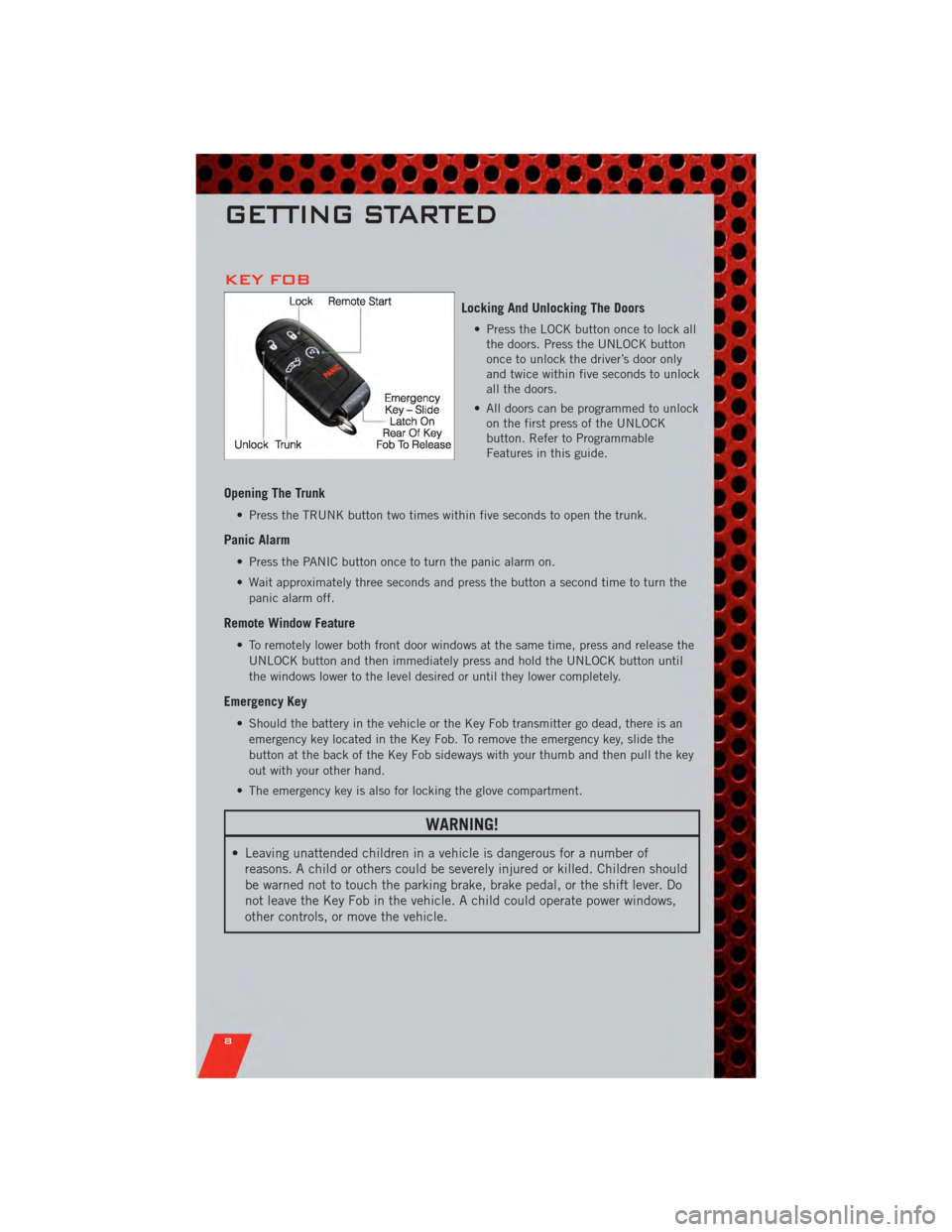
KEY FOB
Locking And Unlocking The Doors
• Press the LOCK button once to lock allthe doors. Press the UNLOCK button
once to unlock the driver’s door only
and twice within five seconds to unlock
all the doors.
• All doors can be programmed to unlock on the first press of the UNLOCK
button. Refer to Programmable
Features in this guide.
Opening The Trunk
• Press the TRUNK button two times within five seconds to open the trunk.
Panic Alarm
• Press the PANIC button once to turn the panic alarm on.
• Wait approximately three seconds and press the button a second time to turn the
panic alarm off.
Remote Window Feature
• To remotely lower both front door windows at the same time, press and release theUNLOCK button and then immediately press and hold the UNLOCK button until
the windows lower to the level desired or until they lower completely.
Emergency Key
• Should the battery in the vehicle or the Key Fob transmitter go dead, there is anemergency key located in the Key Fob. To remove the emergency key, slide the
button at the back of the Key Fob sideways with your thumb and then pull the key
out with your other hand.
• The emergency key is also for locking the glove compartment.
WARNING!
• Leaving unattended children in a vehicle is dangerous for a number of reasons. A child or others could be severely injured or killed. Children should
be warned not to touch the parking brake, brake pedal, or the shift lever. Do
not leave the Key Fob in the vehicle. A child could operate power windows,
other controls, or move the vehicle.
GETTING STARTED
8
Page 11 of 104
REMOTE START
• Press the REMOTE START buttonx2twice within five seconds. Pressing the
REMOTE START button a third time shuts the engine off.
• To drive the vehicle, press the UNLOCK button and cycle the ignition to the ON/RUN position.
• With remote start, the engine will only run for 15 minutes (timeout) unless the ignition is cycled to the ON/RUN position.
• The vehicle must be cycled to the ON/RUN position after two consecutive timeouts.
WARNING!
• Do not start or run an engine in a closed garage or confined area. Exhaust gascontains Carbon Monoxide (CO) which is odorless and colorless. Carbon
Monoxide is poisonous and can cause you or others to be severely injured or
killed when inhaled.
• Keep Key Fob transmitters away from children. Operation of the Remote Start System, windows, door locks or other controls could cause you and others to
be severely injured or killed.
KEYLESS ENTER-N-GO
• The Keyless Enter-N-Go system is an enhancement to the vehicle's Key Fob. Thisfeature allows you to lock and unlock the vehicle's door(s) and trunk without
having to press the Key Fob lock or unlock buttons, as well as starting and
stopping the vehicle with the press of a button.
To Unlock From The Driver or Passenger Side:
• With a valid Keyless Enter-N-Go Key Fob located outside the vehicle and within5 ft (1.5m) of the driver or passenger side door handle, grab either front door
handle to unlock the door automatically.
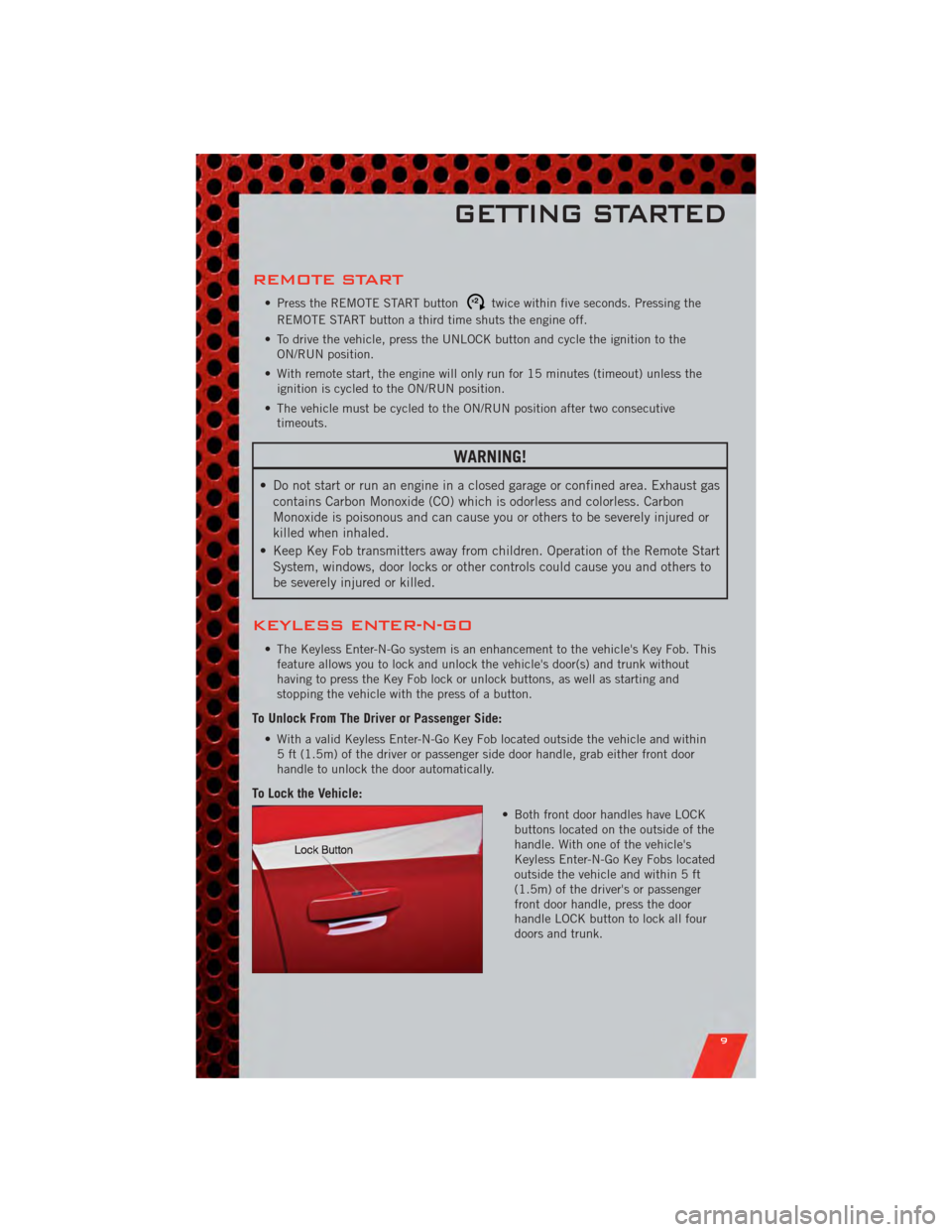
To Lock the Vehicle:
• Both front door handles have LOCKbuttons located on the outside of the
handle. With one of the vehicle's
Keyless Enter-N-Go Key Fobs located
outside the vehicle and within 5 ft
(1.5m) of the driver's or passenger
front door handle, press the door
handle LOCK button to lock all four
doors and trunk.
GETTING STARTED
9
Page 12 of 104
NOTE:
• If “Unlock All Doors 1st Press” is programmed all doors will unlock when you grabhold of the front driver's door handle. To select between “Unlock Driver Door 1st
Press” and “Unlock All Doors 1st Press”, refer to the Uconnect Touch™ Settings in
your vehicle's Owner's Manual on the DVD or Programmable Features in this guide for
further information.
• To select between “Unlock Driver Door 1st Press” and “Unlock All Doors 1st Press”, refer to the Uconnect Touch™ Settings in your vehicle's Owner's Manual on the DVD
or Programmable Features in this guide for further information.
• If a Key Fob is detected in the vehicle when locking the vehicle using the power door lock switch, the doors will unlock and the horn will chirp three times. On the third
attempt, your Key Fob can be locked inside the vehicle.
• After pressing the Keyless Enter-N-Go LOCK button, you must wait 2 seconds before you can lock or unlock the vehicle using the door handle.
• If a Keyless Enter-N-Go door handle has not been used for 72 hours, the Keyless Enter-N-Go feature for that handle may time out. Pulling the deactivated front door
handle will reactivate the door handle's Keyless Enter-N-Go feature.
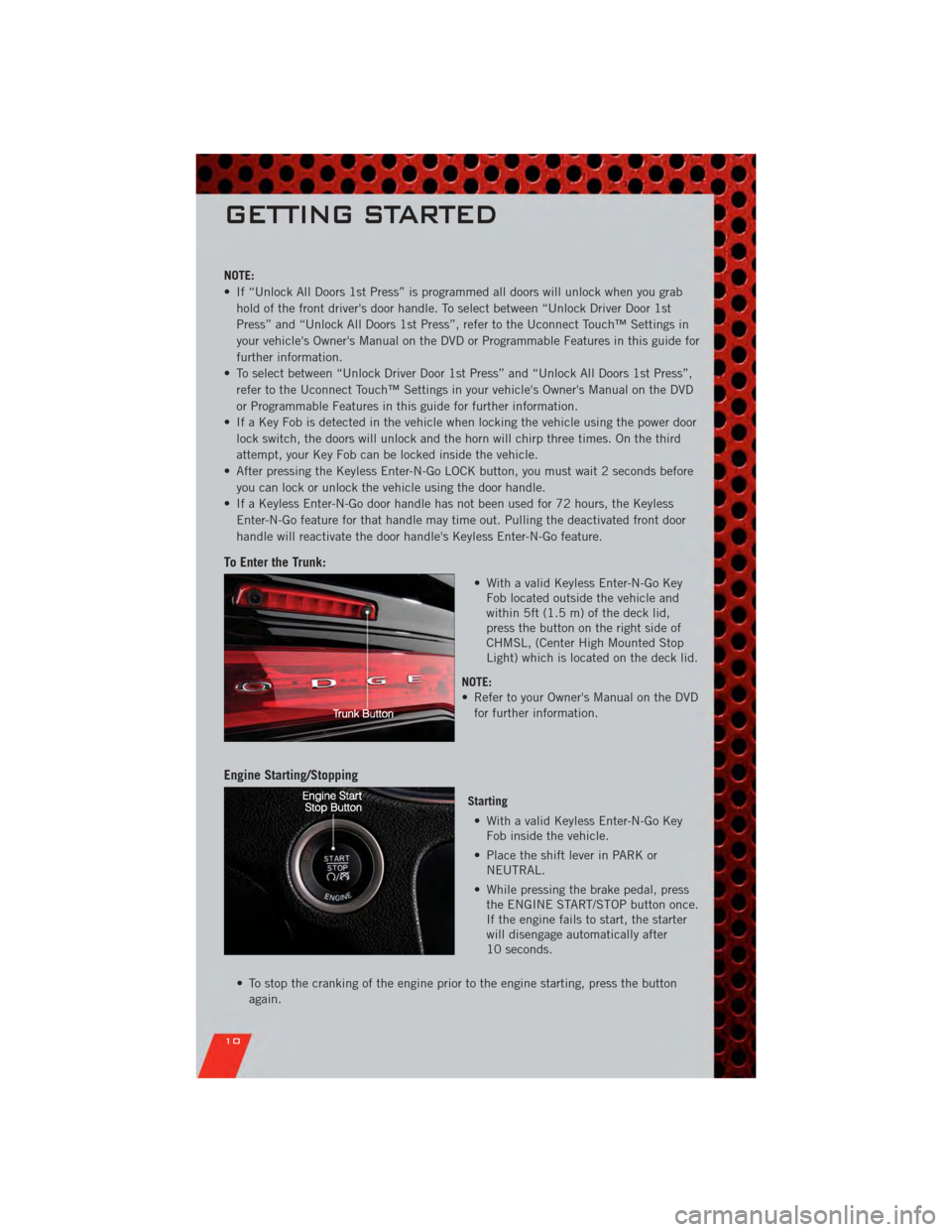
To Enter the Trunk:
• With a valid Keyless Enter-N-Go KeyFob located outside the vehicle and
within 5ft (1.5 m) of the deck lid,
press the button on the right side of
CHMSL, (Center High Mounted Stop
Light) which is located on the deck lid.
NOTE:
• Refer to your Owner's Manual on the DVD for further information.
Engine Starting/Stopping
Starting
• With a valid Keyless Enter-N-Go Key Fob inside the vehicle.
• Place the shift lever in PARK or NEUTRAL.
• While pressing the brake pedal, press the ENGINE START/STOP button once.
If the engine fails to start, the starter
will disengage automatically after
10 seconds.
• To stop the cranking of the engine prior to the engine starting, press the button again.
GETTING STARTED
10
Page 13 of 104
Stopping• Place the shift lever in PARK.
• Press the ENGINE START/STOP button once. The ignition switch will return to the OFF position.
• If the shift lever is not in PARK, the ENGINE START/STOP button must be held for two
seconds and vehicle speed must be above 5 mph (8 km/h) before the engine will shut
off.
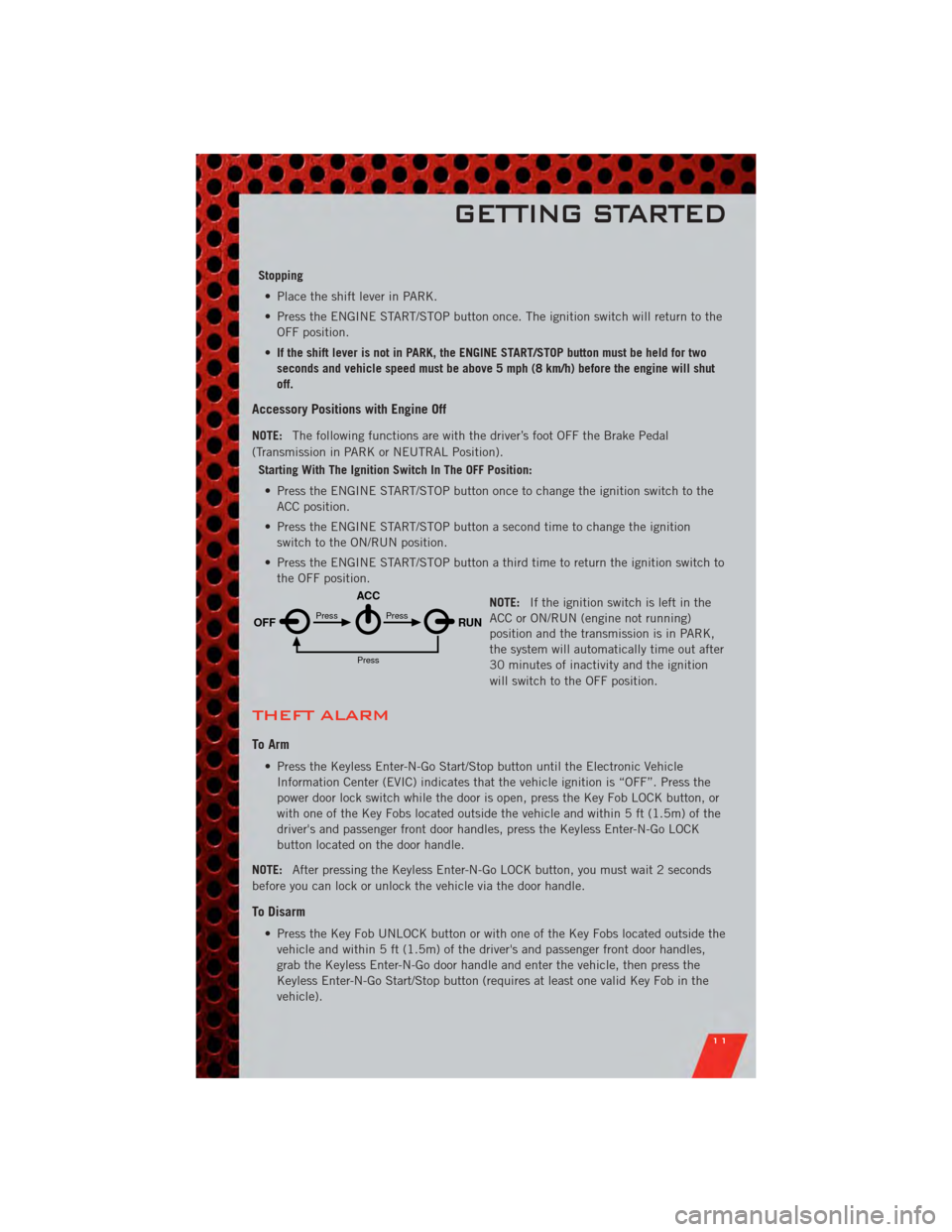
Accessory Positions with Engine Off
NOTE: The following functions are with the driver’s foot OFF the Brake Pedal
(Transmission in PARK or NEUTRAL Position).
Starting With The Ignition Switch In The OFF Position:
• Press the ENGINE START/STOP button once to change the ignition switch to the ACC position.
• Press the ENGINE START/STOP button a second time to change the ignition switch to the ON/RUN position.
• Press the ENGINE START/STOP button a third time to return the ignition switch to the OFF position.
NOTE:If the ignition switch is left in the
ACC or ON/RUN (engine not running)
position and the transmission is in PARK,
the system will automatically time out after
30 minutes of inactivity and the ignition
will switch to the OFF position.
THEFT ALARM
To Arm
• Press the Keyless Enter-N-Go Start/Stop button until the Electronic Vehicle
Information Center (EVIC) indicates that the vehicle ignition is “OFF”. Press the
power door lock switch while the door is open, press the Key Fob LOCK button, or
with one of the Key Fobs located outside the vehicle and within 5 ft (1.5m) of the
driver's and passenger front door handles, press the Keyless Enter-N-Go LOCK
button located on the door handle.
NOTE: After pressing the Keyless Enter-N-Go LOCK button, you must wait 2 seconds
before you can lock or unlock the vehicle via the door handle.
To Disarm
• Press the Key Fob UNLOCK button or with one of the Key Fobs located outside the vehicle and within 5 ft (1.5m) of the driver's and passenger front door handles,
grab the Keyless Enter-N-Go door handle and enter the vehicle, then press the
Keyless Enter-N-Go Start/Stop button (requires at least one valid Key Fob in the
vehicle).
OFF RUN
ACCPress
Press
Press
GETTING STARTED
11
Page 18 of 104
FRONT SEATS
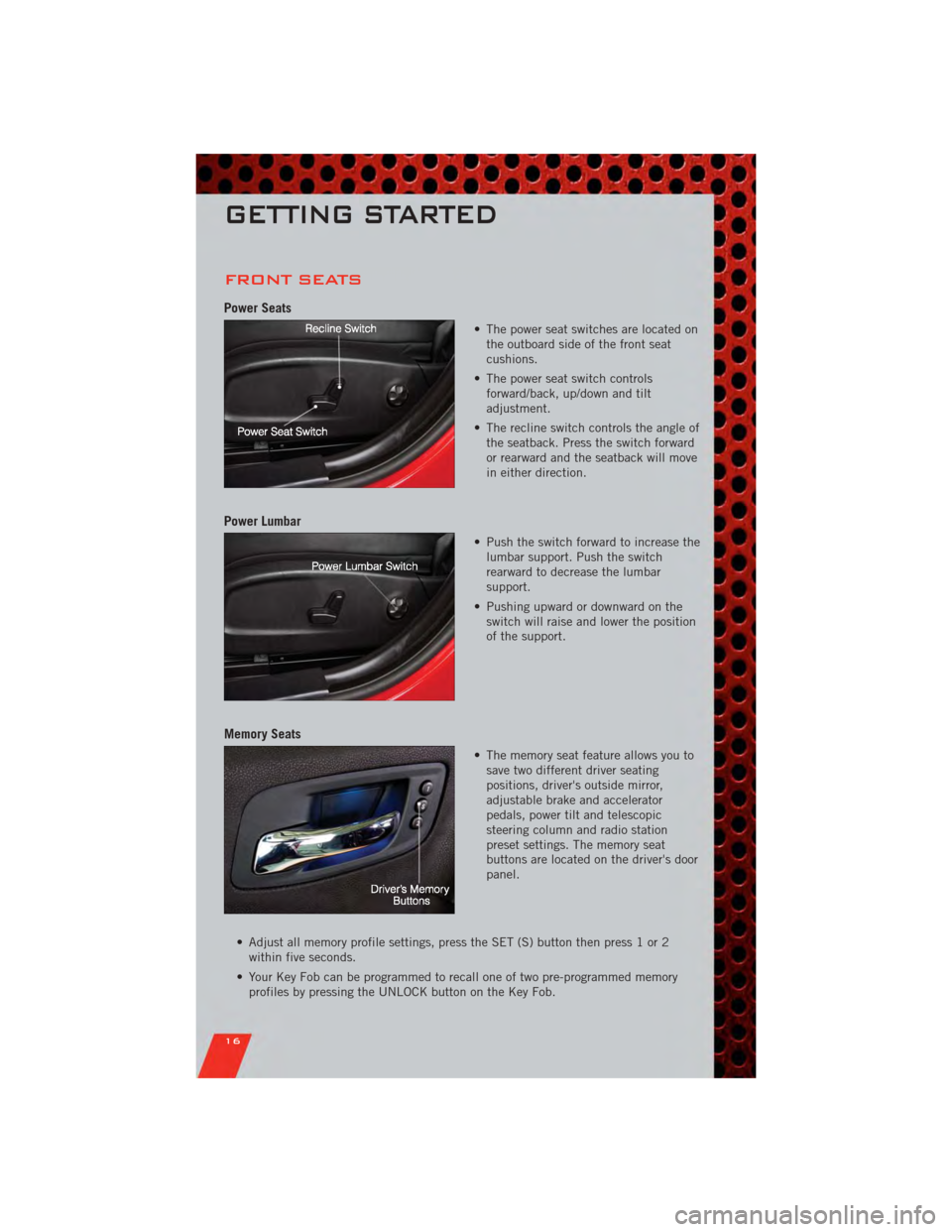
Power Seats
• The power seat switches are located onthe outboard side of the front seat
cushions.
• The power seat switch controls forward/back, up/down and tilt
adjustment.
• The recline switch controls the angle of the seatback. Press the switch forward
or rearward and the seatback will move
in either direction.
Power Lumbar
• Push the switch forward to increase thelumbar support. Push the switch
rearward to decrease the lumbar
support.
• Pushing upward or downward on the switch will raise and lower the position
of the support.
Memory Seats
• The memory seat feature allows you tosave two different driver seating
positions, driver's outside mirror,
adjustable brake and accelerator
pedals, power tilt and telescopic
steering column and radio station
preset settings. The memory seat
buttons are located on the driver's door
panel.
• Adjust all memory profile settings, press the SET (S) button then press 1 or 2 within five seconds.
• Your Key Fob can be programmed to recall one of two pre-programmed memory profiles by pressing the UNLOCK button on the Key Fob.
GETTING STARTED
16
Page 19 of 104
• To program your Key Fobs, perform the following:• Change the ignition to OFF.
• Select desired memory profile 1 or 2.
• Once the profile has been recalled, press and release the SET (S) button on thememory switch, then press and release the side of the rocker switch labeled 1 or
2 accordingly.
• (1 or 2) will display in the instrument cluster if the vehicle is equipped with the EVIC.
• Press and release the LOCK button on the Key Fob within 10 seconds.
NOTE: Your Key Fob can be unlinked to your memory settings by pressing the SET (S)
button followed by the UNLOCK button on the Key Fob in the fourth step.
• Press 1 or 2 to recall the saved positions, or press UNLOCK on the programmedKey Fob.
• Refer to the Owner's Manual on the DVD for further details.
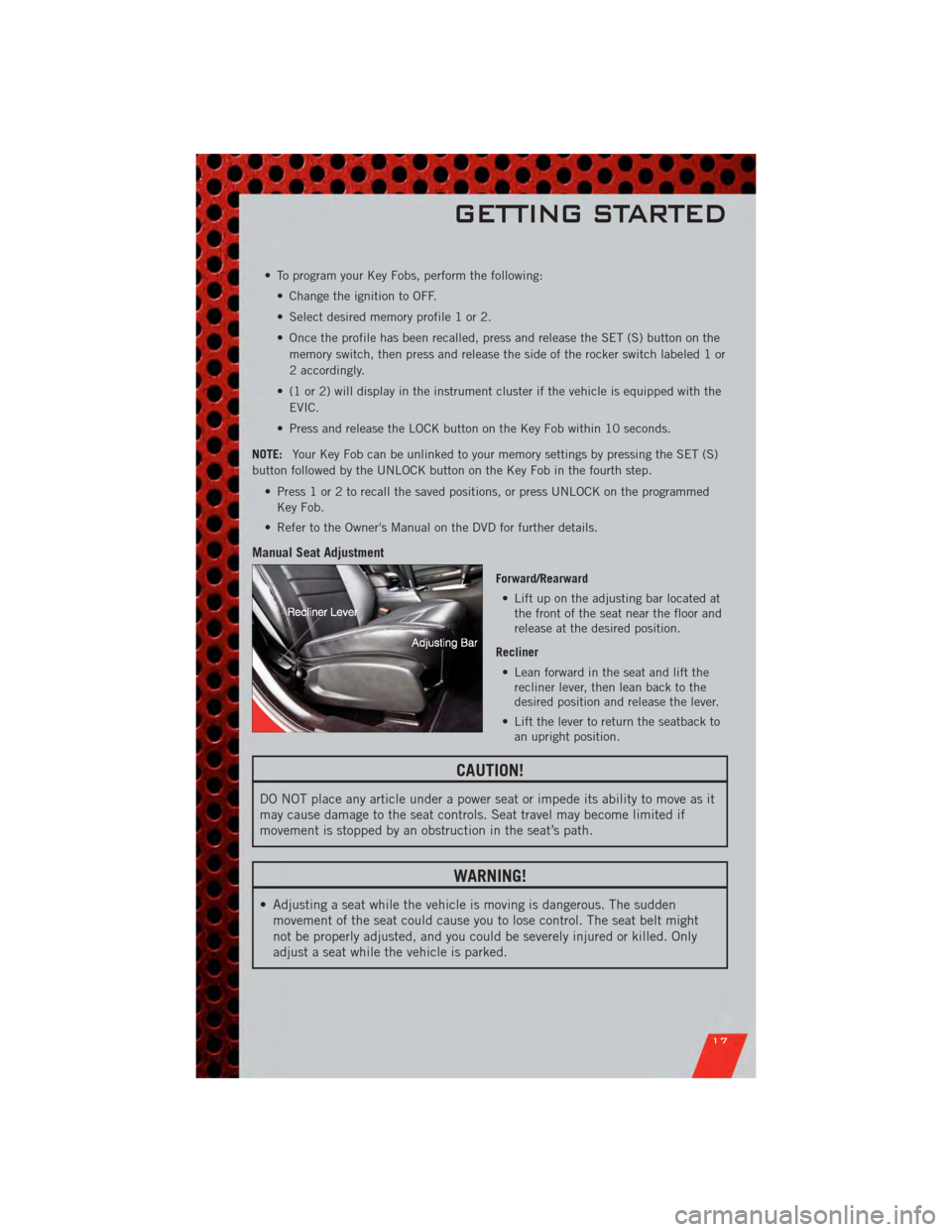
Manual Seat Adjustment
Forward/Rearward • Lift up on the adjusting bar located at the front of the seat near the floor and
release at the desired position.
Recliner • Lean forward in the seat and lift the recliner lever, then lean back to the
desired position and release the lever.
• Lift the lever to return the seatback to an upright position.
CAUTION!
DO NOT place any article under a power seat or impede its ability to move as it
may cause damage to the seat controls. Seat travel may become limited if
movement is stopped by an obstruction in the seat’s path.
WARNING!
• Adjusting a seat while the vehicle is moving is dangerous. The suddenmovement of the seat could cause you to lose control. The seat belt might
not be properly adjusted, and you could be severely injured or killed. Only
adjust a seat while the vehicle is parked.
GETTING STARTED
17
Page 21 of 104
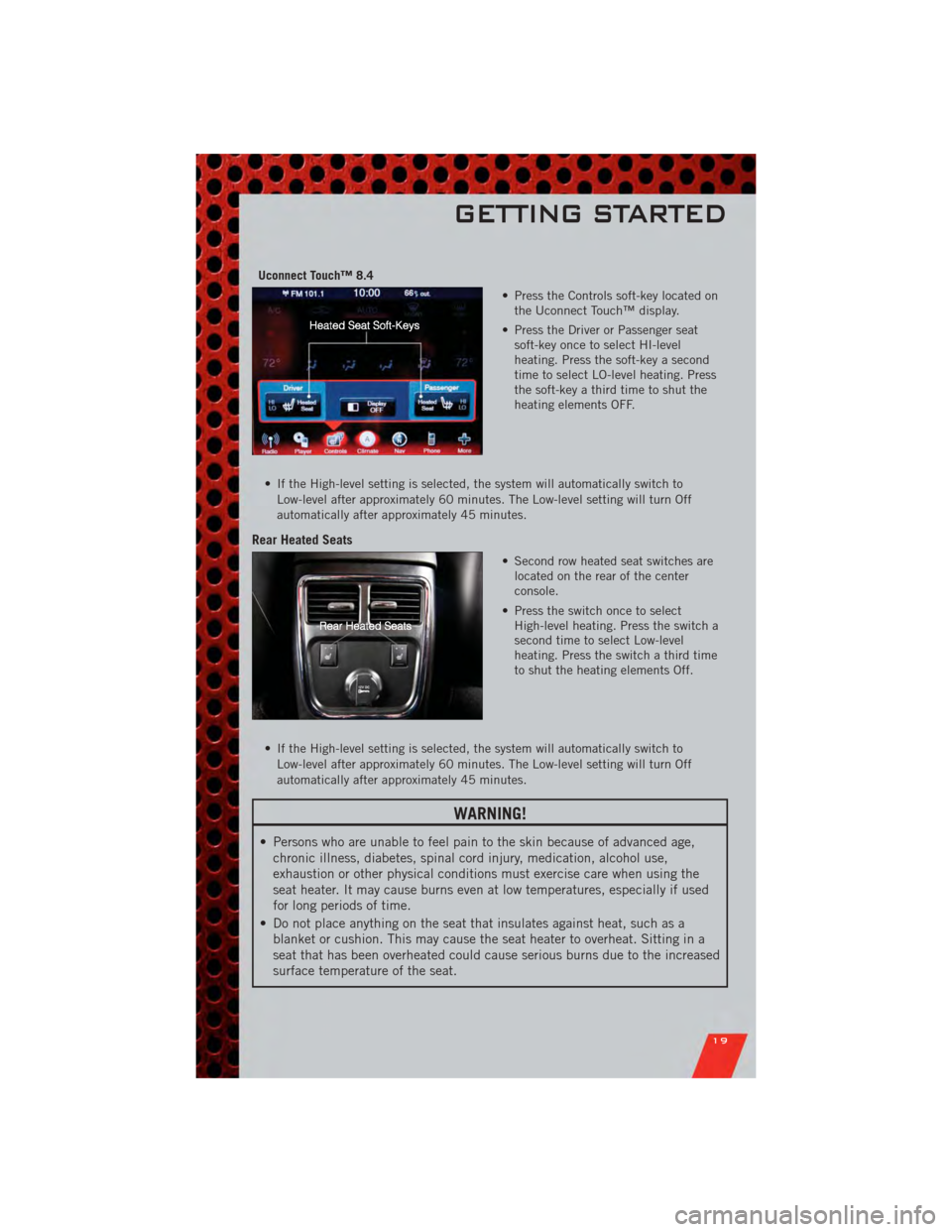
Uconnect Touch™ 8.4• Press the Controls soft-key located onthe Uconnect Touch™ display.
• Press the Driver or Passenger seat soft-key once to select HI-level
heating. Press the soft-key a second
time to select LO-level heating. Press
the soft-key a third time to shut the
heating elements OFF.
• If the High-level setting is selected, the system will automatically switch to Low-level after approximately 60 minutes. The Low-level setting will turn Off
automatically after approximately 45 minutes.
Rear Heated Seats
• Second row heated seat switches arelocated on the rear of the center
console.
• Press the switch once to select High-level heating. Press the switch a
second time to select Low-level
heating. Press the switch a third time
to shut the heating elements Off.
• If the High-level setting is selected, the system will automatically switch to Low-level after approximately 60 minutes. The Low-level setting will turn Off
automatically after approximately 45 minutes.
WARNING!
• Persons who are unable to feel pain to the skin because of advanced age,chronic illness, diabetes, spinal cord injury, medication, alcohol use,
exhaustion or other physical conditions must exercise care when using the
seat heater. It may cause burns even at low temperatures, especially if used
for long periods of time.
• Do not place anything on the seat that insulates against heat, such as a blanket or cushion. This may cause the seat heater to overheat. Sitting in a
seat that has been overheated could cause serious burns due to the increased
surface temperature of the seat.
GETTING STARTED
19
Page 31 of 104
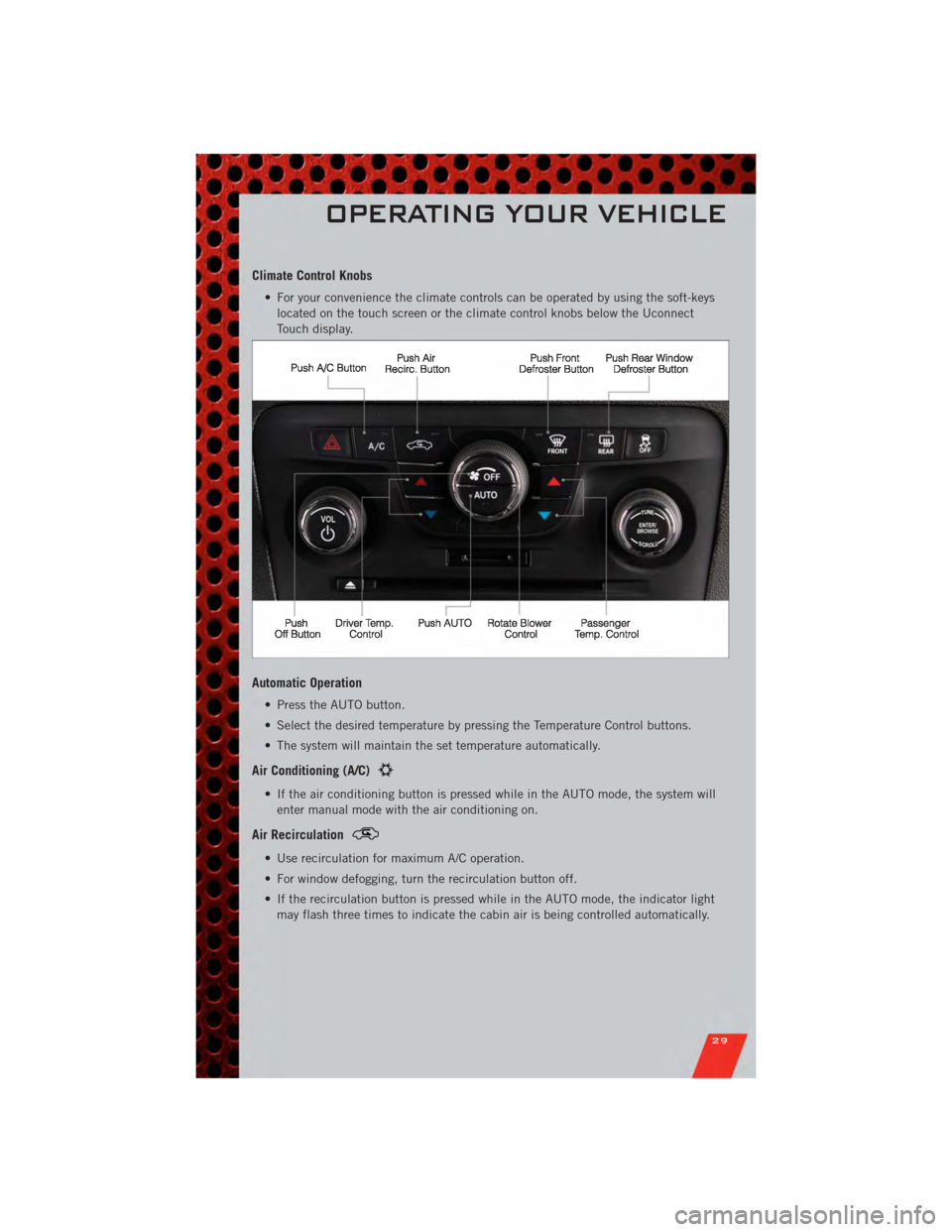
Climate Control Knobs
• For your convenience the climate controls can be operated by using the soft-keyslocated on the touch screen or the climate control knobs below the Uconnect
Touch display.
Automatic Operation
• Press the AUTO button.
• Select the desired temperature by pressing the Temperature Control buttons.
• The system will maintain the set temperature automatically.
Air Conditioning (A/C)
• If the air conditioning button is pressed while in the AUTO mode, the system willenter manual mode with the air conditioning on.
Air Recirculation
• Use recirculation for maximum A/C operation.
• For window defogging, turn the recirculation button off.
• If the recirculation button is pressed while in the AUTO mode, the indicator lightmay flash three times to indicate the cabin air is being controlled automatically.
OPERATING YOUR VEHICLE
29