key DODGE CHARGER 2011 7.G User Guide
[x] Cancel search | Manufacturer: DODGE, Model Year: 2011, Model line: CHARGER, Model: DODGE CHARGER 2011 7.GPages: 104, PDF Size: 4.53 MB
Page 32 of 104
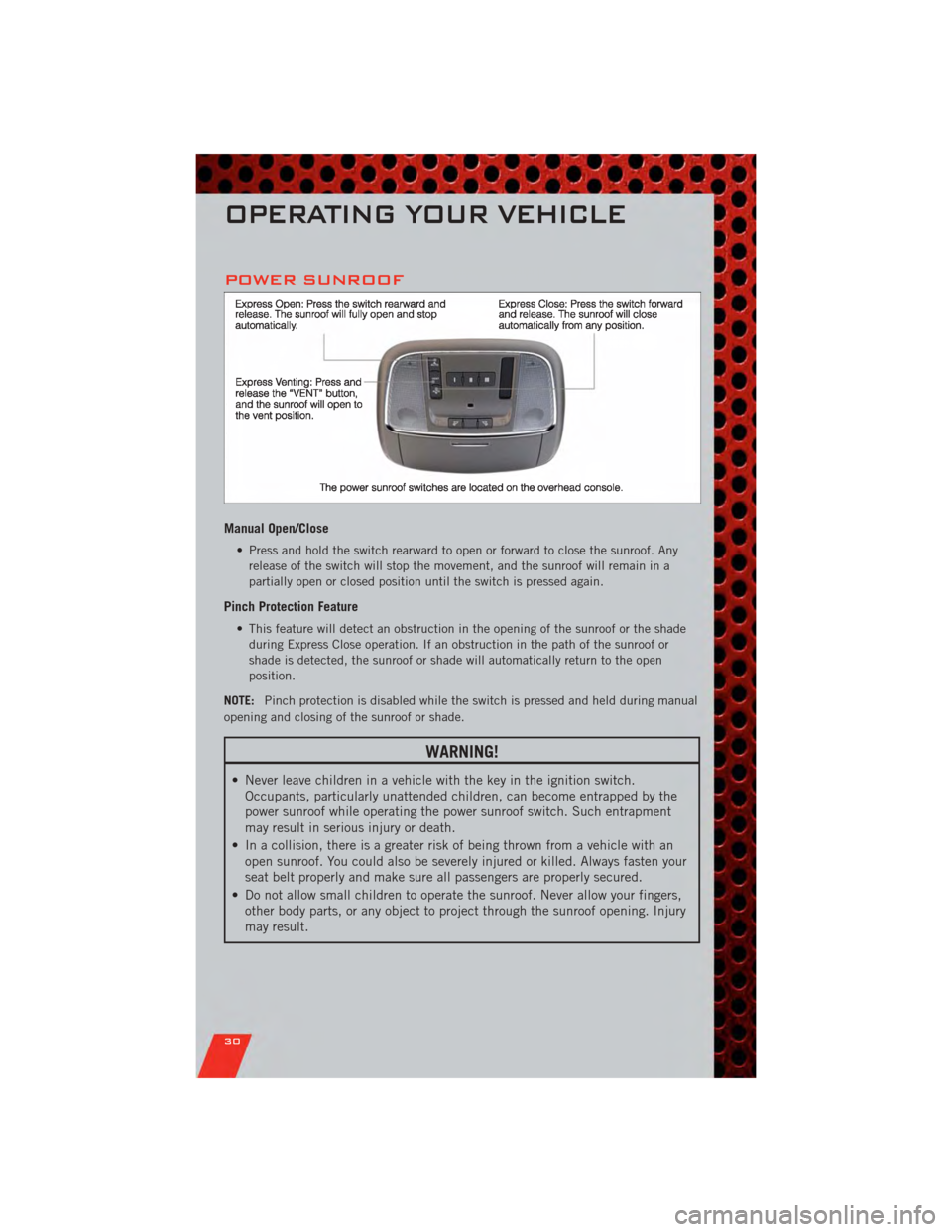
POWER SUNROOF
Manual Open/Close
• Press and hold the switch rearward to open or forward to close the sunroof. Anyrelease of the switch will stop the movement, and the sunroof will remain in a
partially open or closed position until the switch is pressed again.
Pinch Protection Feature
• This feature will detect an obstruction in the opening of the sunroof or the shadeduring Express Close operation. If an obstruction in the path of the sunroof or
shade is detected, the sunroof or shade will automatically return to the open
position.
NOTE: Pinch protection is disabled while the switch is pressed and held during manual
opening and closing of the sunroof or shade.
WARNING!
• Never leave children in a vehicle with the key in the ignition switch. Occupants, particularly unattended children, can become entrapped by the
power sunroof while operating the power sunroof switch. Such entrapment
may result in serious injury or death.
• In a collision, there is a greater risk of being thrown from a vehicle with an open sunroof. You could also be severely injured or killed. Always fasten your
seat belt properly and make sure all passengers are properly secured.
• Do not allow small children to operate the sunroof. Never allow your fingers, other body parts, or any object to project through the sunroof opening. Injury
may result.
OPERATING YOUR VEHICLE
30
Page 36 of 104
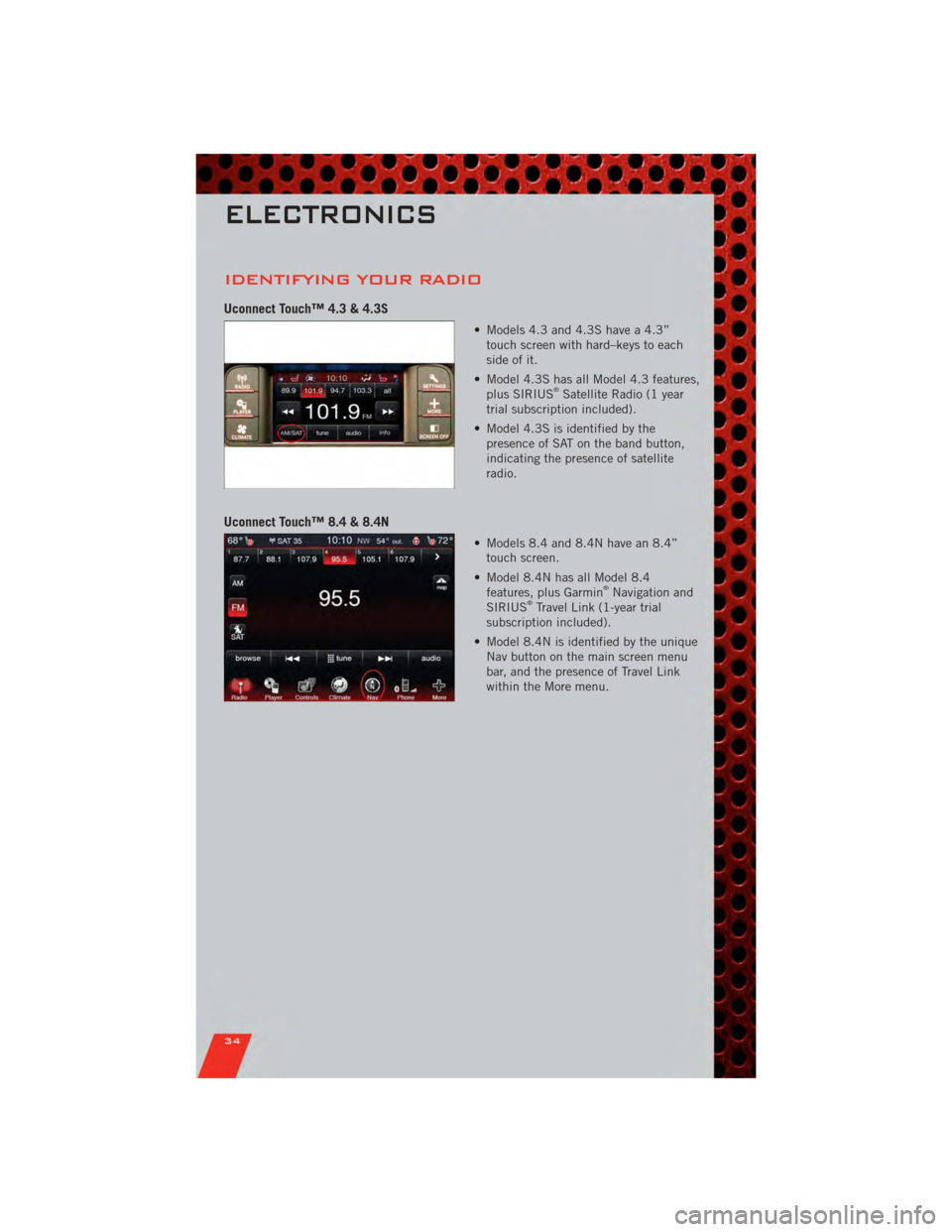
IDENTIFYING YOUR RADIO
Uconnect Touch™ 4.3 & 4.3S
• Models 4.3 and 4.3S have a 4.3”touch screen with hard–keys to each
side of it.
• Model 4.3S has all Model 4.3 features, plus SIRIUS
®Satellite Radio (1 year
trial subscription included).
• Model 4.3S is identified by the presence of SAT on the band button,
indicating the presence of satellite
radio.
Uconnect Touch™ 8.4 & 8.4N
• Models 8.4 and 8.4N have an 8.4”touch screen.
• Model 8.4N has all Model 8.4 features, plus Garmin
®Navigation and
SIRIUS®Travel Link (1-year trial
subscription included).
• Model 8.4N is identified by the unique Nav button on the main screen menu
bar, and the presence of Travel Link
within the More menu.
ELECTRONICS
34
Page 37 of 104
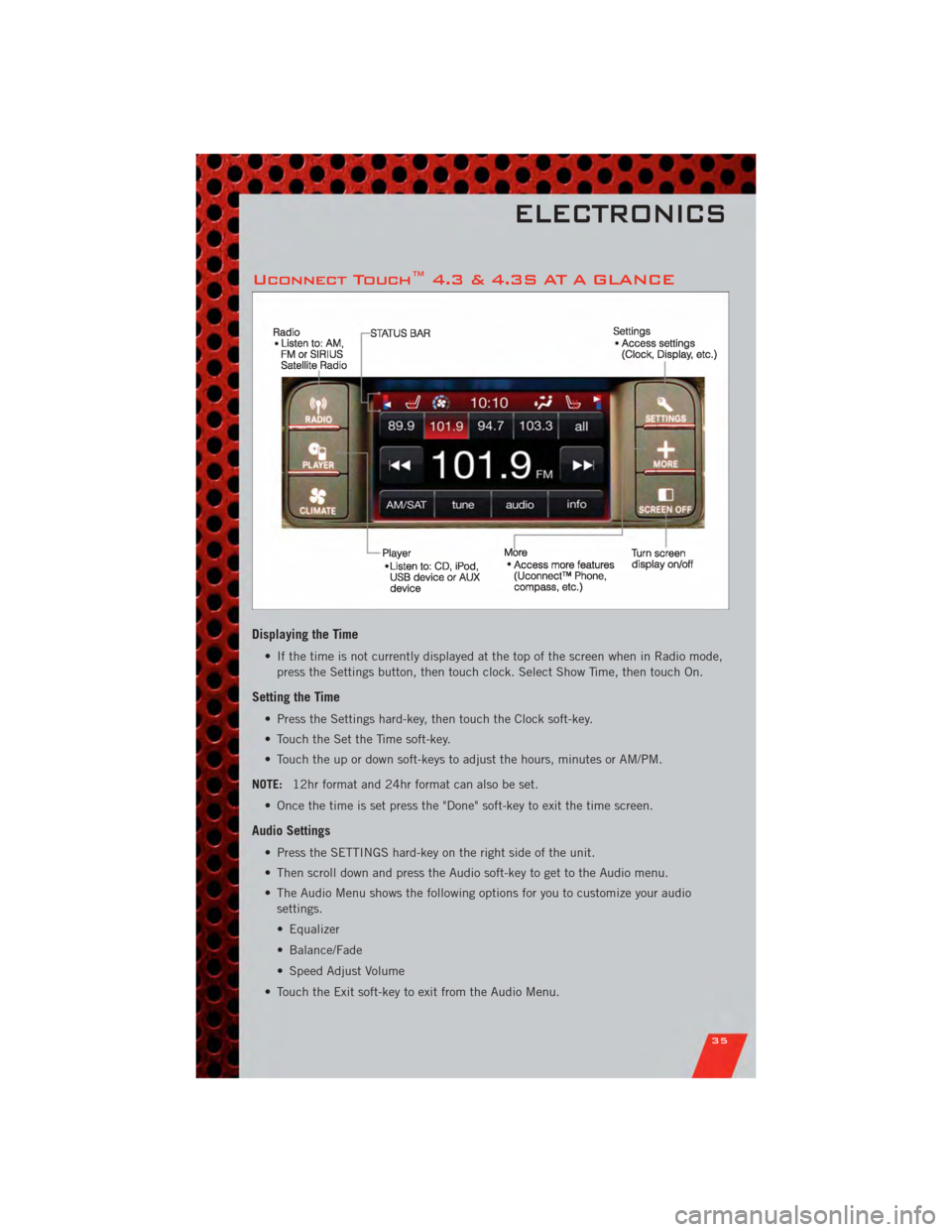
Uconnect Touch™ 4.3 & 4.3S AT A GLANCE
Displaying the Time
• If the time is not currently displayed at the top of the screen when in Radio mode,press the Settings button, then touch clock. Select Show Time, then touch On.
Setting the Time
• Press the Settings hard-key, then touch the Clock soft-key.
• Touch the Set the Time soft-key.
• Touch the up or down soft-keys to adjust the hours, minutes or AM/PM.
NOTE: 12hr format and 24hr format can also be set.
• Once the time is set press the "Done" soft-key to exit the time screen.
Audio Settings
• Press the SETTINGS hard-key on the right side of the unit.
• Then scroll down and press the Audio soft-key to get to the Audio menu.
• The Audio Menu shows the following options for you to customize your audio settings.
• Equalizer
• Balance/Fade
• Speed Adjust Volume
• Touch the Exit soft-key to exit from the Audio Menu.
ELECTRONICS
35
Page 38 of 104
Equalizer• Touch the Equalizer soft-key to adjust the Bass, Mid and Treble. Use the + or - soft-key to adjust the equalizer to your desired settings. Press the back arrow
soft-key when done.
Balance/Fade • Touch the Balance/Fade soft-key to adjust the sound from the speakers. Use the arrow soft-key to adjust the sound level from the front and rear or right and left
side speakers. Touch the Center "C" soft-key to reset the balance and fade to the
factory setting. Press the back arrow soft-key when done.
Speed Adjust Volume • Touch the Speed Adjust Volume soft-key to select between OFF, 1, 2 or 3. This will decrease the radio volume relative to a decrease in vehicle speed. Press the back
arrow soft-key when done.
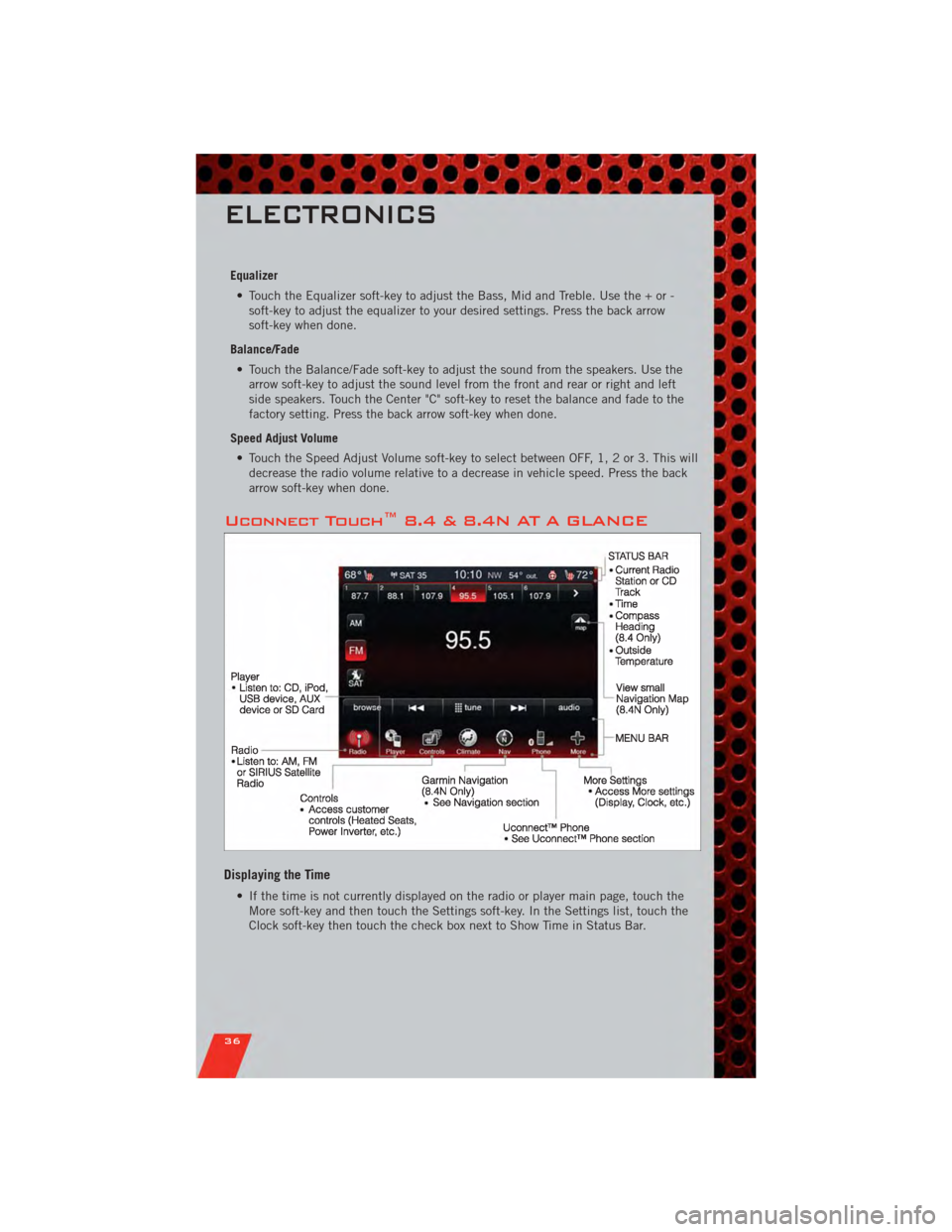
Uconnect Touch™ 8.4 & 8.4N AT A GLANCE
Displaying the Time
• If the time is not currently displayed on the radio or player main page, touch theMore soft-key and then touch the Settings soft-key. In the Settings list, touch the
Clock soft-key then touch the check box next to Show Time in Status Bar.
ELECTRONICS
36
Page 39 of 104
Setting the Time
• Model 8.4N synchronizes time automatically via GPS, so should not require anytime adjustment. If you do need to set the time manually, follow the instructions
below for Model 8.4.
• For Model 8.4, turn the unit on, then touch the time display at the top of the screen. Touch Yes.
• If the time is not displayed at the top of the screen, touch More soft-key and then Settings soft-key. In the Settings screen, touch the Clock soft-key, then check or
uncheck this option.
• Touch + or – next to Set Time Hours and Set Time Minutes to adjust the time.
• If these features are not available, uncheck the Sync with GPS box.
• Touch X to save your settings and exit out of the Clock Setting screen.
Audio Settings
• Touch of the Audio soft-key to activate the Audio settings screen to adjust Balance\Fade, Equalizer, And Speed Adjusted Volume.
• You can return to the Radio screen by touching the X located at the top right.
Balance/Fade • Touch the Balance/Fade soft-key to Balance audio between the front speakers or fade the audio between the rear and front speakers.
• Touching the Front, Rear, Left, or Right soft-keys or touch and drag the red Speaker Icon to adjust the Balance/Fade.
Equalizer • Touch the Equalizer soft-key to activate the Equalizer screen.
• Touch the + or - soft-keys, or by touching and dragging over the level bar for each of the equalizer bands. The level value, which spans between ±9, is displayed at
the bottom of each of the Bands.
Speed Adjusted Volume • Touch the Speed Adjusted Volume soft-key to activate the Speed Adjusted Volume screen. The Speed Adjusted Volume is adjusted by touching of the + and - buttons
or by touching, and dragging over the Level Bar This alters the automatic
adjustment of the audio volume with variation to vehicle speed.
ELECTRONICS
37
Page 41 of 104
• To access the Radio mode, touch the Radio hard-key on the upper left side of thefaceplate (4.3 & 4.3S) or the Radio soft-key at the lower left of the screen (8.4 &
8.4N).
• Unless otherwise noted, the information provided on the operation and functionality of the radios in this section is common to all Uconnect Touch™
radios.
Selecting Radio Stations
• Touch the Radio band soft-key to cycle through AM, FM or SAT (4.3 & 4.3S) or thedesired radio band (AM, FM or SAT) soft-key (8.4 & 8.4N). Satellite Radio is not
only available on the 4.3.
Seek Up/Seek Down • Touch the Seek arrow soft-keys for less than 2 seconds to seek through radio stations.
• Touch and hold either arrow soft-key for more than 2 seconds to bypass stations without stopping. The radio will stop at the next listenable station once the arrow
soft-key is released.
Direct Tune • Tune directly to a radio station by pressing the “Tune” button on the screen, and entering the desired station number.
Store Radio Presets
• Your radio can store 12 total preset stations. They are shown at the top of yourscreen. To see all 12 stations, Press the all soft-key (4.3 & 4.3S) or press the
arrow soft-key at the top right of the screen to toggle between the six presets (8.4
& 8.4N).
• To set a station into memory press and hold the desired numbered soft-key for more than two seconds or until you hear a confirmation beep.
SIRIUS SATELLITE RADIO
• SIRIUS®Satellite Radio gives you over 130 channels, including 100%
commercial-free music from nearly every genre, plus all your favorite sports, news,
talk and entertainment channels –all with crystal clear, coast-to-coast coverage, all
in one place and all at your fingertips.
• To access SIRIUS Satellite Radio, touch the Radio band soft-key and select the SAT soft-key (4.3S) or touch the SAT soft-key on the main Radio screen (8.4 &
8.4N).
• The following describes features that are available when in SIRIUS Satellite Radio mode.
• Unless otherwise noted, the information provided on the operation and functionality of the radios in this section is common to all Uconnect Touch™
radios.
ELECTRONICS
39
Page 42 of 104
Selecting SIRIUS Satellite Channels
Seek Up/Seek Down• Touch the Seek arrow soft-keys for less than 2 seconds to seek through channels in SAT mode.
• Touch and hold either arrow soft-key for more than 2 seconds to bypass channels without stopping. The radio will stop at the next listenable channel once the arrow
soft-key is released.
Direct Tune • Tune directly to a SAT channel by pressing the “Tune” button on the screen, and entering the desired station number.
Info (4.3S Only)
• Provides detailed information about the current SIRIUS Satellite channel.
More... (4.3S Only)
• Access more menus: Audio, Favorites, Game Zone, and Replay.
Jump (8.4 & 8.4N Only)
• Automatically tells you when Traffic & Weather for a favorite city is available, andgives you the option to switch to that channel. Touch Jump to activate the feature.
After listening to Traffic and Weather, touch Jump again to return to the previous
channel.
Fav (8.4 & 8.4N Only)
• Activates the favorites menu. You can add up to 50 favorite artists or songs. Justtouch Add Fav Artist or Add Fav Song while the song is playing. You will then be
alerted any time one of these songs, or works by these artists, is playing on other
SIRIUS channels.
SIRIUS Parental Controls
• You can skip or hide certain channels from view if you do not want access to them.Press the Settings hard-key (4.3S) or touch the More soft-key, then the Settings
soft-key (8.4 & 8.4N), next touch the SIRIUS Setup soft-key, then select Channel
Skip. Touch the channel(s) to be skipped (4.3S) or touch the box, check-mark,
next to the channel you want skipped (8.4 & 8.4N). They will not show up in
normal usage.
• SIRIUS also offers the option to permanently block selected channels. Call 1-888-539-7474 and request the Family Package.
ELECTRONICS
40
Page 44 of 104
PLAYER
Models 4.3 & 4.3S
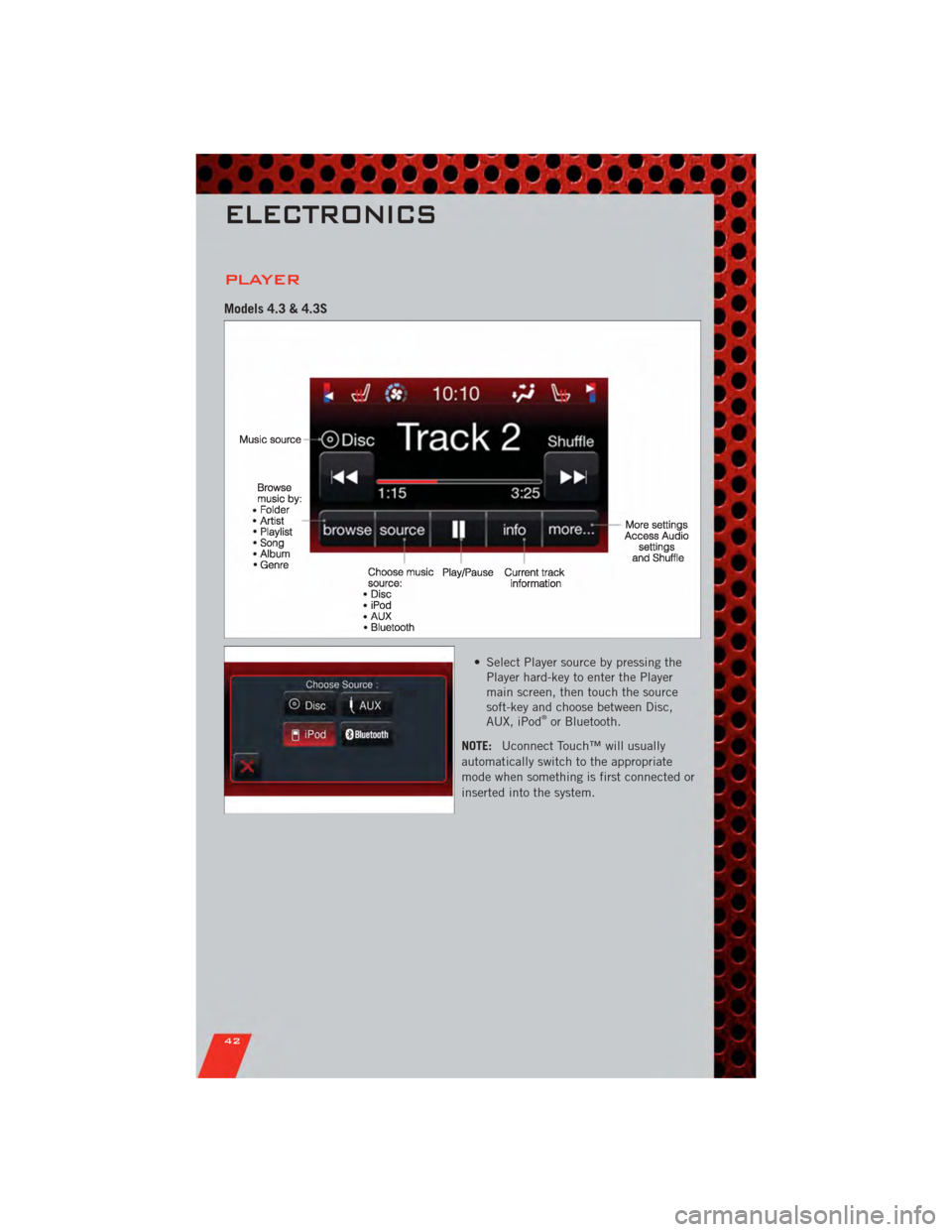
• Select Player source by pressing thePlayer hard-key to enter the Player
main screen, then touch the source
soft-key and choose between Disc,
AUX, iPod
®or Bluetooth.
NOTE: Uconnect Touch™ will usually
automatically switch to the appropriate
mode when something is first connected or
inserted into the system.
ELECTRONICS
42
Page 45 of 104
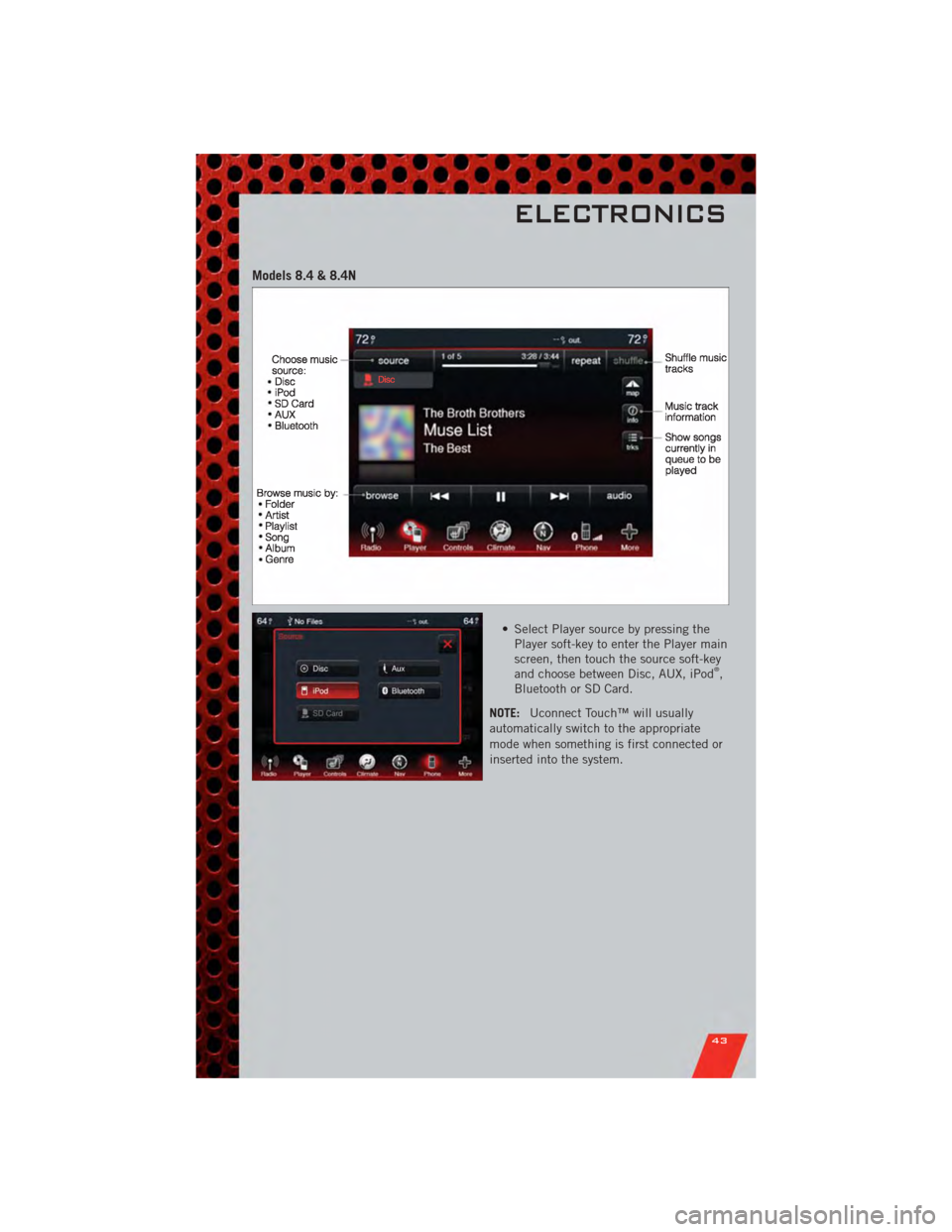
Models 8.4 & 8.4N
• Select Player source by pressing thePlayer soft-key to enter the Player main
screen, then touch the source soft-key
and choose between Disc, AUX, iPod
®,
Bluetooth or SD Card.
NOTE: Uconnect Touch™ will usually
automatically switch to the appropriate
mode when something is first connected or
inserted into the system.
ELECTRONICS
43
Page 46 of 104
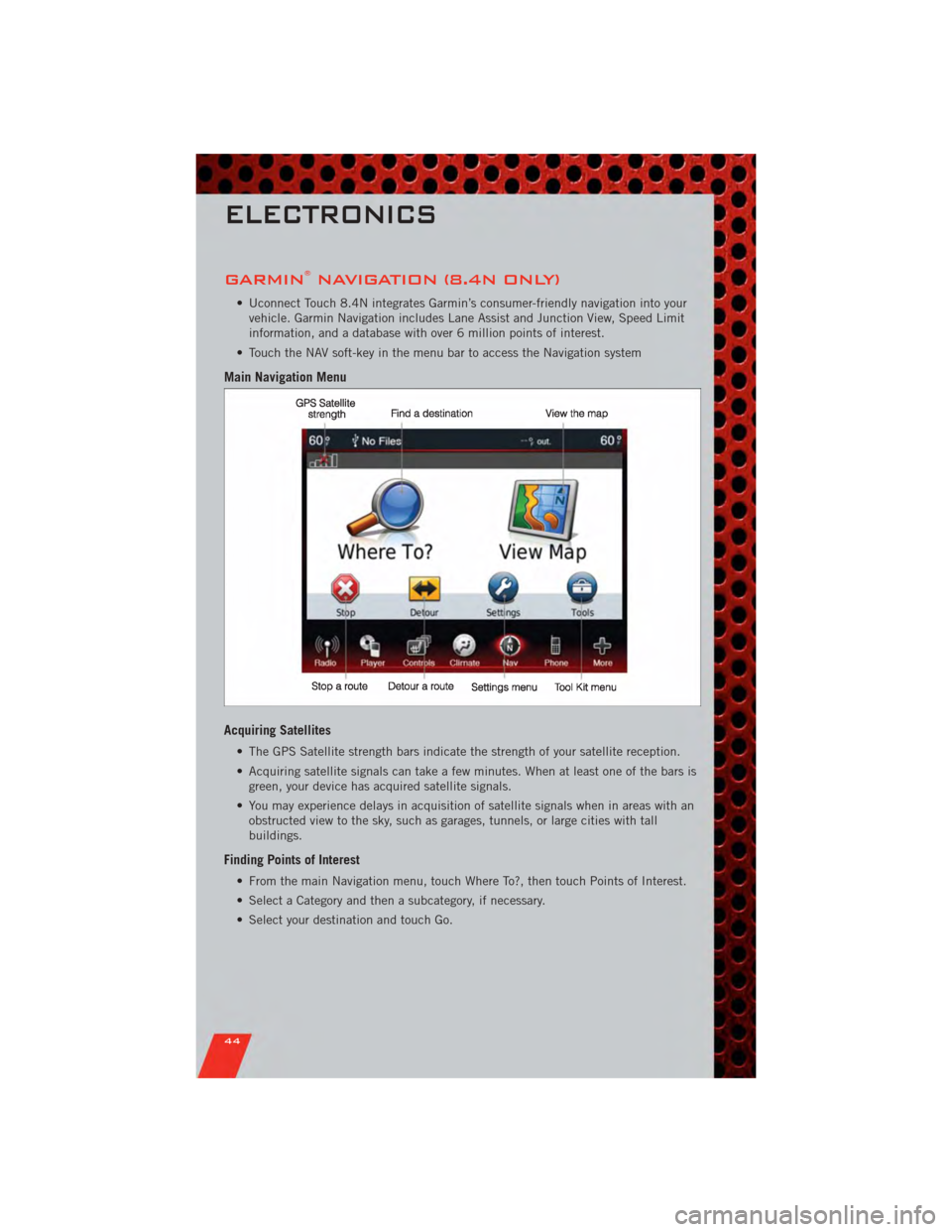
GARMIN®NAVIGATION (8.4N ONLY)
• Uconnect Touch 8.4N integrates Garmin’s consumer-friendly navigation into yourvehicle. Garmin Navigation includes Lane Assist and Junction View, Speed Limit
information, and a database with over 6 million points of interest.
• Touch the NAV soft-key in the menu bar to access the Navigation system
Main Navigation Menu
Acquiring Satellites
• The GPS Satellite strength bars indicate the strength of your satellite reception.
• Acquiring satellite signals can take a few minutes. When at least one of the bars is green, your device has acquired satellite signals.
• You may experience delays in acquisition of satellite signals when in areas with an obstructed view to the sky, such as garages, tunnels, or large cities with tall
buildings.
Finding Points of Interest
• From the main Navigation menu, touch Where To?, then touch Points of Interest.
• Select a Category and then a subcategory, if necessary.
• Select your destination and touch Go.
ELECTRONICS
44