remote start DODGE CHARGER 2021 User Guide
[x] Cancel search | Manufacturer: DODGE, Model Year: 2021, Model line: CHARGER, Model: DODGE CHARGER 2021Pages: 320, PDF Size: 20.61 MB
Page 87 of 320
STARTING AND OPERATING85
If the vehicle is not in PARK and the driver turns off
the engine, the vehicle may AutoPark.
AutoPark will engage when all of these conditions
are met:
Vehicle is equipped with an 8-speed transmission
Vehicle is not in PARK
Vehicle speed is 1.2 mph (1.9 km/h) or less
Ignition is switched from ON/RUN to ACC
NOTE:For Keyless Enter ’n Go™ equipped vehicles, the
engine will turn off and the ignition switch will
change to ACC mode.
If the vehicle is not in PARK and the driver exits the
vehicle with the engine running, the vehicle may
AutoPark.
AutoPark will engage when all of these conditions
are met:
Vehicle is equipped with an 8-speed transmission
Vehicle is not in PARK
Vehicle speed is 1.2 mph (1.9 km/h) or less
Driver’s seat belt is unbuckled
Driver’s door is ajar
Brake pedal is not pressed
The message “ AutoPark Engaged Shift to P then
Shift to Gear ” will display in the instrument cluster.
NOTE:In some cases the ParkSense graphic will be
displayed in the instrument cluster. In these cases,
the gear selector must be returned to “P” to select
desired gear.
If the driver shifts into PARK while moving, the
vehicle may AutoPark.
AutoPark will engage ONLY when vehicle speed is
1.2 mph (1.9 km/h) or less.
The message “ Vehicle Speed is Too High to Shift to
P” will be displayed in the instrument cluster if
vehicle speed is above 1.2 mph (1.9 km/h).
ALWAYS DO A VISUAL CHECK
that your vehicle is
in PARK by looking for the "P" in the instrument
cluster display and on the gear selector. As an
added precaution, always apply the parking brake
when exiting the vehicle.
KEYLESS ENTER ‘N GO™ — IGNITION
This feature allows the driver to operate the
ignition switch with the push of a button, as long as
the Remote Start/Keyless Enter ’n Go™ key fob is
in the passenger compartment.
COLD WEATHER OPERATION
(B
ELOW –22°F OR −30°C)
To ensure reliable starting at these temperatures,
use of an externally powered electric engine block
heater (available from an authorized dealer) is
recommended.
IF ENGINE FAILS TO START
If the engine fails to start after you have followed
the "Normal Starting" or "Cold Weather Operation"
procedure it may be flooded. Push the accelerator
pedal all the way to the floor and hold it there.
Crank the engine for no more than 15 seconds.
This should clear any excess fuel in case the
engine is flooded. Leave the ignition key in the
ON/RUN position, release the accelerator pedal
and repeat the “Normal Starting” procedure.
WARNING!
If vehicle speed is above 1.2 mph (1.9 km/h), the
transmission will default to NEUTRAL until the
vehicle speed drops below 1.2 mph (1.9 km/h).
A vehicle left in the NEUTRAL position can roll. As an
added precaution, always apply the parking brake
when exiting the vehicle.
4
21_LD_OM_EN_USC_t.book Page 85
Page 135 of 320

MULTIMEDIA133
Doors & Locks
When the Doors & Locks button is pressed on the touchscreen, the system displays the options related to locking and unlocking the vehicle’s doors.
NOTE:Depending on the vehicle’s options, feature settings may vary.
Setting Name Description
Auto Unlock On ExitThis setting will unlock the doors when any of the doors are opened from the inside.
Flash Lights With Lock This setting will allow you to turn on or off the flashing of the lights when the Lock button is pushed on
the key fob. Available settings are “On” and “Off”.
Sound Horn With Lock This setting will sound the horn when the Lock button is pushed on the key fob. The “Off” setting will
not sound the horn when the Lock button is pushed. The “1st Press” setting will sound the horn when the Lock button is pushed once. The “2nd Press” setting will sound the horn when the Lock button is pushed twice.
Sound Horn With Remote Start This setting will sound the horn when the remote start is activated from the key fob.
1st Press Of Key Fob Unlocks This setting will change how many pushes of the Unlock button on the key fob are needed to unlock all
the doors. The “Driver Door” setting will only unlock the driver door on the first push on the Unlock button. The “All Doors” setting will unlock all doors on the first push of the Unlock button.
Passive Entry This setting will allow you to turn the Passive Entry feature (Keyless Enter n’ Go™) on or off.
Personal Settings Linked To Key Fob
This setting will recall preset radio stations and driver seat position that have been linked to the key fob.
5
21_LD_OM_EN_USC_t.book Page 133
Page 136 of 320
134MULTIMEDIA
Seats & Comfort
Key Off Options
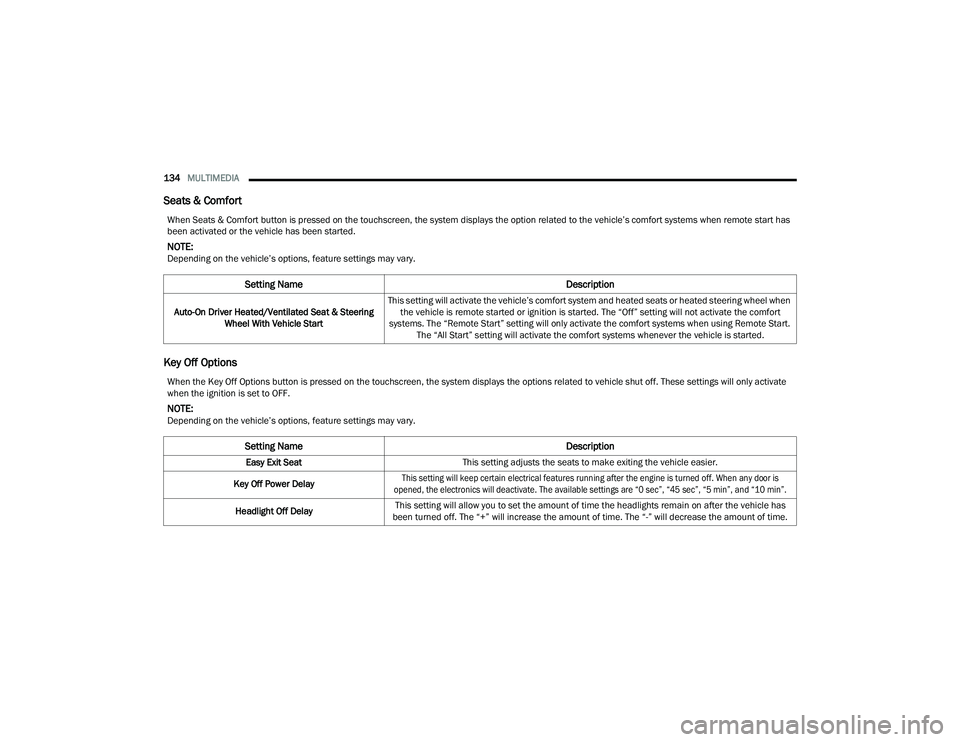
When Seats & Comfort button is pressed on the touchscreen, the system displays the option related to the vehicle’s comfort systems when remote start has
been activated or the vehicle has been started.
NOTE:Depending on the vehicle’s options, feature settings may vary.
Setting Name Description
Auto-On Driver Heated/Ventilated Seat & Steering
Wheel With Vehicle Start This setting will activate the vehicle’s comfort system and heated seats or heated steering wheel when
the vehicle is remote started or ignition is started. The “Off” setting will not activate the comfort
systems. The “Remote Start” setting will only activate the comfort systems when using Remote Start. The “All Start” setting will activate the comfort systems whenever the vehicle is started.
When the Key Off Options button is pressed on the touchscreen, the system displays the options related to vehicle shut off. These settings will only activate
when the ignition is set to OFF.
NOTE:Depending on the vehicle’s options, feature settings may vary.
Setting Name Description
Easy Exit SeatThis setting adjusts the seats to make exiting the vehicle easier.
Key Off Power Delay
This setting will keep certain electrical features running after the engine is turned off. When any door is
opened, the electronics will deactivate. The available settings are “0 sec”, “45 sec”, “5 min”, and “10 min”.
Headlight Off Delay This setting will allow you to set the amount of time the headlights remain on after the vehicle has
been turned off. The “+” will increase the amount of time. The “-” will decrease the amount of time.
21_LD_OM_EN_USC_t.book Page 134
Page 238 of 320
236IN CASE OF EMERGENCY
JUMP STARTING
If your vehicle has a discharged battery, it can be
jump started using a set of jumper cables and a
battery in another vehicle, or by using a portable
battery booster pack. Jump starting can be
dangerous if done improperly, so please follow the
procedures in this section carefully.
NOTE:When using a portable battery booster pack, follow
the manufacturer's operating instructions and
precautions.
PREPARATIONS FOR JUMP START
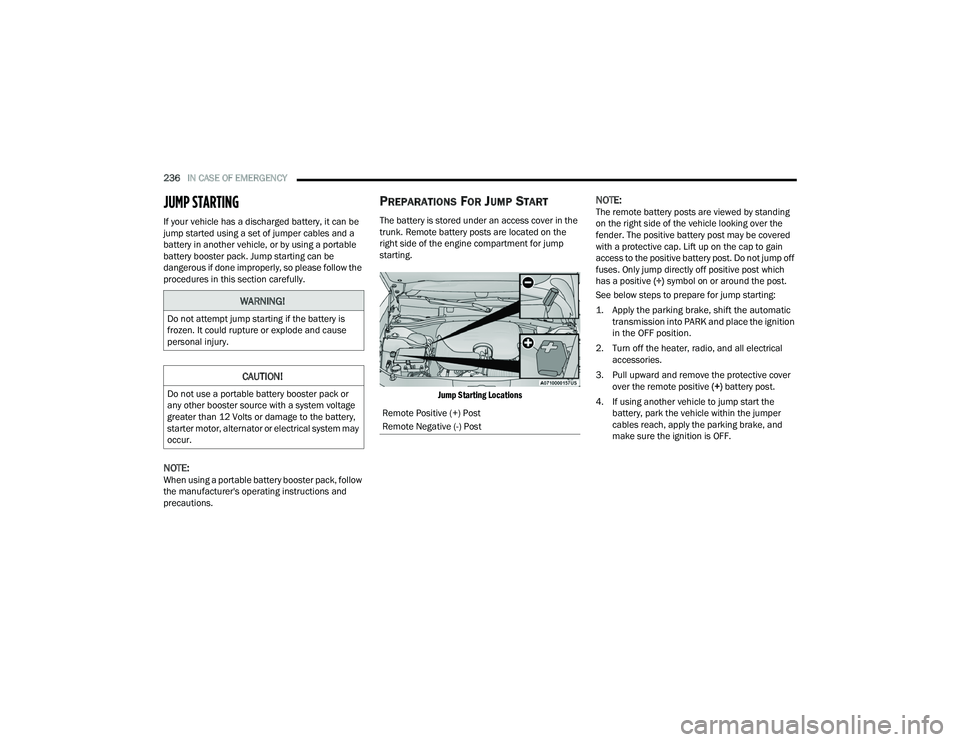
The battery is stored under an access cover in the
trunk. Remote battery posts are located on the
right side of the engine compartment for jump
starting.
Jump Starting Locations
NOTE:The remote battery posts are viewed by standing
on the right side of the vehicle looking over the
fender. The positive battery post may be covered
with a protective cap. Lift up on the cap to gain
access to the positive battery post. Do not jump off
fuses. Only jump directly off positive post which
has a positive (+) symbol on or around the post.
See below steps to prepare for jump starting:
1. Apply the parking brake, shift the automatic transmission into PARK and place the ignition
in the OFF position.
2. Turn off the heater, radio, and all electrical accessories.
3. Pull upward and remove the protective cover over the remote positive (+) battery post.
4. If using another vehicle to jump start the battery, park the vehicle within the jumper
cables reach, apply the parking brake, and
make sure the ignition is OFF.
WARNING!
Do not attempt jump starting if the battery is
frozen. It could rupture or explode and cause
personal injury.
CAUTION!
Do not use a portable battery booster pack or
any other booster source with a system voltage
greater than 12 Volts or damage to the battery,
starter motor, alternator or electrical system may
occur.
Remote Positive (+) Post
Remote Negative (-) Post
21_LD_OM_EN_USC_t.book Page 236
Page 239 of 320
IN CASE OF EMERGENCY237
JUMP STARTING PROCEDURE
Connecting The Jumper Cables
1. Connect the positive
(+) end of the jumper
cable to the remote positive (+)
post of the
vehicle with the discharged battery.
2. Connect the opposite end of the positive (+)
jumper cable to the positive (+) post of the
booster battery.
3. Connect the negative (-) end of the jumper
cable to the negative (-) post of the booster
battery. 4. Connect the opposite end of the negative
(-)
jumper cable to the remote negative (-) post
(exposed metallic/unpainted post of the
discharge vehicle) located directly behind the
underhood fuse box.
5. Start the engine in the vehicle that has the booster battery, let the engine idle a few
minutes, and then start the engine in the
vehicle with the discharged battery.
WARNING!
Do not allow vehicles to touch each other as
this could establish a ground connection and
personal injury could result.
WARNING!
Take care to avoid the radiator cooling fan
whenever the hood is raised. It can start
anytime the ignition switch is ON. You can be
injured by moving fan blades.
Remove any metal jewelry such as rings,
watch bands and bracelets that could make
an inadvertent electrical contact. You could be
seriously injured.
Batteries contain sulfuric acid that can burn
your skin or eyes and generate hydrogen gas
which is flammable and explosive. Keep open
flames or sparks away from the battery.
WARNING!
Failure to follow this jump starting procedure
could result in personal injury or property
damage due to battery explosion.
CAUTION!
Failure to follow these procedures could result in
damage to the charging system of the booster
vehicle or the discharged vehicle.
WARNING!
Do not connect the jumper cable to the negative
(-) post of the discharged battery. The resulting
electrical spark could cause the battery to
explode and could result in personal injury.
CAUTION!
Do not run the booster vehicle engine above
2,000 RPM since it provides no charging benefit,
wastes fuel, and can damage booster vehicle
engine.
7
21_LD_OM_EN_USC_t.book Page 237
Page 240 of 320
238IN CASE OF EMERGENCY
6. Once the engine is started, follow the discon -
nection procedure below.
Disconnecting The Jumper Cables
1. Disconnect the negative
(-) end of the jumper
cable from the remote negative (-)
post of the
vehicle with the discharged battery.
2. Disconnect the opposite end of the negative (-)
jumper cable from the negative (-) post of the
booster battery.
3. Disconnect the positive (+) end of the jumper
cable from the positive (+) post of the booster
battery.
4. Disconnect the opposite end of the positive (+)
jumper cable from the remote positive (+) post
of the vehicle with the discharged battery. If frequent jump starting is required to start your
vehicle you should have the battery and charging
system inspected at an authorized dealer.
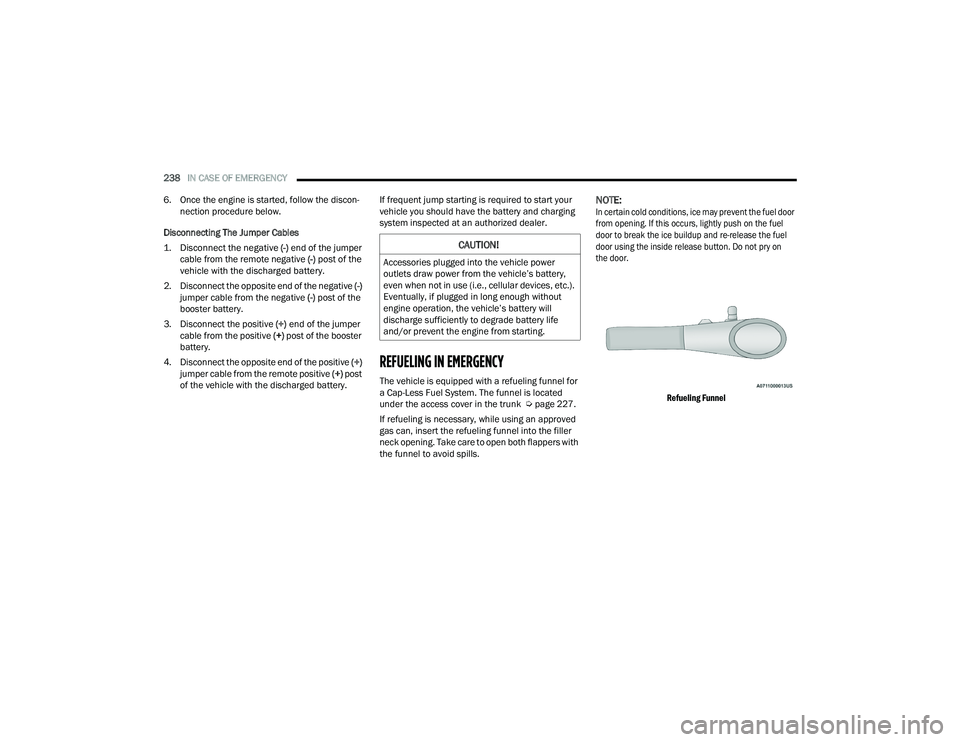
REFUELING IN EMERGENCY
The vehicle is equipped with a refueling funnel for
a Cap-Less Fuel System. The funnel is located
under the access cover in the trunk Ú
page 227.
If refueling is necessary, while using an approved
gas can, insert the refueling funnel into the filler
neck opening. Take care to open both flappers with
the funnel to avoid spills.
NOTE:
In certain cold conditions, ice may prevent the fuel door
from opening. If this occurs, lightly push on the fuel
door to break the ice buildup and re-release the fuel
door using the inside release button. Do not pry on
the door.
Refueling Funnel
CAUTION!
Accessories plugged into the vehicle power
outlets draw power from the vehicle’s battery,
even when not in use (i.e., cellular devices, etc.).
Eventually, if plugged in long enough without
engine operation, the vehicle’s battery will
discharge sufficiently to degrade battery life
and/or prevent the engine from starting.
21_LD_OM_EN_USC_t.book Page 238
Page 254 of 320
252SERVICING AND MAINTENANCE
(Continued)
(Continued)
MAINTENANCE-FREE BATTERY
Your vehicle is equipped with a maintenance-free
battery. Water will never have to be added, and
periodic maintenance is not required.
NOTE:The battery is stored under an access cover in
the trunk. Remote battery terminals are located
in the engine compartment for jump starting
Ú page 236.
PRESSURE WASHING
Cleaning the engine compartment with a high
pressure washer is not recommended.
WARNING!
Commercially available windshield washer
solvents are flammable. They could ignite and
burn you. Care must be exercised when filling or
working around the washer solution.
WARNING!
Battery fluid is a corrosive acid solution and
can burn or even blind you. Do not allow
battery fluid to contact your eyes, skin, or
clothing. Do not lean over a battery when
attaching clamps. If acid splashes in eyes or
on skin, flush the area immediately with large
amounts of water Ú page 236.
Battery gas is flammable and explosive. Keep
flame or sparks away from the battery. Do not
use a booster battery or any other booster
source with an output greater than 12 Volts.
Do not allow cable clamps to touch each other.
Battery posts, terminals, and related accesso -
ries contain lead and lead compounds. Wash
hands after handling.
The battery in this vehicle has a vent hose that
should not be disconnected and should only
be replaced with a battery of the same type
(vented).
CAUTION!
It is essential when replacing the cables on
the battery that the positive cable is attached
to the positive post and the negative cable is
attached to the negative post. Battery posts
are marked positive (+) and negative (-) and
are identified on the battery case. Cable
clamps should be tight on the terminal posts
and free of corrosion.
WARNING!
If a “fast charger” is used while the battery is
in the vehicle, disconnect both vehicle battery
cables before connecting the charger to the
battery. Do not use a “fast charger” to provide
starting voltage.
CAUTION!
Precautions have been taken to safeguard all
parts and connections however, the pressures
generated by these machines is such that
complete protection against water ingress
cannot be guaranteed.
CAUTION!
21_LD_OM_EN_USC_t.book Page 252
Page 270 of 320
268SERVICING AND MAINTENANCE
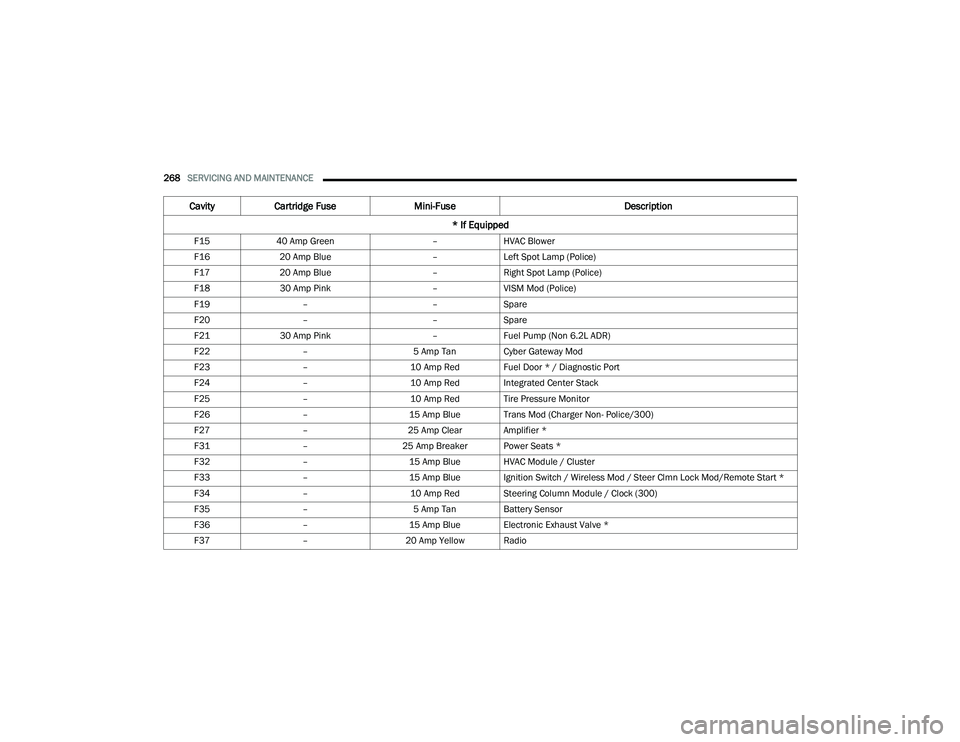
F15 40 Amp Green –HVAC Blower
F16 20 Amp Blue –Left Spot Lamp (Police)
F17 20 Amp Blue –Right Spot Lamp (Police)
F18 30 Amp Pink –VISM Mod (Police)
F19 – –Spare
F20 – –Spare
F21 30 Amp Pink –Fuel Pump (Non 6.2L ADR)
F22 – 5 Amp Tan Cyber Gateway Mod
F23 –10 Amp Red Fuel Door * / Diagnostic Port
F24 –10 Amp Red Integrated Center Stack
F25 –10 Amp Red Tire Pressure Monitor
F26 –15 Amp Blue Trans Mod (Charger Non- Police/300)
F27 –25 Amp Clear Amplifier *
F31 –25 Amp Breaker Power Seats *
F32 –15 Amp Blue HVAC Module / Cluster
F33 –15 Amp Blue Ignition Switch / Wireless Mod / Steer Clmn Lock Mod/Remote Start *
F34 –10 Amp Red Steering Column Module / Clock (300)
F35 – 5 Amp Tan Battery Sensor
F36 –15 Amp Blue Electronic Exhaust Valve *
F37 –20 Amp Yellow Radio
CavityCartridge Fuse Mini-Fuse Description
* If Equipped
21_LD_OM_EN_USC_t.book Page 268
Page 310 of 320
308 Pressure Cap
............................................. 261Radiator Cap............................................. 261Selection Of Coolant (Antifreeze)........................ 260, 299, 300Corrosion Protection...................................... 293Cruise Control (Speed Control)................. 95, 96Cruise Light..................................................... 80Customer Assistance..................................... 302Customer Programmable Features................125Cybersecurity................................................. 124
D
Daytime Running Lights................................... 42Deck LidPower Release............................................ 63Defroster, Windshield.................................... 220De-Icer, Remote Start...................................... 19Deleting A Phone........................................... 157Diagnostic System, Onboard........................... 81Dimmer SwitchHeadlight..................................................... 43DipsticksOil (Engine)................................................ 251Disabled Vehicle Towing................................ 243Disc Drive...................................................... 150Disconnecting................................................ 157DisposalAntifreeze (Engine Coolant)....................... 261Disturb........................................................... 159Door Ajar.......................................................... 75
Door Ajar Light................................................. 75Door LocksAutomatic.................................................... 24Child-Protection Door Lock — Rear Doors.... 24Doors............................................................... 21Drag & Drop.................................................. 140Drive Modes.................................................. 174Driver Memory Presets................................. 148Driver’s Seat Back Tilt...................................... 29DrivingThrough Flowing, Rising, Or Shallow Standing Water
.................................... 122
E
Electric Brake Control System....................... 181Anti-Lock Brake System............................ 180Electronic Roll Mitigation................. 181, 185Electric Remote Mirrors................................... 37Electronic Power Distribution
Center (Fuses).............................................. 264Electronic Speed Control (Cruise Control)........ 95Electronic Stability Control (ESC).................. 182Electronic Throttle Control Warning Light......... 75Emergency Gas Can Refueling...................... 238Emergency, In Case OfFreeing Vehicle When Stuck..................... 242Hazard Warning Flasher........................... 223Jacking..................................................... 226Jump Starting.................................. 236, 237Towing...................................................... 243
Emission Control System Maintenance............82Engine.................................................. 249, 250Air Cleaner................................................ 254Block Heater................................................86Break-In Recommendations........................86Checking Oil Level.................................... 251Compartment.................................. 249, 250Compartment Identification...................... 249Coolant (Antifreeze)......................... 260, 300Cooling...................................................... 259Exhaust Gas Caution................................ 222Fails To Start................................................85Flooded, Starting.........................................85Fuel Requirements.......................... 297, 299Jump Starting.................................. 236, 237Oil...........................................253, 299, 300Oil Filler Cap............................................. 249Oil Filter.................................................... 254Oil Selection..................................... 253, 299Oil Synthetic.............................................. 253Overheating.............................................. 239Starting........................................................83Enhanced Accident Response
Feature................................................ 207, 244Ethanol.......................................................... 298Exhaust Gas Cautions................................... 222Exhaust System................................... 222, 258Exterior Lighting...............................................41Exterior Lights........................................ 41, 222
21_LD_OM_EN_USC_t.book Page 308
Page 312 of 320

310 I
Ignition
............................................................ 16Switch......................................................... 16Indicator Lights Blue............................................................. 81Green.......................................................... 80White........................................................... 80Yellow.......................................................... 79Information Center, Vehicle............................. 68Inside Rearview Mirror............................ 36, 223Instrument Cluster.................................... 65, 67Descriptions................................................ 80Display................................................. 67, 70Instrument Panel Lens Cleaning.................... 295Interior Appearance Care............................... 294Interior Lights.................................................. 45
J
Jack Location................................................. 227Jump Starting...................................... 236, 237
K
Key FobArm The System
.......................................... 20Programming Additional Key Fobs.............. 15Unlatch The Trunk....................................... 14Key Fob Battery Service
(Remote Keyless Entry)................................... 14Key Fob Programming
(Remote Keyless Entry)................................... 15
Keyless Enter 'n Go™................................ 22, 85Enter The Trunk........................................... 14Passive Entry............................................... 22Passive Entry Programming......................... 22Keys................................................................. 13
L
Lane Change And Turn Signals........................ 44Lane Change Assist......................................... 44LaneSense.................................................... 109Lap/Shoulder Belts....................................... 195Latches......................................................... 222Hood............................................................ 62Lead Free Gasoline....................................... 297Leaks, Fluid.................................................. 222Life Of Tires................................................... 285Light Bulbs........................................... 222, 271Lights............................................................ 222Adaptive Cruise Control (ACC) Set With Target Vehicle................................. 80Adaptive Cruise Control (ACC) Set Without Target Vehicle............................ 80Air Bag...................................... 74, 201, 220Automatic Headlights.................................. 43Brake Assist Warning............................... 183Brake Warning....................................74, 296Bulb Replacement.................................... 271Cruise.......................................................... 80Daytime Running......................................... 42
Dimmer Switch, Headlight.................... 42, 43ECO Mode Indicator.....................................80Electric Power Steering Fault.......................75Electronic Stability Control (ESC) Active Warning........................................77Electronic Stability Program(ESP) Indicator..................................................76Exterior.............................................. 41, 222Fog...............................................................44Forward Collision Warning (FCW) OFF Indicator..................................................79Front Fog Indicator......................................80Hazard Warning Flasher........................... 223Headlight Switch..........................................41Headlights............................................ 41, 44Headlights On With Wipers..........................43High Beam...................................................43High Beam Indicator....................................81High Beam/Low Beam Select......................43Instrument Cluster.......................................41Intensity Control..........................................46Interior.........................................................45LaneSense Indicator....................................80License..................................................... 274Lights On Reminder.....................................44Low Fuel......................................................78Low Washer Fluid Warning..........................78Malfunction Indicator (Check Engine)..........78
21_LD_OM_EN_USC_t.book Page 310