eco mode DODGE CHARGER 2023 Owners Manual
[x] Cancel search | Manufacturer: DODGE, Model Year: 2023, Model line: CHARGER, Model: DODGE CHARGER 2023Pages: 292, PDF Size: 13.05 MB
Page 4 of 292

2
INTRODUCTION
SYMBOLS KEY ....................................................................... 8
VEHICLE MODIFICATIONS/ALTERATIONS ......................... 8
SYMBOL GLOSSARY ............................................................. 8
GETTING TO KNOW YOUR VEHICLE
KEYS .....................................................................................12
Key Fob ........................................................................ 12
SENTRY KEY ........................................................................15
IGNITION SWITCH ...............................................................15 Keyless Enter ‘n Go™ Ignition .................................... 15
REMOTE START — IF EQUIPPED .......................................16 How To Use Remote Start .......................................... 17
To Exit Remote Start Mode ....................................... 17
Remote Start Front Defrost Activation —
If Equipped .................................................................. 18
Remote Start Comfort Systems — If Equipped.......... 18
Remote Start Windshield Wiper De-Icer
Activation — If Equipped ............................................. 18
Remote Start Cancel Message — If Equipped........... 18
VEHICLE SECURITY SYSTEM — IF EQUIPPED ..................18 To Arm The System ..................................................... 19
To Disarm The System ................................................ 19
Rearming Of The System ............................................ 19
Security System Manual Override.............................. 19
Tamper Alert ................................................................ 19
DELUXE VEHICLE SECURITY SYSTEM —
IF EQUIPPED ........................................................................19 To Arm The System ..................................................... 20
To Disarm The System ................................................ 20
Security System Manual Override.............................. 20 DOORS ................................................................................. 21
Manual Door Locks......................................................21
Power Door Locks .......................................................21
Keyless Enter ‘n Go™ — Passive Entry ....................... 22
Automatic Unlock Doors On Exit ................................. 23
Automatic Door Locks — If Equipped ......................... 23
Child-Protection Door Lock System — Rear Doors .... 24
STEERING WHEEL............................................................... 24 Manual Tilt/Telescoping Steering Column —
If Equipped ................................................................... 24
Power Tilt/Telescoping Steering Column —
If Equipped ................................................................... 25
Heated Steering Wheel — If Equipped........................ 25
UCONNECT VOICE RECOGNITION .................................... 26 Introducing Voice Recognition .................................... 26
Basic Voice Commands............................................... 26
Get Started ................................................................... 26
Additional Information................................................. 27
DRIVER MEMORY SETTINGS — IF EQUIPPED ................. 27 Programming The Memory Feature............................ 27
Linking And Unlinking The Key Fob To Memory......... 28
Memory Position Recall............................................... 28
SEATS ............................................................................... 28 Manual Adjustment
(Front Seats) — If Equipped......................................... 28
Manual Adjustment (Rear Seats) ............................... 29
Power Adjustment (Front Seats) — If Equipped ......... 30
Heated Seats — If Equipped........................................ 31
Front Ventilated Seats — If Equipped ......................... 32
Head Restraints ........................................................... 33 MIRRORS ............................................................................ 34
Inside Rearview Mirror ................................................ 34
Illuminated Vanity Mirrors........................................... 35
Outside Mirrors ............................................................ 35
Driver's Outside Automatic Dimming Mirror —
If Equipped................................................................... 36
Outside Mirrors Approach Light — If Equipped .......... 36
Power Mirrors ............................................................ 36
Heated Mirrors — If Equipped ..................................... 36
Tilt Side Mirrors In Reverse — If Equipped................. 36
UNIVERSAL GARAGE DOOR OPENER
(HOMELINK®) .................................................................... 36 Before You Begin Programming HomeLink® ............ 37
Erasing All The HomeLink® Channels ....................... 37
Identifying Whether You Have A Rolling Code
Or Non-Rolling Code Device........................................ 37
Programming HomeLink® To A Garage
Door Opener ................................................................ 37
Programming HomeLink® To A
Miscellaneous Device ................................................. 38
Reprogramming A Single HomeLink® Button ........... 38
Canadian/Gate Operator Programming .................... 39
Security ........................................................................ 39
Troubleshooting Tips ................................................... 40
EXTERIOR LIGHTS .............................................................. 40 Headlight Switch.......................................................... 40
Multifunction Lever ................................................... 41
Daytime Running Lights (DRLs) — If Equipped .......... 41
High/Low Beam Switch ............................................. 41
Automatic High Beam — If Equipped ......................... 41
Flash-To-Pass ............................................................. 42
Automatic Headlights ................................................. 42
23_LD_OM_EN_USC_t.book Page 2
Page 5 of 292
3
Parking Lights ............................................................. 42
Automatic Headlights On With Wipers —
If Equipped .................................................................. 42
Headlight Delay .......................................................... 42
Lights-On Reminder .................................................... 42
Fog Lights — If Equipped ............................................ 42
Turn Signals ................................................................ 43
Lane Change Assist — If Equipped............................. 43
Battery Saver ............................................................... 43
INTERIOR LIGHTS ...............................................................43 Interior Courtesy Lights............................................... 43
WINDSHIELD WIPERS AND WASHERS ........................... 45 Windshield Wiper Operation....................................... 45
Rain Sensing Wipers — If Equipped ........................... 46
CLIMATE CONTROLS .........................................................46 Automatic Climate Control Descriptions
And Functions ............................................................. 47
Manual Climate Control Descriptions
And Functions ............................................................. 49
Automatic Temperature Control (ATC) ...................... 51
Climate Voice Commands .......................................... 51
Operating Tips ............................................................ 51
INTERIOR STORAGE AND EQUIPMENT ............................52 Storage ........................................................................ 52
USB/AUX Control ..................................................... 54
Illuminated Cupholders — If Equipped....................... 54
Power Outlets ............................................................. 55
WINDOWS ...........................................................................56 Power Window Controls .............................................. 56
Automatic Window Features ...................................... 56
Reset Auto-Up.............................................................. 57
Window Lockout Switch.............................................. 57
Wind Buffeting ............................................................ 57 POWER SUNROOF — IF EQUIPPED................................... 57
Opening And Closing The Sunroof ..............................58
Pinch Protect Feature.................................................. 58
Sunshade Operation.................................................... 58
Sunroof Maintenance.................................................. 58
Ignition Off Operation .................................................. 58
HOOD.................................................................................... 59 Opening The Hood ......................................................59
Closing The Hood ......................................................... 59
TRUNK .................................................................................. 59 Opening The Trunk ......................................................59
Closing The Trunk ........................................................ 60
Trunk Safety ................................................................. 60
Cargo Area Features ................................................... 60
GETTING TO KNOW YOUR
INSTRUMENT PANEL
INSTRUMENT CLUSTER...................................................... 61 Instrument Cluster Descriptions ................................. 63
INSTRUMENT CLUSTER DISPLAY ..................................... 63 Location And Controls ................................................. 64
Engine Oil Life Reset .................................................. 65
Performance Shift Indicator (PSI) — If Equipped ....... 65
Instrument Cluster Display Selectable
Menu Items .................................................................. 65
Battery Saver On/Battery Saver Mode
Message — Electrical Load Reduction Actions —
If Equipped ................................................................... 67 WARNING LIGHTS AND MESSAGES ................................ 68
Red Warning Lights ..................................................... 68
Yellow Warning Lights ................................................. 71
Yellow Indicator Lights ................................................ 73
Green Indicator Lights................................................. 73
White Indicator Lights ................................................. 74
Blue Indicator Lights ................................................... 74
ONBOARD DIAGNOSTIC SYSTEM — OBD II ..................... 74 Onboard Diagnostic System
(OBD II) Cybersecurity ................................................. 75
EMISSIONS INSPECTION AND MAINTENANCE
PROGRAMS ...................................................................... 75
STARTING AND OPERATING
STARTING THE ENGINE...................................................... 76 Automatic Transmission ............................................ 76
Normal Starting ........................................................ 76
AutoPark ...................................................................... 77
Keyless Enter ‘n Go™ — Ignition ................................. 78
Extended Park Starting ............................................... 78
If Engine Fails To Start ............................................... 78
Cold Weather Operation
(Below –22°F Or −30°C) .......................................... 78
After Starting................................................................ 78
ENGINE BREAK-IN RECOMMENDATIONS —
3.6L & 5.7L ........................................................................ 79
PARKING BRAKE ............................................................... 79
AUTOMATIC TRANSMISSION ............................................ 80 Ignition Park Interlock ................................................. 81
Brake Transmission Shift Interlock
(BTSI) System ............................................................. 81
8-Speed Automatic Transmission .............................. 81
23_LD_OM_EN_USC_t.book Page 3
Page 7 of 292

5
SAFETY TIPS .................................................................... 199Transporting Passengers .......................................... 199
Transporting Pets ................................................... 199
Connected Vehicles .................................................. 199
Safety Checks You Should Make Inside
The Vehicle ................................................................ 199
Periodic Safety Checks You Should Make
Outside The Vehicle .................................................. 201
Exhaust Gas .............................................................. 201Carbon Monoxide Warnings .................................... 201
IN CASE OF EMERGENCY
HAZARD WARNING FLASHERS .................................. 202
ASSIST AND SOS MIRROR — IF EQUIPPED .................. 202
JACKING AND TIRE CHANGING — IF EQUIPPED .......... 205 Preparations For Jacking ......................................... 205Jack Location/Spare Tire Stowage ......................... 206Jacking Instructions .................................................. 207
TIRE SERVICE KIT — IF EQUIPPED ................................. 209 Tire Service Kit Storage ............................................ 209
Tire Service Kit Components And Operation ........... 210Tire Service Kit Usage Precautions .......................... 210Sealing A Tire With Tire Service Kit .......................... 211
JUMP STARTING .............................................................. 213 Preparations For Jump Start .................................... 214
Jump Starting Procedure .......................................... 214
REFUELING IN EMERGENCY .......................................... 215
IF YOUR ENGINE OVERHEATS ....................................... 216 MANUAL PARK RELEASE–8–SPEED
TRANSMISSION................................................................ 216
FREEING A STUCK VEHICLE .......................................... 218
TOWING A DISABLED VEHICLE ...................................... 219 All-Wheel Drive (AWD) Models — If Equipped ......... 220
Rear-Wheel Drive (RWD) Models ............................ 220Without The Key Fob ................................................ 220
ENHANCED ACCIDENT RESPONSE
SYSTEM (EARS) ............................................................... 220
EVENT DATA RECORDER (EDR) ..................................... 220
SERVICING AND MAINTENANCE
SCHEDULED SERVICING ................................................ 221 3.6L And 5.7L Engines ............................................ 221
ENGINE COMPARTMENT ............................................... 225 3.6L Engine ............................................................... 2255.7L Engine .............................................................. 226
Checking Oil Level .................................................... 227
Adding Washer Fluid ................................................ 227
Maintenance-Free Battery ...................................... 228
Pressure Washing ..................................................... 228
VEHICLE MAINTENANCE ................................................. 228 Engine Oil ................................................................. 228Engine Oil Filter ........................................................ 229Engine Air Cleaner Filter ........................................ 229
Air Conditioner Maintenance ................................ 230
Accessory Drive Belt Inspection............................... 231 Body Lubrication........................................................ 231
Windshield Wiper Blades .......................................... 232
Exhaust System ......................................................... 233
Cooling System ......................................................... 234
Brake System ........................................................... 236
Automatic Transmission ........................................... 237
Rear Axle .................................................................... 237
Fuses .......................................................................... 238Bulb Replacement .................................................... 246
TIRES ..................................................................................248 Tire Safety Information ............................................. 248
Tires — General Information .................................... 255
Tire Types ................................................................... 258Spare Tires — If Equipped ......................................... 259
Wheel And Wheel Trim Care ..................................... 260
Snow Traction Devices ............................................. 262
Tire Rotation Recommendations ............................. 263
DEPARTMENT OF TRANSPORTATION UNIFORM
TIRE QUALITY GRADES ................................................... 263 Treadwear .................................................................. 263
Traction Grades ......................................................... 264
Temperature Grades ................................................. 264
STORING THE VEHICLE ....................................................264
BODYWORK ......................................................................264 Protection From Atmospheric Agents ...................... 264
Body And Underbody Maintenance.......................... 265
Preserving The Bodywork ......................................... 265
INTERIORS ........................................................................ 265 Seats And Fabric Parts.............................................. 265Plastic And Coated Parts .......................................... 266
Leather Surfaces ....................................................... 266
Glass Surfaces .......................................................... 266
23_LD_OM_EN_USC_t.book Page 5
Page 9 of 292
7
INTRODUCTION
Dear Customer,
Congratulations on the purchase of your new Dodge vehicle. Be assured that it represents precision workmanship, distinctive styling, and high quality. This Owner's Manual has been
prepared with the assistance of service and engineering specialists to acquaint you with the operation and maintenance of your vehicle. It is supplemented by customer-oriented
documents. Within this information, you will find a description of the services that FCA US LLC offers to its customers as well as the details of the terms and conditions for maintaining
its validity. Please take the time to read all of these publications carefully before driving your vehicle for the first time. Following the instructions, recommendations, tips, and important
warnings in this manual will help ensure safe and enjoyable operation of your vehicle.
This Owner’s Manual describes all versions of this vehicle. Options and equipment dedicated to specific markets or versions are not expressly indicated in the text. Therefore, you should
only consider the information that is related to the trim level, engine, and version that you have purchased. Any content introduced throughout the Owner’s Information, which may or
may not be applicable to your vehicle, will be identified with the wording “If Equipped”. All data contained in this publication are intended to help you use your vehicle in the best possible
way. FCA US LLC aims at a constant improvement of the vehicles produced. For this reason, it reserves the right to make changes to the model described for technical and/or commercial
reasons. For further information, contact an authorized dealer.
When it comes to service, remember that authorized dealers know your Dodge vehicle best, have factory-trained technicians, genuine Mopar® parts, and care about your satisfaction.1
23_LD_OM_EN_USC_t.book Page 7
Page 12 of 292
10
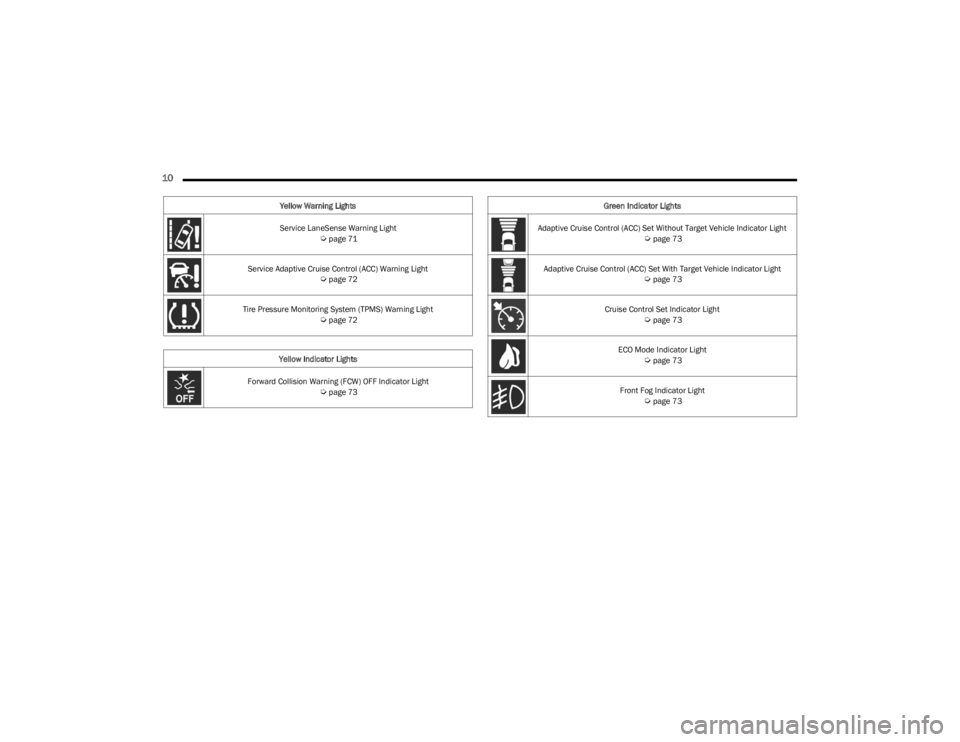
Service LaneSense Warning Light Úpage 71
Service Adaptive Cruise Control (ACC) Warning Light
Úpage 72
Tire Pressure Monitoring System (TPMS) Warning Light
Úpage 72
Yellow Indicator Lights
Forward Collision Warning (FCW) OFF Indicator Light
Úpage 73
Yellow Warning Lights
Green Indicator Lights
Adaptive Cruise Control (ACC) Set Without Target Vehicle Indicator Light
Úpage 73
Adaptive Cruise Control (ACC) Set With Target Vehicle Indicator Light
Úpage 73
Cruise Control Set Indicator Light
Úpage 73
ECO Mode Indicator Light
Úpage 73
Front Fog Indicator Light
Úpage 73
23_LD_OM_EN_USC_t.book Page 10
Page 17 of 292
GETTING TO KNOW YOUR VEHICLE15
SENTRY KEY
The Sentry Key Immobilizer system prevents unauthorized
vehicle operation by disabling the engine. The system
does not need to be armed or activated. Operation is
automatic, regardless of whether the vehicle is locked or
unlocked.
The system uses a key fob, keyless push button ignition
and a Radio Frequency (RF) receiver to prevent
unauthorized vehicle operation. Therefore, only key fobs
that are programmed to the vehicle can be used to start
and operate the vehicle. The system cannot reprogram a
key fob obtained from another vehicle.
After placing the ignition in the ON/RUN position, the
Vehicle Security Light will turn on for three seconds for a
bulb check. If the light remains on after the bulb check, it
indicates that there is a problem with the electronics. In
addition, if the light begins to flash after the bulb check, it
indicates that someone attempted to start the engine with
an invalid key fob. In the event that a valid key fob is used
to start the engine but there is an issue with the vehicle
electronics, the engine will start and shut off after two
seconds.
If the Vehicle Security Light turns on during normal vehicle
operation (vehicle running for longer than 10 seconds), it
indicates that there is a fault in the electronics. Should
this occur, have the vehicle serviced as soon as possible
by an authorized dealer. All of the key fobs provided with your new vehicle have
been programmed to the vehicle electronics
Úpage 277.
NOTE:A key fob that has not been programmed is also
considered an invalid key.
IGNITION SWITCH
KEYLESS ENTER ‘N GO™ IGNITION
This feature allows the driver to operate the ignition switch
with the push of a button as long as the key fob is in the
passenger compartment.
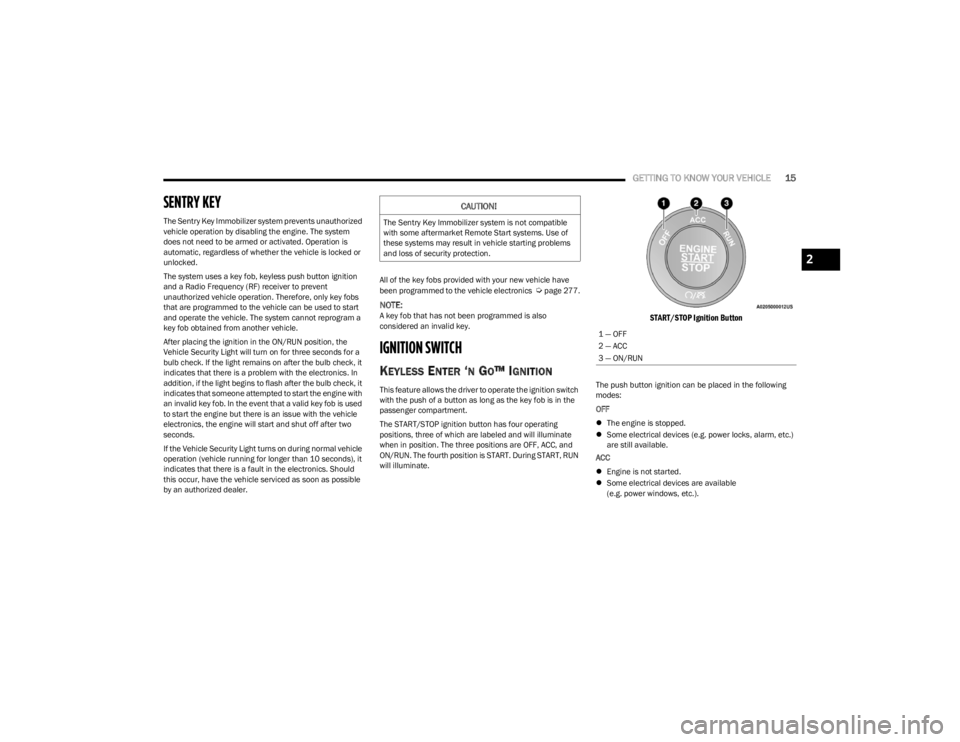
The START/STOP ignition button has four operating
positions, three of which are labeled and will illuminate
when in position. The three positions are OFF, ACC, and
ON/RUN. The fourth position is START. During START, RUN
will illuminate.
START/STOP Ignition Button
The push button ignition can be placed in the following
modes:
OFF
The engine is stopped.
Some electrical devices (e.g. power locks, alarm, etc.)
are still available.
ACC
Engine is not started.
Some electrical devices are available
(e.g. power windows, etc.).
CAUTION!
The Sentry Key Immobilizer system is not compatible
with some aftermarket Remote Start systems. Use of
these systems may result in vehicle starting problems
and loss of security protection.
1 — OFF
2 — ACC
3 — ON/RUN
2
23_LD_OM_EN_USC_t.book Page 15
Page 19 of 292

GETTING TO KNOW YOUR VEHICLE17
HOW TO USE REMOTE START
Push and release the Remote Start button on the key fob
twice within five seconds. The vehicle doors will lock, the
parking lights will flash, and the horn will chirp twice (if
programmed). Then, the engine will start, and the vehicle
will remain in the Remote Start mode for a 15 minute
cycle. Pushing the Remote Start button a third time shuts
the engine off.
To drive the vehicle, push the unlock button, and with a
valid Keyless Enter ‘n Go™ key fob in the vehicle, press the
brake pedal and place the ignition in the ON/RUN position.
NOTE:
With Remote Start, the engine will only run for
15 minutes.
Remote Start can only be used twice.
If an engine fault is present or fuel level is low, the
vehicle will start and then shut down in 10 seconds.
The parking lights will turn on and remain on during
Remote Start mode.
For security, power window operation is disabled when
the vehicle is in the Remote Start mode.
The ignition must be placed in the ON/RUN position
before the Remote Start sequence can be repeated for
a third cycle. All of the following conditions must be met before the
engine will Remote Start:
Gear selector in PARK
Doors closed
Hood closed
Trunk closed
Hazard switch off
Brake switch inactive (brake pedal not pressed)
Battery at an acceptable charge level
Check engine light shall not be present
Panic button not pushed
System not disabled from previous Remote Start event
Vehicle Security system indicator flashing
Ignition in the OFF position
Fuel level meets minimum requirement
Vehicle Security system is not signaling an intrusion
Malfunction Indicator Light (MIL) is not illuminated
TO EXIT REMOTE START MODE
To drive the vehicle after starting the Remote Start
system, either push and release the unlock button on the
key fob to unlock the doors, or unlock the vehicle using
Keyless Enter ‘n Go™ — Passive Entry via the door
handles, and disarm the Vehicle Security system
(if equipped). Then, prior to the end of the 15 minute
cycle, push and release the START/STOP ignition button.
The Remote Start system will turn the engine off if the
Remote Start button is pushed again, or if the engine is
allowed to run for the entire 15 minute cycle. Once the
ignition is placed in the ON/RUN position, the climate
controls will resume previously set operations
(temperature, blower control, etc.).
NOTE:
To avoid unintentional shutdowns, the system will
disable for two seconds after receiving a valid Remote
Start request.
For vehicles equipped with the Keyless Enter ‘n Go™ —
Passive Entry feature, the message “Remote Start
Active — Push Start Button” will display in the instru -
ment cluster display until you push the START/STOP
Ignition button.
WARNING!
Do not start or run an engine in a closed garage or
confined area. Exhaust gas contains carbon
monoxide which is odorless and colorless. Carbon
monoxide is poisonous and can cause serious injury
or death when inhaled.
Keep key fobs away from children. Operation of the
Remote Start system, windows, door locks or other
controls could cause serious injury or death.
2
23_LD_OM_EN_USC_t.book Page 17
Page 31 of 292
GETTING TO KNOW YOUR VEHICLE29
(Continued)
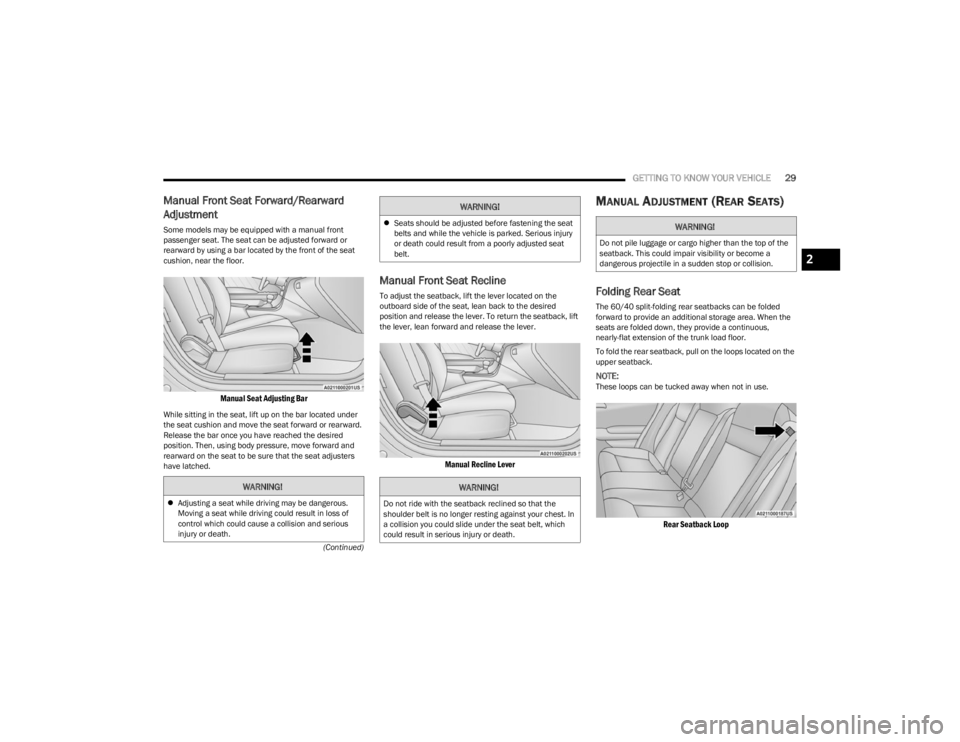
Manual Front Seat Forward/Rearward
Adjustment
Some models may be equipped with a manual front
passenger seat. The seat can be adjusted forward or
rearward by using a bar located by the front of the seat
cushion, near the floor.
Manual Seat Adjusting Bar
While sitting in the seat, lift up on the bar located under
the seat cushion and move the seat forward or rearward.
Release the bar once you have reached the desired
position. Then, using body pressure, move forward and
rearward on the seat to be sure that the seat adjusters
have latched.
Manual Front Seat Recline
To adjust the seatback, lift the lever located on the
outboard side of the seat, lean back to the desired
position and release the lever. To return the seatback, lift
the lever, lean forward and release the lever.
Manual Recline Lever
MANUAL ADJUSTMENT (REAR SEATS)
Folding Rear Seat
The 60/40 split-folding rear seatbacks can be folded
forward to provide an additional storage area. When the
seats are folded down, they provide a continuous,
nearly-flat extension of the trunk load floor.
To fold the rear seatback, pull on the loops located on the
upper seatback.
NOTE:These loops can be tucked away when not in use.
Rear Seatback Loop
WARNING!
Adjusting a seat while driving may be dangerous.
Moving a seat while driving could result in loss of
control which could cause a collision and serious
injury or death.
Seats should be adjusted before fastening the seat
belts and while the vehicle is parked. Serious injury
or death could result from a poorly adjusted seat
belt.
WARNING!
Do not ride with the seatback reclined so that the
shoulder belt is no longer resting against your chest. In
a collision you could slide under the seat belt, which
could result in serious injury or death.
WARNING!
WARNING!
Do not pile luggage or cargo higher than the top of the
seatback. This could impair visibility or become a
dangerous projectile in a sudden stop or collision.
2
23_LD_OM_EN_USC_t.book Page 29
Page 32 of 292
30GETTING TO KNOW YOUR VEHICLE
(Continued)
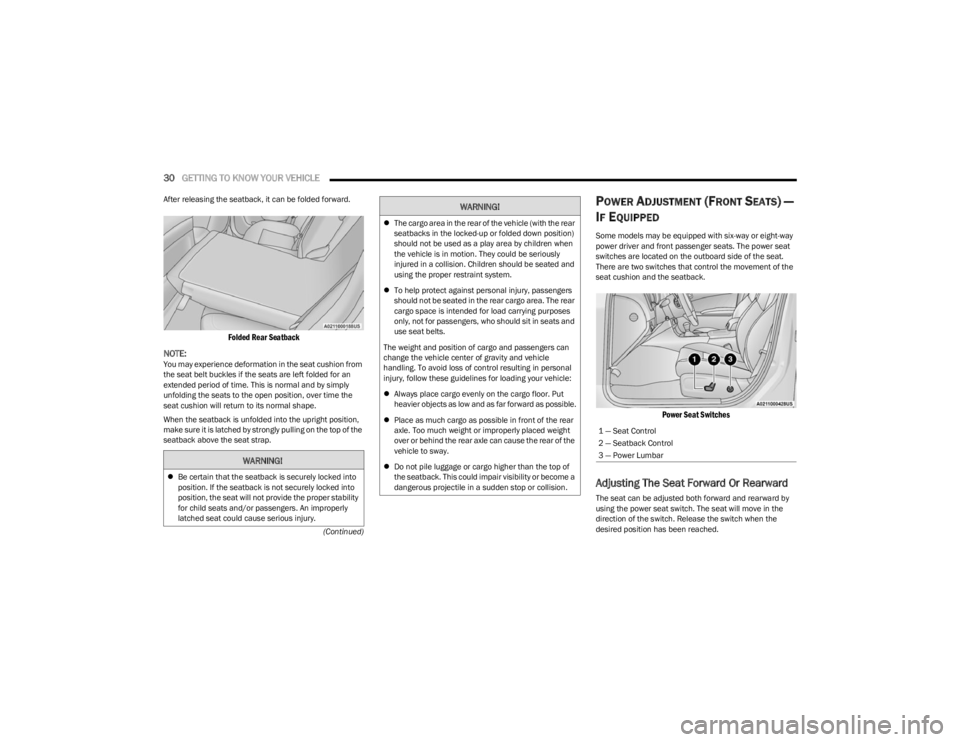
After releasing the seatback, it can be folded forward.
Folded Rear Seatback
NOTE:
You may experience deformation in the seat cushion from
the seat belt buckles if the seats are left folded for an
extended period of time. This is normal and by simply
unfolding the seats to the open position, over time the
seat cushion will return to its normal shape.
When the seatback is unfolded into the upright position,
make sure it is latched by strongly pulling on the top of the
seatback above the seat strap.
POWER ADJUSTMENT (FRONT SEATS) —
I
F EQUIPPED
Some models may be equipped with six-way or eight-way
power driver and front passenger seats. The power seat
switches are located on the outboard side of the seat.
There are two switches that control the movement of the
seat cushion and the seatback.
Power Seat Switches
Adjusting The Seat Forward Or Rearward
The seat can be adjusted both forward and rearward by
using the power seat switch. The seat will move in the
direction of the switch. Release the switch when the
desired position has been reached.
WARNING!
Be certain that the seatback is securely locked into
position. If the seatback is not securely locked into
position, the seat will not provide the proper stability
for child seats and/or passengers. An improperly
latched seat could cause serious injury.
The cargo area in the rear of the vehicle (with the rear
seatbacks in the locked-up or folded down position)
should not be used as a play area by children when
the vehicle is in motion. They could be seriously
injured in a collision. Children should be seated and
using the proper restraint system.
To help protect against personal injury, passengers
should not be seated in the rear cargo area. The rear
cargo space is intended for load carrying purposes
only, not for passengers, who should sit in seats and
use seat belts.
The weight and position of cargo and passengers can
change the vehicle center of gravity and vehicle
handling. To avoid loss of control resulting in personal
injury, follow these guidelines for loading your vehicle:
Always place cargo evenly on the cargo floor. Put
heavier objects as low and as far forward as possible.
Place as much cargo as possible in front of the rear
axle. Too much weight or improperly placed weight
over or behind the rear axle can cause the rear of the
vehicle to sway.
Do not pile luggage or cargo higher than the top of
the seatback. This could impair visibility or become a
dangerous projectile in a sudden stop or collision.
WARNING!
1 — Seat Control
2 — Seatback Control
3 — Power Lumbar
23_LD_OM_EN_USC_t.book Page 30
Page 34 of 292
32GETTING TO KNOW YOUR VEHICLE
Front Heated Seats
The front heated seats control buttons are
located within the Uconnect system. You can
gain access to the control buttons through the
climate screen and the controls screen.
You can choose from HI, LO, or OFF heat settings. The
indicator arrows in the touchscreen buttons indicate the
level of heat in use. Two indicator arrows will illuminate for
HI, and one for LO. Turning the heating elements off will
return the user to the radio screen.
Press the heated seat button once to turn the HI setting
on.
Press the heated seat button a second time to turn the
LO setting on.
Press the heated seat button a third time to turn the
heating elements off.
If the HI-level setting is selected, the system will
automatically switch to LO-level after approximately
60 minutes of continuous operation. At that time, the
display will change from HI to LO, indicating the change.
The LO-level setting will turn off automatically after
approximately 45 minutes.
NOTE:
Once a heat setting is selected, heat will be felt within
two to five minutes.
The engine must be running for the heated seats to
operate. For information on use with the Remote Start system, see
Úpage 18.
Rear Heated Seats
On some models, the two rear outboard seats
may be equipped with heated seats. There are
two heated seat switches that allow the rear
passengers to operate the seats
independently. The heated seat switches for each heater
are located on the rear of the center console.
You can choose from HI, LO, or OFF heat settings. The
indicator lights in each switch indicate the level of heat in
use. Two indicator lights will illuminate for HI, one for LO,
and none for off.
Push the switch once to turn the HI setting on.
Push the switch a second time to turn the LO
setting on.
Push the switch a third time to turn the heating
elements off.
If the HI-level setting is selected, the system will
automatically switch to LO-level after approximately
60 minutes of continuous operation. At that time, the
number of illuminated LEDs changes from two to one,
indicating the change. The LO-level setting will turn off
automatically after approximately 45 minutes.
NOTE:
Once a heat setting is selected, heat will be felt within
two to five minutes.
The engine must be running for the heated seats to
operate.
FRONT VENTILATED SEATS —
I
F EQUIPPED
The ventilated seats are equipped with fans
that can be controlled through the climate and
control screen in the Uconnect system. The
fans operate at two speeds: HI and LO.
Press the ventilated seat button once to choose HI.
Press the ventilated seat button a second time to
choose LO.
Press the ventilated seat button a third time to turn the
ventilated seat off.
WARNING!
Persons who are unable to feel pain to the skin
because of advanced age, chronic illness, diabetes,
spinal cord injury, medication, alcohol use, exhaus -
tion or other physical condition must exercise care
when using the seat heater. It may cause burns even
at low temperatures, especially if used for long
periods of time.
Do not place anything on the seat or seatback that
insulates against heat, such as a blanket or cushion.
This may cause the seat heater to overheat. Sitting in
a seat that has been overheated could cause serious
burns due to the increased surface temperature of
the seat.
23_LD_OM_EN_USC_t.book Page 32