headlights DODGE CHARGER SRT 2014 7.G User Guide
[x] Cancel search | Manufacturer: DODGE, Model Year: 2014, Model line: CHARGER SRT, Model: DODGE CHARGER SRT 2014 7.GPages: 614, PDF Size: 4.37 MB
Page 227 of 614
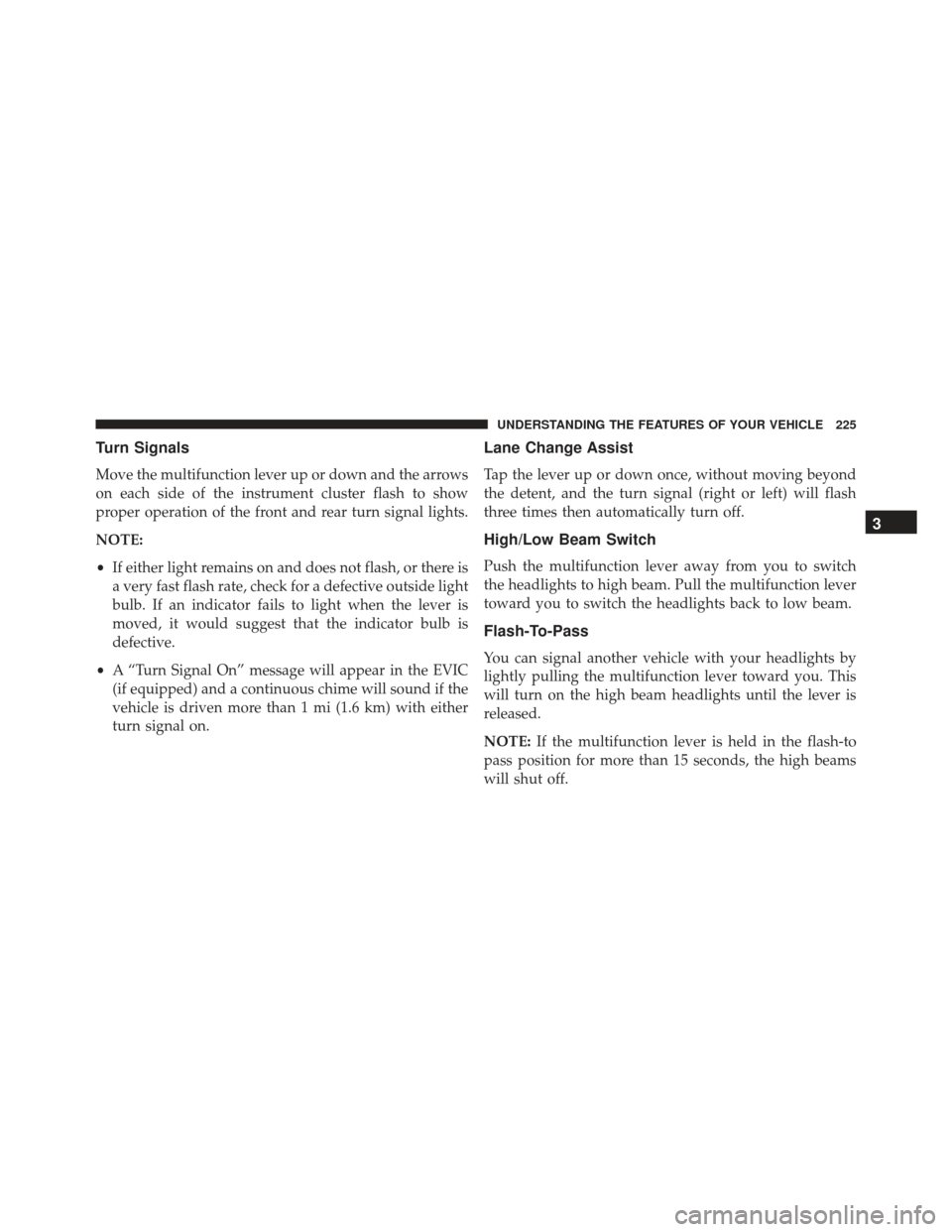
Turn Signals
Move the multifunction lever up or down and the arrows
on each side of the instrument cluster flash to show
proper operation of the front and rear turn signal lights.
NOTE:
•If either light remains on and does not flash, or there is
a very fast flash rate, check for a defective outside light
bulb. If an indicator fails to light when the lever is
moved, it would suggest that the indicator bulb is
defective.
• A “Turn Signal On” message will appear in the EVIC
(if equipped) and a continuous chime will sound if the
vehicle is driven more than 1 mi (1.6 km) with either
turn signal on.
Lane Change Assist
Tap the lever up or down once, without moving beyond
the detent, and the turn signal (right or left) will flash
three times then automatically turn off.
High/Low Beam Switch
Push the multifunction lever away from you to switch
the headlights to high beam. Pull the multifunction lever
toward you to switch the headlights back to low beam.
Flash-To-Pass
You can signal another vehicle with your headlights by
lightly pulling the multifunction lever toward you. This
will turn on the high beam headlights until the lever is
released.
NOTE: If the multifunction lever is held in the flash-to
pass position for more than 15 seconds, the high beams
will shut off.
3
UNDERSTANDING THE FEATURES OF YOUR VEHICLE 225
Page 231 of 614
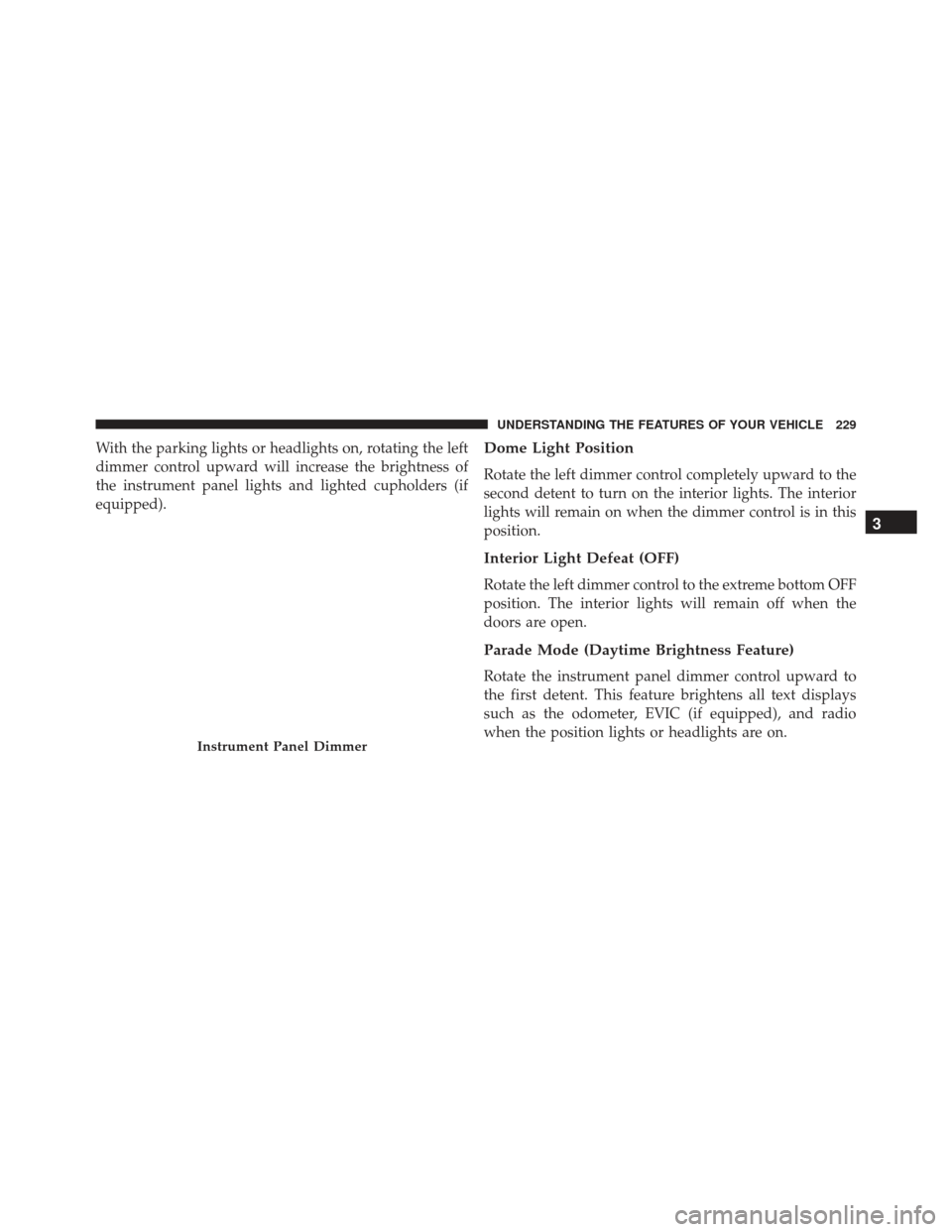
With the parking lights or headlights on, rotating the left
dimmer control upward will increase the brightness of
the instrument panel lights and lighted cupholders (if
equipped).Dome Light Position
Rotate the left dimmer control completely upward to the
second detent to turn on the interior lights. The interior
lights will remain on when the dimmer control is in this
position.
Interior Light Defeat (OFF)
Rotate the left dimmer control to the extreme bottom OFF
position. The interior lights will remain off when the
doors are open.
Parade Mode (Daytime Brightness Feature)
Rotate the instrument panel dimmer control upward to
the first detent. This feature brightens all text displays
such as the odometer, EVIC (if equipped), and radio
when the position lights or headlights are on.
Instrument Panel Dimmer
3
UNDERSTANDING THE FEATURES OF YOUR VEHICLE 229
Page 234 of 614
WARNING!(Continued)
the windshield during freezing weather, warm the
windshield with the defroster before and during
windshield washer use.
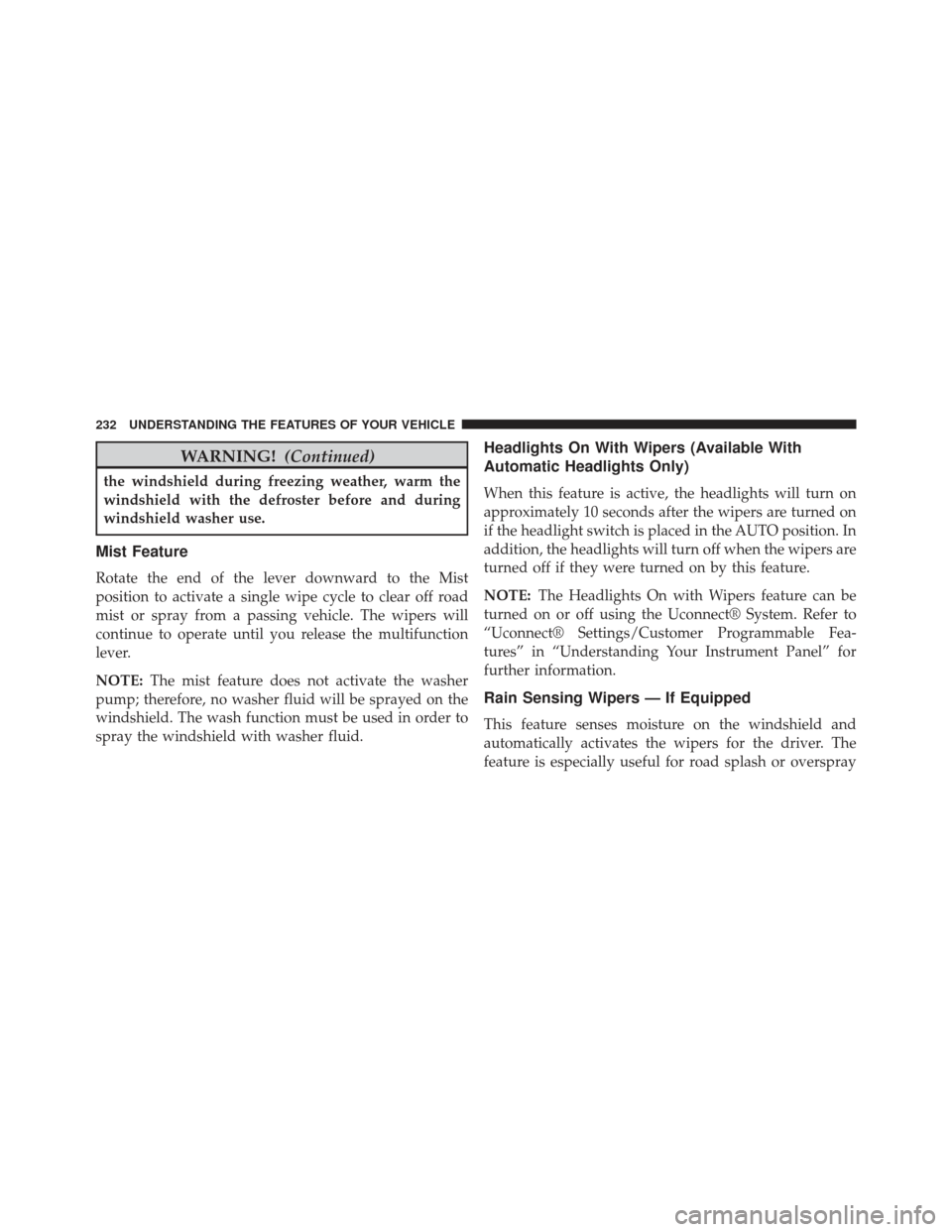
Mist Feature
Rotate the end of the lever downward to the Mist
position to activate a single wipe cycle to clear off road
mist or spray from a passing vehicle. The wipers will
continue to operate until you release the multifunction
lever.
NOTE:The mist feature does not activate the washer
pump; therefore, no washer fluid will be sprayed on the
windshield. The wash function must be used in order to
spray the windshield with washer fluid.
Headlights On With Wipers (Available With
Automatic Headlights Only)
When this feature is active, the headlights will turn on
approximately 10 seconds after the wipers are turned on
if the headlight switch is placed in the AUTO position. In
addition, the headlights will turn off when the wipers are
turned off if they were turned on by this feature.
NOTE: The Headlights On with Wipers feature can be
turned on or off using the Uconnect® System. Refer to
“Uconnect® Settings/Customer Programmable Fea-
tures” in “Understanding Your Instrument Panel” for
further information.
Rain Sensing Wipers — If Equipped
This feature senses moisture on the windshield and
automatically activates the wipers for the driver. The
feature is especially useful for road splash or overspray
232 UNDERSTANDING THE FEATURES OF YOUR VEHICLE
Page 317 of 614
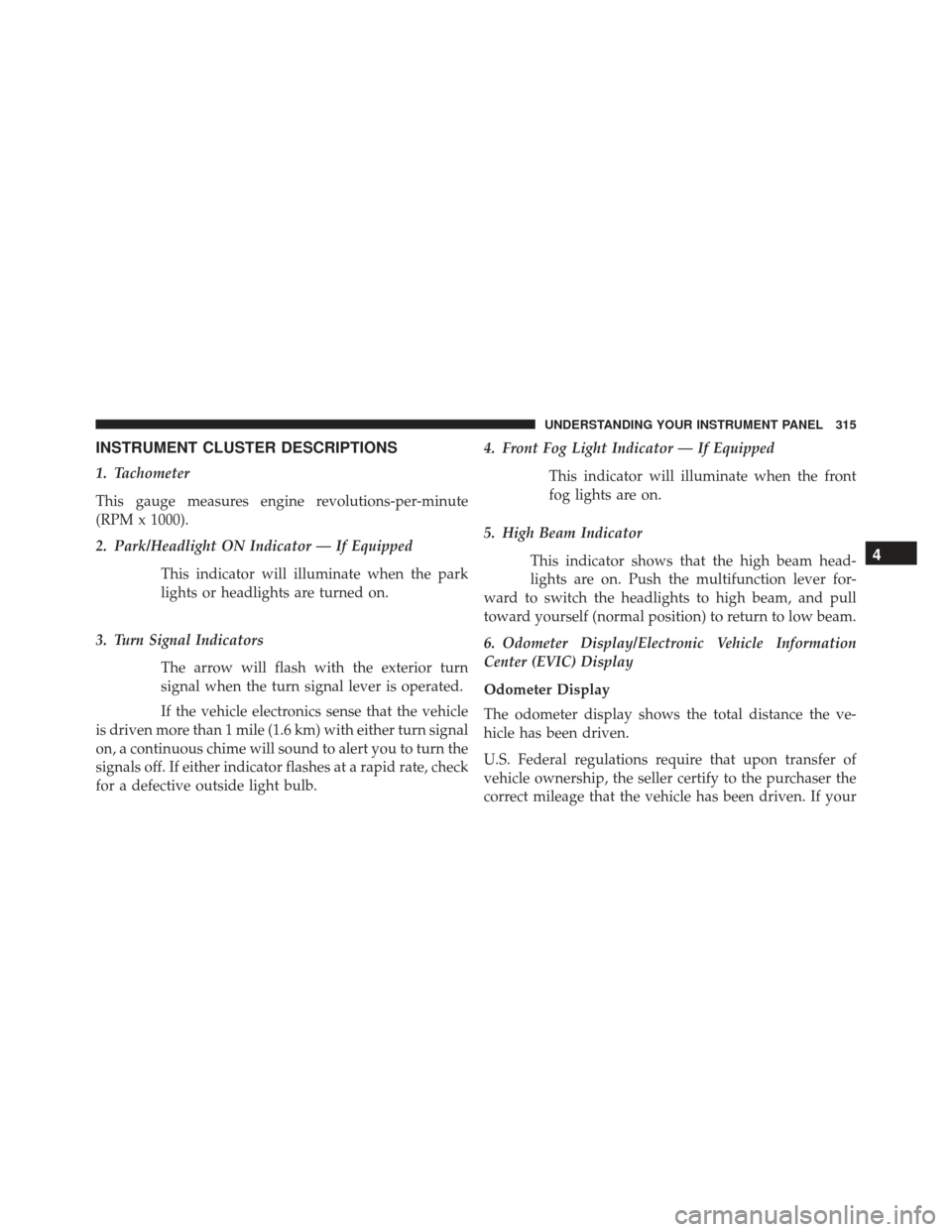
INSTRUMENT CLUSTER DESCRIPTIONS
1. Tachometer
This gauge measures engine revolutions-per-minute
(RPM x 1000).
2. Park/Headlight ON Indicator — If EquippedThis indicator will illuminate when the park
lights or headlights are turned on.
3. Turn Signal Indicators The arrow will flash with the exterior turn
signal when the turn signal lever is operated.
If the vehicle electronics sense that the vehicle
is driven more than 1 mile (1.6 km) with either turn signal
on, a continuous chime will sound to alert you to turn the
signals off. If either indicator flashes at a rapid rate, check
for a defective outside light bulb. 4. Front Fog Light Indicator — If Equipped
This indicator will illuminate when the front
fog lights are on.
5. High Beam Indicator This indicator shows that the high beam head-
lights are on. Push the multifunction lever for-
ward to switch the headlights to high beam, and pull
toward yourself (normal position) to return to low beam.
6. Odometer Display/Electronic Vehicle Information
Center (EVIC) Display
Odometer Display
The odometer display shows the total distance the ve-
hicle has been driven.
U.S. Federal regulations require that upon transfer of
vehicle ownership, the seller certify to the purchaser the
correct mileage that the vehicle has been driven. If your
4
UNDERSTANDING YOUR INSTRUMENT PANEL 315
Page 346 of 614
Display
•Brightness
Touch the “Brightness” soft-key to change this display.
When in this display, you may select display brightness
with the headlights on and the headlights off. Adjust the
brightness with the + and – setting soft-keys or by
selecting any point on the scale between the “+” and “–”
soft-keys. Then touch the arrow back soft-key.
• Mode
Touch the “Mode” soft-key to change this display. When
in this display, you may select one of the auto display
settings. To change Mode status press and release the
“Day,” “Night” or “Auto” soft-key, then touch the arrow
back soft-key.
• Language
Touch the “Language” soft-key to change this display.
When in this display, you may select one of three languages for all display nomenclature, including the trip
functions and the navigation system (if equipped). Touch
the English, French (Français) or Spanish (Español) soft-
key to select the language preferred. Then touch the
arrow back soft-key. As you continue, the information
will display in the selected language.
•
Units
Touch the “Units” soft-key to change this display. When
in this display, you may switch the EVIC, odometer, and
navigation system (if equipped) between US and Metric
units of measure. Touch “US” or “Metric” then touch the
arrow back soft-key. As you continue, the information
will display in the selected units of measure.
• Voice Response
Touch the “Voice Response” soft-key to change the Voice
Response Length settings. To change the Voice Response
Length, press and release the “Brief” or “Long” soft-key.
Then touch the arrow back soft-key.
344 UNDERSTANDING YOUR INSTRUMENT PANEL
Page 350 of 614
•Rain Sensing Auto Wipers — If Equipped
Touch the “Rain Sensing” soft-key to change this display.
When this feature is selected, the system will automati-
cally activate the windshield wipers if it senses moisture
on the windshield. To make your selection, touch the
“Rain Sensing” soft-key and select “ON” or “OFF.” Then
touch the arrow back soft-key.
• Hill Start Assist — If Equipped
Touch the “Hill Start Assist” soft-key to change this
display. When this feature is selected, the Hill Start Assist
(HSA) system is active. Refer to “Electronic Brake Control
System” in “Starting And Operating” for system function
and operating information. To make your selection, touch
the “Hill Start Assist” soft-key and select “ON” or “OFF.”
Then touch the arrow back soft-key.Lights
• Illuminated Approach
Touch the “Illuminated Approach” soft-key to change
this display. When this feature is selected, the headlights
will activate and remain on for 0, 30, 60, or 90 seconds
when the doors are unlocked with the Remote Keyless
Entry (RKE) transmitter. To change the Illuminated Ap-
proach status, touch the “0,” “30,” “60” or “90” soft-key.
Then touch the back arrow soft-key.
• Headlights With Wipers
Touch the “Headlights With Wipers” soft-key to change
this display. When this feature is selected, and the
headlight switch is in the AUTO position, the headlights
will turn on approximately 10 seconds after the wipers
are turned on. The headlights will also turn off when the
wipers are turned off if they were turned on by this
348 UNDERSTANDING YOUR INSTRUMENT PANEL
Page 351 of 614
feature. To make your selection, touch the “Headlights
With Wipers” soft-key and select “ON” or “OFF.” Then
touch the back arrow soft-key.
•Auto High Beams “SmartBeams™”
Touch the “Auto High Beams” soft-key to change this
display. When this feature is selected, the high beam
headlights will deactivate automatically under certain
conditions. To make your selection, touch the “Auto High
Beams” soft-key and select “ON” or “OFF.” Then touch
the back arrow soft-key. Refer to “Lights/SmartBeam™
— If Equipped” in “Understanding The Features Of Your
Vehicle” for further information.
• Daytime Running Lights — If Available
Touch the “Daytime Running Lights” soft-key to change
this display. When this feature is selected, the headlights
will turn on whenever the engine is running. To make your selection, touch the “Daytime Running Lights”
soft-key and select “ON” or “OFF.” Then touch the back
arrow soft-key.
•
Steering Directed Lights — If Equipped
Touch the “Steering Directed Lights” soft-key to change
this display. When this feature is selected, the headlights
turn relative to a change in direction of the steering
wheel. To make your selection, touch the “Steering
Directed Lights” soft-key and select “ON” or ‘OFF.” Then
touch the back arrow soft-key.
• Flash Lights With Lock
Touch the “Flash Headlights With Lock” soft-key to
change this display. When this feature is selected, the
signal lights will flash when the doors are locked with the
Remote Keyless Entry (RKE) transmitter. This feature
may be selected with or without the sound horn on lock
feature selected. To make your selection, touch the “Flash
4
UNDERSTANDING YOUR INSTRUMENT PANEL 349
Page 352 of 614
Headlights With Lock” soft-key and select “ON” or
“OFF.” Then touch the back arrow soft-key.
Doors & Locks
After pressing the Doors & Locks soft-key the following
settings will be available.
•Auto Lock
When this feature is selected, all doors will lock auto-
matically when the vehicle reaches a speed of 15 mph
(24 km/h). To make your selection, touch the “Auto
Unlock On Exit” soft-key, until a check-mark appears
next to setting, showing that setting has been selected.
Touch the arrow back soft-key to return to the previous
menu.
• Auto Unlock On Exit
Touch the “Auto Unlock On Exit” soft-key to change this
display. When this feature is selected, all doors will
unlock when the vehicle is stopped and the transmission is in the PARK or NEUTRAL position and the driver’s
door is opened. To make your selection, touch the “Auto
Unlock On Exit” soft-key and select “ON” or “OFF.”
Then touch the arrow back soft-key.
•
Flash Lights With Lock
Touch the “Flash Lights With Lock” soft-key to change
this display. When this feature is selected, the front and
rear turn signals will flash when the doors are locked or
unlocked with the Remote Keyless Entry (RKE) transmit-
ter. To make your selection, touch the “Flash Lights With
Lock” soft-key and select “ON” or “OFF”. Then touch the
arrow back soft-key.
• Sound Horn With Remote Start
Touch the “Sound Horn With Remote Start” soft-key to
change this display. When this feature is selected, the
horn will sound when the remote start is activated. To
350 UNDERSTANDING YOUR INSTRUMENT PANEL
Page 355 of 614
Engine Off Options
•Easy Exit Seats — If Equipped
Touch the “Easy Exit Seats” soft-key to change this
display. This feature provides automatic driver seat po-
sitioning to enhance driver mobility when entering and
exiting the vehicle. To make your selection, touch the
“Easy Exit Seats” soft-key, and select “ON” or “OFF.”
Then touch the arrow back soft-key. Refer to “Driver
Memory Seat” in “Understanding The Features Of Your
Vehicle” for further information.
• Headlight Off Delay
Touch the “Headlight Off Delay” soft-key to change this
display. When this feature is selected, the driver can
choose to have the headlights remain on for 0, 30, 60, or
90 seconds when exiting the vehicle. To change the
Headlight Off Delay status, touch the “0,” “30,” “60” or
“90” soft-key. Then touch the arrow back soft-key. •
Engine Off Power Delay
Touch the “Engine Off Power Delay” soft-key to change
this display. When this feature is selected, the power
window switches, radio, Uconnect® phone system (if
equipped), DVD video system (if equipped), power
sunroof (if equipped), and power outlets will remain
active for up to 10 minutes after the ignition is cycled to
OFF. Opening either front door will cancel this feature. To
change the Engine Off Power Delay status, touch the “0
seconds,” “45 seconds,” “5 minutes” or “10 minutes”
soft-key. Then touch the arrow back soft-key.
Compass Settings
• Variance
Touch the Variance soft-key to change this display. Com-
pass Variance is the difference between Magnetic North
and Geographic North. To compensate for the differ-
ences, the variance should be set for the zone where the
vehicle is driven, per the zone map. Once properly set,
4
UNDERSTANDING YOUR INSTRUMENT PANEL 353
Page 359 of 614
Customer Programmable Features — Uconnect®
8.4 Settings
Press the “More” soft-key, then press the “Settings”
soft-key to display the menu setting screen. In this mode
the Uconnect® system allows you to access program-
mable features that may be equipped such as Display,
Clock, Safety & Driving Assistance, Lights, Doors &
Locks, Auto-On Comfort & Remote Start, Engine Off
Options, Compass Settings, Audio, Phone/Bluetooth®
and SIRIUS Setup.
NOTE:Only one touchscreen area may be selected at a
time.
When making a selection, press the soft-key to enter the
desired mode. Once in the desired mode press and
release the preferred setting until a check-mark appears
next to the setting, showing that setting has been se-
lected. Once the setting is complete press the “Back Arrow”
soft-key to return to the previous menu or press the “X”
soft-key to close out of the settings screen. Pressing the
“Up” or “Down” arrow soft-keys on the right side of the
screen will allow you to toggle up or down through the
available settings.
Display
After pressing the Display soft-key the following settings
will be available.
•
Display Mode
When in this display you may select one of the auto
display settings. To change Mode status, touch and
release the “Day,” “Night” or “Auto” soft-key. Then
touch the back arrow soft-key.
• Display Brightness With Headlights ON
When in this display, you may select the brightness with
the headlights on. Adjust the brightness with the “+” and
4
UNDERSTANDING YOUR INSTRUMENT PANEL 357