reset DODGE CHARGER SRT 2015 7.G User Guide
[x] Cancel search | Manufacturer: DODGE, Model Year: 2015, Model line: CHARGER SRT, Model: DODGE CHARGER SRT 2015 7.GPages: 595, PDF Size: 16.43 MB
Page 266 of 595
NOTE:If the indicator message illuminates when you
start the vehicle, the oil change indicator system did not
reset. If necessary, repeat this procedure.
Secondary Method Of Navigating To The Oil Life
Screen In The DID And Holding Ok
Your vehicle is equipped with an engine oil change
indicator system. The “Oil Change Required” message
will flash in the DID display for approximately 10
seconds after a single chime has sounded to indicate the
next scheduled oil change interval. The engine oil change
indicator system is duty cycle based, which means the
engine oil change interval may fluctuate, dependent
upon your personal driving style.
Use the steering wheel DID controls for the following
procedure(s):
1. Without pushing the brake pedal, place the ignition in
the ON/RUN position (do not start the engine).
2. Push and release theDOWNarrow button to scroll
downward through the main menu to “Vehicle Info.”
3. Push and release theRIGHTarrow button to access
the ”Oil Life” screen.
4. Push and hold theOKbutton until the “Oil Life”
screen displays.
5. Push and release theDOWNarrow button to select “
Ye s,” then push and release theOKbutton to select
reset of the Oil Life.
6. Push and release theUparrow button to exit the
submenu screen.
NOTE:If the indicator message illuminates when you
start the vehicle, the oil change indicator system did not
reset. If necessary, repeat this procedure.
264 UNDERSTANDING YOUR INSTRUMENT PANEL
Page 272 of 595
DID Selectable Menu Items
Push and release the UP or DOWN arrow buttons until
the desired Selectable Menu item is displayed in the DID.
Follow the Menu or submenu prompts as desired.
Speedometer
Push and release the UP or DOWN arrow button until
the Speedometer menu is displayed in the DID. Push and
release the OK button to toggle units (km/h or mph) of
digital speedometer.
Vehicle Info
Push and release the UP or DOWN arrow button until
the Vehicle Info menu is highlighted in the DID. Push and
release the RIGHT arrow buttons to enter the submenu
items of Vehicle Info. Follow the directional prompts to
access or reset any of the following Vehicle Info submenu
items:
Tire Pressure Monitor
Coolant Temp
Trans Temp
Oil Temp
Oil Pressure
Oil Life
Battery Voltage
Intake Air Temp
Engine Torque
Engine Power
Air-Fuel Ratio — 6.2L Supercharged
Boost Pressure — 6.2L Supercharged
Intercooler Water Temp — 6.2L Supercharged
270 UNDERSTANDING YOUR INSTRUMENT PANEL
Page 277 of 595
Lap Timer
When selected, the Lap Timer page will show the timer
always at 0:00.00 with the previous Best and Last time
data (unless the driver has cleared it via hold to Reset).
•PushingOKwill start “current” timer from 0:00.0.
•WhenOKis pushed, the times are updated accord-
ingly.
•As soon as the driver exits the Lap Timer pages, the
“current” timer will stop and the time will be reset to
0:00.00.
•If the driver stays on the Lap Timer pages, the “cur-
rent” timer will reset to 0:00.0 when ignition is placed
in the off position, or ignition placed in the ON
position (or will roll over at 59:59.99 if ever possible).
•Each time the driver pushesOKfor a Lap that current
time populates, the Last time and also populates the
1st (top) space on the Timer History page the current
time resets to 0:00.0 at every push of theOKbutton.
•The timer will stop when the driver navigates away
from this page.
Lap History
When selected, this screen displays the Lap History, and
will color highlight the time that is the best time from the
Timer Page.
•Each time the driver presses the OK button (while on
the Lap Timer page) the current Lap Time populates
the 1st spot and the rest of the data shifts down.
•Color will indicate the time that is the best time from
the Timer Page.
•Holding theOKbutton only resets the page you are
on.
•Lap History page is a static display of lap times only.
4
UNDERSTANDING YOUR INSTRUMENT PANEL 275
Page 278 of 595
Top Speed
When selected, this screen displays the Top Speed since
last reset:
•Populates a top speed from first drive cycle and every
time that speed is exceeded that number is stored here
unless/until the driver resets the screen.
•Latching over ignition cycles.
•Units will change with the global change in units.
Driver Assist — If Equipped
Adaptive Cruise Control (ACC) Menu
The DID displays the current ACC system settings. The
information displayed depends on ACC system status.
Push the ADAPTIVE CRUISE CONTROL (ACC) ON/
OFF button (located on the steering wheel) until one of
the following displays in the DID:
Adaptive Cruise Control Off
When ACC is deactivated, the display will read “Adap-
tive Cruise Control Off.”
Adaptive Cruise Control Ready
When ACC is activated but the vehicle speed setting has
not been selected, the display will read “Adaptive Cruise
Control Ready.”
Push the SET + or the SET- button (located on the steering
wheel) and the following will display in the DID:
ACC SET
When ACC is set, the set speed will display in the
instrument cluster.
276 UNDERSTANDING YOUR INSTRUMENT PANEL
Page 280 of 595
•Lower end of gauge will be displayed in an amber
color and turn green as Fuel Economy improves.
•MPG will have the gauge fill from the left (clockwise).
•L/100 km will have the gauge fill from the right
(counter clockwise).
•HoldOKto reset average fuel economy information.
Trip Info
Push and release the UP or DOWN arrow button until
the Trip Menu item is highlighted in the DID (Toggle left
or right to select Trip A or Trip B). The Trip information
will display the following:
•Distance
•Average Fuel Economy
•Elapsed Time
Hold the OK button to reset feature information.
Audio
Push and release the UP or DOWN arrow button until
the Audio Menu displays in the DID.
Stored Messages
Push and release the UP or DOWN arrow button until
the Messages Menu item is highlighted in the DID. This
feature shows the number of stored warning messages.
Pushing the RIGHT arrow button will allow you to see
what the stored messages are.
Screen Setup
Push and release the UP or DOWN arrow button until
the Screen Setup Menu displays in the DID. Push and
release the OK button to enter the sub-menus. The Screen
Setup feature allows you to change what information is
displayed in the instrument cluster as well as the location
that information is displayed.
278 UNDERSTANDING YOUR INSTRUMENT PANEL
Page 303 of 595
touchscreen, select the channels you would like to skip
followed by pressing the back arrow button on the
touchscreen.
•Subscription Information
New vehicle purchasers or lessees will receive a free
limited time subscription to SiriusXM Satellite Radio
with your radio. Following the expiration of the free
services, it will be necessary to access the information on
the Subscription Information screen to re-subscribe.
Press the “Subscription Info” button on the touchscreen
to access the Subscription Information screen.
Write down the SIRIUS ID numbers for your receiver. To
reactivate your service, either call the number listed on
the screen or visit the provider online.
NOTE:SiriusXM Travel Link is a separate subscription
and is available for U.S. residents only.
Restore Settings
After pressing the “Restore Settings” button on the
touchscreen the following settings will be available:
•Restore Settings
When this feature is selected it will reset the Display,
Clock, Audio, and Radio Settings to their default settings.
To restore the settings to their default setting, press the
Restore Settings button. A pop-up will appear asking
#Are you sure you want to reset your settings to default?”
select “Yes” to restore, or “Cancel” to exit. Once the
settings are restored, a pop up appears stating#settings
reset to default.#Press the okay button on the touchscreen
to exit.
4
UNDERSTANDING YOUR INSTRUMENT PANEL 301
Page 304 of 595

Clear Personal Data
After pressing the “Clear Personal Data Settings” button
on the touchscreen the following settings will be avail-
able:
•Clear Personal Data
When this feature is selected it will remove personal data
including Bluetooth® devices and presets. To remove
personal information, press the “Clear Personal Data”
button and a pop-up will appear asking#Are you sure
you want to clear all personal data?” select “OK” to
Clear, or “Cancel” to exit. Once the data has been cleared,
a pop up appears stating#Personal data cleared”. Press
the back arrow button on the touchscreen to return to the
previous menu.
System Information
After pressing the “System Information” button on the
touchscreen the following information will be available:
•System Information
When System Information is selected, a System Information
screen will appear displaying the system software version.
SRT Performance Pages
Performance Pages is an application that provides a
display for performance indicators, as received from the
Instrument Cluster, that will help you gain familiarity
with the capabilities of your SRT vehicle in real-time.
To access the SRT Performance Pages, press the “SRT &
Apps” button on the touchscreen, then press the “SRT
Performance” button on the touchscreen, or press “SRT
Pages” in the top left of the touchscreen while in Drive
Modes. Press the desired button on the touchscreen to
access that specific Performance Page.
302 UNDERSTANDING YOUR INSTRUMENT PANEL
Page 314 of 595
When G-Force is selected, the following features will be
available:
•Lateral G-Force Left and Right
The lateral g-force measures the (sideways) left and right
force of the vehicle.
•Longitudinal G-Force Acceleration and Braking
The longitudinal g-force measures the acceleration and
braking force of the vehicle.
•Peak G-Forces Acceleration and Braking, Left and
Right
This shows the maximum g-forces that have been
achieved since the last reset from the DID. Peak values
are maintained through ignition cycles by the DID until
they are cleared by the driver.
•Vehicle Speed
Vehicle Speed measures the current speed of the vehicle
in either mph or km/h, starting at 0 with no maximum
value.
•Steering Wheel Angle
Steering Wheel Angle utilizes the steering angle sensor to
measure the degree of the steering wheel relative to zero.
The zero degree measurement indicates a steering wheel
straight ahead position. When the steering angle value is
negative, this indicates a turn to the left, and when the
steering angle value is positive, a turn to the right.
312 UNDERSTANDING YOUR INSTRUMENT PANEL
Page 331 of 595
500 RPM, ranging from 2000–6000 RPM (6.2L) and 2000–
6250 RPM (6.4L.) The Shift Light setup screen may only
be accessed if the feature is enabled, press the “Reset to
factory default” button on the touchscreen to change
back to factory settings, or press the “Shift Light Off”
button on the touchscreen to turn the system off com-
pletely.
Valet Mode
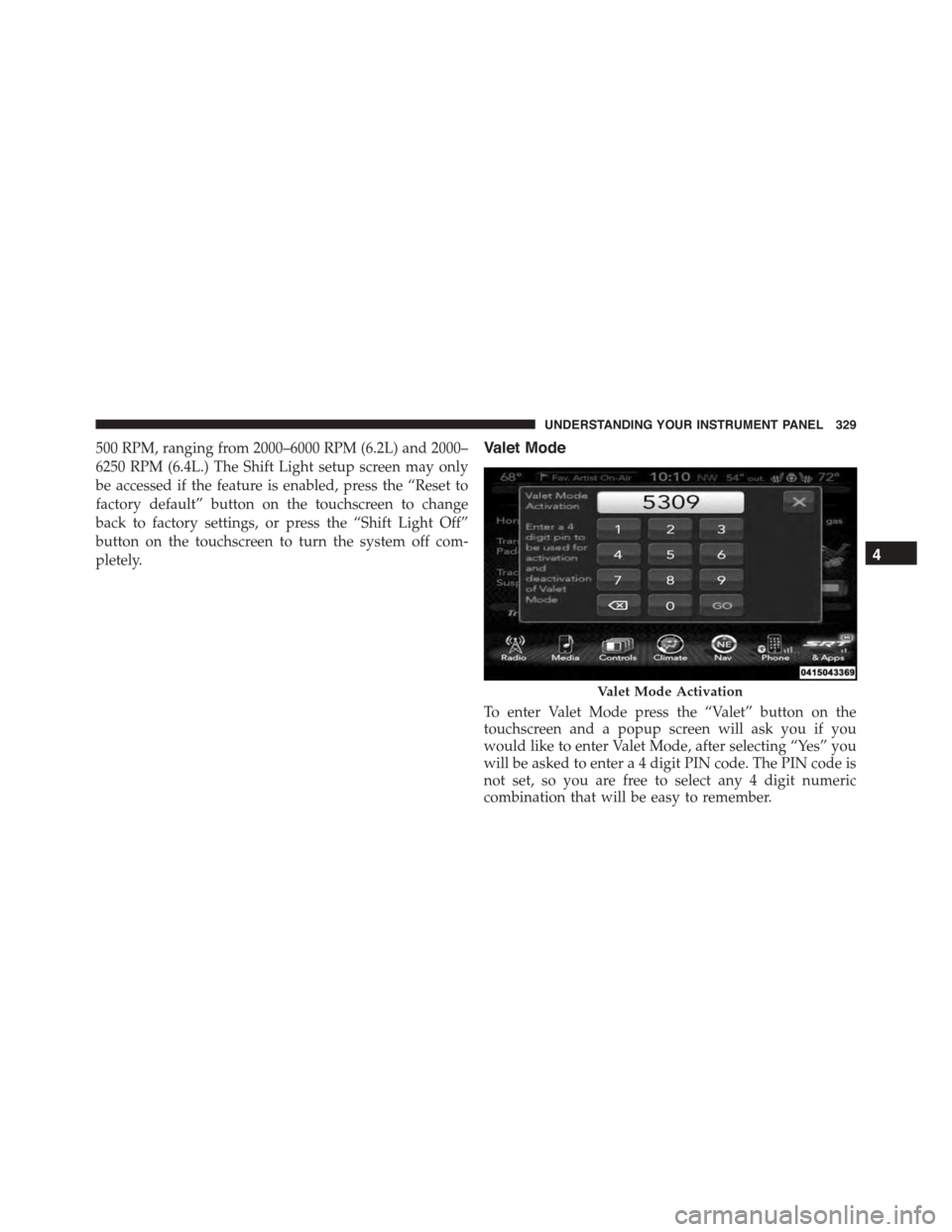
To enter Valet Mode press the “Valet” button on the
touchscreen and a popup screen will ask you if you
would like to enter Valet Mode, after selecting “Yes” you
will be asked to enter a 4 digit PIN code. The PIN code is
not set, so you are free to select any 4 digit numeric
combination that will be easy to remember.
Valet Mode Activation
4
UNDERSTANDING YOUR INSTRUMENT PANEL 329
Page 337 of 595
The right-hand control is a rocker-type switch with a
push-button in the center and controls the volume and
mode of the sound system. Pushing the top of the rocker
switch will increase the volume, and pushing the bottom
of the rocker switch will decrease the volume.
Pushing the center button will make the radio switch
between the various modes available (AM/FM/SAT/
AUX, etc.)
The left-hand control is a rocker-type switch with a
push-button in the center. The function of the left-hand
control is different depending on which mode you are in.
The following describes the left-hand control operation in
each mode.
Radio Operation
Pushing the top of the switch will “Seek” up for the next
listenable station and pushing the bottom of the switch
will “Seek” down for the next listenable station.
The button located in the center of the left-hand control
will tune to the next preset station that you have pro-
grammed in the radio preset button.
RADIO OPERATION AND MOBILE PHONES
Under certain conditions, the mobile phone being on in
your vehicle can cause erratic or noisy performance from
your radio. This condition may be lessened or eliminated
by relocating the mobile phone antenna. This condition is
not harmful to the radio. If your radio performance does
not satisfactorily “clear” by the repositioning of the
antenna, it is recommended that the radio volume be
turned down or off during mobile phone operation when
not using Uconnect® (if equipped).
Regulatory And Safety Information
USA/CANADA
Exposure to Radio Frequency Radiation
4
UNDERSTANDING YOUR INSTRUMENT PANEL 335