navigation system DODGE CHARGER SRT 2015 7.G Uconnect 8.4A
[x] Cancel search | Manufacturer: DODGE, Model Year: 2015, Model line: CHARGER SRT, Model: DODGE CHARGER SRT 2015 7.GPages: 429, PDF Size: 4.01 MB
Page 290 of 429
Uconnect® 8.4AN — If Equipped
CONTENTS
!Uconnect® 8.4AN SYSTEM................291
!RADIO MODE.........................292
▫Setting Presets........................295
▫SiriusXM Satellite Radio Mode — If Equipped . .296
▫Audio..............................304
!MEDIA MODE.........................306
▫Disc Mode — If Equipped...............306
▫USB/iPod® Mode.....................308
▫AUX Mode..........................309
▫SD Card Mode — If Equipped............310
▫Bluetooth® Mode.....................312
!Uconnect® PHONE.....................314
▫Overview...........................314
▫Operation...........................317
▫Phone Call Features...................327
▫Advanced Phone Connectivity............332
▫Things You Should Know About Your Uconnect®
Phone.............................333
▫General Information...................339
!NAVIGATION.........................339
4
Page 292 of 429
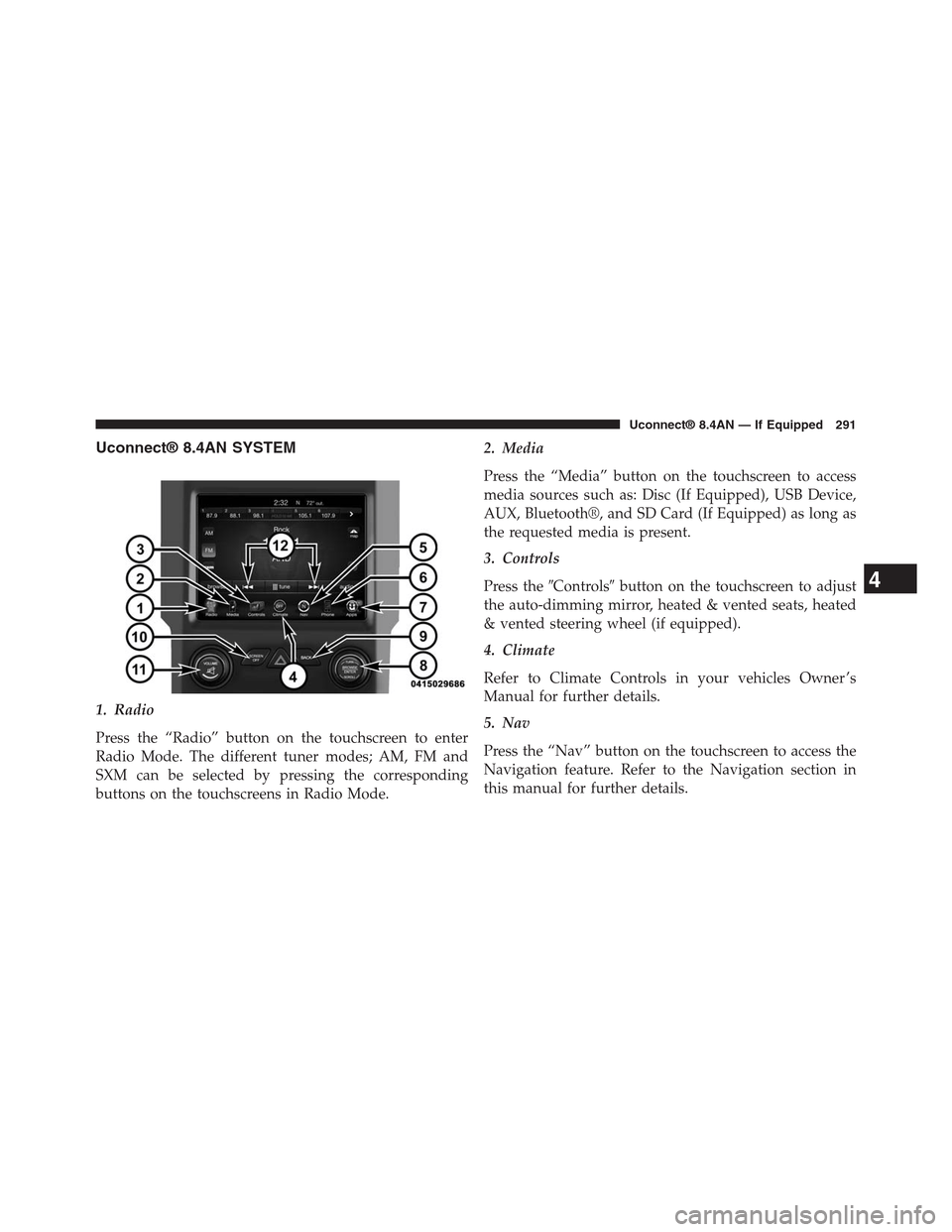
Uconnect® 8.4AN SYSTEM
1. Radio
Press the “Radio” button on the touchscreen to enter
Radio Mode. The different tuner modes; AM, FM and
SXM can be selected by pressing the corresponding
buttons on the touchscreens in Radio Mode.
2. Media
Press the “Media” button on the touchscreen to access
media sources such as: Disc (If Equipped), USB Device,
AUX, Bluetooth®, and SD Card (If Equipped) as long as
the requested media is present.
3. Controls
Press the#Controls#button on the touchscreen to adjust
the auto-dimming mirror, heated & vented seats, heated
& vented steering wheel (if equipped).
4. Climate
Refer to Climate Controls in your vehicles Owner ’s
Manual for further details.
5. Nav
Press the “Nav” button on the touchscreen to access the
Navigation feature. Refer to the Navigation section in
this manual for further details.
4
Uconnect® 8.4AN — If Equipped 291
Page 340 of 429
Bluetooth® Communication Link
Mobile phones have been found to lose connection to the
Uconnect® Phone. When this happens, the connection
can generally be re-established by switching the mobile
phone OFF/ON. Your mobile phone is recommended to
remain in Bluetooth® ON mode.
Power-Up
After switching the ignition key from OFF to either the
ON or ACC position, or after a language change, you
must wait at least 15 seconds prior to using the system.
General Information
This device complies with Part 15 of the FCC rules and
RSS 210 of Industry Canada. Operation is subject to the
following conditions:
•Changes or modifications not expressly approved by
the party responsible for compliance could void the
user’s authority to operate the equipment.
•This device may not cause harmful interference.
•This device must accept any interference received,
including interference that may cause undesired op-
eration.
NAVIGATION
Getting Started
To access the Navigation system, press the#Nav#button
on the bottom of the touchscreen.
4
Uconnect® 8.4AN — If Equipped 339
Page 343 of 429
Intersection
Press this button on the touchscreen to enter in two street
names as a destination.
Go Home
Press this button on the touchscreen to program or
confirm a route to the saved home address.
Trips
Press this button on the touchscreen to program a new
trip or recall a saved trip.
GEO Coordinates
Press this button on the touchscreen to route to a GEO
Coordinate. A geo coordinate is a coordinate used in
geography. You can determine a geo coordinate with the
help of a handheld GPS receiver, a map, or the navigation
system.
Point on Map
Press this button on the touchscreen to select a destina-
tion directly from the Map screen. By selecting a street
segment or icon, you can quickly enter a destination
without the need to input the city name or street.
City Center
Press this button on the touchscreen to route to a particu-
lar city. The navigation system will calculate a route with
the destination at the center of the city.
Trails
Press the “Trails” button on the touchscreen and select
the option to start trail recording to track the route you
are driving. Select the option to#stop trail recording#to
end tracking. This gives you a point of reference to for a
particular route if needed.
342 Uconnect® 8.4AN — If Equipped
Page 344 of 429
Closest City
Press this button on the touchscreen to route to a nearby
city. The screen will display an alphabetical listing of
nearby cities. The navigation system will calculate a route
with the destination at the center of the nearby city.
Phone Number
Press this button on the touchscreen to route to a location
or point of interest by the phone number.
NOTE:You can press the “back” arrow button on the
touchscreen to return to the previous screen or the “X”
button on the touchscreen to exit.
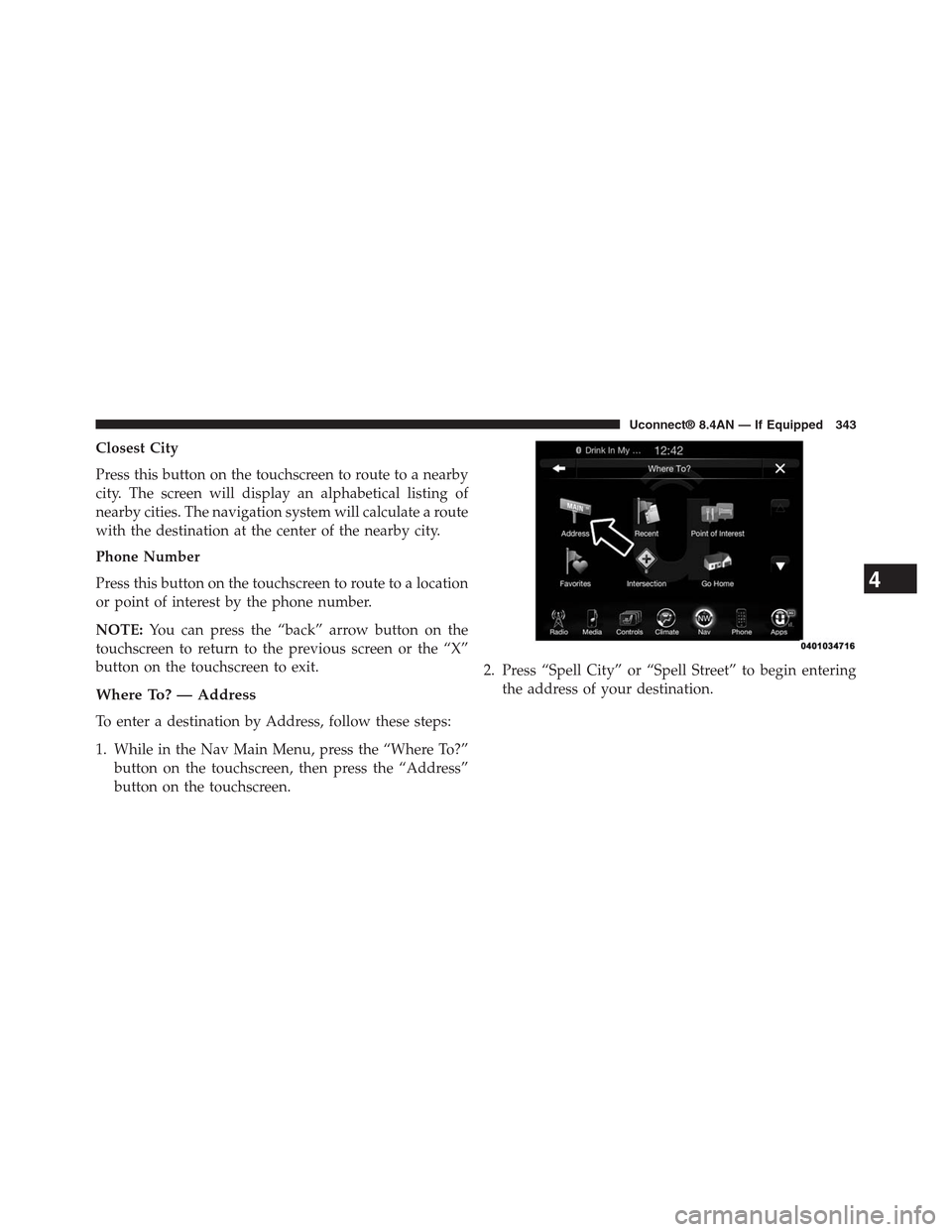
Where To? — Address
To enter a destination by Address, follow these steps:
1. While in the Nav Main Menu, press the “Where To?”
button on the touchscreen, then press the “Address”
button on the touchscreen.
2. Press “Spell City” or “Spell Street” to begin entering
the address of your destination.
4
Uconnect® 8.4AN — If Equipped 343
Page 398 of 429
You can search for a Fire Department by the following
categories, which are button tabs at the top of the
screen.
•Name
•Distance
•ABC (Search)
NOTE:In case of emergency, please contact the facility to
verify their availability before proceeding.
3. Press the desired Fire Department and press “Yes” to
confirm the destination.
If you are currently on a route guidance and you select a
Fire Department the system will ask you to choose one of
the following:
•Cancel previous route
•Add as first destination
•Add as last destination
NOTE:You can press the “back arrow” button on the
touchscreen to return to the previous screen or the “X”
button on the touchscreen to exit.
Map Updates
The map data available in your vehicle is the most
up-to-date information that was available when your
vehicle was built. Map data is updated periodically as
map information changes. Follow the steps below if you
wish to obtain an update for your vehicle.
1. Depending on the vehicle you own, please visit
www.Chrysler.com,www.Jeep.com,
www.Dodge.com,www.ramtrucks.com, or
www.drivesrt.comto obtain your map update. Click
the “Owners” tab at the top of the page. At the bottom
of the page (website footer) under “Multimedia Sys-
tems” select NAVTEQ Navigation Updates. Simply
enter your information and place your order.
4
Uconnect® 8.4AN — If Equipped 397
Page 399 of 429
2. Or, visitDriveUconnect.comand follow these steps:
•Under the “Help & Support” tab, select your vehicle
brand. Click “NAVTEQ NAVIGATION UPDATES.”
Simply enter your information and place your order.
3. Or, if you wish, you can also visit your dealer or place
a phone call to request your Map Update. US/CAN
General Consumer Support (888-628-6277), Chrysler
Dealer Garmin Support (877-628-4480), or Chrysler
Consumer FreshMaps (866-422-8171).
SiriusXM TRAFFIC — U.S. MARKET ONLY
(AVAILABLE ON 8.4AN — IF EQUIPPED)
Don’t drive through traffic. Drive around it.
Avoid congestion before you reach it. By enhancing your
vehicle’s navigation system with the ability to see de-
tailed traffic information, you can pinpoint traffic inci-
dents, determine average traffic speed and estimate
travel time along your route. Since the service is inte-
grated with a vehicle’s navigation system, SiriusXM
Traffic can help drivers pick the fastest route based on
traffic conditions.
1. Detailed information on traffic speed, accidents, con-
struction, and road closings.
2. Traffic information from multiple sources, including
police and emergency services, cameras and road
sensors.
3. Coast-to-coast delivery of traffic information.
4. View conditions for points along your route and
beyond.
398 Uconnect® 8.4AN — If Equipped
Page 400 of 429
SiriusXM TRAVEL LINK — U.S. MARKET ONLY
(AVAILABLE ON 8.4AN — IF EQUIPPED)
In addition to delivering over 160 channels of the best
sports, entertainment, talk, and commercial-free music,
SiriusXM offers premium data services that work in
conjunction with compatible navigation systems. Siri-
usXM Travel Link brings a wealth of useful information
into your vehicle and right to your fingertips.
•Weather — Check variety of local and national
weather information from radar maps to current and
five day forecast.
•Fuel Prices — Check local gas and diesel prices in your
area and route to the station of your choice.
•Sports Scores — In-game and final scores as well as
weekly schedules.
•Movie Listings — Check local movie theatres and
listings in your area and route to the theater of your
choice.
SiriusXM Travel Link feature is completely integrated
into your vehicle. A few minutes after you start your
vehicle, Travel Link information arrives and updates in
the background. You can access the information when-
ever you like, with no waiting.
•To access SiriusXM Travel Link, press the Apps button
on the touchscreen, then the SiriusXM Travel Link
button on the touchscreen.
NOTE:
•SiriusXM Travel Link requires a subscription, sold
separately after the five year trial subscription in-
cluded with your vehicle purchase.
•SiriusXM Travel Link is only available in the continen-
tal United States.
4
Uconnect® 8.4AN — If Equipped 399
Page 410 of 429
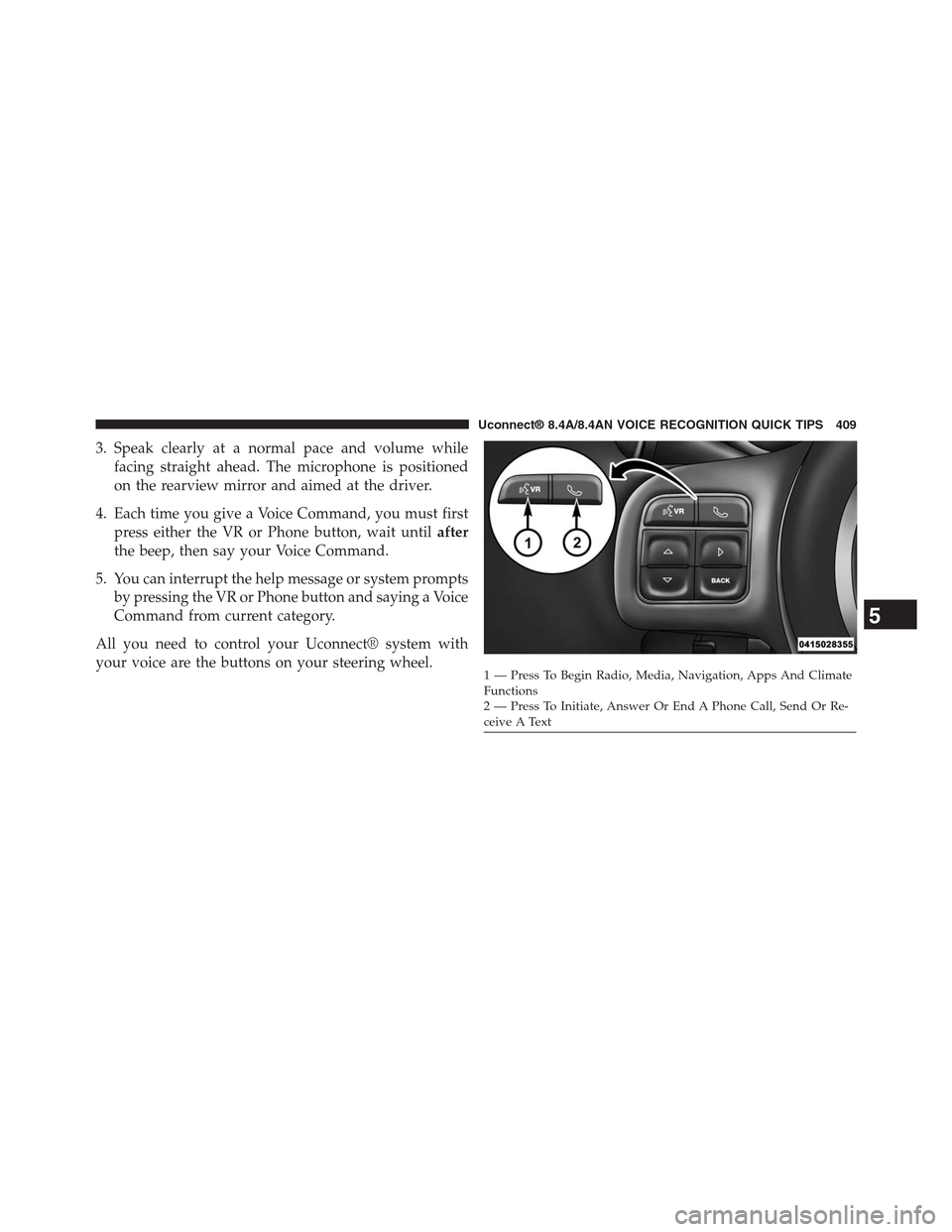
3. Speak clearly at a normal pace and volume while
facing straight ahead. The microphone is positioned
on the rearview mirror and aimed at the driver.
4. Each time you give a Voice Command, you must first
press either the VR or Phone button, wait untilafter
the beep, then say your Voice Command.
5. You can interrupt the help message or system prompts
by pressing the VR or Phone button and saying a Voice
Command from current category.
All you need to control your Uconnect® system with
your voice are the buttons on your steering wheel.1—PressToBeginRadio,Media,Navigation,AppsAndClimateFunctions2—PressToInitiate,AnswerOrEndAPhoneCall,SendOrRe-ceive A Text
5
Uconnect® 8.4A/8.4AN VOICE RECOGNITION QUICK TIPS 409
Page 411 of 429
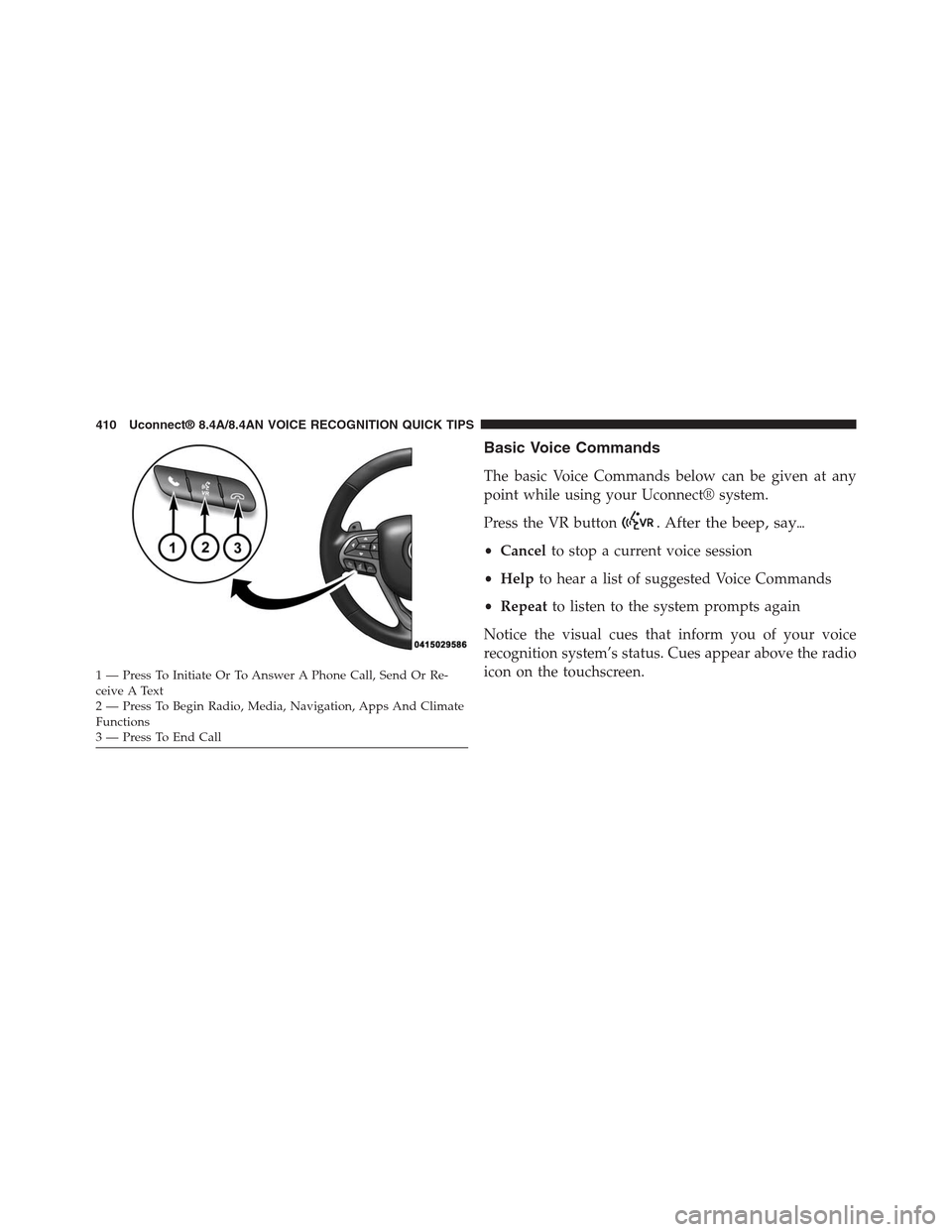
Basic Voice Commands
The basic Voice Commands below can be given at any
point while using your Uconnect® system.
Press the VR button. After the beep, say%
•Cancelto stop a current voice session
•Helpto hear a list of suggested Voice Commands
•Repeatto listen to the system prompts again
Notice the visual cues that inform you of your voice
recognition system’s status. Cues appear above the radio
icon on the touchscreen.1—PressToInitiateOrToAnswerAPhoneCall,SendOrRe-ceive A Text2—PressToBeginRadio,Media,Navigation,AppsAndClimateFunctions3—PressToEndCall
410 Uconnect® 8.4A/8.4AN VOICE RECOGNITION QUICK TIPS