steering DODGE CHARGER SRT 2015 7.G Uconnect 8.4A
[x] Cancel search | Manufacturer: DODGE, Model Year: 2015, Model line: CHARGER SRT, Model: DODGE CHARGER SRT 2015 7.GPages: 429, PDF Size: 4.01 MB
Page 127 of 429
•Vehicle must be equipped with Uconnect 8.4A/8.4AN.
Not available on Uconnect 5.0.
Tips and Shortcuts
•Pandora® will launch with the last setting and play list
you chose. To change this, select the “Station List”
button on the touchscreen in lower left corner to select
another station.
•Steering wheel controls supported are for “next track”
(until reaching maximum skips – for free account).
FAQs
1.Why can’t I get Pandora® Via Mobile to work?Here
are some things to consider:
•Check to ensure you have linked your Pandora®
account credentials with Uconnect® Access. This is
usually done during registration and setup. Then,
check to ensure you have properly connected your
compatible smartphone to the vehicle touchscreen.
The Uconnect® Access App must be open and you
must be logged in. A blue light indicates that it’s
providing data to the vehicle.
•If you recently changed your password for
Pandora®, it may need to be updated on Mopar
Owner Connect under the “Via Mobile” section.
2.If I changed my password for Pandora®, do I have to
update it with Uconnect® Access?Yes. Visit
moparownerconnect.com, log in, and click on Via
Mobile.
3.How do I set up a Pandora® account?You can create
an account with Pandora® by visitingpandora.com.
To make changes to an existing Pandora® account,
visit the Pandora® website.
4.Can I create a Pandora® account during Uconnect®
Access registration and setup?There is a link from the
Via Mobile profile page where the customer can go to
the Pandora® website to create a new account.
126 ALL ABOUT Uconnect® ACCESS
Page 129 of 429
iHeartRadio — If Equipped
iHeartRadio provides instant access to more than 1,500
live radio stations from across the country and allows
listeners to create custom music stations inspired by their
favorite artists or songs.
Description
•Easily control your iHeartRadio app through an intui-
tive interface via the touchscreen and steering wheel
controls.
•Reduce the need to use your Smartphone to access
iHeartRadio so you can stay focused on driving.
•Leverage an existing iHeartRadio account, or set up a
free account atiHeartRadio.com.
•Customers can also create a new iHeartRadio account
by clicking on a link from the Uconnect® Access Via
Mobile profile page during registration and set-up.
•Launch iHeartRadio using Voice Recognition (VR) or
through touchscreen controls.
•Browse, listen, and save radio stations for easy access.
•Browse and create custom stations (e.g. Zac Brown Band).
•Create a new custom station based on what’s currently
playing with a single button press.
•Steering wheel controls supported for preset jump and
“next track” (until reaching maximum skips).
•Listen to live radio stations from across the U.S.
•Continually refine stations to your liking using the
“Thumbs Up” and “Thumbs Down” buttons.
How It Works
Via Mobile uses the Uconnect® Access smartphone app
and your smartphone’s data plan to access your personal
iHeartRadio account from the vehicle and control it using
128 ALL ABOUT Uconnect® ACCESS
Page 133 of 429
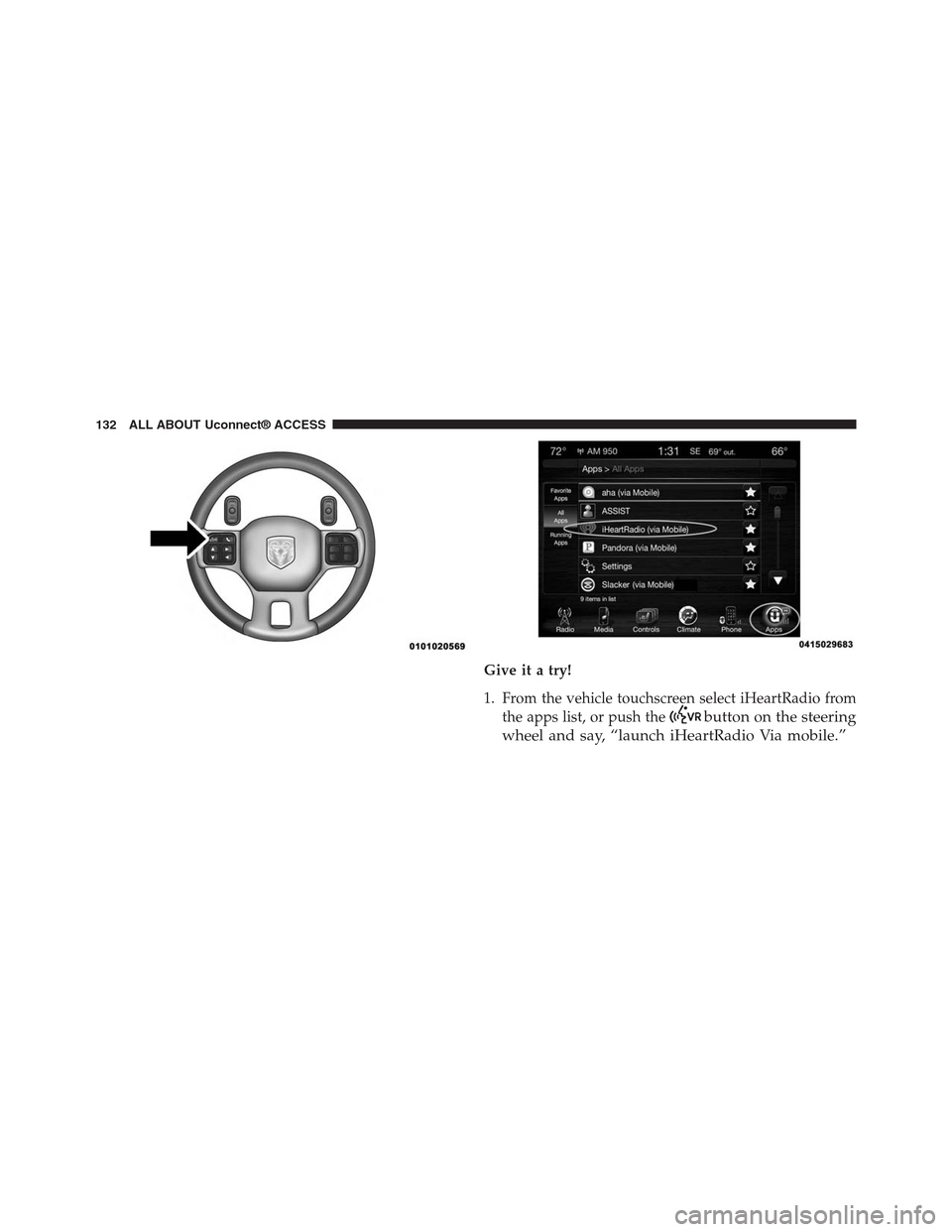
Give it a try!
1. From the vehicle touchscreen select iHeartRadio from
the apps list, or push thebutton on the steering
wheel and say, “launch iHeartRadio Via mobile.”
132 ALL ABOUT Uconnect® ACCESS
Page 137 of 429
5.Can I create an iHeartRadio account during
Uconnect® Access registration and set-up?There is a
link from the Via Mobile profile page where the
customer can go to iHeartRadio’s website to create a
new account.
6.How do I set up an iHeartRadio account?You can
create or make changes to an existing iHeartRadio
account by visiting their website atiHeartRadio.com.
7.Can I create custom content from within the vehicle?
Yes. From the iHeartRadio Home screen, press “Create
Station.”
8.Should I have the iHeartRadio app downloaded to
my smartphone to use Uconnect® Access Via Mo-
bile?You do not need to have the iHeartRadio app on
your smartphone in order to use iHeartRadio Via
Mobile. The Uconnect® Access App is required, how-
ever.
9.How do I know how much data is being used?
Uconnect® Access Via Mobile uses your smartphone’s
existing data plan to stream content. Data usage varies
by phone/device, content (e.g. videos), high quality
audio and several other factors. Please refer to your
device carrier for specific details.
10.How do I block explicit content?Customers have
the ability to block explicit content within the iHeart-
Radio Settings menu. Go to iHeartRadio Home and
select the “gear” icon.
Slacker Radio — If Equipped
Enjoy millions of songs and hundreds of handcrafted
stations.
Description
•Easily control your Slacker Radio app through an
intuitive interface via the vehicle touchscreen and
steering wheels controls.
136 ALL ABOUT Uconnect® ACCESS
Page 139 of 429
1. If you have not registered with Uconnect® Access,
begin by pressing the “Apps” button on the touch-
screen inside your vehicle, and then press “Uconnect
Registration.”
2. Once you receive an email from “Uconnect Access,”
click on the secure link to complete your registration
onmoparownerconnect.comwhere you’ll be guided
through setup of your Via Mobile profile.
3. Next, link app accounts to your Via Mobile profile by
entering your login information for apps like Slacker
Radio.
If you’ve already registered with Uconnect Access, log
in tomoparownerconnect.comto set up your Via
Mobile profile. Click on “Via Mobile Profile”.
4. Next, connect your smartphone to the vehicle touch-
screen. The Uconnect® Access app is compatible with
select iPhone® and Android smartphones. Visit
UconnectPhone.comto confirm that your smart-
phone is compatible with Uconnect®. Once you’ve
confirmed your smartphone is compatible, pair it to
the vehicle touchscreen via Bluetooth® to use Via
Mobile apps. If using an iPhone®, a USB cable may
also be supported for the data connection.
5. Launch the Uconnect® Access app on your connected
smartphone and log in with your Mopar Owner
Connect Username/Email and password. From the
vehicle touchscreen press the “Apps” button and
select Slacker Radio from the list. Slacker Radio is
located within the “All Apps” tab. To launch Slacker
Radio using voice recognition, push the button on the
steering wheel and say, “launch Slacker Via Mobile.”
138 ALL ABOUT Uconnect® ACCESS
Page 142 of 429
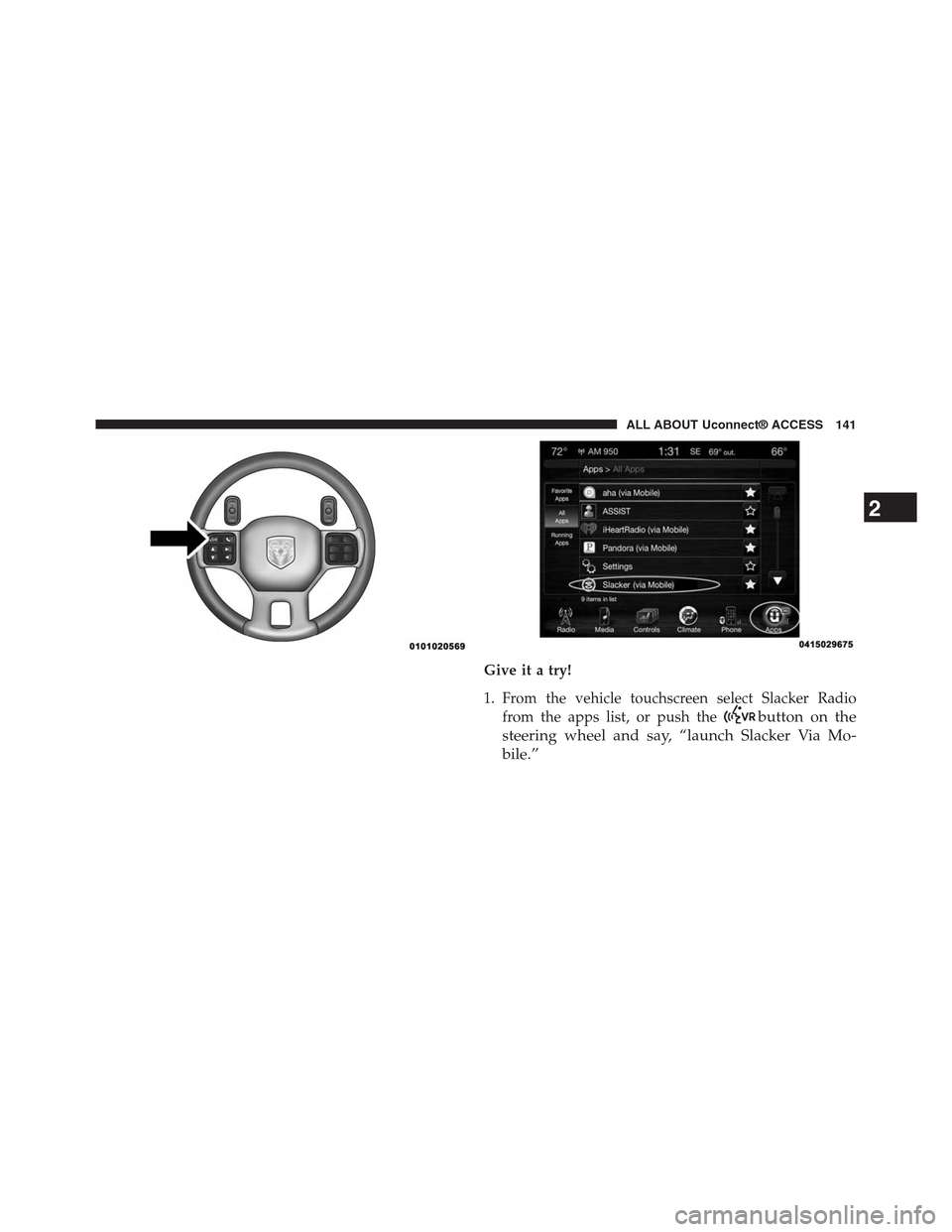
Give it a try!
1. From the vehicle touchscreen select Slacker Radio
from the apps list, or push thebutton on the
steering wheel and say, “launch Slacker Via Mo-
bile.”
2
ALL ABOUT Uconnect® ACCESS 141
Page 143 of 429
2. Select Slacker Radio Stations
3. Select Top Stations > Today’s Hits
Your chosen station will play. Use the “Heart” and “Ban”
buttons on the touchscreen to quickly and easily custom-
ize your experience. Like a song? Heart it to hear it more
often. Dislike a song? Ban it and the song or artist will be
removed from your station. Slacker Radio makes it easy
and personal.
Requirements
•Vehicle must be properly equipped with the
Uconnect® Access System.
•Your smartphone must be compatible with the
Uconnect® Access App and properly connected to the
vehicle.
•Your connected smartphone must be in range of a
usable cellular signal.
•Vehicle must be registered with Uconnect® Access and
have an active subscription that includes the appli-
cable feature or App.
•Vehicle must be powered in the ON/RUN or ACC
(Accessory) position with a properly functioning elec-
trical system.
•Vehicle must be equipped with Uconnect 8.4A/8.4AN.
Not available on Uconnect 5.0.
Tips and Shortcuts
•Continue to use the “like” icon (Heart), and “dislike”
icon (circle with line through it) to confirm your music
preferences and refine the music being played on that
station.
•Steering wheel controls supported for “next track”
(until reaching maximum skips – for free account).
142 ALL ABOUT Uconnect® ACCESS
Page 147 of 429
1. If you have not yet registered with Uconnect® Access,
begin by pressing the “Apps” icon on the touchscreen
inside your vehicle, then pressing “Uconnect Registra-
tion.”
2. Once you receive an email from “Uconnect Access,”
click on the secure link to complete your registration
onmoparownerconnect.comwhere you will be
guided through the setup of your Via Mobile profile.
3. Next, link app accounts to your Via Mobile profile by
entering your login information for Aha™.
If you have already registered with Uconnect® Access,
log in tomoparownerconnect.comto set up your Via
Mobile profile. Click on “Via Mobile Profile.”
4. Next, connect your smartphone to the vehicle touch-
screen. The Uconnect® Access app is compatible with
select iPhone® and Android smartphones. Visit
UconnectPhone.comto confirm that your smart-
phone is compatible with Uconnect. Once you have
confirmed your smartphone is compatible, pair it to
the vehicle touchscreen via Bluetooth® to use Via
Mobile apps. If using an iPhone®, a USB cable may
also be supported for the data connection.
5. Launch the Uconnect® Access app on your connected
smartphone and log in with your Mopar Owner
Connect Username/Email and password. From the
vehicle touchscreen press the#Apps#button and select
Aha™ from the list. Aha™ is located within the “All
Apps” tab. To launch Aha™ using voice recognition,
push the VR button on the steering wheel and say,
“launch Aha™ Via Mobile.”
146 ALL ABOUT Uconnect® ACCESS
Page 151 of 429
Give it a try!
1. From the vehicle touchscreen select Aha™ from the
apps list, or push thebutton on the steering
wheel and say, “launch Aha™ Via Mobile.”
•If you have not used Aha™ before, you will see a list
of default stations. Only after you personalize it will
your presets be shown. Presets can be set from
within the vehicle, from the Aha™ website, or
through the Aha™ mobile app. Some stations may
not be available on Aha™.
2. Select an Aha™ station. Your chosen station will play.
Refine the content for select stations using the “Like”
and “Dislike” buttons on the touchscreens.
•Featured – Takes you back to Aha™ featured content
list
•Nearby – Search for POIs from the following catego-
ries: Hungry, Coffee, Hotels, Weather
•Settings – Designate preference to allow explicit
content
3. Select the “List” button on the touchscreen to see
additional content within the current station
4. Select a program
5. Add station to Presets
You can associate your Aha™ account with your personal
Facebook®, Twitter® and Slacker accounts. If you have
the Aha™ app downloaded to your smartphone visit the
Aha™ settings screen and look for “Associate Accounts.”
You can also associate your Aha™ account from
aharadio.com.
150 ALL ABOUT Uconnect® ACCESS
Page 167 of 429
Safety Guidelines
WARNING!
ALWAYS drive safely with your hands on the
steering wheel. You have full responsibility and
assume all risks related to the use of the
Uconnect® features and applications in this ve-
hicle. Only use Uconnect® when it is safe to do so.
Failure to do so may result in an accident involv-
ing serious injury or death.
Ensure that all persons read this manual carefully before
using the radio system. It contains instructions on how to
use the system in a safe and effective manner.
•Glance at the screen only when safe to do so. If
prolonged viewing of the screen is required, park in a
safe location and set the parking brake.
•Stop use of the system immediately if a problem
occurs. Failure to do so may cause injury or damage to
the product. Return it to your authorized dealer to
repair.
•Ensure the volume level of the system is set to a level
that still allows you to hear outside traffic and emer-
gency vehicles.
Safe Usage Of The Uconnect® Access System
•Read all instructions in this manual carefully before
using your system to ensure proper usage!
•Your system is a sophisticated electronic device. Do
not let young children use your system.
•Permanent hearing loss or damage may occur if you
play your music or otherwise operate the system at
loud volumes. Exercise caution when setting the vol-
ume on your system.
166 ALL ABOUT Uconnect® ACCESS