wheel DODGE DAKOTA 2008 3.G User Guide
[x] Cancel search | Manufacturer: DODGE, Model Year: 2008, Model line: DAKOTA, Model: DODGE DAKOTA 2008 3.GPages: 426, PDF Size: 6.39 MB
Page 113 of 426

Interior Lights
Courtesy and dome lights are turned on when the front
doors are opened, when the dimmer control (rotating
wheel on the right side of the switch) is rotated to the
second upward detent position, or if equipped, when the
UNLOCK button is pressed on the key fob.When a door
is open and the interior lights are on, rotating the dimmercontrol all the way down to the OFF detent will cause all
the interior lights to go out. This is also known as the
9Party9mode because it allows the doors to stay open for
extended periods of time without discharging the vehi-
cle's battery.
The brightness of the instrument panel lighting can be
regulated by rotating the dimmer control up (brighter) or
down (dimmer). When the headlights are ON you can
supplement the brightness of the odometer, trip odom-
eter, radio and overhead console by rotating the control
up until you hear a click. This feature is termed the
ªParadeº mode and is useful when headlights are re-
quired during the day. If the dimmer control is not in this
position, the audio display may be difficult to read if the
headlights are on during the daytime.
Club Cab/Quad Cab models may have an optional
switched dome lamp that may be operated by pressing
the lens.
UNDERSTANDING THE FEATURES OF YOUR VEHICLE 113
3
Page 118 of 426

Passing Light
You can signal another vehicle with your headlights by
partially pulling the multifunction lever toward the steer-
ing wheel. This will cause the high beam headlights to
turn on until the lever is released.
High Beam / Low Beam Select Switch
Pull the multifunction control lever fully toward the
steering wheel to switch the headlights from HIGH or
LOW beam.
WINDSHIELD WIPERS AND WASHERS
The multifunction control lever is located on the left side
of the steering column.
118 UNDERSTANDING THE FEATURES OF YOUR VEHICLE
Page 120 of 426

NOTE:If the front wiper is operating when the ignition
is turned off, the wiper will automatically return to the
9Park9position. When the vehicle is restarted, the wipers
will resume operation.
Windshield Washers
To use the washer, push in on the washer knob on the end
of the multifunction control lever and hold while spray is
desired. If the washer knob is depressed while in the
delay range, the wiper will operate for several seconds
after the washer knob is released. It will then resume the
intermittent interval previously selected. If the washer
knob is pushed, for a period greater than 1 second, while
in the OFF position, the wiper will wipe approximately
three wipes, after the wash knob is released.To prevent freeze-up of your windshield washer system
in cold weather, select a solution or mixture that meets or
exceeds the temperature range of your climate. This
rating information can be found on most washer fluid
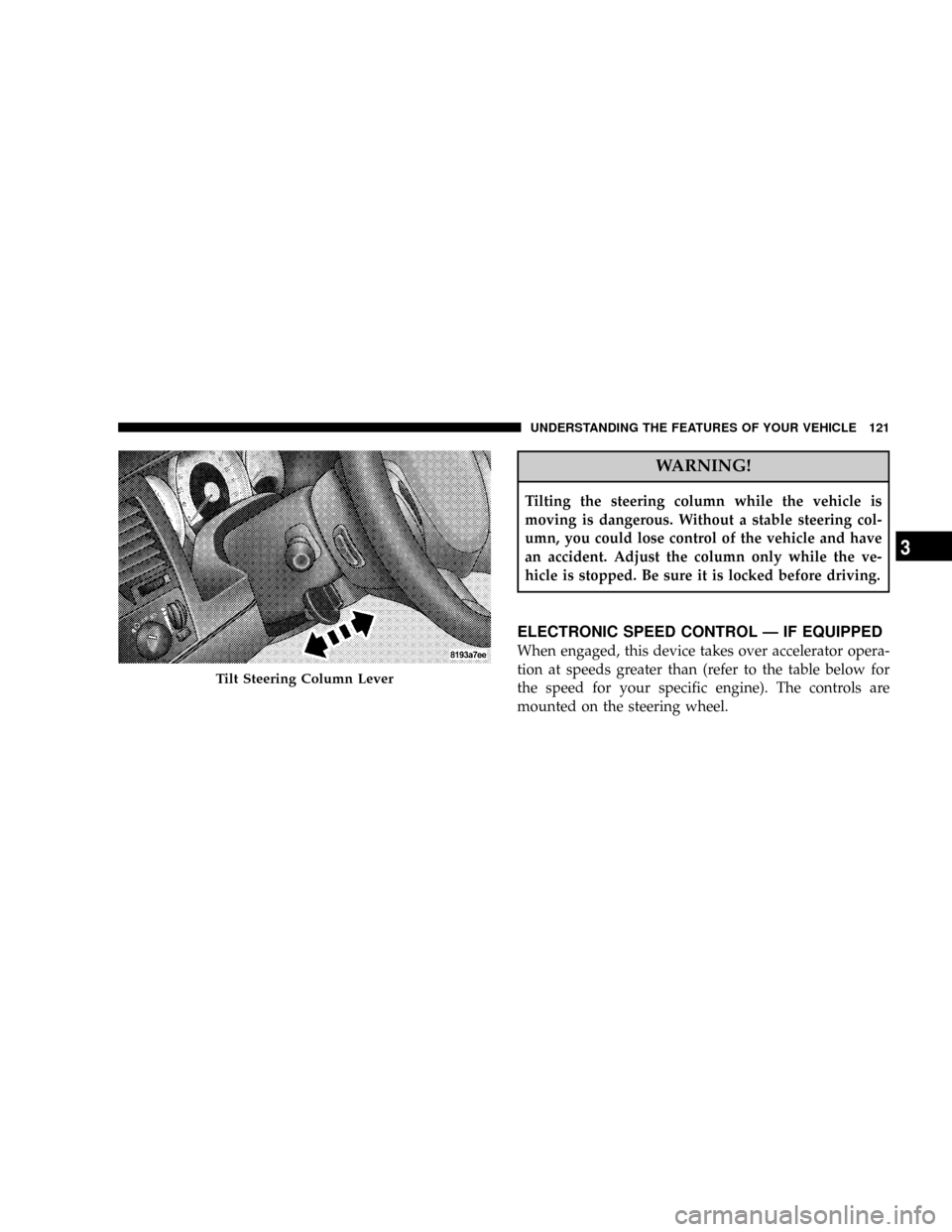
containers.TILT STEERING COLUMN
To tilt the column, pull rearward on the lever below the
turn signal control and move the wheel up or down, as
desired. Push the lever forward to lock the column firmly
in place.
120 UNDERSTANDING THE FEATURES OF YOUR VEHICLE
Page 121 of 426
WARNING!
Tilting the steering column while the vehicle is
moving is dangerous. Without a stable steering col-
umn, you could lose control of the vehicle and have
an accident. Adjust the column only while the ve-
hicle is stopped. Be sure it is locked before driving.
ELECTRONIC SPEED CONTROL Ð IF EQUIPPED
When engaged, this device takes over accelerator opera-
tion at speeds greater than (refer to the table below for
the speed for your specific engine). The controls are
mounted on the steering wheel.
Tilt Steering Column Lever
UNDERSTANDING THE FEATURES OF YOUR VEHICLE 121
3
Page 147 of 426

3. Lift the tailgate off of the pivot on the passenger side
by pulling upward and rearward at the same time.
4. Slide the tailgate to the passenger side while making
sure clearance from the box and taillight is maintained.
To reinstall the tailgate, do the following:
1. Slide the tailgate onto the driver's side pivot.2. Hold the tailgate at a 45É angle and insert it into the
passenger side pivot.
3. Clip the cables to the box.
Two Position Tailgate / Upper Load Platform
Your tailgate can be opened to the full open or the partial
open position. The partial open position is for loading
objects longer than the length of the bed (sheets of
plywood, etc.) by creating an upper load platform:
1. Install lumber
²Place lumber across the box in the indentations
provided above the wheel housings and in the
bulkhead dividers to form the floor. There are
indents in the sheet metal (or bed liner if equipped)
on the inner side of the box in front (Club Cab only)
and behind both wheel housings.
UNDERSTANDING THE FEATURES OF YOUR VEHICLE 147
3
Page 149 of 426
CAUTION!
²Care should always be exercised when operating a
vehicle with cargo. Vehicle speeds may need to be
reduced. Severe turns or rough roads may cause
shifting or bouncing of the cargo that may result in
vehicle damage.
²Insure the load is securely tied down and is
properly identified according to local laws if it
extends beyond the taillamps.
²LOADING should not exceed 400 lbs (181 kg) of
material suspended above the wheelhouse and
partially open tailgate or vehicle damage may
result.
REAR CARGO AREA UTILITY RAILS
CAUTION!
The maximum load per cleat should not exceed 320
lbs (145 kg) and the angle of the load on each cleat
should not exceed 60 degrees above horizontal, or
damage to the cleat or cleat rail may occur.
There are four adjustable cleats that can be used to assist
in securing cargo. Each cleat must be located and tight-
ened down in one of the detentes, located on either rail,
in order to keep cargo properly secure.
To move the cleat to any position on the rail, turn the nut
counterclockwise approximately three turns. Then pull
out on the cleat and slide it to the detent nearest the
desired location. Make sure the cleat is seated in the
detent and tighten the nut.
UNDERSTANDING THE FEATURES OF YOUR VEHICLE 149
3
Page 166 of 426

operating properly. The TPMS malfunction indicator is
combined with the low tire pressure telltale. When the
system detects a malfunction, the telltale will flash for
approximately one minute and then remain continuously
illuminated. This sequence will continue upon subse-
quent vehicle start-ups as long as the malfunction exists.
When the malfunction indicator is illuminated, the sys-
tem may not be able to detect or signal low tire pressure
as intended. TPMS malfunctions may occur for a variety
of reasons, including the installation of replacement or
alternate tires or wheels on the vehicle that prevent the
TPMS from functioning properly. Always check the
TPMS malfunction telltale after replacing one or more
tires or wheels on your vehicle to ensure that the replace-
ment or alternate tires and wheels allow the TPMS to
continue to function properly.CAUTION!
The TPMS has been optimized for the original
equipment tires and wheels. TPMS pressures and
warning have been established for the tire size
equipped on your vehicle. Undesirable system opera-
tion or sensor damage may result when using re-
placement equipment that is not of the same size,
type, and/or style. Aftermarket wheels can cause
sensor damage. Do not use tire sealant from a can, or
balance beads if your vehicle is equipped with a
TPMS, as damage to the sensors may result.
23. Airbag Indicator
The indicator lights and remains lit for 6 to 8
seconds when the ignition is first turned ON. If
the light does not come on when the ignition is
166 INSTRUMENT PANEL AND CONTROLS
Page 169 of 426

Two Types of Signals
There are two basic types of radio signals... AM or
Amplitude Modulation, in which the transmitted sound
causes the amplitude, or height, of the radio waves to
vary... and FM or Frequency Modulation, in which the
frequency of the wave is varied to carry the sound.
Electrical Disturbances
Radio waves may pick up electrical disturbances during
transmission. They mainly affect the wave amplitude,
and thus remain a part of the AM reception. They
interfere very little with the frequency variations that
carry the FM signal.
AM Reception
AM sound is based on wave amplitude, so AM reception
can be disrupted by such things as lightning, power lines
and neon signs.
FM Reception
Because FM transmission is based on frequency varia-
tions, interference that consists of amplitude variations
can be filtered out, leaving the reception relatively clear,
which is the major feature of FM radio.
NOTE:The radio, steering wheel radio controls (if
equipped), and 6 disc CD/DVD changer (if equipped)
will remain active for up to 10 minutes after the ignition
switch has been turned off. Opening a vehicle front door
will cancel this feature.
INSTRUMENT PANEL AND CONTROLS 169
4
Page 205 of 426

Select the button (1-6) you wish to lock onto this channel
and press and release that button. If a button is not
selected within 5 seconds after pressing the SET button,
the channel will continue to play but will not be stored
into push-button memory.
You may add a second channel to each push-button by
repeating the above procedure with this exception: Press
the SET button twice and SET 2 will show in the display
window. Each button can be set for SET 1 and SET 2. This
allows a total of 12 Satellite channels to be stored into
push-button memory. The channels stored in SET 2
memory can be selected by pressing the push-button
twice.
Every time a preset button is used, a corresponding
button number will display.
Buttons1-6
These buttons tune the radio to the channels that you
commit to push-button memory {12 Satellite stations}.
Operating Instructions - Hands Free Phone (If
Equipped)
Refer to ªHands-Free Communication (UConnectŸ)º in
Section 3 of this manual.
Operating Instructions - Video Entertainment
System (VESŸ) (If Equipped)
Refer to separate ªVideo Entertainment System (VESŸ)
Guide.º
REMOTE SOUND SYSTEM CONTROLS Ð IF
EQUIPPED
The remote sound system controls are located on the rear
surface of the steering wheel. Reach behind the wheel to
access the switches.
INSTRUMENT PANEL AND CONTROLS 205
4
Page 217 of 426

STARTING AND OPERATING
CONTENTS
mStarting Procedures.....................221
NManual Transmission..................221
NAutomatic Transmission................221
NNormal Starting......................222
NIf Engine Fails To Start.................222
NAfter Starting........................223
mEngine Block Heater Ð If Equipped.........224
mAutomatic Transmission..................224
NBrake/Transmission Interlock System.......225NAutomatic Transmission................225
mManual Transmission....................230
NRecommended Shift Speeds..............231
NDownshifting........................232
mFour-Wheel Drive Operation...............233
NNV233/243 GII Transfer Case Operating
Information/Precautions................233
NShifting Procedure - NV233/243
Transfer Case........................237
5