light DODGE DAKOTA 2008 3.G Workshop Manual
[x] Cancel search | Manufacturer: DODGE, Model Year: 2008, Model line: DAKOTA, Model: DODGE DAKOTA 2008 3.GPages: 426, PDF Size: 6.39 MB
Page 187 of 426

station with the same selected Music Type name. The
Music Type function only operates when in the FM
mode.
If a preset button is activated while in the Music Type
(Program Type) mode, the Music Type mode will be
exited and the radio will tune to the preset station.
SETUP Button
Pressing the SETUP button allows you to select between
the following items:
NOTE:Use the Tune Control Knob to scroll through the
entries. Push the Audio/Select button to select an entry
and make changes.
²DVD Enter -When the disc is in DVD Menu mode,
selecting DVD Enter will allow you to play the current
highlighted selection. Use the remote control to scroll
up and down the menu (If Equipped).
²DISC Play/Pause -You can toggle between
playing the DVD and pausing the DVD by
pushing the SELECT button (If Equipped).
²DVD Play Options -Selecting the DVD Play Options
will display the following:
²Subtitle ± Repeatedly Pressing SELECT will switch
subtitles to different subtitle languages that are
available on the disc (If Equipped).
²Audio Stream ± Repeatedly Pressing SELECT will
switch to different audio languages (if supported on
the disc) (If Equipped).
²Angle ± Repeatedly Pressing SELECT will change
the viewing angle if supported by the DVD disc (If
Equipped).
NOTE:The available selections for each of the above
entries varies depending upon the disc.
INSTRUMENT PANEL AND CONTROLS 187
4
Page 199 of 426

Operating Instructions Ð Satellite Radio
Refer to your ªNavigation User's Manualº for detailed
operating instructions.
Operating Instructions Ð Hands-Free
Communication (UConnectŸ) (If Equipped)
Refer to your ªNavigation User's Manualº for detailed
operating instructions.
Clock Setting Procedure
The GPS receiver in this system is synchronized to the
time data being transmitted by the GPS satellites. The
satellites' clock is Greenwich Mean Time (GMT). This is
the worldwide standard for time. This makes the sys-
tem's clock very accurate once the appropriate time zone
and daylight savings information is set.
Changing the Time Zone
1. Turn on the system.2. Touch the screen where the time is displayed. The
clock setting menu will appear on the screen. If the words
ªTime: GPS Timeº are displayed at the top of the screen,
proceed to Step 4. Otherwise, proceed to Step 3.
3. If the words ªTime: User Clockº are displayed at the
top of the screen, touch the bottom of the screen where
the words ªUser Clockº are displayed. The GPS time
setting menu will appear on the screen.
4. Touch the screen where the words ªSet Time Zoneº are
displayed. The time zone selection menu will appear on
the screen.
5. Select a time zone by touching the screen where your
selection appears. If you do not see a time zone that you
want to select, touch the screen where the word ªPageº is
displayed to view additional time zones in the menu.
INSTRUMENT PANEL AND CONTROLS 199
4
Page 200 of 426

Changing Daylight Savings Time
When selected, this feature will display the time of day in
daylight savings time. Proceed as follows to change the
current setting:
1. Turn on the system.
2. Touch the screen where the time is displayed. The
clock setting menu will appear on the screen.
3. When this feature is on, a check mark will appear in
the box next to the words ªDaylight Savings.º Touch the
screen where the words ªDaylight Savingsº are dis-
played to change the current setting.
Setting the User Clock
If you wish to set the clock to a time different from the
system clock, you can manually adjust the time by
performing the following:
1. Turn on the system.2. Touch the screen where the time is displayed. The
clock setting menu will appear on the screen. If the words
ªTime: User Clockº are displayed at the top of the screen,
proceed to Step 4. Otherwise, proceed to Step 3.
3. If the words ªTime: GPS Timeº are displayed at the top
of the screen, touch the bottom of the screen where the
words ªGPS Timeº are displayed. The user clock time
setting menu will appear on the screen.
4. To move the hour forward, touch the screen where the
word ªHourº with the arrow pointing upward is dis-
played. To move the hour backward, touch the screen
where the word ªHourº with the arrow pointing down-
ward is displayed.
5. To move the minute forward, touch the screen where
the word ªMinº with the arrow pointing upward is
displayed. To move the minute backward, touch the
screen where the word ªMinº with the arrow pointing
downward is displayed.
200 INSTRUMENT PANEL AND CONTROLS
Page 207 of 426

will go to the beginning of the current track or to the
beginning of the previous track if it is within one second
after the current track begins to play.
If you press the switch up or down twice it plays the
second track, three times, it will play the third, etc.
The button in the center of the left hand switch changes
CD's on the 6±Disc in-dash CD changer radio. This
button does not function for all other radios.
COMPACT DISC MAINTENANCE
To keep the compact discs in good condition, take the
following precautions:
1. Handle the disc by its edge; avoid touching the
surface.
2. If the disc is stained, clean the surface with a soft cloth,
wiping from center to edge.3. Do not apply paper or tape to the disc; avoid scratch-
ing the disc.
4. Do not use solvents such as benzine, thinner, cleaners,
or antistatic sprays.
5. Store the disc in its case after playing.
6. Do not expose the disc to direct sunlight.
7. Do not store the disc where temperatures may become
too high.
NOTE:If you experience difficulty in playing a particu-
lar disc, it may be damaged (i.e. scratched, reflective
coating removed, a hair, moisture or dew on the disc)
oversized, or have theft protection encoding. Try a
known good disc before considering disc player service.
INSTRUMENT PANEL AND CONTROLS 207
4
Page 208 of 426
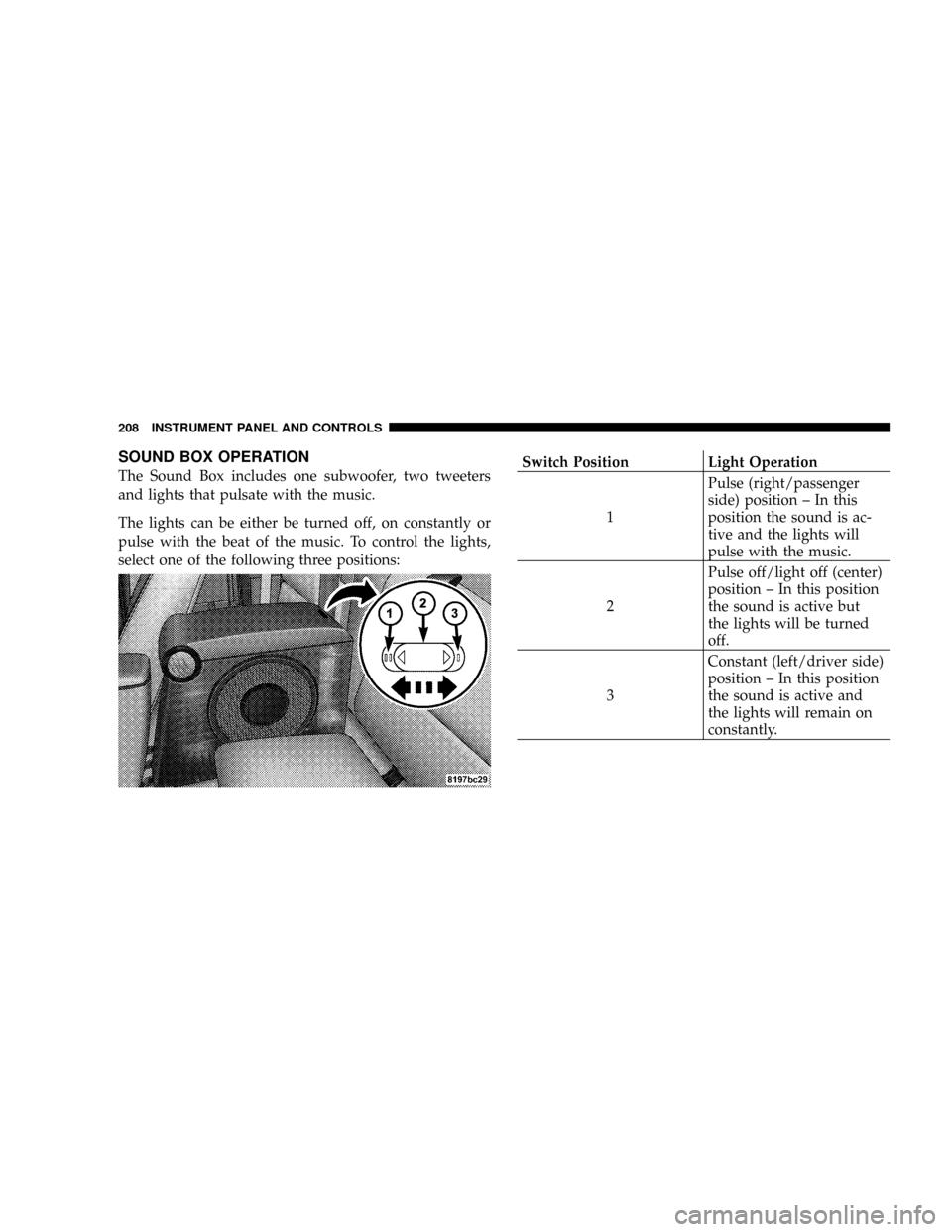
SOUND BOX OPERATION
The Sound Box includes one subwoofer, two tweeters
and lights that pulsate with the music.
The lights can be either be turned off, on constantly or
pulse with the beat of the music. To control the lights,
select one of the following three positions:Switch Position Light Operation
1Pulse (right/passenger
side) position ± In this
position the sound is ac-
tive and the lights will
pulse with the music.
2Pulse off/light off (center)
position ± In this position
the sound is active but
the lights will be turned
off.
3Constant (left/driver side)
position ± In this position
the sound is active and
the lights will remain on
constantly.
208 INSTRUMENT PANEL AND CONTROLS
Page 209 of 426

RADIO OPERATION AND CELLULAR PHONES
Under certain conditions, the cellular phone being ON in
your vehicle can cause erratic or noisy performance from
your radio. This condition may be lessened or eliminated
by relocating the cellular phone antenna. This condition
is not harmful to the radio. If your radio performance
does not satisfactorily ªclearº by the repositioning of the
antenna, it is recommended that the radio volume be
turned down or off during cellular phone operation.
CLIMATE CONTROLS
The controls for the heating, ventilation and air condi-
tioning system in this vehicle consist of a series of rotary
knobs. These comfort controls can be set to obtain desired
interior conditions.
Air Conditioning And Heater
Air Conditioning And Heater Operation
To turn on the Air Conditioning, set the fan control at any
speed and press the snowflake button located at the right
of the control panel. Conditioned air will be directed
through the outlets selected by the mode control. A light
INSTRUMENT PANEL AND CONTROLS 209
4
Page 210 of 426

at the top of the snowflake button shows that the air
conditioning is on. Press the button a second time to turn
the air conditioning off.
Slight changes in engine speed or power may be noticed
when the air conditioning compressor is on. This is a
normal occurrence as the compressor will cycle on and
off to maintain comfort and increase fuel economy.
The mode control (at the right of the
control panel) can be set in any of the
following positions:
NOTE:To improve your selection choices, the system
allows you to operate at intermediate positions between
the major modes. These intermediate positions are iden-
tified by the small dots.Recirculation Modes (Panel or Bi-Level )
Select the recirculation modes when
the outside air contains dust, odors,
high humidity, or if rapid cooling is
desired. This feature allows for recir-
culation of interior air only. Air flows
through either the panel outlets or
both the panel and floor outlets, to-
gether, depending which recirculation mode is selected.
Panel (Fresh Air Modes)
Outside air flows through the outlets located in the
instrument panel.
Bi-Level
Outside air flows through the outlets located in the
instrument panel and at the floor.
Floor
Outside air flows primarily through the floor out-
lets located under the instrument panel.
Mode Control
210 INSTRUMENT PANEL AND CONTROLS
Page 214 of 426

Summer Operation
Air conditioned vehicles must be protected with a high
quality antifreeze coolant during summer to provide
proper corrosion protection and to raise the boiling point
of the coolant for protection against overheating. A 50%
concentration of engine coolant to distilled water is
recommended. See ªCooling Systemº in the Maintaining
Your Vehicle section of your Owner's Manual.
When using the air conditioner in extremely heavy traffic
in hot weather especially when towing a trailer, addi-
tional engine cooling may be required. If this situation is
encountered, operate the transmission in a lower gearand set the air conditioner to recirculation mode. Oper-
ating the air conditioner in recirculation mode provides
the maximum performance from your air conditioning.
When stopped in heavy traffic, it may be necessary to
shift into NEUTRAL and depress the accelerator slightly
for fast idle operation.
Winter Operation
When operating the system during the winter months,
make sure the air intake, located directly in front of the
windshield, is free of ice, slush, snow, or other obstruc-
tions. This will help prevent snow going into the ducts.
214 INSTRUMENT PANEL AND CONTROLS
Page 228 of 426

Overdrive Operation
The overdrive automatic transmission contains an elec-
tronically controlled fourth and fifth (if equipped) speed
(Overdrive). The transmission will automatically shift
from Drive to Overdrive if the following conditions are
present:
²the transmission selector is in Drive;
²the engine coolant has reached normal operating tem-
perature;
²vehicle speed is above approximately 30 mph (48
km/h);
²the ªTOW/HAULº switch has not been activated;
²transmission has reached normal operating tempera-
ture.
NOTE:If the vehicle is started in extremely cold tem-
peratures, the transmission may not shift into Overdriveand will automatically select the most desirable gear for
operation at this temperature. Normal operation will
resume when the transmission fluid temperature has
risen to a suitable level. Refer also to the Note under
torque converter clutch, later in this section.
If the transmission temperature gets extremely hot, the
transmission will automatically select the most desirable
gear for operation at this temperature. If the transmission
temperature becomes hot enough the TRANS TEMP light
may illuminate and the transmission may downshift out
of Overdrive until the transmission cools down. After
cooldown, the transmission will resume normal opera-
tion.
The transmission will downshift from Overdrive to Drive
if the accelerator pedal is fully depressed at vehicle
speeds above approximately 35 mph (56 km/h).
228 STARTING AND OPERATING
Page 229 of 426

When To Use ªTOW/HAULº Mode
When driving in hilly areas, towing a trailer, carrying a
heavy load, etc., and frequent transmission shifting oc-
curs, press the ªTOW/HAULº button. This will improve
performance and reduce the potential for transmission
overheating or failure due to excessive shifting. Whenoperating in ªTOW/HAULº mode, 5th gear (if
equipped) is disabled and 2-3 and 3-4 shift patterns are
modified. Shifts into Overdrive (4th gear) are allowed
during steady cruise (for improved fuel economy) and
automatic closed-throttle downshifts to 3rd gear (for
improved braking) will occur during steady braking.
The ªTOW/HAULº light will illuminate in the instru-
ment cluster to indicate when the switch has been
activated. Pressing the switch a second time restores
normal operation. If the ªTOW/HAULº mode is desired,
the button must be pressed each time the engine is
started.
Torque Converter Clutch
A feature designed to improve fuel economy is included
in all automatic transmissions. A clutch within the torque
converter engages automatically at a calibrated speed at
light throttle. It engages at higher speeds under heavier
acceleration. This may result in a slightly different feeling
Tow Haul Button
STARTING AND OPERATING 229
5