lock DODGE DAKOTA 2009 3.G Owner's Manual
[x] Cancel search | Manufacturer: DODGE, Model Year: 2009, Model line: DAKOTA, Model: DODGE DAKOTA 2009 3.GPages: 449, PDF Size: 10.96 MB
Page 33 of 449
4. Within 10 seconds, cycle the key from the LOCK
position to the ON position and back to LOCK position,
a minimum of four times; ending in the LOCK position.
(Do not start the engine.)
5. Within 30 seconds, press the driver's door LOCK
switch in the LOCK direction.
6. A single chime will be heard to indicate the feature has
been disabled.
7. To reactivate this feature, repeat the above Steps.
8. If a chime is not heard, program mode was canceled
before the feature could be disabled. If necessary, repeat
the above procedure.
Auto Unlock On Exit Feature Ð If Equipped
This feature unlocks all of the doors of the vehicle when
any door is opened. This will occur only after the vehiclehas been shifted into the PARK position after the vehicle
has been driven (shifted out of PARK and the doors
closed).
Auto Unlock Feature Programming
The Customer Programming sequence to disable or en-
able Auto Unlock:
1. Enter your vehicle and close all the doors.
2. Fasten your seat belt. (Fastening the seat belt will
cancel any chiming that may be confusing during this
programming procedure.)
3. Insert the key into the ignition.
4. Within 15 seconds, cycle the key from the LOCK
position to the ON position and back to LOCK position,
a minimum of four times; ending in the LOCK position.
(Do not start the engine.)
THINGS TO KNOW BEFORE STARTING YOUR VEHICLE 31
2
Page 34 of 449
5. Within 30 seconds, press the driver's door LOCK
switch in the UNLOCK direction.
6. A single chime will sound to indicate the feature has
been changed.
7. To reactivate the feature, repeat the above Steps.
8. If a chime is not heard, program mode was canceled
before the feature could be changed. If necessary, repeat
the above procedure.
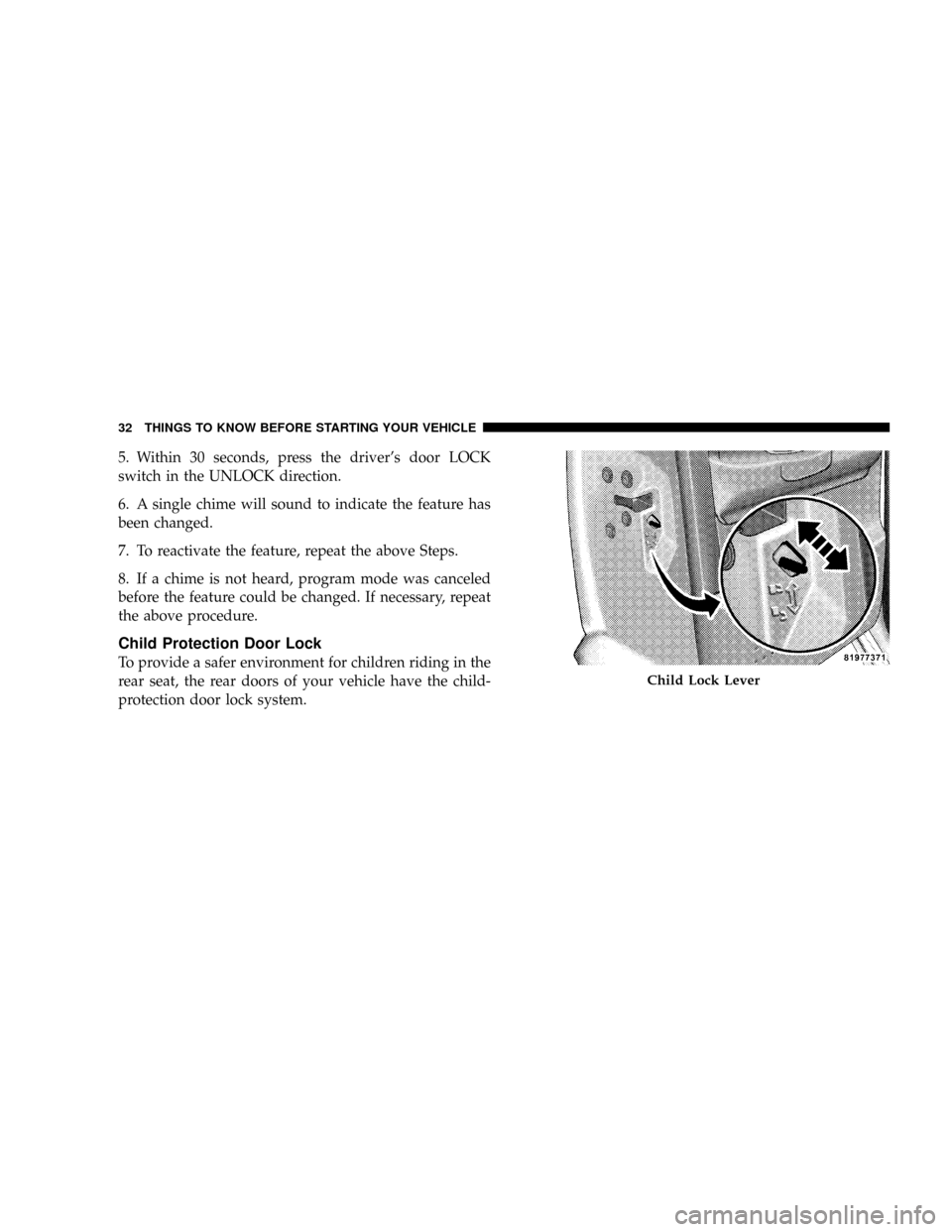
Child Protection Door Lock
To provide a safer environment for children riding in the
rear seat, the rear doors of your vehicle have the child-
protection door lock system.
Child Lock Lever
32 THINGS TO KNOW BEFORE STARTING YOUR VEHICLE
Page 35 of 449
To use the system, open each rear door, slide the lever up
to engage the locks, and down to disengage the child-
protection locks. When the system on a door is engaged,
that door can only be opened by using the outside door
handle, even if the inside door lock is in the unlocked
position.
WARNING!
Avoid trapping anyone in a vehicle in a collision.
Remember that the rear doors can only be opened
from the outside when the child protection locks are
engaged.NOTE:
²After setting the child protection door lock system,
always test the door from the inside to make certain it
is in the desired position.
²For emergency exit with the system engaged, move
the door lock switch to the UNLOCK position, roll
down the window and open the door with the outside
door handle.
THINGS TO KNOW BEFORE STARTING YOUR VEHICLE 33
2
Page 37 of 449
WARNING!
Never leave children alone in a vehicle. Leaving
unattended children in a vehicle is dangerous for a
number of reasons. A child or others could be seri-
ously or fatally injured. Don't leave the key in the
ignition. A child could operate power windows,
other controls, or move the vehicle.
Auto Down (Driver's Side Only)
The driver's window switch has an Auto Down feature.
Push the window switch past the first detent, release, and
the window will go down automatically. To cancel the
Auto Down movement, operate the switch in either the
up or down direction and release the switch.
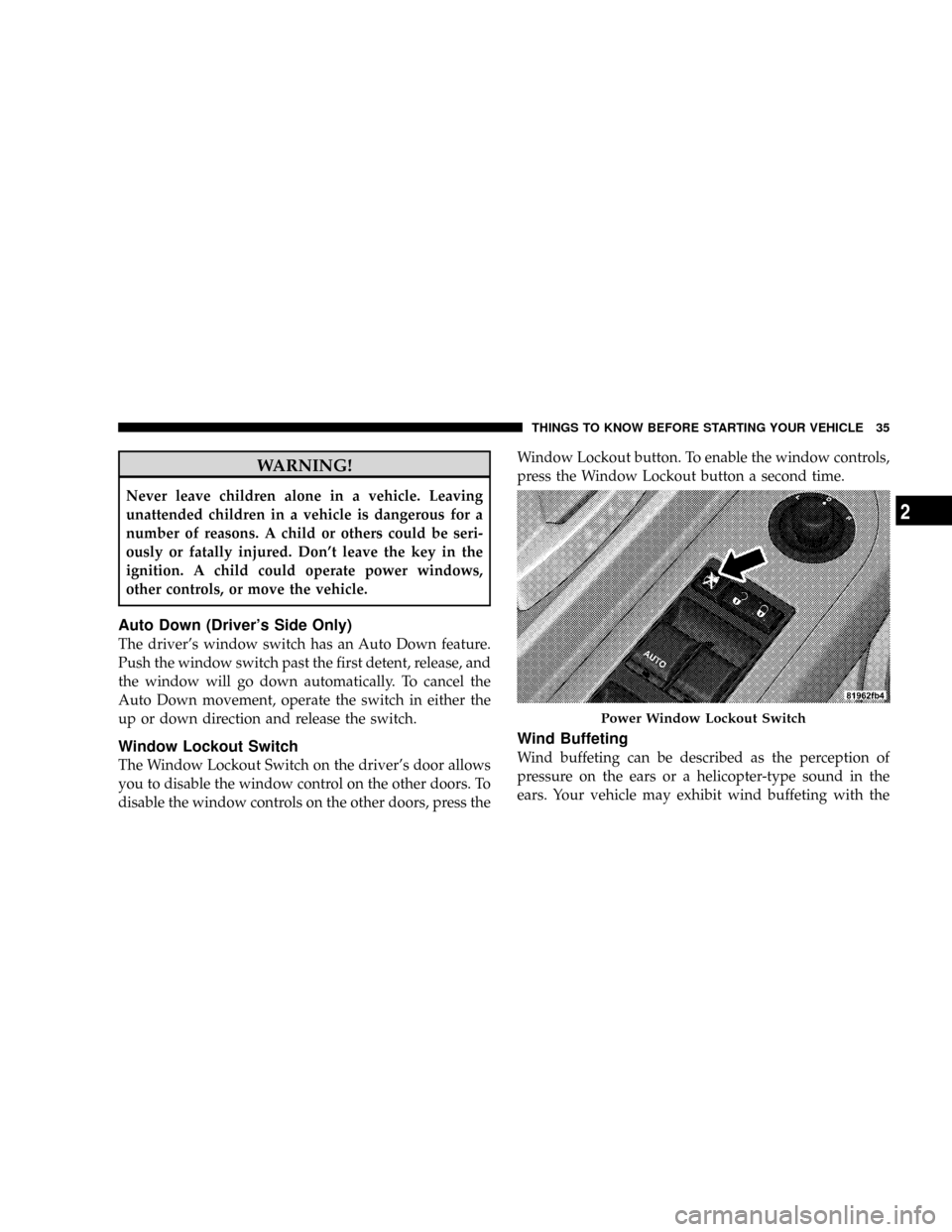
Window Lockout Switch
The Window Lockout Switch on the driver's door allows
you to disable the window control on the other doors. To
disable the window controls on the other doors, press theWindow Lockout button. To enable the window controls,
press the Window Lockout button a second time.
Wind Buffeting
Wind buffeting can be described as the perception of
pressure on the ears or a helicopter-type sound in the
ears. Your vehicle may exhibit wind buffeting with the
Power Window Lockout Switch
THINGS TO KNOW BEFORE STARTING YOUR VEHICLE 35
2
Page 39 of 449
Research has shown that seat belts save lives, and that
they can reduce the seriousness of injuries in a collision.
Some of the worst injuries happen when people are
thrown from the vehicle. Seat belts reduce the possibility
of ejection and the risk of injury caused by striking the
inside of the vehicle.Everyonein a motor vehicle should
be belted at all times.
Lap/Shoulder Belts
All seating positions, except the front center seating
position (with full bench seat), have combination lap/
shoulder belts. The belt webbing retractor is designed to
lock during very sudden stops or collisions. This feature
allows the shoulder part of the belt to move freely with
you under normal conditions. But in a collision, the belt
will lock and reduce the risk of your striking the inside of
the vehicle or being thrown out.
WARNING!
²It is extremely dangerous to ride in a cargo area,
inside or outside of a vehicle. In a collision, people
riding in these areas are more likely to be seri-
ously injured or killed.
²Do not allow people to ride in any area of your
vehicle that is not equipped with seats and seat
belts.
²Be sure everyone in your vehicle is in a seat and
using a seat belt properly.
(Continued)
THINGS TO KNOW BEFORE STARTING YOUR VEHICLE 37
2
Page 44 of 449
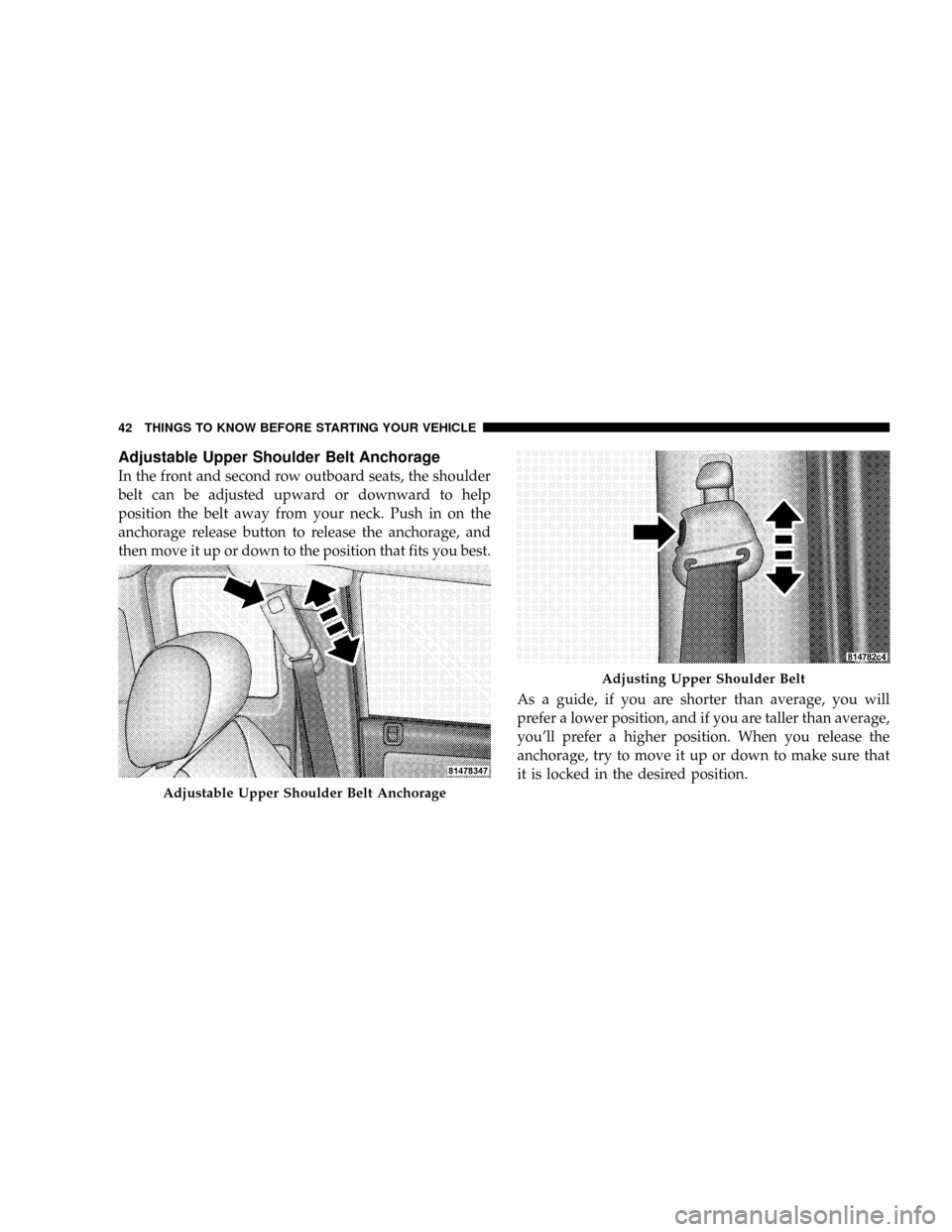
Adjustable Upper Shoulder Belt Anchorage
In the front and second row outboard seats, the shoulder
belt can be adjusted upward or downward to help
position the belt away from your neck. Push in on the
anchorage release button to release the anchorage, and
then move it up or down to the position that fits you best.
As a guide, if you are shorter than average, you will
prefer a lower position, and if you are taller than average,
you'll prefer a higher position. When you release the
anchorage, try to move it up or down to make sure that
it is locked in the desired position.
Adjustable Upper Shoulder Belt Anchorage
Adjusting Upper Shoulder Belt
42 THINGS TO KNOW BEFORE STARTING YOUR VEHICLE
Page 45 of 449
The adjuster has an easy up (EZ Up) feature, which will
allow it to be moved up without engaging the button.
Automatic Locking Retractors (ALR) Mode ± If
Equipped
In this mode, the shoulder belt is automatically pre-
locked. The belt will still retract to remove any slack in
the shoulder belt. The automatic locking mode is avail-
able on all passenger seating positions with a combina-
tion lap/shoulder belt.
When to Use the Automatic Locking Mode
Use the Automatic Locking Mode anytime a child safety
seat is installed in a passenger seating position. Children
12 years old, and younger, should be properly restrained
in the rear seat, whenever possible.
How to Use the Automatic Locking Mode
1. Buckle the combination lap/shoulder belt.2. Grasp the shoulder portion and pull downward until
the entire belt is fully extended.
3. Allow the belt to retract. As the belt retracts, you will
hear a clicking sound. This indicates the safety belt is
now in the Automatic Locking mode.
How to Disengage the Automatic Locking Mode
To disengage the Automatic Locking Mode, disconnect
the combination lap/shoulder belt and allow it to retract
completely. The vehicle sensitive (emergency) locking
mode is automatically activated.
Center Lap Belts
The center seat position on the front seat bench has a lap
belt only. To fasten the lap belt, slide the latch plate into
the buckle until you hear a ªclick.º To lengthen the lap
belt, tilt the latch plate and pull. To remove slack, pull the
loose end of the webbing. Wear the lap belt snug against
the hips. Sit back and erect in the seat, then adjust the belt
as tightly as is comfortable.
THINGS TO KNOW BEFORE STARTING YOUR VEHICLE 43
2
Page 49 of 449
The front airbags have a multistage inflator design. This
may allow the airbag to have different rates of inflation
that are based on collision severity and occupant size.
This vehicle may also be equipped with window bags to
protect the driver, and front and rear passengers sitting
next to a window. If the vehicle is equipped with window
bags, they are located above the side windows. Their
covers are also labeled SRS AIRBAG.
NOTE:Airbag covers may not be obvious in the interior
trim; but they will open to allow airbag deployment.WARNING!
²Do not put anything on or around the front airbag
covers or attempt to manually open them. You may
damage the airbags and you could be injured
because the airbags are no longer functional.
These protective covers for the airbag cushions are
designed to open only when the airbags are inflat-
ing.
²If your vehicle is equipped with window bags, do
not stack luggage or other cargo up high enough to
block the location of the window bag. The area
where the window bag is located should remain
free from any obstructions.
(Continued)
THINGS TO KNOW BEFORE STARTING YOUR VEHICLE 47
2
Page 57 of 449
WARNING! (Continued)
²It is dangerous to try to repair any part of the airbag
system yourself. Be sure to tell anyone who works
on your vehicle that it has an airbag system.
NOTE:Perchlorate Material ± special handling may apply.
See www.dtsc.ca.gov/hazardouswaste/perchlorate.
Enhanced Accident Response System
If the airbags deploy after an impact and the electrical
system remains functional, vehicles equipped with
power door locks will unlock automatically. In addition,
approximately five seconds after the vehicle has stopped
moving, the interior lights will light until the ignition
switch is turned off.
Airbag Warning Light
You will want to have the airbags ready to
inflate for your protection in an impact. While
the airbag system is designed to be mainte-
nance free, if any of the following occurs, have
an authorized dealer service the system promptly:
²The Airbag Warning Light does not come on or flickers
during the six to eight seconds when the ignition
switch is first turned on.
²The light remains on or flickers after the six to eight
second interval.
²The light flickers or comes on and remains on while
driving.
NOTE:If the speedometer, tachometer or any engine
related gauges are not working, the Occupant Restraint
Controller (ORC) may also be disabled. The airbags may
not be ready to inflate for your protection. Promptly
THINGS TO KNOW BEFORE STARTING YOUR VEHICLE 55
2
Page 58 of 449
check the fuse block for blown fuses. Refer to the label
located on the inside of the fuse block cover for the
proper airbag fuses. See your authorized dealer if the
fuse is good.
Event Data Recorder (EDR)
In the event of an accident, your vehicle is designed to
record up to five seconds of specific vehicle data param-
eters (see the following list) in an event data recorder,
prior to the moment of airbag deployment, or near
deployment, and up to a quarter-second of high-speed
deceleration data during, and/or after, airbag deploy-
ment. EDR data are ONLY recorded if an airbag deploys,
or nearly deploys, and are otherwise unavailable.
NOTE:
1. A near-deployment event occurs when the airbag
sensor detects severe vehicle deceleration usually indica-
tive of a crash, but not severe enough to warrant airbag
deployment.2. Under certain circumstances, EDR data may not be
recorded (e.g., loss of battery power).
In conjunction with other data gathered during a com-
plete accident investigation, the electronic data may be
used by Chrylser LLC, and others, to learn more about
the possible causes of crashes and associated injuries, in
order to assess and improve vehicle performance. In
addition to crash investigations initiated by Chrylser
LLC, such investigations may be requested by customers,
insurance carriers, government officials, and professional
crash researchers, such as those associated with univer-
sities, and with hospital and insurance organizations.
In the event that an investigation is undertaken by
Chrylser LLC (regardless of initiative), the company, or
its designated representative, will first obtain permission
of the appropriate custodial entity for the vehicle (usually
the vehicle owner or lessee) before accessing the elec-
tronic data stored, unless ordered to download data by a
56 THINGS TO KNOW BEFORE STARTING YOUR VEHICLE