buttons DODGE DURANGO 2004 2.G User Guide
[x] Cancel search | Manufacturer: DODGE, Model Year: 2004, Model line: DURANGO, Model: DODGE DURANGO 2004 2.GPages: 386, PDF Size: 6.22 MB
Page 75 of 386

access the system. The diagram below shows the mirror
with the appropriate buttons. Individual button behavior
is discussed in the ªOperationº Section.The UConnectŸ system can be used with any Hands
Free Profile certified BluetoothŸ cellular phone. If your
cellular phone has a different profile (i.e. headset profile),
you will not be able to use any UConnectŸ features.
The UConnectŸ system is fully integrated into your
vehicle, including your vehicle's stereo system. All voice
prompts as well as the other party's voice in a conversa-
tion will be played over your vehicle's stereo system. The
volume of the UConnectŸ system can be controlled
through your normal stereo controls.
The radio display will be used for visual prompts from
the UConnectŸ system such as caller ID.
UNDERSTANDING THE FEATURES OF YOUR VEHICLE 75
3
Page 97 of 386

To Return The Seat(s) To An Upright Position
Snap the flipper panel(s) on the seat back. Then pull on
the pull strap on the seat back to reposition the seat(s) to
an upright position.
NOTE:Make sure the seatback is properly engaged to
lock the seatback to a upright position. This can be
verified by pulling/pushing forward on the seatback.
The seatback will not move forward.
DRIVER MEMORY SYSTEM Ð IF EQUIPPED
Once programmed, the memory buttons 1 and 2 on the
driver's door panel can be used to recall the driver's seat
position, driver's outside mirror position, adjustable
brake and accelerator pedals position, Automatic Tem-
perature Control (ATC) temperature and radio station
UNDERSTANDING THE FEATURES OF YOUR VEHICLE 97
3
Page 100 of 386

A recall can be cancelled by pressing any of the memory
buttons on the drivers door during a recall (S, 1, or 2), or
pressing any one of the power seat buttons, or pressing
the adjustable pedals button, or pressing either the LOCK
or UNLOCK button on the remote keyless entry trans-
mitter when not in the ignition switch. When a recall is
cancelled, the driver's seat, and the pedals stop moving.
A delay of one second will occur before another recall can
be selected.
To Disable A Transmitter Linked to Memory
1. Turn the ignition switch to the OFF position and
remove the key.
2. Press and release the memory SET (S) button located
on the driver's door.
3. Within 10 seconds, press and release the UNLOCK
button on the Remote Keyless Entry transmitter.To disable another transmitter linked to either memory
position, repeat steps 1-3 for each transmitter.
NOTE:The capability to link Remote Keyless Entry
transmitters to memory is enabled when delivered from
the factory. The capability to link Remote Keyless Entry
transmitters to memory can be disabled (or later reen-
abled) by a qualified DaimlerChrysler representative.
Self-Limiting Control
To improve vehicle reliability, the memory system in-
cludes a self-limiting control for full travel positioning of
power seat and Adjustable Pedal movement (all direc-
tions). This self-limiting control may however develop an
unintended movement limitation if an obstruction is
encountered at sometime during usage. One example of
such an occurrence may include a box or package ob-
structing the full rearward movement of the driver's seat.
Once the obstruction is removed, the self-limiting control
may be restored to maximum position. The self-limiting
100 UNDERSTANDING THE FEATURES OF YOUR VEHICLE
Page 101 of 386

control may be restored by first reaching the recently
limited or obstructed position, then release and reactivate
the same button or buttons. Continued seat travel beyond
the obstructed position will indicate the recently encoun-
tered self-limitation has been cleared.
Driver Easy Exit and Easy Entry Control
This additional feature provides automatic driver's seat
positioning which will enhance driver mobility out of
and into the vehicle. The seat cushion will move rear-
ward approximately 2.5 inches (60 mm) when the key is
removed from the ignition switch. The seat will move
forward approximately 2.5 inches (60 mm) when the key
is placed into the ignition and turned out of the LOCK
position, only when the seatbelt is unbuckled. Each
stored memory setting will have an associated Easy Exit
and Easy Entry position. The Easy Exit and Easy Entry
feature may be automatically disabled if the seat is
positioned rearward enough and no benefit from moving
the seat any farther rearward.NOTE:The Easy Exit Easy Entry feature is not enabled
when delivered from the factory. The Easy Exit Easy
Entry feature may be enabled (or later disabled) by a
qualified DaimlerChrysler service representative.
Tilt Mirrors in Reverse
This additional feature provides automatic outside mir-
ror positioning which will aid the driver's view of the
ground rearward of the front doors. The outside mirrors
will move slightly downward from the present position
when the vehicle is shifted into Reverse position. The
outside mirrors will then return to the original position
when the vehicle is shifted out of Reverse position. Each
stored memory setting will have an associated Tilt Mir-
rors in Reverse position.
NOTE:The tilt mirrors in Reverse feature is not enabled
when delivered from the factory. The Tilt Mirrors in
Reverse feature may be enabled (or later disabled) by a
qualified DaimlerChrysler service representative.
UNDERSTANDING THE FEATURES OF YOUR VEHICLE 101
3
Page 128 of 386
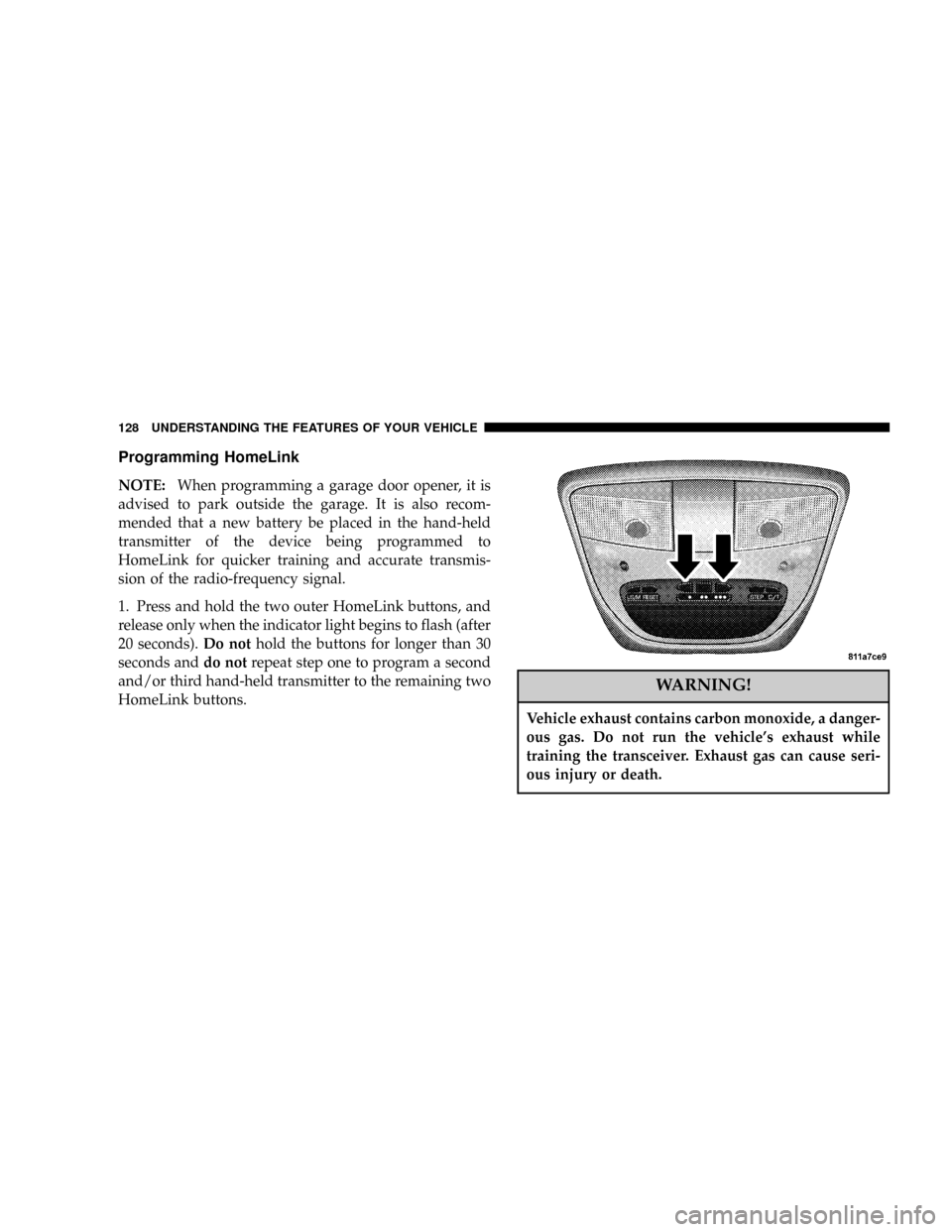
Programming HomeLink
NOTE:When programming a garage door opener, it is
advised to park outside the garage. It is also recom-
mended that a new battery be placed in the hand-held
transmitter of the device being programmed to
HomeLink for quicker training and accurate transmis-
sion of the radio-frequency signal.
1. Press and hold the two outer HomeLink buttons, and
release only when the indicator light begins to flash (after
20 seconds).Do nothold the buttons for longer than 30
seconds anddo notrepeat step one to program a second
and/or third hand-held transmitter to the remaining two
HomeLink buttons.
WARNING!
Vehicle exhaust contains carbon monoxide, a danger-
ous gas. Do not run the vehicle's exhaust while
training the transceiver. Exhaust gas can cause seri-
ous injury or death.
128 UNDERSTANDING THE FEATURES OF YOUR VEHICLE
Page 129 of 386
WARNING!
Your motorized door or gate will open and close
while you are training the Universal Transceiver. Do
not train the transceiver if people or pets are in the
path of the door or gate. A moving door or gate can
cause serious injury or death to people and pets or
damage to objects.
2. Position the end of your hand-held transmitter 1-3
inches (3-8 cm) away from the HomeLink buttons while
keeping the indicator light in view.
3. Simultaneously press and hold both the HomeLink
button that you want to train and the hand-held trans-
mitter buttons.Do not release the buttons until step 4
has been completed.NOTE:Some gate operators and garage door openers
may require you to replace this Programming Step 3 with
procedures noted in the9Gate Operator/Canadian Pro-
gramming9section.
4. The HomeLink indicator light will flash slowly and
then rapidly after HomeLink successfully receives the
frequency signal from the hand-held transmitter. Release
both buttons after the indicator light changes from the
slow to the rapid flash.
5. Press and hold the just trained HomeLink button and
observe the indicator light. If the indicator lightstays on
constantly, programming is completeand your device
should activate when the HomeLink button is pressed
and released.
NOTE:To program the remaining two HomeLink but-
tons, begin with9Programming9step two. Do not repeat
step one.
UNDERSTANDING THE FEATURES OF YOUR VEHICLE 129
3
Page 131 of 386

If you live in Canada or you are having difficulties
programming a gate operator by using the9Program-
ming9procedures (regardless of where you live),replace
(Programming HomeLink(step 3with the following:
NOTE:If programming a garage door opener or gate
operator, it is advised to unplug the device during the
9cycling9process to prevent possible overheating.
3. Continue to press and hold the HomeLink button
while youpress and release every two seconds(9cycle9)
your hand-held transmitter until the frequency signal has
successfully been accepted by HomeLink. (The indicator
light will flash slowly and then rapidly.) Proceed with
9Programming9step four to complete.
Using HomeLink
To operate, simply press and release the programmed
HomeLink button. Activation will now occur for the
trained device (i.e. garage door opener, gate operator,
security system, entry door lock, home/office lighting,etc.). For convenience, the hand-held transmitter of the
device may also be used at any time. In the event that
there are still programming difficulties or questions,
contact HomeLink at:www.homelink.com or 1-800-355-
3515.
Erasing HomeLink Buttons
To erase programming from the three buttons (individual
buttons cannot be erased but can be9reprogrammed9-
note below), follow the step noted:
²Press and hold the two outer HomeLink buttons until
the indicator light begins to flash-after 20 seconds.
Release both buttons. Do not hold for longer that 30
seconds. HomeLink is now in the train (or learning)
mode and can be programmed at any time beginning
with9Programming9- step 2.
UNDERSTANDING THE FEATURES OF YOUR VEHICLE 131
3
Page 132 of 386

Reprogramming a Single HomeLink Button
To program a device to HomeLink using a HomeLink
button previously trained, follow these steps:
1. Press and hold the desired HomeLink button.Do
NOTrelease the button.
2. The indicator light will begin to flash after 20 seconds.
Without releasing the HomeLink button, proceed with
9Programming9step 2
For questions or comments, contact HomeLink at:
www.homelink.com or 1-800-355-3515.
Security
Garage Door Opener Operation with Security
Alarm (if equipped)
If your vehicle is equipped with the Security Alarm
feature, the operation of the HomeLink feature will be
purposely inhibited if the Security Alarm is9Armed9.
This prevents HomeLink operation due to un-authorizedvehicle entry. HomeLink operation will be re-stored
when the Security Alarm has been9Disarmed9.
If you sell your vehicle, be sure to erase the frequencies.
To erase all of the previously trained frequencies, hold
down both outside buttons until the green light begins to
flash.
This device complies with part 15 of FCC rules and with
RSS-210 of Industry Canada. Operation is subject to the
following conditions:
²This device may not cause harmful interference.
²This device must accept any interference that may be
received including interference that may cause undes-
ired operation.
NOTE:Changes or modifications not expressly ap-
proved by the party responsible for compliance could
void the user's authority to operate the equipment.
132 UNDERSTANDING THE FEATURES OF YOUR VEHICLE
Page 159 of 386

Preset Buttons1-6(Radio Mode)
These buttons tune the Radio to the stations that you
commit to push-button memory {12 AM, 12 FM, and 12
Satellite (if equipped) stations}.
Operation Instructions - CD Mode
NOTE:The ignition switch must be in the ON or ACC
position to operate the radio.
Inserting The Compact Disc (Single CD Player)
Gently insert one CD into the CD player with the CD
label facing up. The CD will automatically be pulled into
the CD Player and the CD icon will illuminate on the
radio display.
If the volume control is ON, the unit will switch to CD
mode and begin to play. The display will show the track
number and play time in minutes and seconds. Play will
begin at the start of track one.NOTE:
²You may insert or eject a disc with the radio or ignition
switch OFF.
²If you insert a disc with the ignition ON and the radio
OFF, the CD will automatically be pulled into the CD
Player and the display will show the time of day.
SEEK Button (CD Mode)
Press the right side of the SEEK button for the next track
on the CD. Press the left side of the button to return to the
beginning of the current track, or return to the beginning
of the previous track if the CD is within the first 10
seconds of the current selection.
MUTE Button ((CD Mode)
Press the MUTE button to cancel the sound from the
speakers.9MUTE9will be displayed. Press the MUTE
button a second time and the sound from the speakers
will return. Rotating the volume control or turning OFF
the ignition will also return the sound from the speakers.
INSTRUMENT PANEL AND CONTROLS 159
4
Page 165 of 386
By pressing the SEEK button when the PTY icon is
displayed, the radio will be tuned to the next frequency
station with the same selected PTY name. The PTY
function only operates when in the FM mode.
If a preset button is activated while in the PTY (Program
Type) mode, the PTY mode will be exited and the radio
will tune to the preset station.
Buttons1-6(Radio Mode)
These buttons tune the Radio to the stations that you
commit to push-button memory {12AM, 12 FM, and 12
Satellite (if equipped) stations}.
Operation Instructions - (CD MODE For CD Audio
Play)
NOTE:The ignition switch must be in the ON or ACC
position to operate the radio.
NOTE:Note: This Radio is capable of playing compact
discs (CD), recordable compact discs (CD-R), rewritablecompact discs (CD-RW) compact discs with MP3 tracks
and multisession compact discs with CD and MP3 tracks.
Inserting Compact Disc(s)
CAUTION!
This CD player will accept 4 3/4 inch (12 cm) discs
only. The use of other sized discs may damage the
CD player mechanism.
You may eject a disc with the radio OFF.
If you insert a disc with the ignition ON and the radio
OFF, the display will show the time of day. If you insert
a disc with the ignition OFF, the display will show the
time of day for about 5 seconds, then go out.
If you insert a disc with the ignition ON and the radio
ON, the unit will switch from radio to CD mode and
INSTRUMENT PANEL AND CONTROLS 165
4