instrument panel DODGE DURANGO 2005 2.G Manual PDF
[x] Cancel search | Manufacturer: DODGE, Model Year: 2005, Model line: DURANGO, Model: DODGE DURANGO 2005 2.GPages: 416, PDF Size: 14.25 MB
Page 209 of 416
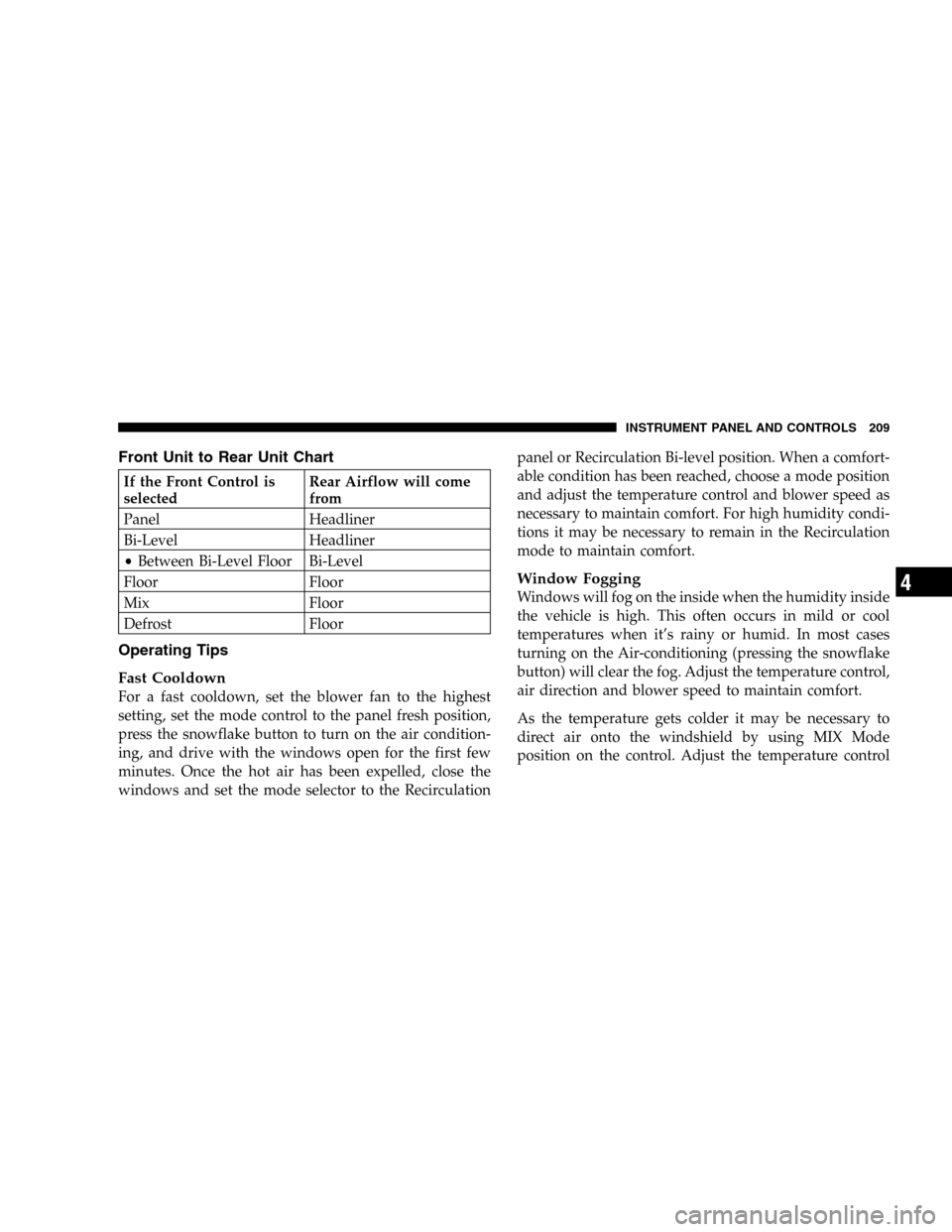
Front Unit to Rear Unit Chart
If the Front Control is
selectedRear Airflow will come
from
Panel Headliner
Bi-Level Headliner
•Between Bi-Level Floor Bi-Level
Floor Floor
Mix Floor
Defrost Floor
Operating Tips
Fast Cooldown
For a fast cooldown, set the blower fan to the highest
setting, set the mode control to the panel fresh position,
press the snowflake button to turn on the air condition-
ing, and drive with the windows open for the first few
minutes. Once the hot air has been expelled, close the
windows and set the mode selector to the Recirculationpanel or Recirculation Bi-level position. When a comfort-
able condition has been reached, choose a mode position
and adjust the temperature control and blower speed as
necessary to maintain comfort. For high humidity condi-
tions it may be necessary to remain in the Recirculation
mode to maintain comfort.
Window Fogging
Windows will fog on the inside when the humidity inside
the vehicle is high. This often occurs in mild or cool
temperatures when it’s rainy or humid. In most cases
turning on the Air-conditioning (pressing the snowflake
button) will clear the fog. Adjust the temperature control,
air direction and blower speed to maintain comfort.
As the temperature gets colder it may be necessary to
direct air onto the windshield by using MIX Mode
position on the control. Adjust the temperature control
INSTRUMENT PANEL AND CONTROLS 209
4
Page 210 of 416
and blower speed to maintain comfort. Interior fogging
on the windshield can be quickly removed by selecting
the defrost mode.
Regular cleaning of the inside of the windows with a
non-filming cleaning solution (vinegar and water works
very well) will help prevent contaminates (cigarette
smoke, perfumes, etc.) from sticking to the windows.
Contaminates increase the rate of window fogging.
Summer Operation
Air conditioned vehicles must be protected with a high
quality antifreeze coolant during summer to provide
proper corrosion protection and to raise the boiling point
of the coolant for protection against overheating. A 50 %
concentration is recommended.
When using the air conditioner in extremely heavy traffic
in hot weather especially when towing a trailer, addi-
tional engine cooling may be required. If this situation is
encountered, operate the transmission in a lower gear.When stopped in heavy traffic, it may be necessary to
shift into NEUTRAL and press the accelerator slightly for
fast idle operation.
Winter Operation
When operating the system during the winter months,
make sure the air intake, located directly in front of the
windshield, is free of ice, slush, snow, or other obstruc-
tions.
210 INSTRUMENT PANEL AND CONTROLS
Page 211 of 416
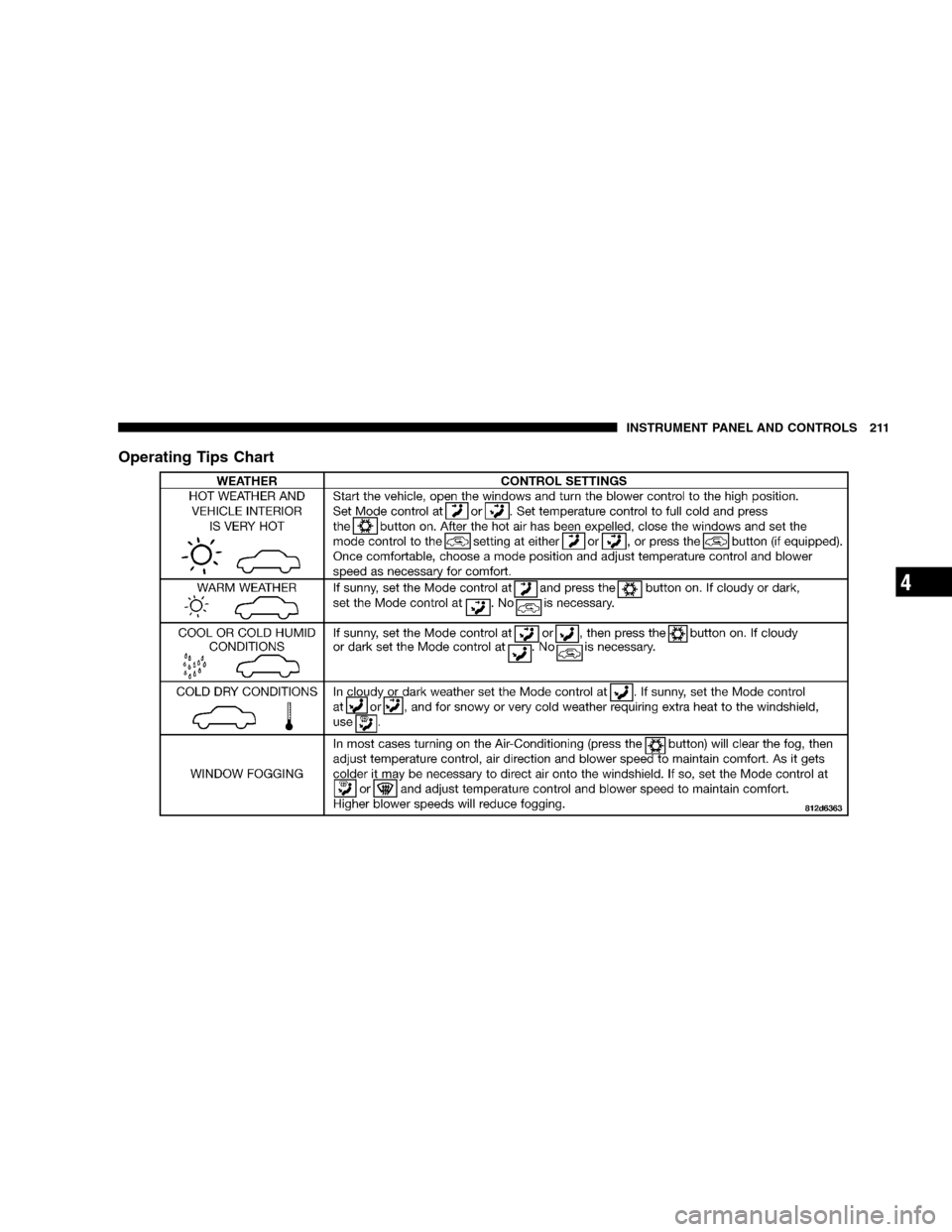
Operating Tips Chart
INSTRUMENT PANEL AND CONTROLS 211
4
Page 212 of 416
REAR WINDOW FEATURES
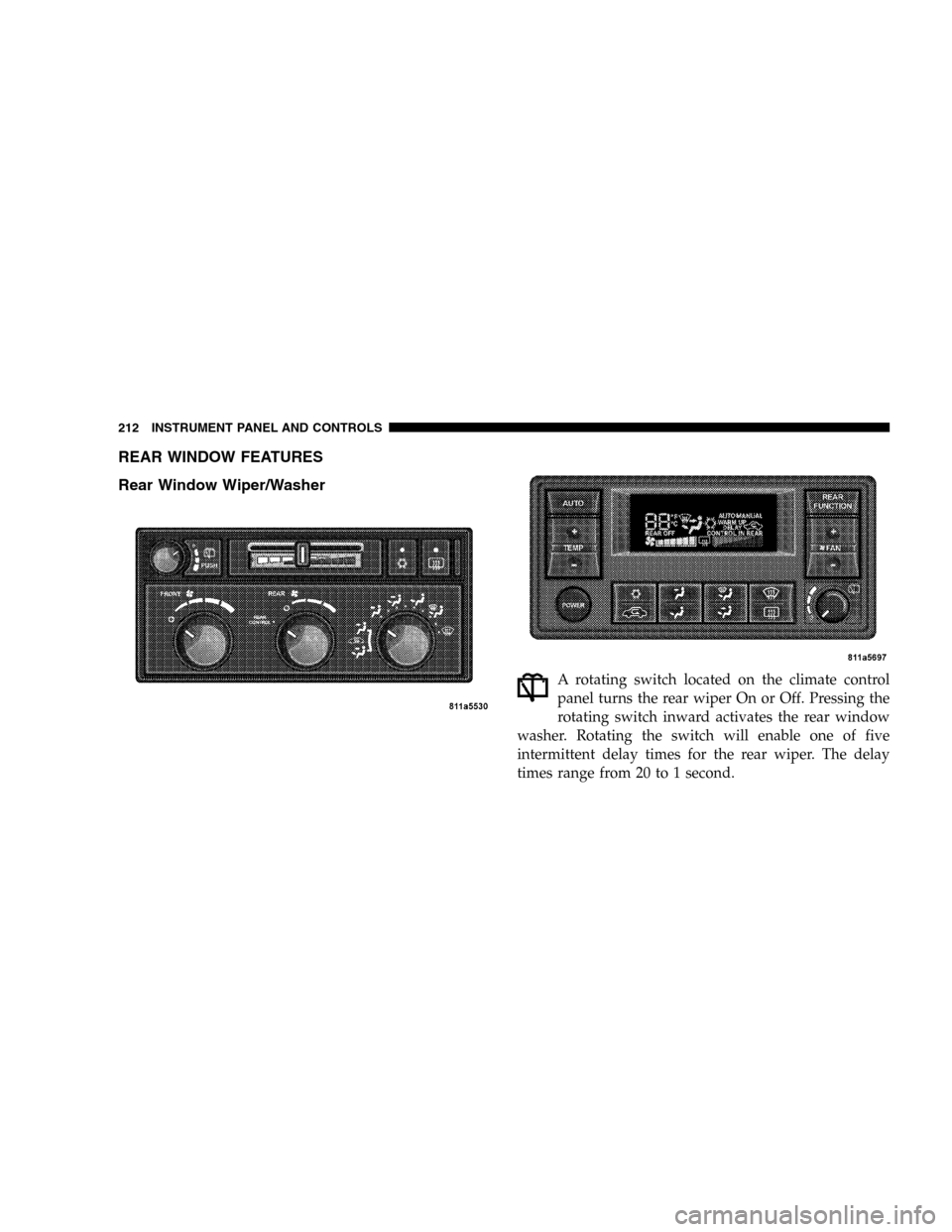
Rear Window Wiper/Washer
A rotating switch located on the climate control
panel turns the rear wiper On or Off. Pressing the
rotating switch inward activates the rear window
washer. Rotating the switch will enable one of five
intermittent delay times for the rear wiper. The delay
times range from 20 to 1 second.
212 INSTRUMENT PANEL AND CONTROLS
Page 213 of 416
If the rear wiper is operating when the ignition is turned
off, the wiper will automatically return to the “Park”
position. When the vehicle is restarted, the wiper will
resume operation.
Rear Window Defrosting
A push-button type switch is located in the climate
control panel. Press the switch and the rear win-
dow defroster and electric remote control heated mirrors
(if equipped) will turn On. An amber indicator on the
push-button will light when the defroster is turned On.
An symbol will be displayed when the defroster is turned
on with an ATC control. Push again to turn Off prior to
time-out. The defroster will automatically turn Off after
fifteen minutes. For ten more minutes of operation, push
the button again. To prevent excessive battery drain, use
the defroster only when the engine is operating.
CAUTION!
Use care when washing the inside of the rear win-
dow to prevent damage to heating elements. Use a
soft cloth and a mild washing solution, wiping
parallel to the heating elements. Also, keep all
objects a safe distance from the window to prevent
damaging the heating elements.
INSTRUMENT PANEL AND CONTROLS 213
4
Page 226 of 416
the fluid partially draining from the torque converter into
the transmission. This condition is normal and will not
cause damage to the transmission. The torque converter
will refill within five seconds of shifting from Park into
any other gear position.
FOUR-WHEEL DRIVE OPERATION
NV 144 Transfer Case Operating
Information/Precautions
The NV 144 is an electric shift transfer case and is
operated by the Four-Wheel-Drive (4WD) Control
Switch, which is located on the instrument panel.
The NV 144 transfer case provides 2 mode positions:
All-Wheel Drive (AWD) and 4-Wheel-Drive LOCK.
The NV 144 transfer case is designed to be driven in for
AWD for normal street and highway conditions (all road
surfaces roads).When additional traction is required, the transfer case
4LOCK position can be used to lock the front and rear
driveshafts together and force the front and rear wheels
to rotate at the same speed. This is accomplished by
rotating the 4WD Control Switch to the 4LOCK position
- see Shifting Procedure section for specific shifting
instructions. The 4LOCK position is designed for loose,
slippery road surfaces only. Driving in the 4LOCK posi-
tion on dry hard surfaced roads may cause increased tire
wear and damage to the driveline components.
Transfer Case Position Indicator Lights
Transfer case position indicator lights are located on the
instrument cluster, and indicate the current and desired
transfer case selection. If there are no indicator lights on
or flashing the transfer case position is All-Wheel Drive
(AWD).
The “SVC 4WD” warning light monitors the electric shift
4WD system. If this light remains on after engine start up
226 STARTING AND OPERATING
Page 228 of 416
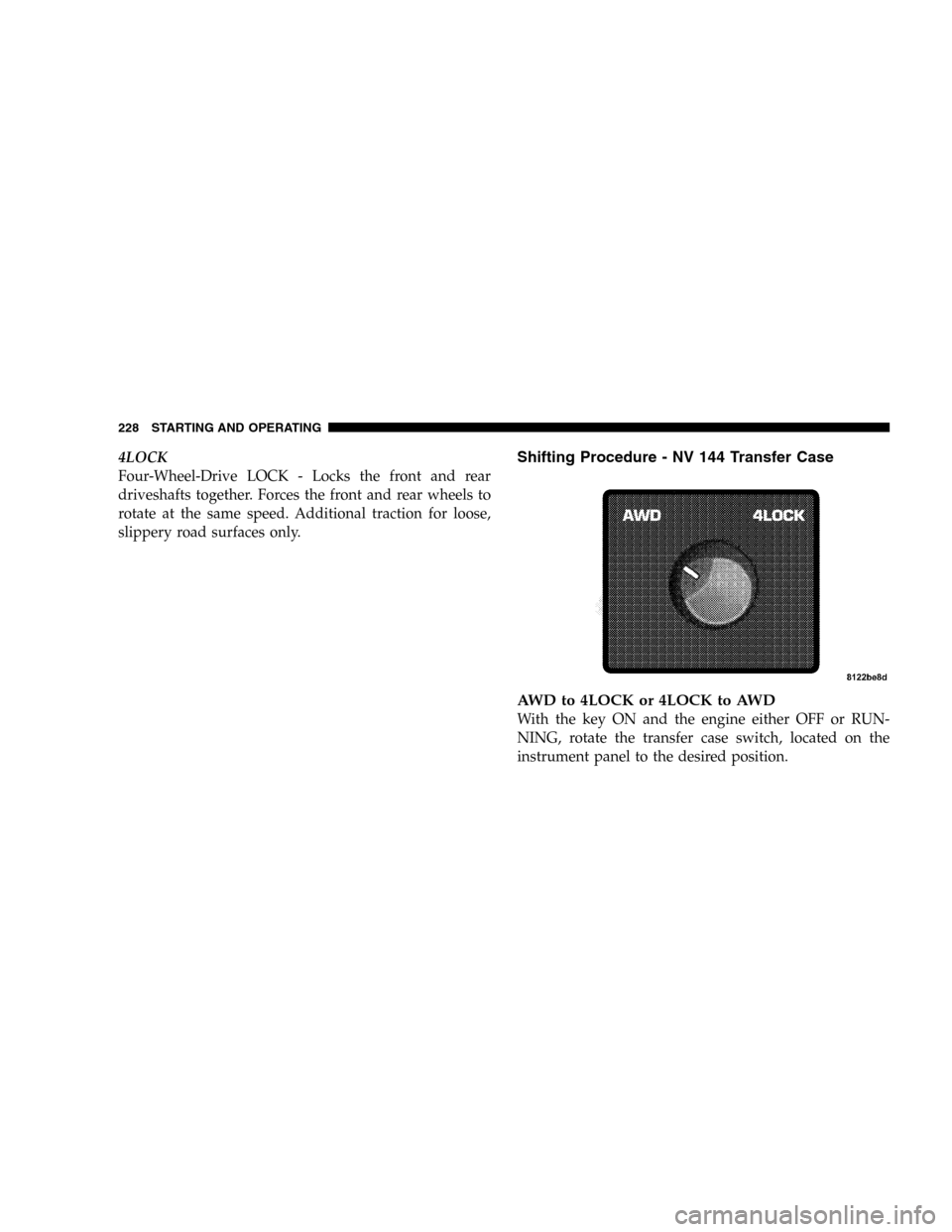
4LOCK
Four-Wheel-Drive LOCK - Locks the front and rear
driveshafts together. Forces the front and rear wheels to
rotate at the same speed. Additional traction for loose,
slippery road surfaces only.Shifting Procedure - NV 144 Transfer Case
AWD to 4LOCK or 4LOCK to AWD
With the key ON and the engine either OFF or RUN-
NING, rotate the transfer case switch, located on the
instrument panel to the desired position.
228 STARTING AND OPERATING
Page 229 of 416
NOTE:Delayed shifting out of 4LOCK may be experi-
enced due to uneven tire wear, low tire pressure, or
excessive vehicle loading.
NOTE:If any of the requirements to select a new
transfer case position have not been met, the transfer case
will not shift.The indicator light will flash and the current
transfer case position will be maintained.To retry a
selection, turn the control knob back to the current
position, wait five (5) seconds, and retry the shift.
NOTE:The 4x4 system will not allow shifts between
AWD/4LOCK if the rear wheels are spinning (no trac-
tion). In this situation the position indicator light will
continue to flash. At this time, reduce speed and stop
spinning the wheels to complete the shift. There may be
a delay up to 13 seconds for the shift to complete after the
wheels have stopped spinning.
NOTE:The ignition key must be ON for a shift to take
place and for the position indicator lights to be operable.If the key is not ON then the shift will not take place and
no position indicator lights will be on or flashing.
NV 244 Generation II Transfer Case Operating
Information / Precautions
The NV 244 Generation II is an electric shift transfer case
and is operated by the 4WD Control Switch, which is
located on the instrument panel.
The NV 244 Generation II transfer case provides 4 mode
positions - Normal all-wheel-drive high range, four-
wheel-drive LOCK, four-wheel-drive low range, and
neutral.
This transfer case is equipped with an inter-axle differ-
ential that allows driving the vehicle in the normal
all-wheel-drive position (AWD) at all times on any given
road surface, including dry hard surfaced roads. The
AWD mode allows the front and rear wheels to rotate at
different speeds. This eliminates driveline binding and
component wear normally associated with driving the
STARTING AND OPERATING 229
5
Page 234 of 416
3. While still rolling, rotate the transfer case control
switch to the desired position.
4. After the position indicator light has stopped flashing,
shift the transmission back into gear.
Alternate Procedure
1. Bring the vehicle to complete stop.
2. With the key ON and the engine either OFF or
RUNNING, shift the transmission into NEUTRAL.
3. Rotate the transfer case control switch to the desired
position.
4. After the position indicator light has stopped flashing,
shift the transmission back into gear.
NOTE:The ignition key must be ON for a shift to take
place and for the position indicator lights to be operable.
If the key is not ON then the shift will not take place and
no position indicator lights will be on or flashing.NOTE:If any of the requirements to select a new
transfer case position have not been met, the transfer case
will not shift. The indicator light will flash and the
current transfer case position will be maintained. To retry
the selection, turn the control knob back to the current
position, wait five (5) seconds, and retry the shift.
PARKING BRAKE
The foot operated parking brake is positioned below the
lower left corner of the instrument panel. To release the
parking brake, pull the parking brake release handle.
234 STARTING AND OPERATING
Page 276 of 416
In Canada, refer to the following website address:http://
www.dodge.ca.
Trailer Towing Requirements
All Dodge Durango trucks are intended to tow trailers up
to 2,000 lbs. (907 kg) without added equipment or
alterations to standard equipment. Your vehicle may be
factory equipped for safe towing of trailers over 2,000 lbs.
(907 kg) with the trailer tow package.The electrical part of
this package includes an instruction sheet and wiring
pigtail for an aftermarket electric trailer brake controller.
These items are stored in the glove box.
If you regularly pull a trailer, regardless of the trailer size,
stop and turn signals on the trailer are recommended for
motoring safety.
When the additional trailer lighting is connected to the
vehicle, the flasher does not provide an indication ofoutside lamp/bulb failure. Therefore, an occasional vi-
sual check around the vehicle is recommended. Once the
trailer is removed the above indication will return to the
vehicle.
WARNING!
The direct connection of hydraulic brake lines from
vehicle brake system to trailer system is not accept-
able. The extra load may cause brake failure and you
may be injured.
All Durango models are equipped with an Anti-Lock
Brake System and require an electrically actuated electric
brake controller. A blue colored connector for electric
brake hookup is located under the instrument panel
above the brake pedal.
276 STARTING AND OPERATING