air condition DODGE DURANGO 2008 2.G User Guide
[x] Cancel search | Manufacturer: DODGE, Model Year: 2008, Model line: DURANGO, Model: DODGE DURANGO 2008 2.GPages: 481, PDF Size: 7.75 MB
Page 258 of 481

feature. Refer to the9Overhead Console-Customer Pro-
grammable Features.9The mode will also be shown in the
display and will change as required during automatic
operation.
NOTE:The system can be put into recirculate mode
without affecting ATC operation. This will prevent out-
side air from entering the vehicle. Use this mode to
temporarily block out any outside odors, smoke, or dust.
Manual Control (ATC)
You also may choose to customize your comfort by
selecting the fan speed and mode manually. Turning the
fan speed knob or any mode button places the system
into manual operation.
While in manual operation there are six fan speeds
available and the choice of any mode. The airflow
temperature is adjusted automatically to maintain the
desired comfort level. You can adjust the temperature by
pressing the + or - TEMP rocker switches.
FAN Control
Use this knob to regulate the amount of air delivered
through the system in any mode you select. Rotation
of the knob to increase (clockwise) or decrease (counter-
clockwise) fan speed.
Air Conditioning Operation
Press this button to enable the air conditioning
system. Compressor operation is automatic when
you press the AUTO button and no snowflake is
shown. A snowflake indicates that the A/C system is
enabled. The snowflake will not be displayed in AUTO
mode even though the A/C system is enabled.
The compressor may operate at any temperature above
32ÉF (0ÉC).
NOTE:The compressor will not engage until the engine
has been running for several seconds. Slight changes in
258 INSTRUMENT PANEL AND CONTROLS
Page 259 of 481

engine speed or power may be noticed when the com-
pressor cycles. This is a normal occurrence since the
compressor will cycle on and off to maintain comfort and
improve fuel economy.
Recirculate Button
Press this button to recirculate the air inside the
vehicle. Outside air is prevented from entering
the vehicle. Use this mode to temporarily block
out any outside odors, smoke, dust or when
rapid cooling of the interior is required.
Manual control of Recirculation is possible only in Panel,
Floor, and Bi-Level modes. It will not operate in Mix, or
Defrost modes. The recirculation symbol will flash three
times indicating recirculation is not available in these
modes.NOTE:If the interior of the windows begin to fog, press
the recirculate button to return to outside air. Some
conditions will cause captured interior air to fog win-
dows when in recirculate mode.
Panel
Air flows through the outlets located in the instru-
ment panel. These outlets can be adjusted to direct
the airflow.
Floor (Heat)
Air flows primarily through the floor outlets lo-
cated under the instrument panel. A small amount
of air is directed through the defrost and side window
demister outlets.
Mix
Outside air flows in equal proportions through the
floor and defroster outlets.
INSTRUMENT PANEL AND CONTROLS 259
4
Page 260 of 481

Bi-Level
Air flows through the outlets located in the instru-
ment panel and those located on the floor.
NOTE:There is a difference in temperature between the
upper and lower outlets for added comfort. The warmer
air goes to the floor outlets. This feature gives improved
comfort during sunny but cool conditions.
Defrost
Outside air is directed to the windshield through
the defroster outlet located at the base of the
windshield and side window demist outlets.
NOTE:The air conditioning compressor operates in
both Mix and Defrost or a blend of these modes, even if
the A/C snowflake button has not been pressed. This
dehumidifies the air to help dry the windshield.
Rear Temperature Control (ATC)
The ªREARº button cycles through the following modes:
Rear Control from Front
This allows the driver or passenger to control the rear
blower speeds rotating the POWER / FAN knob and the
rear temperature using the pass/rear TEMP +/- rocker
switch. While in this mode, pressing the POWER/FAN
knob will turn the rear system off. Pressing the POWER/
FAN knob will turn the rear system back on.
NOTE:The display will show a9REAR9fan speed graph
and a9REAR9digital temp setting.
CONTROL IN REAR
This allows the passengers in the second row seats to
control the blower speed and temperature by means of
the rear control located in the rear of the center floor
console as described under the9Rear Zone Climate
Control.9
NOTE:The front display will show ªCONTROL IN
REAR.º
260 INSTRUMENT PANEL AND CONTROLS
Page 262 of 481

The rear compartment control uses two rotary knobs: one
for the temperature control and the other for the fan
speed control. The mode for the rear air conditioning and
heating system is always controlled by the front control
unit. Fan and temperature can be controlled from the
front control unit or the rear control unit.
Rear Rotary Blower Control
The second row seat occupants have control of the rear
blower speed, only when the front control unit is in the
ªREAR CONTROLº position or CONTROL IN REAR9
for ATC.9
The rear blower switch has an ªOffº position and a range
of blower speeds. Rotating the rear blower control clock-
wise will increase the blower speed.
Rear Rotary Temperature Control
The second row seat occupants have contorl of the rear
temperature only when the front control unit is in the
9REAR CONTROL9position.
To change the temperature in the rear of the vehicle,
rotate the temperature control knob to the right or left.
The blue area indicates cooler temperatures while the red
area indicates warmer temperatures.
262 INSTRUMENT PANEL AND CONTROLS
Page 263 of 481
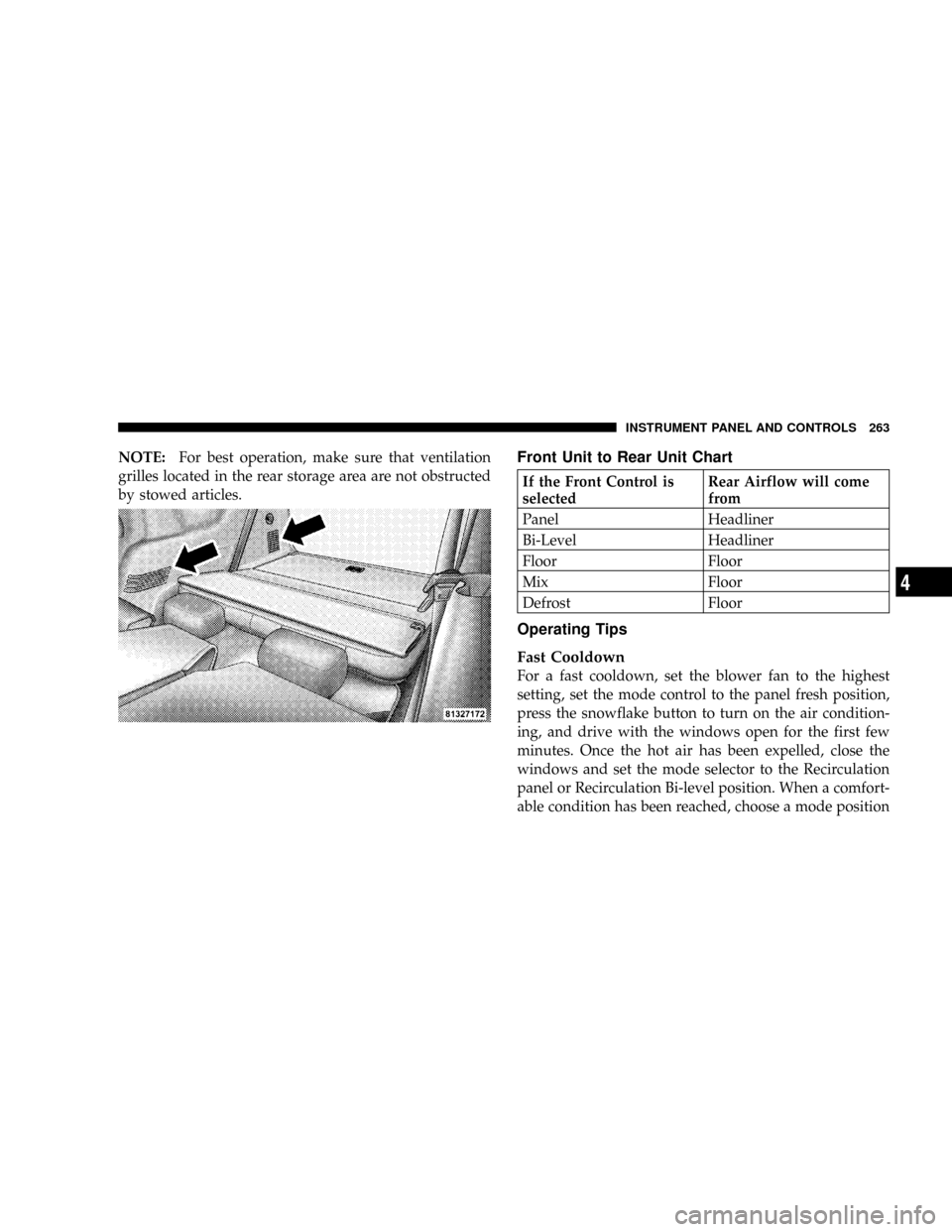
NOTE:For best operation, make sure that ventilation
grilles located in the rear storage area are not obstructed
by stowed articles.Front Unit to Rear Unit Chart
If the Front Control is
selectedRear Airflow will come
from
Panel Headliner
Bi-Level Headliner
Floor Floor
Mix Floor
Defrost Floor
Operating Tips
Fast Cooldown
For a fast cooldown, set the blower fan to the highest
setting, set the mode control to the panel fresh position,
press the snowflake button to turn on the air condition-
ing, and drive with the windows open for the first few
minutes. Once the hot air has been expelled, close the
windows and set the mode selector to the Recirculation
panel or Recirculation Bi-level position. When a comfort-
able condition has been reached, choose a mode position
INSTRUMENT PANEL AND CONTROLS 263
4
Page 264 of 481

and adjust the temperature control and blower speed as
necessary to maintain comfort. For high humidity condi-
tions it may be necessary to remain in the Recirculation
mode to maintain comfort.
Window Fogging
Windows will fog on the inside when the humidity inside
the vehicle is high. This often occurs in mild or cool
temperatures when it's rainy or humid. In most cases
turning on the Air-conditioning (pressing the snowflake
button) will clear the fog. Adjust the temperature control,
air direction and blower speed to maintain comfort.
As the temperature gets colder it may be necessary to
direct air onto the windshield by using MIX Mode
position on the control. Adjust the temperature control
and blower speed to maintain comfort. Interior fogging
on the windshield can be quickly removed by selecting
the defrost mode.Regular cleaning of the inside of the windows with a
non-filming cleaning solution (vinegar and water works
very well) will help prevent contaminates (cigarette
smoke, perfumes, etc.) from sticking to the windows.
Contaminates increase the rate of window fogging.Summer Operation
Air conditioned vehicles must be protected with a high
quality antifreeze coolant during summer to provide
proper corrosion protection and to raise the boiling point
of the coolant for protection against overheating. A 50 %
concentration is recommended.
Winter Operation
When operating the system during the winter months,
make sure the air intake, located directly in front of the
windshield, is free of ice, slush, snow, or other obstruc-
tions. This will also prevent snow ingestion into the
ducts.
264 INSTRUMENT PANEL AND CONTROLS
Page 315 of 481

check tire pressure. Do not make a visual judgement
when determining proper inflation. Radial tires may look
properly inflated even when they are under inflated.
CAUTION!
After inspecting or adjusting the tire pressure, al-
ways reinstall the valve stem cap (if equipped). This
will prevent moisture and dirt from entering the
valve stem, which could damage the valve stem.
Inflation pressures specified on the placard are always
ªcold tire inflation pressure.º Cold tire inflation pressure
is defined as the tire pressure after the vehicle has not
been driven for at least 3 hours, or driven less than 1 mile
(1 km) after a 3 hour period. The cold tire inflation
pressure must not exceed the maximum inflation pres-
sure molded into the tire sidewall.Check tire pressures more often if subject to a wide range
of outdoor temperatures, as tire pressures vary with
temperature changes.
Tire pressures change by approximately 1 psi (7 kPa) per
12 ÉF (7 ÉC) of air temperature change. Keep this in mind
when checking tire pressure inside a garage, especially in
the winter.
Example: If garage temperature = 68 ÉF (20 ÉC) and the
outside temperature = 32 ÉF (0 ÉC) then the cold tire
inflation pressure should be increased by 3 psi (21 kPa),
which equals 1 psi (7 kPa) for every 12 ÉF (7 ÉC) for this
outside temperature condition.
Tire pressure may increase from 2 to 6 psi (13 to 40 kPa)
during operation. DO NOT reduce this normal pressure
build up or your tire pressure will be too low.
STARTING AND OPERATING 315
5
Page 318 of 481

original equipped tire on the front or rear axle of your
vehicle, but it is not. Installation of this limited use spare
tire affects vehicle handling. Since it is not the same tire,
replace (or repair) the original tire and reinstall on the
vehicle at the first opportunity.
WARNING!
The limited use spare tires are for emergency use
only. Installation of this limited use spare tire affects
vehicle handling. With this tire, do not drive more
than 60 mph (100 km/h). Keep inflated to the cold tire
inflation pressure listed on either your tire placard or
limited use spare tire and wheel assembly. Replace
(or repair) the original tire at the first opportunity
and reinstall it on your vehicle. Failure to do so could
result in loss of vehicle control.
Tire Spinning
When stuck in mud, sand, snow, or ice conditions, do not
spin your vehicle's wheels faster than 30 mph (48 km/h)
or for longer than 30 seconds continuously without
stopping when you are stuck.
Refer to ªFreeing A Stuck Vehicleº in Section 6 of this
manual for additional information.
WARNING!
Fast spinning tires can be dangerous. Forces gener-
ated by excessive wheel speeds may cause tire dam-
age or failure. A tire could explode and injure some-
one. Do not spin your vehicle's wheels faster than 30
mph (48 km/h) or for more than 30 seconds continu-
ously when you are stuck, and don't let anyone near
a spinning wheel, no matter what the speed.
318 STARTING AND OPERATING
Page 335 of 481

Materials Added To Fuel
All gasolines sold in the United States are required to
contain effective detergent additives. Use of additional
detergents or other additives is not needed under normal
conditions and would result in unnecessary cost. There-
fore, you should not have to add anything to the fuel.
Fuel System Cautions
CAUTION!
Follow these guidelines to maintain your vehicle's performance:
²The use of leaded gas is prohibited by Federal law. Using
leaded gasoline can impair engine performance, damage the
emission control system.
²An out-of-tune engine, or certain fuel or ignition malfunc-
tions, can cause the catalytic converter to overheat. If you
notice a pungent burning odor or some light smoke, your
engine may be out of tune or malfunctioning and may require
immediate service. Contact your dealer for service assistance.
²When pulling a heavy load or driving a fully loaded vehicle
when the humidity is low and the temperature is high, use a
premium unleaded fuel to help prevent spark knock. If spark
knock persists, lighten the load, or engine piston damage may
result.
²The use of fuel additives which are now being sold as octane
enhancers is not recommended. Many of these products
contain high concentrations of methanol. Fuel system damage
or vehicle performance problems resulting from the use of
such fuels or additives is not the responsibility of the
manufacturer.
STARTING AND OPERATING 335
5
Page 336 of 481

NOTE:Intentional tampering with emissions control sys-
tems can result in civil penalties being assessed against you.
Carbon Monoxide Warnings
WARNING!
Carbon monoxide (CO) in exhaust gases is deadly. Follow the
precautions below to prevent carbon monoxide poisoning:
²Do not inhale exhaust gases. They contain carbon monox-
ide, a colorless and odorless gas which can kill. Never run
the engine in a closed area, such as a garage, and never sit
in a parked vehicle with the engine running for an ex-
tended period. If the vehicle is stopped in an open area
with the engine running for more than a short period,
adjust the ventilation system to force fresh, outside air into
the vehicle.
²Guard against carbon monoxide with proper maintenance.
Have the exhaust system inspected every time the vehicle is
raised. Have any abnormal conditions repaired promptly.
Until repaired, drive with all side windows fully open.
²Keep the liftgate closed when driving your vehicle to
prevent carbon monoxide and other poisonous exhaust
gases from entering the vehicle.
ADDING FUEL
Fuel Filler Cap (Gas Cap)
The gas cap is behind the fuel filler door. If the gas cap is
lost or damaged, be sure the replacement cap is for use
with this vehicle.
NOTE:To avoid contact between fuel cap and paint,
hang tether strap over hook provided on inner fuel door.
CAUTION!
Damage to the fuel system or emission control sys-
tem could result from using an improper fuel tank
filler tube cap (gas cap). A poorly fitting cap could let
impurities into the fuel system.
336 STARTING AND OPERATING