ECO mode DODGE DURANGO 2008 2.G Owner's Manual
[x] Cancel search | Manufacturer: DODGE, Model Year: 2008, Model line: DURANGO, Model: DODGE DURANGO 2008 2.GPages: 481, PDF Size: 7.75 MB
Page 164 of 481

²ªSOUND HORN W/LOCK > YESº ± When ON is
selected, a short horn sound will occur when the
remote keyless entry ªLockº button is pressed. This
feature may be selected with or without the flash lights
on lock/unlock feature. To make your selection, press
and release the RESET button until ªONº or ªOFFº
appears.
²ªFLASH LAMPS w/LOCK >YESº ± When ON is
selected, the front and rear turn signals will flash when
the doors are locked or unlocked with the remote
keyless entry transmitter. This feature may be selected
with or without the sound horn on lock feature
selected. To make your selection, press and release the
RESET button until ªONº or ªOFFº appears.
²ªHEAD LAMP OFF DELAY > 0 SECº ± When this
feature is selected, the driver can choose to have the
head lamps remain on for 0, 30, 60, or 90 seconds whenexiting the vehicle. To make your selection, press and
release the RESET button until ª0,º ª30,º ª60,º or ª90º
appears.
NOTE:The head lamp switch must be in the ªAº auto
mode before this feature will work.
²HEADLAMPS W /WIPERS > YES ± When ON is
selected, the headlamps will automatically turn on
when the wiper switch is activated.
²EASY EXIT SEAT > YES ± When ON is selected, and
the key is removed from the ignition, the driver's seat
will automatically move rearward to allow easy exit.
²TILT MIRRORS IN ªRº > YES ± When On is selected,
and the transmission is put in reverse, the outside
mirrors will tilt downward.
164 UNDERSTANDING THE FEATURES OF YOUR VEHICLE
Page 174 of 481

NOTE:The transmitter has been tested and it complies
with FCC and IC rules. Changes or modifications not
expressly approved by the party responsible for compli-
ance could void the user 's authority to operate the
device.
The term ªIC:º before the certification/registration num-
ber only signifies that Industry Canada technical specifi-
cations were met.
POWER SUNROOF Ð IF EQUIPPED
The power sunroof control is located between the sun
visors on the overhead console.
Pressing the9open9end of the rocker switch once moves
the panel to a comfort stop position. Pressing the switch
a second time causes the panel to continue moving
rearward, up to the full-open position.To close the panel, the9close9end of the switch must be
pressed and held.
Pressing the ªventº button from a fully closed position,
raises the trailing edge of the panel for ventilation. When
the panel is venting, pressing the ªcloseº end or the
rocker switch returns it to the closed position. Both
opening and closing operations in the vent mode occur
only while the switch is held.
NOTE:The sunroof will continue to operate for ten
minutes after the ignition is turned OFF or until the
driver door is opened. This feature may be disabled by
your authorized dealer.
174 UNDERSTANDING THE FEATURES OF YOUR VEHICLE
Page 199 of 481

9ESP/TCS Indicator Light9starts to flash as soon as the
tires lose traction and the ESP system becomes active. The
9ESP/TCS Indicator Light9also flashes when TCS is
active. If the9ESP/TCS Indicator Light9begins to flash
during acceleration, ease up on the accelerator and apply
as little throttle as possible. Be sure to adapt your speed
and driving to the prevailing road conditions. The ªESP/
TCS Indicator Lightº becomes illuminated when the
ESP-Off button has been pressed or ESP is only partially
available caused by lack of engine management or brake
thermal model.
19. Transmission Temperature Indicator
This light indicates that there is excessive trans-
mission fluid temperature that might occur
with severe usage such as trailer towing. If this
light comes on, stop the vehicle and run the
engine at idle or faster, with the transmission in NEU-
TRAL until the light goes off.20. Electronic Throttle Control (ETC)
This light informs you of a problem with the
Electronic Throttle Control system. If a prob-
lem is detected the light will come on while the
engine is running. If the light remains lit with
the engine running your vehicle will usually be drivable,
however, see your dealer for service as soon as possible.
If the light is flashing when the engine is running,
immediate service is required and you may experience
reduced performance, an elevated/rough idle or engine
stall and your vehicle may require towing. The light will
come on when the ignition is first turned on and remain
on for 15 seconds as a bulb check. If the light does not
come on during starting, have the system checked by an
authorized dealer.
21. BRAKE System Warning Light
The red ªBRAKEº warning light will come on when the
ignition key is first turned on, and stay on briefly as a
bulb check. If the bulb does not come on during starting,
INSTRUMENT PANEL AND CONTROLS 199
4
Page 204 of 481

30. 4LOW Indicator
Indicates transfer case is in 4LOW position.
31. Odometer/Trip Odometer Button
Press this button to toggle between the odometer and the
trip odometer display. Holding the button in resets the
trip odometer reading.
ELECTRONIC DIGITAL CLOCK
The clock and radio each use the display panel built into
the radio. A digital readout shows the frequency and/or
time in hours and minutes (depending on your radio
model) whenever the ignition switch is in the ªONº or
ªACCº position.
When the ignition switch is in the ªOFFº position, or
when the radio frequency is being displayed, time keep-
ing is accurately maintained.
On the AM/FM/CD (6-disc) radio the time button alter-
nates the location of the time and frequency on thedisplay. On the AM/FM/CD (single-disc) radio only one
of the two, time or frequency is displayed.
Clock Setting Procedure
1. Press and hold the time button until the hours blink.
2. Adjust the hours by turning the right side Tune /
Audio control.
3. After the hours are adjusted, press the right side Tune
/ Audio control to set the minutes.
4. Adjust the minutes using the right side Tune / Audio
control.
5. To exit, press any button/knob or wait approximately
5 seconds.
204 INSTRUMENT PANEL AND CONTROLS
Page 209 of 481

SALES CODE RES Ð AM/FM STEREO RADIO
WITH CD PLAYER (MP3 AUX JACK)
NOTE:The radio sales code is located on the lower right
side of your radio faceplate.
Operating Instructions - Radio Mode
NOTE:The ignition switch must be in the ON or ACC
position to operate the radio.
Power Switch/Volume Control (Rotary)
Press the ON/VOLUME control knob to turn on the
radio. Press the ON/VOLUME control knob a second
time to turn off the radio.
Electronic Volume Control
The electronic volume control turns continuously (360
degrees) in either direction without stopping. Turning the
ON/VOLUME control knob to the right increases the
volume and to the left decreases it.
When the audio system is turned on, the sound will be
set at the same volume level as last played.
SEEK Buttons
Press and release the SEEK buttons to search for the next
listenable station in AM/FM mode. Press the right switch
RES Radio (Non-Satellite Model Shown -
With Satellite Similar)
INSTRUMENT PANEL AND CONTROLS 209
4
Page 210 of 481

to seek up and the left switch to seek down. The radio
will remain tuned to the new station until you make
another selection. Holding either button will bypass
stations without stopping until you release it.
SCAN Button
Pressing the SCAN button causes the tuner to search for
the next listenable station in AM or FM frequencies,
pausing for 5 seconds at each listenable station before
continuing to the next. To stop the search, press the
SCAN button a second time.
Voice Recognition Button (UConnectŸ Hands Free
Phone) Ð If Equipped
Press this button to operate the Hand Free Phone (UCon-
nectŸ) feature (if equipped). Refer to ªHands-Free Commu-
nication (UConnectŸ)º in Section 3 for more information.
If your vehicle is not equipped with or this feature is not
available on your vehicle, a ªNot Equipped With UCon-
nectº message will display on the radio screen.
Phone Button (UConnectŸ Hands Free Phone) Ð
If Equipped
Press this button to operate the Hand Free Phone (UCon-
nectŸ) feature (if equipped). Refer to ªHands-Free Com-
munication (UConnectŸ)º in Section 3 for more informa-
tion.
If your vehicle is not equipped with or this feature is not
available on your vehicle, a ªNot Equipped With UCon-
nectº message will display on the radio screen.
TIME Button
Press the TIME button and the time of day will display. In
AM or FM mode, pressing the TIME button will switch
between the time and frequency displays.
Clock Setting Procedure
1. Press and hold the TIME button, until the hours blink.
2. Adjust the hours by turning the right side TUNE
control knob.
210 INSTRUMENT PANEL AND CONTROLS
Page 211 of 481

3. After adjusting the hours, press the right side TUNE
control knob to set the minutes. The minutes will begin to
blink.
4. Adjust the minutes using the right side TUNE control
knob. Press the TUNE control knob to save time change.
5. To exit, press any button/knob or wait 5 seconds.
The clock can also be set by pressing the SETUP button.
For vehicles equipped with satellite radio, press the
SETUP button, use the TUNE control to select SET
CLOCK, and then follow the above procedure, starting at
Step 2. For vehicles not equipped with satellite radio,
press the SETUP button and then follow the above
procedure, starting at Step 2.
INFO Button
Press the INFO button for an RDS station (one with call
letters displayed). The radio will return a Radio Text
message broadcast from an FM station (FM mode only).
RW/FF
Pressing the RW (Rewind) or FF (Fast Forward) buttons
causes the tuner to search for the next frequency in the
direction of the arrows. This feature operates in either
AM or FM frequencies.
TUNE Control
Turn the right side rotary control clockwise to increase or
counter-clockwise to decrease the frequency.
Setting the Tone, Balance, and Fade
Press the rotary TUNE control knob and BASS will
display. Turn the TUNE control knob to the right or left to
increase or decrease the Bass tones.
Press the rotary TUNE control knob a second time and
MID will display. Turn the TUNE control knob to the
right or left to increase or decrease the Mid Range tones.
INSTRUMENT PANEL AND CONTROLS 211
4
Page 212 of 481
Press the rotary TUNE control knob a third time and
TREBLE will display. Turn the TUNE control knob to the
right or left to increase or decrease the Treble tones.
Press the rotary TUNE control knob a fourth time and
BALANCE will display. Turn the TUNE control knob to
the right or left to adjust the sound level from the right or
left side speakers.
Press the rotary TUNE control knob a fifth time and
FADE will display. Turn the TUNE control knob to the
left or right to adjust the sound level between the front
and rear speakers.
Press the rotary TUNE control knob again to exit setting
tone, balance, and fade.
MUSIC TYPE Button
Pressing this button once will turn on the Music Type mode
for 5 seconds. Pressing the Music Type button or turning
the TUNE control knob within 5 seconds will allow theprogram format type to be selected. Many radio stations do
not currently broadcast Music Type information.
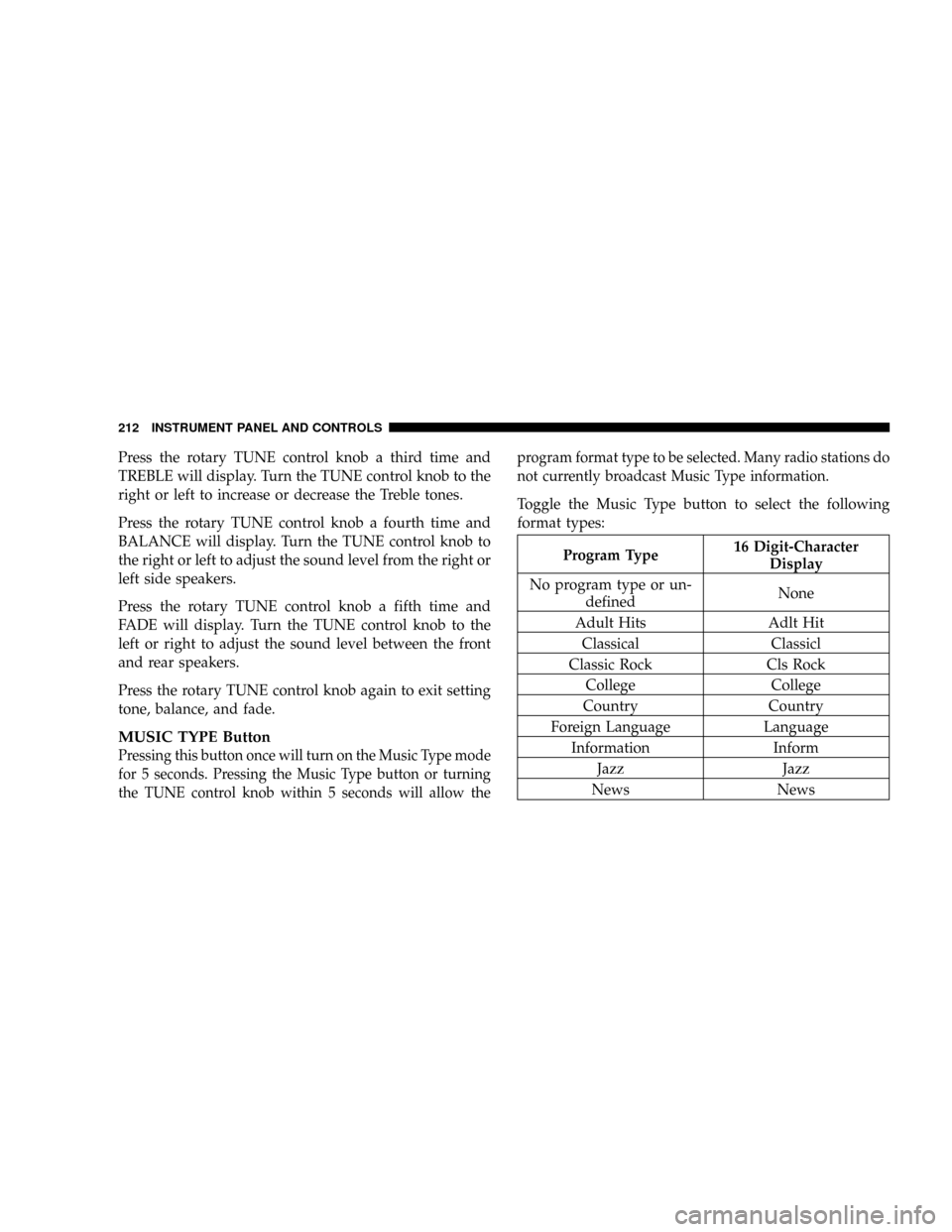
Toggle the Music Type button to select the following
format types:
Program Type16 Digit-Character
Display
No program type or un-
definedNone
Adult Hits Adlt Hit
Classical Classicl
Classic Rock Cls Rock
College College
Country Country
Foreign Language Language
Information Inform
Jazz Jazz
News News
212 INSTRUMENT PANEL AND CONTROLS
Page 214 of 481

AM and FM Buttons
Press the buttons to select AM or FM Modes.
SET Button Ð To Set the Push-Button Memory
When you are receiving a station that you wish to
commit to push-button memory, press the SET button.
The symbol SET 1 will now show in the display window.
Select the button (1-6) you wish to lock onto this station
and press and release that button. If a button is not
selected within 5 seconds after pressing the SET button,
the station will continue to play but will not be stored
into push-button memory.
You may add a second station to each push-button by
repeating the above procedure with this exception: Press
the SET button twice and SET 2 will show in the display
window. Each button can be set for SET 1 and SET 2 in
both AM and FM. This allows a total of 12 AM and 12 FMstations to be stored into push-button memory. The
stations stored in SET 2 memory can be selected by
pressing the push-button twice.
Every time a preset button is used, a corresponding
button number will display.
Buttons1-6
These buttons tune the radio to the stations that you
commit to push-button memory {12 AM and 12 FM
stations}.
DISC Button
Pressing the DISC button will allow you to switch from
AM/FM modes to Disc modes.
214 INSTRUMENT PANEL AND CONTROLS
Page 215 of 481
Operation Instructions - CD MODE for CD and
MP3 Audio Play
NOTE:The ignition switch must be in the ON or ACC
position to operate the radio.
NOTE:This Radio is capable of playing compact discs
(CD), recordable compact discs (CD-R), rewritable com-
pact discs (CD-RW) compact discs with MP3 tracks and
multisession compact discs with CD and MP3 tracks.
Inserting Compact Disc(s)
Gently insert one CD into the CD player with the CD
label facing up. The CD will automatically be pulled into
the CD player and the CD icon will illuminate on the
radio display. If a CD does not go into the slot more than
an inch, a disc may already be loaded and must be ejected
before a new disc can be loaded.
If you insert a disc with the ignition ON and the radio
ON, the unit will switch from radio to CD mode andbegin to play when you insert the disc. The display will
show the disc number, the track number, and index time
in minutes and seconds. Play will begin at the start of
track 1.
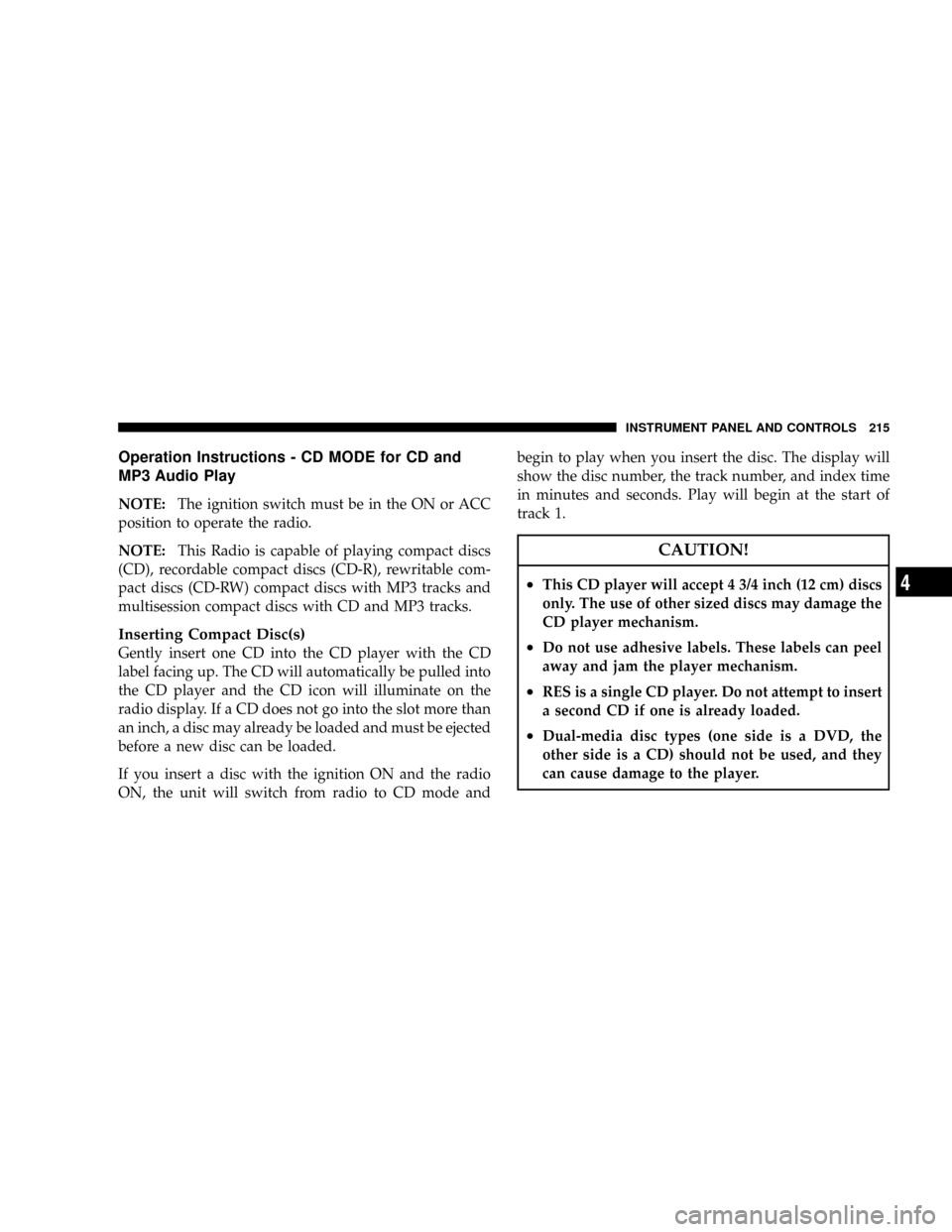
CAUTION!
²This CD player will accept 4 3/4 inch (12 cm) discs
only. The use of other sized discs may damage the
CD player mechanism.
²Do not use adhesive labels. These labels can peel
away and jam the player mechanism.
²RES is a single CD player. Do not attempt to insert
a second CD if one is already loaded.
²Dual-media disc types (one side is a DVD, the
other side is a CD) should not be used, and they
can cause damage to the player.
INSTRUMENT PANEL AND CONTROLS 215
4