warning DODGE DURANGO 2008 2.G Service Manual
[x] Cancel search | Manufacturer: DODGE, Model Year: 2008, Model line: DURANGO, Model: DODGE DURANGO 2008 2.GPages: 481, PDF Size: 7.75 MB
Page 136 of 481

Then push the safety latch lever to the left. It is located
between the grille and hood opening right of the center.
To prevent possible damage, do not slam the hood to
close it. Use a firm downward push at the center frontedge of the hood to ensure that both latches engage.
Never drive your vehicle unless the hood is fully closed,
with both latches engaged.
NOTE:Ensure hood prop rod is fully seated into clip
before closing hood to prevent damage to grille.
WARNING!
If the hood is not fully latched, it could fly up when
the vehicle is moving and block your forward vision.
Be sure all hood latches are fully latched before
driving.
Hood Safety Catch
136 UNDERSTANDING THE FEATURES OF YOUR VEHICLE
Page 145 of 481

WARNING!
Sudden loss of visibility through the windshield
could lead to an accident. You might not see other
vehicles or other obstacles. To avoid sudden icing of
the windshield during freezing weather, warm the
windshield with defroster before and during wind-
shield washer use.NOTE:Avoid using the wiper blades to remove frost or
ice from the windshield.
NOTE:If the front wiper is operating when the ignition
is turned off, the wiper will automatically return to the
9Park9position. When the vehicle is restarted, the wipers
will resume operation.
UNDERSTANDING THE FEATURES OF YOUR VEHICLE 145
3
Page 147 of 481

TILT STEERING COLUMN
To tilt the column, pull rearward on the lever below the
turn signal control and move the wheel up or down, as
desired. Push the lever forward to lock the column firmly
in place.WARNING!
Tilting the steering column while the vehicle is
moving is dangerous. Without a stable steering col-
umn, you could lose control of the vehicle and have
an accident. Adjust the column only while the ve-
hicle is stopped. Be sure it is locked before driving.
Tilt Steering Column Lever
UNDERSTANDING THE FEATURES OF YOUR VEHICLE 147
3
Page 150 of 481

can be reactivated by pushing the speed control switch
ON / OFF button and re-establishing the desired vehicle
SET speed.
Push the ON/OFF button to the ON position. In the
instrument cluster, the word ªCRUISEº illuminates when
the system is on.
To Set At A Desired Speed
When the vehicle has reached the desired speed, press
and release the SET button. Release the accelerator and
the vehicle will operate at the selected speed.
To Deactivate
A soft tap on the brake pedal, normal braking, or pressing
the CANCEL button will deactivate speed control with-
out erasing the memory. Pushing the ON/OFF button to
the OFF position or turning off the ignition erases the
memory.
WARNING!
Leaving the Speed Control ON when not in use is
dangerous. You could accidentally set the system to
cause it to go faster than you want. You could lose
control and have an accident. Always leave the sys-
tem OFF when you aren't using it.
To Resume Speed
To resume a previously set speed, push and release the
RESUME button. Resume can be used at any speed above
(refer to the table below for the speed for your specific
engine).
150 UNDERSTANDING THE FEATURES OF YOUR VEHICLE
Page 152 of 481

To Accelerate For Passing
Depress the accelerator as you would normally. When the
pedal is released, the vehicle will return to the set speed.
NOTE:When driving uphill, at elevations above 2,000
feet (610 meters), or when the vehicle is heavily loaded
(especially when towing) the vehicle may slow below the
SET speed. If the vehicle speed drops below (refer to the
table below for the speed for your specific engine), the
speed control will automatically disengage. If this hap-
pens, you can push down on the accelerator pedal to
maintain the desired speed.
Vehicles equipped with a Automatic transmission may
exhibit several downshifts under the above conditions.
To reduce the frequency of the downshifts and to im-
prove vehicle performance, it is advisable to lock out
overdrive by pressing the ªTOW/HAULº button located
at the end of the gear shifter.WARNING!
Speed Control can be dangerous where the system
can't maintain a constant speed. Your vehicle could
go too fast for the conditions, and you could lose
control. An accident could be the result. Don't use
Speed Control in heavy traffic or on roads that are
winding, icy, snow-covered, or slippery.
REAR PARK ASSIST SYSTEM Ð IF EQUIPPED
NOTE:The manufacturer suggest disabling the Rear
Park Assist System when towing a trailer. Refer to
Overhead Console with Electronic Vehicle Information
(EVIC) ± If Equipped, Personal Settings (Customer Pro-
grammable Features) in section 3 of this Owner Manual.
This system is used to help drivers determine if an obstacle
is in the way of the vehicle while it is backing up in
addition to the use of inside rearview and outside mirrors.
152 UNDERSTANDING THE FEATURES OF YOUR VEHICLE
Page 153 of 481

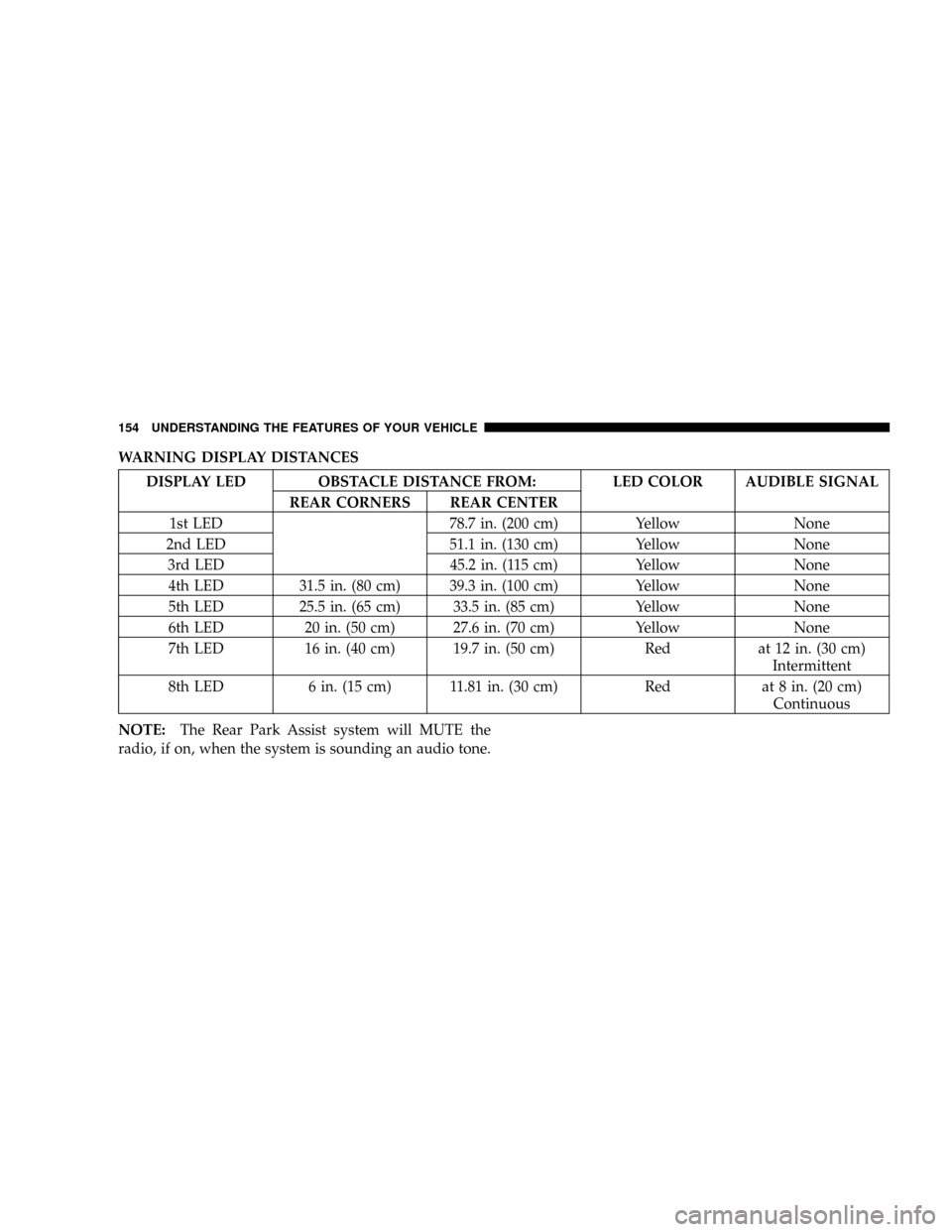
When the driver selects Reverse the system scans for
objects behind the vehicle using four sensors located in
the rear bumper. Objects can be detected from up to 78.7
inches (200 cm). A warning display above the rear
window provides both visible and audible warnings
indicating the range of the object.The warning display contains two sets of yellow and red
LEDs, one set to warn of obstacles behind the left rear of
the vehicle and the other set to warn of obstacles behind
the right rear of the vehicle. The driver can view the LEDs
either through the rear view mirror or by looking at the
display above the rear window.
The system dimly illuminates the two outer most yellow
LEDs when it is ON and detecting no obstacles. The
following chart shows the warning display operation
when the system is detecting an obstacle:
Rear Park Assist LED's
UNDERSTANDING THE FEATURES OF YOUR VEHICLE 153
3
Page 154 of 481
WARNING DISPLAY DISTANCES
DISPLAY LED OBSTACLE DISTANCE FROM: LED COLOR AUDIBLE SIGNAL
REAR CORNERS REAR CENTER
1st LED 78.7 in. (200 cm) Yellow None
2nd LED 51.1 in. (130 cm) Yellow None
3rd LED 45.2 in. (115 cm) Yellow None
4th LED 31.5 in. (80 cm) 39.3 in. (100 cm) Yellow None
5th LED 25.5 in. (65 cm) 33.5 in. (85 cm) Yellow None
6th LED 20 in. (50 cm) 27.6 in. (70 cm) Yellow None
7th LED 16 in. (40 cm) 19.7 in. (50 cm) Red at 12 in. (30 cm)
Intermittent
8th LED 6 in. (15 cm) 11.81 in. (30 cm) Red at 8 in. (20 cm)
Continuous
NOTE:The Rear Park Assist system will MUTE the
radio, if on, when the system is sounding an audio tone.
154 UNDERSTANDING THE FEATURES OF YOUR VEHICLE
Page 155 of 481

WARNING!
²Drivers must be careful when backing up even
when using the Rear Park Assist System. Always
check carefully behind your vehicle, look behind
you, and be sure to check for pedestrians, animals,
other vehicles, obstructions, and blind spots before
backing up. You are responsible for safety and must
continue to pay attention to your surroundings.
Failure to do so can result in serious injury or death.
²Before using the Rear Park Assist System, it is
strongly recommended that the ball mount and
hitch ball assembly is disconnected from the ve-
hicle when the vehicle is not used for towing.
Failure to do so can result in injury or damage to
vehicles or obstacles because the hitch ball will be
much closer to the obstacle than the rear fascia
when the warning display turns the red LEDs ON.
Also, the sensors could detect the ball mount and
hitch ball assembly, depending on its size and
shape, giving a false indication that an obstacle is
behind the vehicle.
CAUTION!
²The Rear Park Assist System is only a parking aid
and it is unable to recognize every obstacle, in-
cluding small obstacles. Parking curbs might be
temporarily detected or not detected at all. Ob-
stacles located above or below the sensors will not
be detected when they are in close proximity.
²The vehicle must be driven slowly when using the
Rear Park Assist System to be able to stop in time
when the obstacle is detected. It is recommended
that the driver looks over his/her shoulder when
using the Rear Park Assist System.
NOTE:
²Ensure that the rear bumper is free of dirt and debris
to keep the system operating properly.
UNDERSTANDING THE FEATURES OF YOUR VEHICLE 155
3
Page 157 of 481
WARNING!
Drivers must be careful when backing up even when
using the Rear Camera System. Always check care-
fully behind your vehicle, and be sure to check for
pedestrians, animals, other vehicles, obstructions, or
blind spots before backing up. You are responsible
for the safety of your surroundings and must con-
tinue to pay attention while backing up. Failure to do
so can result in serious injury or death.
CAUTION!
²To avoid vehicle damage the Rear Camera System
should only be used as a parking aid and is unable
to view every obstacle, or object in your drive
path.
²To avoid vehicle damage the vehicle must be
driven slowly when using the Rear Camera Sys-
tem to be able to stop in time when an obstacle is
seen. It is recommended that the driver look fre-
quently over his/her shoulder when using the Rear
Camera System.
NOTE:If snow, ice, mud, or anything else builds up on
the camera lens, clean the lens, rinse with water, and dry
with a soft cloth. Do not cover the lens.
UNDERSTANDING THE FEATURES OF YOUR VEHICLE 157
3
Page 161 of 481

NOTE:Significant changes in driving style or vehicle
loading will greatly affect the actual drivable distance of
the vehicle, regardless of the DTE displayed value.
²When the DTE value is less than 30 miles (48 km)
estimated driving distance, the DTE display will change
to a text display of9LOW FUEL.9This display will
continue until the vehicle runs out of fuel. Adding a
significant amount of fuel to the vehicle will turn off the
9LOW FUEL9text and a new DTE value will display.
²Global Reset ± If the RESET button is pressed twice
within 2 seconds while in any of the 3 resettable
displays (AVG.MPG, ET (ELAPSED TIME) and TRIP)
System Status (EVIC Displays)
When the appropriate conditions exist, the Electronic
Vehicle Information Center (EVIC) displays the following
messages:
²TURN SIGNALS ON (with a continuous warning chime)
²PERSONAL SETTINGS NOT AVAILABLE ± Vehicle
Not in Park
²LEFT/RIGHT FRONT DOOR AJAR (one or more,
with a single chime if speed is above 1 mph)
²LEFT/RIGHT REAR DOOR AJAR (one or more, with
a single chime if speed is above 1 mph)
²DOOR(S) AJAR (with a single chime if vehicle is in
motion)
²LOW WASHER FLUID (with a single chime)
²OIL CHANGE REQUIRED (with a single chime)
²SERVICE PARK ASSIST SYSTEM (with a single chime)
²SERVICE PARK ASSIST SYSTEM
²COOLANT LOW
²LIFTGATE OPEN
²CHECK TPM SYSTEM (with single chime) (Premium
TPM System Only)
UNDERSTANDING THE FEATURES OF YOUR VEHICLE 161
3