warning DODGE DURANGO 2008 2.G Workshop Manual
[x] Cancel search | Manufacturer: DODGE, Model Year: 2008, Model line: DURANGO, Model: DODGE DURANGO 2008 2.GPages: 481, PDF Size: 7.75 MB
Page 168 of 481
1.Turn the ignition switch to the ON/RUN position.
2.Press the menu buttonuntil Personal Set-
tings is displayed.
3.Press the STEP buttonuntil ªCompass Varianceº is
displayed.
4.Press and release RESET buttonuntil the proper
variance zone is selected according to the variance map.
5.Press and release the Compass/Temperature button
to exit.
GARAGE DOOR OPENER Ð IF EQUIPPED
HomeLinktreplaces up to three remote controls (hand
held transmitters) that operate devices such as garage
door openers, motorized gates, lighting, or home security
systems. The HomeLinktunit operates off of your vehi-
cle's battery.NOTE:HomeLinktis disabled when the Vehicle Secu-
rity Alarm is active.
WARNING!
Your motorized door or gate will open and close while
you are training the Universal Transceiver. Do not
train the transceiver if people or pets are in the path of
the door or gate. Only use this transceiver with a
garage door opener that has a ªstop and reverseº
feature as required by federal safety standards. This
includes most garage door opener models manufac-
tured after 1982. Do not use a garage door opener
without these safety features. Call toll-free 1±800±355±
3515 or, on the Internet at www.HomeLink.com for
safety information or assistance.
168 UNDERSTANDING THE FEATURES OF YOUR VEHICLE
Page 169 of 481
WARNING!
Vehicle exhaust contains carbon monoxide, a danger-
ous gas. Do not run your vehicle in the garage while
training the transceiver. Exhaust gas can cause seri-
ous injury or death.
Programming HomeLinkT
Before You Begin
If you have not trained any of the HomeLinktbuttons,
erase all channels before you begin training.
To do this, press and hold the two outside buttons for 20
seconds. The EVIC will display ªCLEARING CHAN-
NELS.º Release the buttons when the EVIC message
states ªCHANNELS CLEARED.º
It is recommended that a new battery be placed in the
hand-held transmitter of the device being programmedto HomeLinktfor more efficient training and accurate
transmission of the radio-frequency signal.
Your vehicle should be parked outside of the garage
while training.
1. Turn the ignition switch to the ON/RUN position.
2. Place the hand-held transmitter 1±3 inches (3±8 cm)
from the HomeLinktbuttons while keeping the EVIC
display in view.
For optimal training, point the battery end of the hand-
held transmitter away from the HomeLinkt.
3. Simultaneously press and hold both the chosen
HomeLinktbutton and the hand-held transmitter button
until the EVIC display changes from ªCHANNEL #
TRAININGº to ªCHANNEL # TRAINED.º
Then release both the HomeLinktand hand-held trans-
mitter buttons.
UNDERSTANDING THE FEATURES OF YOUR VEHICLE 169
3
Page 175 of 481

Express Open Feature
During the Express Open operation, any movement of
the switch will stop the sunroof and it will remain in a
partial open position. Again, momentarily pressing the
switch rearward will activate the Express Open Feature.
To close the sunroof, hold the switch in the forward
position. Again, any release of the switch will stop the
movement and the sunroof will remain in a partial open
condition until the switch is pushed forward again. To
close fully, hold the switch in the forward position until
the glass movement has stopped.
The sunshade can be opened manually. It will also open
as the sunroof opens. The sunshade cannot be closed if
the sunroof is open.WARNING!
Never leave children alone in a vehicle. Leaving
children in a vehicle unattended is dangerous for a
number of reasons. A child or others could be seri-
ously or fatally injured. Don't leave the keys in the
ignition. A child could operate power windows,
other controls, or move the vehicle.
UNDERSTANDING THE FEATURES OF YOUR VEHICLE 175
3
Page 176 of 481

WARNING!
In an accident, there is a greater risk of being thrown
from a vehicle with an open sunroof. You could also
be seriously injured or killed. Always fasten your
seat belt properly and make sure all passengers are
properly secured too.
Do not allow small children to operate the sunroof.
Never allow fingers or other body parts, or any object
to project through the sunroof opening. Injury may
result.
Wind Buffeting
Wind buffeting can be described as the perception of
pressure on the ears or a helicopter type sound in the
ears. Your vehicle may exhibit wind buffeting with the
windows down, or the sunroof (if equipped) in certain
open or partially open positions. This is a normal occur-
rence and can be minimized. If the buffeting occurs with
the rear windows open, open the front and rear windows
together to minimize the buffeting. If the buffeting occurs
with the sunroof open, adjust the sunroof opening to
minimize the buffeting or open any window.
Sunroof Maintenance
Use only a nonabrasive cleaner and a soft cloth to clean
the glass panel.
176 UNDERSTANDING THE FEATURES OF YOUR VEHICLE
Page 178 of 481
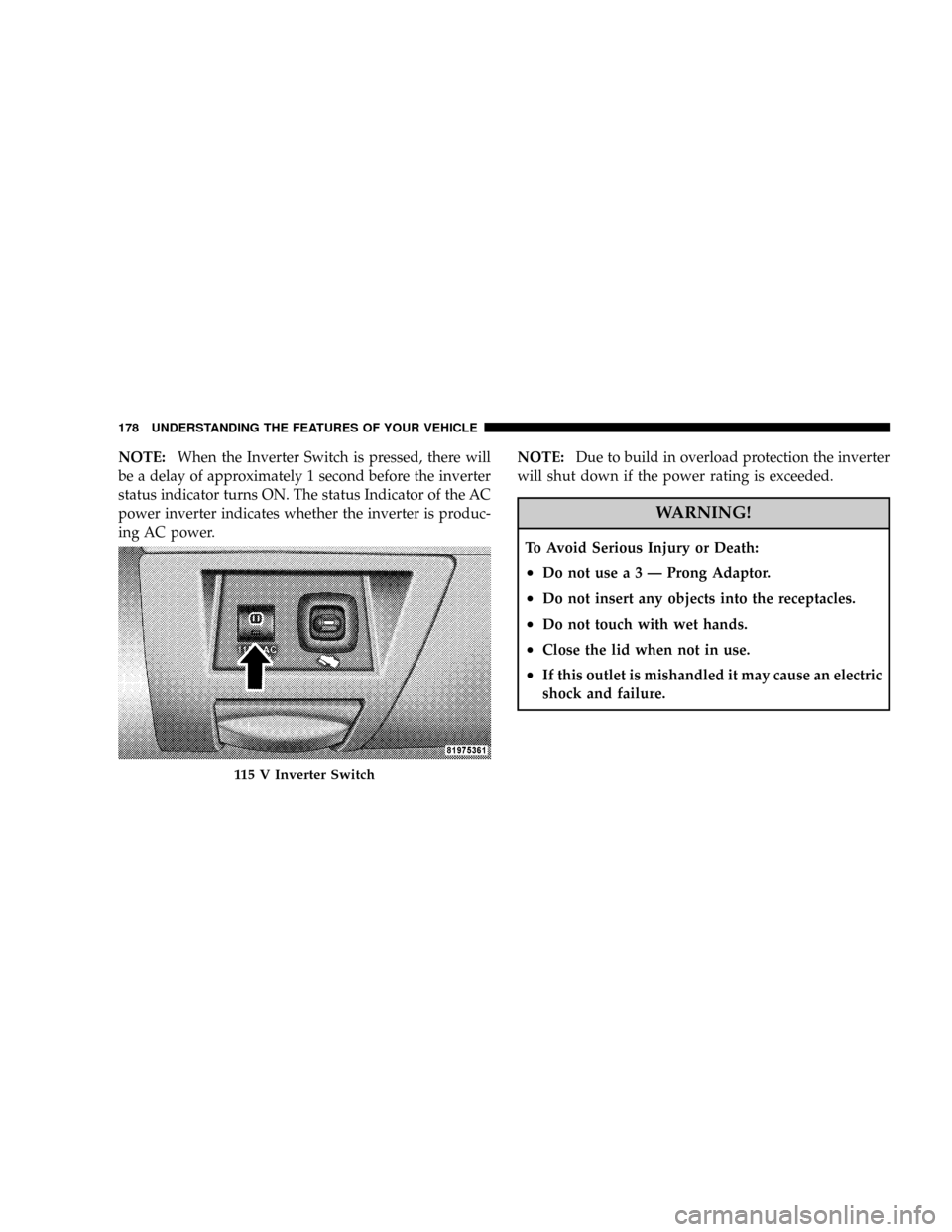
NOTE:When the Inverter Switch is pressed, there will
be a delay of approximately 1 second before the inverter
status indicator turns ON. The status Indicator of the AC
power inverter indicates whether the inverter is produc-
ing AC power.NOTE:Due to build in overload protection the inverter
will shut down if the power rating is exceeded.
WARNING!
To Avoid Serious Injury or Death:
²Donotusea3ÐProng Adaptor.
²Do not insert any objects into the receptacles.
²Do not touch with wet hands.
²Close the lid when not in use.
²If this outlet is mishandled it may cause an electric
shock and failure.
115 V Inverter Switch
178 UNDERSTANDING THE FEATURES OF YOUR VEHICLE
Page 185 of 481
WARNING!
Cargo must be securely tied before driving your
vehicle. Improperly secured loads can fly off the
vehicle, particularly at high speeds, resulting in per-
sonal injury or property damage. Follow the roof rack
Cautions when carrying cargo on your roof rack.
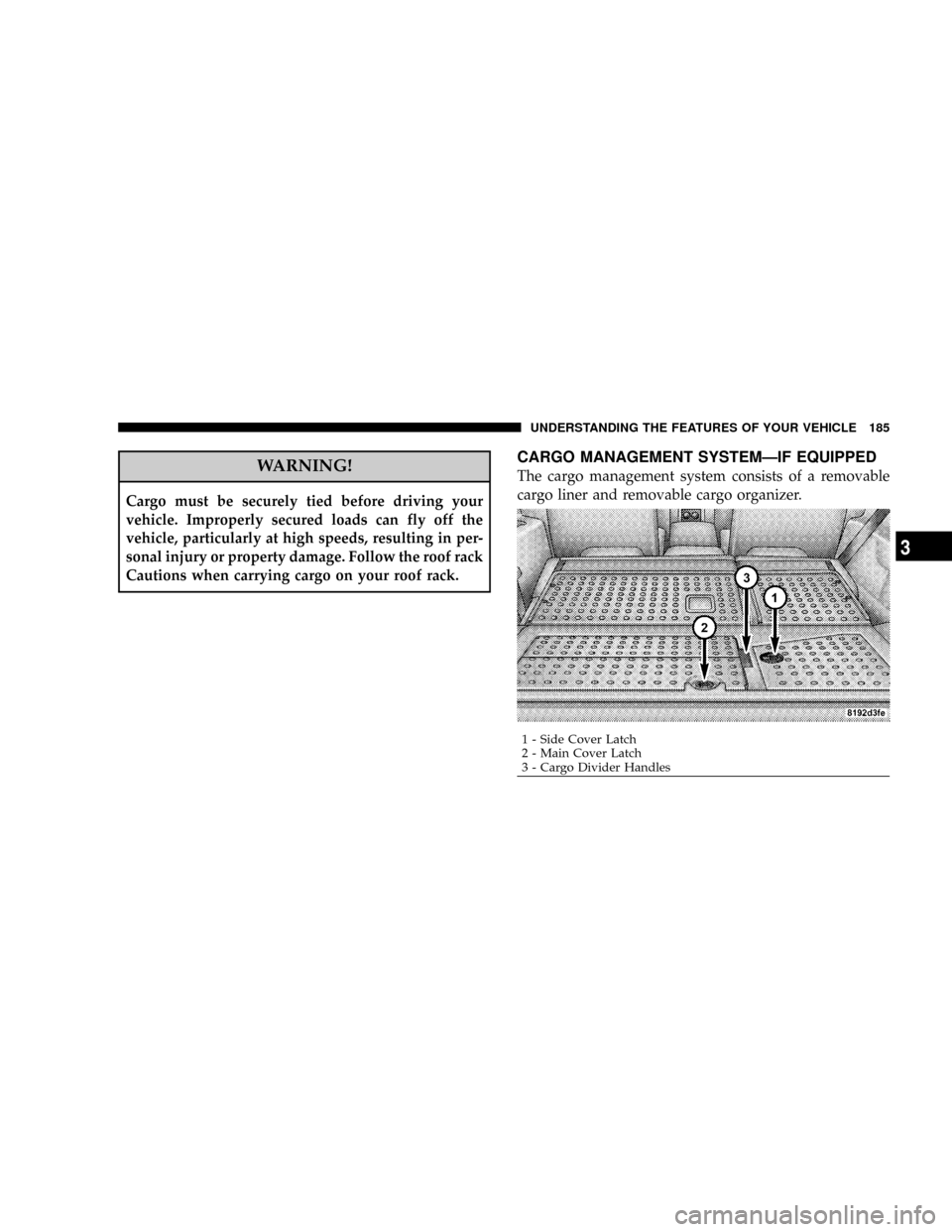
CARGO MANAGEMENT SYSTEMÐIF EQUIPPED
The cargo management system consists of a removable
cargo liner and removable cargo organizer.
1 - Side Cover Latch
2 - Main Cover Latch
3 - Cargo Divider HandlesUNDERSTANDING THE FEATURES OF YOUR VEHICLE 185
3
Page 194 of 481

left/right turn signal is left on with the engine RPM
vehicle speed greater than 15 mph (24 km/h) for more
than one mile.
4. Low Fuel Warning Light
This indicator lights when the fuel gauge reads
1/16 of a tank or less.
5. High Beam Indicator
Indicates that headlights are on high beam.
6. Seat Belt Reminder Light
This light comes on for several seconds after the
ignition is turned ON as a reminder to ªbuckle
up.º This light will remain on as long as the seat
belt remains unbuckled. If this light flashes, it indicates a
fault in the airbag system. Have the system checked by
an authorized dealer.7. Coolant Temperature Light
This light warns of an overheated engine condi-
tion. For a bulb check, this light will come on
momentarily when the ignition is turned On. If the
light turns on while driving, stop the vehicle, shift into N
(Neutral) and increase the engine speed for 2 to 3
minutes. If the temperature reading does not return to
normal, seek authorized service immediately.
CAUTION!
Driving with a hot engine cooling system could
damage your vehicle. If the temperature light is on,
safely pull over and stop the vehicle. Idle the vehicle
in neutral with the air conditioner turned off until
the light turns off. If the if the light remains on, turn
the engine off immediately, and call for service.
194 INSTRUMENT PANEL AND CONTROLS
Page 195 of 481
WARNING!
A hot engine cooling system is dangerous. You or
others could be badly burned by steam or boiling
coolant. You may want to call a service center if your
vehicle overheats. If you decide to look under the
hood yourself, see Section 7 of this manual. Follow
the warnings under the Cooling System Pressure Cap
paragraph.
8. Speedometer
Shows the vehicles speed.
9. Voltage Light
This light monitors the electrical system voltage.
The light should turn on momentarily as the
engine is started. If the light stays on or turns on while
driving, it indicates a problem with the charging system.
Immediate service should be obtained.10. Security Light
This light will flash rapidly for approximately 15 seconds
when the vehicle theft alarm is arming. The light will
flash at a slower speed continuously after the alarm is set.
The security light will also come on for about three
seconds when the ignition is first turned on.
11. ABS Warning Light
This light monitors the Anti-Lock Brake System
which is described elsewhere in this manual.
This light will come on when the ignition key is
turned to the ON position and may stay on for
approximately 3 seconds. If this light remains on or
comes on during driving, it indicates that the Anti-Lock
portion of the brake system is not functioning and that
service is required. See your authorized dealer immedi-
ately. With the ABS malfunctioning, the BAS and ESP are
also switched off. Both malfunction indicator lights illu-
minate with the engine running. If the charging voltage
falls below 10 volts, the malfunction indicator light
INSTRUMENT PANEL AND CONTROLS 195
4
Page 197 of 481

The two trip odometers show individual trip mileage. To
switch from odometer to trip odometers, press and
release the Trip Odometer button.
To reset a trip odometer, display the desired trip odom-
eter to be reset then push and hold the button until the
display resets (approximately 2 seconds).
Vehicle Warning Messages
For non-Electronic Vehicle Information Center (EVIC)
equipped vehicles, and the appropriate conditions exist,
messages such as ªdoor ajarº (indicates that a door(s)
may be ajar), ªgASCAPº (which indicates that your gas
cap is possibly loose or damaged),9CHANgE OILº
(indicates that the engine oil should be change), ªLo-
WASHº (low washer fluid), and ªnoFUSEº (indicates
that the IOD fuse is removed from the Integrated Power
Module), will display in the odometer.NOTE:If the vehicle is equipped with an EVIC, most
warnings will display in the EVIC. For additional infor-
mation, refer to ªElectronic Vehicle Information Center
(EVIC) Ð If Equippedº in Section 3.
The outside temperature will display in the odometer for
non-EVIC equipped vehicles. Pressing the trip odometer
reset button toggles the feature back to the odometer.
Change Oil Message
Your vehicle is equipped with an engine oil change
indicator system. The ªChange Oilº message will flash in
the instrument cluster odometer for approximately 12
seconds after a single chime has sounded to indicate the
next scheduled oil change interval. The engine oil change
indicator system is duty cycle based, which means the
engine oil change interval may fluctuate dependent upon
your personal driving style.
INSTRUMENT PANEL AND CONTROLS 197
4
Page 199 of 481

9ESP/TCS Indicator Light9starts to flash as soon as the
tires lose traction and the ESP system becomes active. The
9ESP/TCS Indicator Light9also flashes when TCS is
active. If the9ESP/TCS Indicator Light9begins to flash
during acceleration, ease up on the accelerator and apply
as little throttle as possible. Be sure to adapt your speed
and driving to the prevailing road conditions. The ªESP/
TCS Indicator Lightº becomes illuminated when the
ESP-Off button has been pressed or ESP is only partially
available caused by lack of engine management or brake
thermal model.
19. Transmission Temperature Indicator
This light indicates that there is excessive trans-
mission fluid temperature that might occur
with severe usage such as trailer towing. If this
light comes on, stop the vehicle and run the
engine at idle or faster, with the transmission in NEU-
TRAL until the light goes off.20. Electronic Throttle Control (ETC)
This light informs you of a problem with the
Electronic Throttle Control system. If a prob-
lem is detected the light will come on while the
engine is running. If the light remains lit with
the engine running your vehicle will usually be drivable,
however, see your dealer for service as soon as possible.
If the light is flashing when the engine is running,
immediate service is required and you may experience
reduced performance, an elevated/rough idle or engine
stall and your vehicle may require towing. The light will
come on when the ignition is first turned on and remain
on for 15 seconds as a bulb check. If the light does not
come on during starting, have the system checked by an
authorized dealer.
21. BRAKE System Warning Light
The red ªBRAKEº warning light will come on when the
ignition key is first turned on, and stay on briefly as a
bulb check. If the bulb does not come on during starting,
INSTRUMENT PANEL AND CONTROLS 199
4