door lock DODGE DURANGO 2015 3.G Owner's Manual
[x] Cancel search | Manufacturer: DODGE, Model Year: 2015, Model line: DURANGO, Model: DODGE DURANGO 2015 3.GPages: 689, PDF Size: 20.05 MB
Page 39 of 689
If one of the vehicle doors is open, and the door panel
switch is used to lock the vehicle, once all open doors
have been closed, the vehicle checks the inside and
outside of the vehicle for any valid Passive Entry RKE
transmitters. If one of the vehicle’s Passive Entry RKE
transmitters is detected inside the vehicle, and no other
valid Passive Entry RKE transmitters are detected out-
side the vehicle, the Passive Entry System automatically
unlocks all vehicle doors and chirps the horn three times
(on the third attempt, ALL doors will lock, and the
Passive Entry RKE transmitter can be locked in the
vehicle).
To Unlock/Enter The Liftgate
The liftgate passive entry unlock feature is built into the
electronic liftgate handle. With a valid Passive Entry RKE
transmitter within 3 ft (1.0 m) of the liftgate, push the
electronic liftgate handle for a power open on vehicles
equipped with Power Liftgate. Push the electronic lift-
gate handle and lift for Manual Liftgate vehicles.
NOTE:If the vehicle is unlocked, the liftgate will open
with the handle and no RKE Transmitter is required.
2
THINGS TO KNOW BEFORE STARTING YOUR VEHICLE 37
Page 40 of 689
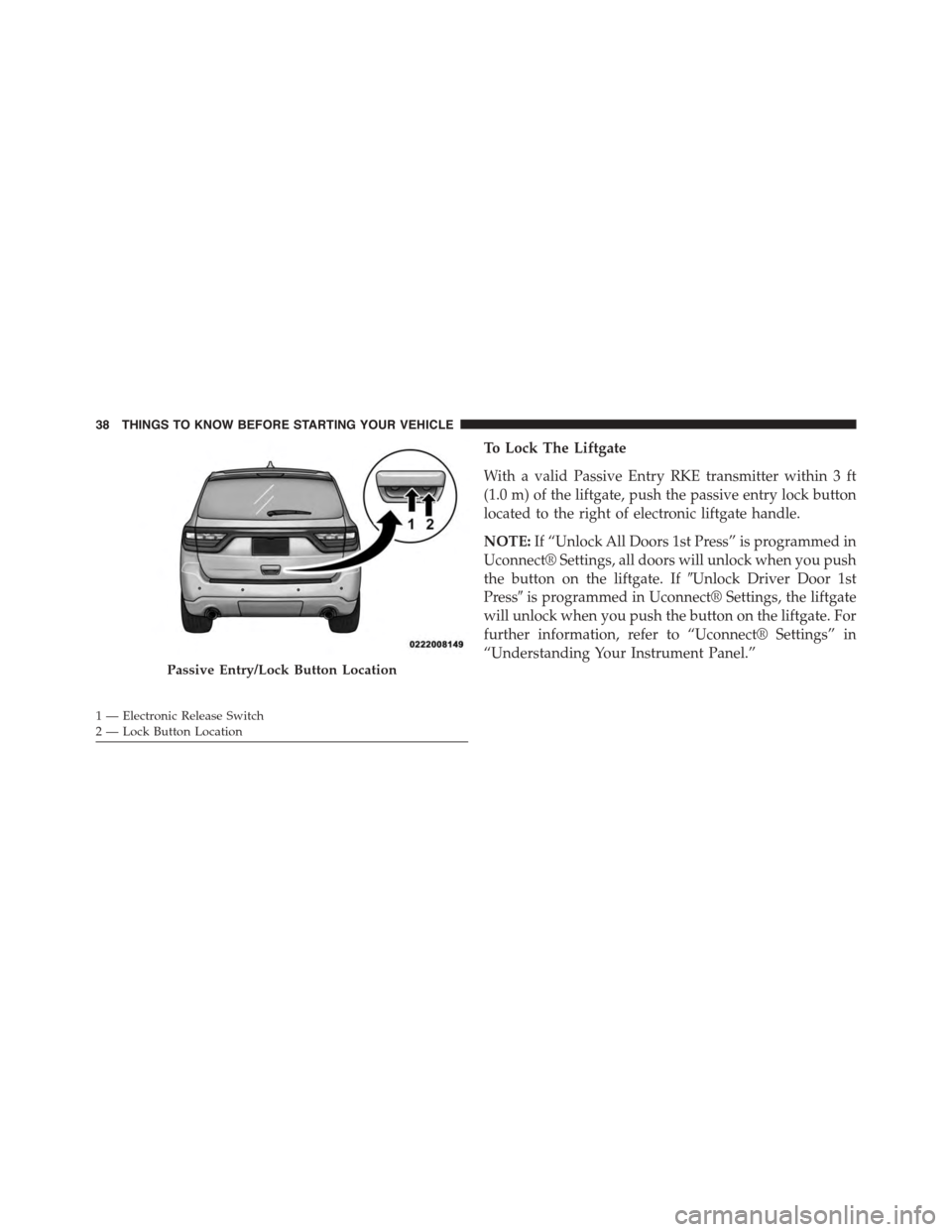
To Lock The Liftgate
With a valid Passive Entry RKE transmitter within 3 ft
(1.0 m) of the liftgate, push the passive entry lock button
located to the right of electronic liftgate handle.
NOTE:If “Unlock All Doors 1st Press” is programmed in
Uconnect® Settings, all doors will unlock when you push
the button on the liftgate. If#Unlock Driver Door 1st
Press#is programmed in Uconnect® Settings, the liftgate
will unlock when you push the button on the liftgate. For
further information, refer to “Uconnect® Settings” in
“Understanding Your Instrument Panel.”
Passive Entry/Lock Button Location
1 — Electronic Release Switch2—LockButtonLocation
38 THINGS TO KNOW BEFORE STARTING YOUR VEHICLE
Page 41 of 689
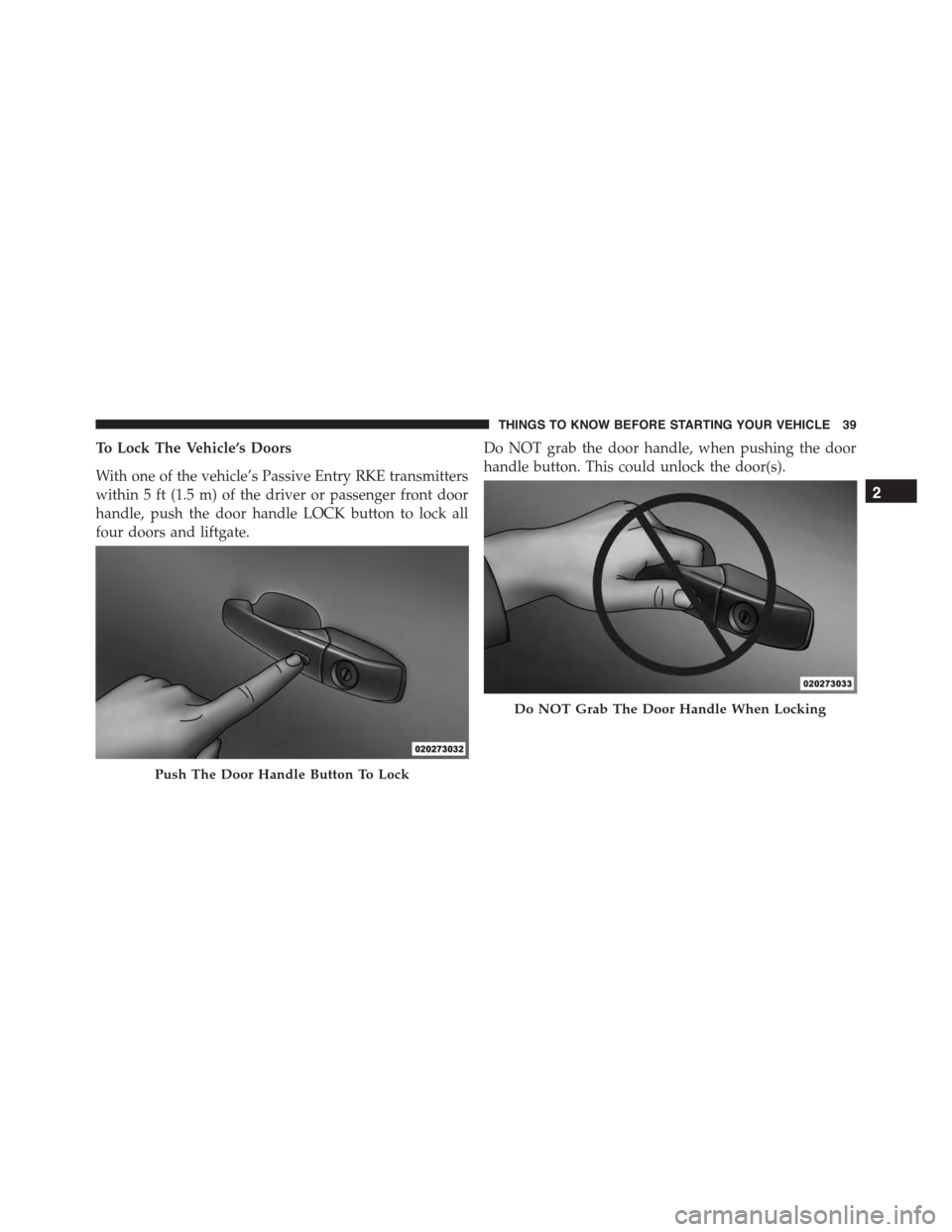
To Lock The Vehicle’s Doors
With one of the vehicle’s Passive Entry RKE transmitters
within 5 ft (1.5 m) of the driver or passenger front door
handle, push the door handle LOCK button to lock all
four doors and liftgate.
Do NOT grab the door handle, when pushing the door
handle button. This could unlock the door(s).
Push The Door Handle Button To Lock
Do NOT Grab The Door Handle When Locking
2
THINGS TO KNOW BEFORE STARTING YOUR VEHICLE 39
Page 42 of 689
NOTE:
•After pushing the door handle button, you must wait
two seconds before you can lock or unlock the doors,
using either Passive Entry door handle. This is done to
allow you to check if the vehicle is locked by pulling
the door handle, without the vehicle reacting and
unlocking.
•The Passive Entry system will not operate if the RKE
transmitter battery is dead.
The vehicle doors can also be locked by using the RKE
transmitter lock button or the lock button located on the
vehicle’s interior door panel.
WINDOWS
Power Windows
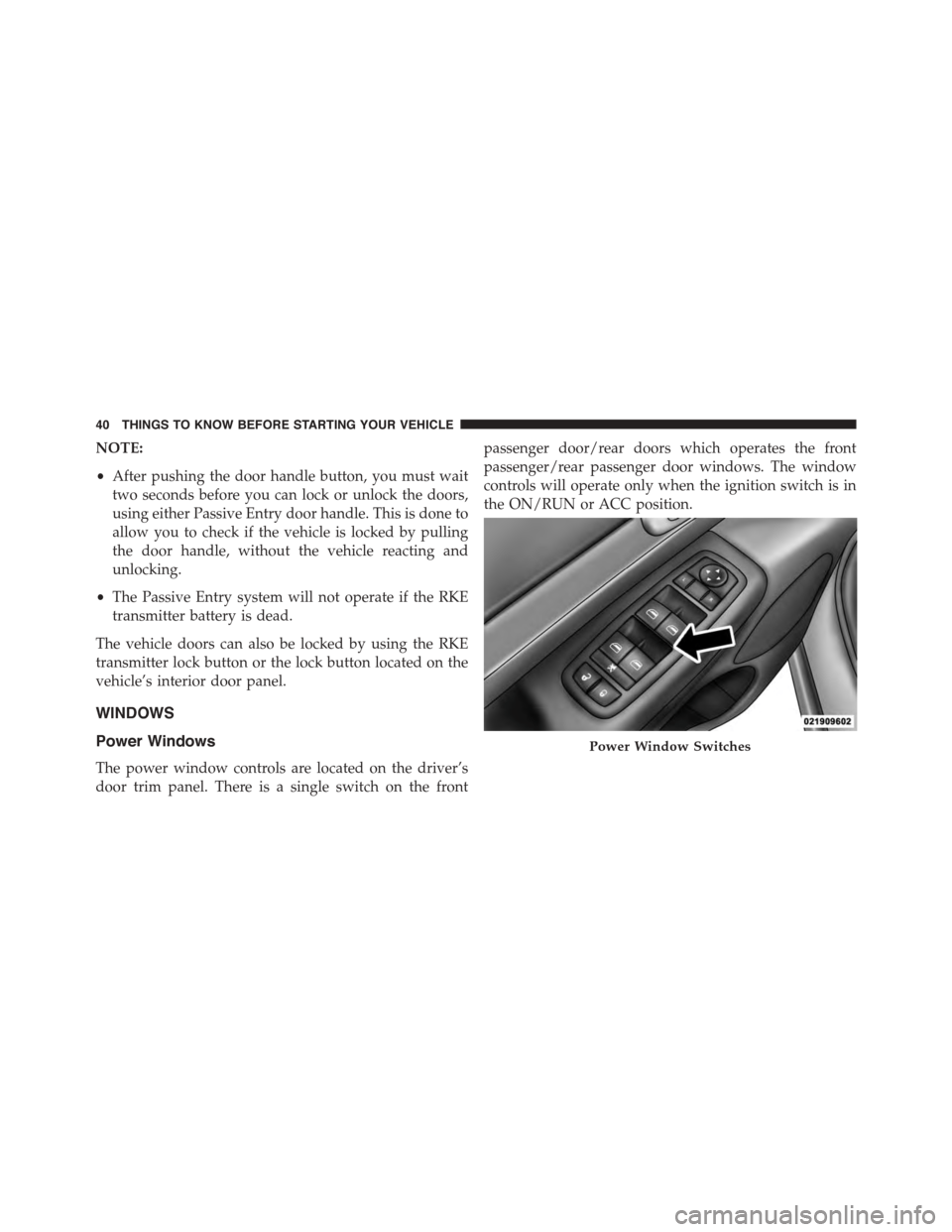
The power window controls are located on the driver’s
door trim panel. There is a single switch on the front
passenger door/rear doors which operates the front
passenger/rear passenger door windows. The window
controls will operate only when the ignition switch is in
the ON/RUN or ACC position.
Power Window Switches
40 THINGS TO KNOW BEFORE STARTING YOUR VEHICLE
Page 46 of 689
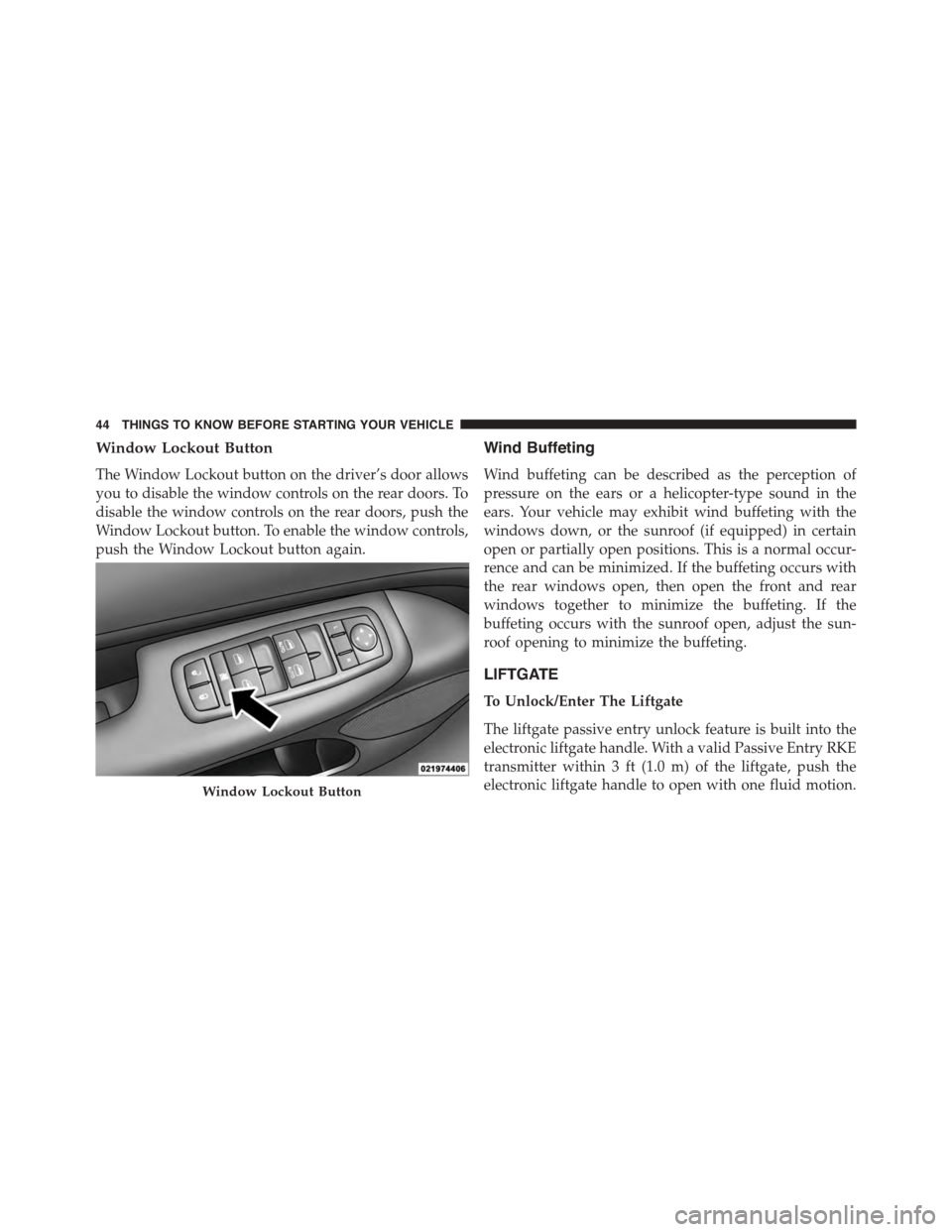
Window Lockout Button
The Window Lockout button on the driver’s door allows
you to disable the window controls on the rear doors. To
disable the window controls on the rear doors, push the
Window Lockout button. To enable the window controls,
push the Window Lockout button again.
Wind Buffeting
Wind buffeting can be described as the perception of
pressure on the ears or a helicopter-type sound in the
ears. Your vehicle may exhibit wind buffeting with the
windows down, or the sunroof (if equipped) in certain
open or partially open positions. This is a normal occur-
rence and can be minimized. If the buffeting occurs with
the rear windows open, then open the front and rear
windows together to minimize the buffeting. If the
buffeting occurs with the sunroof open, adjust the sun-
roof opening to minimize the buffeting.
LIFTGATE
To Unlock/Enter The Liftgate
The liftgate passive entry unlock feature is built into the
electronic liftgate handle. With a valid Passive Entry RKE
transmitter within 3 ft (1.0 m) of the liftgate, push the
electronic liftgate handle to open with one fluid motion.Window Lockout Button
44 THINGS TO KNOW BEFORE STARTING YOUR VEHICLE
Page 47 of 689
NOTE:If “Unlock All Doors 1st Press is programmed in
Uconnect® Settings, all doors will unlock when you push
the button on the liftgate. If#Unlock Driver Door 1st
Press#is programmed in Uconnect® Settings, the liftgate
will unlock when you push the button on the liftgate. For
further information, refer to “Uconnect® Settings” in
“Understanding Your Instrument Panel.”
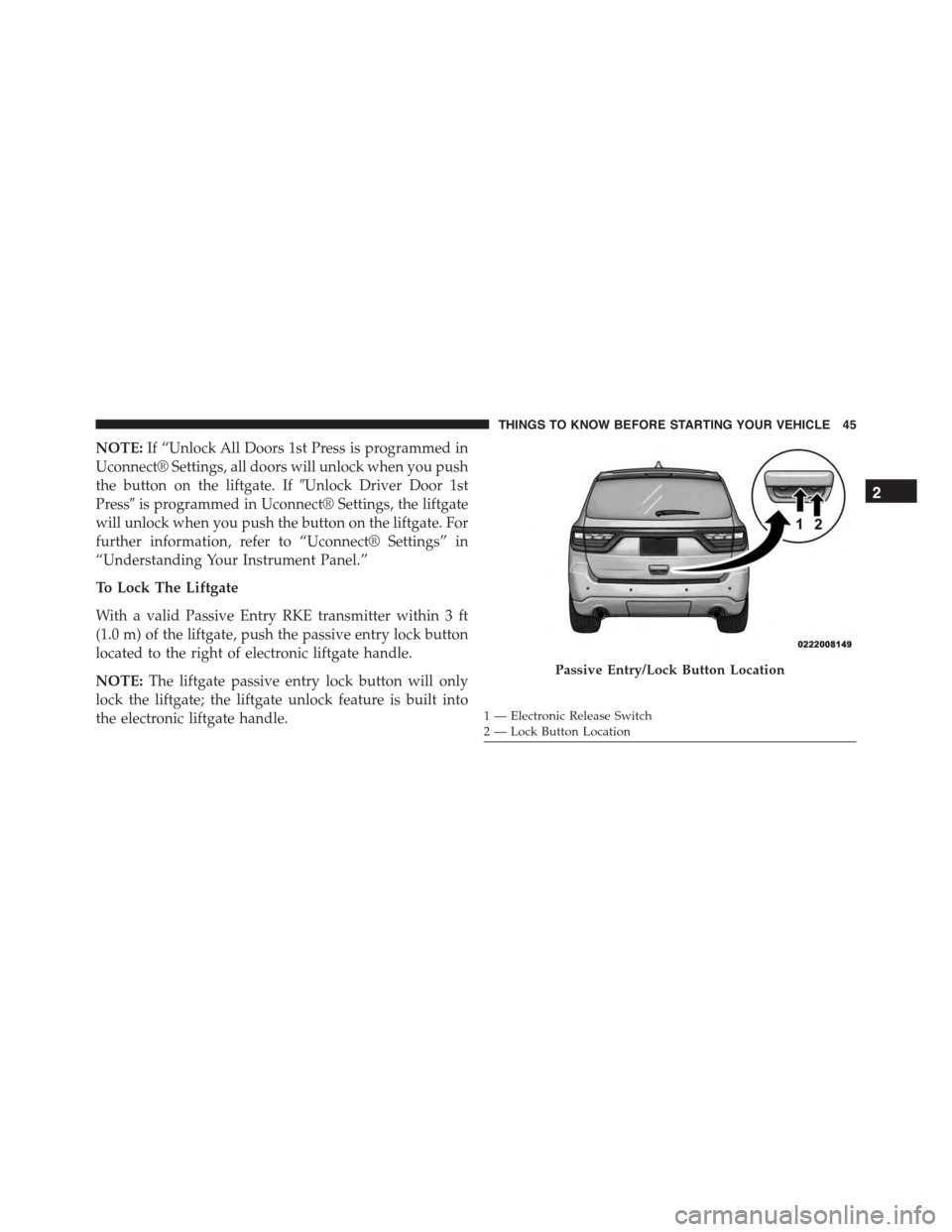
To Lock The Liftgate
With a valid Passive Entry RKE transmitter within 3 ft
(1.0 m) of the liftgate, push the passive entry lock button
located to the right of electronic liftgate handle.
NOTE:The liftgate passive entry lock button will only
lock the liftgate; the liftgate unlock feature is built into
the electronic liftgate handle.
Passive Entry/Lock Button Location
1 — Electronic Release Switch2—LockButtonLocation
2
THINGS TO KNOW BEFORE STARTING YOUR VEHICLE 45
Page 79 of 689
continues, see your doctor. If these particles settle on
your clothing, follow the garment manufacturer ’s in-
structions for cleaning.
Do not drive your vehicle after the air bags have de-
ployed. If you are involved in another collision, the air
bags will not be in place to protect you.
WARNING!
Deployed air bags and seat belt pretensioners cannot
protect you in another collision. Have the air bags,
seat belt pretensioners, and the seat belt retractor
assemblies replaced by an authorized dealer imme-
diately. Also, have the Occupant Restraint Controller
System serviced as well.
NOTE:
•Air bag covers may not be obvious in the interior trim,
but they will open during air bag deployment.
•After any collision, the vehicle should be taken to an
authorized dealer immediately.
Enhanced Accident Response System
In the event of an impact, if the communication network
remains intact, and the power remains intact, depending
on the nature of the event, the ORC will determine
whether to have the Enhanced Accident Response Sys-
tem perform the following functions:
•Cut off fuel to the engine.
•Flash hazard lights as long as the battery has power or
until the ignition is placed in the “OFF” position.
•Turn on the interior lights, which remain on as long as
the battery has power or until the ignition is placed in
the “OFF” position.
•Unlock the doors automatically.
2
THINGS TO KNOW BEFORE STARTING YOUR VEHICLE 77
Page 114 of 689
WARNING!(Continued)
•Always make sure that objects cannot fall into the
driver footwell while the vehicle is moving. Ob-
jects can become trapped under the brake pedal
and accelerator pedal causing a loss of vehicle
control.
•If required, mounting posts must be properly in-
stalled, if not equipped from the factory.
Failure to properly follow floor mat installation or
mounting can cause interference with the brake
pedal and accelerator pedal operation causing loss of
control of the vehicle.
Periodic Safety Checks You Should Make Outside
The Vehicle
Tires
Examine tires for excessive tread wear and uneven wear
patterns. Check for stones, nails, glass, or other objects
lodged in the tread or sidewall. Inspect the tread for cuts
and cracks. Inspect sidewalls for cuts, cracks, and bulges.
Check the wheel nuts for tightness. Check the tires
(including spare) for proper cold inflation pressure.
Lights
Have someone observe the operation of brake lights and
exterior lights while you work the controls. Check turn
signal and high beam indicator lights on the instrument
panel.
Door Latches
Check for proper closing, latching, and locking.
Fluid Leaks
Check area under vehicle after overnight parking for fuel,
engine coolant, oil, or other fluid leaks. Also, if gasoline
fumes are detected or if fuel, power steering fluid (if
equipped), or brake fluid leaks are suspected. The cause
should be located and corrected immediately.
11 2 T H I N G S TO K N O W B E F O R E S TA R T I N G Y O U R V E H I C L E
Page 166 of 689
WARNING!
Be certain that the seatback is securely locked into
position. If the seatback is not securely locked into
position the seat will not provide the proper stability
for child seats and/or passengers. An improperly
latched seat could cause serious injury.
DRIVER MEMORY SEAT — IF EQUIPPED
This feature allows the driver to store up to two different
memory profiles for easy recall through a memory
switch. Each memory profile contains desired position
settings for the driver seat, side mirrors, adjustable
pedals (if equipped), and power tilt and telescopic steer-
ing column (if equipped) and a set of desired radio
station presets. Your Remote Keyless Entry (RKE) trans-
mitter can also be programmed to recall the same posi-
tions when the UNLOCK button is pushed.
NOTE:Your vehicle is equipped with two RKE transmit-
ters, one RKE transmitter can be linked to memory
position 1 and the other transmitter can be linked to
memory position 2.
The memory seat switch is located on the driver ’s door
trim panel. The switch consists of three buttons:
•The (S) button, which is used to activate the memory
save function.
•The (1) and (2) buttons which are used to recall either
of two pre-programmed memory profiles.
164 UNDERSTANDING THE FEATURES OF YOUR VEHICLE
Page 178 of 689
An indicator light located in the instrument cluster will
illuminate when the fog lights are on. The fog lights will
turn off when the switch is pushed a second time, when
the headlight switch is rotated to the off position, or the
high beam is selected.
Interior Lights
Courtesy and dome lights are turned on when the front
doors are opened or when the dimmer control (rotating
wheel on the right side of the headlight switch) is rotated
to the its farthest upward position. If your vehicle is
equipped with Remote Keyless Entry (RKE) and the
UNLOCK button is pushed on the RKE transmitter, the
courtesy and dome lights will turn on. When a door is
open and the interior lights are on, rotating the dimmer
control all the way down, to the OFF detent, will cause all
the interior lights to go out. This is also known as the
“Party” mode because it allows the doors to stay open for
extended periods of time without discharging the vehi-
cle’s battery.
The brightness of the instrument panel lighting can be
regulated by rotating the dimmer control up (brighter) or
down (dimmer). When the headlights are on you can
supplement the brightness of the odometer, trip odom-
eter, radio and overhead console by rotating the control
to its farthest position up until you hear a click. This
feature is termed the “Parade” mode and is useful when
headlights are required during the day.
176 UNDERSTANDING THE FEATURES OF YOUR VEHICLE