headlights DODGE DURANGO 2015 3.G Owners Manual
[x] Cancel search | Manufacturer: DODGE, Model Year: 2015, Model line: DURANGO, Model: DODGE DURANGO 2015 3.GPages: 689, PDF Size: 20.05 MB
Page 21 of 689
NOTE:Changes or modifications not expressly approved
by the party responsible for compliance could void the
user’s authority to operate the equipment.
VEHICLE SECURITY ALARM — IF EQUIPPED
This Vehicle Security Alarm monitors the vehicle doors,
liftgate, and ignition for unauthorized operation. When
the alarm is activated, the interior switches for door locks
and power liftgate are disabled. The Vehicle Security
Alarm provides both audio and visual signals, the horn
will sound, the headlights will turn on, park lamps,
and/or turn signals will flash repeatedly for three min-
utes. If the disturbance is still present (driver’s door,
passenger door, other doors, ignition) after three minutes,
the headlights, park lamps, and/or turn signals will flash
for an additional 15 minutes.
NOTE:The Panic and Security alarms are quite different.
Please take a moment to activate the Panic and the
Security modes to hear the differences in the horn. In case
one should go off in the future, you will need to know
which mode has been activated in order to deactivate it.
To Arm The System
Follow these steps to arm the Vehicle Security Alarm:
1. Make sure the vehicles ignition is cycled to the “OFF”
position (refer to#Starting Procedures#in#Starting
And Operating#for further information).
•For vehicles equipped with Keyless Enter-N-Go™,
make sure the vehicle ignition system is OFF.
•For vehicles not equipped with Keyless Enter-N-
Go™, make sure the vehicle ignition system is OFF,
and the key is physically removed from the ignition.
2
THINGS TO KNOW BEFORE STARTING YOUR VEHICLE 19
Page 26 of 689
Headlight Illumination On Approach
This feature activates the headlights for up to 90 seconds
when the doors are unlocked with the RKE transmitter.
The time for this feature is programmable on vehicles
equipped through Uconnect®. To change the current
setting, refer to “Uconnect® Settings” in “Understanding
Your Instrument Panel” for further information.
To Lock The Doors And Liftgate
Push and release the LOCK button on the RKE transmit-
ter to lock all doors and liftgate. The turn signal lights
will flash, and the horn will chirp to acknowledge the
signal.
If the vehicle is equipped with Passive Entry, refer to
“Keyless Enter-N-Go™” in “Things To Know Before
Starting Your Vehicle” for further information.
Sound Horn With Lock
This feature will cause the horn to chirp when the doors
are locked with the RKE transmitter. This feature can be
turned on or turned off. To change the current setting,
refer to “Uconnect® Settings” in “Understanding Your
Instrument Panel” for further information.
Using The Panic Alarm
To turn the Panic Alarm feature on or off, push and hold
the PANIC button on the RKE transmitter for at least one
second and release. When the Panic Alarm is activated,
the turn signals will flash, the horn will pulse on and off,
and the interior lights will turn on.
The Panic Alarm will stay on for three minutes unless
you turn it off by either pushing the PANIC button a
second time or drive the vehicle at a speed of 15 MPH
(24 km/h) or greater.
24 THINGS TO KNOW BEFORE STARTING YOUR VEHICLE
Page 116 of 689
▫Power Lumbar — If Equipped............144
▫Manual Front Passenger Seat Forward/Rearward
Adjustment.........................145
▫Manual Front Passenger Seatback Adjustment —
Recline............................146
▫Front Passenger Seat Fold-Flat Feature —
If Equipped..........................146
▫Heated Seats — If Equipped..............147
▫Front Ventilated Seats — If Equipped.......150
▫Head Restraints......................151
▫60/40 Split Rear Seat..................156
▫Rear Captain Chairs — If Equipped.........159
▫Folding Third Row....................163
!DRIVER MEMORY SEAT — IF EQUIPPED . . . .164
▫Programming The Memory Feature.........165
▫Linking And Unlinking The Remote Keyless Entry
Transmitter To Memory.................166
▫Memory Position Recall.................167
▫Easy Entry/Exit Seat...................168
!TO OPEN AND CLOSE THE HOOD.........170
!LIGHTS.............................171
▫Headlight Switch.....................171
▫Automatic Headlights — If Equipped.......173
▫Headlights On Automatically With Wipers . . .173
▫Automatic High Beam — If Equipped......173
▫Daytime Running Lights — If Equipped.....174
▫Headlight Delay......................175
11 4 U N D E R S TA N D I N G T H E F E AT U R E S O F Y O U R V E H I C L E
Page 173 of 689
CAUTION!
To prevent possible damage, do not slam the hood to
close it. Use a firm downward push at the front center
of the hood to ensure that both latches engage.
WARNING!
Be sure the hood is fully latched before driving your
vehicle. If the hood is not fully latched, it could open
when the vehicle is in motion and block your vision.
Failure to follow this warning could result in serious
injury or death.
LIGHTS
Headlight Switch
The headlight switch is located on the left side of the
instrument panel, next to the steering wheel. The head-
light switch controls the operation of the headlights,
parking lights, instrument panel lights, cargo lights and
fog lights (if equipped).
3
UNDERSTANDING THE FEATURES OF YOUR VEHICLE 171
Page 174 of 689
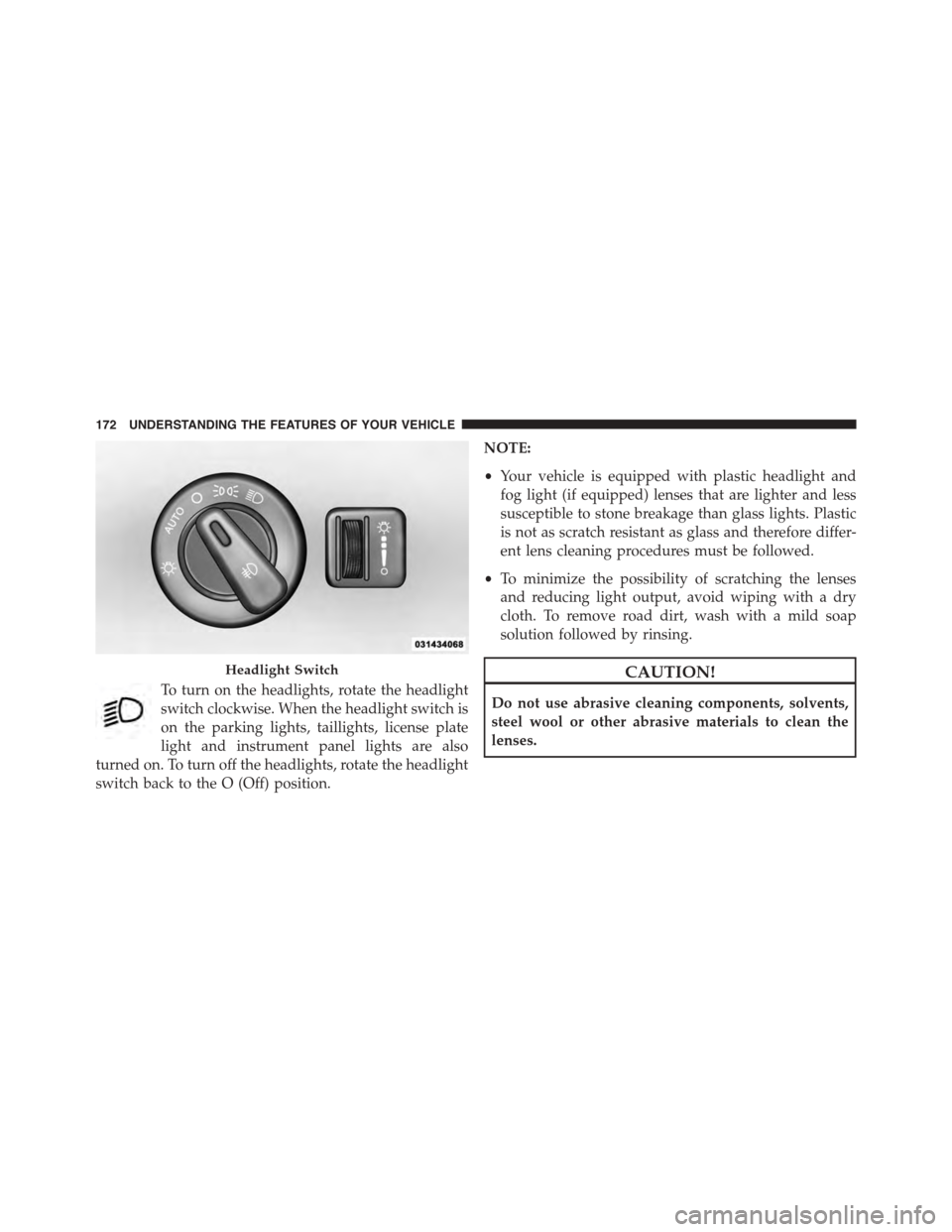
To turn on the headlights, rotate the headlight
switch clockwise. When the headlight switch is
on the parking lights, taillights, license plate
light and instrument panel lights are also
turned on. To turn off the headlights, rotate the headlight
switch back to the O (Off) position.
NOTE:
•Your vehicle is equipped with plastic headlight and
fog light (if equipped) lenses that are lighter and less
susceptible to stone breakage than glass lights. Plastic
is not as scratch resistant as glass and therefore differ-
ent lens cleaning procedures must be followed.
•To minimize the possibility of scratching the lenses
and reducing light output, avoid wiping with a dry
cloth. To remove road dirt, wash with a mild soap
solution followed by rinsing.
CAUTION!
Do not use abrasive cleaning components, solvents,
steel wool or other abrasive materials to clean the
lenses.
Headlight Switch
172 UNDERSTANDING THE FEATURES OF YOUR VEHICLE
Page 175 of 689
Automatic Headlights — If Equipped
This system automatically turns the headlights on or off
according to ambient light levels. To turn the system on,
rotate the headlight switch counterclockwise to the
AUTO position. When the system is on, the headlight
time delay feature is also on. This means the headlights
will stay on for up to 90 seconds after you place the
ignition into the OFF position. To turn the automatic
system off, move the headlight switch out of the AUTO
position.
NOTE:The engine must be running before the headlights
will come on in the automatic mode.
Headlights On Automatically With Wipers
If your vehicle is equipped with Automatic Headlights, it
also has this customer-programmable feature. When
your headlights are in the automatic mode and the
engine is running, they will automatically turn on when
the wiper system is on. This feature is programmable
through the Uconnect® system. Refer to “Uconnect®
Settings/Customer Programmable Features” in “Under-
standing Your Instrument Panel” for further information.
NOTE:When your headlights come on during the day-
time, the vehicle will monitor outside brightness and
decide if the instrument panel needs to be dimmed or
not. Refer to “Lights” in this section for further informa-
tion.
Automatic High Beam — If Equipped
The Automatic High Beam Headlamp Control system
provides increased forward lighting at night by automat-
ing high beam control through the use of a digital camera
mounted on the inside rearview mirror. This camera
detects vehicle specific light and automatically switches
from high beams to low beams until the approaching
vehicle is out of view.
3
UNDERSTANDING THE FEATURES OF YOUR VEHICLE 173
Page 176 of 689
NOTE:
•The Automatic High Beam Headlamp Control can be
turned on or off using the Uconnect® System. Refer to
“Uconnect® Settings” in “Understanding Your Instru-
ment Panel” for further information.
•Broken, muddy, or obstructed headlights and taillights
of vehicles in the field of view will cause headlights to
remain on longer (closer to the vehicle). Also, dirt, film,
and other obstructions on the windshield or camera
lens will cause the system to function improperly.
•To opt out of the Advanced Auto High-Beam Sensitiv-
ity Control (default) and enter Reduced High-Beam
Sensitivity Control (not recommended), toggle high-
beam lever 6 full on/off cycles within 10 seconds of
ignition ON. System will return to default setting upon
ignition off.
If the windshield or Automatic High Beam Headlamp
Control mirror is replaced, the mirror must be re-aimed
to ensure proper performance. See your local authorized
dealer.
Daytime Running Lights — If Equipped
The Daytime Running Lights come on whenever the
engine is running, and the transmission is not in the
PARK position. The lights will remain on until the
ignition is switched to the OFF or ACC position or the
parking brake is engaged. The headlight switch must be
used for normal nighttime driving.
NOTE:If allowed by law in the country in which the
vehicle was purchased the Daytime Running Lights can
be turned on and off using the Uconnect® System, refer
to “Uconnect® Settings” in “Understanding Your Instru-
ment Panel” for further information.
174 UNDERSTANDING THE FEATURES OF YOUR VEHICLE
Page 177 of 689
Headlight Delay
To aid in your exit, your vehicle is equipped with a
headlight delay that will leave the headlights on for
approximately 90 seconds. This delay is initiated when
the ignition is turned OFF while the headlight switch is
on, and then the headlight switch is cycled off. Headlight
delay can be cancelled by either turning the headlight
switch on then off, or by turning the ignition ON.
NOTE:The headlight delay time is programmable
through the Uconnect® System. Refer to “Uconnect®
Settings/Customer Programmable Features” in “Under-
standing Your Instrument Panel” for further information.
Parking Lights And Panel Lights
To turn on the parking lights and instrument
panel lights, rotate the headlight switch clockwise.
To turn off the parking lights, rotate the headlight switch
back to the O (Off) position.
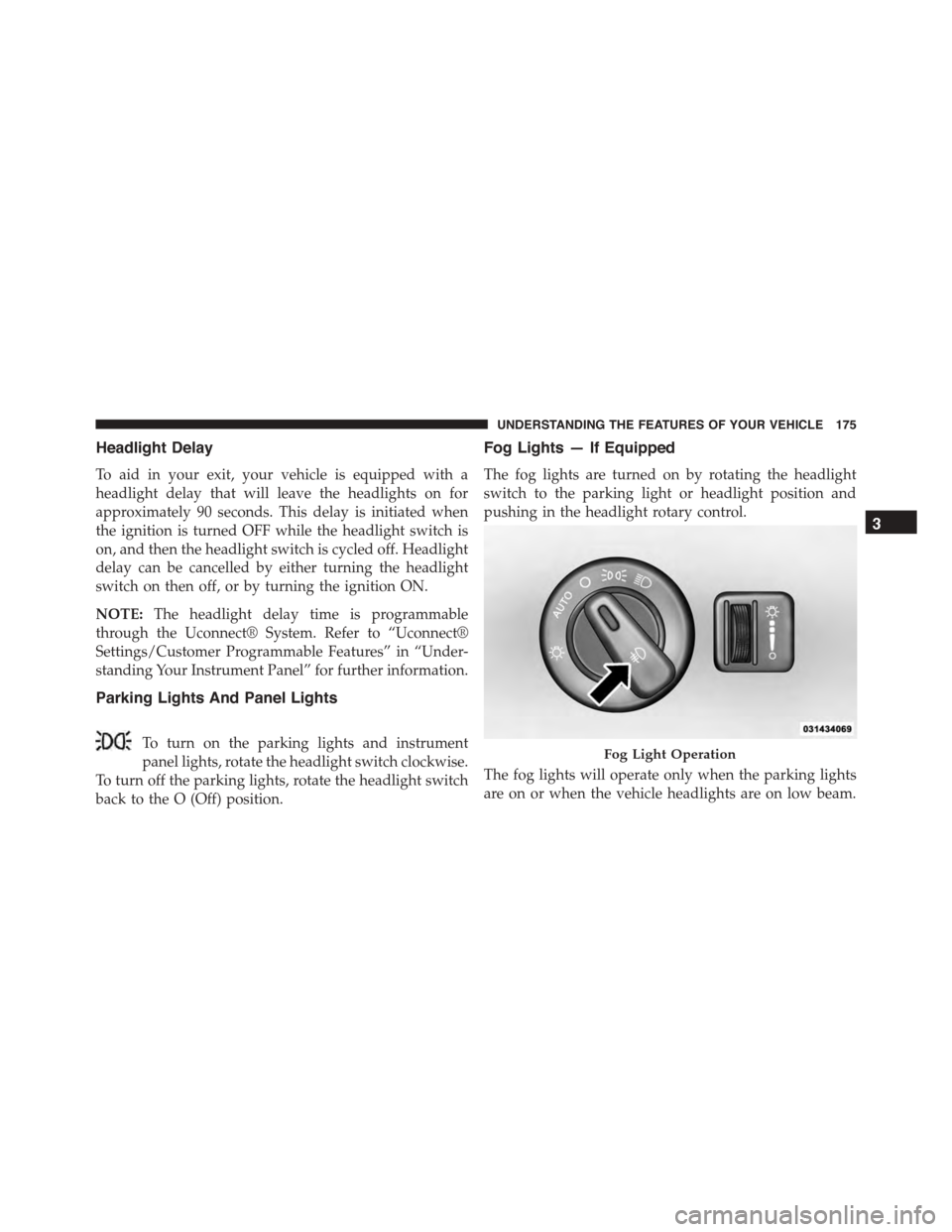
Fog Lights — If Equipped
The fog lights are turned on by rotating the headlight
switch to the parking light or headlight position and
pushing in the headlight rotary control.
The fog lights will operate only when the parking lights
are on or when the vehicle headlights are on low beam.
Fog Light Operation
3
UNDERSTANDING THE FEATURES OF YOUR VEHICLE 175
Page 178 of 689
An indicator light located in the instrument cluster will
illuminate when the fog lights are on. The fog lights will
turn off when the switch is pushed a second time, when
the headlight switch is rotated to the off position, or the
high beam is selected.
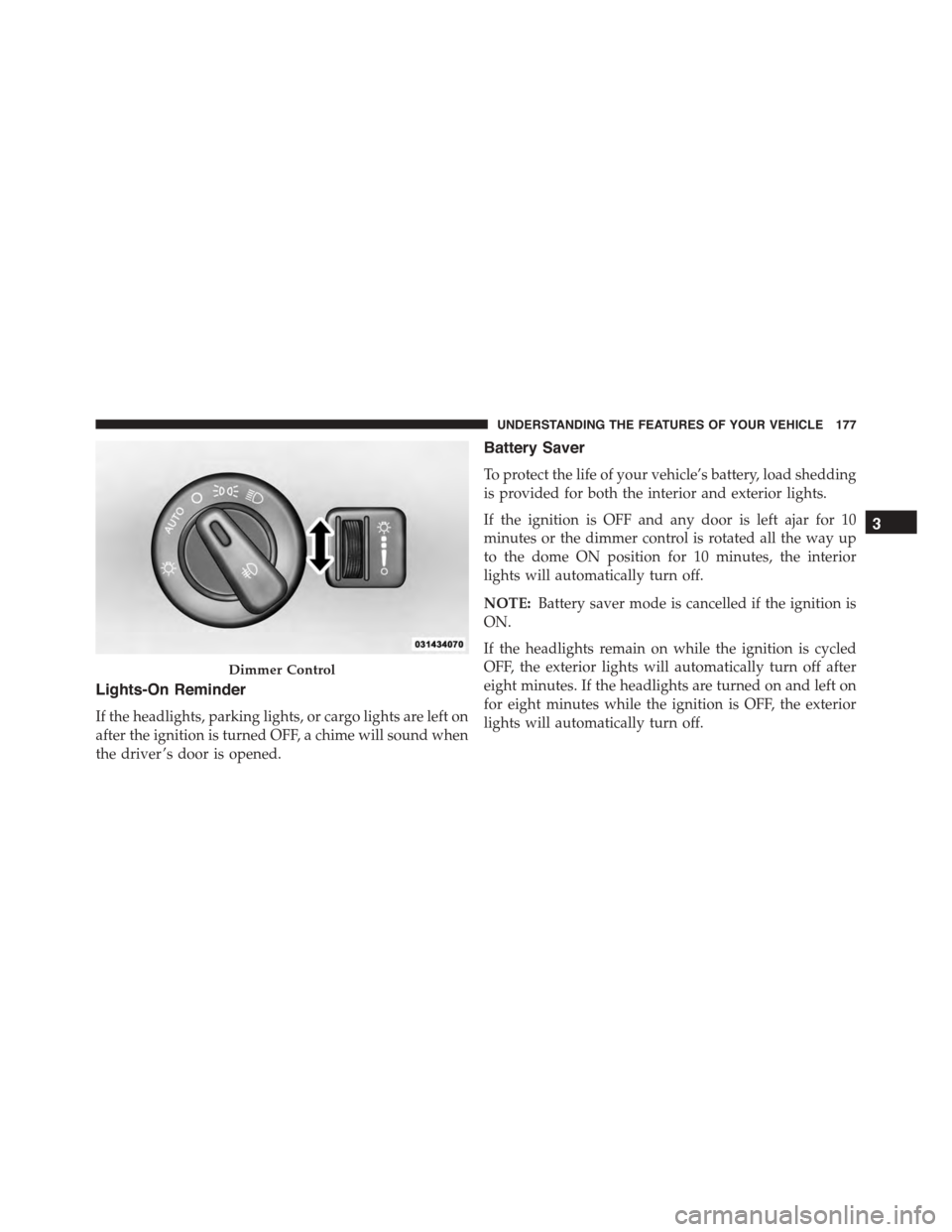
Interior Lights
Courtesy and dome lights are turned on when the front
doors are opened or when the dimmer control (rotating
wheel on the right side of the headlight switch) is rotated
to the its farthest upward position. If your vehicle is
equipped with Remote Keyless Entry (RKE) and the
UNLOCK button is pushed on the RKE transmitter, the
courtesy and dome lights will turn on. When a door is
open and the interior lights are on, rotating the dimmer
control all the way down, to the OFF detent, will cause all
the interior lights to go out. This is also known as the
“Party” mode because it allows the doors to stay open for
extended periods of time without discharging the vehi-
cle’s battery.
The brightness of the instrument panel lighting can be
regulated by rotating the dimmer control up (brighter) or
down (dimmer). When the headlights are on you can
supplement the brightness of the odometer, trip odom-
eter, radio and overhead console by rotating the control
to its farthest position up until you hear a click. This
feature is termed the “Parade” mode and is useful when
headlights are required during the day.
176 UNDERSTANDING THE FEATURES OF YOUR VEHICLE
Page 179 of 689
Lights-On Reminder
If the headlights, parking lights, or cargo lights are left on
after the ignition is turned OFF, a chime will sound when
the driver ’s door is opened.
Battery Saver
To protect the life of your vehicle’s battery, load shedding
is provided for both the interior and exterior lights.
If the ignition is OFF and any door is left ajar for 10
minutes or the dimmer control is rotated all the way up
to the dome ON position for 10 minutes, the interior
lights will automatically turn off.
NOTE:Battery saver mode is cancelled if the ignition is
ON.
If the headlights remain on while the ignition is cycled
OFF, the exterior lights will automatically turn off after
eight minutes. If the headlights are turned on and left on
for eight minutes while the ignition is OFF, the exterior
lights will automatically turn off.
Dimmer Control
3
UNDERSTANDING THE FEATURES OF YOUR VEHICLE 177