USB DODGE DURANGO 2020 User Guide
[x] Cancel search | Manufacturer: DODGE, Model Year: 2020, Model line: DURANGO, Model: DODGE DURANGO 2020Pages: 464, PDF Size: 22.14 MB
Page 411 of 464
MULTIMEDIA409
Uconnect works seamlessly with Apple
CarPlay®, the smarter, more secure way to use
your iPhone® in the car, and stay focused on
the road. Use your Uconnect Touchscreen
display, the vehicle's knobs and controls, and
your voice with Siri to get access to Apple
Music®, Maps, Messages, and more.
To use Apple CarPlay®, make sure you are
using iPhone® 5 or later, have Siri enabled in
Settings, ensure your iPhone® is unlocked for
the very first connection only, and then use the
following procedure:
1. Connect your iPhone® to one of the media
USB ports in your vehicle.
NOTE:
Be sure to use the factory-provided Lightning
cable that came with your phone, as after -
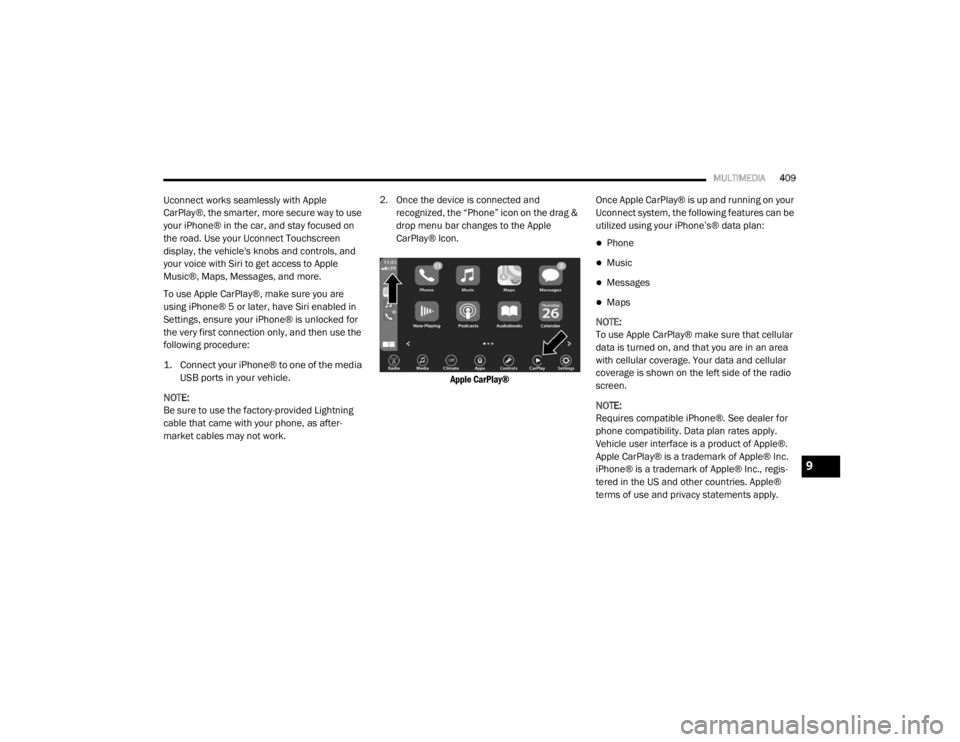
market cables may not work. 2. Once the device is connected and recognized, the “Phone” icon on the drag &
drop menu bar changes to the Apple
CarPlay® Icon.
Apple CarPlay®
Once Apple CarPlay® is up and running on your
Uconnect system, the following features can be
utilized using your iPhone’s® data plan:
Phone
Music
Messages
Maps
NOTE:
To use Apple CarPlay® make sure that cellular
data is turned on, and that you are in an area
with cellular coverage. Your data and cellular
coverage is shown on the left side of the radio
screen.
NOTE:
Requires compatible iPhone®. See dealer for
phone compatibility. Data plan rates apply.
Vehicle user interface is a product of Apple®.
Apple CarPlay® is a trademark of Apple® Inc.
iPhone® is a trademark of Apple® Inc., regis -
tered in the US and other countries. Apple®
terms of use and privacy statements apply.
9
20_WD_OM_EN_USC_t.book Page 409
Page 413 of 464
MULTIMEDIA411
Android Auto™ Automatic Bluetooth® Pairing
After connecting to Android Auto™ for the first
time and undergoing the setup procedure, the
smartphone will automatically pair to the
Uconnect system via Bluetooth® without any
setup required every time it is within range, if
Bluetooth® is turned on.
NOTE:
Android Auto™ features cannot be used with
Bluetooth®, a USB connection is required for its
use. Android Auto™ uses both Bluetooth® and
USB connections to function, and the
connected device will be unavailable to other
devices when connected using Android Auto™.
Multiple Devices Connecting To The Uconnect
System
It is possible to have multiple devices
connected to the Uconnect system. For
example, if using Android Auto™/Apple
CarPlay®, the connected device will be the one
that will be used to place hands-free phone calls
or send hands-free text messages. However,
another device can also be paired to the
Uconnect system, via Bluetooth®, as an audio
source, so the passenger can stream music. NOTE:
If using a Samsung device, every time it is
connected to a media USB, and there is
another device plugged in, you will need to
manually change the configuration of the
USB connection in order for the Samsung
device to send data.
The Uconnect 4 built-in media functions will
be unavailable when Android Auto™/Apple
CarPlay® are in use.
PHONE MODE
Overview
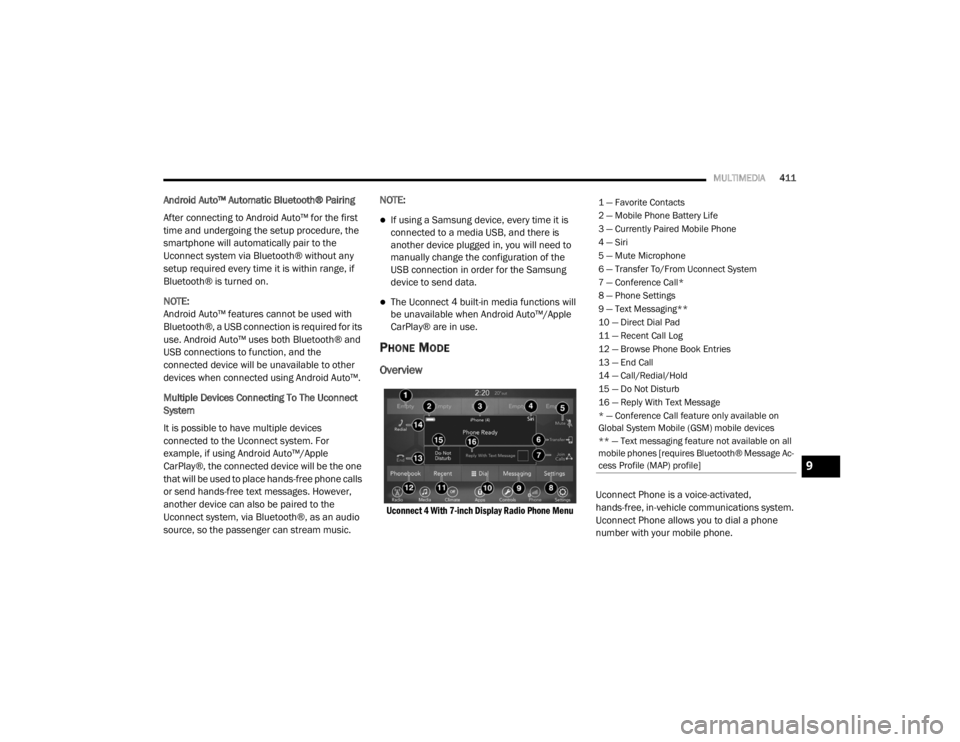
Uconnect 4 With 7-inch Display Radio Phone Menu
Uconnect Phone is a voice-activated,
hands-free, in-vehicle communications system.
Uconnect Phone allows you to dial a phone
number with your mobile phone.
1 — Favorite Contacts
2 — Mobile Phone Battery Life
3 — Currently Paired Mobile Phone
4 — Siri
5 — Mute Microphone
6 — Transfer To/From Uconnect System
7 — Conference Call*
8 — Phone Settings
9 — Text Messaging**
10 — Direct Dial Pad
11 — Recent Call Log
12 — Browse Phone Book Entries
13 — End Call
14 — Call/Redial/Hold
15 — Do Not Disturb
16 — Reply With Text Message
* — Conference Call feature only available on
Global System Mobile (GSM) mobile devices
** — Text messaging feature not available on all
mobile phones [requires Bluetooth® Message Ac
-
cess Profile (MAP) profile]
9
20_WD_OM_EN_USC_t.book Page 411
Page 425 of 464

MULTIMEDIA423
Performance such as audio clarity, echo, and
loudness to a large degree rely on the phone
and network, and not the Uconnect Phone.
Echo at the far end can sometimes be reduced
by lowering the in-vehicle audio volume.
Bluetooth® Communication Link
Mobile phones have been found to lose
connection to the Uconnect Phone. When this
happens, the connection can generally be
re-established by switching the mobile phone
OFF/ON. Your mobile phone is recommended to
remain in Bluetooth® ON mode.
Power-Up
After switching the ignition key from OFF to
either the ON/RUN or ACC position, or after a
language change, you must wait at least
15 seconds prior to using the system.
STEERING WHEEL AUDIO CONTROLS
The Remote Sound System controls are located
on the rear surface of the steering wheel. Reach
behind the wheel to access the switches.
Steering Wheel Audio Controls
(Back View Of Steering Wheel)
The right-hand control is a rocker-type switch
with a push button in the center and controls
the volume and mode of the sound system.
Pushing the top of the rocker switch increases
the volume, and pushing the bottom of the
rocker switch decreases the volume.
Pushing the center button makes the radio
switch between the various modes available
(AM/FM/SXM or Media, etc.)
The left-hand control is a rocker-type switch with
a push button in the center. The function of the
left-hand control is different depending on
which mode you are in. The following describes the left-hand control
operation in each mode.
RADIO OPERATION
Pushing the top of the switch will “Seek” up for
the next listenable station, and pushing the
bottom of the switch will “Seek” down for the
next listenable station.
The button located in the center of the left-hand
control will tune to the next preset station that
you have programmed in the radio preset
button.
MEDIA MODE
Pushing the top of the switch once goes to the
next track on the selected media (AUX/USB/
Bluetooth®). Pushing the bottom of the switch
once goes to the beginning of the current track,
or to the beginning of the previous track if it is
within eight seconds after the current track
begins to play.
9
20_WD_OM_EN_USC_t.book Page 423
Page 426 of 464
424MULTIMEDIA
IPOD®/USB/MP3 CONTROL — IF EQUIPPED
This feature allows an iPod® or external USB
device to be plugged into the USB port, located
inside the storage area on the center stack of
the instrument panel.
Plugging in a smartphone device to a USB Port
may activate Android Auto™ or Apple CarPlay®
features, if equipped. For further information,
refer to “Android Auto™” or “Apple CarPlay®” in
the Owner’s Manual Supplement.
iPod® control supports Mini, 4G, Photo, iPod
nano®, 5G iPod® and iPhone® devices. Some
iPod® software versions may not fully support
the iPod® control features. Please visit
Apple’s® website for software updates.
For further information, refer to the Uconnect
Owner’s Manual Supplement.
CONNECTING THE AU X AUDIO INPUT OR
E
XTERNAL USB DEVICE
Use the connection cable to connect an iPod®
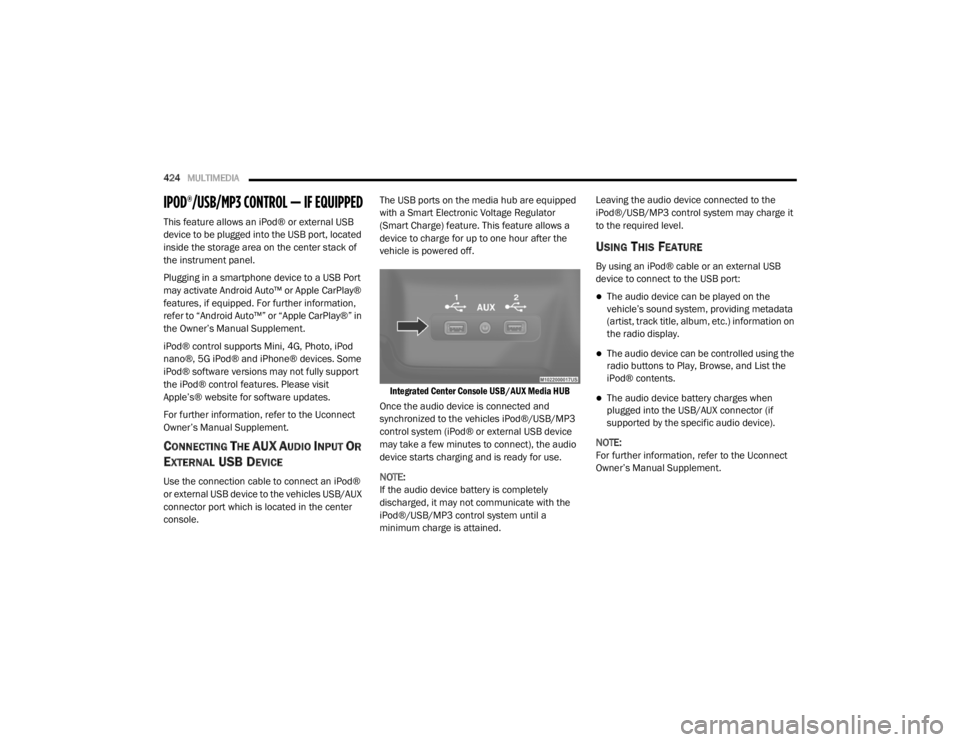
or external USB device to the vehicles USB/AUX
connector port which is located in the center
console. The USB ports on the media hub are equipped
with a Smart Electronic Voltage Regulator
(Smart Charge) feature. This feature allows a
device to charge for up to one hour after the
vehicle is powered off.
Integrated Center Console USB/AUX Media HUB
Once the audio device is connected and
synchronized to the vehicles iPod®/USB/MP3
control system (iPod® or external USB device
may take a few minutes to connect), the audio
device starts charging and is ready for use.
NOTE:
If the audio device battery is completely
discharged, it may not communicate with the
iPod®/USB/MP3 control system until a
minimum charge is attained. Leaving the audio device connected to the
iPod®/USB/MP3 control system may charge it
to the required level.
USING THIS FEATURE
By using an iPod® cable or an external USB
device to connect to the USB port:
The audio device can be played on the
vehicle’s sound system, providing metadata
(artist, track title, album, etc.) information on
the radio display.
The audio device can be controlled using the
radio buttons to Play, Browse, and List the
iPod® contents.
The audio device battery charges when
plugged into the USB/AUX connector (if
supported by the specific audio device).
NOTE:
For further information, refer to the Uconnect
Owner’s Manual Supplement.
20_WD_OM_EN_USC_t.book Page 424
Page 427 of 464
MULTIMEDIA425
SECOND ROW USB CHARGING PORT
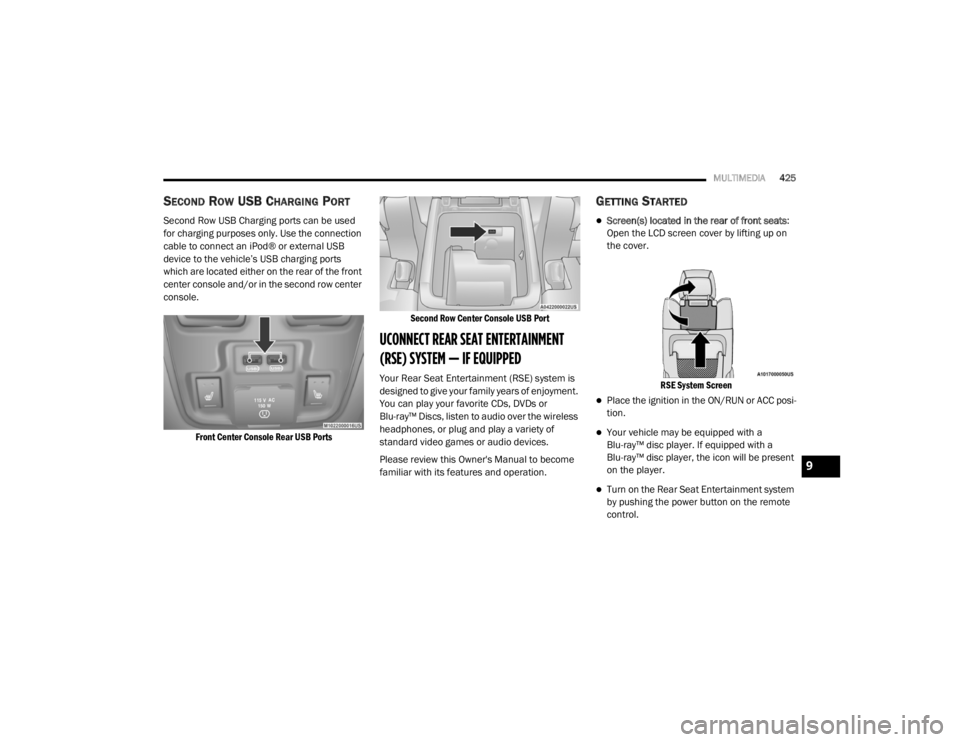
Second Row USB Charging ports can be used
for charging purposes only. Use the connection
cable to connect an iPod® or external USB
device to the vehicle’s USB charging ports
which are located either on the rear of the front
center console and/or in the second row center
console.
Front Center Console Rear USB Ports Second Row Center Console USB Port
UCONNECT REAR SEAT ENTERTAINMENT
(RSE) SYSTEM — IF EQUIPPED
Your Rear Seat Entertainment (RSE) system is
designed to give your family years of enjoyment.
You can play your favorite CDs, DVDs or
Blu-ray™ Discs, listen to audio over the wireless
headphones, or plug and play a variety of
standard video games or audio devices.
Please review this Owner's Manual to become
familiar with its features and operation.
GETTING STARTED
Screen(s) located in the rear of front seats
:
Open the LCD screen cover by lifting up on
the cover.
RSE System Screen
Place the ignition in the ON/RUN or ACC posi -
tion.
Your vehicle may be equipped with a
Blu-ray™ disc player. If equipped with a
Blu-ray™ disc player, the icon will be present
on the player.
Turn on the Rear Seat Entertainment system
by pushing the power button on the remote
control.
9
20_WD_OM_EN_USC_t.book Page 425
Page 441 of 464

MULTIMEDIA439
BASIC VOICE COMMANDS
The basic Voice Commands below can be given
at any point while using your Uconnect system.
Push the VR button . After the beep, say:
“Cancel ” to stop a current voice session
“Help ” to hear a list of suggested Voice
Commands
“ Repeat ” to listen to the system prompts
again
Notice the visual cues that inform you of your
voice recognition system’s status. Cues appear
on the touchscreen.
RADIO
Use your voice to quickly get to the AM, FM, or
SiriusXM® Satellite Radio stations you would
like to hear. (Subscription or included
SiriusXM® Satellite Radio trial required.)
Push the VR button . After the beep, say:
“ Tune to ninety-five-point-five FM”
“Tune to Satellite Channel Hits 1”TIP:
At any time, if you are not sure of what to say or
want to learn a Voice Command, push the VR
button and say, “
Help”. The system provides
you with a list of commands.
MEDIA
Uconnect offers connections via USB,
Bluetooth®, and auxiliary ports (if equipped).
Voice operation is only available for connected
USB and AUX devices.
Push the VR button . After the beep, say one
of the following commands and follow the
prompts to switch your media source or choose
an artist.
“ Change source to Bluetooth®”
“Change source to AUX”
“Change source to USB”
“Play artist Beethoven”; “ Play album
Greatest Hits”; “ Play song Moonlight
Sonata”; “ Play genre Classical” TIP:
Press the Browse button on the touchscreen to
see all of the music on your USB device. Your
Voice Command must match exactly how the
artist, album, song, and genre information is
displayed.
PHONE
Making and answering hands-free phone calls
is easy with Uconnect. When the Phonebook
button is illuminated on your touchscreen, your
system is ready. Check UconnectPhone.com for
mobile phone compatibility and pairing
instructions.
Push the Phone button . After the beep, say
one of the following commands:
“ Call John Smith”
“Dial 123-456-7890 and follow the system
prompts”
“ Redial (call previous outgoing phone
number)”
“ Call back (call previous incoming phone
number)”
9
20_WD_OM_EN_USC_t.book Page 439
Page 444 of 464

442MULTIMEDIA
ANDROID AUTO™ — IF EQUIPPED
NOTE:
Feature availability depends on your carrier and
mobile phone manufacturer. Some Android
Auto™ features may or may not be available in
every region and/or language.
Android Auto™ allows you to use your voice to
interact with Android’s™ best-in-class speech
technology through your vehicle’s voice
recognition system, and use your smartphone’s
data plan to project your Android™-powered
smartphone and a number of its apps onto your
Uconnect touchscreen. Connect your Android™
5.0 or higher to one of the media USB ports,
using the factory-provided USB cable, and press
the new Android Auto™ icon that replaces your
“Phone” icon on the main menu bar to begin
Android Auto™. Push and hold the VR button on
the steering wheel, or press and hold the
Microphone icon within Android Auto™, to
activate Android’s™ VR, which recognizes
natural voice commands, to use a list of your
smartphone’s features:
Maps
Music
Phone
Text Messages
Additional Apps
Refer to your Uconnect Owner’s Manual
Supplement for further information.
NOTE:
Requires compatible smartphone running
Android™ 5.0 or higher and download app on
Google Play. Android™, Android Auto™, and
Google Play are trademarks of Google Inc.
APPLE CARPLAY® — IF EQUIPPED
NOTE:
Feature availability depends on your carrier and
mobile phone manufacturer. Some Apple
CarPlay® features may or may not be available
in every region and/or language.
Apple CarPlay® allows you to use your voice to
interact with Siri through your vehicle’s voice
recognition system, and use your smartphone’s
data plan to project your iPhone® and a
number of its apps onto your Uconnect
touchscreen. Connect your iPhone® 5, or higher, to one of the
media USB ports, using the factory-provided
Lightning cable, and press the new Apple
CarPlay® icon that replaces your Phone icon on
the main menu bar to begin Apple CarPlay®.
Push and hold the VR button on the steering
wheel, or press and hold the Home button
within Apple CarPlay®, to activate Siri, which
recognizes natural voice commands to use a list
of your iPhone’s® features:
Phone
Music
Messages
Maps — if equipped
Additional Apps — if equipped
Refer to your Uconnect Owner’s Manual
Supplement for further information.
NOTE:
Requires compatible iPhone®. See dealer for
phone compatibility. Data plan rates apply.
Vehicle user interface is a product of Apple®.
20_WD_OM_EN_USC_t.book Page 442
Page 454 of 464

452
Intermittent Wipers (Delay Wipers)
.................. 56Introduction....................................................... 9Inverter Power.......................................................... 90iPod/USB/MP3 Control....................... 404, 424
J
Jack Location................................................. 276Jack Operation..................................... 279, 327Jacking And Tire Changing Instructions......... 279Jacking Instructions....................................... 279Jump Starting................................................ 283
K
Key Fob........................................................... 13Arm The System.......................................... 23Disarm The System..................................... 24Programming Additional Key Fobs....... 16, 22Key Fob Battery Service (Remote
Keyless Entry).................................................. 15Key Fob Programming (Remote
Keyless Entry).................................................. 16Key-In Reminder.............................................. 18Keyless Enter-N-Go........................................ 184Passive Entry............................................... 26Passive Entry Programming................ 26, 370Keys................................................................. 13Replacement........................................ 16, 22Sentry (Immobilizer).................................... 21
L
Lane Change Assist......................................... 53LaneSense.................................................... 234Lap/Shoulder Belts....................................... 145Latches......................................................... 183Hood............................................................ 75Lead Free Gasoline....................................... 351Leaks, Fluid.................................................. 183Life Of Tires................................................... 338Liftgate............................................................ 75Liftgate Window Wiper/Washer....................... 58Light Bulbs.................................................... 183Lights............................................................ 183Air Bag.................................... 110, 153, 181Automatic Headlights.................................. 52Brake Assist Warning............................... 127Brake Warning.......................................... 110Bulb Replacement........................... 266, 268Cargo........................................................... 77Center Mounted Stop............................... 269Cruise.............................................. 117, 119Daytime Running......................................... 51Dimmer Switch, Headlight........................... 50Electronic Stability Program(ESP) Indicator............................................... 112Exterior...............................................50, 183Fog........................................................... 269Hazard Warning Flasher........................... 261
Headlights................................................ 268Headlights On With Wipers..........................52High Beam/Low Beam Select......................51Interior.........................................................54Lights On Reminder.....................................52Malfunction Indicator (Check Engine)....... 113Park................................................... 52, 118Passing........................................................52Reading.......................................................54Rear Servicing.......................................... 269Rear Tail Lamps........................................ 269Seat Belt Reminder.................................. 110Security Alarm.......................................... 113Service............................................. 266, 268Side Marker.............................................. 269Traction Control........................................ 127Turn Signals..................... 50, 118, 183, 269Vanity Mirror................................................50Warning Instrument ClusterDescriptions................................ 112, 118Load Shed Battery Saver Mode..................... 108Load Shed Battery Saver On......................... 108Load Shed Electrical Load Reduction........... 108Load Shed Intelligent Battery Sensor............ 108Loading Vehicle............................................. 240Tires.......................................................... 332
20_WD_OM_EN_USC_t.book Page 452