Eco DODGE DURANGO 2020 Owners Manual
[x] Cancel search | Manufacturer: DODGE, Model Year: 2020, Model line: DURANGO, Model: DODGE DURANGO 2020Pages: 464, PDF Size: 22.14 MB
Page 359 of 464
TECHNICAL SPECIFICATIONS357
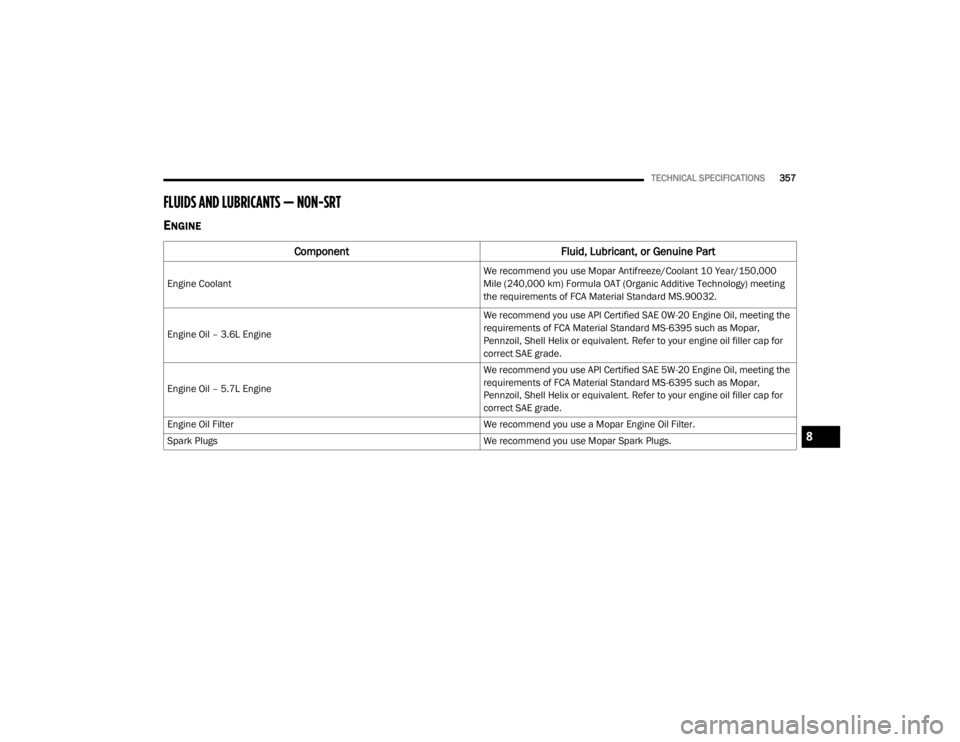
FLUIDS AND LUBRICANTS — NON-SRT
ENGINE
Component Fluid, Lubricant, or Genuine Part
Engine Coolant
We recommend you use Mopar Antifreeze/Coolant 10 Year/150,000
Mile (240,000 km) Formula OAT (Organic Additive Technology) meeting
the requirements of FCA Material Standard MS.90032.
Engine Oil – 3.6L Engine We recommend you use API Certified SAE 0W-20 Engine Oil, meeting the
requirements of FCA Material Standard MS-6395 such as Mopar,
Pennzoil, Shell Helix or equivalent. Refer to your engine oil filler cap for
correct SAE grade.
Engine Oil – 5.7L Engine We recommend you use API Certified SAE 5W-20 Engine Oil, meeting the
requirements of FCA Material Standard MS-6395 such as Mopar,
Pennzoil, Shell Helix or equivalent. Refer to your engine oil filler cap for
correct SAE grade.
Engine Oil Filter We recommend you use a Mopar Engine Oil Filter.
Spark Plugs We recommend you use Mopar Spark Plugs.
8
20_WD_OM_EN_USC_t.book Page 357
Page 360 of 464
358TECHNICAL SPECIFICATIONS
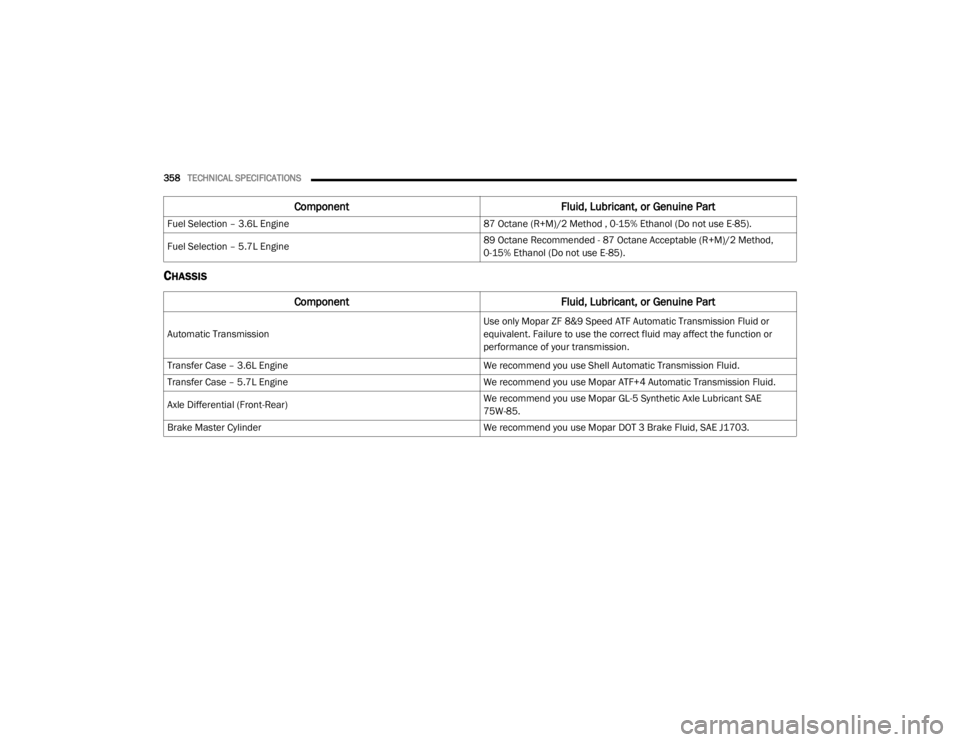
CHASSIS
Fuel Selection – 3.6L Engine 87 Octane (R+M)/2 Method , 0-15% Ethanol (Do not use E-85).
Fuel Selection – 5.7L Engine 89 Octane Recommended - 87 Octane Acceptable (R+M)/2 Method,
0-15% Ethanol (Do not use E-85).
Component
Fluid, Lubricant, or Genuine Part
Automatic Transmission
Use only Mopar ZF 8&9 Speed ATF Automatic Transmission Fluid or
equivalent. Failure to use the correct fluid may affect the function or
performance of your transmission.
Transfer Case – 3.6L Engine We recommend you use Shell Automatic Transmission Fluid.
Transfer Case – 5.7L Engine We recommend you use Mopar ATF+4 Automatic Transmission Fluid.
Axle Differential (Front-Rear) We recommend you use Mopar GL-5 Synthetic Axle Lubricant SAE
75W-85.
Brake Master Cylinder We recommend you use Mopar DOT 3 Brake Fluid, SAE J1703.
ComponentFluid, Lubricant, or Genuine Part
20_WD_OM_EN_USC_t.book Page 358
Page 361 of 464
TECHNICAL SPECIFICATIONS359
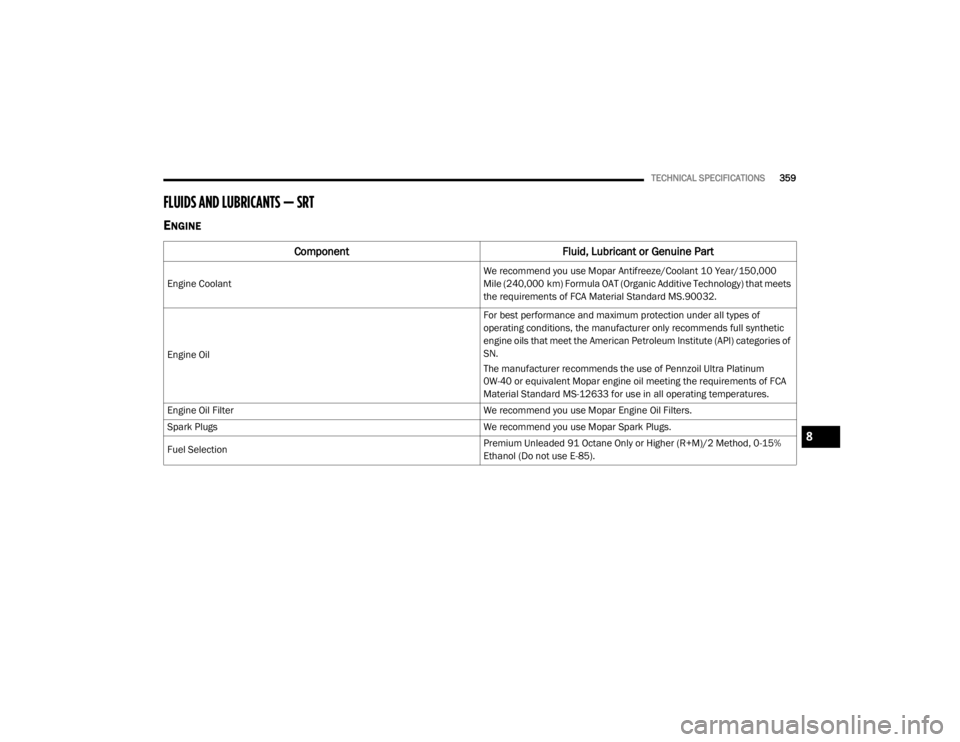
FLUIDS AND LUBRICANTS — SRT
ENGINE
Component Fluid, Lubricant or Genuine Part
Engine Coolant
We recommend you use Mopar Antifreeze/Coolant 10 Year/150,000
Mile (240,000 km) Formula OAT (Organic Additive Technology) that meets
the requirements of FCA Material Standard MS.90032.
Engine Oil For best performance and maximum protection under all types of
operating conditions, the manufacturer only recommends full synthetic
engine oils that meet the American Petroleum Institute (API) categories of
SN.
The manufacturer recommends the use of Pennzoil Ultra Platinum
0W-40 or equivalent Mopar engine oil meeting the requirements of FCA
Material Standard MS-12633 for use in all operating temperatures.
Engine Oil Filter We recommend you use Mopar Engine Oil Filters.
Spark Plugs We recommend you use Mopar Spark Plugs.
Fuel Selection Premium Unleaded 91 Octane Only or Higher (R+M)/2 Method, 0-15%
Ethanol (Do not use E-85).
8
20_WD_OM_EN_USC_t.book Page 359
Page 362 of 464
360TECHNICAL SPECIFICATIONS
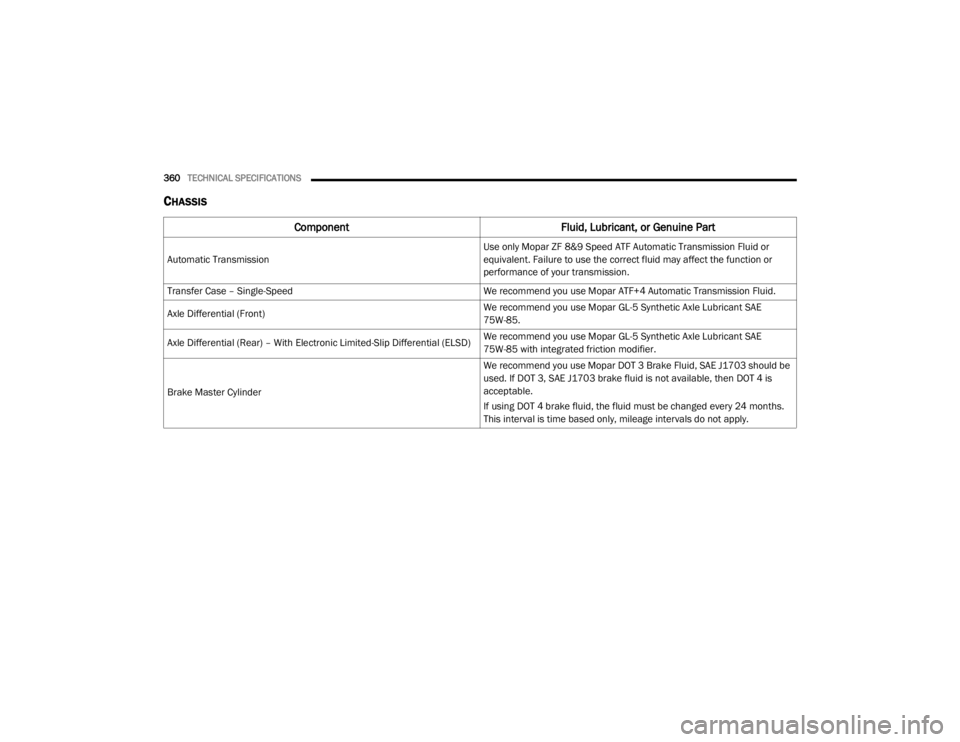
CHASSIS
Component Fluid, Lubricant, or Genuine Part
Automatic Transmission
Use only Mopar ZF 8&9 Speed ATF Automatic Transmission Fluid or
equivalent. Failure to use the correct fluid may affect the function or
performance of your transmission.
Transfer Case – Single-Speed We recommend you use Mopar ATF+4 Automatic Transmission Fluid.
Axle Differential (Front) We recommend you use Mopar GL-5 Synthetic Axle Lubricant SAE
75W-85.
Axle Differential (Rear) – With Electronic Limited-Slip Differential (ELSD) We recommend you use Mopar GL-5 Synthetic Axle Lubricant SAE
75W-85 with integrated friction modifier.
Brake Master Cylinder We recommend you use Mopar DOT 3 Brake Fluid, SAE J1703 should be
used. If DOT 3, SAE J1703 brake fluid is not available, then DOT 4 is
acceptable.
If using DOT 4 brake fluid, the fluid must be changed every 24 months.
This interval is time based only, mileage intervals do not apply.
20_WD_OM_EN_USC_t.book Page 360
Page 368 of 464
366MULTIMEDIA
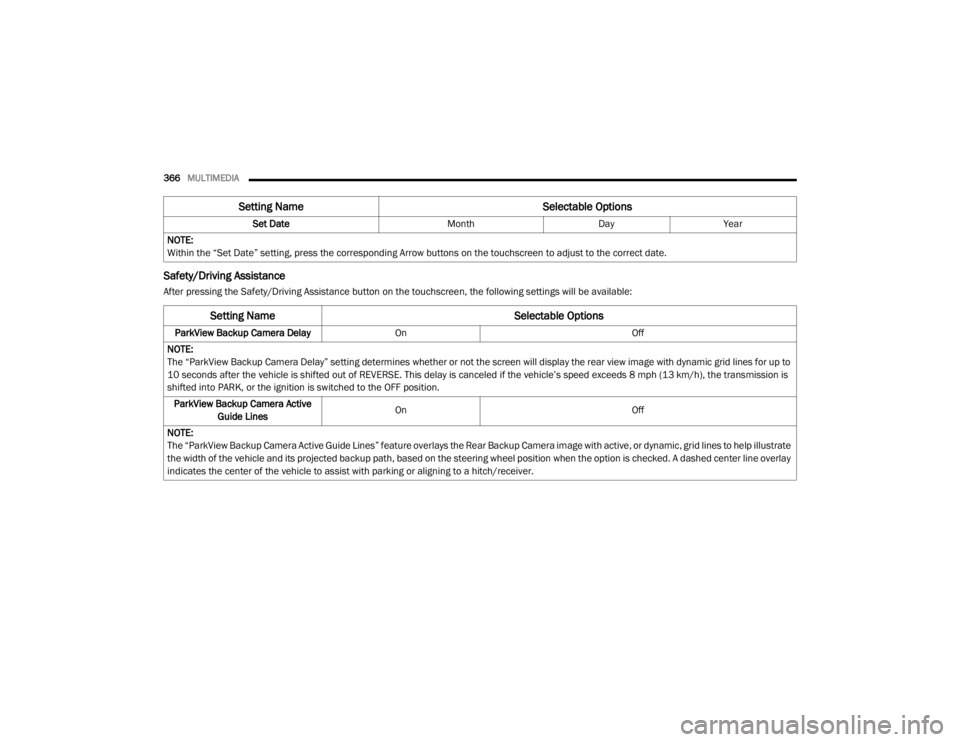
Safety/Driving Assistance
After pressing the Safety/Driving Assistance button on the touchscreen, the following settings will be available: Set Date
MonthDayYear
NOTE:
Within the “Set Date” setting, press the corresponding Arrow buttons on the touchscreen to adjust to the correct date.
Setting Name Selectable Options
Setting NameSelectable Options
ParkView Backup Camera DelayOn Off
NOTE:
The “ParkView Backup Camera Delay” setting determines whether or not the screen will display the rear view image with dynamic grid lines for up to
10 seconds after the vehicle is shifted out of REVERSE. This delay is canceled if the vehicle’s speed exceeds 8 mph (13 km/h), the transmission is
shifted into PARK, or the ignition is switched to the OFF position. ParkView Backup Camera Active Guide Lines On
Off
NOTE:
The “ParkView Backup Camera Active Guide Lines” feature overlays the Rear Backup Camera image with active, or dynamic, grid lines to help illustrate
the width of the vehicle and its projected backup path, based on the steering wheel position when the option is checked. A dashed center line overlay
indicates the center of the vehicle to assist with parking or aligning to a hitch/receiver.
20_WD_OM_EN_USC_t.book Page 366
Page 370 of 464
368MULTIMEDIA
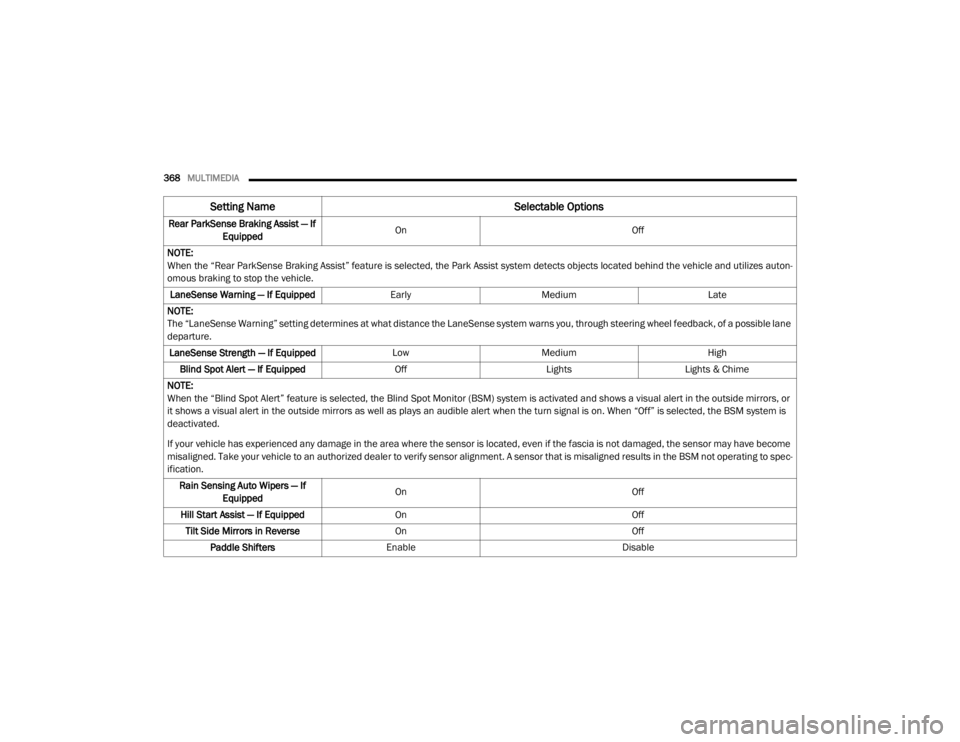
Rear ParkSense Braking Assist — If
Equipped On
Off
NOTE:
When the “Rear ParkSense Braking Assist” feature is selected, the Park Assist system detects objects located behind the vehicle and utilizes auton -
omous braking to stop the vehicle.
LaneSense Warning — If Equipped EarlyMedium Late
NOTE:
The “LaneSense Warning” setting determines at what distance the LaneSense system warns you, through steering wheel feedback, of a possible lane
departure. LaneSense Strength — If Equipped LowMedium High
Blind Spot Alert — If Equipped OffLightsLights & Chime
NOTE:
When the “Blind Spot Alert” feature is selected, the Blind Spot Monitor (BSM) system is activated and shows a visual alert in the outside mirrors, or
it shows a visual alert in the outside mirrors as well as plays an audible alert when the turn signal is on. When “Off” is selected, the BSM system is
deactivated.
If your vehicle has experienced any damage in the area where the sensor is located, even if the fascia is not damaged, the sensor may have become
misaligned. Take your vehicle to an authorized dealer to verify sensor alignment. A sensor that is misaligned results in the BSM not operating to spec -
ification.
Rain Sensing Auto Wipers — If Equipped On
Off
Hill Start Assist — If Equipped On Off
Tilt Side Mirrors in Reverse On Off
Paddle Shifters Enable Disable
Setting Name Selectable Options
20_WD_OM_EN_USC_t.book Page 368
Page 375 of 464
MULTIMEDIA373
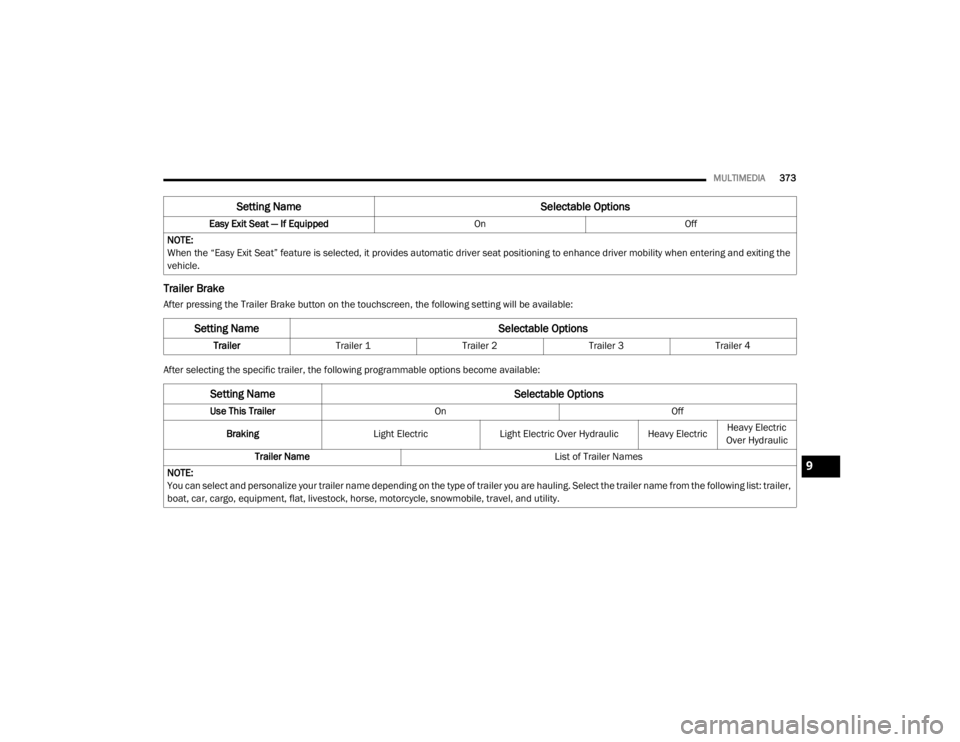
Trailer Brake
After pressing the Trailer Brake button on the touchscreen, the following setting will be available:
After selecting the specific trailer, the following programmable options become available:Easy Exit Seat — If Equipped
OnOff
NOTE:
When the “Easy Exit Seat” feature is selected, it provides automatic driver seat positioning to enhance driver mobility when entering and exiting the
vehicle.
Setting Name Selectable Options
Setting NameSelectable Options
TrailerTrailer 1 Trailer 2Trailer 3Trailer 4
Setting Name Selectable Options
Use This TrailerOn Off
Braking Light ElectricLight Electric Over Hydraulic Heavy Electric Heavy Electric
Over Hydraulic
Trailer Name List of Trailer Names
NOTE:
You can select and personalize your trailer name depending on the type of trailer you are hauling. Select the trailer name from the following list: trailer,
boat, car, cargo, equipment, flat, livestock, horse, motorcycle, snowmobile, travel, and utility.
9
20_WD_OM_EN_USC_t.book Page 373
Page 381 of 464
MULTIMEDIA379
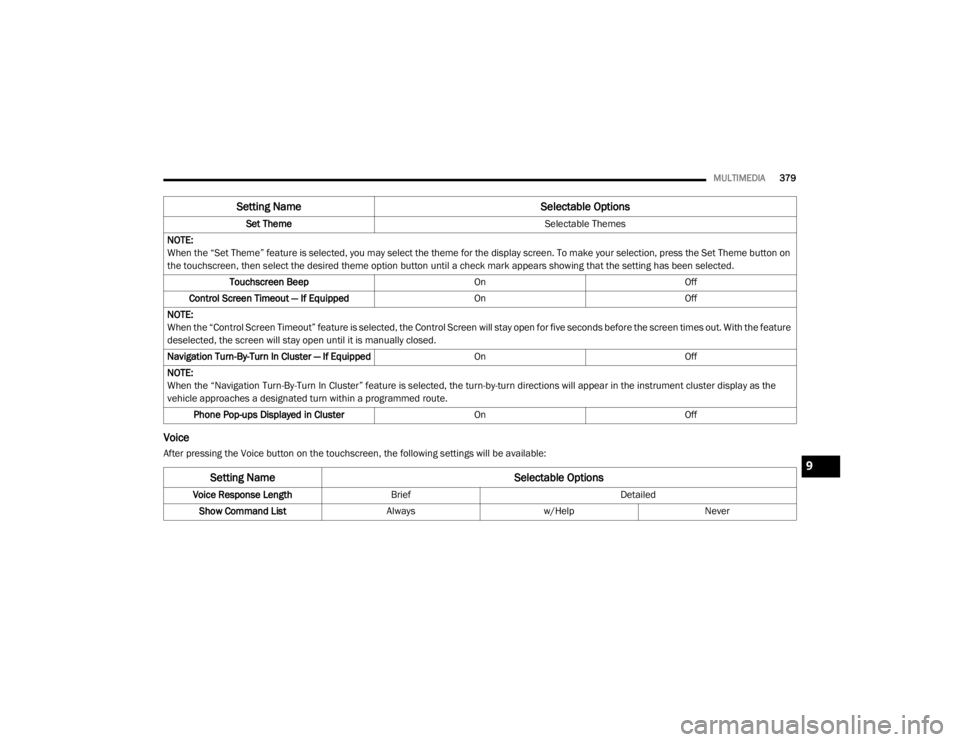
Voice
After pressing the Voice button on the touchscreen, the following settings will be available: Set Theme
Selectable Themes
NOTE:
When the “Set Theme” feature is selected, you may select the theme for the display screen. To make your selection, press the Set Theme button on
the touchscreen, then select the desired theme option button until a check mark appears showing that the setting has been selected. Touchscreen Beep OnOff
Control Screen Timeout — If Equipped OnOff
NOTE:
When the “Control Screen Timeout” feature is selected, the Control Screen will stay open for five seconds before the screen times out. With the feature
deselected, the screen will stay open until it is manually closed.
Navigation Turn-By-Turn In Cluster — If Equipped OnOff
NOTE:
When the “Navigation Turn-By-Turn In Cluster” feature is selected, the turn-by-turn directions will appear in the instrument cluster display as the
vehicle approaches a designated turn within a programmed route. Phone Pop-ups Displayed in Cluster OnOff
Setting Name Selectable Options
Setting NameSelectable Options
Voice Response LengthBrief Detailed
Show Command List Alwaysw/Help Never
9
20_WD_OM_EN_USC_t.book Page 379
Page 382 of 464
380MULTIMEDIA
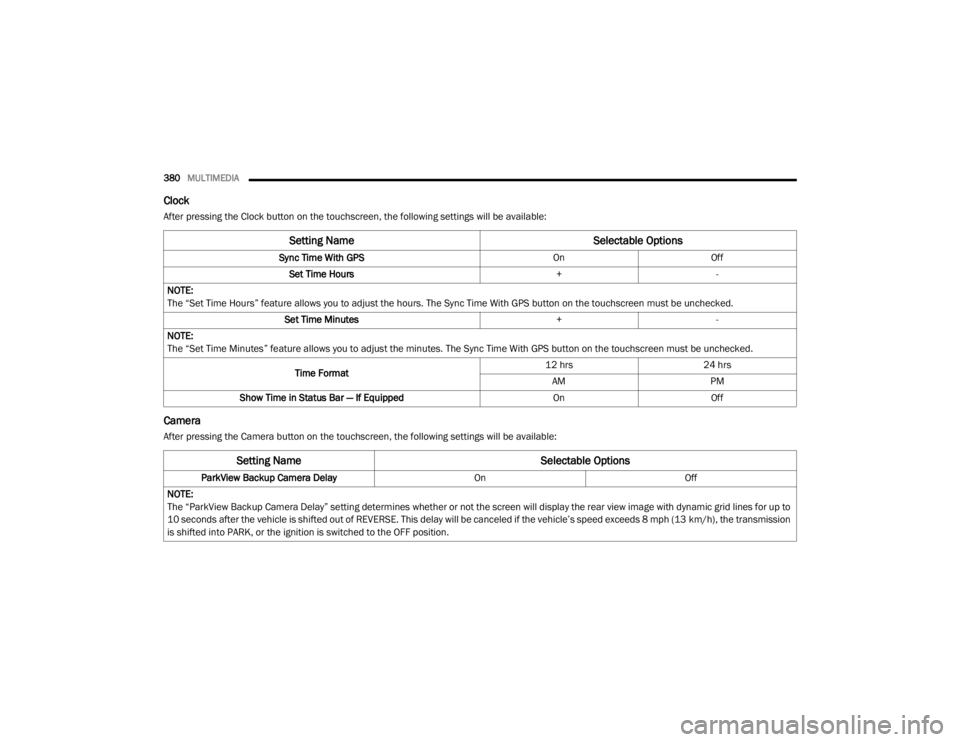
Clock
After pressing the Clock button on the touchscreen, the following settings will be available:
Camera
After pressing the Camera button on the touchscreen, the following settings will be available:
Setting Name Selectable Options
Sync Time With GPS OnOff
Set Time Hours +-
NOTE:
The “Set Time Hours” feature allows you to adjust the hours. The Sync Time With GPS button on the touchscreen must be unchecked. Set Time Minutes +-
NOTE:
The “Set Time Minutes” feature allows you to adjust the minutes. The Sync Time With GPS button on the touchscreen must be unchecked.
Time Format 12 hrs
24 hrs
AM PM
Show Time in Status Bar — If Equipped OnOff
Setting Name Selectable Options
ParkView Backup Camera Delay OnOff
NOTE:
The “ParkView Backup Camera Delay” setting determines whether or not the screen will display the rear view image with dynamic grid lines for up to
10 seconds after the vehicle is shifted out of REVERSE. This delay will be canceled if the vehicle’s speed exceeds 8 mph (13 km/h), the transmission
is shifted into PARK, or the ignition is switched to the OFF position.
20_WD_OM_EN_USC_t.book Page 380
Page 385 of 464
MULTIMEDIA383
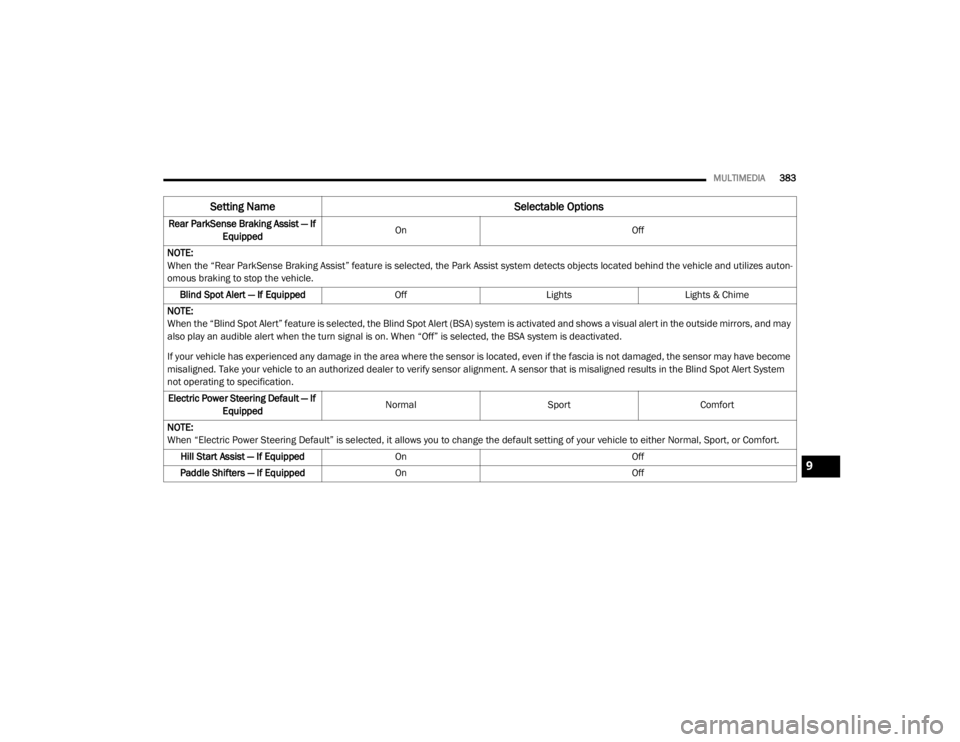
Rear ParkSense Braking Assist — If
Equipped On
Off
NOTE:
When the “Rear ParkSense Braking Assist” feature is selected, the Park Assist system detects objects located behind the vehicle and utilizes auton -
omous braking to stop the vehicle.
Blind Spot Alert — If Equipped OffLightsLights & Chime
NOTE:
When the “Blind Spot Alert” feature is selected, the Blind Spot Alert (BSA) system is activated and shows a visual alert in the outside mirrors, and may
also play an audible alert when the turn signal is on. When “Off” is selected, the BSA system is deactivated.
If your vehicle has experienced any damage in the area where the sensor is located, even if the fascia is not damaged, the sensor may have become
misaligned. Take your vehicle to an authorized dealer to verify sensor alignment. A sensor that is misaligned results in the Blind Spot Alert System
not operating to specification. Electric Power Steering Default — If Equipped Normal
SportComfort
NOTE:
When “Electric Power Steering Default” is selected, it allows you to change the default setting of your vehicle to either Normal, Sport, or Comfort. Hill Start Assist — If Equipped On Off
Paddle Shifters — If Equipped On Off
Setting Name Selectable Options
9
20_WD_OM_EN_USC_t.book Page 383