phone DODGE DURANGO 2020 Owners Manual
[x] Cancel search | Manufacturer: DODGE, Model Year: 2020, Model line: DURANGO, Model: DODGE DURANGO 2020Pages: 464, PDF Size: 22.14 MB
Page 2 of 464

WARNING: Operating, servicing and maintaining a passenger vehicle or off-highway \
motor vehicle can expose you to
chemicals including engine exhaust, carbon monoxide, phthalates, and lea\
d, which are known to the State of California to
cause cancer and birth defects or other reproductive harm. To minimize exposure, avoid breathing exhaust, do not idle the
engine except as necessary, service your vehicle in a well-ventilated area and wear gloves or wash\
your hands frequently
when servicing your vehicle. For more information go to
www.P65Warnings.ca.gov/passenger-vehicle.
This Owner’s Manual illustrates and describes the operation of features and equipme\
nt that are either standard or optional on this vehicle. This manual may also include
a description of features and equipment that are no longer available or \
were not ordered on this vehicle. Please disregard any features and equipment described in this
manual that are not on this vehicle. FCA US LLC reserves the right to make changes in design and specificat\
ions, and/or make additions to or improvements to its
products without imposing any obligation upon itself to install them on \
products previously manufactured.
With respect to any vehicles sold in Canada, the name FCA US LLC shall b\
e deemed to be deleted and the name FCA Canada Inc. used in substitution therefore.
If you are the first registered retail owner of your vehicle, you may \
obtain a complimentary printed copy of the Warranty Booklet by calling 1-800-423-6343 (U.S.) or
1-800-387-1143 (Canada) or by contacting your dealer.
This Owner’s Manual is intended to familiarize you with the important features of y\
our vehicle. Your most up-to-date Owner’s Manual, Navigation/Uconnect manuals and
Warranty Booklet can be found by visiting the website on the back cover. U.S. residents can purchase replacement kits by visiting www.techauthority.com and Canadian
residents can purchase replacement kits by calling 1-800-387-1143.The driver’s primary responsibility is the safe operation of the vehicle. Driving w\
hile distracted can result in loss of vehicle control, resulting in an accident and
personal injury. FCA US LLC strongly recommends that the driver use extreme caution whe\
n using any device or feature that may take their attention off the road.
Use of any electrical devices, such as cellular telephones, computers, p\
ortable radios, vehicle navigation or other devices, by the driver while the vehicle is moving
is dangerous and could lead to a serious accident. Texting while driving is also dangerous and should never be done while th\
e vehicle is moving. If you find yourself
unable to devote your full attention to vehicle operation, pull off the \
road to a safe location and stop your vehicle. Some states or provinces prohibit the use of
cellular telephones or texting while driving. It is always the driver’\
s responsibility to comply with all local laws.
This Owner’s Manual has been prepared to help you get acquainted with your new Dodg\
e brand vehicle and to provide a convenient reference source
for common questions.
Not all features shown in this manual may apply to your vehicle. For add\
itional information, visit www.mopar.com (U.S.), www.mopar.ca (Canada) or your local
Dodge brand dealer.
Drunk driving is one of the most frequent causes of accidents. Your driving ability can be seriously impaired with blood alcohol levels
far below the legal minimum. If you are drinking, don’t drive. Ride with a designated non-drinking driver, call a cab, a friend or use
public transportation.
DRIVING AND ALCOHOL
Driving after drinking can lead to an accident. Your perceptions are less sharp, your reflexes are slower and your judg\
ment is impaired
when you have been drinking. Never drink and then drive.
WARNING!
Page 9 of 464

7
RAISING THE VEHICLE ..................................... 327
TIRES ................................................................... 327 Tire Safety Information .............................327Tires — General Information .....................335Tire Types ...................................................339
Spare Tires — If Equipped ........................ 340Wheel And Wheel Trim Care ...................342Tire Chains and Traction Devices —
Non-SRT .....................................................343 Tire Chains and Traction Devices —
SRT .............................................................344 Tire Rotation Recommendations .............344
DEPARTMENT OF TRANSPORTATION
UNIFORM TIRE QUALITY GRADES ................... 344
Treadwear .................................................. 345Traction Grades .........................................345
Temperature Grades .................................345
STORING THE VEHICLE ..................................... 346
BODYWORK ........................................................ 346
Protection From Atmospheric Agents ......346Body And Underbody Maintenance ..........346
Preserving The Bodywork ..........................347
INTERIORS ......................................................... 348
Seats And Fabric Parts .............................. 348
Plastic And Coated Parts ...........................348
Leather Parts .............................................349Glass Surfaces ..........................................349
TECHNICAL SPECIFICATIONS
IDENTIFICATION DATA .......................................350
Vehicle Identification Number .................. 350
BRAKE SYSTEM .................................................. 350
WHEEL AND TIRE TORQUE
SPECIFICATIONS ............................................... 350
Torque Specifications ................................ 350
FUEL REQUIREMENTS ......................................351
3.6L Engine ................................................ 351
5.7L Engine ................................................ 351
6.4L Engine ................................................ 352
Reformulated Gasoline .......................... 352Materials Added To Fuel .......................... 352Gasoline/Oxygenate Blends .................... 353
Do Not Use E-85 In Non-Flex Fuel
Vehicles ...................................................... 353 CNG And LP Fuel System Modifications... 353
MMT In Gasoline ........................................ 353
Fuel System Cautions................................ 354
Carbon Monoxide Warnings ..................... 354
FLUID CAPACITIES — NON-SRT ........................355
FLUID CAPACITIES — SRT ................................. 356
FLUIDS AND LUBRICANTS — NON-SRT ........... 357
Engine ........................................................ 357
Chassis ....................................................... 358
FLUIDS AND LUBRICANTS — SRT .................... 359
Engine ........................................................ 359
Chassis ...................................................... 360
MULTIMEDIA
UCONNECT SYSTEMS ........................................ 361
CYBERSECURITY ................................................ 361
UCONNECT SETTINGS ....................................... 362Customer Programmable Features —
Uconnect 4 Settings .................................. 363 Customer Programmable Features —
Uconnect 4C/4C NAV Settings ................. 377
SAFETY AND GENERAL INFORMATION .......... 394
Safety Guidelines....................................... 394
UCONNECT 4 WITH 7-INCH DISPLAY .............. 395
Introduction................................................ 395
Radio Mode ................................................ 396
Media Mode ............................................... 404
Phone Mode............................................... 411
STEERING WHEEL AUDIO CONTROLS ............ 423
Radio Operation......................................... 423Media Mode ............................................... 423
IPOD®/USB/MP3 CONTROL —
IF EQUIPPED ....................................................... 424
Connecting The AUX Audio Input Or
External USB Device .................................. 424 Using This Feature..................................... 424
Second Row USB Charging Port ............... 425
20_WD_OM_EN_USC_t.book Page 7
Page 10 of 464

8
UCONNECT REAR SEAT ENTERTAINMENT
(RSE) SYSTEM — IF EQUIPPED......................... 425 Getting Started........................................... 425
Dual Video Screen ..................................... 426Blu-ray™ Disc Player ..................................427Play Video Games ......................................428
Play A DVD/Blu-ray™ Disc Using The
Touchscreen Radio ....................................428 Important Notes For Dual Video Screen
System ........................................................ 430 Blu-ray™ Disc Player Remote Control —
If Equipped .................................................430 Headphones Operation .............................431Controls ......................................................431
Replacing The Headphone Batteries........432Accessibility — If Equipped ........................ 432Stereo Headphone Lifetime Limited
Warranty .....................................................432
RADIO OPERATION AND MOBILE PHONES.... 436
Regulatory And Safety Information........... 436 UCONNECT VOICE RECOGNITION
QUICK TIPS ..........................................................438
Introducing Uconnect ................................ 438
Get Started ................................................. 438
Basic Voice Commands............................. 439Radio .......................................................... 439
Media.......................................................... 439
Phone ......................................................... 439Voice Text Reply — If Equipped ................. 440
Climate ....................................................... 440Navigation (4C NAV) .................................. 441Siri® Eyes Free — If Equipped ................. 441
Do Not Disturb .......................................... 441Android Auto™ — If Equipped ................... 442
Apple CarPlay® — If Equipped ................. 442
General Information .................................. 443Additional Information ............................... 443
CUSTOMER ASSISTANCE
SUGGESTIONS FOR OBTAINING SERVICE
FOR YOUR VEHICLE .......................................... 444
Prepare For The Appointment................... 444
Prepare A List............................................. 444
Be Reasonable With Requests ................. 444 IF YOU NEED ASSISTANCE ............................... 444
FCA US LLC Customer Center ................... 445
FCA Canada Inc. Customer Center ........... 445
In Mexico Contact ...................................... 445
Puerto Rico And US Virgin Islands ............ 445
Customer Assistance For The Hearing
Or Speech Impaired
(TDD/TTY) ................................................... 445 Service Contract ....................................... 445
WARRANTY INFORMATION .............................. 446
MOPAR PARTS................................................... 446
REPORTING SAFETY DEFECTS ........................ 446
In The 50 United States And
Washington, D.C. ....................................... 446 In Canada ................................................... 447
PUBLICATION ORDER FORMS ......................... 447
20_WD_OM_EN_USC_t.book Page 8
Page 14 of 464
12
GETTING TO KNOW YOUR VEHICLE
VEHICLE USER GUIDE — IF EQUIPPED
Access your Owner’s Information right through
your Uconnect 4C or 4C NAV touchscreen
system (if equipped).
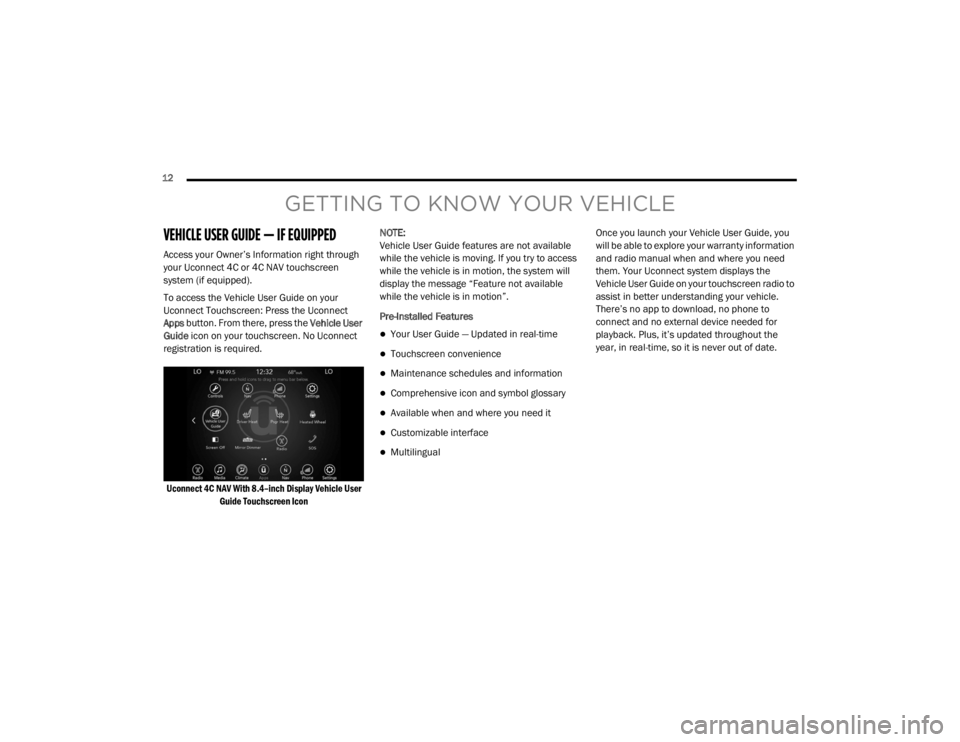
To access the Vehicle User Guide on your
Uconnect Touchscreen: Press the Uconnect
Apps button. From there, press the Vehicle User
Guide icon on your touchscreen. No Uconnect
registration is required.
Uconnect 4C NAV With 8.4–inch Display Vehicle User Guide Touchscreen Icon
NOTE:
Vehicle User Guide features are not available
while the vehicle is moving. If you try to access
while the vehicle is in motion, the system will
display the message “Feature not available
while the vehicle is in motion”.
Pre-Installed Features
Your User Guide — Updated in real-time
Touchscreen convenience
Maintenance schedules and information
Comprehensive icon and symbol glossary
Available when and where you need it
Customizable interface
Multilingual Once you launch your Vehicle User Guide, you
will be able to explore your warranty information
and radio manual when and where you need
them. Your Uconnect system displays the
Vehicle User Guide on your touchscreen radio to
assist in better understanding your vehicle.
There’s no app to download, no phone to
connect and no external device needed for
playback. Plus, it’s updated throughout the
year, in real-time, so it is never out of date.
20_WD_OM_EN_USC_t.book Page 12
Page 15 of 464

GETTING TO KNOW YOUR VEHICLE13
Features/Benefits
Pre-installed on your Uconnect touchscreen
radio
Enhanced search and browsing capability
Robust NAV application (if equipped)
Add selected topics to a fast-access Favor -
ites category
Icon and symbol glossary
Warranty information
Crucial driver information and assistance:
Operating Instructions
Warranty Information
Fluid Level Standards
Maintenance Schedules
Emergency Procedures
911 Contact and More TIP:
When viewing a topic, tap the star icon to add it
to your Favorites, for easy access in the future.
KEYS
KEY FOB
Your vehicle uses a keyless ignition system. The
ignition system consists of a key fob with
Remote Keyless Entry (RKE) and a START/STOP
push button ignition system. The RKE system
consists of a key fob and Keyless Enter-N-Go
feature (if equipped).
NOTE:
The key fob may not be found if it is located next
to a mobile phone, laptop or other electronic
device; these devices may block the key fob’s
wireless signal.
The key fob also includes an emergency key,
which stores in the rear of the key fob.
The emergency key allows for entry into the
vehicle should the battery in the vehicle or the
key fob become depleted. The emergency key is
also for locking the glove compartment. You can
keep the emergency key with you when valet
parking.
To remove the emergency key, slide the
mechanical latch at the top of the key fob
sideways with your thumb and then pull the key
out with your other hand.
2
20_WD_OM_EN_USC_t.book Page 13
Page 27 of 464
GETTING TO KNOW YOUR VEHICLE25
(Continued)
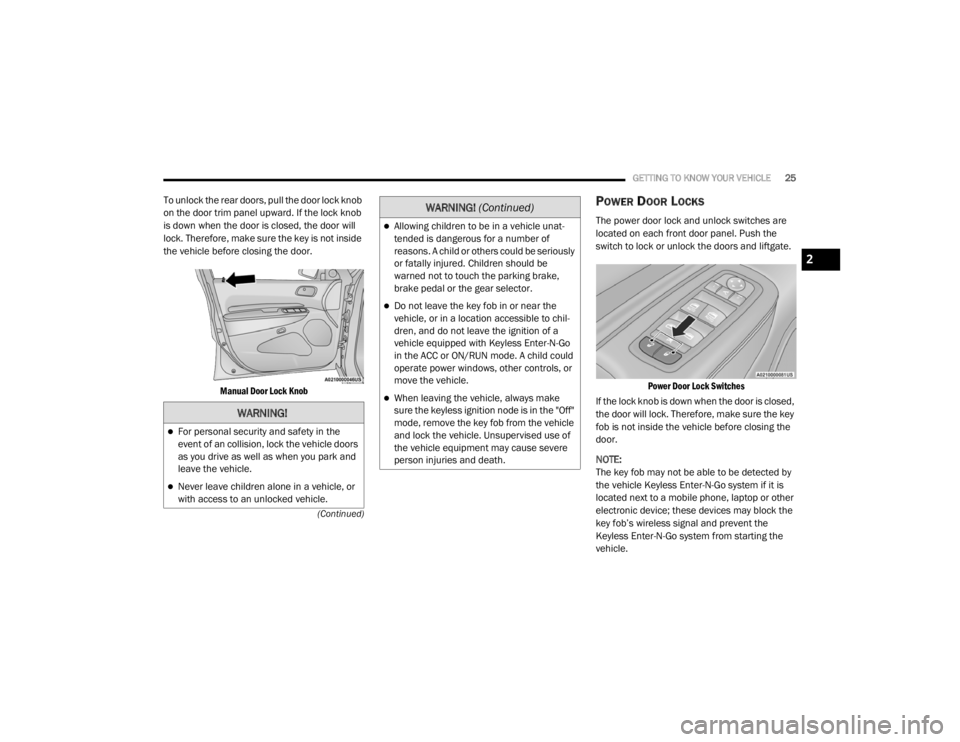
To unlock the rear doors, pull the door lock knob
on the door trim panel upward. If the lock knob
is down when the door is closed, the door will
lock. Therefore, make sure the key is not inside
the vehicle before closing the door.
Manual Door Lock Knob
POWER DOOR LOCKS
The power door lock and unlock switches are
located on each front door panel. Push the
switch to lock or unlock the doors and liftgate.
Power Door Lock Switches
If the lock knob is down when the door is closed,
the door will lock. Therefore, make sure the key
fob is not inside the vehicle before closing the
door.
NOTE:
The key fob may not be able to be detected by
the vehicle Keyless Enter-N-Go system if it is
located next to a mobile phone, laptop or other
electronic device; these devices may block the
key fob’s wireless signal and prevent the
Keyless Enter-N-Go system from starting the
vehicle.
WARNING!
For personal security and safety in the
event of an collision, lock the vehicle doors
as you drive as well as when you park and
leave the vehicle.
Never leave children alone in a vehicle, or
with access to an unlocked vehicle.
Allowing children to be in a vehicle unat -
tended is dangerous for a number of
reasons. A child or others could be seriously
or fatally injured. Children should be
warned not to touch the parking brake,
brake pedal or the gear selector.
Do not leave the key fob in or near the
vehicle, or in a location accessible to chil-
dren, and do not leave the ignition of a
vehicle equipped with Keyless Enter-N-Go
in the ACC or ON/RUN mode. A child could
operate power windows, other controls, or
move the vehicle.
When leaving the vehicle, always make
sure the keyless ignition node is in the "Off"
mode, remove the key fob from the vehicle
and lock the vehicle. Unsupervised use of
the vehicle equipment may cause severe
person injuries and death.
WARNING! (Continued)
2
20_WD_OM_EN_USC_t.book Page 25
Page 28 of 464
26GETTING TO KNOW YOUR VEHICLE
If you push the door lock switch while the
ignition position is in ACC or ON/RUN and the
driver or front passenger's door is open, the
doors will not lock.
If a rear door is locked, it cannot be opened
from inside the vehicle without first unlocking
the door. The door may be unlocked manually
by raising the lock knob.
KEYLESS ENTER-N-GO — PASSIVE
E
NTRY
The Passive Entry system is an enhancement to
the vehicle’s Remote Keyless Entry (RKE)
system and a feature of Keyless Enter-N-Go —
Passive Entry. This feature allows you to lock
and unlock the vehicle’s door(s) without having
to push the key fob lock or unlock buttons.
NOTE:
Passive Entry may be programmed on/off.
Refer to “Uconnect Settings” in “Multimedia”
for further information.
If wearing gloves on your hands, or if it has
been raining/snowing on the Passive Entry
door handle, the unlock sensitivity can be
affected, resulting in a slower response time.
If the vehicle is unlocked by Passive Entry
and no door is opened within 60 seconds, the
vehicle will re-lock and will arm the security
alarm (if equipped).
The key fob may not be able to be detected by
the vehicle Passive Entry system if it is
located next to a mobile phone, laptop or
other electronic device; these devices may
block the key fob's wireless signal and
prevent the passive entry handle from
locking/unlocking the vehicle.
Passive Entry activates illuminated approach
for the time set by the customer (0, 30, 60, or
90 seconds), and flashes the turn signal
lights. Refer to “Uconnect Settings” in “Multi -
media” for further information
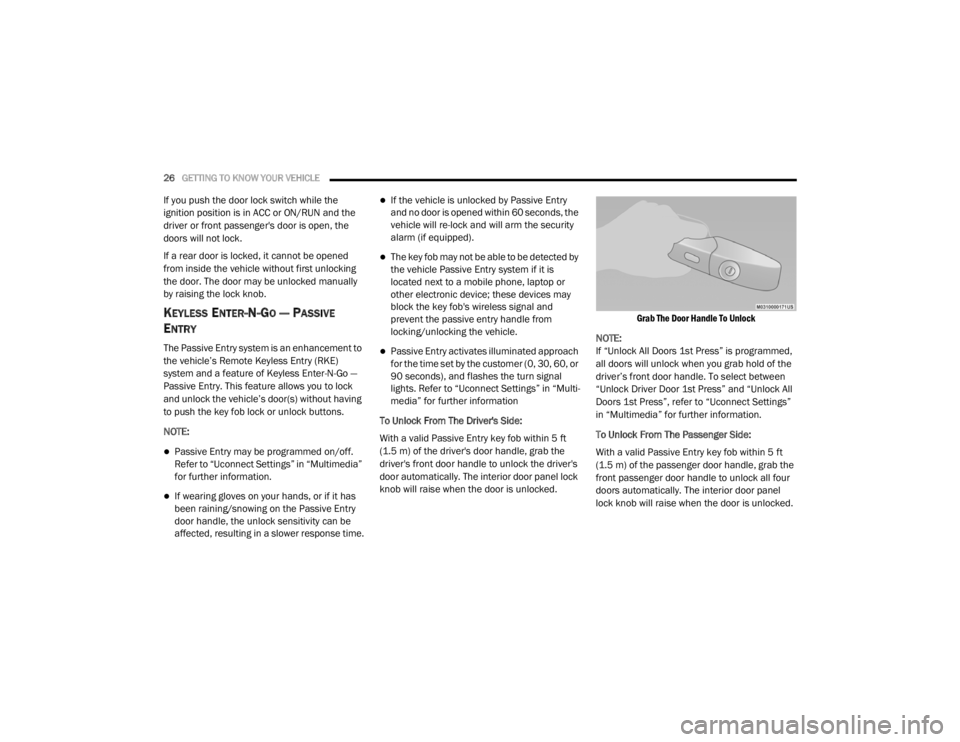
To Unlock From The Driver's Side:
With a valid Passive Entry key fob within 5 ft
(1.5 m) of the driver's door handle, grab the
driver's front door handle to unlock the driver's
door automatically. The interior door panel lock
knob will raise when the door is unlocked.
Grab The Door Handle To Unlock
NOTE:
If “Unlock All Doors 1st Press” is programmed,
all doors will unlock when you grab hold of the
driver’s front door handle. To select between
“Unlock Driver Door 1st Press” and “Unlock All
Doors 1st Press”, refer to “Uconnect Settings”
in “Multimedia” for further information.
To Unlock From The Passenger Side:
With a valid Passive Entry key fob within 5 ft
(1.5 m) of the passenger door handle, grab the
front passenger door handle to unlock all four
doors automatically. The interior door panel
lock knob will raise when the door is unlocked.
20_WD_OM_EN_USC_t.book Page 26
Page 89 of 464
GETTING TO KNOW YOUR VEHICLE87
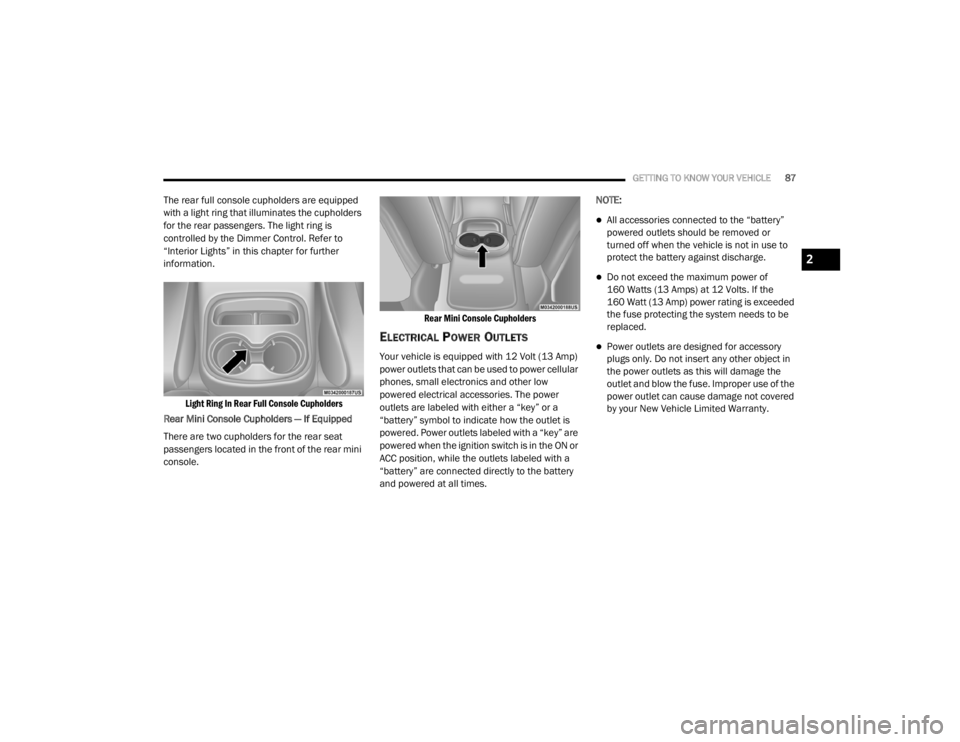
The rear full console cupholders are equipped
with a light ring that illuminates the cupholders
for the rear passengers. The light ring is
controlled by the Dimmer Control. Refer to
“Interior Lights” in this chapter for further
information.
Light Ring In Rear Full Console Cupholders
Rear Mini Console Cupholders — If Equipped
There are two cupholders for the rear seat
passengers located in the front of the rear mini
console.
Rear Mini Console Cupholders
ELECTRICAL POWER OUTLETS
Your vehicle is equipped with 12 Volt (13 Amp)
power outlets that can be used to power cellular
phones, small electronics and other low
powered electrical accessories. The power
outlets are labeled with either a “key” or a
“battery” symbol to indicate how the outlet is
powered. Power outlets labeled with a “key” are
powered when the ignition switch is in the ON or
ACC position, while the outlets labeled with a
“battery” are connected directly to the battery
and powered at all times.NOTE:
All accessories connected to the “battery”
powered outlets should be removed or
turned off when the vehicle is not in use to
protect the battery against discharge.
Do not exceed the maximum power of
160 Watts (13 Amps) at 12 Volts. If the
160 Watt (13 Amp) power rating is exceeded
the fuse protecting the system needs to be
replaced.
Power outlets are designed for accessory
plugs only. Do not insert any other object in
the power outlets as this will damage the
outlet and blow the fuse. Improper use of the
power outlet can cause damage not covered
by your New Vehicle Limited Warranty.
2
20_WD_OM_EN_USC_t.book Page 87
Page 91 of 464
GETTING TO KNOW YOUR VEHICLE89
(Continued)
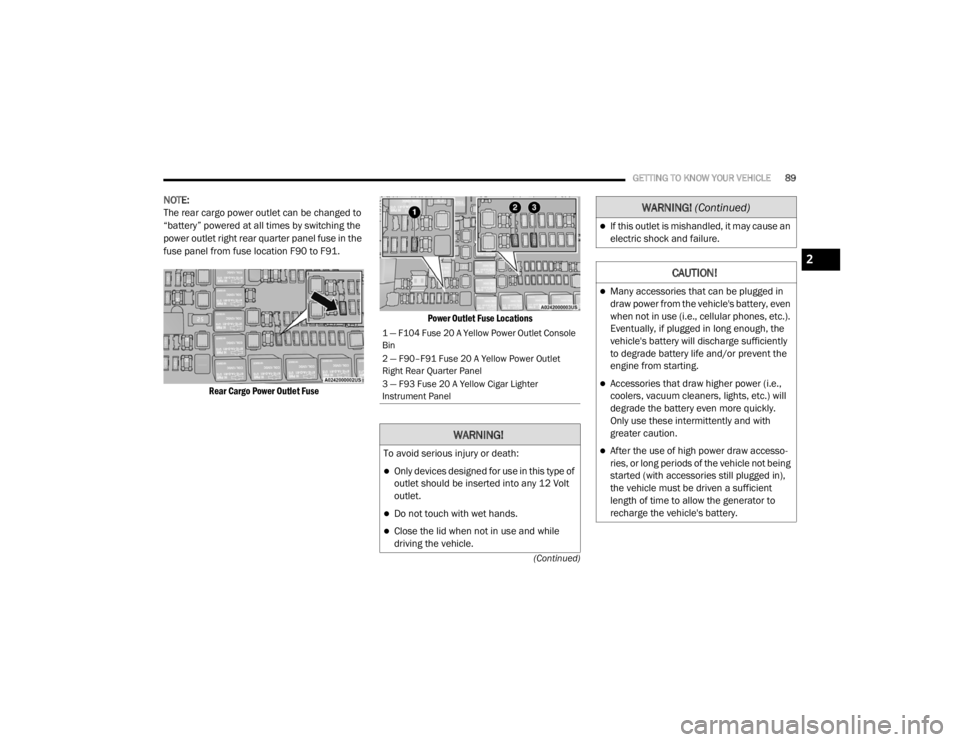
NOTE:
The rear cargo power outlet can be changed to
“battery” powered at all times by switching the
power outlet right rear quarter panel fuse in the
fuse panel from fuse location F90 to F91.
Rear Cargo Power Outlet Fuse Power Outlet Fuse Locations
1 — F104 Fuse 20 A Yellow Power Outlet Console
Bin
2 — F90–F91 Fuse 20 A Yellow Power Outlet
Right Rear Quarter Panel
3 — F93 Fuse 20 A Yellow Cigar Lighter
Instrument Panel
WARNING!
To avoid serious injury or death:
Only devices designed for use in this type of
outlet should be inserted into any 12 Volt
outlet.
Do not touch with wet hands.
Close the lid when not in use and while
driving the vehicle.
If this outlet is mishandled, it may cause an
electric shock and failure.
CAUTION!
Many accessories that can be plugged in
draw power from the vehicle's battery, even
when not in use (i.e., cellular phones, etc.).
Eventually, if plugged in long enough, the
vehicle's battery will discharge sufficiently
to degrade battery life and/or prevent the
engine from starting.
Accessories that draw higher power (i.e.,
coolers, vacuum cleaners, lights, etc.) will
degrade the battery even more quickly.
Only use these intermittently and with
greater caution.
After the use of high power draw accesso
-
ries, or long periods of the vehicle not being
started (with accessories still plugged in),
the vehicle must be driven a sufficient
length of time to allow the generator to
recharge the vehicle's battery.
WARNING! (Continued)
2
20_WD_OM_EN_USC_t.book Page 89
Page 92 of 464
90GETTING TO KNOW YOUR VEHICLE
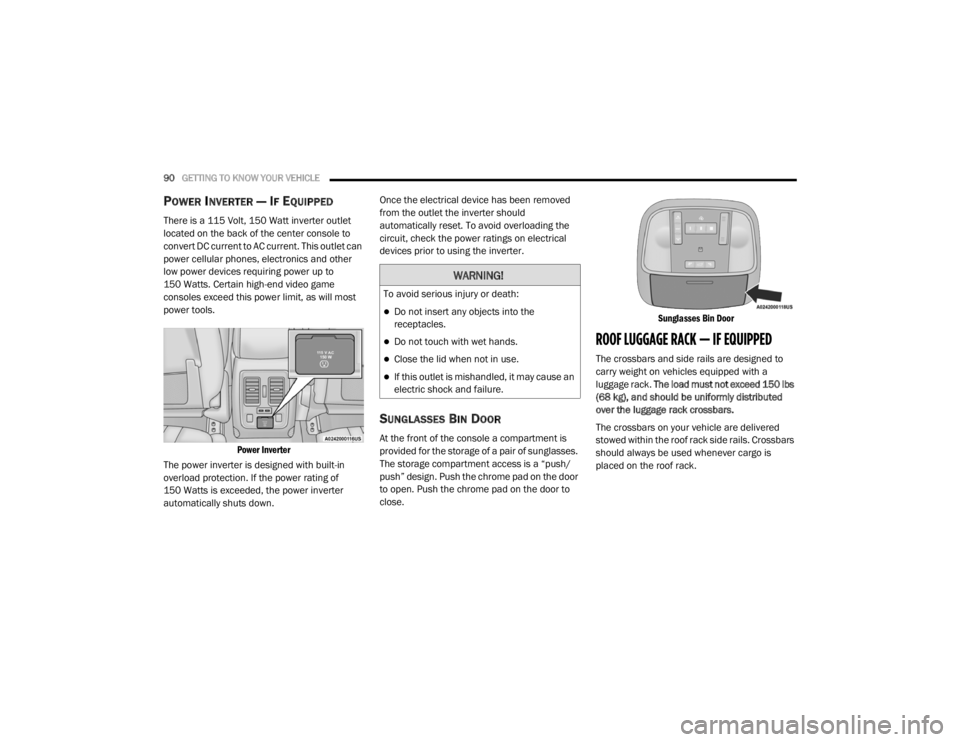
POWER INVERTER — IF EQUIPPED
There is a 115 Volt, 150 Watt inverter outlet
located on the back of the center console to
convert DC current to AC current. This outlet can
power cellular phones, electronics and other
low power devices requiring power up to
150 Watts. Certain high-end video game
consoles exceed this power limit, as will most
power tools.
Power Inverter
The power inverter is designed with built-in
overload protection. If the power rating of
150 Watts is exceeded, the power inverter
automatically shuts down. Once the electrical device has been removed
from the outlet the inverter should
automatically reset. To avoid overloading the
circuit, check the power ratings on electrical
devices prior to using the inverter.
SUNGLASSES BIN DOOR
At the front of the console a compartment is
provided for the storage of a pair of sunglasses.
The storage compartment access is a “push/
push” design. Push the chrome pad on the door
to open. Push the chrome pad on the door to
close.
Sunglasses Bin Door
ROOF LUGGAGE RACK — IF EQUIPPED
The crossbars and side rails are designed to
carry weight on vehicles equipped with a
luggage rack.
The load must not exceed 150 lbs
(68 kg), and should be uniformly distributed
over the luggage rack crossbars.
The crossbars on your vehicle are delivered
stowed within the roof rack side rails. Crossbars
should always be used whenever cargo is
placed on the roof rack.
WARNING!
To avoid serious injury or death:
Do not insert any objects into the
receptacles.
Do not touch with wet hands.
Close the lid when not in use.
If this outlet is mishandled, it may cause an
electric shock and failure.
20_WD_OM_EN_USC_t.book Page 90