transmission DODGE DURANGO 2023 Owners Manual
[x] Cancel search | Manufacturer: DODGE, Model Year: 2023, Model line: DURANGO, Model: DODGE DURANGO 2023Pages: 328, PDF Size: 13.82 MB
Page 6 of 328

4
STARTING AND OPERATING
STARTING THE ENGINE ......................................... 98
Automatic Transmission ..................................98
Normal Starting ...............................................98
AutoPark ...........................................................99
Extended Park Starting ................................. 100If Engine Fails To Start .................................. 101
Cold Weather Operation
(Below –22°F Or −30°C) ............................ 101
After Starting.................................................. 101
ENGINE BREAK-IN RECOMMENDATIONS ........ 101
PARKING BRAKE ................................................ 102
AUTOMATIC TRANSMISSION.............................. 103 Ignition Park Interlock ................................... 104Brake Transmission Shift Interlock (BTSI)
System ........................................................... 104Fuel Economy (ECO) Mode ........................... 104
8-Speed Automatic Transmission ................ 104
SPORT MODE — IF EQUIPPED ............................ 108
ALL-WHEEL DRIVE OPERATION .........................108
Single-Speed Operating Instructions/
Precautions — If Equipped ............................ 108
Electronically Shifted Transfer Case —
If Equipped..................................................... 109
Shifting Procedure......................................... 110
TOW N GO — IF EQUIPPED ................................. 111
Guidelines For Track Use .............................. 112
FUEL SAVER TECHNOLOGY 5.7L ONLY —
IF EQUIPPED ......................................................... 113
POWER STEERING ............................................... 113 STOP/START SYSTEM — IF EQUIPPED ............. 114
Autostop Mode .............................................. 114
Possible Reasons The Engine Does Not
Autostop......................................................... 114
To Start The Engine While In Autostop
Mode .............................................................. 114
To Manually Turn Off The
Stop/Start System......................................... 115
To Manually Turn On The
Stop/Start System......................................... 115
System Malfunction ...................................... 115
CRUISE CONTROL SYSTEMS — IF EQUIPPED .... 115
Cruise Control ............................................... 115
Adaptive Cruise Control (ACC) ...................... 117
PARKSENSE FRONT/REAR PARK ASSIST
SYSTEM — IF EQUIPPED .................................... 125
ParkSense Sensors ....................................... 126
ParkSense Display ........................................ 126ParkSense Warning Display ......................... 129
Enabling And Disabling ParkSense .............. 129Operation With A Trailer................................ 129
Service The ParkSense Park Assist System ...130
Cleaning The ParkSense System ................. 130
ParkSense System Usage Precautions........ 130
LANESENSE — IF EQUIPPED ............................. 131
LaneSense Operation ................................... 131Turning LaneSense On Or Off ....................... 132
LaneSense Warning Message ...................... 132Changing LaneSense Status ........................ 134 PARKVIEW REAR BACK UP CAMERA .............. 134
REFUELING THE VEHICLE ................................... 135
VEHICLE LOADING .............................................. 136
Certification Label ......................................... 136
TRAILER TOWING ................................................ 137
Common Towing Definitions......................... 137
Trailer Hitch Classification............................ 139
Trailer Towing Weights (Maximum Trailer
Weight Ratings) ............................................ 139
Trailer Hitch Receiver Cover Removal —
If Equipped .................................................... 140
Trailer And Tongue Weight .......................... 140
Towing Requirements .................................. 141Towing Tips ................................................... 145
RECREATIONAL TOWING
(BEHIND MOTORHOME) ..................................... 146
Towing This Vehicle Behind Another Vehicle ..146
Recreational Towing — Rear-Wheel
Drive Models ................................................. 147
Recreational Towing — All-Wheel Drive
Models (Single-Speed Transfer Case) ......... 147
Recreational Towing — All-Wheel Drive
Models (Two-Speed Transfer Case) ............. 147
DRIVING TIPS ....................................................... 150
On-Road Driving Tips..................................... 150Off-Road Driving Tips .................................... 150
23_WD_OM_EN_USC_t.book Page 4
Page 7 of 328
5
MULTIMEDIA
UCONNECT SYSTEMS ......................................... 153
CYBERSECURITY ................................................. 153
UCONNECT SETTINGS ......................................... 153Customer Programmable Features .............. 154
STEERING WHEEL AUDIO CONTROLS .............. 176
Radio Operation ............................................ 176
Media Mode................................................... 176
RADIO OPERATION AND MOBILE PHONES...... 176
Regulatory And Safety Information .............. 176
SAFETY
SAFETY FEATURES .............................................. 177 Anti-Lock Brake System (ABS) ..................... 177
Rear Seat Reminder Alert (RSRA) ................ 178
Electronic Brake Control (EBC) System ...... 178
AUXILIARY DRIVING SYSTEMS .......................... 183
Blind Spot Monitoring (BSM) —
If Equipped..................................................... 183
Forward Collision Warning (FCW) With
Mitigation ....................................................... 186
Tire Pressure Monitoring System (TPMS) .... 188
OCCUPANT RESTRAINT SYSTEMS .................... 191
Occupant Restraint Systems Features ........ 191
Important Safety Precautions....................... 191
Seat Belt Systems ........................................ 192
Supplemental Restraint Systems (SRS) ...... 198
Child Restraints ............................................. 210 SAFETY TIPS ....................................................... 225
Transporting Passengers .............................. 225Transporting Pets ......................................... 225
Connected Vehicles ...................................... 225
Safety Checks You Should Make Inside
The Vehicle ................................................... 226
Periodic Safety Checks You Should Make
Outside The Vehicle ...................................... 227
Exhaust Gas................................................... 228
Carbon Monoxide Warnings ......................... 228
IN CASE OF EMERGENCY
HAZARD WARNING FLASHERS ........................ 229
SOS AND ASSIST MIRROR — IF EQUIPPED ..... 229
JACKING AND TIRE CHANGING ........................ 232 Preparations For Jacking .............................. 232Jack Location ................................................. 233
Spare Tire Stowage ....................................... 234
Spare Tire Removal ....................................... 234
Jacking Instructions ..................................... 236
JUMP STARTING ................................................. 239
Preparations For Jump Start ........................ 240
Jump Starting Procedure .............................. 240
REFUELING IN EMERGENCY – IF EQUIPPED .. 242
IF YOUR ENGINE OVERHEATS ........................... 243
MANUAL PARK RELEASE ................................... 243
FREEING A STUCK VEHICLE .............................. 245
TOWING A DISABLED VEHICLE ........................ 246
Rear-Wheel Drive Models ............................. 247
All-Wheel Drive Models ................................. 247 ENHANCED ACCIDENT RESPONSE SYSTEM
(EARS) .................................................................. 248
EVENT DATA RECORDER (EDR) ......................... 248
SERVICING AND MAINTENANCE
SCHEDULED SERVICING .................................... 249
Maintenance Plan ......................................... 250
ENGINE COMPARTMENT .................................... 253
3.6L Engine ................................................... 253
5.7L Engine ................................................... 254
Checking Oil Level ......................................... 255
Adding Washer Fluid .................................... 255
Maintenance-Free Battery ........................... 255
Pressure Washing ......................................... 256
VEHICLE MAINTENANCE ..................................... 256
Engine Oil ...................................................... 256
Engine Oil Filter ............................................. 257Engine Air Cleaner Filter .............................. 257
Air Conditioner Maintenance ....................... 258
Accessory Drive Belt Inspection ................... 260Body Lubrication ........................................... 261
Windshield Wiper Blades.............................. 261
Exhaust System ............................................ 264
Cooling System.............................................. 265
Brake System ............................................... 268Automatic Transmission ............................... 269
Front/Rear Axle Fluid ................................... 269
Transfer Case ............................................... 270Fuses.............................................................. 270
Bulb Replacement ........................................ 278
23_WD_OM_EN_USC_t.book Page 5
Page 9 of 328
7
INTRODUCTION
Dear Customer,
Congratulations on the purchase of your new Dodge vehicle. Be assured that it represents precision workmanship, distinctive styling, and high quality.
This is a specialized utility vehicle. It can go places and perform tasks that are not intended for conventional passenger vehicles. It handles and maneuvers
differently from many passenger vehicles both on-road and off-road, so take time to become familiar with your vehicle. If equipped, the two-wheel drive version
of this vehicle was designed for on-road use only. It is not intended for off-road driving or use in other severe conditions suited for a four-wheel drive vehicle.
Before you start to drive this vehicle, read the Owner’s Manual. Be sure you are familiar with all vehicle controls, particularly those used for braking, steering,
transmission, and transfer case shifting. Learn how your vehicle handles on different road surfaces. Your driving skills will improve with experience. When driving
off-road, or working the vehicle, don’t overload the vehicle or expect the vehicle to overcome the natural laws of physics. Always observe federal, state, provincial
and local laws wherever you drive. As with other vehicles of this type, failure to operate this vehicle correctly may result in loss of control or a collision Úpage 150.
This Owner's Manual has been prepared with the assistance of service and engineering specialists to acquaint you with the operation and maintenance of your
vehicle. It is supplemented by customer-oriented documents. Within this information, you will find a description of the services that FCA US LLC offers to its
customers as well as the details of the terms and conditions for maintaining its validity. Please take the time to read all of these publications carefully before
driving your vehicle for the first time. Following the instructions, recommendations, tips, and important warnings in this manual will help ensure safe and
enjoyable operation of your vehicle.
This Owner's Manual describes all versions of this vehicle. Options and equipment dedicated to specific markets or versions are not expressly indicated in the
text. Therefore, you should only consider the information that is related to the trim level, engine, and version that you have purchased. Any content introduced
throughout the Owner's Information, which may or may not be applicable to your vehicle, will be identified with the wording "If Equipped". All data contained in
this publication are intended to help you use your vehicle in the best possible way. FCA US LLC aims at a constant improvement of the vehicles produced. For
this reason, it reserves the right to make changes to the model described for technical and/or commercial reasons. For further information, contact an authorized
dealer.
When it comes to service remember that authorized dealers know your Dodge best, have factory-trained technicians, genuine Mopar® parts, and care about
your satisfaction.1
23_WD_OM_EN_USC_t.book Page 7
Page 12 of 328
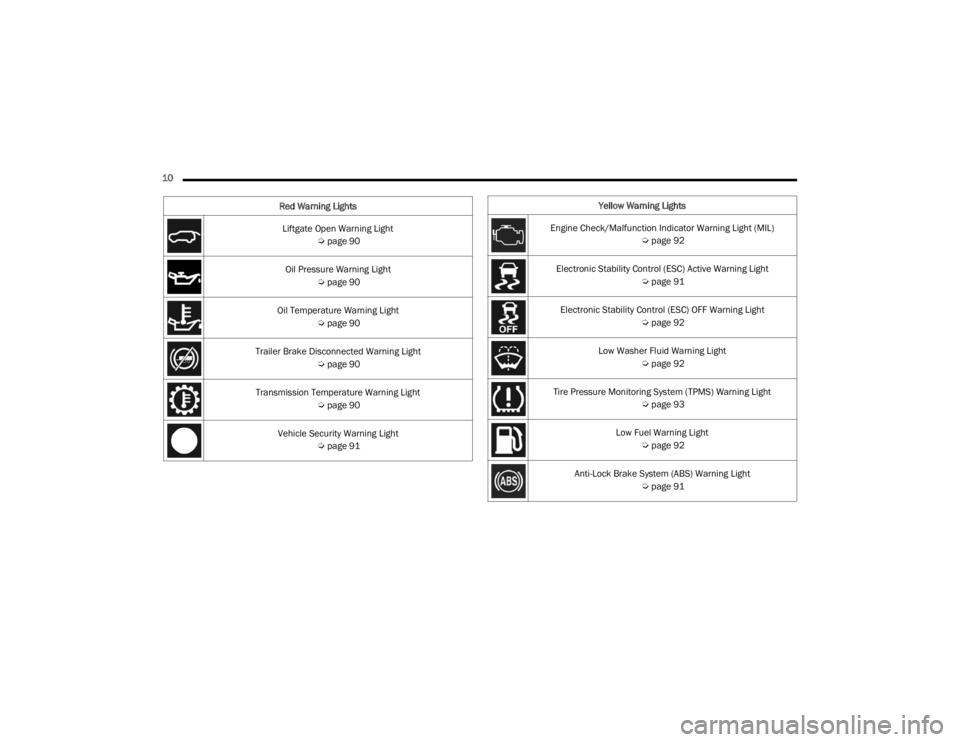
10 Liftgate Open Warning Light Úpage 90
Oil Pressure Warning Light Úpage 90
Oil Temperature Warning Light Úpage 90
Trailer Brake Disconnected Warning Light Úpage 90
Transmission Temperature Warning Light Úpage 90
Vehicle Security Warning Light Úpage 91
Red Warning Lights
Yellow Warning Lights
Engine Check/Malfunction Indicator Warning Light (MIL) Úpage 92
Electronic Stability Control (ESC) Active Warning Light Úpage 91
Electronic Stability Control (ESC) OFF Warning Light Úpage 92
Low Washer Fluid Warning Light Úpage 92
Tire Pressure Monitoring System (TPMS) Warning Light Úpage 93
Low Fuel Warning Light Úpage 92
Anti-Lock Brake System (ABS) Warning Light Úpage 91
23_WD_OM_EN_USC_t.book Page 10
Page 19 of 328
GETTING TO KNOW YOUR VEHICLE17
ON/RUN
Driving position
All electrical devices are available (e.g. climate
controls, etc.)
START
The engine will start (when foot is on the brake
pedal)
NOTE:If the ignition position does not change with a push
of the ignition button, and the instrument cluster
display message “Key Fob Not Detected” is being
displayed, the key fob may have a low or depleted
battery. In this situation, a backup method can be
used to operate the ignition switch. Put the nose
side of the key fob (side opposite of the emergency
key) against the START/STOP ignition button and
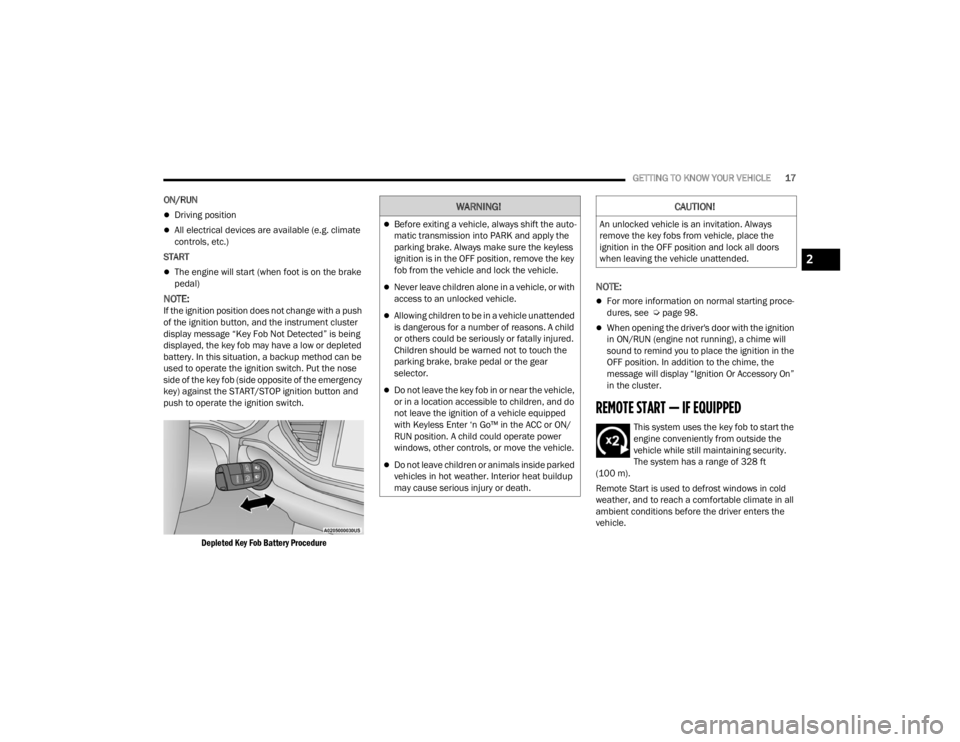
push to operate the ignition switch.
Depleted Key Fob Battery Procedure
NOTE:
For more information on normal starting proce -
dures, see Ú page 98.
When opening the driver's door with the ignition
in ON/RUN (engine not running), a chime will
sound to remind you to place the ignition in the
OFF position. In addition to the chime, the
message will display “Ignition Or Accessory On”
in the cluster.
REMOTE START — IF EQUIPPED
This system uses the key fob to start the
engine conveniently from outside the
vehicle while still maintaining security.
The system has a range of 328 ft
(100 m).
Remote Start is used to defrost windows in cold
weather, and to reach a comfortable climate in all
ambient conditions before the driver enters the
vehicle.
WARNING!
Before exiting a vehicle, always shift the auto -
matic transmission into PARK and apply the
parking brake. Always make sure the keyless
ignition is in the OFF position, remove the key
fob from the vehicle and lock the vehicle.
Never leave children alone in a vehicle, or with
access to an unlocked vehicle.
Allowing children to be in a vehicle unattended
is dangerous for a number of reasons. A child
or others could be seriously or fatally injured.
Children should be warned not to touch the
parking brake, brake pedal or the gear
selector.
Do not leave the key fob in or near the vehicle,
or in a location accessible to children, and do
not leave the ignition of a vehicle equipped
with Keyless Enter ‘n Go™ in the ACC or ON/
RUN position. A child could operate power
windows, other controls, or move the vehicle.
Do not leave children or animals inside parked
vehicles in hot weather. Interior heat buildup
may cause serious injury or death.
CAUTION!
An unlocked vehicle is an invitation. Always
remove the key fobs from vehicle, place the
ignition in the OFF position and lock all doors
when leaving the vehicle unattended.
2
23_WD_OM_EN_USC_t.book Page 17
Page 44 of 328
42GETTING TO KNOW YOUR VEHICLE
The HomeLink® buttons that are located in the
overhead console or sunvisor designate the
three different HomeLink® channels.
To operate HomeLink®, push and release any
of the programmed HomeLink® buttons. These
buttons will activate the devices they are
programmed to with each press of the corre -
sponding HomeLink® button.
The HomeLink® indicator light is located above
the center button.
NOTE:HomeLink® is disabled when the Vehicle Security
system is active Ú page 312.
BEFORE YOU BEGIN PROGRAMMING
H
OMELINK®
For efficient programming and accurate
transmission of the Radio Frequency (RF) signal, it
is recommended that a new battery be placed in
the hand-held transmitter of the device that is
being programmed to the HomeLink® system.
Make sure your hand-held transmitter is
programmed to activate the device you are trying
to program your HomeLink® button to.
Ensure that your vehicle is parked outside of the
garage before you begin programming.
It is recommended that you erase all the channels
of your HomeLink® before you use it for the first
time.
ERASING ALL THE HOMELINK®
C
HANNELS
To erase the channels, follow this procedure:
1. Place the ignition switch in the ON/RUN
position.
2. Push and hold the two outside HomeLink® buttons (I and III) for up to 20 seconds, or until
the HomeLink® indicator light flashes.
NOTE:Erasing all channels should only be performed
when programming HomeLink® for the first time.
Do not erase channels when programming addi -
tional buttons.
IDENTIFYING WHETHER YOU HAVE A
R
OLLING CODE OR NON-ROLLING CODE
D
EVICE
Before programming a device to one of your
HomeLink® buttons, you must determine whether
the device has a rolling code or non-rolling code.
Rolling Code Devices
To determine if your device has a rolling code, a
good indicator is its manufacturing date. Typically,
devices manufactured after 1995 have rolling
codes. A device with a rolling code will also have a
“LEARN” or “TRAIN” button located where the
antenna is attached to the device. The button may not be immediately visible when looking at the
device. The name and color of the button may vary
slightly by manufacturer.
NOTE:The “LEARN” or “TRAIN” button is not the button
you normally use to operate the device.
Non-rolling Code Devices
Most devices manufactured before 1995 will not
have a rolling code. These devices will also not
have a “LEARN” or “TRAIN” button.
PROGRAMMING HOMELINK® TO A
G
ARAGE DOOR OPENER
To program any of the HomeLink® buttons to
activate your garage door opener motor, proceed
as follows:
NOTE:All HomeLink® buttons are programmed using this
procedure. You do not need to erase all channels
when programming additional buttons.
1. Place the ignition switch in the ON/RUN
position.
2. Place the garage door opener transmitter 1 to 3 inches (3 to 8 cm) away from the
HomeLink® button you wish to program, while
keeping the HomeLink® indicator light in view.
23_WD_OM_EN_USC_t.book Page 42
Page 45 of 328
GETTING TO KNOW YOUR VEHICLE43
(Continued)
3. Push and hold the HomeLink® button you
want to program while you push and hold the
garage door opener transmitter button you are
trying to replicate.
4. Continue to hold both buttons and observe the HomeLink® indicator light. The HomeLink®
indicator light will flash slowly and then rapidly.
Once this happens, release both buttons.
NOTE:Make sure the garage door opener motor is
plugged in before moving on to the rolling code/
non-rolling code final steps.
Rolling Code Garage Door Opener Final Steps
NOTE:You have 30 seconds in which to initiate rolling
code final step 2, after completing rolling code
final step 1.
1. At the garage door opener motor (in the garage), locate the “LEARN” or “TRAIN”
button. This can usually be found where the
hanging antenna wire is attached to the
garage door opener motor. Firmly push and
release the “LEARN” or “TRAIN” button.
2. Return to the vehicle and push the
programmed HomeLink® button three times
(holding the button for two seconds each
time). If the garage door opener motor
operates, programming is complete.
3. Push the programmed HomeLink® button to confirm that the garage door opener motor
operates. If the garage door opener motor
does not operate, repeat the final steps for the
rolling code procedure.
Non-Rolling Code Garage Door Opener Final Steps
1. Push and hold the programmed HomeLink® button and observe the HomeLink® indicator
light. If the HomeLink® indicator light stays
on constantly, programming is complete.
2. Push the programmed HomeLink® button to confirm that the garage door opener motor
operates. If the garage door opener motor
does not operate, repeat the steps from the
beginning.
PROGRAMMING HOMELINK® TO A
M
ISCELLANEOUS DEVICE
The procedure on how to program HomeLink® to a
miscellaneous device follows the same procedure
as programming to a garage door opener
Ú page 42. Be sure to determine if the device has
a rolling code, or non-rolling code before beginning
the programming process.
NOTE:Canadian Radio Frequency (RF) laws require trans -
mitter signals to time-out (or quit) after several
seconds of transmission, which may not be long
enough for HomeLink® to pick up the signal during
programming. Similar to this Canadian law, some
U.S. gate operators are designed to time-out in the
same manner. The procedure may need to be
performed multiple times to successfully pair the
device to your HomeLink® buttons.
WARNING!
Your motorized door or gate will open and close
while you are programming the universal trans -
mitter. Do not program the transmitter if people
or pets are in the path of the door or gate.
Do not run your vehicle in a closed garage or
confined area while programming the trans -
mitter. Exhaust gas from your vehicle contains
carbon monoxide (CO) which is odorless and
colorless. Carbon monoxide is poisonous
when inhaled and can cause you and others to
be severely injured or killed.
WARNING!
2
23_WD_OM_EN_USC_t.book Page 43
Page 46 of 328
44GETTING TO KNOW YOUR VEHICLE
REPROGRAMMING A SINGLE
H
OMELINK® BUTTON
To reprogram a single HomeLink® button that has
been previously trained, without erasing all the
channels, proceed as follows. Be sure to
determine whether the new device you want to
program the HomeLink® button to has a rolling
code, or non-rolling code.
1. Place the ignition in the ON/RUN position,
without starting the engine.
2. Push and hold the desired HomeLink® button until the HomeLink® indicator light begins to
flash after 20 seconds. Do not release the
button.
3. Without releasing the button , proceed with
Step 2 in “Programming HomeLink® To A
Garage Door Opener” and follow all remaining
steps.
CANADIAN/GATE OPERATOR
P
ROGRAMMING
For programming transmitters in Canada/United
States that require the transmitter signals to
“time-out” after several seconds of transmission:
Canadian Radio Frequency (RF) laws require
transmitter signals to time-out (or quit) after
several seconds of transmission, which may not be
long enough for HomeLink® to pick up the signal during programming. Similar to this Canadian law,
some U.S. gate operators are designed to time-out
in the same manner.
It may be helpful to unplug the device during the
cycling process to prevent possible overheating of
the garage door or gate motor.
1. Place the ignition in the ON/RUN position.
NOTE:For vehicles equipped with Keyless Enter ‘n Go™,
place the ignition in the RUN position. Make sure
while programming HomeLink® with the engine on
that your vehicle is outside of your garage, or that
the garage door remains open at all times.
2. Place the hand-held transmitter 1 to 3 inches
(3 to 8 cm) away from the HomeLink® button
you wish to program while keeping the
HomeLink® indicator light in view.
3. Continue to push and hold the HomeLink® button while you push and release (cycle) your
hand-held transmitter every two seconds until
HomeLink® has successfully accepted the
frequency signal. The indicator light will flash
slowly and then rapidly when fully trained.
4. Watch for the HomeLink® indicator to change flash rates. When it changes, it is
programmed. It may take up to 30 seconds or
longer in rare cases. The garage door may
open and close while you are programming. 5. Push and hold the programmed HomeLink®
button and observe the indicator light.
NOTE:
If the indicator light stays on constantly,
programming is complete and the garage
door/device should activate when the
HomeLink® button is pushed.
To program the two remaining HomeLink®
buttons, repeat each step for each
remaining button. DO NOT erase the chan -
nels.
If you unplugged the garage door opener/device
for programming, plug it back in at this time.
Reprogramming A Single HomeLink® Button
(Canadian/Gate Operator)
To reprogram a channel that has been previously
trained, follow these steps:
1. Place the ignition in the ON/RUN position.
2. Press and hold the desired HomeLink® button until the indicator light begins to flash after 20
seconds. Do not release the button.
3. Without releasing the button, proceed with “Canadian/Gate Operator Programming” Step
2 and follow all remaining steps.
23_WD_OM_EN_USC_t.book Page 44
Page 54 of 328
52GETTING TO KNOW YOUR VEHICLE
Windshield Washers
To use the washer, push on the end of the lever
(toward the steering wheel) and hold. If the lever is
pushed while in the intermittent setting, the wipers
will turn on and operate for several cycles after the
end of the lever is released, and then resume the
intermittent interval previously selected.
If the end of the lever is pushed while the wipers
are in the off position, the wipers will operate for
several cycles, then turn off.
NOTE:As a protective measure, the washer will stop if the
switch is held for more than 20 seconds. Once the
switch is released the washer will resume normal
operation. Mist
Rotate the end of the lever downward to the MIST
position and release for a single wiping cycle.
NOTE:The Mist feature does not activate the washer
pump; therefore, no washer fluid will be sprayed on
the windshield. The washer function must be used
in order to spray the windshield with washer fluid.
For information on wiper care and replacement,
see Ú
page 261.
RAIN SENSING WIPERS — IF EQUIPPED
This feature senses rain or snowfall on the
windshield and automatically activates the wipers.
Rotate the end of the multifunction lever to one of
four detent positions to activate this feature.
The sensitivity of the system can be adjusted with
the multifunction lever. Wiper delay position one is
the least sensitive, and wiper delay position four is
the most sensitive.
Setting three is preferred by the average driver
during normal rain conditions.
NOTE:
The Rain Sensing feature will not operate when
the wiper switch is in the low or high-speed posi -
tion.
The Rain Sensing feature may not function prop -
erly when ice, or dried salt water is present on
the windshield.
Use of products containing wax or silicone may
reduce Rain Sensing performance.
The Rain Sensing feature can be turned on and
off using the Uconnect system Ú page 153.
The Rain Sensing system has protection features
for the wiper blades and arms, and will not operate
under the following conditions:
Low Ambient Temperature — When the ignition
is first placed in the ON position, the Rain
Sensing system will not operate until the wiper
switch is moved, vehicle speed is greater than
3 mph (5 km/h), or the outside temperature is
greater than 32°F (0°C).
Transmission In NEUTRAL Position — When the
ignition is in the ON position, and the gear
selector is in NEUTRAL, the Rain Sensing system
will not operate until the wiper switch is moved,
vehicle speed is greater than 3 mph (5 km/h),
or the gear selector is moved out of NEUTRAL.
WARNING!
Sudden loss of visibility through the windshield
could lead to a collision. You might not see other
vehicles or other obstacles. To avoid sudden
icing of the windshield during freezing weather,
warm the windshield with the defroster before
and during windshield washer use.
23_WD_OM_EN_USC_t.book Page 52
Page 85 of 328

GETTING TO KNOW YOUR INSTRUMENT PANEL83
DISPLAY AND MESSAGES
Includes the following, but not limited to:
The Reconfigurable Telltales section is divided into the white or yellow telltales area on the left, and the green or red telltales area on the right.Front Seat Belts Unbuckled
Driver Seat Belt UnbuckledPassenger Seat Belt Unbuckled
Traction Control Off Washer Fluid LowOil Pressure Low
Oil Change Due Fuel LowService Anti-lock Brake System
Service Electronic Throttle Control Service Power SteeringCruise Off
Cruise Ready ACC OverrideCruise Set To XXX mph or km/h
Service Shifter Tire Pressure Screen With Low Tire(s)Service Tire Pressure System
Park Brake Engaged Brake Fluid LowEngine Temperature Hot
Lights On Right Front Turn Signal Light OutRight Rear Turn Signal Light Out
Left Front Turn Signal Light Out Left Rear Turn Signal Light OutIgnition or Accessory On
Vehicle Not In Park Remote Start Active Push Start ButtonRemote Start Canceled Fuel Low
Remote Start Canceled Door Open Remote Start Canceled Hood OpenRemote Start Canceled Liftgate Open
Remote Start Canceled Time Expired Remote Start Disabled Start To ResetService Air Bag System
Service Air Bag Warning Light Door OpenLiftgate Open
Hood Open Shift Not AllowedVehicle Speed Too High To Shift to D
Vehicle Speed is Too High to Shift to R Vehicle Speed is Too High to Shift to PService Transmission
3
23_WD_OM_EN_USC_t.book Page 83