service DODGE GRAND CARAVAN 2008 5.G Owner's Manual
[x] Cancel search | Manufacturer: DODGE, Model Year: 2008, Model line: GRAND CARAVAN, Model: DODGE GRAND CARAVAN 2008 5.GPages: 531, PDF Size: 7.72 MB
Page 245 of 531
EVIC Displays
When the appropriate conditions exist, the EVIC displays
the following messages:
²Door(s) Ajar (with a single chime if vehicle is in
motion)
²Liftgate Ajar (chime will sound when vehicle starts
moving)
²Hood Ajar (If equipped with hood switch)
²Check TPM System. Refer to ªTire Pressure Monitor-
ing Systemº in Section 5 of this manual.
²Turn Signal On
²RKE Battery Low
²LOW WASHER FLUID
²Oil Change Required
²Left Front Turn Signal Light Out
²Left Rear Turn Signal Light Out
²Right Front Turn Signal Light Out
²Right Rear Turn Signal Light Out
²Park Assist Disabled
²Service Park Assist System
²Personal Settings Not Available ± Vehicle Not in Park
Oil Change Required
Your vehicle is equipped with an engine oil change
indicator system. TheOil Change Requiredmessage will
flash in the EVIC display for approximately 10 seconds
after a single chime has sounded to indicate the next
scheduled oil change interval. The engine oil change
indicator system is duty cycle based, which means the
engine oil change interval may fluctuate dependent upon
your personal driving style.
UNDERSTANDING YOUR INSTRUMENT PANEL 243
4
Page 289 of 531
2. Touch the screen where the time is displayed. The
clock setting menu will appear on the screen.
3. When this feature is on, a check mark will appear in
the box next to the words ªShow Time if Radio is Off.º
Touch the screen where the words ªShow Time if Radio is
Offº are displayed to change the current setting.
SATELLITE RADIO Ð IF EQUIPPED
(REN/REQ/RER/RES/REU RADIOS ONLY)
Satellite radio uses direct satellite-to-receiver broadcast-
ing technology to provide clear digital sound, coast to
coast. The subscription service provider is Sirius Satellite
Radio. This service offers over 130 channels of music,
sports, news, entertainment, and programming for chil-
dren, directly from its satellites and broadcasting studios.
NOTE:Sirius service is not available in Hawaii and has
limited coverage in Alaska.
System Activation
Sirius Satellite Radio service is pre-activated, and you
may begin listening immediately to the one year of audio
service that is included with the factory-installed satellite
radio system in your vehicle. Sirius will supply a wel-
come kit that contains general information, including
how to setup your on-line listening account at no addi-
tional charge. For further information, call the toll-free
number 888-539-7474, or visit the Sirius web site at
www.sirius.com, or at www.siriuscanada.ca for Cana-
dian residents.
Electronic Serial Number/Sirius Identification
Number (ESN/SID)
Please have the following information available when
calling:
1. The Electronic Serial Number/Sirius Identification
Number (ESN/SID).
2. Your Vehicle Identification Number.
UNDERSTANDING YOUR INSTRUMENT PANEL 287
4
Page 299 of 531
SIRIUS BACKSEAT TVŸ Ð IF EQUIPPED
Satellite video uses direct satellite receiver broadcasting
technology to provide streaming video coast to coast. The
subscription service provider is SIRIUS Satellite Radio.
SIRIUS Backseat TVŸ offers three video channels for
family entertainment, directly from its satellites and
broadcasting studios.
NOTE:SIRIUS service is not available in Hawaii and
has limited coverage in Alaska.
Refer to your Video Entertainment System (VES)t, RER
Navigation or REN Multimedia User Manuals for de-
tailed operating instructions.
VIDEO ENTERTAINMENT SYSTEM (VEST)ÐIF
EQUIPPED
The optional VESt(Video Entertainment System) is
available with:
²One or two video screens
²Additional single-disc DVD player with twoÐscreen
system
²Battery-powered two channel remote control
²Two remote headphones
²Integrated remote storage in either screen location
²Three different medias can be played simultaneously
(Cabin speakers and Headphone Channels 1 and 2)
²Easy menu driven functions on touch screen radios
²Video and audio input jacks available in rear seating
area
UNDERSTANDING YOUR INSTRUMENT PANEL 297
4
Page 320 of 531
HEADLINER Mode
Air comes from the outlets in the headliner. Each of
these outlets can be individually adjusted to direct
the flow of air. Moving the air vanes of the outlets to one
side will shut off the airflow.
SUMMER OPERATION
The engine cooling system in air conditioned vehicles
must be protected with a high-quality antifreeze coolant
to provide proper corrosion protection and to protect
against engine overheating. A 50% solution of ethylene
glycol antifreeze coolant in water is recommended. Refer
to section 7, ªMaintenance Proceduresº, of this manual
for proper coolant selection.
WINTER OPERATION
To ensure the best possible heater and defroster perfor-
mance, make sure the engine cooling system is function-
ing properly and the proper amount, type, and concen-
tration of coolant is used. Refer to section 7,ªMaintenance Proceduresº, of this manual for proper
coolant selection. Use of the air RECIRCULATION mode
during winter months is not recommended because it
may cause window fogging.
VACATION/STORAGE
Anytime you store your vehicle, or keep it out of service
(i.e., vacation) for two weeks or more, run the air
conditioning system at idle for about five minutes in the
fresh air and high blower setting. This will ensure
adequate system lubrication to minimize the possibility
of compressor damage when the system is started again.
WINDOW FOGGING
Vehicle windows tend to fog on the inside in mild rainy
or humid weather. To clear the windows, select DE-
FROST or MIX mode and increase the front blower
speed. Do not use the RECIRCULATION mode without
A/C for long periods, as fogging may occur.
318 UNDERSTANDING YOUR INSTRUMENT PANEL
Page 331 of 531
while the ignition switch is in the ON position. Always
press the brake pedal first before moving the gear selec-
tor lever out of PARK.
Automatic Transmission Ignition Interlock System
For electrical system malfunctions, there is an override
for the interlock system. In order to override this system,
remove the cover located to the top right of the gear
selector lever in the instrument panel. The override can
be activated by pressing the white-colored tab, which can
be accessed through the hole in the instrument panel.
While the override is pressed, the gear selector lever can
be moved out of the PARK position without pressing the
brake pedal. After operation, return the cover to its
original position.
This system prevents the key from being removed unless
the gear selector lever is in PARK. It also prevents shifting
the gear selector lever out of PARK unless the key is in
the LOCK/OFF or ON positions.NOTE:If a malfunction occurs, the system will trap the
key in the ignition cylinder to warn you that this safety
feature is inoperable. The engine can be started and
stopped but the key cannot be removed until you obtain
service.
Four-Speed or Six-Speed Automatic
Transmission
The electronically controlled transmission provides a
precise shift schedule. The transmission electronics are
self-calibrating; therefore, the first few shifts on a new
vehicle may be somewhat abrupt. This is a normal
condition, and precision shifts will develop within a few
hundred miles (kilometers).
The transmission has only PRND shift positions. Down-
shifts are carried out by an Electronic Range Select (ERS)
by moving the leverÐ/+while in the DRIVE position,
STARTING AND OPERATING 329
5
Page 336 of 531
Odometer
Screen Display1234 5 6D
Actual Gear(s)
Allowed ÐSix-
Speed Trans-
mission1 1-2 1-3 1-4 1-5 1-6 1-6
Actual Gear(s)
Allowed
ÐFour-Speed
Transmission1 1-2 1-3 1-4 N/A N/A 1±4
NOTE:To select the proper gear position for maximum
deceleration (engine braking), simply press and hold the
gear selector lever to the left (-). The transmission will
shift to the range from which the vehicle can best be
slowed down.Reset Mode - Electronic Transmission
The transmission is monitored electronically for abnor-
mal conditions. If a condition is detected that could cause
damage, the transmission automatically shifts into 2nd
gear (3rd gear for six-speed). The transmission remains in
2nd gear (3rd gear for six-speed) despite the forward gear
selected. PARK, REVERSE, and NEUTRAL will continue
to operate. This Reset feature allows the vehicle to be
driven to an authorized dealer for service without dam-
aging the transmission.
In the event of a momentary problem, the transmission
can be reset to regain all forward gears by performing the
following steps:
1. Stop the vehicle.
2. Shift into PARK.
3. Turn the ignition switch to the LOCK position.
4. Restart the engine.
334 STARTING AND OPERATING
Page 337 of 531
5. Shift into the desired gear range and resume driving.
NOTE:Even if the transmission can be reset, it is
recommended that you visit an authorized dealer at your
earliest possible convenience. Your authorized dealer has
diagnostic equipment to determine if the problem could
recur.
If the transmission cannot be reset, authorized dealer
service is required.
PARKING BRAKE
When the parking brake is applied with the ignition
switch ON, the brake light in the instrument cluster will
turn on.
NOTE:This light only shows that the parking brake is
applied. It does not show the degree of brake application.
Before leaving the vehicle, make sure that the parking
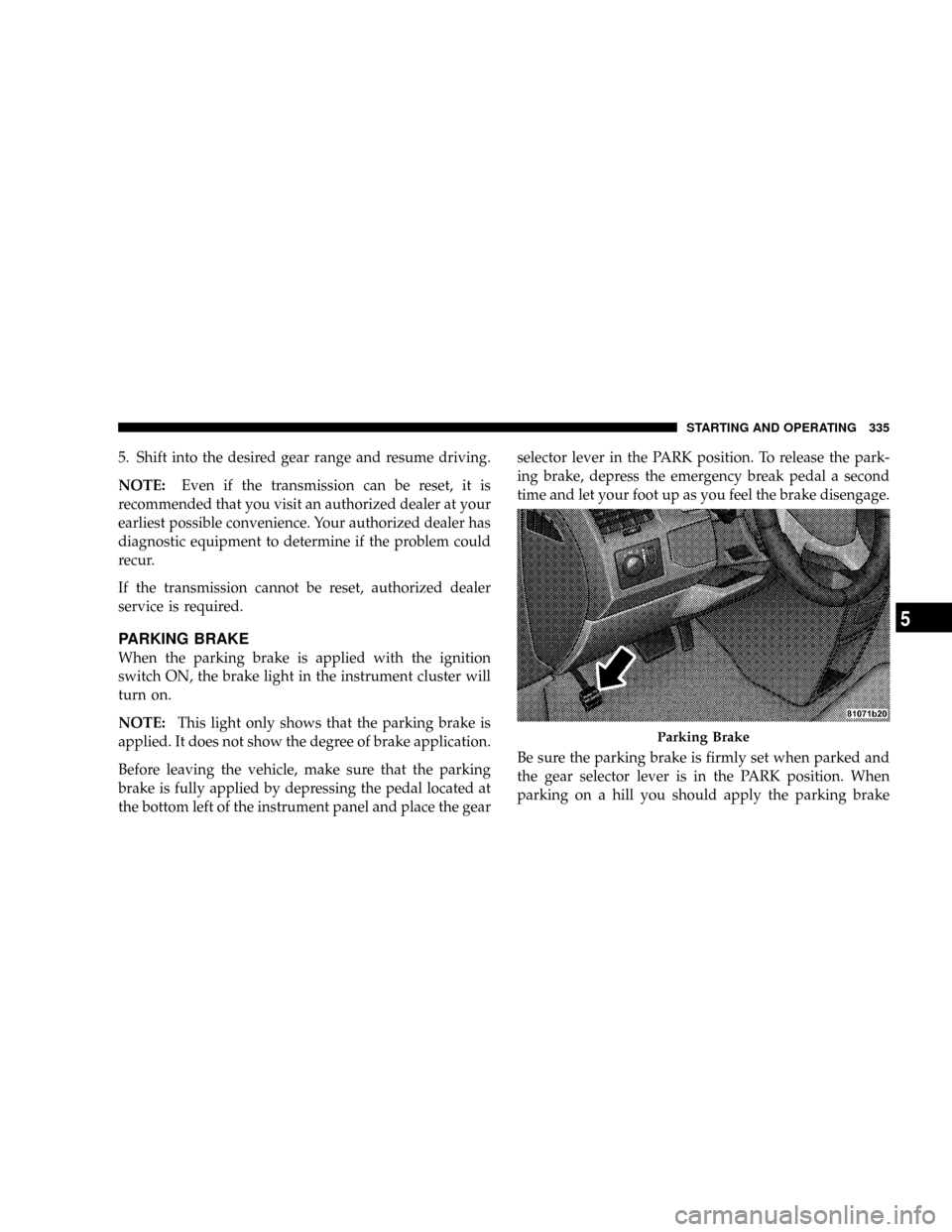
brake is fully applied by depressing the pedal located at
the bottom left of the instrument panel and place the gearselector lever in the PARK position. To release the park-
ing brake, depress the emergency break pedal a second
time and let your foot up as you feel the brake disengage.
Be sure the parking brake is firmly set when parked and
the gear selector lever is in the PARK position. When
parking on a hill you should apply the parking brake
Parking Brake
STARTING AND OPERATING 335
5
Page 341 of 531
WARNING!
²The Anti-Lock Brake System cannot prevent acci-
dents, including those resulting from excessive
speed in turns, following another vehicle too
closely, or hydroplaning. Only a safe, attentive,
and skillful driver can prevent accidents.
²The capabilities of an ABS-equipped vehicle must
never be exploited in a reckless or dangerous
manner which could jeopardize the user's safety
or the safety of others.
All vehicle wheels and tires must be the same size and
type, and tires must be properly inflated to produce
accurate signals for the computer.
Anti-Lock Brake Light
The ABS light monitors the Anti-Lock System.
The light will come on when the ignition
switch is turned to the ON position and may
stay on for as long as four seconds.
If the ABS light remains on or comes on while driving, it
indicates that the Anti-Lock portion of the brake system
is not functioning and that service is required. However,
the conventional brake system will continue to operate
normally if the BRAKE warning light is not on.
If the ABS light is on, the brake system should be serviced
as soon as possible to restore the benefits of anti-lock
brakes. If the ABS light does not come on when the
ignition switch is turned to the ON position, have the
bulb repaired as soon as possible.
If both the Brake Warning Light and the ABS Light
remain on, the ABS and Electronic Brake Force Distribu-
tion (EBD) systems are not functioning. Immediate repair
STARTING AND OPERATING 339
5
Page 342 of 531
to the ABS system is required. Consult with your autho-
rized dealer service center as soon as possible.
ELECTRONIC BRAKE CONTROL SYSTEMS
Your vehicle is equipped with an advanced electronic
brake control system that includes TCS (Traction Control
System), BAS (Brake Assist System) and ESP (Electronic
Stability Program). These systems complement the Anti-
Lock Brake System (ABS) by optimizing the vehicle
braking capability during emergency braking maneu-
vers.
Traction Control System (TCS)
This system monitors the amount of wheel spin of each of
the driven wheels. If wheel spin is detected, brake
pressure is applied to the slipping wheel(s) and engine
power is reduced to provide enhanced acceleration and
stability. A feature of the TCS system functions similar to
a limited slip differential and controls the wheel spin
across a driven axle. If one wheel on a driven axle isspinning faster than the other, the system will apply the
brake of the spinning wheel. This will allow more engine
torque to be applied to the wheel that is not spinning.
This feature remains active even if the ESP is in the
ªPartial Offº mode.
The Traction Control System (TCS) Indicator
Light, located in the instrument cluster, starts
to flash as soon as the tires lose traction and the
wheels begin to spin. This indicates that the
TCS is active. If the indicator light flashes during accel-
eration, ease up on the accelerator and apply as little
throttle as possible. Be sure to adapt your speed and
driving to the prevailing road conditions, and do not
switch off the ESP or TCS.
340 STARTING AND OPERATING
Page 347 of 531
WARNING!
Continued operation with reduced power steering
assist could pose a safety risk to yourself and others.
Service should be obtained as soon as possible.
CAUTION!
Prolonged operation of the steering system at the end
of the steering wheel travel will increase the steering
fluid temperature and it should be avoided when
possible. Damage to the power steering pump may
occur.
DRIVING ON SLIPPERY SURFACES
ACCELERATION
Rapid acceleration on snow covered, wet, or other slip-
pery surfaces may cause the front wheels to pull errati-
cally to the right or left. This phenomenon occurs when
there is a difference in the surface traction under the front
(driving) wheels.
WARNING!
Rapid acceleration on slippery surfaces is dangerous.
Unequal traction can cause sudden pulling of the
front wheels. You could lose control of the vehicle
and possibly have an accident. Accelerate slowly and
carefully whenever there is likely to be poor traction
(ice, snow, wet mud, loose sand, etc.).
STARTING AND OPERATING 345
5