lock DODGE GRAND CARAVAN 2008 5.G Repair Manual
[x] Cancel search | Manufacturer: DODGE, Model Year: 2008, Model line: GRAND CARAVAN, Model: DODGE GRAND CARAVAN 2008 5.GPages: 531, PDF Size: 7.72 MB
Page 168 of 531
Battery Protection
This feature provides battery protection to avoid wearing
down the battery if the headlights, park lights, or front
fog lights are left on for extended periods of time when
the ignition switch is in the LOCK position. After eight
minutes of the ignition switch being in the LOCK posi-
tion and the headlight switch in any position other than
OFF or AUTO, the lights will turn off automatically until
the next cycle of the ignition switch or headlight switch.
The battery protection feature will be disabled if the
ignition switch is turned to any other position other than
LOCK during the three minute delay.
MULTIFUNCTION LEVER
The multifunction control lever is located on the left side
of the steering column.
The Multifunction Lever assembly controls:
²Turn Signals
²Headlight Low and High Beams
²Flash-to-Pass (Optical Horn)
²Front and Rear Wiper And Washer Functions
Turn Signals
Move the multifunction lever up or down to signal a
right-hand or left-hand turn.
The arrow on either side of the instrument cluster flashes
to indicate the direction of the turn, and proper operation
of the front and rear turn signal lights.
166 UNDERSTANDING THE FEATURES OF YOUR VEHICLE
Page 173 of 531
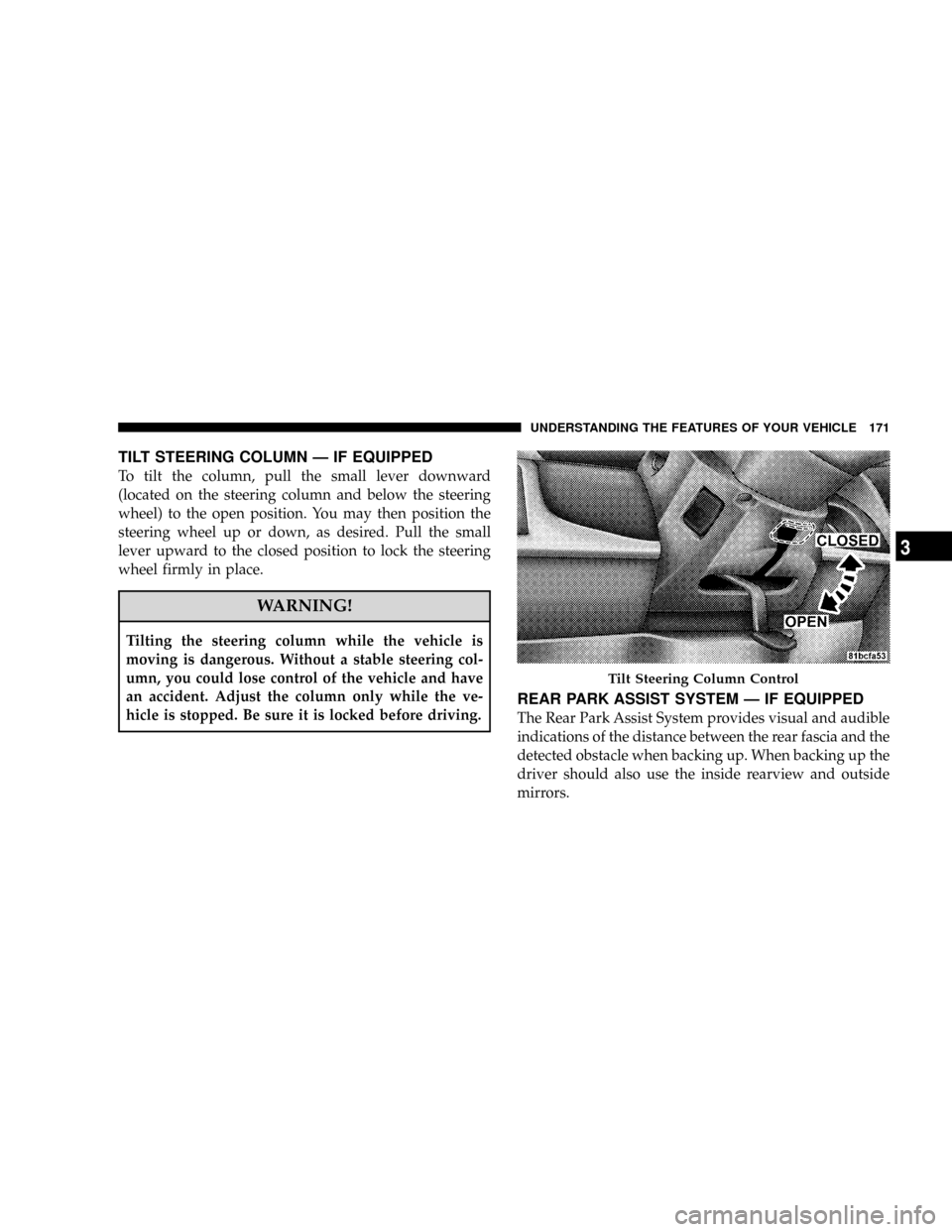
TILT STEERING COLUMN Ð IF EQUIPPED
To tilt the column, pull the small lever downward
(located on the steering column and below the steering
wheel) to the open position. You may then position the
steering wheel up or down, as desired. Pull the small
lever upward to the closed position to lock the steering
wheel firmly in place.
WARNING!
Tilting the steering column while the vehicle is
moving is dangerous. Without a stable steering col-
umn, you could lose control of the vehicle and have
an accident. Adjust the column only while the ve-
hicle is stopped. Be sure it is locked before driving.
REAR PARK ASSIST SYSTEM Ð IF EQUIPPED
The Rear Park Assist System provides visual and audible
indications of the distance between the rear fascia and the
detected obstacle when backing up. When backing up the
driver should also use the inside rearview and outside
mirrors.
Tilt Steering Column Control
UNDERSTANDING THE FEATURES OF YOUR VEHICLE 171
3
Page 180 of 531
Press the button forward to move the pedals forward
(toward the front of the vehicle).
Press the button rearward to move the pedals rearward
(toward the driver).
²The pedals can be adjusted with the ignition OFF.
²The pedals can be adjusted while driving.
²The pedalscannotbe adjusted when the vehicle is in
REVERSE or when the Electronic Speed Control Sys-
tem is ON. The following messages will be displayed
on vehicles equipped with the Electronic Vehicle In-
formation System (EVIC) if the pedals are attempted to
be adjusted when the system is locked out (ªAdjust-
able Pedal Disabled Ð Cruise Control Engagedº or
ªAdjustable Pedal Disabled Ð Vehicle In Reverseº).
CAUTION!
Do not place any article under the adjustable pedals
or impede its ability to move as it may cause damage
to the pedal controls. Pedal travel may become lim-
ited if movement is stopped by an obstruction in the
adjustable pedal's path.
178 UNDERSTANDING THE FEATURES OF YOUR VEHICLE
Page 185 of 531
Courtesy/Interior Lighting
At the forward end of the console are two courtesy lights
(standard dome light has two buttons). The lights turn on
when a front door, a sliding door or the liftgate is opened.
If your vehicle is equipped with Remote Keyless Entry,
the lights will also turn on when the unlock button on the
transmitter is pressed.
The courtesy lights also function as reading lights. Press
in on each lens to turn these lights on while inside the
vehicle. Press a second time to turn the each light off. You
may adjust the direction of these lights by pressing the
outside ring which is identified with four directional
arrows.The area around the instrument panel cupholders is also
illuminated from a light in the overhead console. This
light is turned on when the headlight switch is on and
will adjust in brightness when the dimmer control is
rotated up or down.
Sunglass Storage
At the rear of the front overhead console, a compartment
is provided for the storage of two pairs of sunglasses.
Press the door latch to open the compartment. The door
will slowly rotate to an open position.
NOTE:The front overhead console used with factory
sunroof incorporates a sunroof switch.
UNDERSTANDING THE FEATURES OF YOUR VEHICLE 183
3
Page 187 of 531
Rear Courtesy/Reading Lights Ð If Equipped
The overhead console had two sets of courtesy lights. The
lights turn on when a front door, a sliding door or the
liftgate is opened. If your vehicle is equipped with
Remote Keyless Entry, the lights will also turn on when
the unlock button on the transmitter is pressed.
The courtesy lights also function as reading lights. Press
in on each lens to turn these lights on while inside the
vehicle. Press a second time to turn the each light off. You
may adjust the direction of these lights by pressing the
outside ring which is identified with four directional
arrows.
Rear Console Halo Lighting Ð If Equipped
The rear overhead console features recessed halo lighting
around the perimeter of the console base. This feature
provides additional lighting options while traveling and
is controlled by the headlight switch. Refer to ªHalo
Lighting - If Equippedº under ªLightingº in ªUnder-
standing The Features Of Your Vehicleº in Section 3.
GARAGE DOOR OPENER Ð IF EQUIPPED
HomeLinktreplaces up to three remote controls (hand-
held transmitters) that operate devices such as garage
door openers, motorized gates, lighting, or home security
systems. The HomeLinktunit operates off your vehicle's
battery.
UNDERSTANDING THE FEATURES OF YOUR VEHICLE 185
3
Page 192 of 531
Using HomeLinkt
To operate, simply press and release the programmed
HomeLinktbutton. Activation will now occur for the
trained device (i.e., garage door opener, gate operator,
security system, entry door lock, home/office lighting,
etc. The hand-held transmitter of the device may also be
used at any time.
Reprogramming a Single HomelinktButton
To reprogram a channel that has been previously trained,
follow these steps:
1. Turn the ignition switch to the ON/RUN position.
2. Press and hold the desired HomeLinktbutton until
the indicator light begins to flash after 20 seconds.Do not
release the button.
3.Without releasing the button,proceed with Program-
ming HomelinktStep 2 and follow all remaining steps.
GATE OPERATOR/CANADIAN PROGRAMMING
Canadian radio frequency laws require transmitter sig-
nals to time-out (or quit) after several seconds of trans-
mission ± which may not be long enough for HomeLinkt
to pick up the signal during programming. Similar to this
Canadian law, some U.S. gate operators are designed to
time-out in the same manner.
It may be helpful to unplug the device during the cycling
process to prevent possible overheating of the garage
door or gate motor.
If you are having difficulties programming a garage door
opener or a gate operator, replace ªProgramming
HomeLinktº Step 3, with the following:
3. Continue to press and hold the HomeLinktbutton
while you press and release - every two seconds
(ªcycleº) your hand-held transmitter until HomeLinkt
190 UNDERSTANDING THE FEATURES OF YOUR VEHICLE
Page 210 of 531
WARNING!
In an accident, serious injury could result if the
removable floor console is not properly installed.
Always be sure the removable floor console is fully
latched.
STORAGE
Glove Compartments
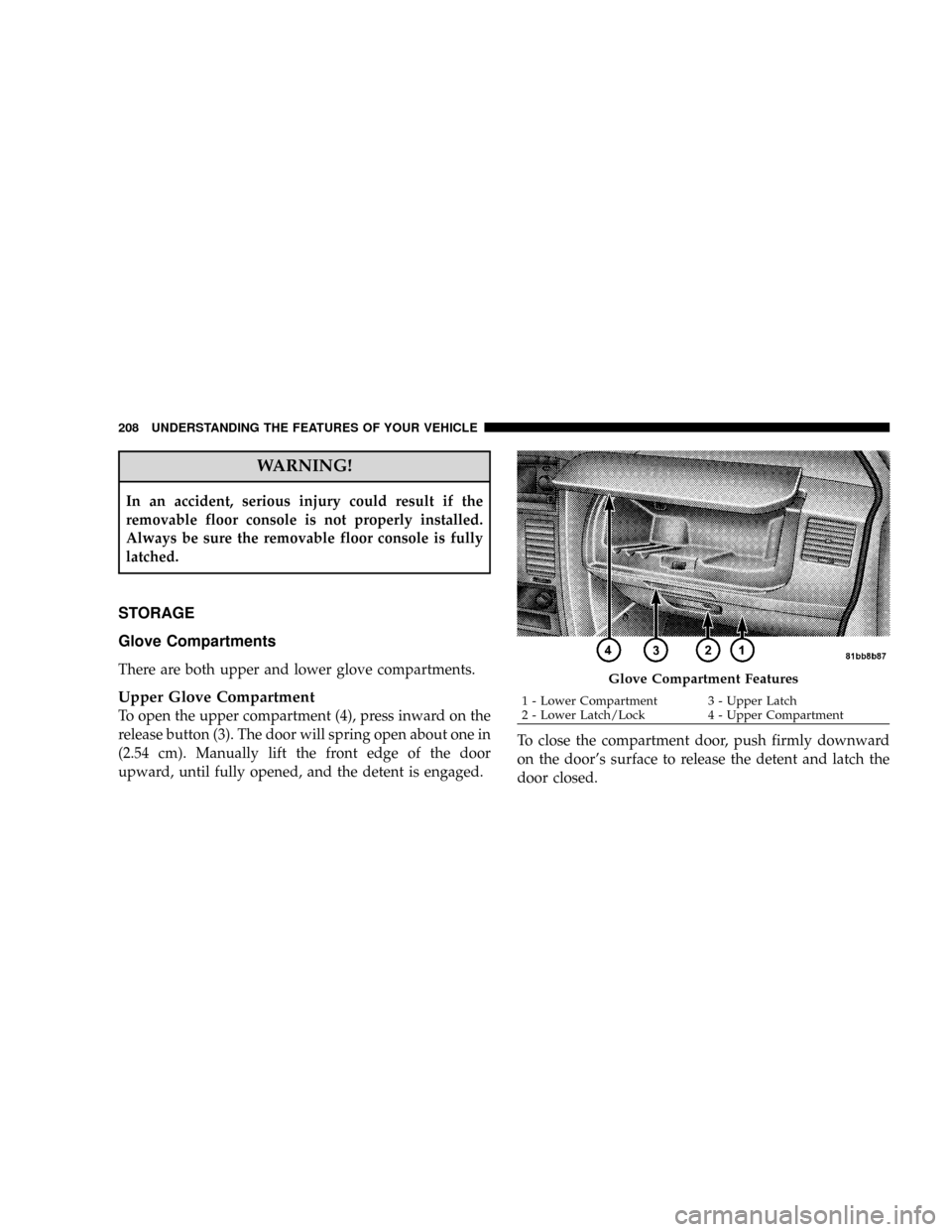
There are both upper and lower glove compartments.
Upper Glove Compartment
To open the upper compartment (4), press inward on the
release button (3). The door will spring open about one in
(2.54 cm). Manually lift the front edge of the door
upward, until fully opened, and the detent is engaged.To close the compartment door, push firmly downward
on the door's surface to release the detent and latch the
door closed.
Glove Compartment Features
1 - Lower Compartment 3 - Upper Latch
2 - Lower Latch/Lock 4 - Upper Compartment 208 UNDERSTANDING THE FEATURES OF YOUR VEHICLE
Page 211 of 531
Lower Glove Compartment
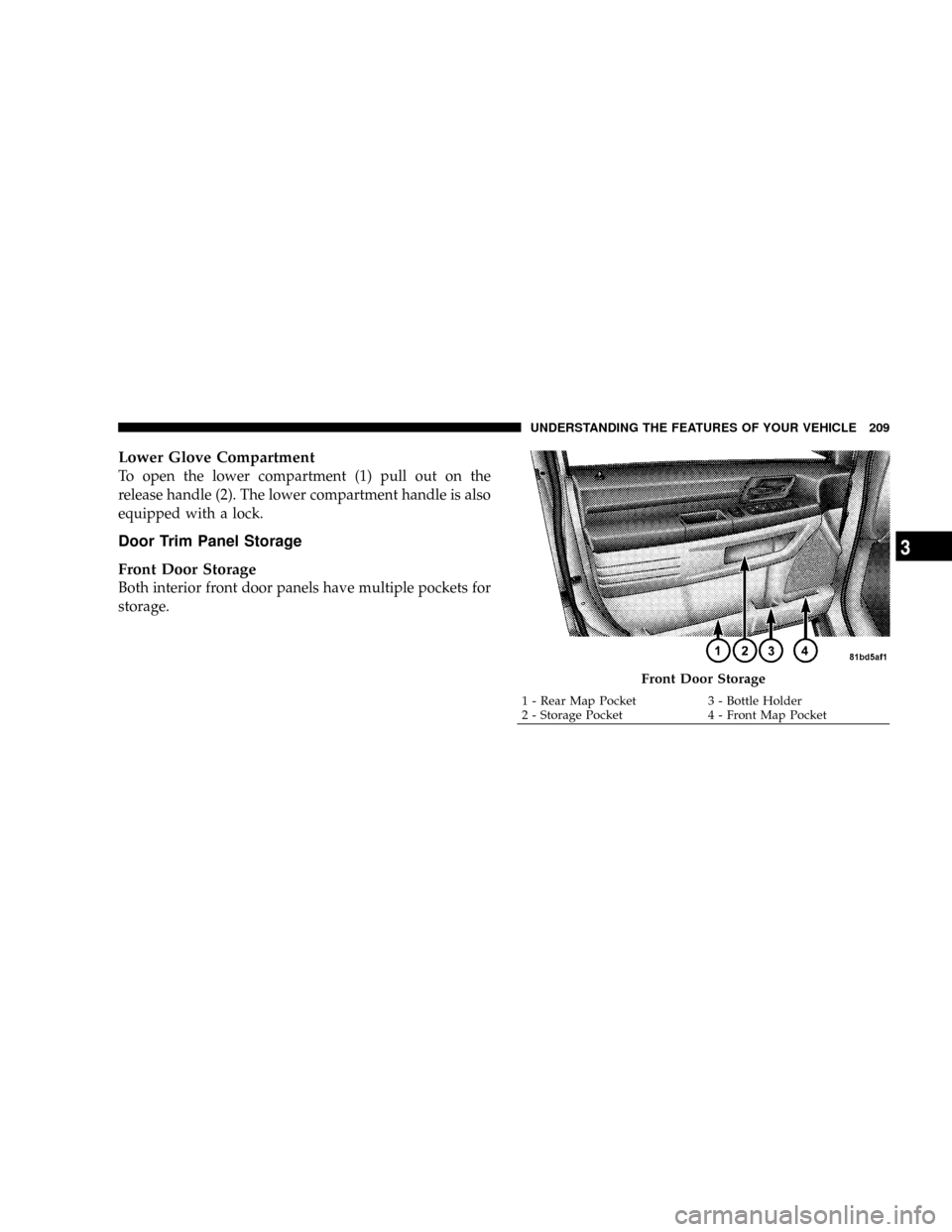
To open the lower compartment (1) pull out on the
release handle (2). The lower compartment handle is also
equipped with a lock.
Door Trim Panel Storage
Front Door Storage
Both interior front door panels have multiple pockets for
storage.
Front Door Storage
1 - Rear Map Pocket 3 - Bottle Holder
2 - Storage Pocket 4 - Front Map PocketUNDERSTANDING THE FEATURES OF YOUR VEHICLE 209
3
Page 212 of 531
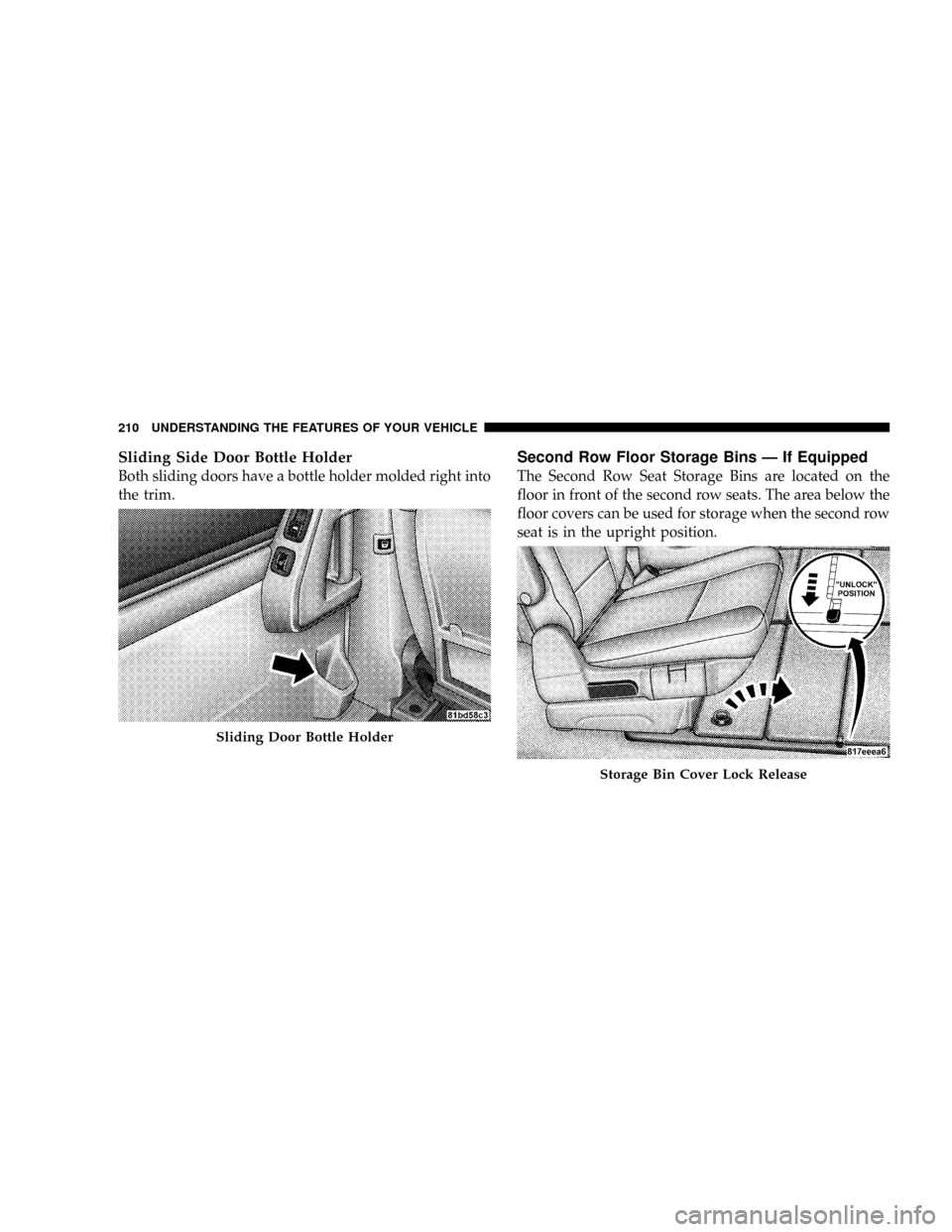
Sliding Side Door Bottle Holder
Both sliding doors have a bottle holder molded right into
the trim.
Second Row Floor Storage Bins Ð If Equipped
The Second Row Seat Storage Bins are located on the
floor in front of the second row seats. The area below the
floor covers can be used for storage when the second row
seat is in the upright position.
Sliding Door Bottle Holder
Storage Bin Cover Lock Release
210 UNDERSTANDING THE FEATURES OF YOUR VEHICLE
Page 213 of 531
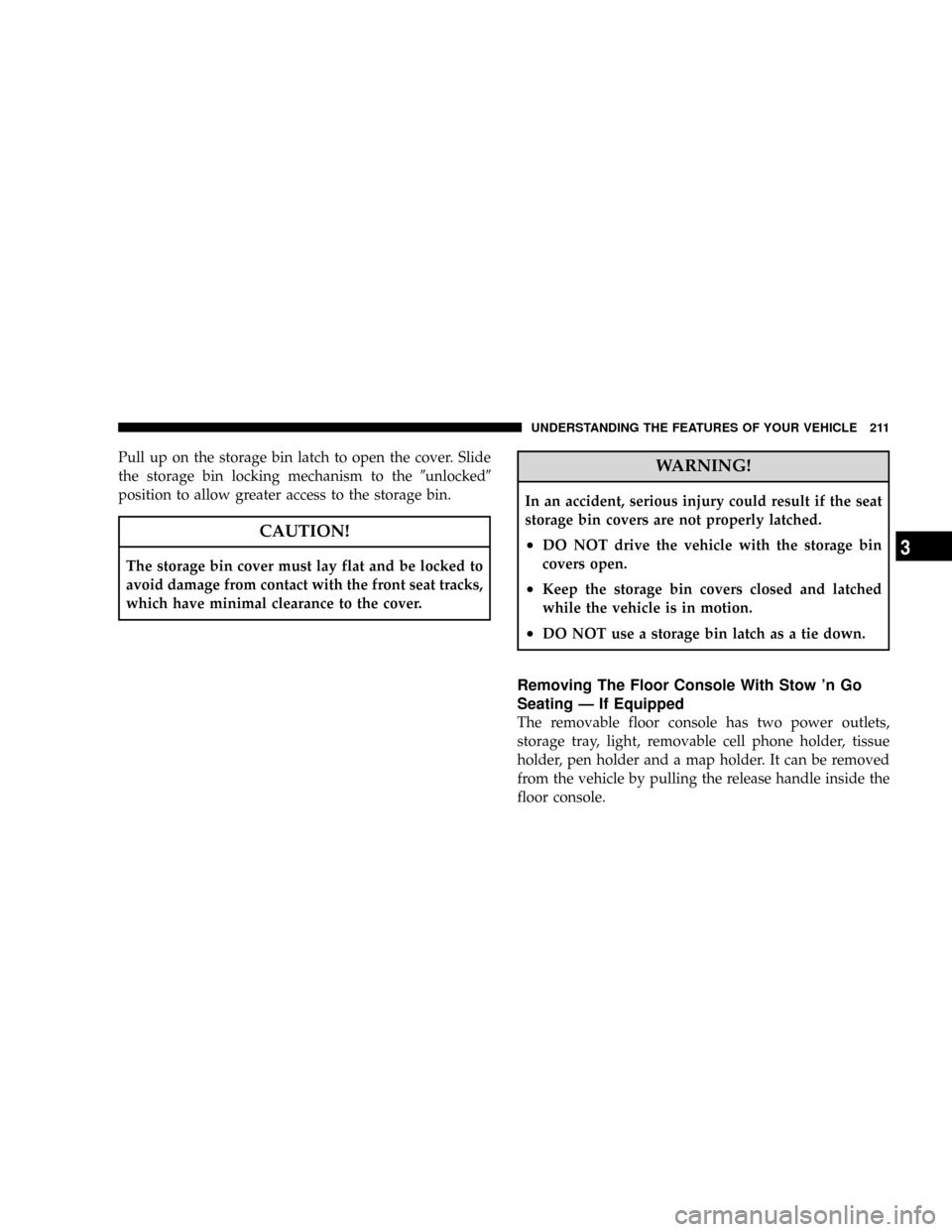
Pull up on the storage bin latch to open the cover. Slide
the storage bin locking mechanism to the9unlocked9
position to allow greater access to the storage bin.
CAUTION!
The storage bin cover must lay flat and be locked to
avoid damage from contact with the front seat tracks,
which have minimal clearance to the cover.
WARNING!
In an accident, serious injury could result if the seat
storage bin covers are not properly latched.
²DO NOT drive the vehicle with the storage bin
covers open.
²Keep the storage bin covers closed and latched
while the vehicle is in motion.
²DO NOT use a storage bin latch as a tie down.
Removing The Floor Console With Stow 'n Go
Seating Ð If Equipped
The removable floor console has two power outlets,
storage tray, light, removable cell phone holder, tissue
holder, pen holder and a map holder. It can be removed
from the vehicle by pulling the release handle inside the
floor console.
UNDERSTANDING THE FEATURES OF YOUR VEHICLE 211
3