warning DODGE GRAND CARAVAN 2009 5.G Owners Manual
[x] Cancel search | Manufacturer: DODGE, Model Year: 2009, Model line: GRAND CARAVAN, Model: DODGE GRAND CARAVAN 2009 5.GPages: 535, PDF Size: 18.61 MB
Page 253 of 535
CAUTION!The TPMS has been optimized for the original
equipment tires and wheels. TPMS pressures and
warning have been established for the tire size
equipped on your vehicle. Undesirable system opera-
tion or sensor damage may result when using re-
placement equipment that is not of the same size,
type, and/or style. Aftermarket wheels can cause
sensor damage. Do not use tire sealant from a can, or
balance beads if your vehicle is equipped with a
TPMS, as damage to the sensors may result.
26. Electronic Stability Program (ESP) Indicator Light
/ Brake Assist System (BAS) Warning Light The malfunction light for the Electronic Stabil-
ity Program (ESP) is combined with Brake
Assist System (BAS). The yellow “ESP/BAS
Warning Light” comes on when the ignition switch is turned to the “ON” position. They should go
out with the engine running. If the “ESP/BAS Warning
Light” comes on continuously with the engine running, a
malfunction has been detected in either the ESP or the
BAS system. If this light remains on after several ignition
cycles, and the vehicle has been driven several miles/
kilometers at speeds greater than 30 mph (48 km/h), see
an authorized dealer as soon as possible.
27. Compass Mini-Trip Computer (CMTC) Reset
Button
Press the reset button to scroll through sub menus (i.e.,
Outside Temperature, Trip Functions: AVG Fuel
Economy, DTE, Elapsed Time, and Units. Press and hold
the reset button for approximately two seconds to reset
the display shown.
NOTE:
For more detailed operation, refer to “Compass
Mini-Trip Computer” later in this section. UNDERSTANDING YOUR INSTRUMENT PANEL 251
4
Page 258 of 535
ELECTRONIC VEHICLE INFORMATION CENTER
(EVIC) —
IF EQUIPPED
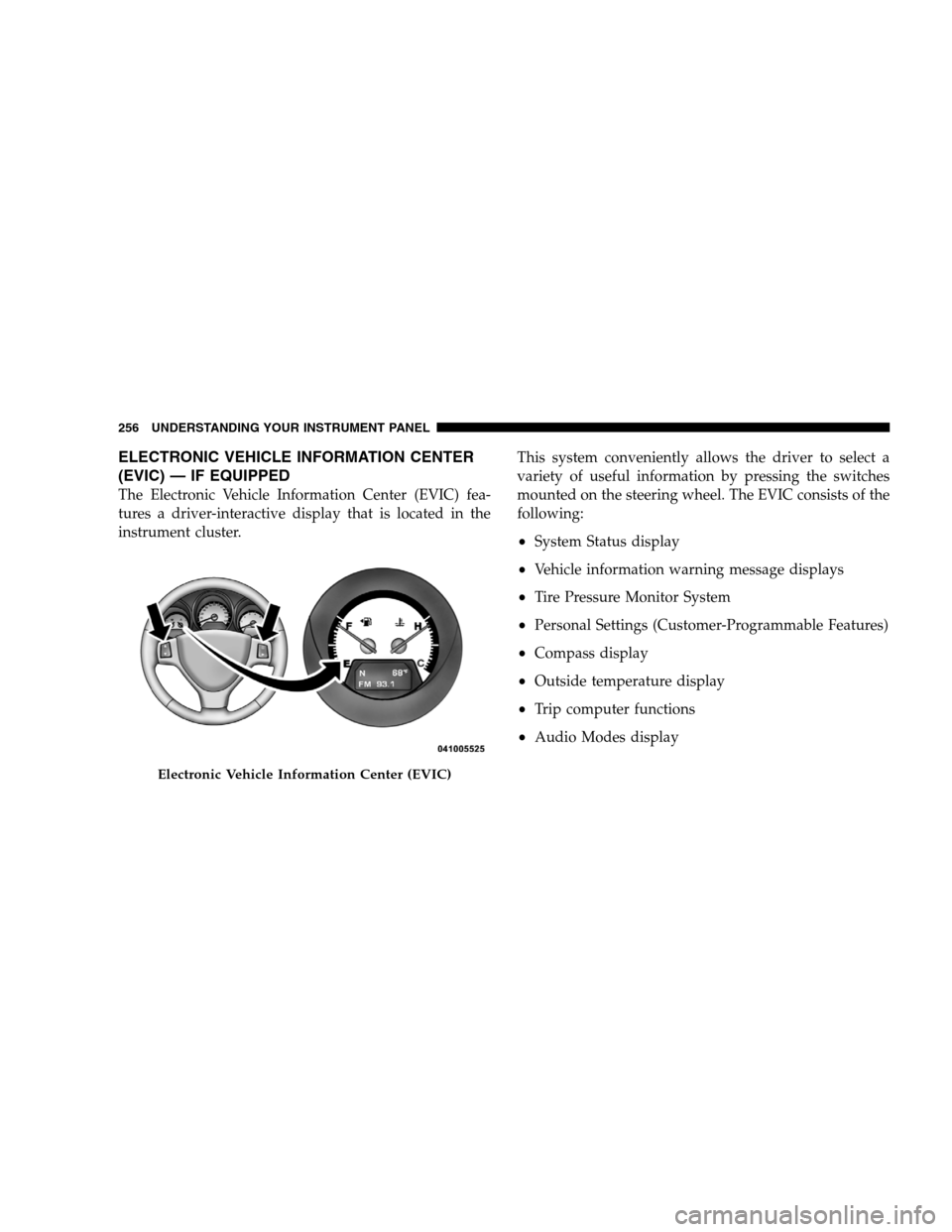
The Electronic Vehicle Information Center (EVIC) fea-
tures a driver-interactive display that is located in the
instrument cluster. This system conveniently allows the driver to select a
variety of useful information by pressing the switches
mounted on the steering wheel. The EVIC consists of the
following:
System Status display
Vehicle information warning message displays
Tire Pressure Monitor System
Personal Settings (Customer-Programmable Features)
Compass display
Outside temperature display
Trip computer functions
Audio Modes displayElectronic Vehicle Information Center (EVIC)
256 UNDERST
ANDING YOUR INSTRUMENT PANEL
Page 265 of 535
2. Press and hold the compass button for approximately
two seconds.
3. Press the STEP button until “Compass Variance” mes-
sage, and the last variance zone number, displays in the
EVIC.
4. Press and release the STEP button until the proper
variance zone is selected, according to the map.
5. Press and release the compass button to exit.
Personal Settings (Customer-Programmable
Features)
Personal Settings allows you to set and recall features
when the transmission is in PARK. If the transmission is
out of PARK or the vehicle begins moving, a warning
messagePERSONAL SETTING NOT AVAILABLE ,
followed in three seconds by, VEHICLE NOT IN PARK.
Press and release the MENU button until Personal Set-
tings displays in the EVIC. Use the Step button to display one of the following
choices.
Language
When in this display you may select one of five lan-
guages for all display nomenclature, including the trip
functions and the navigation system (if equipped). Press
the RESET button while in this display to select English,
Spanish (Español), French (Français), Italian (Italiano),
German (Deutsch), and Dutch (Nederlands). Then, as
you continue, the information will display in the selected
language.
Auto Door Locks
When ON is selected, all doors will lock automatically
when the vehicle reaches a speed of 15 mph (24 km/h).
To make your selection, press and release the RESET
button until ON or OFF appears.
UNDERSTANDING YOUR INSTRUMENT PANEL 263 4
Page 297 of 535
To Exit List mode without selecting a track, press the
same PRESET button again to go back to Play
mode.
LIST button: The LISTbutton will display the top
level menu of the iPodt. Turn the TUNEcontrol knob
to list the top-menu item you wish to select and press
the TUNE control knob. This will display the next
sub-menu list item on the iPodt then you can follow
the same steps to go to the desired track in that list.
Not all iPodt sub-menu levels are available on this
system.
MUSIC TYPE button: TheMUSIC TYPE button is
another shortcut button to the genre listing on your
iPodt. CAUTION!
Leaving the iPodt (or any supported device) any-
where in the vehicle in extreme heat or cold can
alter the operation or damage the device. Follow
the device manufacturer ’s guidelines.
Placing items on the iPodt, or connections to the
iPodt in the vehicle, can cause damage to the
device and/or to the connectors. WARNING!
Do not plug in or remove the iPodt
while driving.
Failure to follow this warning could result in an
accident.
UNDERSTANDING YOUR INSTRUMENT PANEL 295 4
Page 328 of 535
mDriving Through Water . . . . . . . . . . . . . . . . 340
▫ Flowing/Rising Water . . . . . . . . . . . . . . . . 340
▫ Shallow Standing Water . . . . . . . . . . . . . . 340
m Power Steering . . . . . . . . . . . . . . . . . . . . . . 342
▫ Power Steering Fluid Check . . . . . . . . . . . 342
m Parking Brake . . . . . . . . . . . . . . . . . . . . . . . 343
m Anti-Lock Brake System (ABS) . . . . . . . . . . . 345
▫ Anti-Lock Brake Warning Light . . . . . . . . . 347
m Electronic Brake Control System . . . . . . . . . . 347
▫ Traction Control System (TCS) . . . . . . . . . . 347
▫ Brake Assist System (BAS) . . . . . . . . . . . . . 348
▫ Electronic Stability Program (ESP) . . . . . . . 349
▫ ESP/BAS Warning Light . . . . . . . . . . . . . . 351 m
Tire Safety Information . . . . . . . . . . . . . . . . 352
▫ Tire Markings . . . . . . . . . . . . . . . . . . . . . 352
▫ Tire Identification Number (TIN) . . . . . . . . 355
▫ Tire Loading And Tire Pressure . . . . . . . . . 356
m Tires — General Information . . . . . . . . . . . . 360
▫ Tire Pressure . . . . . . . . . . . . . . . . . . . . . . 360
m Tire Chains . . . . . . . . . . . . . . . . . . . . . . . . . 367
m Snow Tires . . . . . . . . . . . . . . . . . . . . . . . . . 369
m Tire Rotation . . . . . . . . . . . . . . . . . . . . . . . . 369
m Tire Pressure Monitor System (TPMS) . . . . . . 370
▫ Base System . . . . . . . . . . . . . . . . . . . . . . . 372
▫ Premium System — If Equipped . . . . . . . . 374
326 STARTING AND OPERATING
Page 329 of 535
mFuel Requirements . . . . . . . . . . . . . . . . . . . . 378
▫ 3.3L/3.8L Gasoline Engine . . . . . . . . . . . . . 378
▫ 4.0L Gasoline Engine . . . . . . . . . . . . . . . . 379
▫ Reformulated Gasoline . . . . . . . . . . . . . . . 379
▫ Gasoline/Oxygenate Blends . . . . . . . . . . . 380
▫ E-85 Usage In Non-Flex Fuel Vehicles . . . . . 380
▫ MMT In Gasoline . . . . . . . . . . . . . . . . . . . 381
▫ Materials Added To Fuel . . . . . . . . . . . . . . 381
▫ Fuel System Cautions . . . . . . . . . . . . . . . . 381
▫ Carbon Monoxide Warnings . . . . . . . . . . . 382
m Flexible Fuel (3.3L Engines Only) — If
Equipped . . . . . . . . . . . . . . . . . . . . . . . . . . . . 383
▫ E-85 General Information . . . . . . . . . . . . . 383 ▫
Ethanol Fuel (E-85) . . . . . . . . . . . . . . . . . . 384
▫ Fuel Requirements . . . . . . . . . . . . . . . . . . 384
▫ Selection Of Engine Oil For Flexible Fuel
Vehicles E-85 And Gasoline Vehicles . . . . . . . 385
▫ Starting . . . . . . . . . . . . . . . . . . . . . . . . . . 386
▫ Cruising Range . . . . . . . . . . . . . . . . . . . . 386
▫ Replacement Parts . . . . . . . . . . . . . . . . . . 386
▫ Maintenance . . . . . . . . . . . . . . . . . . . . . . 386
m Adding Fuel . . . . . . . . . . . . . . . . . . . . . . . . 387
▫ Fuel Filler Cap (Gas Cap) . . . . . . . . . . . . . 387
▫ Loose Fuel Filler Cap Message . . . . . . . . . . 388
m Vehicle Loading . . . . . . . . . . . . . . . . . . . . . 389
▫ Vehicle Certification Label . . . . . . . . . . . . . 389
STARTING AND OPERATING 327 5
Page 331 of 535
STARTING PROCEDURESBefore starting your vehicle, adjust your seat, adjust the
inside and outside mirrors, fasten your seat belt, and if
present, instruct all other occupants to buckle their seat
belts.
WARNING!
Never leave unattended children alone in a ve-
hicle. Leaving children in a vehicle is dangerous
for a number of reasons. A child or others could be
seriously or fatally injured. Do not leave the key in
the ignition. A child could operate power win-
dows, other controls, or move the vehicle.
Do not leave animals or children inside parked
vehicles in hot weather. Interior heat build-up may
cause serious injury or death.
Automatic Transaxle
The shift lever must be in the NEUTRAL or PARK
position before you can start the engine. Press the brake
pedal before shifting into any driving gear.
Normal Starting
1. Do not press the accelerator.
2. Use the Fob with Integrated Key to briefly turn the
ignition switch to the START position and release it as
soon as the starter engages. The starter motor will
continue to run, and it will disengage automatically
when the engine is running.
3. If the engine fails to start, the starter will disengage
automatically in 10 seconds. If this occurs, turn the
ignition switch to the OFF position, wait 10 to 15 seconds,
then repeat the “Normal Starting” procedure (Steps 1–3
above).
STARTING AND OPERATING 329 5
Page 332 of 535
NOTE: This vehicle is equipped with a transaxle shift
interlocking system. The brake pedal must be pressed
to shift out of PARK.
Extreme Cold Weather (Below20°F or –29°C)
Follow the same instructions in the “Normal Starting”
procedure.
To ensure reliable starting at these temperatures, use of
an externally powered electric engine block heater (avail-
able from your authorized dealer) is recommended.
If The Engine Fails To Start WARNING!
Never pour fuel or other flammable liquids into
the throttle body air inlet opening in an attempt to
start the vehicle. This could result in a flash fire
causing serious personal injury.
(Continued) WARNING! (Continued)
Do not attempt to push or tow your vehicle to get
it started. Vehicles equipped with an automatic
transaxle cannot be started this way. Unburned
fuel could enter the catalytic converter and once
the engine has started, ignite and damage the
converter and vehicle.
If the vehicle has a discharged battery, booster
cables may be used to obtain a start from a booster
battery or the battery in another vehicle. This type
of start can be dangerous if done improperly. Refer
to “Jump Starting” in Section 6 of this manual.
If the engine fails to start after you have followed the
“Normal Starting” procedure, it may be flooded. Push
the accelerator pedal all the way to the floor and hold it
there while cranking the engine. This should clear any
excess fuel in case the engine is flooded.
330 STARTING AND OPERATING
Page 333 of 535
CAUTION!To prevent damage to the starter, DO NOT crank the
engine for more than 15–second intervals at one time.
Wait 10 to 15 seconds before trying again.
If the engine has been flooded, it may start to run, but not
have enough power to continue running when the key is
released. If this occurs, continue cranking with the accel-
erator pedal pushed all the way to the floor. Release the
accelerator pedal and the key once the engine is running
smoothly.
If the engine shows no sign of starting after two 15–
second intervals of cranking with the accelerator pedal
held to the floor, the “Normal Starting” procedure should
be repeated.
After Starting
The idle speed will automatically decrease as the engine
warms up.
ENGINE BLOCK HEATER — IF EQUIPPED
The engine block heater warms the engine, and permits
quicker starts in cold weather. Connect the electrical cord
to a standard 110-115 Volt AC electrical outlet with a
grounded, three-wire extension cord.
The engine block heater cord is routed under the hood on
the driver’s side of the vehicle. It has a removable cap
that is located on the driver side of the Integrated Power
Module. WARNING!
Remember to disconnect the electrical cord before
driving. Damage to the 110-115 volt electrical cord
could cause electrocution.
STARTING AND OPERATING 331 5
Page 334 of 535
AUTOMATIC TRANSAXLE
CAUTION!Damage to the transaxle may occur if the following
precautions are not observed:
Move the shift lever into PARK only after the
vehicle has come to a complete stop.
Do not move the shift lever from REVERSE,
PARK, or NEUTRAL into any forward gear when
the engine is above idle speed.
Before moving the shift lever into any gear, make
sure your foot is firmly on the brake pedal.
NOTE: You must press and hold the brake pedal down
while shifting out of PARK. WARNING!
It is dangerous to move the shift lever out of PARK or
NEUTRAL if the engine speed is higher than idle
speed. If your foot is not firmly on the brake pedal,
the vehicle could accelerate quickly forward or in
reverse. You could lose control of the vehicle and hit
someone or something. Only shift into gear when the
engine is idling normally and when your foot is
firmly on the brake pedal.
Brake/Transaxle Interlock System
This system holds the shift lever in the PARK position
when the ignition switch is in the OFF position. It also
prevents you, once the engine is started, from moving the
shift lever out of PARK and into any gear, unless the
brake pedal is pressed. This system is active only while
the ignition switch is in the ON position. Always press
the brake pedal first before moving the shift lever out of
PARK.
332 STARTING AND OPERATING