steering DODGE GRAND CARAVAN 2009 5.G User Guide
[x] Cancel search | Manufacturer: DODGE, Model Year: 2009, Model line: GRAND CARAVAN, Model: DODGE GRAND CARAVAN 2009 5.GPages: 535, PDF Size: 18.61 MB
Page 184 of 535
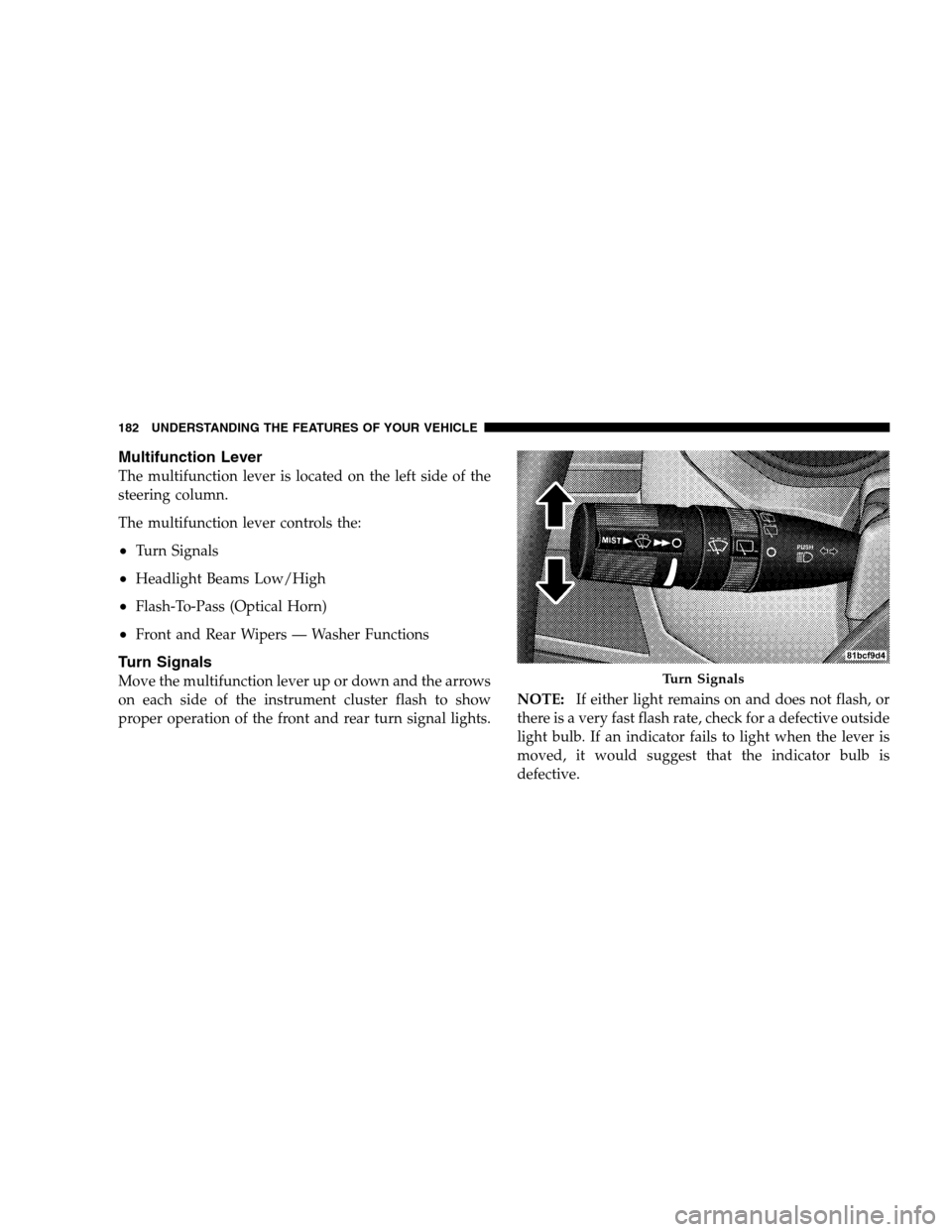
Multifunction LeverThe multifunction lever is located on the left side of the
steering column.
The multifunction lever controls the:
Turn Signals
Headlight Beams Low/High
Flash-To-Pass (Optical Horn)
Front and Rear Wipers — Washer Functions
Turn Signals
Move the multifunction lever up or down and the arrows
on each side of the instrument cluster flash to show
proper operation of the front and rear turn signal lights.
NOTE:
If either light remains on and does not flash, or
there is a very fast flash rate, check for a defective outside
light bulb. If an indicator fails to light when the lever is
moved, it would suggest that the indicator bulb is
defective. Turn Signals
182 UNDERST
ANDING THE FEATURES OF YOUR VEHICLE
Page 187 of 535
2. Intermittent, Low and High Speed Wipers
Use the intermittent wipers when weather conditions
make a single wiping cycle, with a variable pause be-
tween cycles, desirable. Rotate the end of the multifunc-
tion lever to the first detent position, then turn the end of
the multifunction lever to select the desired delay inter-
val. The delay can be regulated from approximately two
seconds, to a maximum of 20 seconds between cycles.
The time delay will be doubled if the vehicle speed is less
than 10 mph (16 km/h).
Low-speed is achieved by rotating the multifunction
lever past the intermittent settings, to the first detent.
High-speed is achieved by rotating the multifunction
lever past the intermittent settings, to the second detent.
3. Rear Wiper and Washer
Rotating the rotary ring to the first detent activates the
rear intermittent wipers. To activate the washers, rotatethe rotary ring fully forward and the washers will spray
until the ring is released, and then resume the intermit-
tent interval.
NOTE:
Rear window wipers function in the intermittent
wiper speed only. WARNING!
Sudden loss of visibility through the windshield
could lead to an accident. You might not see other
vehicles or other obstacles. To avoid sudden icing of
the windshield during freezing weather, warm the
windshield with the defroster before and during
windshield washer use.
TILT STEERING COLUMN — IF EQUIPPED
This feature allows you to tilt the steering column
upward or downward. The tilt control lever is located on
the steering column, below the steering wheel.
UNDERSTANDING THE FEATURES OF YOUR VEHICLE 185 3
Page 188 of 535
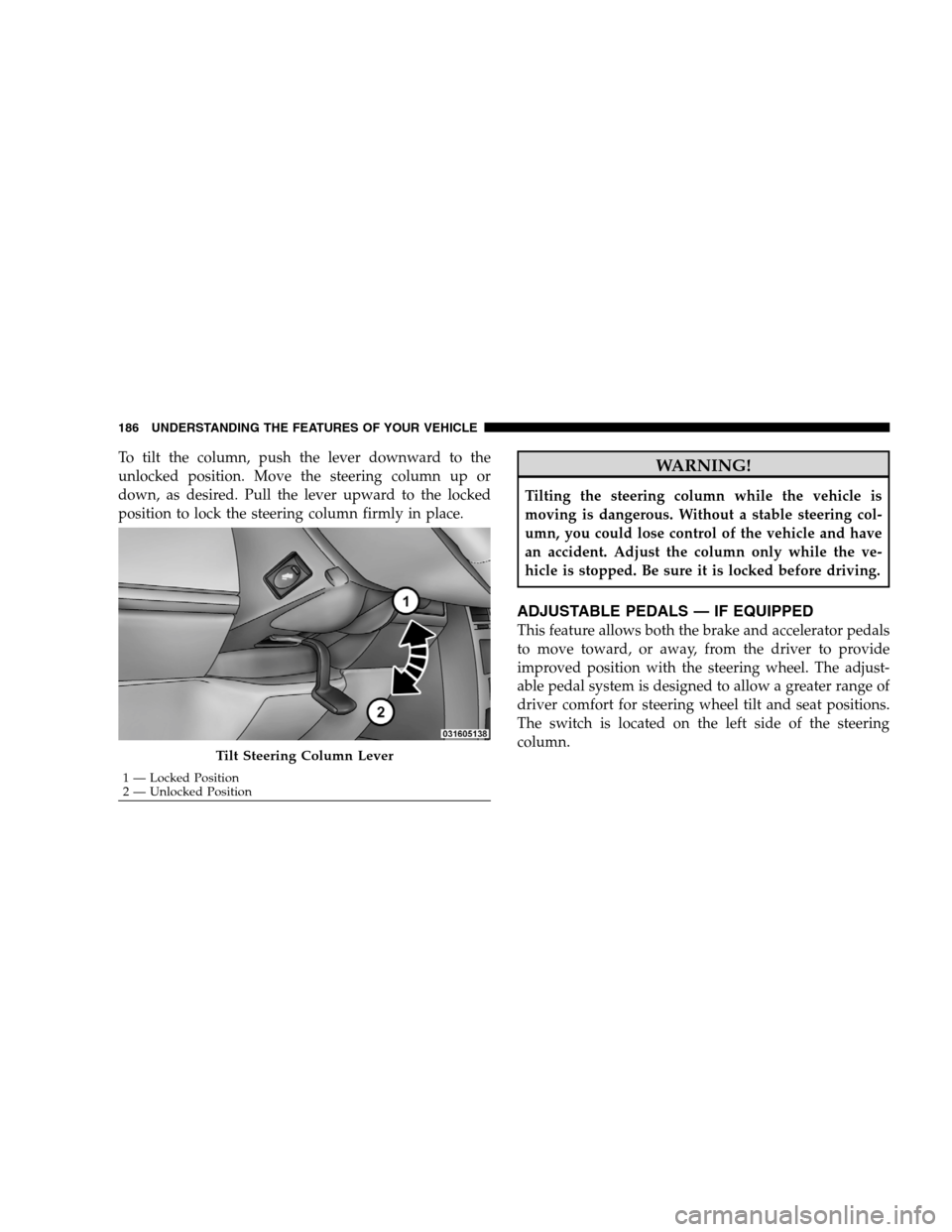
To tilt the column, push the lever downward to the
unlocked position. Move the steering column up or
down, as desired. Pull the lever upward to the locked
position to lock the steering column firmly in place.WARNING!
Tilting the steering column while the vehicle is
moving is dangerous. Without a stable steering col-
umn, you could lose control of the vehicle and have
an accident. Adjust the column only while the ve-
hicle is stopped. Be sure it is locked before driving.
ADJUSTABLE PEDALS — IF EQUIPPED
This feature allows both the brake and accelerator pedals
to move toward, or away, from the driver to provide
improved position with the steering wheel. The adjust-
able pedal system is designed to allow a greater range of
driver comfort for steering wheel tilt and seat positions.
The switch is located on the left side of the steering
column.
Tilt Steering Column Lever
1 — Locked Position
2 —
Unlocked Position
186 UNDERSTANDING THE FEATURES OF YOUR VEHICLE
Page 258 of 535
ELECTRONIC VEHICLE INFORMATION CENTER
(EVIC) —
IF EQUIPPED
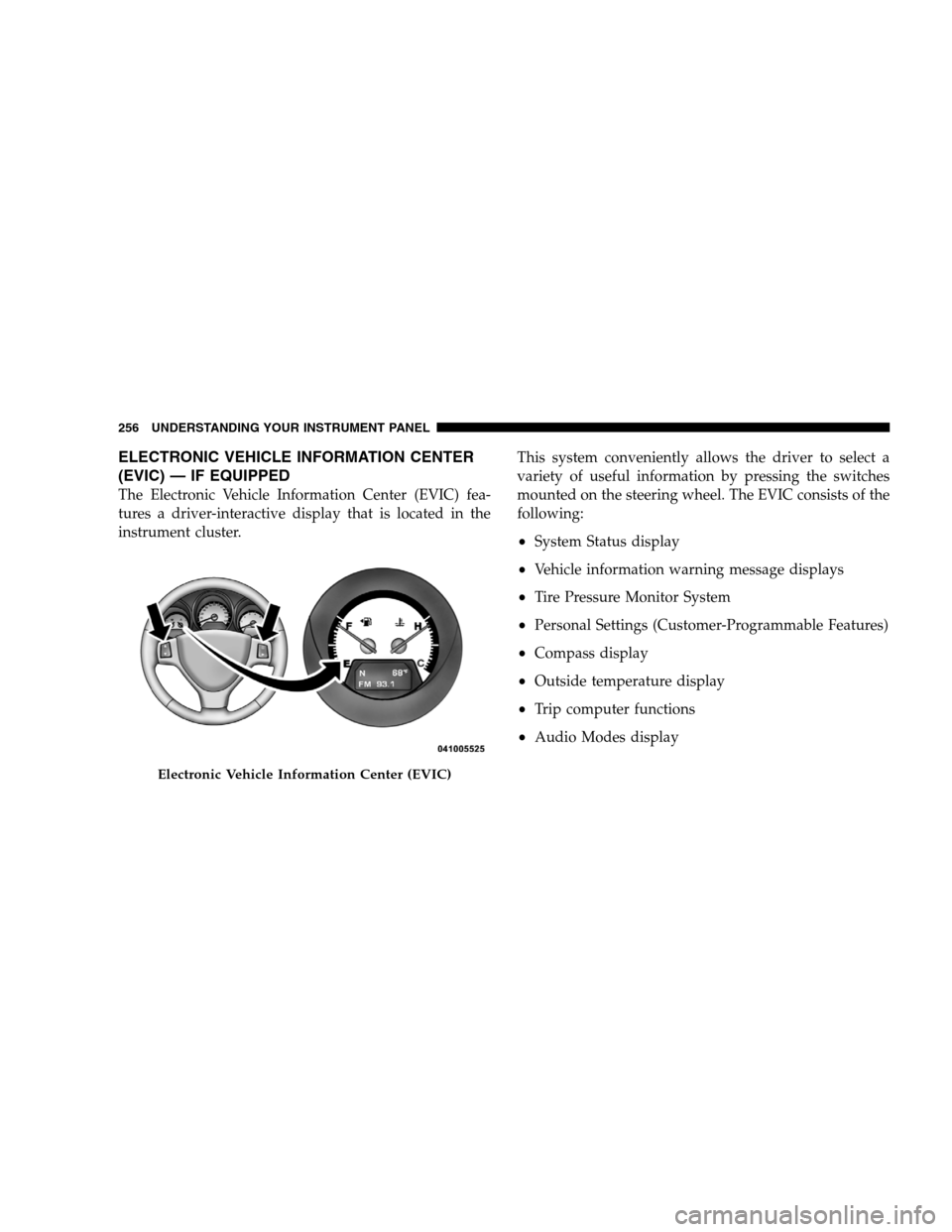
The Electronic Vehicle Information Center (EVIC) fea-
tures a driver-interactive display that is located in the
instrument cluster. This system conveniently allows the driver to select a
variety of useful information by pressing the switches
mounted on the steering wheel. The EVIC consists of the
following:
System Status display
Vehicle information warning message displays
Tire Pressure Monitor System
Personal Settings (Customer-Programmable Features)
Compass display
Outside temperature display
Trip computer functions
Audio Modes displayElectronic Vehicle Information Center (EVIC)
256 UNDERST
ANDING YOUR INSTRUMENT PANEL
Page 259 of 535
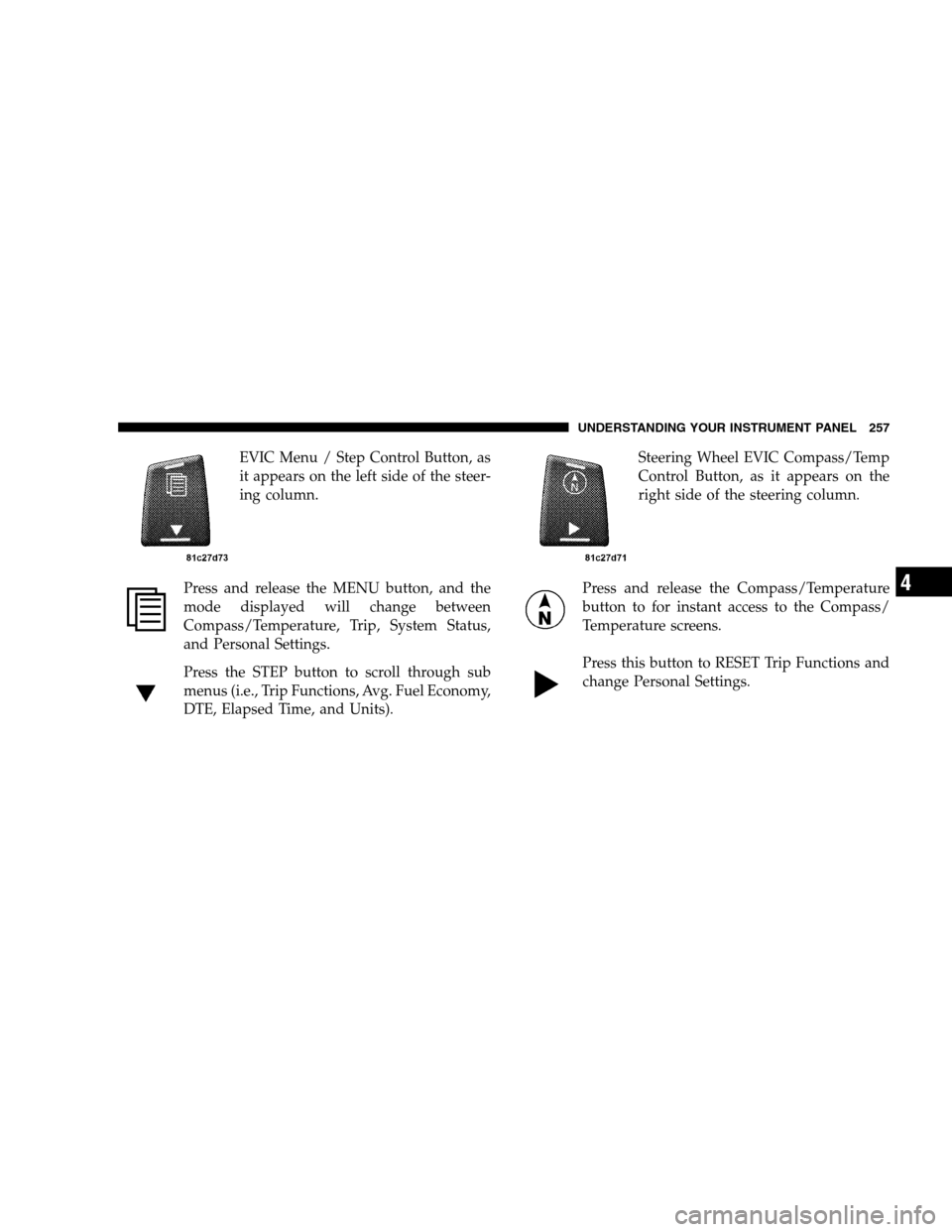
EVIC Menu / Step Control Button, as
it appears on the left side of the steer-
ing column.
Press and release the MENU button, and the
mode displayed will change between
Compass/Temperature, Trip, System Status,
and Personal Settings.
Press the STEP button to scroll through sub
menus (i.e., Trip Functions, Avg. Fuel Economy,
DTE, Elapsed Time, and Units). Steering Wheel EVIC Compass/Temp
Control Button, as it appears on the
right side of the steering column.
Press and release the Compass/Temperature
button to for instant access to the Compass/
Temperature screens.
Press this button to RESET Trip Functions and
change Personal Settings. UNDERSTANDING YOUR INSTRUMENT PANEL 257
4
Page 305 of 535
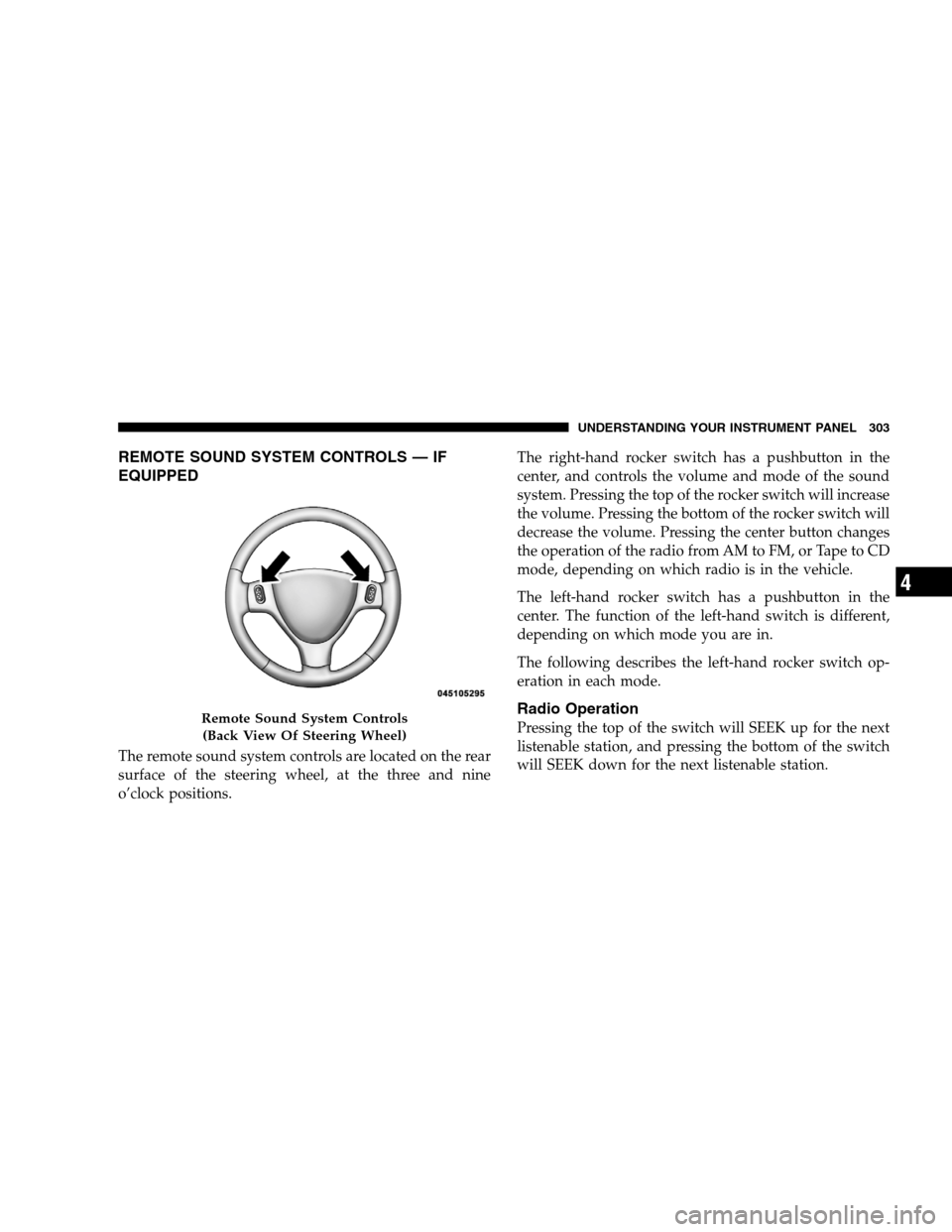
REMOTE SOUND SYSTEM CONTROLS — IF
EQUIPPEDThe remote sound system controls are located on the rear
surface of the steering wheel, at the three and nine
o’clock positions.
The right-hand rocker switch has a pushbutton in the
center, and controls the volume and mode of the sound
system. Pressing the top of the rocker switch will increase
the volume. Pressing the bottom of the rocker switch will
decrease the volume. Pressing the center button changes
the operation of the radio from AM to FM, or Tape to CD
mode, depending on which radio is in the vehicle.
The left-hand rocker switch has a pushbutton in the
center. The function of the left-hand switch is different,
depending on which mode you are in.
The following describes the left-hand rocker switch op-
eration in each mode.
Radio Operation
Pressing the top of the switch will SEEK up for the next
listenable station, and pressing the bottom of the switch
will SEEK down for the next listenable station.Remote Sound System Controls
(Back V iew Of Steering Wheel) UNDERSTANDING YOUR INSTRUMENT PANEL 303 4
Page 328 of 535
mDriving Through Water . . . . . . . . . . . . . . . . 340
▫ Flowing/Rising Water . . . . . . . . . . . . . . . . 340
▫ Shallow Standing Water . . . . . . . . . . . . . . 340
m Power Steering . . . . . . . . . . . . . . . . . . . . . . 342
▫ Power Steering Fluid Check . . . . . . . . . . . 342
m Parking Brake . . . . . . . . . . . . . . . . . . . . . . . 343
m Anti-Lock Brake System (ABS) . . . . . . . . . . . 345
▫ Anti-Lock Brake Warning Light . . . . . . . . . 347
m Electronic Brake Control System . . . . . . . . . . 347
▫ Traction Control System (TCS) . . . . . . . . . . 347
▫ Brake Assist System (BAS) . . . . . . . . . . . . . 348
▫ Electronic Stability Program (ESP) . . . . . . . 349
▫ ESP/BAS Warning Light . . . . . . . . . . . . . . 351 m
Tire Safety Information . . . . . . . . . . . . . . . . 352
▫ Tire Markings . . . . . . . . . . . . . . . . . . . . . 352
▫ Tire Identification Number (TIN) . . . . . . . . 355
▫ Tire Loading And Tire Pressure . . . . . . . . . 356
m Tires — General Information . . . . . . . . . . . . 360
▫ Tire Pressure . . . . . . . . . . . . . . . . . . . . . . 360
m Tire Chains . . . . . . . . . . . . . . . . . . . . . . . . . 367
m Snow Tires . . . . . . . . . . . . . . . . . . . . . . . . . 369
m Tire Rotation . . . . . . . . . . . . . . . . . . . . . . . . 369
m Tire Pressure Monitor System (TPMS) . . . . . . 370
▫ Base System . . . . . . . . . . . . . . . . . . . . . . . 372
▫ Premium System — If Equipped . . . . . . . . 374
326 STARTING AND OPERATING
Page 337 of 535
The following indicators should be used to ensure that
you have placed the shift lever into the PARK position:
When moving the shift lever into PARK, press the
button on the shift lever and firmly move the lever all
the way forward until it stops.
Look at the shift indicator window on the console to
ensure the shift lever is in the PARK position.
When engaged in PARK, you will not be able to move
the shift lever rearward without pressing the shift
lever button.CAUTION!
Before moving the shift lever out of PARK, you must
turn the ignition from OFF to ACC/ON so the steer-
ing wheel and shift lever are released. Otherwise,
damage to the steering column or shift lever could
result.
REVERSE
This range is for moving the vehicle backward. Shift into
REVERSE only after the vehicle has come to a complete
stop.
NEUTRAL
This range is used when vehicle is standing for pro-
longed periods with engine running. Engine may be
started in this range. Set the parking brake if you must
leave the vehicle. WARNING!
Do not coast in NEUTRAL and never turn off the
ignition to coast down a hill. These are unsafe
practices that limit your response to changing traffic
or road conditions. You might lose control of the
vehicle and have an accident.
STARTING AND OPERATING 335 5
Page 344 of 535
POWER STEERINGThe standard power steering system will give you good
vehicle response and increased ease of maneuverability
in tight spaces. The system will provide mechanical
steering capability if power assist is lost.
If for some reason the power assist is interrupted, it will
still be possible to steer your vehicle. Under these condi-
tions, you will observe a substantial increase in steering
effort, especially at very low vehicle speeds and during
parking maneuvers.
NOTE:
Increased noise levels at the end of the steering
wheel travel are considered normal and do not indicate
that there is a problem with the power steering system.
Upon initial start-up in cold weather, the power steering
pump may make noise for a short amount of time. This is
due to the cold, thick fluid in the steering system. This
noise should be considered normal, and it does not in any
way damage the steering system. WARNING!
Continued operation with reduced power steering
assist could pose a safety risk to yourself and others.
Service should be obtained as soon as possible.
CAUTION!
Prolonged operation of the steering system at the end
of the steering wheel travel will increase the steering
fluid temperature and it should be avoided when
possible. Damage to the power steering pump may
occur.
Power Steering Fluid Check
Checking the power steering fluid level at a defined
service interval is not required. The fluid should only be
checked if a leak is suspected, abnormal noises are
342 STARTING AND OPERATING
Page 345 of 535
apparent, and/or the system is not functioning as antici-
pated. Coordinate inspection efforts through an autho-
rized dealer.CAUTION!
Do not use chemical flushes in your power steering
system as the chemicals can damage your power
steering components. Such damage is not covered by
the New Vehicle Limited Warranty.
WARNING!
Fluid level should be checked on a level surface and
with the engine off to prevent injury from moving
parts and to ensure accurate fluid level reading. Do
not overfill. Use only manufacturer’s recommended
power steering fluid.
If necessary, add fluid to restore to the proper indicated
level. With a clean cloth, wipe any spilled fluid from all
surfaces. Refer to “Fluids, Lubricants, and Genuine
Parts” in Section 7 for the correct fluid type.
PARKING BRAKE
When the parking brake is applied with the ignition
switch ON, the “Brake Warning Light” in the instrument
cluster will turn on.
NOTE:
This light only shows that the parking brake is
applied. It does not show the degree of brake application.
STARTING AND OPERATING 343 5